More on Windows 7 and Windows 8.1 servicing changes

spc3rd, hang on until Wednesday. Then, if you have any issues using the software, send me a PM. Once you've used it, you'll see its pretty straightforward to use. I think it might take a few weeks for the software to be updated to take into account the new update options though.
 

My Computer My Computer

Computer type
PC/Desktop
Computer Manufacturer/Model Number
Custom Build
OS
Win 7 Ultimate, Win 8.1 Pro, Linux Mint 19 Cinnamon (All 64-Bit)
CPU
Intel i5 4690K
Motherboard
Gigabyte Z97X-UD3H
Memory
Corsair Vengeance LP 32GB DDR3
Graphics Card(s)
MSI GTX 1060 GAMING X 6GB
Sound Card
Onboard
Hard Drives
Samsung 850 EVO 250GB SSD (x2)
Samsung 860 EVO 1TB SSD (x2)
Crucial MX300 525GB SSD
WD Blue 2TB 5400rpm Intellipark Disabled (x2)
PSU
Corsair HX750i
Case
Phanteks Enthoo Pro
Cooling
CM Hyper 212 EVO on CPU, Noctua Redux NF-P14S 1500rpm (x6)
Keyboard
Corsair K70 RGB LUX
Mouse
Corsair Sabre RGB
Antivirus
Avast Free, MalwareBytes, SAS & CryptoPrevent
Browser
Chrome
Other Info
StarTech PEXESAT322I 2 Port PCI-E SATA Card
ASUS PCE-AC56 Dual-band AC1300 Wireless Card
Akasa FC.Six Manual Fan Controller
And a Partridge in a Pear Tree!
O.k., Brds7t7.

Just for 'good measure'...I'll wait until say Friday or Saturday, then give it a go.

Much obliged for the follow-up info!
 

My Computer My Computer

Computer type
PC/Desktop
Computer Manufacturer/Model Number
Dell Inspiron Desktop (refurbished)
OS
Win 7 Home Premium x64 SP1
CPU
Intel Core i3, 3.07 gHz
Motherboard
Dell
Memory
6 GB
Graphics Card(s)
ASUS VH198 (1440x900@60Hz) Intel Q965/Q963 Express Chipset F
Monitor(s) Displays
Asus
Hard Drives
Western Digital 1 TB SATA HDD (Internal)

WD 1-TB "My Passport Ultra" (external drive used for system images)
Keyboard
Azio KB505U wired, standard, large print 3-color backlit
Mouse
Logitech (wired)
Internet Speed
Download: up to 50 Mbps | Upload: 5 Mbps
Antivirus
MSE
Browser
Firefox (default) and IE11
Other Info
MBAM 3xx (lifetime license) |
SAS (on-demand) | FF w/NoScript & IE11 | uBlock Origin | POP Peeper Pro | Aeris Calendar | GWX Control Panel Monitor | CPUID
I would certainly never install any updates for at least a week from their release, that gives time for MS to pull or replace any problematic ones.
 

My Computer My Computer

Computer type
PC/Desktop
Computer Manufacturer/Model Number
Custom build by PC Specialist
OS
Windows 7 Home Premium 64
CPU
AMD Phenom II X4 955
Motherboard
Asus M4A78T-E
Memory
8GB Corsair XMS3 DDR3
Graphics Card(s)
Gigabyte Geforce GTX 960 2GB
Sound Card
SB Audigy
Monitor(s) Displays
BenQ 24"
Screen Resolution
1920 x 1080
Hard Drives
500GB Serial ATA
PSU
1010W Quiet Quad Rail
Case
Antec 900
Cooling
Fenrir
Keyboard
Corsair
Mouse
Logitech
Internet Speed
20mbps
Antivirus
MSE plus MBAM 2.x Free
Browser
Chrome
Other Info
Second desktop different spec but similar level.
Sounds good to me, Seffrid.

Thanks for the additional suggestion!
 

My Computer My Computer

Computer type
PC/Desktop
Computer Manufacturer/Model Number
Dell Inspiron Desktop (refurbished)
OS
Win 7 Home Premium x64 SP1
CPU
Intel Core i3, 3.07 gHz
Motherboard
Dell
Memory
6 GB
Graphics Card(s)
ASUS VH198 (1440x900@60Hz) Intel Q965/Q963 Express Chipset F
Monitor(s) Displays
Asus
Hard Drives
Western Digital 1 TB SATA HDD (Internal)

WD 1-TB "My Passport Ultra" (external drive used for system images)
Keyboard
Azio KB505U wired, standard, large print 3-color backlit
Mouse
Logitech (wired)
Internet Speed
Download: up to 50 Mbps | Upload: 5 Mbps
Antivirus
MSE
Browser
Firefox (default) and IE11
Other Info
MBAM 3xx (lifetime license) |
SAS (on-demand) | FF w/NoScript & IE11 | uBlock Origin | POP Peeper Pro | Aeris Calendar | GWX Control Panel Monitor | CPUID
I would certainly never install any updates for at least a week from their release, that gives time for MS to pull or replace any problematic ones.

100% agree! :thumbsup: especially with some of the "dodgy" patches MS has pushed out the past couple of years! :D

I just noticed yesterday that the September rollup had borked up my sfc scans again. :confused: Getting integrity violations which went away after I uninstalled the update. I'll save that for another thread though.
 

My Computer My Computer

Computer type
PC/Desktop
Computer Manufacturer/Model Number
Custom Build
OS
Win 7 Ultimate, Win 8.1 Pro, Linux Mint 19 Cinnamon (All 64-Bit)
CPU
Intel i5 4690K
Motherboard
Gigabyte Z97X-UD3H
Memory
Corsair Vengeance LP 32GB DDR3
Graphics Card(s)
MSI GTX 1060 GAMING X 6GB
Sound Card
Onboard
Hard Drives
Samsung 850 EVO 250GB SSD (x2)
Samsung 860 EVO 1TB SSD (x2)
Crucial MX300 525GB SSD
WD Blue 2TB 5400rpm Intellipark Disabled (x2)
PSU
Corsair HX750i
Case
Phanteks Enthoo Pro
Cooling
CM Hyper 212 EVO on CPU, Noctua Redux NF-P14S 1500rpm (x6)
Keyboard
Corsair K70 RGB LUX
Mouse
Corsair Sabre RGB
Antivirus
Avast Free, MalwareBytes, SAS & CryptoPrevent
Browser
Chrome
Other Info
StarTech PEXESAT322I 2 Port PCI-E SATA Card
ASUS PCE-AC56 Dual-band AC1300 Wireless Card
Akasa FC.Six Manual Fan Controller
And a Partridge in a Pear Tree!
Anyone changing their Windows Update Settings for tomorrow - To what and why?

I am just referring to these options...

- 'Notify, but let me choose'.
- 'Never Update'
- 'Download, but let me choose when to install'
- 'Automatic updates on'

I have 'notify, but let me choose', and I am going to leave it that way even though I am not installing the WU monthly package.
I want to get the .NET and IE updates via WU as they are separate and I want to see the Preview list too. A friend is recommending setting it to 'never update' until patch Tuesday rolls around - then reset it again. He has not convinced me that there is any benefit to doing this.
 

My Computer My Computer

Computer type
PC/Desktop
Computer Manufacturer/Model Number
Custom build
OS
W7Pro/64
I've just read the first official blog again and realised I COMPLETELY missed this about the security only update:

The Security-only update will be available to download and deploy from WSUS, SCCM, and the Microsoft Update Catalog. :doh:

The fact it will be available from the Windows Update Catalog actually makes it a lot easier to get than using WSUS. You just have to keep an eye out for the KB number of the security patch that month and download it from the site. Makes things a LOT easier! :thumbsup:

Now, MS needs to hurry up and remove the ActiveX requirement so we can access it with any browser!
 

My Computer My Computer

Computer type
PC/Desktop
Computer Manufacturer/Model Number
Custom Build
OS
Win 7 Ultimate, Win 8.1 Pro, Linux Mint 19 Cinnamon (All 64-Bit)
CPU
Intel i5 4690K
Motherboard
Gigabyte Z97X-UD3H
Memory
Corsair Vengeance LP 32GB DDR3
Graphics Card(s)
MSI GTX 1060 GAMING X 6GB
Sound Card
Onboard
Hard Drives
Samsung 850 EVO 250GB SSD (x2)
Samsung 860 EVO 1TB SSD (x2)
Crucial MX300 525GB SSD
WD Blue 2TB 5400rpm Intellipark Disabled (x2)
PSU
Corsair HX750i
Case
Phanteks Enthoo Pro
Cooling
CM Hyper 212 EVO on CPU, Noctua Redux NF-P14S 1500rpm (x6)
Keyboard
Corsair K70 RGB LUX
Mouse
Corsair Sabre RGB
Antivirus
Avast Free, MalwareBytes, SAS & CryptoPrevent
Browser
Chrome
Other Info
StarTech PEXESAT322I 2 Port PCI-E SATA Card
ASUS PCE-AC56 Dual-band AC1300 Wireless Card
Akasa FC.Six Manual Fan Controller
And a Partridge in a Pear Tree!
Anyone changing their Windows Update Settings for tomorrow - To what and why?

I am just referring to these options...

- 'Notify, but let me choose'.
- 'Never Update'
- 'Download, but let me choose when to install'
- 'Automatic updates on'

I have 'notify, but let me choose', and I am going to leave it that way even though I am not installing the WU monthly package.
I want to get the .NET and IE updates via WU as they are separate and I want to see the Preview list too. A friend is recommending setting it to 'never update' until patch Tuesday rolls around - then reset it again. He has not convinced me that there is any benefit to doing this.
I'm leaving my second computer on "Notify, but let me choose" so that I can see what is being offered, but I've tonight changed my main computer to "Never update" primarily because I want to see if that prevents a constant updating search process taking 25% of resources coupled with a failure of the MSE definition updating process during the period in which WU is running as has been the case in recent months. I'll keep both decisions under review.
 

My Computer My Computer

Computer type
PC/Desktop
Computer Manufacturer/Model Number
Custom build by PC Specialist
OS
Windows 7 Home Premium 64
CPU
AMD Phenom II X4 955
Motherboard
Asus M4A78T-E
Memory
8GB Corsair XMS3 DDR3
Graphics Card(s)
Gigabyte Geforce GTX 960 2GB
Sound Card
SB Audigy
Monitor(s) Displays
BenQ 24"
Screen Resolution
1920 x 1080
Hard Drives
500GB Serial ATA
PSU
1010W Quiet Quad Rail
Case
Antec 900
Cooling
Fenrir
Keyboard
Corsair
Mouse
Logitech
Internet Speed
20mbps
Antivirus
MSE plus MBAM 2.x Free
Browser
Chrome
Other Info
Second desktop different spec but similar level.
Anyone changing their Windows Update Settings for tomorrow - To what and why?

I've always had it set to Notify, but let me choose, I was especially glad i had it that way when the Get 10 debacle reared it's ugly head.

As far as I'm concerned, I always wait a few days before d/l ing the patches to see which ones are causing problems. Not like their record has been stellar concerning those for a bit now.

It looks like I'll be using WSUS from this point to update the various 7 & 8 OS's I have. I have no desire to allow MS to put whatever they want on my system. I saw another one of those patches issued a few days ago where they wanted to check out your system for upgrade compatibility. I also occasionally see the telemetry patches come up.

I came across this item while perusing some documents on WSUS Offline, anyone heard or used this program? Looks interesting.

Portable Update is a windows-base tool for updating a Microsoft Windows computer in a isolated environment.
Portable Update: Update Windows in an isolated environment. The first. The best.
 
Last edited:

My Computer My Computer

Computer type
PC/Desktop
Computer Manufacturer/Model Number
Dell Hell oh Well
OS
Win 7 32 Home Premium, Win 7 64 Pro, Win 8.1, Win 10
CPU
Intel Core 2 Duo 2.93GHz
Memory
Not much with my ADHD
Graphics Card(s)
ATI Radeon HD 4350
Monitor(s) Displays
24" HDTV/Monitor
Screen Resolution
Blurry after a Scotch or 2
Hard Drives
1 HDD 250 GB, 1 HDD 1 TB, 3 - 1 TB Externals
Case
Don't get on my case...man :D
Cooling
I have an Air Conditioner & Diet Pepsi
Keyboard
Saitek Cyborg
Mouse
10 yr old MS optical mouse that still works
Internet Speed
Never fast enough
Antivirus
Various
Browser
Various
Portable Update is a windows-base tool for updating a Microsoft Windows computer in a isolated environment.

Haven't heard of that software before. The only ones I have heard of and tried are WSUSOffline, Simplix and the Dr. Windows Update Pack, which I have used on a couple of new installs.

Anyone changing their Windows Update Settings for tomorrow - To what and why?

I am just referring to these options...

- 'Notify, but let me choose'.
- 'Never Update'
- 'Download, but let me choose when to install'
- 'Automatic updates on'

I have 'notify, but let me choose', and I am going to leave it that way even though I am not installing the WU monthly package.
I want to get the .NET and IE updates via WU as they are separate and I want to see the Preview list too. A friend is recommending setting it to 'never update' until patch Tuesday rolls around - then reset it again. He has not convinced me that there is any benefit to doing this.

Painter, I too will be leaving my WU settings on "Check for updates but let me choose"
 

My Computer My Computer

Computer type
PC/Desktop
Computer Manufacturer/Model Number
Custom Build
OS
Win 7 Ultimate, Win 8.1 Pro, Linux Mint 19 Cinnamon (All 64-Bit)
CPU
Intel i5 4690K
Motherboard
Gigabyte Z97X-UD3H
Memory
Corsair Vengeance LP 32GB DDR3
Graphics Card(s)
MSI GTX 1060 GAMING X 6GB
Sound Card
Onboard
Hard Drives
Samsung 850 EVO 250GB SSD (x2)
Samsung 860 EVO 1TB SSD (x2)
Crucial MX300 525GB SSD
WD Blue 2TB 5400rpm Intellipark Disabled (x2)
PSU
Corsair HX750i
Case
Phanteks Enthoo Pro
Cooling
CM Hyper 212 EVO on CPU, Noctua Redux NF-P14S 1500rpm (x6)
Keyboard
Corsair K70 RGB LUX
Mouse
Corsair Sabre RGB
Antivirus
Avast Free, MalwareBytes, SAS & CryptoPrevent
Browser
Chrome
Other Info
StarTech PEXESAT322I 2 Port PCI-E SATA Card
ASUS PCE-AC56 Dual-band AC1300 Wireless Card
Akasa FC.Six Manual Fan Controller
And a Partridge in a Pear Tree!
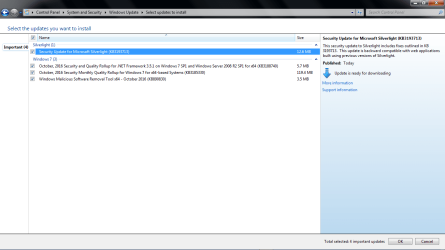
Got the following 4 important updates.
 

Attachments

  • October WU.png
    October WU.png
    34.3 KB · Views: 17

My Computer My Computer

Computer type
PC/Desktop
OS
Windows 7 Home 64-bit
I manually checked for today's PT updates and had 4 important and 2 optional available.
I installed the 4 important updates, rebooted, and let mscoresvw recompile for the net framework update.
Re-booted, and the 2 optional updates i didn't install were no longer listed as available for me.
I got a notification of another new important update available for KB3177467.
https://support.microsoft.com/en-us/kb/3177467
I installed KB3177467, and then the optionals are listed as available again.

No problems here so far.
Just weird that the optionals disappeared/reappeared, and another important was available.

I'm now seeing some weird changes with Notepad++, it didn't open my previous session correctly, and opens a new window, it should open a tab for me...

:rolleyes:
 

My Computer My Computer

Computer type
PC/Desktop
Computer Manufacturer/Model Number
home built
OS
Multi-Boot W7_Pro_x64 W8.1_Pro_x64 W10_Pro_x64 +Linux_VMs +Chromium_VM
CPU
AMD Athlon II x4 620
Motherboard
Gigabyte GA-MA785G-UD3H
Memory
6GB GSkill DDR2 800
Graphics Card(s)
AMD 4670 GPU + AMD 4200 IGP
Sound Card
on board Realtek ALC889A
Monitor(s) Displays
RCA 40" LCD TV, Insignia 32" LCD TV, HP 15" LCD monitor
Screen Resolution
1680 x 1050
Hard Drives
OCZ Vertex 3 120GB,
Samsung F3 1TB (3),
Several others - WD, Seagate, Hitachi, ...
PSU
Corsair 500 W
Case
Rosewill mid tower
Cooling
CM 90mm rifle
Keyboard
Gyration wireless, Logitech wireless, Dell USB wired
Mouse
Gyration wireless, Logitech wireless, V7 USB wired
Internet Speed
Spectrum - 100Mbps D / 10Mbps U
Antivirus
Avast, MBAM3, EMET, WinPatrol
Browser
Pale Moon, Firefox, IE
Other Info
2 multi-boot PC's
Mainly HTPC/Office/Gen purpose (no gaming).
Trendnet USB KVM.
LG DVD burner/Blue Ray Player.
Tray system for removable SATA backup drives.

Not currently OCd, under-volted.
I use Hybrid sleep, rarely re-boot or shutdown.

Hauppauge HD-PVR, Avermedia PCIe TV Tuner, Hauppauge PCI TV Tuner.
So when I go to the Security Bulletins page, I see Security Only and the Monthly Rollup downloads. Being as October is the first month of the unified update model, what is in the monthly rollup that isn't in the Security Only? Microsoft has cited the monthly rollups contain "reliability updates". What exactly are those? Drivers, new features?

I was also surprised that there was not a .NET monthly rollup. There were updates for .NET v3.5 but it appears that it was included in the Security Only download. Am I missing something there?
:)
 

My Computer My Computer

Computer type
PC/Desktop
Computer Manufacturer/Model Number
HP xw8600 Workstation
OS
Windows 8 Pro x64
CPU
Two Xeon Core2 Quad 3.2 GHz Processors
Motherboard
Proprietary
Memory
16 GB DDR2 800 MHz
Graphics Card(s)
nVidia Quadro FX 3800 PCI
Sound Card
Realtek HD Audio
Monitor(s) Displays
Samsung SyncMaster 213T 21" 4x3 Flat Screen
Screen Resolution
1600x1200
Hard Drives
Two Seagate Cheetah 300 GB SAS Disks
PSU
Proprietary
Case
HP xw8600 Workstation Case
Cooling
Two CPU Fans and a Larger Case Fan
Keyboard
PS/2 Keyboard
Mouse
Microsoft USB Optical Mouse
Internet Speed
7 mbps
Antivirus
Windows Defender
Browser
Firefox ESR 102
Other Info
Two LSI 3000 SAS Adapters
I manually checked for today's PT updates and had 4 important and 2 optional available.
I installed the 4 important updates, rebooted, and let mscoresvw recompile for the net framework update.
Re-booted, and the 2 optional updates i didn't install were no longer listed as available for me.
I got a notification of another new important update available for KB3177467.
https://support.microsoft.com/en-us/kb/3177467
I installed KB3177467, and then the optionals are listed as available again.

No problems here so far.
Just weird that the optionals disappeared/reappeared, and another important was available.

:rolleyes:

Well I don't know about this new update system but usually after installing updates and rebooting it takes a while before you get the correct missing/ optional updates showing up as available. The reason is that your machine needs to be re-scanned for installed updates and it can take a while. I've always found it best to wait for trustedinstaller.exe and svchost (netsvcs) to finish after a reboot before rechecking for updates.

Currently I have not received this months updates. They will probably arrive later or tomorrow here in the UK.

I made as system image backup yesterday after getting everything patched.
 

My Computer My Computer

Computer type
Laptop
Computer Manufacturer/Model Number
ASUS
OS
Microsoft Windows 7 Home Premium 64-bit 7601 Multiprocessor Free Service Pack 1
CPU
AMD C-60 APU with Radeon(tm) HD Graphics
Motherboard
ASUSTeK COMPUTER INC. X501U
Memory
4.00 GB
Graphics Card(s)
AMD Radeon HD 6290 Graphics
Sound Card
(1) AMD High Definition Audio Device (2) Realtek High Defi
Screen Resolution
1366 x 768 x 32 bits (4294967296 colors) @ 60 Hz
Hard Drives
Hitachi HTS545050A7E380 SATA Disk Device
Antivirus
Comodo CIS & FW, SecureAplus App Whitelisting, Threatfire
Browser
Cyberfox 64bit, Opera 64bit, Airfox
Other Info
Spy-The-Spy, HitmanPro.Alert, Norton Connect Safe, MJRegWatcher, BitDefender TrafficLight, Voodoo Shield, Zemana AntiMalware
All my updates came through about an hour ago. So far have only installed the Office updates.

I had the two optional updates sitting in my list which came back as recommended, as a lot of 7 updates seem to these days.
 

My Computer My Computer

Computer type
PC/Desktop
Computer Manufacturer/Model Number
Custom Build
OS
Win 7 Ultimate, Win 8.1 Pro, Linux Mint 19 Cinnamon (All 64-Bit)
CPU
Intel i5 4690K
Motherboard
Gigabyte Z97X-UD3H
Memory
Corsair Vengeance LP 32GB DDR3
Graphics Card(s)
MSI GTX 1060 GAMING X 6GB
Sound Card
Onboard
Hard Drives
Samsung 850 EVO 250GB SSD (x2)
Samsung 860 EVO 1TB SSD (x2)
Crucial MX300 525GB SSD
WD Blue 2TB 5400rpm Intellipark Disabled (x2)
PSU
Corsair HX750i
Case
Phanteks Enthoo Pro
Cooling
CM Hyper 212 EVO on CPU, Noctua Redux NF-P14S 1500rpm (x6)
Keyboard
Corsair K70 RGB LUX
Mouse
Corsair Sabre RGB
Antivirus
Avast Free, MalwareBytes, SAS & CryptoPrevent
Browser
Chrome
Other Info
StarTech PEXESAT322I 2 Port PCI-E SATA Card
ASUS PCE-AC56 Dual-band AC1300 Wireless Card
Akasa FC.Six Manual Fan Controller
And a Partridge in a Pear Tree!
So I got 5 updates. Similar to Sky Ranch, but with an extra one.

That one being KB3184143 to remove all things related to Windows 10 I presume. Should I install that one? (Not sure if that has any bugs to it or w/e, or can be trusted for that matter.)

Also I just realized that I have Microsoft framework 4.5.2 and 4.6.1 from September 22 in optional. Not sure why that was in there instead of important. So should I download that first before the 3.5.1 one? :'O​
 

My Computer My Computer

Computer type
PC/Desktop
Computer Manufacturer/Model Number
HP
OS
7 Home Premium x64
When I update anything; after reboot I watch the drive light. When it stops going crazy I check for updates again. Although Callender method using trustedinstaller.exe and svchost would work quite well.

When you reboot after Windows Updates it take a little time for Windows 7 to correctly installed some updates.
It usually take no longer that a minute for Windows 7 to catch up on my systems. Then I check for more updates.
 

My Computer My Computer

Computer type
PC/Desktop
Computer Manufacturer/Model Number
Home made Desktop
OS
Windows 10 Pro. 64/ version 1709 Windows 7 Pro/64
CPU
Intel i7-6800K @ 4.3
Motherboard
ASUS X-99 Deluxe II
Memory
Corsair Platinum 16 gig @2400
Graphics Card(s)
EVGA GTX 1070 OC
Monitor(s) Displays
Asus 27" LED LCD/VE278Q
Screen Resolution
1920-1080 or 1280-720 HDMI
Hard Drives
INTEL SSD 730-240 Gb Sata 3.0/
PSU
EVGA Platium 1200W
Case
Phanteks Luxe Tempered Glass 8 fans/ one radiator
Cooling
XSPC/ Water Cooled CPU
Keyboard
Das 4 Professional
Mouse
Logitech M705/MX Anywhere 2-S
Internet Speed
100 mbits
Antivirus
Microsoft Security Essentials/ Malwarebytes Premium 3.0/ SAS
Browser
I.E. 11 default/Firefox/ ISP Time Warner Cable/Spectrum
Other Info
LG BluRay Burner/
Sound system-KLipsch-THX/
Icy Dock ssd Hot Swap bays.
So, how to avoid telemetry, spyware and other so called "updates" ?
 

My Computer My Computer

Computer type
PC/Desktop
Computer Manufacturer/Model Number
Self assembled
OS
Windows 7 64-bit Professional
CPU
Core i5-3570K
Motherboard
Z77X-UD3H
Memory
8 GB
Graphics Card(s)
GTX-1050 Ti
Monitor(s) Displays
42" Sanyo LED TV
Screen Resolution
1920x1080
Hard Drives
Crucial MX200 250 GB
Western Digital Black 2 x 1 TB
PSU
Seasonic
Internet Speed
Cheapest that Comcast sells
Antivirus
What?
Browser
Pale Moon
So, how to avoid telemetry, spyware and other so called "updates" ?

Once the updates become fully cumulative, you won't be able to, unless you go for the security only update option. Or unless MS does leave some updates separate. But according to their articles they want to incorporate all past patches.
 
Last edited:

My Computer My Computer

Computer type
PC/Desktop
Computer Manufacturer/Model Number
Custom Build
OS
Win 7 Ultimate, Win 8.1 Pro, Linux Mint 19 Cinnamon (All 64-Bit)
CPU
Intel i5 4690K
Motherboard
Gigabyte Z97X-UD3H
Memory
Corsair Vengeance LP 32GB DDR3
Graphics Card(s)
MSI GTX 1060 GAMING X 6GB
Sound Card
Onboard
Hard Drives
Samsung 850 EVO 250GB SSD (x2)
Samsung 860 EVO 1TB SSD (x2)
Crucial MX300 525GB SSD
WD Blue 2TB 5400rpm Intellipark Disabled (x2)
PSU
Corsair HX750i
Case
Phanteks Enthoo Pro
Cooling
CM Hyper 212 EVO on CPU, Noctua Redux NF-P14S 1500rpm (x6)
Keyboard
Corsair K70 RGB LUX
Mouse
Corsair Sabre RGB
Antivirus
Avast Free, MalwareBytes, SAS & CryptoPrevent
Browser
Chrome
Other Info
StarTech PEXESAT322I 2 Port PCI-E SATA Card
ASUS PCE-AC56 Dual-band AC1300 Wireless Card
Akasa FC.Six Manual Fan Controller
And a Partridge in a Pear Tree!
Even though MS said the W7 security-only package would only be available from the MS Update Catalog, here it is available as a download from their regular website ...

KB3192391

No need to stress out over Active-X / IE and that antiquated website.
 
Last edited:

My Computer My Computer

Computer type
PC/Desktop
Computer Manufacturer/Model Number
Custom build
OS
W7Pro/64
Back
Top