Solved Epson 3170 scanner from Vista to W7 issues.

danward

New member
Local time
6:20 AM
Messages
3
Hello forum,
We are moving from Vista to W7. We have an Epson 3170 scanner which has several options like scan to e-mail, copy with various copy settings, etc.
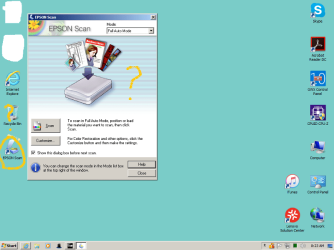
Here are two images. The first is the way things looked on Vista when we turned to scanner on and opened it using the desktop icon. All the choices are shown.

Then when we installed the scanner without the disc on W7, you can see the desktop icon looks like "an open" scanner (lid up) whereas it was closed on the Vista desktop.
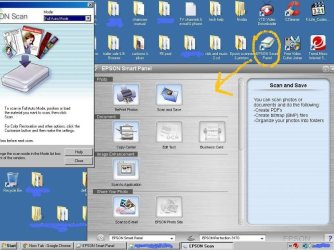
When we open the scanner from the Windows 7 desktop then we lose most of the choices as you can in the second photo.
 

Attachments
  • Clipboard01888.jpg
    Clipboard01888.jpg
    77.4 KB · Views: 3
  • bbUntitled.png
    bbUntitled.png
    45.5 KB · Views: 0

My Computer My Computer

At a glance

Windows 7 64 bit
Computer type
PC/Desktop
Computer Manufacturer/Model Number
Lenovo
OS
Windows 7 64 bit
Browser
IE 11.0
Then when we installed the scanner without the disc on W7, you can see the desktop icon looks like "an open" scanner (lid up) whereas it was closed on the Vista desktop.
When we open the scanner from the Windows 7 desktop then we lose most of the choices as you can in the second photo.


Why did you installed the scanner without the disk?
When you install without the disk it loads only the driver. You must install with the disk so it also install the scanner manager, to have the options you had on Vista

Epson Perfection 3170 Photo | Perfection Series | Scanners | Support | Epson US
 

My Computers My Computers

  • At a glance

    Windows 7 HP 64i5 6600K - 800MHz to 4200MHz4+4G GSkill DDR4 3000IG - Intel 530
    Computer type
    PC/Desktop
    Computer Manufacturer/Model Number
    custom build
    OS
    Windows 7 HP 64
    CPU
    i5 6600K - 800MHz to 4200MHz
    Motherboard
    GA-Z170-HD3P
    Memory
    4+4G GSkill DDR4 3000
    Graphics Card(s)
    IG - Intel 530
    Monitor(s) Displays
    Samsung 226BW
    Screen Resolution
    1680x1050
    Hard Drives
    (1) -1 SM951 – 128GB M.2 AHCI PCIe SSD drive for Windows 7 and Lubuntu
    (2) -1 WD SATA 3 - 1T for Data
    (3) -1 WD SATA 3 - 1T for backup
    PSU
    Thermaltake 450W TR2 gold
    Keyboard
    Old and good Chicony mechanical keyboard
    Mouse
    Logitech mX performance - 9 buttons (had to disable some)
    Internet Speed
    500Mb/s
    Browser
    Firefox 64
    Other Info
    TinyWall firewall
  • At a glance

    Windows 7 Proi7-4500U 800MHz to 3.0GHz(4+4)G DDR3 1600IG intel 4400 + NVIDIA GeForce GT 745M
    Computer type
    Laptop
    System Manufacturer/Model Number
    Asus Q550LF
    OS
    Windows 7 Pro
    CPU
    i7-4500U 800MHz to 3.0GHz
    Motherboard
    Asus Q550LF
    Memory
    (4+4)G DDR3 1600
    Graphics Card(s)
    IG intel 4400 + NVIDIA GeForce GT 745M
    Sound Card
    Realtek
    Monitor(s) Displays
    LG Display LP156WF4-SPH1
    Screen Resolution
    1920 x 1080
    Hard Drives
    BX500 120G SSD for Windows and programs +
    1T HDD for data
    Internet Speed
    500 Mb/s
    Browser
    Firefox
    Other Info
    TinyWall firewall
Then when we installed the scanner without the disc on W7, you can see the desktop icon looks like "an open" scanner (lid up) whereas it was closed on the Vista desktop.
When we open the scanner from the Windows 7 desktop then we lose most of the choices as you can in the second photo.


Why did you installed the scanner without the disk?
When you install without the disk it loads only the driver. You must install with the disk so it also install the scanner manager, to have the options you had on Vista

Epson Perfection 3170 Photo | Perfection Series | Scanners | Support | Epson US

Since the device was a gift from years ago, we were not aware of a disk. We had installed a new printer and did not need a disk. The Epson disk was found by a relative and the scanner works normal now. Thanks. :D
 

My Computer My Computer

At a glance

Windows 7 64 bit
Computer type
PC/Desktop
Computer Manufacturer/Model Number
Lenovo
OS
Windows 7 64 bit
Browser
IE 11.0
The link posted has the latest drivers and the scanner manager specifically to Win 7 64 bits. You should install this latest from the link.
 

My Computers My Computers

  • At a glance

    Windows 7 HP 64i5 6600K - 800MHz to 4200MHz4+4G GSkill DDR4 3000IG - Intel 530
    Computer type
    PC/Desktop
    Computer Manufacturer/Model Number
    custom build
    OS
    Windows 7 HP 64
    CPU
    i5 6600K - 800MHz to 4200MHz
    Motherboard
    GA-Z170-HD3P
    Memory
    4+4G GSkill DDR4 3000
    Graphics Card(s)
    IG - Intel 530
    Monitor(s) Displays
    Samsung 226BW
    Screen Resolution
    1680x1050
    Hard Drives
    (1) -1 SM951 – 128GB M.2 AHCI PCIe SSD drive for Windows 7 and Lubuntu
    (2) -1 WD SATA 3 - 1T for Data
    (3) -1 WD SATA 3 - 1T for backup
    PSU
    Thermaltake 450W TR2 gold
    Keyboard
    Old and good Chicony mechanical keyboard
    Mouse
    Logitech mX performance - 9 buttons (had to disable some)
    Internet Speed
    500Mb/s
    Browser
    Firefox 64
    Other Info
    TinyWall firewall
  • At a glance

    Windows 7 Proi7-4500U 800MHz to 3.0GHz(4+4)G DDR3 1600IG intel 4400 + NVIDIA GeForce GT 745M
    Computer type
    Laptop
    System Manufacturer/Model Number
    Asus Q550LF
    OS
    Windows 7 Pro
    CPU
    i7-4500U 800MHz to 3.0GHz
    Motherboard
    Asus Q550LF
    Memory
    (4+4)G DDR3 1600
    Graphics Card(s)
    IG intel 4400 + NVIDIA GeForce GT 745M
    Sound Card
    Realtek
    Monitor(s) Displays
    LG Display LP156WF4-SPH1
    Screen Resolution
    1920 x 1080
    Hard Drives
    BX500 120G SSD for Windows and programs +
    1T HDD for data
    Internet Speed
    500 Mb/s
    Browser
    Firefox
    Other Info
    TinyWall firewall
Back
Top