Make Windows 7 bootable after motherboard swap

Make Windows 7 bootable after motherboard swap, or bootable after swapping hard drive to new machine. Software described Paragon P2P Adjust OS.


This procedure describes how to do it. Procedure can be used in case of:
  1. Download "Paragon Adaptive Restore 2010" from Paragon Adaptive Restore 2010 on my DROPBOX.
  2. Burn the ISO to CD/DVD using Windows Disc Image Burner or ImgBurn.
  3. Set CD/DVD as first boot device in BIOS.
Do the following:
  1. Boot the computer from Paragon Windows PE 3.0 based CD/DVD.
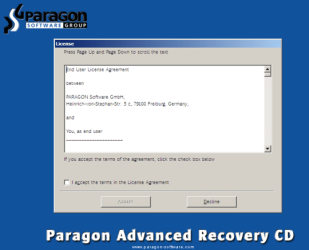
  2. Accept the end user license agreement, otherwise you are not able to use the tool.
    1.png
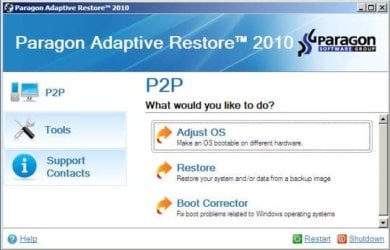
  3. Launch P2P Adjust OS.
    2.jpg
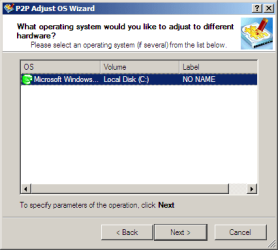
  4. Select the operating system you need to adjust to your new hardware.
    3.png
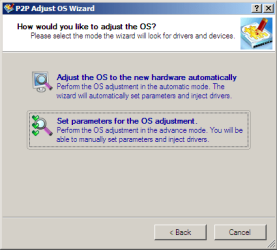
  5. Choose whether you want to add third-party drivers or not, and the way to do it.
    4.png
  6. If you chose "Adjust the OS to the new hardware automatically", the P2P Adjust OS Wizard will automatically accomplish all the necessary actions.
    5.png
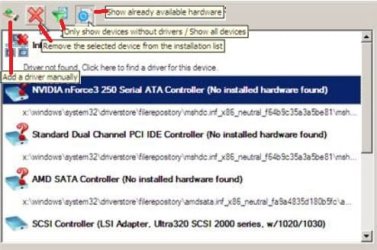
  7. The only thing that might need your interaction is to specify additional driver repository.
    6.png
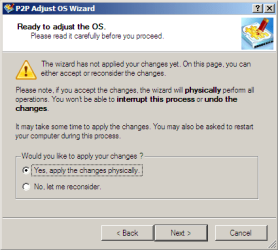
  8. At last, choose "Yes, apply the changes physically" and then restart your computer after operations are done. Do remember, you cannot interrupt the process or undo the changes.
    7.png
Compelete pdf manual: Paragon Adaptive Restore 2010 on my DROPBOX.

Just before the OS adjustment, you can additionally:
extra.JPG


   Warning
Sometimes the internal hard drive is not recognized in Paragon P2P Adjust OS due to missing SATA or RAID driver. In that case add specific drivers to Windows PE based Paragon Recovery Environment.
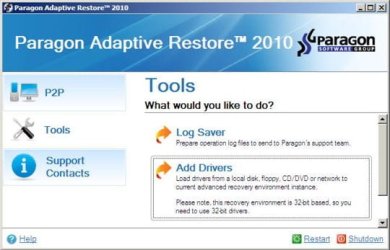
  1. Click to open Add Drivers dialog.
    a.jpg
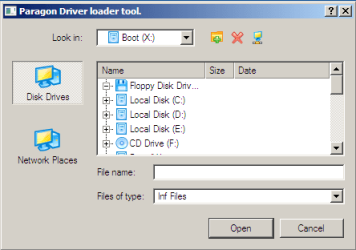
  2. Browse for an .INF file of the required driver, then click the Open button to initiate the process.
    b.png
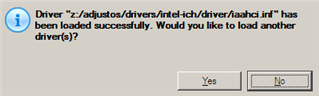
  3. Click Yes to confirm the operation.
    c.png
   Information
You can only add third-party drivers in INF file. If they are zipped, you need to unpack them before processing the steps. The Windows PE environment is 32bit-based, so you need to use 32-bit drivers for injection.
After procedure has finished succesfully and system boots fine, first check if Enable hardware auto-updating via Windows Update (Set to Automatic) is on so it will query Windows Update. After that:

  1. Uninstall Device and Device Driver for devices no longer attached to system. Uninstall associated software as well.
  2. Install all of your device drivers, then Windows Updates.
  3. Refresh your Windows Experience Index (WEI) score.
  4. When done, all you will need to do is to activate Windows 7.
After rebooting from disk, drivers should start swapping out in a cascade you can monitor by clicking on the system tray animation. Wait until all are finished before doing the requested restart. After reboot, go immediately to Check for Updates and install all Important and Optional Updates which may include critical drivers and patches for the OS to run on that hardware.

You must reactivate at the Change Product Key link on System page. If it's not present you can insert Product Key and then Activate using SLMgr Commands

On some systems you see "setup is preparing your computer for first use" on every reboot. Read this to fix that issue: Fix "Setup is Preparing Your Computer for First Use" on Every Reboot


Last edited:
@ignatzatsonic: Thanks for replying. I read through this whole thread-- It looks like there were a number of people earlier in the thread who used Paragon Adaptive Restore successfully. It always sounded to me like a nifty feature, but I have seen little discussion of how to handle licensing questions.

My version of Win 7 is indeed retail, though it was an upgrade version. I don't recall what previous XP was. I thought MS changed even how the "Retail License" works, but what you are saying sounds reasonable and justifiable. I actually do have another available key. If the old hardware is not in fact broken, one could transfer an installation to newer, better hardware, and at the same time continue to use Win 7 on the old hardware. Let's say you transfer the OS plus the User to the new machine, and on that machine change the hardware drivers and then the also change the product key to a new license. (I think Windows itself includes a provision for doing this.) On the OLD machine, delete the current User and associated files and establish a new one. Or do a repair install if desired--but the old machine would keep the old product key. So the old machine would be available for another use.

Any reason the above would not work? If the old motherboard is dead, looks like what you are suggesting should work with a Retail Licesne.

Michael
 

My Computer My Computer

At a glance

Win 7 x64 ProIntel Core i74 GB
Computer type
Laptop
Computer Manufacturer/Model Number
Toshiba
OS
Win 7 x64 Pro
CPU
Intel Core i7
Memory
4 GB
Browser
IE; Chrome
Hi
Does this method retain Windows 7 personalization? Start Menu, side panel favorites, small Registry edits, etc...
 

My Computer My Computer

At a glance

Windows 7 Ultimate SP1 x64
Computer type
PC/Desktop
OS
Windows 7 Ultimate SP1 x64
Yes, it should. That is the main intention of using this.
 

My Computer My Computer

At a glance

Win 7 x64 ProIntel Core i74 GB
Computer type
Laptop
Computer Manufacturer/Model Number
Toshiba
OS
Win 7 x64 Pro
CPU
Intel Core i7
Memory
4 GB
Browser
IE; Chrome
Has anyone tried this with a 8 or 10?
 

My Computer My Computer

At a glance

64 bit Windows 7 Ultimate
Computer type
PC/Desktop
Computer Manufacturer/Model Number
more than you can count
OS
64 bit Windows 7 Ultimate
Antivirus
Avast + Mbam
It works up to and including win7.

You need a more recent version for 8.1/10.
 

My Computers My Computers

  • At a glance

    7 X64i5 84002x8gb 3200mhz
    Computer type
    PC/Desktop
    OS
    7 X64
    CPU
    i5 8400
    Motherboard
    gigabyte b365m ds3h
    Memory
    2x8gb 3200mhz
    Hard Drives
    various
    PSU
    pure power 11 400w cm
    Case
    Coolermaster
    Cooling
    cryorig m9i
  • At a glance

    7x64g54008gb ddr4 2400
    Computer type
    PC/Desktop
    OS
    7x64
    CPU
    g5400
    Motherboard
    ga b365m ds3h
    Memory
    8gb ddr4 2400
    PSU
    xfx pro 450w

My Computers My Computers

  • At a glance

    7 X64i5 84002x8gb 3200mhz
    Computer type
    PC/Desktop
    OS
    7 X64
    CPU
    i5 8400
    Motherboard
    gigabyte b365m ds3h
    Memory
    2x8gb 3200mhz
    Hard Drives
    various
    PSU
    pure power 11 400w cm
    Case
    Coolermaster
    Cooling
    cryorig m9i
  • At a glance

    7x64g54008gb ddr4 2400
    Computer type
    PC/Desktop
    OS
    7x64
    CPU
    g5400
    Motherboard
    ga b365m ds3h
    Memory
    8gb ddr4 2400
    PSU
    xfx pro 450w
I didn't like the normal sysprep way because of scary/annoying things such as "All personalization is removed (taskbar, toolbars, folder options, start orb etc.)" and "In case of relocated system folders... first move the relocated system folders back to C: then disconnect all other drives."

Yeah, no, not doing that, although I admit I'm not sure if it literally means moved folders are only an issues if they're on other drives or if it also applies to different partition on the boot drive.

Either way, am I safe from both of those issues through this method with PAR? I saw one person above - one; would like to see if others agree - say that all personalization does stay, but I also wanted to make sure this method will work find with my 2-partition boot / system drive. C is the main partition, but temp folders and installed applications are on D.

PS: Still have emails proving my initial registration years back. Was there an account wipe or expiration some time back?
 

My Computer My Computer

At a glance

Windows 7 Pro x64AMD Phenom 9850 2.5GHz Quadcore6 GB PC2-6400GeForce 9800GT
Computer type
PC/Desktop
Computer Manufacturer/Model Number
Custom
OS
Windows 7 Pro x64
CPU
AMD Phenom 9850 2.5GHz Quadcore
Motherboard
GA-MA785GM-US2H
Memory
6 GB PC2-6400
Graphics Card(s)
GeForce 9800GT
Hard Drives
More than you!
...I'm not sure if it literally means moved folders are only an issues if they're on other drives or if it also applies to different partition on the boot drive.

Either way, am I safe from both of those issues through this method with PAR? ...I also wanted to make sure this method will work find with my 2-partition boot / system drive. C is the main partition, but temp folders and installed applications are on D.

I couldn't say for sure, but I think the main issue is trusting that devices (drives, other hardware?) on the new machine will be set up exactly the same way as on the old machine. It would be easy to get something wrong and the OS would not find something where it expects it.
 

My Computer My Computer

At a glance

Win 7 x64 ProIntel Core i74 GB
Computer type
Laptop
Computer Manufacturer/Model Number
Toshiba
OS
Win 7 x64 Pro
CPU
Intel Core i7
Memory
4 GB
Browser
IE; Chrome
I couldn't say for sure, but I think the main issue is trusting that devices (drives, other hardware?) on the new machine will be set up exactly the same way as on the old machine. It would be easy to get something wrong and the OS would not find something where it expects it.

Thanks, a small issue I can handle, if I'm imagining what you are. All my hard drives have designated drive letters I chose for them anyway, so making sure they're correct is part of 1st boot tasks.

From my experience, I can't imagine my dual partitions being an issue - I was just asking in case someone can say anything for sure since I'm not sure how precise the wording on the sysprep tutorial was. All's good if it doesn't mess with booting into Windows. :)

Anyway, I managed to free up a drive (usually impossible for me) and thus cloned my hard drive as a backup, so I'll go ahead and see how it goes.
 

My Computer My Computer

At a glance

Windows 7 Pro x64AMD Phenom 9850 2.5GHz Quadcore6 GB PC2-6400GeForce 9800GT
Computer type
PC/Desktop
Computer Manufacturer/Model Number
Custom
OS
Windows 7 Pro x64
CPU
AMD Phenom 9850 2.5GHz Quadcore
Motherboard
GA-MA785GM-US2H
Memory
6 GB PC2-6400
Graphics Card(s)
GeForce 9800GT
Hard Drives
More than you!
thank you

hi ,your post is so helpful for me, i was copied my system partition sector by sector from my first hard disk to second new hard disk for my new system and i cant boot my old windows on my new system until i see your post after hundred search in website ,aafter that i used Paragon Adaptive Restore step by step along with your education:geek: and i fixed my hard disk, thanks again,have good luck:)
 

My Computer My Computer

At a glance

Windows 7 Ultimate x32
Computer type
PC/Desktop
OS
Windows 7 Ultimate x32
YUP, another satisfied customer. Replaced mobo with same model, and then...oh yeah, that 100mb boot partition nonsense.....how do I address that again?....and fortunately I googled correctly and found this thread, and BINGO, we back en bid-ness!
 
Last edited:

My Computer My Computer

At a glance

Windows 7 Pro x64
Computer type
PC/Desktop
OS
Windows 7 Pro x64
Switched to a new Gigabyte mobo very similar to my old one because I broke the old one while cleaning. Windows 7 decided to give me STOP 0x7b on boot. This fixed it in seconds.

I just have a couple of questions:

Isn't this software paid software? Is it actually legal to download and use?

And, I'm probably being paranoid but how do I know it isn't installing a rootkit or something when fixing the machine? :)
 

My Computer My Computer

At a glance

Windows 7 64 bit
Computer type
PC/Desktop
OS
Windows 7 64 bit
trash
 
Last edited:

My Computer My Computer

At a glance

Windows 7 Pro x64
Computer type
PC/Desktop
OS
Windows 7 Pro x64
Hi,
This forum is monitored pretty well so I seriously doubt anything bad is added to the utility :)

On another note I recently just swapped a very old acer mother boards ssd install into a new x299 mother board and had no issues besides the absence of the original acer board had no usb3 drivers
The new board had a feature mouse and keyboard simulation I activated and everything was good so I could sign into windows and install the needed usb3 drivers :)
 

My Computer My Computer

At a glance

Win-7-Pro64bit 7-H-Prem-64biti7-5930K 2nd i9-9940x both water blocked VRM'...Trident-z 3200C14 2nd Trident-z 3600C16EVGA 1080ti ftw3 2nd Titan Xp both water blocked
Computer type
PC/Desktop
Computer Manufacturer/Model Number
Custom assembled by me :}
OS
Win-7-Pro64bit 7-H-Prem-64bit
CPU
i7-5930K 2nd i9-9940x both water blocked VRM's too
Motherboard
ASUS SABERTOOTH X99 2nd ASUS x299 Apex
Memory
Trident-z 3200C14 2nd Trident-z 3600C16
Graphics Card(s)
EVGA 1080ti ftw3 2nd Titan Xp both water blocked
Sound Card
Built-in Realtek
Monitor(s) Displays
1-AOC G2460PG 24"G-Sync 144Hz/ 2nd 1-ASUS VG248QE 24" 144Hz
Screen Resolution
1920 x 1080 144Hz
Hard Drives
2-Samsung M.2 Evo & Evo Plus
2-Samsung 850 EVO 500GB SSD's/ 3-2.5 W.D. Black 1tb-&3-1tb/3-3.5 WD Black 1tb hdd's
PSU
EVGA SuperNOVA 1000-P2 2nd 1200-P2
Case
2-Corsair Obsidian Series 450D Black ATX Mid Tower
Cooling
Custom water loops
Keyboard
Logitech G710+/ 2nd Logitech G910
Mouse
2-RedDragon M901 Perdition 16400 dpi Gaming mouse = wired
Internet Speed
Comcast Ping 19ms 89.31mbps download speed 6.12mbps upload
Antivirus
Malwarebytes Pro/ Superantispyware Pro
Browser
FireFox & Pale moon
Other Info
2nd ASUS X299 Apex/Intel i9-9940x with Custom water loop/7H-Prem-x64/Corsair 450D case/Ram Trident-z 3600C16 4x8gb / Samsung970Evo plus 500gb SSD/Dual ssd EZ swap evo/PSU EVGA SuperNova 1200w-P2 80+Platinum/GPU Titan Xp /8-ML-140 on push-pull on 2-280GTX rads
trash
 
Last edited:

My Computer My Computer

At a glance

Windows 7 Pro x64
Computer type
PC/Desktop
OS
Windows 7 Pro x64
Issue here. I cloned from the oem 1TB to a new 2TB. Both are Hitachi. XP partition boots (shouldn't it?...), and 7 does not. Used Paragon, but still "Windows failed to start". I thought maybe it was because the partition wasn't labeled, but that did not fix it.
 

My Computer My Computer

At a glance

Windows 7 Pro x64
Computer type
PC/Desktop
OS
Windows 7 Pro x64

My Computers My Computers

  • At a glance

    7 X64i5 84002x8gb 3200mhz
    Computer type
    PC/Desktop
    OS
    7 X64
    CPU
    i5 8400
    Motherboard
    gigabyte b365m ds3h
    Memory
    2x8gb 3200mhz
    Hard Drives
    various
    PSU
    pure power 11 400w cm
    Case
    Coolermaster
    Cooling
    cryorig m9i
  • At a glance

    7x64g54008gb ddr4 2400
    Computer type
    PC/Desktop
    OS
    7x64
    CPU
    g5400
    Motherboard
    ga b365m ds3h
    Memory
    8gb ddr4 2400
    PSU
    xfx pro 450w
Is that the full message?

That's the truncated version. ".....a recent hardware or software change...." yadda yadda yadda. Same as when I did it last time, but this time the new drive is 2TB. Oh wait, this is a drive change, not Mobo change. Hmmm.... Recovery tools, we'll see.....
 

My Computer My Computer

At a glance

Windows 7 Pro x64
Computer type
PC/Desktop
OS
Windows 7 Pro x64
No, I can't even get to the recovery console. No option. Shouldn't this be the same kind of circumstance, though?
 

My Computer My Computer

At a glance

Windows 7 Pro x64
Computer type
PC/Desktop
OS
Windows 7 Pro x64
Recovery console?

Try using startup repair from the booted win 7 installation media. You might need to run it two or three times.
 

My Computers My Computers

  • At a glance

    7 X64i5 84002x8gb 3200mhz
    Computer type
    PC/Desktop
    OS
    7 X64
    CPU
    i5 8400
    Motherboard
    gigabyte b365m ds3h
    Memory
    2x8gb 3200mhz
    Hard Drives
    various
    PSU
    pure power 11 400w cm
    Case
    Coolermaster
    Cooling
    cryorig m9i
  • At a glance

    7x64g54008gb ddr4 2400
    Computer type
    PC/Desktop
    OS
    7x64
    CPU
    g5400
    Motherboard
    ga b365m ds3h
    Memory
    8gb ddr4 2400
    PSU
    xfx pro 450w
Back
Top