SSD unrecognized - disk management says "unknown" and "not initialized

jhk

New member
Local time
3:12 PM
Messages
7
SSD unrecognized - disk management says "unknown" and "not initialized

My PC wouldn't boot off the SSD (with Win 10 OS). It said there were boot problems and tried to diagnose the problem but it doesn't boot. I'm now using the original HD with Win 7. I'd like to get the SSD working if I can. The SSD is OCZ - 240 GB or so.

But between last night and today, the SSD has gotten worse. I can't access it at all now. Last night I was able to access it as an external drive. What I did in between was a chkdsk of the HD just to make sure it was OK. Then this morning I saw that the SSD had problems.

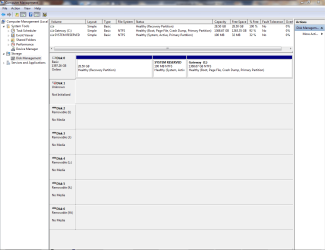
Disk Management shows the SSD as disk 1, but it has no information on it. It just says the disk is unknown and uninitialized.

I saw a recommendation for Partition Wizard 9.1 Free. But that doesn't show the drive at all. I attached screen shots as a Word document.

Any help would be greatly appreciated.
 

Attachments

My Computer My Computer

At a glance

Win7 Home Premium 64 biti7 860 @ 2.8GHz8 GB
Computer type
PC/Desktop
Computer Manufacturer/Model Number
Gateway FX6840
OS
Win7 Home Premium 64 bit
CPU
i7 860 @ 2.8GHz
Memory
8 GB
Hard Drives
Seagate 1 TB
Antivirus
Avast
Browser
Chrome, Firefox, IE

My Computer My Computer

At a glance

Windows 10 Pro. 64/ version 1709 Windows 7 Pr...Intel i7-6800K @ 4.3Corsair Platinum 16 gig @2400EVGA GTX 1070 OC
Computer type
PC/Desktop
Computer Manufacturer/Model Number
Home made Desktop
OS
Windows 10 Pro. 64/ version 1709 Windows 7 Pro/64
CPU
Intel i7-6800K @ 4.3
Motherboard
ASUS X-99 Deluxe II
Memory
Corsair Platinum 16 gig @2400
Graphics Card(s)
EVGA GTX 1070 OC
Monitor(s) Displays
Asus 27" LED LCD/VE278Q
Screen Resolution
1920-1080 or 1280-720 HDMI
Hard Drives
INTEL SSD 730-240 Gb Sata 3.0/
PSU
EVGA Platium 1200W
Case
Phanteks Luxe Tempered Glass 8 fans/ one radiator
Cooling
XSPC/ Water Cooled CPU
Keyboard
Das 4 Professional
Mouse
Logitech M705/MX Anywhere 2-S
Internet Speed
100 mbits
Antivirus
Microsoft Security Essentials/ Malwarebytes Premium 3.0/ SAS
Browser
I.E. 11 default/Firefox/ ISP Time Warner Cable/Spectrum
Other Info
LG BluRay Burner/
Sound system-KLipsch-THX/
Icy Dock ssd Hot Swap bays.
Thanks for the hint, Jack. I'm attaching the 2 images - disk management and partition wizard.
 

Attachments

  • 7forums - disk mgmt.PNG
    7forums - disk mgmt.PNG
    34.6 KB · Views: 6
  • 7forums - Partition wizard.PNG
    7forums - Partition wizard.PNG
    303.3 KB · Views: 5

My Computer My Computer

At a glance

Win7 Home Premium 64 biti7 860 @ 2.8GHz8 GB
Computer type
PC/Desktop
Computer Manufacturer/Model Number
Gateway FX6840
OS
Win7 Home Premium 64 bit
CPU
i7 860 @ 2.8GHz
Memory
8 GB
Hard Drives
Seagate 1 TB
Antivirus
Avast
Browser
Chrome, Firefox, IE
Thank you for the pictures.

Does disk #1 have a operating system or data on it?

If you initialized disk #1 you will lose all data on disk #1.

If their is data on disk#1 that you would like to save I will request help from others to give guidance on saving your data.

The information I'm asking for will help others help you.

P/S
I just got back from surgery and I'm on some strong medication so I don't want to get into such things as data recovery. I don't think my 3 brain cells are up to the job at this time.

Jack
 

My Computer My Computer

At a glance

Windows 10 Pro. 64/ version 1709 Windows 7 Pr...Intel i7-6800K @ 4.3Corsair Platinum 16 gig @2400EVGA GTX 1070 OC
Computer type
PC/Desktop
Computer Manufacturer/Model Number
Home made Desktop
OS
Windows 10 Pro. 64/ version 1709 Windows 7 Pro/64
CPU
Intel i7-6800K @ 4.3
Motherboard
ASUS X-99 Deluxe II
Memory
Corsair Platinum 16 gig @2400
Graphics Card(s)
EVGA GTX 1070 OC
Monitor(s) Displays
Asus 27" LED LCD/VE278Q
Screen Resolution
1920-1080 or 1280-720 HDMI
Hard Drives
INTEL SSD 730-240 Gb Sata 3.0/
PSU
EVGA Platium 1200W
Case
Phanteks Luxe Tempered Glass 8 fans/ one radiator
Cooling
XSPC/ Water Cooled CPU
Keyboard
Das 4 Professional
Mouse
Logitech M705/MX Anywhere 2-S
Internet Speed
100 mbits
Antivirus
Microsoft Security Essentials/ Malwarebytes Premium 3.0/ SAS
Browser
I.E. 11 default/Firefox/ ISP Time Warner Cable/Spectrum
Other Info
LG BluRay Burner/
Sound system-KLipsch-THX/
Icy Dock ssd Hot Swap bays.
I wish you speedy and full recovery from your surgery, Jack. Yeah, the drugs can affect you, but it was also some of the most relaxing times for me in the couple of operations I had :)

I didn't initialize disk 1 (in disk management picture). Well not that I know, anyhow, and I never saw any messages saying it was being initialized or was initialized. I could access it last night, but not this morning. And the only thing I did was chkdsk on drive 0. I tried to do chkdsk on drive 1 (the SSD) to see if whatever errors that kept it from booting could be fixed, but I didn't know how to do that. Then this morning I found that drive 1 (the SSD) was not accessible.

So, yes, disk 1 had an OS on it and data.

What I'd really like is to have the SSD working as much as it was yesterday so I can use it as the boot drive.

And if I can't do that, I'd like to save the data from the SSD.
 

My Computer My Computer

At a glance

Win7 Home Premium 64 biti7 860 @ 2.8GHz8 GB
Computer type
PC/Desktop
Computer Manufacturer/Model Number
Gateway FX6840
OS
Win7 Home Premium 64 bit
CPU
i7 860 @ 2.8GHz
Memory
8 GB
Hard Drives
Seagate 1 TB
Antivirus
Avast
Browser
Chrome, Firefox, IE
It appears that disk #0 has your operating system.

Disk #1 is unknown/not initialized.

Is their anything on disk #0 that you want to save?
[/DEL


Edit.
Is their any thing on disk #1 that you want to save?


Jack
 
Last edited:

My Computer My Computer

At a glance

Windows 10 Pro. 64/ version 1709 Windows 7 Pr...Intel i7-6800K @ 4.3Corsair Platinum 16 gig @2400EVGA GTX 1070 OC
Computer type
PC/Desktop
Computer Manufacturer/Model Number
Home made Desktop
OS
Windows 10 Pro. 64/ version 1709 Windows 7 Pro/64
CPU
Intel i7-6800K @ 4.3
Motherboard
ASUS X-99 Deluxe II
Memory
Corsair Platinum 16 gig @2400
Graphics Card(s)
EVGA GTX 1070 OC
Monitor(s) Displays
Asus 27" LED LCD/VE278Q
Screen Resolution
1920-1080 or 1280-720 HDMI
Hard Drives
INTEL SSD 730-240 Gb Sata 3.0/
PSU
EVGA Platium 1200W
Case
Phanteks Luxe Tempered Glass 8 fans/ one radiator
Cooling
XSPC/ Water Cooled CPU
Keyboard
Das 4 Professional
Mouse
Logitech M705/MX Anywhere 2-S
Internet Speed
100 mbits
Antivirus
Microsoft Security Essentials/ Malwarebytes Premium 3.0/ SAS
Browser
I.E. 11 default/Firefox/ ISP Time Warner Cable/Spectrum
Other Info
LG BluRay Burner/
Sound system-KLipsch-THX/
Icy Dock ssd Hot Swap bays.
Yes, I'd like to save all of Disk 0. That is my "backup" so I can use it for times like this.

I'd like to recover Disk 1 so I can use it again.
 

My Computer My Computer

At a glance

Win7 Home Premium 64 biti7 860 @ 2.8GHz8 GB
Computer type
PC/Desktop
Computer Manufacturer/Model Number
Gateway FX6840
OS
Win7 Home Premium 64 bit
CPU
i7 860 @ 2.8GHz
Memory
8 GB
Hard Drives
Seagate 1 TB
Antivirus
Avast
Browser
Chrome, Firefox, IE

My Computers My Computers

  • At a glance

    Windows 7 HP 64i5 6600K - 800MHz to 4200MHz4+4G GSkill DDR4 3000IG - Intel 530
    Computer type
    PC/Desktop
    Computer Manufacturer/Model Number
    custom build
    OS
    Windows 7 HP 64
    CPU
    i5 6600K - 800MHz to 4200MHz
    Motherboard
    GA-Z170-HD3P
    Memory
    4+4G GSkill DDR4 3000
    Graphics Card(s)
    IG - Intel 530
    Monitor(s) Displays
    Samsung 226BW
    Screen Resolution
    1680x1050
    Hard Drives
    (1) -1 SM951 – 128GB M.2 AHCI PCIe SSD drive for Windows 7 and Lubuntu
    (2) -1 WD SATA 3 - 1T for Data
    (3) -1 WD SATA 3 - 1T for backup
    PSU
    Thermaltake 450W TR2 gold
    Keyboard
    Old and good Chicony mechanical keyboard
    Mouse
    Logitech mX performance - 9 buttons (had to disable some)
    Internet Speed
    500Mb/s
    Browser
    Firefox 64
    Other Info
    TinyWall firewall
  • At a glance

    Windows 7 Proi7-4500U 800MHz to 3.0GHz(4+4)G DDR3 1600IG intel 4400 + NVIDIA GeForce GT 745M
    Computer type
    Laptop
    System Manufacturer/Model Number
    Asus Q550LF
    OS
    Windows 7 Pro
    CPU
    i7-4500U 800MHz to 3.0GHz
    Motherboard
    Asus Q550LF
    Memory
    (4+4)G DDR3 1600
    Graphics Card(s)
    IG intel 4400 + NVIDIA GeForce GT 745M
    Sound Card
    Realtek
    Monitor(s) Displays
    LG Display LP156WF4-SPH1
    Screen Resolution
    1920 x 1080
    Hard Drives
    BX500 120G SSD for Windows and programs +
    1T HDD for data
    Internet Speed
    500 Mb/s
    Browser
    Firefox
    Other Info
    TinyWall firewall
We are not on the same page.

Disk (0) is your operating system that you are booted into now.
I would suggest leaving it alone at this time.


If their is nothing on disk #1 that you want to save just format it.
If their is something on disk #1 that you want to save, let me know and I will find help.


I will ask again.
Is their anything on disk #1 that you want to save?

***Sorry I made a mistake in my last post. I corrected it.***

What I'm try to do is this.
I don't want you to do anything to Disk#1 at this time if their is data you want to save on Disk #1.

Please note.
Recovering a drive so it can be use again is not the same as recovering the data on said drive.
That is why I keep asking about data on said drive.

Jack
 

My Computer My Computer

At a glance

Windows 10 Pro. 64/ version 1709 Windows 7 Pr...Intel i7-6800K @ 4.3Corsair Platinum 16 gig @2400EVGA GTX 1070 OC
Computer type
PC/Desktop
Computer Manufacturer/Model Number
Home made Desktop
OS
Windows 10 Pro. 64/ version 1709 Windows 7 Pro/64
CPU
Intel i7-6800K @ 4.3
Motherboard
ASUS X-99 Deluxe II
Memory
Corsair Platinum 16 gig @2400
Graphics Card(s)
EVGA GTX 1070 OC
Monitor(s) Displays
Asus 27" LED LCD/VE278Q
Screen Resolution
1920-1080 or 1280-720 HDMI
Hard Drives
INTEL SSD 730-240 Gb Sata 3.0/
PSU
EVGA Platium 1200W
Case
Phanteks Luxe Tempered Glass 8 fans/ one radiator
Cooling
XSPC/ Water Cooled CPU
Keyboard
Das 4 Professional
Mouse
Logitech M705/MX Anywhere 2-S
Internet Speed
100 mbits
Antivirus
Microsoft Security Essentials/ Malwarebytes Premium 3.0/ SAS
Browser
I.E. 11 default/Firefox/ ISP Time Warner Cable/Spectrum
Other Info
LG BluRay Burner/
Sound system-KLipsch-THX/
Icy Dock ssd Hot Swap bays.
Thanks, Megahertz, I will ask Jumanji for help.

If I can fix the problems (corrupted data? bad sectors?) on Disk 1 so I can use it as a boot drive again (hopefully with all files intact), that would be ideal. That's why I was trying to see if i could run chkdsk on drive 1 - I saw it had an option to fix errors.

If I can't do that, then there are some files that I'd like to recover (my wife's latest update to her Christmas address).

Then I'd like to recover the drive so i can use it again - and I know this will most likely get rid of everything on the drive.
 

My Computer My Computer

At a glance

Win7 Home Premium 64 biti7 860 @ 2.8GHz8 GB
Computer type
PC/Desktop
Computer Manufacturer/Model Number
Gateway FX6840
OS
Win7 Home Premium 64 bit
CPU
i7 860 @ 2.8GHz
Memory
8 GB
Hard Drives
Seagate 1 TB
Antivirus
Avast
Browser
Chrome, Firefox, IE
I don't understand why you have data on a SSD and OS on a HDD.

In my desktop I have 3 drives for 2 systems

System 1
- 128G SSD - C: drive for windows (83G) and Linux (45G) - OS and programs - There is still plenty space
- 1T HDD - D: drive for \Users, installation files etc - It's a Data HDD (used Kari tutorial to move \Users from C: to D:)

System 2
- 1T HDD with 2 partitions:
- C: drive (83G) - for windows - OS and programs
- D: drive (~910G) for \Users, installation files etc - It's a Data HDD (used Kari tutorial to move \Users from C: to D:)

Normally Disk 3 (system 2) remains with power connector disconnected from disk an I use system 1. As OS and programs are on the SSD it's very fast and have lot of space on the HDD.

Once a week I connect the power cable to Disk 3 (system 2) and boot with it.
From it I access disks from system 1 (SSD+HDD) to do maintenance (backup, disk images etc).
 

My Computers My Computers

  • At a glance

    Windows 7 HP 64i5 6600K - 800MHz to 4200MHz4+4G GSkill DDR4 3000IG - Intel 530
    Computer type
    PC/Desktop
    Computer Manufacturer/Model Number
    custom build
    OS
    Windows 7 HP 64
    CPU
    i5 6600K - 800MHz to 4200MHz
    Motherboard
    GA-Z170-HD3P
    Memory
    4+4G GSkill DDR4 3000
    Graphics Card(s)
    IG - Intel 530
    Monitor(s) Displays
    Samsung 226BW
    Screen Resolution
    1680x1050
    Hard Drives
    (1) -1 SM951 – 128GB M.2 AHCI PCIe SSD drive for Windows 7 and Lubuntu
    (2) -1 WD SATA 3 - 1T for Data
    (3) -1 WD SATA 3 - 1T for backup
    PSU
    Thermaltake 450W TR2 gold
    Keyboard
    Old and good Chicony mechanical keyboard
    Mouse
    Logitech mX performance - 9 buttons (had to disable some)
    Internet Speed
    500Mb/s
    Browser
    Firefox 64
    Other Info
    TinyWall firewall
  • At a glance

    Windows 7 Proi7-4500U 800MHz to 3.0GHz(4+4)G DDR3 1600IG intel 4400 + NVIDIA GeForce GT 745M
    Computer type
    Laptop
    System Manufacturer/Model Number
    Asus Q550LF
    OS
    Windows 7 Pro
    CPU
    i7-4500U 800MHz to 3.0GHz
    Motherboard
    Asus Q550LF
    Memory
    (4+4)G DDR3 1600
    Graphics Card(s)
    IG intel 4400 + NVIDIA GeForce GT 745M
    Sound Card
    Realtek
    Monitor(s) Displays
    LG Display LP156WF4-SPH1
    Screen Resolution
    1920 x 1080
    Hard Drives
    BX500 120G SSD for Windows and programs +
    1T HDD for data
    Internet Speed
    500 Mb/s
    Browser
    Firefox
    Other Info
    TinyWall firewall
The HD was the original drive that came with the PC. I copied it to the SSD and removed the HD. So the SSD is the only drive I had in the PC. When it wouldn't boot anymore, I hooked up the original HD as the boot drive and the SSD as an external drive.

I'm hoping to get the SSD in shape to use as a boot drive again (with all, or as much, of the data, applications, etc. as it had before it had this problem).
 

My Computer My Computer

At a glance

Win7 Home Premium 64 biti7 860 @ 2.8GHz8 GB
Computer type
PC/Desktop
Computer Manufacturer/Model Number
Gateway FX6840
OS
Win7 Home Premium 64 bit
CPU
i7 860 @ 2.8GHz
Memory
8 GB
Hard Drives
Seagate 1 TB
Antivirus
Avast
Browser
Chrome, Firefox, IE
Please clarify:

1. Your system came with Windows 7 Home Premium 64 bit on a 1.5TB HDD. Yes/No

2. "I copied it to the SSD and removed the HD" Copied what?

3. You bought a new SSD and installed Windows 10 on it. Yes/No

4. So what you copied from HDD to SSD was the data on the HDD. Yes/no

5. Was Windows 10 booting on the system after it was installed? Yes/No

6. Was it the only drive in the system or your HDD was also there as a second internal drive?

7. Then suddenly one day it did not boot. Yes/no

8. Do you know/guess any event that could have made it non-bootable? Say like you tried to create a partition, or extend a partition, installed some software, downloaded or browsed some malicious sites etc.,

The first thing we do when a system becomes unbootable is to check and see whether we can access the drive with Live Linux. ( not removing it from the system and put it inside an enclosure - which may be good or faulty we don't know.You are only introducing another "unknown" device interface )

So restore it as a boot drive and run Lucid Puppy from a pendrive.

To create a Lucid Puppy pendrive : post#8 here Is there any way of saving a completely unrecognisable hard drive?

Boot from the Lucid Puppy pendrive and check whether you can access the SSD

On how to use Lucid Puppy: Go to the topic Recovering files from the non-bootable Internal Drive: in this thread Lucid Puppy way to recover files from a non-bootable computer ( no need to read what is above the highlighted topic on creating the Lucid Puppy pendrive which is outdated) )
 

My Computer My Computer

At a glance

Windows 7 Home Premium 32 bit
OS
Windows 7 Home Premium 32 bit
Sorry that my imprecise use of terms made things unclear.

Please clarify:

1. Your system came with Windows 7 Home Premium 64 bit on a 1.5TB HDD. => Yes

2. "I copied it to the SSD and removed the HD" Copied what? => I cloned the HDD to the SSD

3. You bought a new SSD and installed Windows 10 on it. => Yes - I cloned the HDD to the SSD

4. So what you copied from HDD to SSD was the data on the HDD. => I cloned the HDD to the SSD

5. Was Windows 10 booting on the system after it was installed? => Yes, it worked for many months until a few days ago

6. Was it the only drive in the system or your HDD was also there as a second internal drive? => it was the only drive in the system

7. Then suddenly one day it did not boot. => Yes

8. Do you know/guess any event that could have made it non-bootable? Say like you tried to create a partition, or extend a partition, installed some software, downloaded or browsed some malicious sites etc.,
=> I didn't do any of those things and I don't recall downloading anything or going to any unusual sites. I don't know what could have made it non-bootable.
=> I turned on the PC and now the SSD is accessible, although it still doesn't boot. I can read and write to the SSD, but I still can't boot from it. If I can fix the Win10 to make it boot, I'd be a happy man. Hopefully without having to erase the SSD - it would be nice to not have to install various programs. The Win10 on this was the free upgrade by Microsoft via downloads.


The first thing we do when a system becomes unbootable is to check and see whether we can access the drive with Live Linux. ( not removing it from the system and put it inside an enclosure - which may be good or faulty we don't know.You are only introducing another "unknown" device interface )

So restore it as a boot drive and run Lucid Puppy from a pendrive.

To create a Lucid Puppy pendrive : post#8 here Is there any way of saving a completely unrecognisable hard drive?

Boot from the Lucid Puppy pendrive and check whether you can access the SSD

On how to use Lucid Puppy: Go to the topic Recovering files from the non-bootable Internal Drive: in this thread Lucid Puppy way to recover files from a non-bootable computer ( no need to read what is above the highlighted topic on creating the Lucid Puppy pendrive which is outdated) )
 

My Computer My Computer

At a glance

Win7 Home Premium 64 biti7 860 @ 2.8GHz8 GB
Computer type
PC/Desktop
Computer Manufacturer/Model Number
Gateway FX6840
OS
Win7 Home Premium 64 bit
CPU
i7 860 @ 2.8GHz
Memory
8 GB
Hard Drives
Seagate 1 TB
Antivirus
Avast
Browser
Chrome, Firefox, IE
Thank you jumanji for coming to help.

Jack
 

My Computer My Computer

At a glance

Windows 10 Pro. 64/ version 1709 Windows 7 Pr...Intel i7-6800K @ 4.3Corsair Platinum 16 gig @2400EVGA GTX 1070 OC
Computer type
PC/Desktop
Computer Manufacturer/Model Number
Home made Desktop
OS
Windows 10 Pro. 64/ version 1709 Windows 7 Pro/64
CPU
Intel i7-6800K @ 4.3
Motherboard
ASUS X-99 Deluxe II
Memory
Corsair Platinum 16 gig @2400
Graphics Card(s)
EVGA GTX 1070 OC
Monitor(s) Displays
Asus 27" LED LCD/VE278Q
Screen Resolution
1920-1080 or 1280-720 HDMI
Hard Drives
INTEL SSD 730-240 Gb Sata 3.0/
PSU
EVGA Platium 1200W
Case
Phanteks Luxe Tempered Glass 8 fans/ one radiator
Cooling
XSPC/ Water Cooled CPU
Keyboard
Das 4 Professional
Mouse
Logitech M705/MX Anywhere 2-S
Internet Speed
100 mbits
Antivirus
Microsoft Security Essentials/ Malwarebytes Premium 3.0/ SAS
Browser
I.E. 11 default/Firefox/ ISP Time Warner Cable/Spectrum
Other Info
LG BluRay Burner/
Sound system-KLipsch-THX/
Icy Dock ssd Hot Swap bays.
Back
Top