External HDD is Unknown and Not Initialized

Quinlan Vos

New member
Local time
11:47 AM
Messages
4
Hello there. This is my first post at this forum.

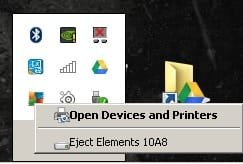
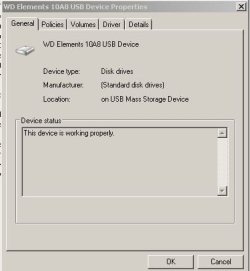
I have a probably 6-7 years old WD Elements 1TB external HDD. When I connect it to PC via USB I can hear ordinary HDD detected sound and after that it sounds some short beeps at 7-3-3 order. Here are some screenshots of my situation. Is there any way to recover my data stored in this HDD? My priority is saving my data but saving HDD would also be cool :)

Help me SevenForums-Wan Kenobi you're my only hope.

OS: Win7 Ultimate x64
 

Attachments

  • sevenforums1.JPG
    sevenforums1.JPG
    67.9 KB · Views: 5
  • sevenforums2.jpg
    sevenforums2.jpg
    8 KB · Views: 30
  • sevenforums3.JPG
    sevenforums3.JPG
    48.2 KB · Views: 30
  • sevenforums4.JPG
    sevenforums4.JPG
    23.6 KB · Views: 30

My Computer

Computer type
PC/Desktop
Computer Manufacturer/Model Number
Toshiba Satellite P50-A
OS
İstanbul
CPU
Intel(R) Core(TM) i7-4700MQ 2.40GHz
Memory
8 GB
Graphics Card(s)
NVIDIA GT 745M
Antivirus
AVG Antivirus
Jumunji is one of the best recovery techs around! However, I can ask this: Did the computer use the Smartware and DriveUnlock when operations were aok? If so, my best guess is: get the Smartware and DriveUnlock back to the aok-days' operations.
 

My Computer

Computer type
PC/Desktop
Computer Manufacturer/Model Number
Antec desktop; Acer Aspire laptops
OS
Windows 7 Professional 64-bit
CPU
Desktop i5; Acers i5 & i7
Memory
desktop 16GB; 1 Acer 8GB & 1 Acer 16GB
Hard Drives
1TB split into 2 equal partitions [OS and data] usable by RJS
Internet Speed
AT&T DSL
Browser
FF, GChrome, msIE
Other Info
Windows 7 Firewall, Emsisoft AM/AV, MSE [scan-only], SpywareBlaster, Ruiware/BillP combine
Jumunji is one of the best recovery techs around! However, I can ask this: Did the computer use the Smartware and DriveUnlock when operations were aok? If so, my best guess is: get the Smartware and DriveUnlock back to the aok-days' operations.

Hello there RolandJS. At first thanks for quick reply and yeah while I was searching for other posts I saw Mr. Jumanji. I hope he can help me to get rid of this bad situation :) I've never used Smartware or DriveUnlock. Just plugged the thing, clicked to "View files" :D.
 

My Computer

Computer type
PC/Desktop
Computer Manufacturer/Model Number
Toshiba Satellite P50-A
OS
İstanbul
CPU
Intel(R) Core(TM) i7-4700MQ 2.40GHz
Memory
8 GB
Graphics Card(s)
NVIDIA GT 745M
Antivirus
AVG Antivirus
Until Jumunji comes to help, I would suggest doing nothing with the problem drive.
Doing the wrong thing at the wrong time will just cause more problems.

Jack
 

My Computer

Computer type
PC/Desktop
Computer Manufacturer/Model Number
Home made Desktop
OS
Windows 10 Pro. 64/ version 1709 Windows 7 Pro/64
CPU
Intel i7-6800K @ 4.3
Motherboard
ASUS X-99 Deluxe II
Memory
Corsair Platinum 16 gig @2400
Graphics Card(s)
EVGA GTX 1070 OC
Monitor(s) Displays
Asus 27" LED LCD/VE278Q
Screen Resolution
1920-1080 or 1280-720 HDMI
Hard Drives
INTEL SSD 730-240 Gb Sata 3.0/
PSU
EVGA Platium 1200W
Case
Phanteks Luxe Tempered Glass 8 fans/ one radiator
Cooling
XSPC/ Water Cooled CPU
Keyboard
Das 4 Professional
Mouse
Logitech M705/MX Anywhere 2-S
Internet Speed
100 mbits
Antivirus
Microsoft Security Essentials/ Malwarebytes Premium 3.0/ SAS
Browser
I.E. 11 default/Firefox/ ISP Time Warner Cable/Spectrum
Other Info
LG BluRay Burner/
Sound system-KLipsch-THX/
Icy Dock ssd Hot Swap bays.
Hi Quinlan Vos.

Welcome to Seven Forums.

Please read this Beeping Hard Drive | My Computer Is Beeping | Beeping Noises Hard drive bleeping means some sort of mechanical damage has taken place. If indeed it is, no DIY data recovery is possible. Only a Professional Data Recovery agency with clean room facility can repair and recover the data.You may contact WD Data Recovery Partners in your region. Telephonic consultation is free, Data Recovery | WD Support

Sometimes this beeping can occur if your external drive is power-starved and does not get sufficient power from the USB ports to actuate the mechanical parts. Consider yourself lucky if this is it in your case.( This applies only if your WD Elements drive is a portable drive drawing power exclusively from USB ports. Does not apply if your WD Elements is a Desktop one drawing power from the Mains supply through a power adapter)

So do this:

1. Try with a new interconnect cable. ( Your present USB cable could have been damaged)

2. Try connecting it to a USB3 port. (USB3 port can supply more power.)

3. Try different USB ports. (May be other ports can supply more power.)

4. Try a Y-USB cable that plugs into two USB ports. ( Two heads are better than one :))

5. Try connecting your drive through a Powered USB hub. ( You know why :))

Above all try all this on another PC that is working well.

Good Luck.
 
Last edited:

My Computer

OS
Windows 7 Home Premium 32 bit
Until Jumunji comes to help, I would suggest doing nothing with the problem drive.
Doing the wrong thing at the wrong time will just cause more problems.

Jack

Thanks for your warning Jack. I only installed Minitool Partition Wizard and Minitool Power Data Recovery softwares to see if I can see my HDD at those softwares and even at those software my HDD couldn't be listed :)


Hi Quinlan Vos.

Welcome to Seven Forums.

Please read this Beeping Hard Drive | My Computer Is Beeping | Beeping Noises Hard drive bleeping means some sort of mechanical damage has taken place. If indeed it is, no DIY data recovery is possible. Only a Professional Data Recovery agency with clean room facility can repair and recover the data.You may contact WD Data Recovery Partners in your region. Telephonic consultation is free, Data Recovery | WD Support

Sometimes this beeping can occur if your external drive is power-starved and does not get sufficient power from the USB ports to actuate the mechanical parts. Consider yourself lucky if this is it in your case.( This applies only if your WD Elements drive is a portable drive drawing power exclusively from USB ports. Does not apply if your WD Elements is a Desktop one drawing power from the Mains supply through a power adapter)

So do this:

1. Try with a new interconnect cable. ( Your present USB cable could have been damaged)

2. Try connecting it to a USB3 port. (USB3 port can supply more power.)

3. Try different USB ports. (May be other ports can supply more power.)

4. Try a Y-USB cable that plugs into two USB ports. ( Two heads are better than one :))

5. Try connecting your drive through a Powered USB hub. ( You know why :))

Above all try all this on another PC that is working well.

Good Luck.

Hello Jumanji. At first I want to thank you for your long and explanatory post.

I tested some instructions you written above:

1) Today I bought 1TB WD Elements(portable one, exact same model as my damaged HDD) and 2TB WD Elements(desktop version), I tried to plug damaged HDD with those two new connection cables provided with new HDDs and it did not work BUT I tried to plug new 1TB portable with connection cable of my damaged 1TB HDD and it worked without any problem. So I can say this problem is not about cables.

2-3) Desktop has only USB3.0 ports and laptop has two USB3.0 ports. I tried all of them and result is same. Problem I explained at my first post of topic still exists.

4-5) I do not have any Y-USB and Powered USB hub. After I buy I am going to test damaged HDD with those cables too.

But according to results I got from 1-2-3 it seems trying 4 and 5 also won't be a sollution for me I guess problem is a mechanical damage inside HDD so it would be better to start searching for Data Recovery Center as you said recovering data from damaged HDD is impossible to do at home :)I hope those Data Recovery guys don't charge me high prices.
 

My Computer

Computer type
PC/Desktop
Computer Manufacturer/Model Number
Toshiba Satellite P50-A
OS
İstanbul
CPU
Intel(R) Core(TM) i7-4700MQ 2.40GHz
Memory
8 GB
Graphics Card(s)
NVIDIA GT 745M
Antivirus
AVG Antivirus
Yes, you need not try 4 & 5. it is now established that your drive has undergone a physical damage. And as I said only an expert Professional Data Recovery service with a clean room can do the repair/recovery. And a clean room facility is an expensive affair. So you can't expect any lower fees for the service. It will be very high. You have to decide on the cost benefit ratio of getting that data back.
 

My Computer

OS
Windows 7 Home Premium 32 bit
Yes, you need not try 4 & 5. it is now established that your drive has undergone a physical damage. And as I said only an expert Professional Data Recovery service with a clean room can do the repair/recovery. And a clean room facility is an expensive affair. So you can't expect any lower fees for the service. It will be very high. You have to decide on the cost benefit ratio of getting that data back.


How much fee are we talking about here? Thousands of dollars? At Monday I am going to talk with Data Recovery Centers and I must prepare my heart for an attack lol :D
 

My Computer

Computer type
PC/Desktop
Computer Manufacturer/Model Number
Toshiba Satellite P50-A
OS
İstanbul
CPU
Intel(R) Core(TM) i7-4700MQ 2.40GHz
Memory
8 GB
Graphics Card(s)
NVIDIA GT 745M
Antivirus
AVG Antivirus
I don't know. May differ from region to region, agency to agency. When you do find out let us know.:)
 

My Computer

OS
Windows 7 Home Premium 32 bit
Back
Top