
RAM usage too high in idle ?

JordanMihailov

New member
Local time
5:53 PM
Messages
34
Location
Sofia, Bulgaria
Researching over the forums for this issue:)

Hi all, have this problem for a while now. I have 16GB of ram and usage is extremely high while PC is in idle. 99% ram usage and 70-80% quite often.When i start the computer it's fine and then it starts slowly to increase to as i said 70-80 and finally 99%. Computer doesn't lag or lacks of performance even when 99% of the ram is used ?! If you know how to fix that s..t pls aa and that happens in win 10 and win 7 also
I checked task manager to see which process uses that much memory but nothing appeared to be out of order. Could it be some kind of virus ?
 

My Computer

Computer type
PC/Desktop
OS
windows 7 Ultimate x64
CPU
Intel i7 4790k
Motherboard
Asrock z97 extreme4
Memory
Corsair ddr3
Graphics Card(s)
Gtx 780
Hard Drives
Samsung 840 Evo 120gb
Western Digital 500gb
"I checked task manager to see which process uses that much memory but nothing appeared to be out of order. "

How did you measured the RAM usage?
 

My Computers

System One System Two

  • Computer type
    PC/Desktop
    Computer Manufacturer/Model Number
    custom build
    OS
    Windows 7 HP 64
    CPU
    i5 6600K - 800MHz to 4200MHz
    Motherboard
    GA-Z170-HD3P
    Memory
    4+4G GSkill DDR4 3000
    Graphics Card(s)
    IG - Intel 530
    Monitor(s) Displays
    Samsung 226BW
    Screen Resolution
    1680x1050
    Hard Drives
    (1) -1 SM951 – 128GB M.2 AHCI PCIe SSD drive for Windows 7 and Lubuntu
    (2) -1 WD SATA 3 - 1T for Data
    (3) -1 WD SATA 3 - 1T for backup
    PSU
    Thermaltake 450W TR2 gold
    Keyboard
    Old and good Chicony mechanical keyboard
    Mouse
    Logitech mX performance - 9 buttons (had to disable some)
    Internet Speed
    500Mb/s
    Browser
    Firefox 64
    Other Info
    TinyWall firewall
  • Computer type
    Laptop
    System Manufacturer/Model Number
    Asus Q550LF
    OS
    Windows 7 Pro
    CPU
    i7-4500U 800MHz to 3.0GHz
    Motherboard
    Asus Q550LF
    Memory
    (4+4)G DDR3 1600
    Graphics Card(s)
    IG intel 4400 + NVIDIA GeForce GT 745M
    Sound Card
    Realtek
    Monitor(s) Displays
    LG Display LP156WF4-SPH1
    Screen Resolution
    1920 x 1080
    Hard Drives
    BX500 120G SSD for Windows and programs +
    1T HDD for data
    Internet Speed
    500 Mb/s
    Browser
    Firefox
    Other Info
    TinyWall firewall
Task manager is the first place where i check for memory usage. Task manager>Performance. Second is with Core Temp program where there is a option that shows the ram usage.
 

My Computer

Computer type
PC/Desktop
OS
windows 7 Ultimate x64
CPU
Intel i7 4790k
Motherboard
Asrock z97 extreme4
Memory
Corsair ddr3
Graphics Card(s)
Gtx 780
Hard Drives
Samsung 840 Evo 120gb
Western Digital 500gb
Post a screenshot of Task Manager - Performance tab. Often the problem is not a process at all. In many cases it is the non paged pool.
 

My Computer

Computer type
PC/Desktop
Computer Manufacturer/Model Number
HP
OS
Windows 7 Pro 64 bit
CPU
Xeon W3520
Memory
8 GB
Graphics Card(s)
Nvidia Geforce 210
So this thing happens today :(
Period of about 30 minutes.

URLCrypt.to - Keeping your links safe

15 minutes 78%
25 minutes 97%
30 minutes max :(
Some fellas said why should you even care about this problem when there is not performance hit at 99% usage?
Because irritates me too much that is why:)
 

My Computer

Computer type
PC/Desktop
OS
windows 7 Ultimate x64
CPU
Intel i7 4790k
Motherboard
Asrock z97 extreme4
Memory
Corsair ddr3
Graphics Card(s)
Gtx 780
Hard Drives
Samsung 840 Evo 120gb
Western Digital 500gb
Please don't post outside links (yours is in a language that it's quite impossible to understand).
To post an attachment, Go Advanced, Manage Attachments - Browse and upload

Try to uninstall Chrome and see the results.
 

My Computers

System One System Two

  • Computer type
    PC/Desktop
    Computer Manufacturer/Model Number
    custom build
    OS
    Windows 7 HP 64
    CPU
    i5 6600K - 800MHz to 4200MHz
    Motherboard
    GA-Z170-HD3P
    Memory
    4+4G GSkill DDR4 3000
    Graphics Card(s)
    IG - Intel 530
    Monitor(s) Displays
    Samsung 226BW
    Screen Resolution
    1680x1050
    Hard Drives
    (1) -1 SM951 – 128GB M.2 AHCI PCIe SSD drive for Windows 7 and Lubuntu
    (2) -1 WD SATA 3 - 1T for Data
    (3) -1 WD SATA 3 - 1T for backup
    PSU
    Thermaltake 450W TR2 gold
    Keyboard
    Old and good Chicony mechanical keyboard
    Mouse
    Logitech mX performance - 9 buttons (had to disable some)
    Internet Speed
    500Mb/s
    Browser
    Firefox 64
    Other Info
    TinyWall firewall
  • Computer type
    Laptop
    System Manufacturer/Model Number
    Asus Q550LF
    OS
    Windows 7 Pro
    CPU
    i7-4500U 800MHz to 3.0GHz
    Motherboard
    Asus Q550LF
    Memory
    (4+4)G DDR3 1600
    Graphics Card(s)
    IG intel 4400 + NVIDIA GeForce GT 745M
    Sound Card
    Realtek
    Monitor(s) Displays
    LG Display LP156WF4-SPH1
    Screen Resolution
    1920 x 1080
    Hard Drives
    BX500 120G SSD for Windows and programs +
    1T HDD for data
    Internet Speed
    500 Mb/s
    Browser
    Firefox
    Other Info
    TinyWall firewall
Make sure your system is set like this picture of my systems.

msconfig Boot advanced options.PNG

Jack
 

My Computer

Computer type
PC/Desktop
Computer Manufacturer/Model Number
Home made Desktop
OS
Windows 10 Pro. 64/ version 1709 Windows 7 Pro/64
CPU
Intel i7-6800K @ 4.3
Motherboard
ASUS X-99 Deluxe II
Memory
Corsair Platinum 16 gig @2400
Graphics Card(s)
EVGA GTX 1070 OC
Monitor(s) Displays
Asus 27" LED LCD/VE278Q
Screen Resolution
1920-1080 or 1280-720 HDMI
Hard Drives
INTEL SSD 730-240 Gb Sata 3.0/
PSU
EVGA Platium 1200W
Case
Phanteks Luxe Tempered Glass 8 fans/ one radiator
Cooling
XSPC/ Water Cooled CPU
Keyboard
Das 4 Professional
Mouse
Logitech M705/MX Anywhere 2-S
Internet Speed
100 mbits
Antivirus
Microsoft Security Essentials/ Malwarebytes Premium 3.0/ SAS
Browser
I.E. 11 default/Firefox/ ISP Time Warner Cable/Spectrum
Other Info
LG BluRay Burner/
Sound system-KLipsch-THX/
Icy Dock ssd Hot Swap bays.
Please don't post outside links (yours is in a language that it's quite impossible to understand).
To post an attachment, Go Advanced, Manage Attachments - Browse and upload

Try to uninstall Chrome and see the results.

I'll do that.
 

My Computer

Computer type
PC/Desktop
OS
windows 7 Ultimate x64
CPU
Intel i7 4790k
Motherboard
Asrock z97 extreme4
Memory
Corsair ddr3
Graphics Card(s)
Gtx 780
Hard Drives
Samsung 840 Evo 120gb
Western Digital 500gb
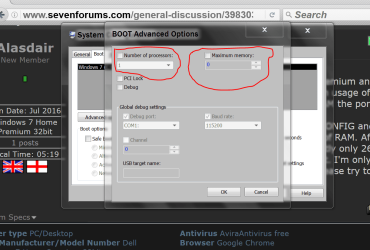
Attachments

  • Boot.jpg
    Boot.jpg
    230.7 KB · Views: 2

My Computer

Computer type
PC/Desktop
OS
windows 7 Ultimate x64
CPU
Intel i7 4790k
Motherboard
Asrock z97 extreme4
Memory
Corsair ddr3
Graphics Card(s)
Gtx 780
Hard Drives
Samsung 840 Evo 120gb
Western Digital 500gb
Please don't post outside links (yours is in a language that it's quite impossible to understand).
To post an attachment, Go Advanced, Manage Attachments - Browse and upload

Try to uninstall Chrome and see the results.

I tried to find it in ADD/Remove programs but there is nothing about chrome ?
 

My Computer

Computer type
PC/Desktop
OS
windows 7 Ultimate x64
CPU
Intel i7 4790k
Motherboard
Asrock z97 extreme4
Memory
Corsair ddr3
Graphics Card(s)
Gtx 780
Hard Drives
Samsung 840 Evo 120gb
Western Digital 500gb
It looks like you have lots of applications installed, try going through the programs in control panel and uninstall anything you don't use anymore
 
Last edited:

My Computer

Computer type
PC/Desktop
OS
Windows 10 Pro x64 + macOS 10.15 Catalina
CPU
AMD Ryzen 7 2700
Motherboard
ASUS PRIME B450-PLUS
Memory
32gb Corsair Vengance LPX 4x 8gb 3000MHz
Graphics Card(s)
MSI Reference Radeon RX 5700
Sound Card
Build in
Monitor(s) Displays
Viewsonic XG2705-2K 27in 1440p 144hz + Samsung C24F390 24in
Screen Resolution
2560x1440 + 1920x1080
Hard Drives
Transcend 500gb NVME
Seagate 2tb drive
2x Western Digital 1tb drives
Crucial 250gb SATA SSD
PSU
Cooler Master 600w
Case
Corsair iCUE 4000x
Cooling
AMD Stock Cooler
Keyboard
Razer Blackwidow X Chroma
Mouse
Logitech G502 Proteus Spectrum
Internet Speed
Zen Internet 70mbps
Browser
Google Chrome
So i made and observation yesterday: While not using mozilla or chrome my ram usage stays into reasonable limits ?! If i open any of the explorers starts to increase. If that is the case what could be the problem? Ideas
 

My Computer

Computer type
PC/Desktop
OS
windows 7 Ultimate x64
CPU
Intel i7 4790k
Motherboard
Asrock z97 extreme4
Memory
Corsair ddr3
Graphics Card(s)
Gtx 780
Hard Drives
Samsung 840 Evo 120gb
Western Digital 500gb
I fixed my problem simply by reinstalling windows and going back to win 10 
Even when I open few tabs both from firefox and chrome still no more than 3 gb of memory usa.
This problem is fixed but now audio problem rises with realtek codec not supporting dts in win 10 
 

My Computer

Computer type
PC/Desktop
OS
windows 7 Ultimate x64
CPU
Intel i7 4790k
Motherboard
Asrock z97 extreme4
Memory
Corsair ddr3
Graphics Card(s)
Gtx 780
Hard Drives
Samsung 840 Evo 120gb
Western Digital 500gb
Back
Top