Every usb port is underpowered for more demanding devices

Tir McDohl

New member
Local time
1:51 PM
Messages
4
Greetings. Situation is as follows: 2500k, z77-A, 8g ram, gtx960, 3 HDD (2.5tb tot) Thermaltake Berlin

I have two usb 3.0 ports and four 2.0 on the back, 4 more 2.0 to the front and all work well, no hiccup or slow transfer data or failure to detect usb pen, cellphone, 3-led usb light, external hdd, external sound card, usb headset, keyboard and mouse.

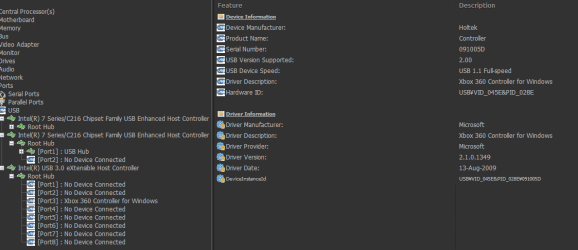
The problem is that they don't seem to output nearly enough power to either detect or fully support peripherals like gamepads or racing wheels.

So far I tried three items: a DualShock 2 hooked to one of those blue triangular adapters with the chinese drivers (Twin PS to PC), a generic PS2-PS360-PC wheel, a generic plug and play dualshock knockoff (no drivers needed).

Originally, all three worked flawlessly, except for whenever I tried to use rumble with the DS2, it would disconnect (common regardless of the device with most pc pads).

I haven't gamed for quite a while, so I did not notice sooner I guess, but after a full check:

- The chinese adapter only works on one USB 3.0 port, in the other one it blinks (stutters) and tends to shut down. The rumble-makes-it-die handicap still there
- The plug and play pad does not work at all anymore. In the USB 3.0 it boots as unknown device, in the 2.0 it says it had to shut it down because it had issues (not true). Oh, and I even opened it and cut the rumble motors off to see if it would ease the power draw. Nada.
- The wheel is recognized in every single port as 360 pad (as originally intended for full analog support) but only the green light in the back is turned on, the red light in front (power?) is off, and in the gamepad control panel it inputs no signal at all.

As for troubleshooting I tried reset of cmos, all ports empty but the one malfunctioning device, boot on win 10 (currently still on 7), no gpu (not sure if that even makes sense but), let the rig rest for 12 hours all unplugged inside and outside, then took the battery out again and let it sit for ten minutes before booting. Nothing, both on 7 and 10 it shows the same results.

What else can I think of other than looking for a cheap usb hub with external ac adapter option?
 
Last edited:

My Computer My Computer

At a glance

Windows 7 Ultimate x64Intel i5-2500k @3.3Kingston Hyper-X 2x4Sapphire 6870
Computer type
PC/Desktop
Computer Manufacturer/Model Number
custom build
OS
Windows 7 Ultimate x64
CPU
Intel i5-2500k @3.3
Motherboard
Asus Z77-A
Memory
Kingston Hyper-X 2x4
Graphics Card(s)
Sapphire 6870
Hard Drives
Seagate Barracuda 7200rpm
Antivirus
none
Browser
palemoon
Ok Tir now one of the first things that comes to mind is that the build is like one of mine a Sandy Bridge and therefore getting on a bit and I am just wondering if the PSU may need a look at.
So take a look at this and post back please - as by the by just what board do you have in place - an Asus Z77-A could be a few models.
Using HW Info
PART A:
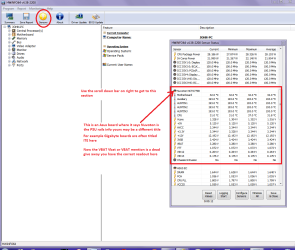
You can test the volts on the PSU with HW Info HWiNFO, HWiNFO32/64 - Download < download the right bit version and close the right hand window select Sensors and scroll down to the power section where you will see what the volts are doing see my pic. In my pic the section (Nuvoton) with VBATT as a dead give away you are in the section for the rail voltages. There are other section titles and one that pops up often is ITE (sometimes the usual one for Gigabyte boards)
Now the voltage on the different rails have to be within 5% =+/- of what is required or the machine will not work properly if at all.
Limits +/-
12v1 = 11.4 - 12 - 12.6v
12v2 = 11.4 - 12- 12.6v
5v = 4.75 – 5 - 5.25v
3.3v = 3.135 – 3 – 3.465v
-12v = -10.80 - -12 - -13.20v
+5VSB = 4.75 – 5 - 5.25v
The Power good signal voltage at pin 8 on the 24 pin plug (grey cable) should be the same as the 5v rail reading/s
See this for the rail voltage info
PSUs 101: A Detailed Look Into Power Supplies (Section 2.)
The original right hand window shows the machine running and is handy for that but for looking at the components in some detail close it and use the main left hand side panel
FOR OTHER COMPONENTS
PART B:
Open each small square with + in it on the section the components are in and then click on the individual component/s (it will highlight in blue) - in the right hand side will appear all sorts of details including brands speeds and other essential info that particular device. See pic for example.
 

Attachments

  • HW INFO DESKTOP PSU.PNG
    HW INFO DESKTOP PSU.PNG
    51.3 KB · Views: 1

My Computer My Computer

At a glance

Desk1 7 Home Prem / Desk2 10 Pro / Main lap A...Desk1 i5 3750K / Laptop i7 GTX 860M / Desk2 i...Desk1 8GB (1866) / Desk2 16GB (1333) / Laptop...Desk 1& 2NVidia GTX 650 & Laptops on board Intel
Computer type
PC/Desktop
Computer Manufacturer/Model Number
Own build (new) Desk1 / Asus ROG Win 7 / Desk2 1st build
OS
Desk1 7 Home Prem / Desk2 10 Pro / Main lap Asus ROG 10 Pro 2 laptop Toshiba 7 Pro Asus P2520 7 & 10
CPU
Desk1 i5 3750K / Laptop i7 GTX 860M / Desk2 i5 2500
Motherboard
Desk1 Asus P877-V / Desk2 Gigabyte H67 UD3H / Laptop ?
Memory
Desk1 8GB (1866) / Desk2 16GB (1333) / Laptop 8Gb DDR3
Graphics Card(s)
Desk 1& 2NVidia GTX 650 & Laptops on board Intel
Sound Card
Desk 1 & 2 -XONAR DG Realtek High Def audio Laptop
Monitor(s) Displays
Desk 1 Benq HD 2450 / Desk2 Philips 24" / Laptop 17.5"
Screen Resolution
1920x1080 D1 & D2 & Laptop 1
Hard Drives
Desk1 Samsung 120GB 830 SSD
Asus ROG 256GB 850 Pro SSD
Desk2 Samsung 840 256 SSD
Toshiba 120GB EVO
PSU
Desk 1 Corsair HX 1050/ Laptop ? / Desk 2 Corsair HX 650
Case
Desk 1 Cooler HAF XM ? Toshiba laptop / Desk2 Coolermaster
Cooling
Fans on all Desk1 -2 Desk2 - all Coolermasters 5 Laptop ?
Keyboard
Desk 1 MS Sidewinder X6 Desk 2 MS Sidewinder X 4
Mouse
Desk 1&2 - Gigabyte MS 900 gamer - laptop - Logitec wireless
Internet Speed
ADSL2+
Other Info
One other Desktop (tester) and spare Toshba laptop both with SSD's
Running Kaspersky 2016 ISS on all machines config'd identically
Logitec audio stereo systems on each machine (x3)
Canon MG5250MFC
Router/modem TP-Link running WPA2SK
Hi Tir,
just a comment not my area.

You referenced the GPU, your graphics set-up, and W10 dual boot.

im wondering if an update has changed the GPU values/properties in the BIOS set-up

Roy
 

My Computer My Computer

At a glance

W7 home premium 32bit/W7HP 64bit/w10 tp insid...E5300 dual core3gbNvidia Geforce 7100 Nforce 630i
Computer type
PC/Desktop
Computer Manufacturer/Model Number
medionl/Aspire 6930G/acer x55a
OS
W7 home premium 32bit/W7HP 64bit/w10 tp insider ring
CPU
E5300 dual core
Motherboard
medion MS7366
Memory
3gb
Graphics Card(s)
Nvidia Geforce 7100 Nforce 630i
Monitor(s) Displays
avixc
Internet Speed
n (isp resticted to 72)
Antivirus
mse/pands
Browser
palemoon
Other Info
Belkin Fd7050 n USB using Railink RT2870 drivers, more upto date
Hmm yes Roy should have seen the dual boot part too and am wondering if the drivers for different OS's have somehow got muddled?? Just a thought.
 

My Computer My Computer

At a glance

Desk1 7 Home Prem / Desk2 10 Pro / Main lap A...Desk1 i5 3750K / Laptop i7 GTX 860M / Desk2 i...Desk1 8GB (1866) / Desk2 16GB (1333) / Laptop...Desk 1& 2NVidia GTX 650 & Laptops on board Intel
Computer type
PC/Desktop
Computer Manufacturer/Model Number
Own build (new) Desk1 / Asus ROG Win 7 / Desk2 1st build
OS
Desk1 7 Home Prem / Desk2 10 Pro / Main lap Asus ROG 10 Pro 2 laptop Toshiba 7 Pro Asus P2520 7 & 10
CPU
Desk1 i5 3750K / Laptop i7 GTX 860M / Desk2 i5 2500
Motherboard
Desk1 Asus P877-V / Desk2 Gigabyte H67 UD3H / Laptop ?
Memory
Desk1 8GB (1866) / Desk2 16GB (1333) / Laptop 8Gb DDR3
Graphics Card(s)
Desk 1& 2NVidia GTX 650 & Laptops on board Intel
Sound Card
Desk 1 & 2 -XONAR DG Realtek High Def audio Laptop
Monitor(s) Displays
Desk 1 Benq HD 2450 / Desk2 Philips 24" / Laptop 17.5"
Screen Resolution
1920x1080 D1 & D2 & Laptop 1
Hard Drives
Desk1 Samsung 120GB 830 SSD
Asus ROG 256GB 850 Pro SSD
Desk2 Samsung 840 256 SSD
Toshiba 120GB EVO
PSU
Desk 1 Corsair HX 1050/ Laptop ? / Desk 2 Corsair HX 650
Case
Desk 1 Cooler HAF XM ? Toshiba laptop / Desk2 Coolermaster
Cooling
Fans on all Desk1 -2 Desk2 - all Coolermasters 5 Laptop ?
Keyboard
Desk 1 MS Sidewinder X6 Desk 2 MS Sidewinder X 4
Mouse
Desk 1&2 - Gigabyte MS 900 gamer - laptop - Logitec wireless
Internet Speed
ADSL2+
Other Info
One other Desktop (tester) and spare Toshba laptop both with SSD's
Running Kaspersky 2016 ISS on all machines config'd identically
Logitec audio stereo systems on each machine (x3)
Canon MG5250MFC
Router/modem TP-Link running WPA2SK
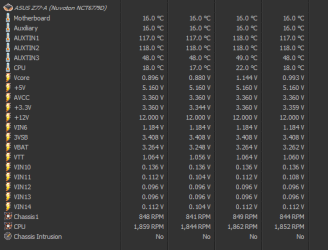
Thanks for all replies. I'll go in order. From HWInfo64 there's the picture

Ok Tir now one of the first things that comes to mind is that the build is like one of mine a Sandy Bridge and therefore getting on a bit and I am just wondering if the PSU may need a look at.
So take a look at this and post back please - as by the by just what board do you have in place - an Asus Z77-A could be a few models.
Using HW Info
PART A:
You can test the volts on the PSU with HW Info HWiNFO, HWiNFO32/64 - Download < download the right bit version and close the right hand window select Sensors and scroll down to the power section where you will see what the volts are doing see my pic. In my pic the section (Nuvoton) with VBATT as a dead give away you are in the section for the rail voltages. There are other section titles and one that pops up often is ITE (sometimes the usual one for Gigabyte boards)
Now the voltage on the different rails have to be within 5% =+/- of what is required or the machine will not work properly if at all.
Limits +/-
12v1 = 11.4 - 12 - 12.6v
12v2 = 11.4 - 12- 12.6v
5v = 4.75 – 5 - 5.25v
3.3v = 3.135 – 3 – 3.465v
-12v = -10.80 - -12 - -13.20v
+5VSB = 4.75 – 5 - 5.25v
The Power good signal voltage at pin 8 on the 24 pin plug (grey cable) should be the same as the 5v rail reading/s
See this for the rail voltage info
PSUs 101: A Detailed Look Into Power Supplies (Section 2.)
The original right hand window shows the machine running and is handy for that but for looking at the components in some detail close it and use the main left hand side panel
FOR OTHER COMPONENTS
PART B:
Open each small square with + in it on the section the components are in and then click on the individual component/s (it will highlight in blue) - in the right hand side will appear all sorts of details including brands speeds and other essential info that particular device. See pic for example.

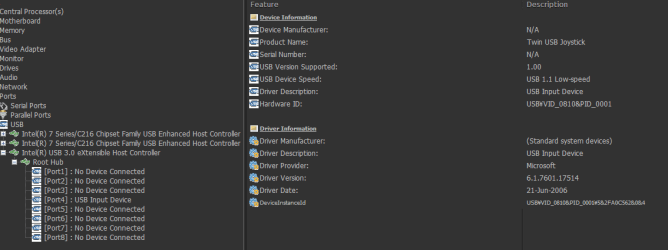
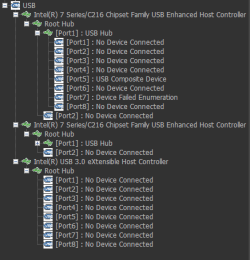
The board is just that, Z77-A. The pad shows failed enumeration in any hub, and no info.

Hi Tir,
just a comment not my area.

You referenced the GPU, your graphics set-up, and W10 dual boot.

im wondering if an update has changed the GPU values/properties in the BIOS set-up

Roy

Could be, but all the settings should have been restored to default when I resetted the cmos multiple times. The bios is up to date, before anyone asks.

Hmm yes Roy should have seen the dual boot part too and am wondering if the drivers for different OS's have somehow got muddled?? Just a thought.

10 is installed on a separate hard disk, and I detached the original hdd with seven when I installed it. Besides, I haven't booted on 10 for months, and only after the issue surfaced.
 

Attachments

  • motherboard.png
    motherboard.png
    8.2 KB · Views: 10
  • twin usb.png
    twin usb.png
    15.5 KB · Views: 0
  • device failed enumeration.png
    device failed enumeration.png
    7.3 KB · Views: 10
  • wheel.png
    wheel.png
    19.1 KB · Views: 0

My Computer My Computer

At a glance

Windows 7 Ultimate x64Intel i5-2500k @3.3Kingston Hyper-X 2x4Sapphire 6870
Computer type
PC/Desktop
Computer Manufacturer/Model Number
custom build
OS
Windows 7 Ultimate x64
CPU
Intel i5-2500k @3.3
Motherboard
Asus Z77-A
Memory
Kingston Hyper-X 2x4
Graphics Card(s)
Sapphire 6870
Hard Drives
Seagate Barracuda 7200rpm
Antivirus
none
Browser
palemoon
Back
Top