I keep deleting folders by accident!

Axel Slingland

New member
Member
Local time
2:31 PM
Messages
23
Location
The Lost Coast
Me again... I have a serious problem. I have poor vision and I have deleted folders containing important files because I think I have the filename highlighted in the right pane of Windows Explorer, but it's the folder the file is in on the left pane, and it deletes the entire folder. I did this today and deleted my "MP3" folder, which had all of my MP3 files, some movies, assorted images, etc. in it, to the tune of about 70Gb of files. I used the "Previous Versions" option and went back 3 days, but I lost a lot of files that were created in those 3 days.

This kind of thing never happened in previous version of Windows. Is there anything I can do to prevent this, or is this yet another one of those things I am going to have to learn to live with? If I can't prevent the folder from being deleted, is it possible to change the restore point thing to be created daily?

I thank you in advance for any assistance anyone might have...
 

My Computers My Computers

  • At a glance

    Windows 7 64 HomeFX 6300 3.5 GHz w/4.1 GHz Boost 6-Core 64bit8Gb DDR3Asus Nvidia GeForce GTX 750 Ti 2Gb
    Computer type
    PC/Desktop
    Computer Manufacturer/Model Number
    Custom Build
    OS
    Windows 7 64 Home
    CPU
    FX 6300 3.5 GHz w/4.1 GHz Boost 6-Core 64bit
    Motherboard
    Gigabyte 78LMT USB3
    Memory
    8Gb DDR3
    Graphics Card(s)
    Asus Nvidia GeForce GTX 750 Ti 2Gb
    Hard Drives
    500Gb Western Digital 7,200 RPM SATA Hard Drive
    1Tb Seagate USB 3.0 External Hard Drive
    2Tb Seagate USB 3.0 External Hard Drive x2
    8Tb Seagate USB 3.0 External Hard Drive x2
    Antivirus
    Avast Free
    Browser
    Firefox / Chrome
  • Computer type
    PC/Desktop
The first thing I have to suggest is get yourself some form of backup - I know I could delete my whole data drive today and have the complete contents back within an hour or so, (technically i may lose some files as it was last backed up on Thursday)

These days an external hard drive is not a major outlay and with something like Macrium Reflect free it's simple to create a regular image of everything you need to keep safe.

We may not be able to cure Our actual issues but we can lessen the problems caused by them :)

Edit

There are a few clones of Apple's Time Machine software where every change you make to a file is backed up to an external drive this is seamless and automatic so may be an option for you to mitigate your issues one such is ...

Genie9 (Formerly Genie-soft) | Backup, Restore & Disaster Recovery Solutions for Windows

which advertises a free version for home users, I've not used the software and am not suggesting that this is the only way to go but just as a possible solution
 

My Computers My Computers

  • At a glance

    Windows 11 Pro x64 [Latest Release and Releas...Ryzen 9 5950X, 3.8 - 5.2 MHz64GB [2 x 32GB] DDR4 3200MHz4GB NVIDIA GEFORCE GTX 1650 Ti
    Computer type
    PC/Desktop
    Computer Manufacturer/Model Number
    ChillBlast - Custom to my design
    OS
    Windows 11 Pro x64 [Latest Release and Release Preview]
    CPU
    Ryzen 9 5950X, 3.8 - 5.2 MHz
    Motherboard
    Asus Prime X570-Pro
    Memory
    64GB [2 x 32GB] DDR4 3200MHz
    Graphics Card(s)
    4GB NVIDIA GEFORCE GTX 1650 Ti
    Sound Card
    On-board SPDIF to 5.1 System + HDMI [5.1 system]
    Monitor(s) Displays
    32" UHD 32 Bit HDR Monitor + 43" UHD 4K 32Bit HDR TV
    Screen Resolution
    2 x 3840 x 2160 @60Hz
    Hard Drives
    1TB M2 SSD OS, 500GB Fast Access SSD, 2 x 8TB Data + Various Externals from 1TB to 4TB, 10TB NAS
    PSU
    NZXT C750 80 PLUS Gold 750W Modular PSU
    Case
    Workstation Case [Matt Black]
    Cooling
    NZXT Kraken X63 280mm CPU Cooler +2x Quiet Case fans
    Keyboard
    Logitech Wireless MX Keys & K400 + others
    Mouse
    Logitech Wireless MX Master 3S
    Internet Speed
    920 MB Down 50 MB Up
    Antivirus
    BitDefender Total Security Pro
    Browser
    Chrome (always run latest Non-Beta)
    Other Info
    Also run ...
    Laptop - Quad 8GB - Windows 10 Pro x64
    Nexus 7 Android tablet x2
    Samsung 10.2" tablet
    Blackview TAB 8 4G Android Tablet c/w Keyboard
    Wacom Intuos Pro Medium Pen Pad
    Wacom Intuos Pro Small Pen Pad
    Wacom Expresskeys Remote
    Loopdeck+ Graphics Controller
    Shuttle Pro v2 Control
  • At a glance

    Windows 11 Pro x64 Latest RPIntel I7 10750H 5.0GHz32GB [2x16GB] DDR4 2933 MHznVidia GTX1650Ti 4 GB GDDR6
    Computer type
    Laptop
    System Manufacturer/Model Number
    Dell XPS 17 10750H
    OS
    Windows 11 Pro x64 Latest RP
    CPU
    Intel I7 10750H 5.0GHz
    Motherboard
    Dell XPS
    Memory
    32GB [2x16GB] DDR4 2933 MHz
    Graphics Card(s)
    nVidia GTX1650Ti 4 GB GDDR6
    Sound Card
    Stock [Realtek] 4 Speaker
    Monitor(s) Displays
    17" IPS UHD+ Infinity Edge Touchscreen
    Screen Resolution
    3840 x 2400
    Hard Drives
    2TB M2 NVMe, 4TB External + various 500GB & 1TB External NVMe (also have access to spinner HDD from
    PSU
    Stock
    Case
    Stock XPS Aluminium & Carbon Fibre
    Cooling
    Stock - Active Fan Control
    Keyboard
    Backlit + Various Logitech
    Mouse
    Stock Track Pad + Logitech MX Trackball
    Internet Speed
    72 MB Down 18MB Up
    Browser
    Chrome
    Other Info
    Also run ...
    Laptop - Quad 8GB - Windows 10 Pro x64
    Nexus 7 Android tablet x2
    10.2" tablet
    Sony Z3 Android Smartphone
    Wacom Intuos Pro Medium Pen Pad
    Wacom Intuos Pro Small Pen Pad
    Wacom Expresskeys Remote
    Loopdeck+ Graphics Controller
    Shuttle Pro v2 Control Pad
    10TB NAS
Have a look and see if your deleted folder is in your Recycle Bin. If so you can just highlight the folder and click "Restore".
 

My Computer My Computer

At a glance

Microsoft Windows 7 Home Premium 64-bit 7601 ...Intel(R) Core(TM) i7-3770 CPU @ 3.40GHz8.00 GBIntel(R) HD Graphics 4000
Computer type
PC/Desktop
OS
Microsoft Windows 7 Home Premium 64-bit 7601 Multiprocessor Free Service Pack 1
CPU
Intel(R) Core(TM) i7-3770 CPU @ 3.40GHz
Motherboard
ASUSTeK COMPUTER INC. P8H77-M
Memory
8.00 GB
Graphics Card(s)
Intel(R) HD Graphics 4000
Sound Card
On Board
Monitor(s) Displays
Dell 24"
Screen Resolution
1920 x 1080
Hard Drives
(1) INTEL SSDSC2CT180A3 ATA Device (2) ST500DM002-1BD142 ATA Device (3) WDC WD3200AAKS-75L9A0 ATA Device (4) Generic- Compact Flash USB Device (5) Generic- MS/MS-Pro USB Device (6) Generic- SD/MMC USB Device (7) Generic- SM/xD-Picture USB
PSU
500w Corsair
Case
Cooler Master
Cooling
3 Fans
Keyboard
Logitech MK300
Mouse
Logitech WOM
Internet Speed
75Mb
Antivirus
Norton 360
Browser
Firefox, Opera, IE
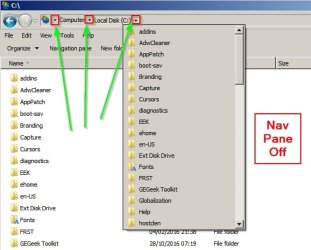
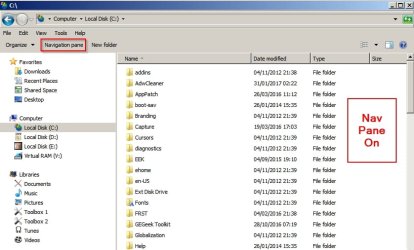
In addition you can turn the navigation pane off.

How to Turn the Navigation Pane On or Off in Windows 7

It is also possible to add a button to toggle the navigation pane on/ off using third party software but I have not provided details here.

Navigation Pane Off:

Nav Pane.jpg

Note: You can use drop down arrows (see green arrows in screenshot) in explorer address bar to navigate folders.

Navigation Pane On:

Nav Pane 2.jpg

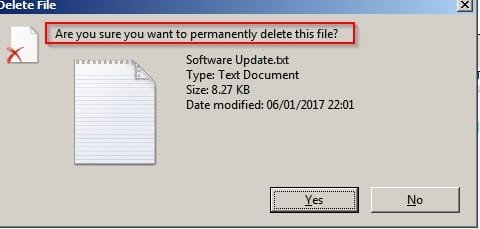
Also you should be seeing a confirmation dialog box when deleting files or folders:

Confirmation.jpg

Confirmation 2.jpg

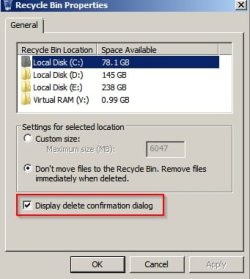
If you are not seeing it - right click Recycle Bin on desktop and choose "Properties"

Recycle Bin Properties.jpg
 

My Computer My Computer

At a glance

Microsoft Windows 7 Home Premium 64-bit 7601 ...AMD C-60 APU with Radeon(tm) HD Graphics4.00 GBAMD Radeon HD 6290 Graphics
Computer type
Laptop
Computer Manufacturer/Model Number
ASUS
OS
Microsoft Windows 7 Home Premium 64-bit 7601 Multiprocessor Free Service Pack 1
CPU
AMD C-60 APU with Radeon(tm) HD Graphics
Motherboard
ASUSTeK COMPUTER INC. X501U
Memory
4.00 GB
Graphics Card(s)
AMD Radeon HD 6290 Graphics
Sound Card
(1) AMD High Definition Audio Device (2) Realtek High Defi
Screen Resolution
1366 x 768 x 32 bits (4294967296 colors) @ 60 Hz
Hard Drives
Hitachi HTS545050A7E380 SATA Disk Device
Antivirus
Comodo CIS & FW, SecureAplus App Whitelisting, Threatfire
Browser
Cyberfox 64bit, Opera 64bit, Airfox
Other Info
Spy-The-Spy, HitmanPro.Alert, Norton Connect Safe, MJRegWatcher, BitDefender TrafficLight, Voodoo Shield, Zemana AntiMalware

My Computer My Computer

At a glance

Win-7-Pro64bit 7-H-Prem-64biti7-5930K 2nd i9-9940x both water blocked VRM'...Trident-z 3200C14 2nd Trident-z 3600C16EVGA 1080ti ftw3 2nd Titan Xp both water blocked
Computer type
PC/Desktop
Computer Manufacturer/Model Number
Custom assembled by me :}
OS
Win-7-Pro64bit 7-H-Prem-64bit
CPU
i7-5930K 2nd i9-9940x both water blocked VRM's too
Motherboard
ASUS SABERTOOTH X99 2nd ASUS x299 Apex
Memory
Trident-z 3200C14 2nd Trident-z 3600C16
Graphics Card(s)
EVGA 1080ti ftw3 2nd Titan Xp both water blocked
Sound Card
Built-in Realtek
Monitor(s) Displays
1-AOC G2460PG 24"G-Sync 144Hz/ 2nd 1-ASUS VG248QE 24" 144Hz
Screen Resolution
1920 x 1080 144Hz
Hard Drives
2-Samsung M.2 Evo & Evo Plus
2-Samsung 850 EVO 500GB SSD's/ 3-2.5 W.D. Black 1tb-&3-1tb/3-3.5 WD Black 1tb hdd's
PSU
EVGA SuperNOVA 1000-P2 2nd 1200-P2
Case
2-Corsair Obsidian Series 450D Black ATX Mid Tower
Cooling
Custom water loops
Keyboard
Logitech G710+/ 2nd Logitech G910
Mouse
2-RedDragon M901 Perdition 16400 dpi Gaming mouse = wired
Internet Speed
Comcast Ping 19ms 89.31mbps download speed 6.12mbps upload
Antivirus
Malwarebytes Pro/ Superantispyware Pro
Browser
FireFox & Pale moon
Other Info
2nd ASUS X299 Apex/Intel i9-9940x with Custom water loop/7H-Prem-x64/Corsair 450D case/Ram Trident-z 3600C16 4x8gb / Samsung970Evo plus 500gb SSD/Dual ssd EZ swap evo/PSU EVGA SuperNova 1200w-P2 80+Platinum/GPU Titan Xp /8-ML-140 on push-pull on 2-280GTX rads

My Computer My Computer

At a glance

Windows 10 Pro. 64/ version 1709 Windows 7 Pr...Intel i7-6800K @ 4.3Corsair Platinum 16 gig @2400EVGA GTX 1070 OC
Computer type
PC/Desktop
Computer Manufacturer/Model Number
Home made Desktop
OS
Windows 10 Pro. 64/ version 1709 Windows 7 Pro/64
CPU
Intel i7-6800K @ 4.3
Motherboard
ASUS X-99 Deluxe II
Memory
Corsair Platinum 16 gig @2400
Graphics Card(s)
EVGA GTX 1070 OC
Monitor(s) Displays
Asus 27" LED LCD/VE278Q
Screen Resolution
1920-1080 or 1280-720 HDMI
Hard Drives
INTEL SSD 730-240 Gb Sata 3.0/
PSU
EVGA Platium 1200W
Case
Phanteks Luxe Tempered Glass 8 fans/ one radiator
Cooling
XSPC/ Water Cooled CPU
Keyboard
Das 4 Professional
Mouse
Logitech M705/MX Anywhere 2-S
Internet Speed
100 mbits
Antivirus
Microsoft Security Essentials/ Malwarebytes Premium 3.0/ SAS
Browser
I.E. 11 default/Firefox/ ISP Time Warner Cable/Spectrum
Other Info
LG BluRay Burner/
Sound system-KLipsch-THX/
Icy Dock ssd Hot Swap bays.
Well, I managed to botch my reply... I forgot I open the link and was on a different page, and I accidentally posted my reply Here by mistake. The joke was about something Brink said, but this part was supposed to go here.


So many new things to learn in Windows 7! Thanks guys. I'll let you what if any of this helps...
 

My Computers My Computers

  • At a glance

    Windows 7 64 HomeFX 6300 3.5 GHz w/4.1 GHz Boost 6-Core 64bit8Gb DDR3Asus Nvidia GeForce GTX 750 Ti 2Gb
    Computer type
    PC/Desktop
    Computer Manufacturer/Model Number
    Custom Build
    OS
    Windows 7 64 Home
    CPU
    FX 6300 3.5 GHz w/4.1 GHz Boost 6-Core 64bit
    Motherboard
    Gigabyte 78LMT USB3
    Memory
    8Gb DDR3
    Graphics Card(s)
    Asus Nvidia GeForce GTX 750 Ti 2Gb
    Hard Drives
    500Gb Western Digital 7,200 RPM SATA Hard Drive
    1Tb Seagate USB 3.0 External Hard Drive
    2Tb Seagate USB 3.0 External Hard Drive x2
    8Tb Seagate USB 3.0 External Hard Drive x2
    Antivirus
    Avast Free
    Browser
    Firefox / Chrome
  • Computer type
    PC/Desktop
Back
Top