GUI Boot - Enable or Disable in Windows

How to Enable or Disable "GUI Boot" in Windows

   Information
This tutorial will show you how to enable or disable the graphical animation GUI Boot while booting or resuming from hibernation into Vista, Windows 7, or Windows 8.

You must be logged in as an administrator to be able to do the steps in this tutorial.

   Note

  • If "No GUI Boot" in Vista, you will have the Aurora boot screen instead of the green animated loading bar.
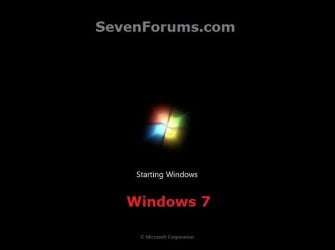
  • If "No GUI Boot" in Windows 7, you will have a blank black boot screen instead of the animated dots turning into a Windows flag.
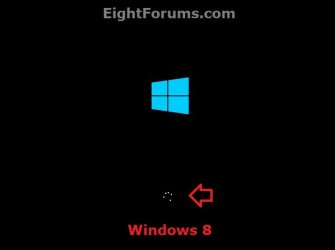
  • If "No GUI Boot" in Windows 8, you will only have the blue window in the boot screen instead of also with the animated spining circle of dots.
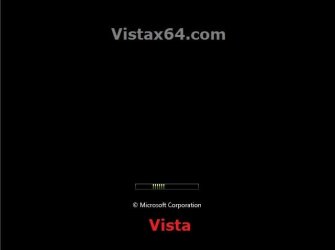
EXAMPLE: Default "GUI Boot" Screens in Vista, Windows 7, and Windows 8
Vista.jpg

Windows-7.jpg

Windows-8.jpg


OPTION ONE

Enable or Disable "GUI Boot" in msconfig (System Configuration)


1. Press Windows+R keys to open the Run dialog, type msconfig, and click/tap on OK.

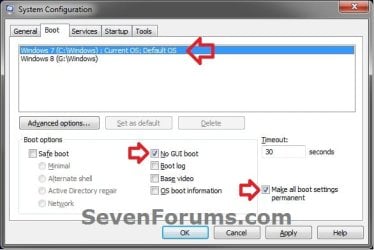
2. Click/tap on the Boot tab, select the OS (ex: Windows 7) that you want to set this for at it's startup, and go to step 3 or 4 below. (see screenshot below)
Step-1.jpg
3. To Enable GUI Boot for the Selected Windows
NOTE: This is the default setting.
A) Uncheck the No GUI Boot box, and go to step 5 below. (see screenshot below step 2)
4. To Disable GUI Boot for the Selected Windows
A) Check the No GUI Boot box, and go to step 5 below. (see screenshot below step 2)
5. If you have another Windows installed (ex: Windows 8) in a multiboot setup that you would like to set this for as well, then repeat step 3 or 4 above for it as well and go to step 6 afterwards.

6. Check the Make all boot settings permanent box, and click/tap on OK. (see screenshot below step 2)

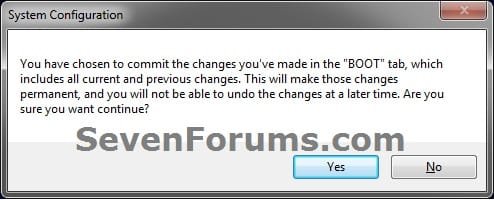
7. Click/tap on Yes. (see screenshot below)
Step-2.jpg
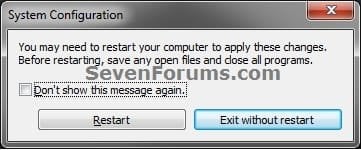
8. Click/tap on Restart to apply. (see screenshot below)
NOTE: Be sure to save and close anything you have open first.
Step-3.jpg


OPTION TWO

Enable or Disable "GUI Boot" in a Command Prompt


1. Open an elevated command prompt, or a command prompt at boot.

2. In the command prompt, type bcdedit and press Enter. Under the Windows Boot Loader sections, make note of the identifier value (ex: {current}) for the OS description (ex: Windows 7) that you want to use in step 4 or 5 below.
CMD.jpg
3. Do step 4 or 5 below for what you would like to do.

4. To Enable GUI Boot for the Selected Windows
NOTE: This is the default setting.
A) In the command prompt, type the command below and press Enter.
NOTE: Substitute identifier in the command below with the actual value or long GUID number to the right of identifer in the command used from step 2.
bcdedit /set {identifier} quietboot Yes

For example: If I wanted to set this for Windows 7 (description) with it's "identifier" showing as {current} from step 2, I would type this command below exactly and press Enter.

bcdedit /set {current} quietboot Yes
B) Go to step 6 below.
5. To Disable GUI Boot for the Selected Windows
A) In the command prompt, type the command below and press Enter.
NOTE: Substitute identifier in the command below with the actual value or long GUID number to the right of identifer in the command used from step 2.
bcdedit /set {identifier} quietboot No

For example: If I wanted to set this for Windows 7 (description) with it's "identifier" showing as {current} from step 2, I would type this command below exactly and press Enter.

bcdedit /set {current} quietboot No
B) Go to step 6 below.
6. If you have another Windows installed (ex: Windows 8) in a multiboot setup that you would like to set this for as well, then repeat the steps above for it as well and go to step 7 afterwards.

7. Close the command prompt. If you like, you can restart the computer and startup the Windows this was applied to see the change.
That's it,
Shawn


Last edited:
On a decent system, I suspect there would be no difference because I don't think the animated logo delays the boot. I think the boot continues normally, while the animated logo appears at the same time as boot operations continue in the background.

BTW Brink, I've read many of your tutorials. Excellent stuff!!


It's mostly just for whether one wants the animated GUI showing or not. If they select not to, then usually it's probably as you say, but there's also the possibility of shaving a fraction of a second or so. I haven't put a stopwatch to it though. :)
 
Last edited:

My Computer My Computer

Computer type
PC/Desktop
Computer Manufacturer/Model Number
Self built custom
OS
64-bit Windows 11 Pro for Workstations
CPU
Intel i7-8700K OC'd to 5 GHz
Motherboard
ASUS ROG Maximus XI Formula Z390
Memory
64 GB (4x16GB) G.SKILL TridentZ RGB DDR4 3600 MHz
Graphics Card(s)
ASUS ROG-STRIX-GTX1080TI-O11G-GAMING
Sound Card
Integrated
Monitor(s) Displays
2 x Samsung Odyssey G7 27"
Screen Resolution
2560x1440
Hard Drives
1TB Samsung 990 PRO M.2,
4TB Samsung 990 PRO PRO M.2,
TerraMaster F8 SSD Plus NAS
PSU
Seasonic Prime Titanium 850W
Case
Thermaltake Core P3
Cooling
Corsair Hydro H115i
Keyboard
Logitech wireless K800
Mouse
Logitech MX Master 4
Internet Speed
2 Gb/s Download and 100 Mb/s Upload
Antivirus
Malwarebyte Anti-Malware Premium
Browser
Google Chrome
Other Info
Logitech Z625 speaker system,
Logitech BRIO 4K Pro webcam,
HP Color LaserJet Pro MFP M477fdn,
APC SMART-UPS RT 1000 XL - SURT1000XLI,
Galaxy S23 Plus phone
It would be interesting if we could substitute our own graphic or animation in place of the animated logo.
 

My Computer My Computer

Computer type
Laptop
Computer Manufacturer/Model Number
Dell XPS 15 L502X
OS
Windows 10 Home, 64-bit
Yeah, that would be nice, but Microsoft locked that down for security purposes to help prevent anything (ex: malware) from being able to run prior to Windows 8 and your AV program starting.
 

My Computer My Computer

Computer type
PC/Desktop
Computer Manufacturer/Model Number
Self built custom
OS
64-bit Windows 11 Pro for Workstations
CPU
Intel i7-8700K OC'd to 5 GHz
Motherboard
ASUS ROG Maximus XI Formula Z390
Memory
64 GB (4x16GB) G.SKILL TridentZ RGB DDR4 3600 MHz
Graphics Card(s)
ASUS ROG-STRIX-GTX1080TI-O11G-GAMING
Sound Card
Integrated
Monitor(s) Displays
2 x Samsung Odyssey G7 27"
Screen Resolution
2560x1440
Hard Drives
1TB Samsung 990 PRO M.2,
4TB Samsung 990 PRO PRO M.2,
TerraMaster F8 SSD Plus NAS
PSU
Seasonic Prime Titanium 850W
Case
Thermaltake Core P3
Cooling
Corsair Hydro H115i
Keyboard
Logitech wireless K800
Mouse
Logitech MX Master 4
Internet Speed
2 Gb/s Download and 100 Mb/s Upload
Antivirus
Malwarebyte Anti-Malware Premium
Browser
Google Chrome
Other Info
Logitech Z625 speaker system,
Logitech BRIO 4K Pro webcam,
HP Color LaserJet Pro MFP M477fdn,
APC SMART-UPS RT 1000 XL - SURT1000XLI,
Galaxy S23 Plus phone
Hello Nilank,

It may help shave off a couple of more seconds at most from your startup time.
 

My Computer My Computer

Computer type
PC/Desktop
Computer Manufacturer/Model Number
Self built custom
OS
64-bit Windows 11 Pro for Workstations
CPU
Intel i7-8700K OC'd to 5 GHz
Motherboard
ASUS ROG Maximus XI Formula Z390
Memory
64 GB (4x16GB) G.SKILL TridentZ RGB DDR4 3600 MHz
Graphics Card(s)
ASUS ROG-STRIX-GTX1080TI-O11G-GAMING
Sound Card
Integrated
Monitor(s) Displays
2 x Samsung Odyssey G7 27"
Screen Resolution
2560x1440
Hard Drives
1TB Samsung 990 PRO M.2,
4TB Samsung 990 PRO PRO M.2,
TerraMaster F8 SSD Plus NAS
PSU
Seasonic Prime Titanium 850W
Case
Thermaltake Core P3
Cooling
Corsair Hydro H115i
Keyboard
Logitech wireless K800
Mouse
Logitech MX Master 4
Internet Speed
2 Gb/s Download and 100 Mb/s Upload
Antivirus
Malwarebyte Anti-Malware Premium
Browser
Google Chrome
Other Info
Logitech Z625 speaker system,
Logitech BRIO 4K Pro webcam,
HP Color LaserJet Pro MFP M477fdn,
APC SMART-UPS RT 1000 XL - SURT1000XLI,
Galaxy S23 Plus phone
That's something exciting, no matter be it some seconds, thanks for the great tip. Firstly it was you who helped me decrease my shutdown time, and now it's again you! I am in love with you :p (no I was kidding :p :p)
 
So I tried this tutorial but when I press apply, this is what I get
 

Attachments

  • Boot config_trying to rid of GUI @ start up.PNG
    Boot config_trying to rid of GUI @ start up.PNG
    14.2 KB · Views: 1,663

My Computer My Computer

OS
Windows 7 Home Premium 64bit
Motherboard
ASUS P6X58-E WS
Memory
12.0GB
Graphics Card(s)
EVGA GeForce GTX 550 Ti FPB
Sound Card
MOTU 8Pre, Tascam US-1641, Tascam US-144MK2
Monitor(s) Displays
Dual monitors 2 Visio 32" Screen TV's
Hard Drives
Vertex3 120GB SSD, 1TB Seagate HDD, (QTY 2) 1TB Western Digital HDD
Antivirus
Norton Internet security and virus protection (paid version)
Hello Nathan,

Are you in Safe Mode or normal mode when trying to do this?

If in Safe Mode, then boot to normal mode and try again.

If in normal mode, then you may have a pre existing MBR issue. See if doing an Startup Repair may help fix your MBR and allow you to do this afterwards.

Hope this helps for now, :)
Shawn
 
Last edited:

My Computer My Computer

Computer type
PC/Desktop
Computer Manufacturer/Model Number
Self built custom
OS
64-bit Windows 11 Pro for Workstations
CPU
Intel i7-8700K OC'd to 5 GHz
Motherboard
ASUS ROG Maximus XI Formula Z390
Memory
64 GB (4x16GB) G.SKILL TridentZ RGB DDR4 3600 MHz
Graphics Card(s)
ASUS ROG-STRIX-GTX1080TI-O11G-GAMING
Sound Card
Integrated
Monitor(s) Displays
2 x Samsung Odyssey G7 27"
Screen Resolution
2560x1440
Hard Drives
1TB Samsung 990 PRO M.2,
4TB Samsung 990 PRO PRO M.2,
TerraMaster F8 SSD Plus NAS
PSU
Seasonic Prime Titanium 850W
Case
Thermaltake Core P3
Cooling
Corsair Hydro H115i
Keyboard
Logitech wireless K800
Mouse
Logitech MX Master 4
Internet Speed
2 Gb/s Download and 100 Mb/s Upload
Antivirus
Malwarebyte Anti-Malware Premium
Browser
Google Chrome
Other Info
Logitech Z625 speaker system,
Logitech BRIO 4K Pro webcam,
HP Color LaserJet Pro MFP M477fdn,
APC SMART-UPS RT 1000 XL - SURT1000XLI,
Galaxy S23 Plus phone
Brink, I seriously dont know where id be without ya. You have helped me so many times and I thank you. I noticed that tutorial link you sent was on windows 8. works same for 7?
 

My Computer My Computer

OS
Windows 7 Home Premium 64bit
Motherboard
ASUS P6X58-E WS
Memory
12.0GB
Graphics Card(s)
EVGA GeForce GTX 550 Ti FPB
Sound Card
MOTU 8Pre, Tascam US-1641, Tascam US-144MK2
Monitor(s) Displays
Dual monitors 2 Visio 32" Screen TV's
Hard Drives
Vertex3 120GB SSD, 1TB Seagate HDD, (QTY 2) 1TB Western Digital HDD
Antivirus
Norton Internet security and virus protection (paid version)
Sorry Nathan. I had Windows 8 in mind. :o

I updated the link above for Windows 7 instead.
 

My Computer My Computer

Computer type
PC/Desktop
Computer Manufacturer/Model Number
Self built custom
OS
64-bit Windows 11 Pro for Workstations
CPU
Intel i7-8700K OC'd to 5 GHz
Motherboard
ASUS ROG Maximus XI Formula Z390
Memory
64 GB (4x16GB) G.SKILL TridentZ RGB DDR4 3600 MHz
Graphics Card(s)
ASUS ROG-STRIX-GTX1080TI-O11G-GAMING
Sound Card
Integrated
Monitor(s) Displays
2 x Samsung Odyssey G7 27"
Screen Resolution
2560x1440
Hard Drives
1TB Samsung 990 PRO M.2,
4TB Samsung 990 PRO PRO M.2,
TerraMaster F8 SSD Plus NAS
PSU
Seasonic Prime Titanium 850W
Case
Thermaltake Core P3
Cooling
Corsair Hydro H115i
Keyboard
Logitech wireless K800
Mouse
Logitech MX Master 4
Internet Speed
2 Gb/s Download and 100 Mb/s Upload
Antivirus
Malwarebyte Anti-Malware Premium
Browser
Google Chrome
Other Info
Logitech Z625 speaker system,
Logitech BRIO 4K Pro webcam,
HP Color LaserJet Pro MFP M477fdn,
APC SMART-UPS RT 1000 XL - SURT1000XLI,
Galaxy S23 Plus phone
This works on a UEFI system, but you'd have to set "No GUI Boot" it in MSCONFIG. This is precisely what most OEMs had been doing in the practice of selling computers.

Although, if you have your boot order set to include Windows Boot Manager, like mine is, you're left with a screen showing the motherboard/OEM branding.
 
Last edited:

My Computer My Computer

Computer type
PC/Desktop
Computer Manufacturer/Model Number
Custom
OS
Microsoft Windows 7 Home Premium 64-bit Service Pack 1
CPU
AMD A10-6800K APU with Radeon(tm)™ HD Graphics 4100
Motherboard
ASRock FM2A85X Extreme4-M
Memory
(2) G.Skill F3-12800CL10-8GBXL
Graphics Card(s)
ASUS R7 250 Series (0x6610)
Sound Card
Realtek High Definition Audio
Monitor(s) Displays
Acer X213H LCD monitor, 21"
Screen Resolution
1920 x 1080 x 32 bits @ 60 Hz
Hard Drives
WD Black, 1.0TB, WDC WD1002FAEX-00Z3A0
PSU
Rosewill Quark-650
Case
Raidmax Comet SECC Steel ATX Mid Tower Computer Case
Cooling
1 x 80mm + 2 x 120mm + Stock cooler
Mouse
Gear Head Wireless Optical 5-button mouse
Internet Speed
FTTx 6000 / 1000
Antivirus
Avast! Free Antivirus 2015.10.0.2208
Browser
Google Chrome Version 40.0.2214.115
Other Info
*AMD Dual-Graphics
*Uses OpenDNS
*Uses Folding@Home
*HP 16x Super-Multi DVD Writer
*Superspeed 74-in-1 Card Reader
*Maximum overclock has not been determined.
Hello HoneycombAG,

In addition, you might also check your UEFI/BIOS settings for a "Full Screen Logo" setting in the "Boot" area to disable the OEM/motherboard branded screen at boot.
 

My Computer My Computer

Computer type
PC/Desktop
Computer Manufacturer/Model Number
Self built custom
OS
64-bit Windows 11 Pro for Workstations
CPU
Intel i7-8700K OC'd to 5 GHz
Motherboard
ASUS ROG Maximus XI Formula Z390
Memory
64 GB (4x16GB) G.SKILL TridentZ RGB DDR4 3600 MHz
Graphics Card(s)
ASUS ROG-STRIX-GTX1080TI-O11G-GAMING
Sound Card
Integrated
Monitor(s) Displays
2 x Samsung Odyssey G7 27"
Screen Resolution
2560x1440
Hard Drives
1TB Samsung 990 PRO M.2,
4TB Samsung 990 PRO PRO M.2,
TerraMaster F8 SSD Plus NAS
PSU
Seasonic Prime Titanium 850W
Case
Thermaltake Core P3
Cooling
Corsair Hydro H115i
Keyboard
Logitech wireless K800
Mouse
Logitech MX Master 4
Internet Speed
2 Gb/s Download and 100 Mb/s Upload
Antivirus
Malwarebyte Anti-Malware Premium
Browser
Google Chrome
Other Info
Logitech Z625 speaker system,
Logitech BRIO 4K Pro webcam,
HP Color LaserJet Pro MFP M477fdn,
APC SMART-UPS RT 1000 XL - SURT1000XLI,
Galaxy S23 Plus phone
Aren't the "rolling dots" animation needed for most OEMs and not on custom-build machines?
My Windows 8 laptop almost starts twice as fast as this tower, even with "No GUI Boot" set.
 

My Computer My Computer

Computer type
PC/Desktop
Computer Manufacturer/Model Number
Custom
OS
Microsoft Windows 7 Home Premium 64-bit Service Pack 1
CPU
AMD A10-6800K APU with Radeon(tm)™ HD Graphics 4100
Motherboard
ASRock FM2A85X Extreme4-M
Memory
(2) G.Skill F3-12800CL10-8GBXL
Graphics Card(s)
ASUS R7 250 Series (0x6610)
Sound Card
Realtek High Definition Audio
Monitor(s) Displays
Acer X213H LCD monitor, 21"
Screen Resolution
1920 x 1080 x 32 bits @ 60 Hz
Hard Drives
WD Black, 1.0TB, WDC WD1002FAEX-00Z3A0
PSU
Rosewill Quark-650
Case
Raidmax Comet SECC Steel ATX Mid Tower Computer Case
Cooling
1 x 80mm + 2 x 120mm + Stock cooler
Mouse
Gear Head Wireless Optical 5-button mouse
Internet Speed
FTTx 6000 / 1000
Antivirus
Avast! Free Antivirus 2015.10.0.2208
Browser
Google Chrome Version 40.0.2214.115
Other Info
*AMD Dual-Graphics
*Uses OpenDNS
*Uses Folding@Home
*HP 16x Super-Multi DVD Writer
*Superspeed 74-in-1 Card Reader
*Maximum overclock has not been determined.
This animation is only a GUI screen displayed while Windows is loading. While the animated GUI only uses a bit of overhead and time, it's not needed.

Windows 8 does indeed startup faster than Windows 7.
 

My Computer My Computer

Computer type
PC/Desktop
Computer Manufacturer/Model Number
Self built custom
OS
64-bit Windows 11 Pro for Workstations
CPU
Intel i7-8700K OC'd to 5 GHz
Motherboard
ASUS ROG Maximus XI Formula Z390
Memory
64 GB (4x16GB) G.SKILL TridentZ RGB DDR4 3600 MHz
Graphics Card(s)
ASUS ROG-STRIX-GTX1080TI-O11G-GAMING
Sound Card
Integrated
Monitor(s) Displays
2 x Samsung Odyssey G7 27"
Screen Resolution
2560x1440
Hard Drives
1TB Samsung 990 PRO M.2,
4TB Samsung 990 PRO PRO M.2,
TerraMaster F8 SSD Plus NAS
PSU
Seasonic Prime Titanium 850W
Case
Thermaltake Core P3
Cooling
Corsair Hydro H115i
Keyboard
Logitech wireless K800
Mouse
Logitech MX Master 4
Internet Speed
2 Gb/s Download and 100 Mb/s Upload
Antivirus
Malwarebyte Anti-Malware Premium
Browser
Google Chrome
Other Info
Logitech Z625 speaker system,
Logitech BRIO 4K Pro webcam,
HP Color LaserJet Pro MFP M477fdn,
APC SMART-UPS RT 1000 XL - SURT1000XLI,
Galaxy S23 Plus phone
Is there any way (cmd / reg etc) of seeing which settings are currently active?

I have an old build I'd like to trash, but there's some tweaks I'd like to transfer first, including the 'quick boot' tweak...

I'm wondering how many BCD options there are. tried /verbose and enum, but bcdedit gives no clues...

reminds me of problems I made for myself when tampering with /extension + /ddriversigning BCD options. Recently I read that, instead of /deletevalue you may want to /enable on some settings... I just wanna know the defaults first, and (like I said) how to inspect each entry...

I found a page AGES ago that I can't seem to unearth right now. It explained why disabling GUI logo + other things seemed to have such a significant impact on boot times.

no mention of the quietboot option @ technet

EDIT: found it! 'What Remains of Magic Speed Improvements'
 

My Computer My Computer

Computer type
Laptop
Computer Manufacturer/Model Number
Dell
OS
Windows 7 Ultimate 64bit
CPU
2.2
Memory
8Gb
Graphics Card(s)
NVIDIA
Screen Resolution
1280/762
Mouse
built in pad || iphone || MS wireless
Internet Speed
100MB
Antivirus
Avast
Browser
Chrome, Chrome portable
I use msconfig's No GUI and other cool stuff to give me "battleship" boots, long and detailed, with plenty of time to F8 in cases where Safe Mode is needed; normal boots give me taskbar notifications [I can tell all is well or work is needed].
 

My Computer My Computer

Computer type
PC/Desktop
Computer Manufacturer/Model Number
Antec desktop; Acer Aspire laptops
OS
Windows 7 Professional 64-bit
CPU
Desktop i5; Acers i5 & i7
Memory
desktop 16GB; 1 Acer 8GB & 1 Acer 16GB
Hard Drives
1TB split into 2 equal partitions [OS and data] usable by RJS
Internet Speed
AT&T DSL
Browser
FF, GChrome, msIE
Other Info
Windows 7 Firewall, Emsisoft AM/AV, MSE [scan-only], SpywareBlaster, Ruiware/BillP combine
how much of a change will it decrease the boot time? i always used to max out the number of processors (in my case, to 8) "BOOT Advanced Options" in msconfig to speedup boot time. thanks for the info after 3 years LOL, i'll try this and see :cool:
 

My Computer My Computer

Computer type
Laptop
Computer Manufacturer/Model Number
Acer Aspire One 725
OS
Windows 7 Ultimate 32-bit (6.1, Build 7601)
CPU
AMD C-60 APU with Radeon(tm) HD Graphics (2 CPUs), 1.0GHz
Antivirus
Avira Internet Security Suite 2014
Browser
Google Chrome
Hello Samzter,

I doubt that you will notice any difference in boot time with the GUI enabled or disabled.
 

My Computer My Computer

Computer type
PC/Desktop
Computer Manufacturer/Model Number
Self built custom
OS
64-bit Windows 11 Pro for Workstations
CPU
Intel i7-8700K OC'd to 5 GHz
Motherboard
ASUS ROG Maximus XI Formula Z390
Memory
64 GB (4x16GB) G.SKILL TridentZ RGB DDR4 3600 MHz
Graphics Card(s)
ASUS ROG-STRIX-GTX1080TI-O11G-GAMING
Sound Card
Integrated
Monitor(s) Displays
2 x Samsung Odyssey G7 27"
Screen Resolution
2560x1440
Hard Drives
1TB Samsung 990 PRO M.2,
4TB Samsung 990 PRO PRO M.2,
TerraMaster F8 SSD Plus NAS
PSU
Seasonic Prime Titanium 850W
Case
Thermaltake Core P3
Cooling
Corsair Hydro H115i
Keyboard
Logitech wireless K800
Mouse
Logitech MX Master 4
Internet Speed
2 Gb/s Download and 100 Mb/s Upload
Antivirus
Malwarebyte Anti-Malware Premium
Browser
Google Chrome
Other Info
Logitech Z625 speaker system,
Logitech BRIO 4K Pro webcam,
HP Color LaserJet Pro MFP M477fdn,
APC SMART-UPS RT 1000 XL - SURT1000XLI,
Galaxy S23 Plus phone
Hello Samzter,

I doubt that you will notice any difference in boot time with the GUI enabled or disabled.

Yep, i thought so :D ..was just curious though :)
 

My Computer My Computer

Computer type
Laptop
Computer Manufacturer/Model Number
Acer Aspire One 725
OS
Windows 7 Ultimate 32-bit (6.1, Build 7601)
CPU
AMD C-60 APU with Radeon(tm) HD Graphics (2 CPUs), 1.0GHz
Antivirus
Avira Internet Security Suite 2014
Browser
Google Chrome
Disabling GUI Boot can help reduce the amount of time it takes to startup Windows by the amount of time it takes to not play the graphical animation anymore.

I find this is false. If I disable the BootGui from systeminfo (boot tab). Boot up will only display a black screen for the amount of time it takes for the animation to play (but without the anomation afcourse). Any way to reduce this unneeded boot time?
 

My Computer My Computer

Computer type
Laptop
Computer Manufacturer/Model Number
Asus
OS
Windows7
CPU
i5
Memory
4GB
Graphics Card(s)
Intel 7 series
Hard Drives
SSD
Back
Top