
How to Enable or Disable "GUI Boot" in Windows
Information
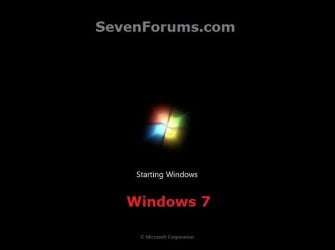
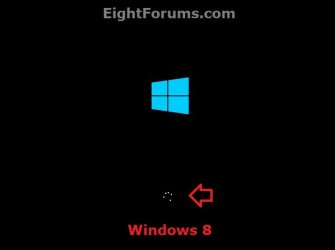
This tutorial will show you how to enable or disable the graphical animation GUI Boot while booting or resuming from hibernation into Vista, Windows 7, or Windows 8.
You must be logged in as an administrator to be able to do the steps in this tutorial.
You must be logged in as an administrator to be able to do the steps in this tutorial.
Note
- If "No GUI Boot" in Vista, you will have the Aurora boot screen instead of the green animated loading bar.
- If "No GUI Boot" in Windows 7, you will have a blank black boot screen instead of the animated dots turning into a Windows flag.
- If "No GUI Boot" in Windows 8, you will only have the blue window in the boot screen instead of also with the animated spining circle of dots.

OPTION ONE
Enable or Disable "GUI Boot" in msconfig (System Configuration)
1. Press Windows+R keys to open the Run dialog, type msconfig, and click/tap on OK.
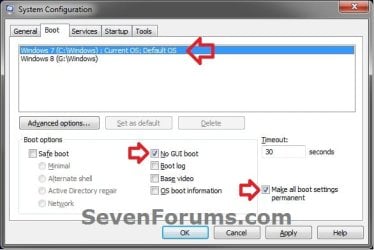
2. Click/tap on the Boot tab, select the OS (ex: Windows 7) that you want to set this for at it's startup, and go to step 3 or 4 below. (see screenshot below)
3. To Enable GUI Boot for the Selected Windows
NOTE: This is the default setting.
A) Uncheck the No GUI Boot box, and go to step 5 below. (see screenshot below step 2)
4. To Disable GUI Boot for the Selected Windows
A) Check the No GUI Boot box, and go to step 5 below. (see screenshot below step 2)
5. If you have another Windows installed (ex: Windows 8) in a multiboot setup that you would like to set this for as well, then repeat step 3 or 4 above for it as well and go to step 6 afterwards.
6. Check the Make all boot settings permanent box, and click/tap on OK. (see screenshot below step 2)
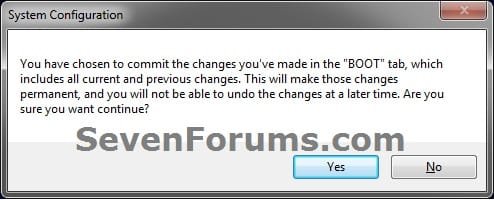
7. Click/tap on Yes. (see screenshot below)
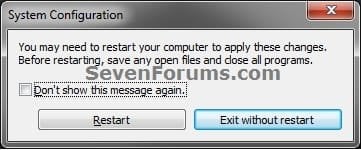
8. Click/tap on Restart to apply. (see screenshot below)
NOTE: Be sure to save and close anything you have open first.
OPTION TWO
Enable or Disable "GUI Boot" in a Command Prompt
1. Open an elevated command prompt, or a command prompt at boot.
2. In the command prompt, type bcdedit and press Enter. Under the Windows Boot Loader sections, make note of the identifier value (ex: {current}) for the OS description (ex: Windows 7) that you want to use in step 4 or 5 below.

3. Do step 4 or 5 below for what you would like to do.
4. To Enable GUI Boot for the Selected Windows
NOTE: This is the default setting.
A) In the command prompt, type the command below and press Enter.
NOTE: Substitute identifier in the command below with the actual value or long GUID number to the right of identifer in the command used from step 2.
bcdedit /set {identifier} quietboot Yes
For example: If I wanted to set this for Windows 7 (description) with it's "identifier" showing as {current} from step 2, I would type this command below exactly and press Enter.
bcdedit /set {current} quietboot Yes
B) Go to step 6 below.
5. To Disable GUI Boot for the Selected Windows
A) In the command prompt, type the command below and press Enter.
NOTE: Substitute identifier in the command below with the actual value or long GUID number to the right of identifer in the command used from step 2.
bcdedit /set {identifier} quietboot No
For example: If I wanted to set this for Windows 7 (description) with it's "identifier" showing as {current} from step 2, I would type this command below exactly and press Enter.
bcdedit /set {current} quietboot No
B) Go to step 6 below.
6. If you have another Windows installed (ex: Windows 8) in a multiboot setup that you would like to set this for as well, then repeat the steps above for it as well and go to step 7 afterwards.
7. Close the command prompt. If you like, you can restart the computer and startup the Windows this was applied to see the change.
That's it,
Shawn
Related Tutorials
- How to Enable the Hidden Aurora Boot Screen in Vista
- How to Speed Up the Performance of Windows 7
- How to Change the Default Operating System to Start in Windows 7
- How to Choose a Default Operating System to Run at Startup in Windows 8
- How to Enable or Disable the New Windows 8 Startup Options Boot Menu
Last edited:


