Need help with Bluetooth on Windows 7 (HP laptop)

spotify95

New member
Member
Local time
12:28 AM
Messages
73
Hi,
Apologies if this is in the wrong area - please move if necessary.

I have an issue regarding the Bluetooth on my HP laptop running Windows 7. It is a HP 15-AC153SA.
It originally came with Windows 10 but had been set up for dual booting with Windows 7 and 10. The problem is on Windows 7; Windows 10 has Bluetooth installed and works fine.

As can be seen from HP's site here: HP Notebook - 15-ac153sa (ENERGY STAR) Product Specifications | HP® Customer Support
it states that this HP has Wireless a/b/g/n/ac and Bluetooth built in - and the Bluetooth is fine in windows 10 but not in windows 7.

According to HP's pages: HP Software and Driver Downloads for HP Printers, Laptops, Desktops and More | HP® Customer Support
there are 4 network drivers; a Realtek wireless driver, a Broadcom wireless driver, a Realtek LAN driver and a Realtek Bluetooth driver. I have tried the Realtek Bluetooth driver with no success.

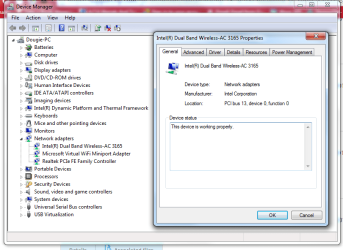
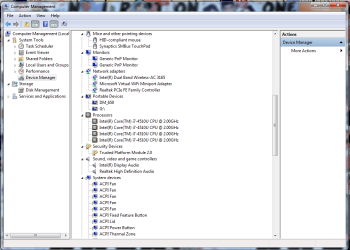
Attached is what I get when I go into device manager for wireless.

Any help would be appreciated.
 

Attachments
  • wireless.png
    wireless.png
    39.4 KB · Views: 1

My Computer My Computer

At a glance

Windows 7 Professional, 64 bitIntel Core i7-4510U @ 2.00GHz16GB DDR3Intel HD 4400 (integrated)
Computer type
Laptop
Computer Manufacturer/Model Number
HP 15-ac153sa
OS
Windows 7 Professional, 64 bit
CPU
Intel Core i7-4510U @ 2.00GHz
Memory
16GB DDR3
Graphics Card(s)
Intel HD 4400 (integrated)
Monitor(s) Displays
Inbuilt 15.6 inch HD display
Screen Resolution
1366x768
Hard Drives
2TB HDD, partitioned as 1TB (Windows 7) and 1TB (Windows 10)
2TB external HDD (portable)
Cooling
1x built in laptop fan
Keyboard
HP Slimline Wired Keyboard
Mouse
HP Optical Wired Mouse
Internet Speed
Virgin Media 250Mbps
Antivirus
Microsoft Windows Defender
Browser
Chrome, Firefox
Other Info
Laptop is set up as dual boot with Windows 7 Professional and Windows 10 Home. Windows 7 preferred.
you may also need the bluetooth enumerator driver. Try microsoft's

Download Microsoft Bluetooth Device Driver 9.1.496.0 for Windows 7 64 bit

alternatively, go into windows 10 device manager, right click the bluetooth adapter and look for the hardware device id under details. The do a google of that ID and the word windows 7 driver. Maybe you can find the driver that way.
 

Attachments

  • Image_000001.png
    Image_000001.png
    22.7 KB · Views: 53

My Computer My Computer

At a glance

Win7 pro x64stock i7 7700kCorsair Vengeance LPX 16GB (2x8GB) DDR4 @ 320...integrated Intel HD 630
Computer type
PC/Desktop
Computer Manufacturer/Model Number
diy
OS
Win7 pro x64
CPU
stock i7 7700k
Motherboard
Gigabyte Z270N-WIFI mini-ITX
Memory
Corsair Vengeance LPX 16GB (2x8GB) DDR4 @ 3200MHz
Graphics Card(s)
integrated Intel HD 630
Sound Card
onboard Realtek ALC1220
Monitor(s) Displays
two vertically mounted samsung 55" 4k un55mu8000
Screen Resolution
1920x1280
Hard Drives
256GB Samsung EVO 960 M.2 pci-e NVMe SSD
PSU
SilverStone Nightjar ST45NF 450Watt Fanless
Case
No case. Motherboard is mounted directly onto power supply
Cooling
Evercool low profile 815EP with Panaflow 12L fan at 7v
Keyboard
Ortek MCK-86 mini
Mouse
Belkin 5-button USB
Internet Speed
spectrum 400mbps
you may also need the bluetooth enumerator driver. Try microsoft's

Download Microsoft Bluetooth Device Driver 9.1.496.0 for Windows 7 64 bit

alternatively, go into windows 10 device manager, right click the bluetooth adapter and look for the hardware device id under details. The do a google of that ID and the word windows 7 driver. Maybe you can find the driver that way.

Hi,

I've found all of the drivers and software for my wireless chip:
Downloads for Intel® Dual Band Wireless-AC 3165

I've tried downloading the latest Intel Wireless Bluetooth Software for Windows 7. Nothing has happened so far with no Bluetooth software in Control Panel or Device Manager.

With regards to the Softpedia install, it is telling me I should extract the file somewhere, but wherabouts is the correct place for it to go?

Any other ideas? This Bluetooth should be working but I can't get it to!
 

My Computer My Computer

At a glance

Windows 7 Professional, 64 bitIntel Core i7-4510U @ 2.00GHz16GB DDR3Intel HD 4400 (integrated)
Computer type
Laptop
Computer Manufacturer/Model Number
HP 15-ac153sa
OS
Windows 7 Professional, 64 bit
CPU
Intel Core i7-4510U @ 2.00GHz
Memory
16GB DDR3
Graphics Card(s)
Intel HD 4400 (integrated)
Monitor(s) Displays
Inbuilt 15.6 inch HD display
Screen Resolution
1366x768
Hard Drives
2TB HDD, partitioned as 1TB (Windows 7) and 1TB (Windows 10)
2TB external HDD (portable)
Cooling
1x built in laptop fan
Keyboard
HP Slimline Wired Keyboard
Mouse
HP Optical Wired Mouse
Internet Speed
Virgin Media 250Mbps
Antivirus
Microsoft Windows Defender
Browser
Chrome, Firefox
Other Info
Laptop is set up as dual boot with Windows 7 Professional and Windows 10 Home. Windows 7 preferred.
you extract it anywhere, like for instance your desktop, then follow the instruction on this page:

Download Microsoft Bluetooth Device Driver 9.1.496.0 for Windows 7 64 bit

however, I see there is no bluetooth radio item listed at all in your windows 7 device manager, so this may not work.

However, since you are using Intel dual-band, I recommend running this program..

Download Intel® Wireless Bluetooth® Software for Windows 7*

and it that does not work either, it would be best if you could post a screenshot of your windows10 bluetooth radio device manager item discussed in post #2
 

My Computer My Computer

At a glance

Win7 pro x64stock i7 7700kCorsair Vengeance LPX 16GB (2x8GB) DDR4 @ 320...integrated Intel HD 630
Computer type
PC/Desktop
Computer Manufacturer/Model Number
diy
OS
Win7 pro x64
CPU
stock i7 7700k
Motherboard
Gigabyte Z270N-WIFI mini-ITX
Memory
Corsair Vengeance LPX 16GB (2x8GB) DDR4 @ 3200MHz
Graphics Card(s)
integrated Intel HD 630
Sound Card
onboard Realtek ALC1220
Monitor(s) Displays
two vertically mounted samsung 55" 4k un55mu8000
Screen Resolution
1920x1280
Hard Drives
256GB Samsung EVO 960 M.2 pci-e NVMe SSD
PSU
SilverStone Nightjar ST45NF 450Watt Fanless
Case
No case. Motherboard is mounted directly onto power supply
Cooling
Evercool low profile 815EP with Panaflow 12L fan at 7v
Keyboard
Ortek MCK-86 mini
Mouse
Belkin 5-button USB
Internet Speed
spectrum 400mbps
you extract it anywhere, like for instance your desktop, then follow the instruction on this page:

Download Microsoft Bluetooth Device Driver 9.1.496.0 for Windows 7 64 bit

however, I see there is no bluetooth radio item listed at all in your windows 7 device manager, so this may not work.

However, since you are using Intel dual-band, I recommend running this program..

Download Intel® Wireless Bluetooth® Software for Windows 7*

and it that does not work either, it would be best if you could post a screenshot of your windows10 bluetooth radio device manager item discussed in post #2

Hi, thanks for the information.

I have extracted the drivers but it hasn't changed anything in Control Panel, Device Manager etc.

I also found the Intel software previously and have installed that already - no result as of yet.
I have checked under services.msc and all Bluetooth services seem to be set to automatic (delayed start) or manual (in the case of the support service) so there is no issue there.

I am currently on Windows 7 and will update this thread with a screenshot of Windows 10 when I next boot into W10 (which will likely be tomorrow morning).
 

My Computer My Computer

At a glance

Windows 7 Professional, 64 bitIntel Core i7-4510U @ 2.00GHz16GB DDR3Intel HD 4400 (integrated)
Computer type
Laptop
Computer Manufacturer/Model Number
HP 15-ac153sa
OS
Windows 7 Professional, 64 bit
CPU
Intel Core i7-4510U @ 2.00GHz
Memory
16GB DDR3
Graphics Card(s)
Intel HD 4400 (integrated)
Monitor(s) Displays
Inbuilt 15.6 inch HD display
Screen Resolution
1366x768
Hard Drives
2TB HDD, partitioned as 1TB (Windows 7) and 1TB (Windows 10)
2TB external HDD (portable)
Cooling
1x built in laptop fan
Keyboard
HP Slimline Wired Keyboard
Mouse
HP Optical Wired Mouse
Internet Speed
Virgin Media 250Mbps
Antivirus
Microsoft Windows Defender
Browser
Chrome, Firefox
Other Info
Laptop is set up as dual boot with Windows 7 Professional and Windows 10 Home. Windows 7 preferred.
question - what precisely happened when you followed the instructions on the softpedia link? In case you missed it, those steps are required after the extraction. Just based on your post, it sounds like you may have only done the extraction.

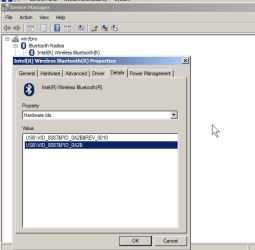
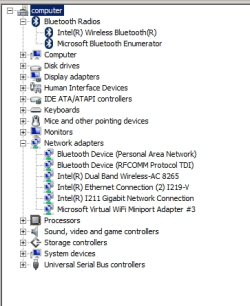
btw here is what my device manager looks like after installing the intel program in the link. It will not hurt if you install it again.

After doing both of the above, if your win7 device manager still shows nothing at all related to bluetooth, its as though win7 does not even see your bluetooth hardware, as though its disabled in bios.
 

Attachments

  • 1.png
    1.png
    24.3 KB · Views: 38

My Computer My Computer

At a glance

Win7 pro x64stock i7 7700kCorsair Vengeance LPX 16GB (2x8GB) DDR4 @ 320...integrated Intel HD 630
Computer type
PC/Desktop
Computer Manufacturer/Model Number
diy
OS
Win7 pro x64
CPU
stock i7 7700k
Motherboard
Gigabyte Z270N-WIFI mini-ITX
Memory
Corsair Vengeance LPX 16GB (2x8GB) DDR4 @ 3200MHz
Graphics Card(s)
integrated Intel HD 630
Sound Card
onboard Realtek ALC1220
Monitor(s) Displays
two vertically mounted samsung 55" 4k un55mu8000
Screen Resolution
1920x1280
Hard Drives
256GB Samsung EVO 960 M.2 pci-e NVMe SSD
PSU
SilverStone Nightjar ST45NF 450Watt Fanless
Case
No case. Motherboard is mounted directly onto power supply
Cooling
Evercool low profile 815EP with Panaflow 12L fan at 7v
Keyboard
Ortek MCK-86 mini
Mouse
Belkin 5-button USB
Internet Speed
spectrum 400mbps
question - what precisely happened when you followed the instructions on the softpedia link? In case you missed it, those steps are required after the extraction. Just based on your post, it sounds like you may have only done the extraction.

btw here is what my device manager looks like after installing the intel program in the link. It will not hurt if you install it again.

After doing both of the above, if your win7 device manager still shows nothing at all related to bluetooth, its as though win7 does not even see your bluetooth hardware, as though its disabled in bios.

Hi,

Do you mean this bit?

In order to manually update your driver, follow the steps below (the next steps):
1. Go to Device Manager (right click on My Computer, choose Manage and then find Device Manager in the left panel)
2. Right click on the hardware device you wish to update and choose Update Driver Software
3. Choose to select the location of the new driver manually and browse to the folder where you downloaded the driver
I have the three files from the extraction on my desktop but I don't know what to do from here. On Device Manager it has nothing to do with Bluetooth, and I don't know which of the three files to progress with. I'm guessing it is the coin91.dll, not the security catalog or setup information files.

Failing that, I'll reinstall the Intel Bluetooth.

edit: If it was BIOS related, would it just affect Windows 7? Because the Bluetooth works fine in Windows 10 (but not on 7).
 

My Computer My Computer

At a glance

Windows 7 Professional, 64 bitIntel Core i7-4510U @ 2.00GHz16GB DDR3Intel HD 4400 (integrated)
Computer type
Laptop
Computer Manufacturer/Model Number
HP 15-ac153sa
OS
Windows 7 Professional, 64 bit
CPU
Intel Core i7-4510U @ 2.00GHz
Memory
16GB DDR3
Graphics Card(s)
Intel HD 4400 (integrated)
Monitor(s) Displays
Inbuilt 15.6 inch HD display
Screen Resolution
1366x768
Hard Drives
2TB HDD, partitioned as 1TB (Windows 7) and 1TB (Windows 10)
2TB external HDD (portable)
Cooling
1x built in laptop fan
Keyboard
HP Slimline Wired Keyboard
Mouse
HP Optical Wired Mouse
Internet Speed
Virgin Media 250Mbps
Antivirus
Microsoft Windows Defender
Browser
Chrome, Firefox
Other Info
Laptop is set up as dual boot with Windows 7 Professional and Windows 10 Home. Windows 7 preferred.
you're right, if it works in win10 its not a bios issue. And of course if there is a switch for you to manually turn it on and off, make sure its on. And my intel link leads to the same program you already downloaded, so that won't help either. And the softpedia files cannot be loaded if we don't know what device to load them under, so we need to take a new tack here.

Try each of these links and see if they are of any help. Also make sure that any reference at all to bluetooth within services.msc is set to automatic start as opposed to manual.

Adding Bluetooth Devices in Windows 7 - TechGenix

https://support.microsoft.com/en-us...s-in-control-panel-for-your-mouse-or-keyboard

If none of that helps, I'm guessing that because HP only gives you drivers for win10 for your machine, that there is some as-yet unknown win7 driver that you need to find and install, but it may not be actually bluetooth, but is a prerequisite for bluetooth. Just as a for instance, if your win7 machine has the generic USB root hub installed but you really need a more specific USB root hub driver in order for bluetooth to be detected, then we need to figure out what exactly that root hub driver is. That would explain your clean device manager, meaning when you installed windows it installed the generic usb root hub so that's why there is no yellow exclamation mark within your device manager.

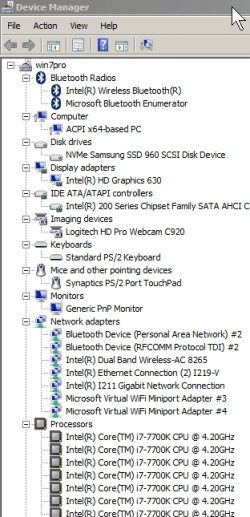
Fortunately you have win10 fully working so there's a way you can figure out what you need. Just go into win7 device manager and expand every single plus sign next to each device name section. This will produce two or three screens of details. Then make a screen shot of that device manager detail, then page down to the remaining devices and make a screen shot of those too. I'll attach an image of just my uppermost devices to show you what I mean.

Then save those images somewhere and boot into win10 and open device manager the same way, and by opening your win7 device manager images right next to your actual win10 device manager details, compare the win7 device manager to the win10 device manager. My guess is you will find that one or more of the devices within win7 are generic yet within win10 they are specific to your hp hardware. Once you find which devices are different, just find the hardware ID as I mentioned in post #2 and do a google search for the win7 drivers for those devices. Let me know if I'm not being clear.
 

Attachments

  • 1.png
    1.png
    35.5 KB · Views: 38

My Computer My Computer

At a glance

Win7 pro x64stock i7 7700kCorsair Vengeance LPX 16GB (2x8GB) DDR4 @ 320...integrated Intel HD 630
Computer type
PC/Desktop
Computer Manufacturer/Model Number
diy
OS
Win7 pro x64
CPU
stock i7 7700k
Motherboard
Gigabyte Z270N-WIFI mini-ITX
Memory
Corsair Vengeance LPX 16GB (2x8GB) DDR4 @ 3200MHz
Graphics Card(s)
integrated Intel HD 630
Sound Card
onboard Realtek ALC1220
Monitor(s) Displays
two vertically mounted samsung 55" 4k un55mu8000
Screen Resolution
1920x1280
Hard Drives
256GB Samsung EVO 960 M.2 pci-e NVMe SSD
PSU
SilverStone Nightjar ST45NF 450Watt Fanless
Case
No case. Motherboard is mounted directly onto power supply
Cooling
Evercool low profile 815EP with Panaflow 12L fan at 7v
Keyboard
Ortek MCK-86 mini
Mouse
Belkin 5-button USB
Internet Speed
spectrum 400mbps
you're right, if it works in win10 its not a bios issue. And of course if there is a switch for you to manually turn it on and off, make sure its on. And my intel link leads to the same program you already downloaded, so that won't help either. And the softpedia files cannot be loaded if we don't know what device to load them under, so we need to take a new tack here.

Try each of these links and see if they are of any help. Also make sure that any reference at all to bluetooth within services.msc is set to automatic start as opposed to manual.

Adding Bluetooth Devices in Windows 7 - TechGenix

https://support.microsoft.com/en-us...s-in-control-panel-for-your-mouse-or-keyboard

If none of that helps, I'm guessing that because HP only gives you drivers for win10 for your machine, that there is some as-yet unknown win7 driver that you need to find and install, but it may not be actually bluetooth, but is a prerequisite for bluetooth. Just as a for instance, if your win7 machine has the generic USB root hub installed but you really need a more specific USB root hub driver in order for bluetooth to be detected, then we need to figure out what exactly that root hub driver is. That would explain your clean device manager, meaning when you installed windows it installed the generic usb root hub so that's why there is no yellow exclamation mark within your device manager.

Fortunately you have win10 fully working so there's a way you can figure out what you need. Just go into win7 device manager and expand every single plus sign next to each device name section. This will produce two or three screens of details. Then make a screen shot of that device manager detail, then page down to the remaining devices and make a screen shot of those too. I'll attach an image of just my uppermost devices to show you what I mean.

Then save those images somewhere and boot into win10 and open device manager the same way, and by opening your win7 device manager images right next to your actual win10 device manager details, compare the win7 device manager to the win10 device manager. My guess is you will find that one or more of the devices within win7 are generic yet within win10 they are specific to your hp hardware. Once you find which devices are different, just find the hardware ID as I mentioned in post #2 and do a google search for the win7 drivers for those devices. Let me know if I'm not being clear.

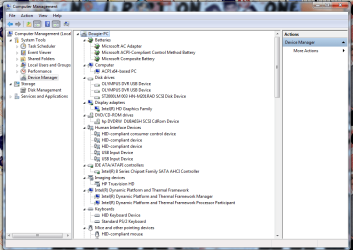
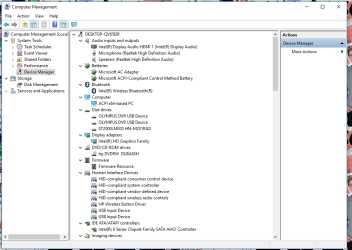
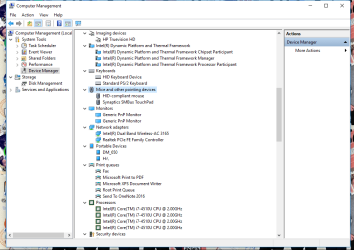
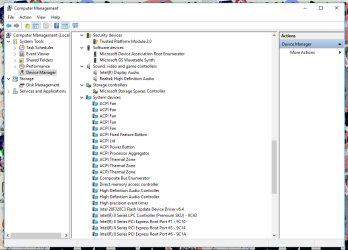
Hi, apologies for the delays in getting back to you, I have been bit busy with things so haven't been able to continue with this for now.

I have just gone into W10 today (as W10 needed updating; I plan on using W7 until 2020 and potentially beyond) and got everything that is required.

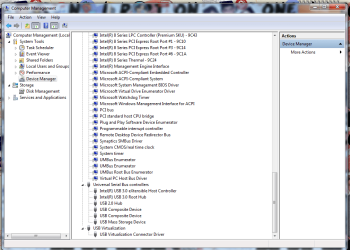
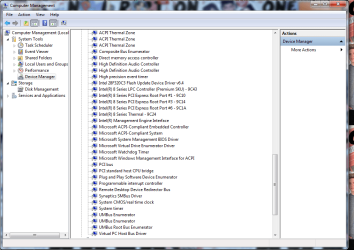
I've attached all of the screenshots with regards to W7 and W10 device manager - hopefully you may be able to help me find out what I need to do to get BT working?
 

Attachments

  • windows 7 computer management 4.png
    windows 7 computer management 4.png
    53.6 KB · Views: 1
  • windows 7 computer management 3.png
    windows 7 computer management 3.png
    54.1 KB · Views: 2
  • windows 7 computer management 2.png
    windows 7 computer management 2.png
    49.9 KB · Views: 1
  • windows 7 computer management.png
    windows 7 computer management.png
    56.9 KB · Views: 1
  • Windows 10 Computer Management.png
    Windows 10 Computer Management.png
    38 KB · Views: 1
  • Windows 10 Computer Management 2.png
    Windows 10 Computer Management 2.png
    41.5 KB · Views: 1
  • Windows 10 Computer Management 3.png
    Windows 10 Computer Management 3.png
    40.9 KB · Views: 1
  • Windows 10 Computer Management 4.png
    Windows 10 Computer Management 4.png
    38.3 KB · Views: 1

My Computer My Computer

At a glance

Windows 7 Professional, 64 bitIntel Core i7-4510U @ 2.00GHz16GB DDR3Intel HD 4400 (integrated)
Computer type
Laptop
Computer Manufacturer/Model Number
HP 15-ac153sa
OS
Windows 7 Professional, 64 bit
CPU
Intel Core i7-4510U @ 2.00GHz
Memory
16GB DDR3
Graphics Card(s)
Intel HD 4400 (integrated)
Monitor(s) Displays
Inbuilt 15.6 inch HD display
Screen Resolution
1366x768
Hard Drives
2TB HDD, partitioned as 1TB (Windows 7) and 1TB (Windows 10)
2TB external HDD (portable)
Cooling
1x built in laptop fan
Keyboard
HP Slimline Wired Keyboard
Mouse
HP Optical Wired Mouse
Internet Speed
Virgin Media 250Mbps
Antivirus
Microsoft Windows Defender
Browser
Chrome, Firefox
Other Info
Laptop is set up as dual boot with Windows 7 Professional and Windows 10 Home. Windows 7 preferred.
sometimes the wifi miniport adapter causes a conflict. You might try disabling it within win7 device manager and rebooting.

also, I might have missed it but from the above it appears you have not tried the second part of post #2 regarding your bluetooth hardware device id within win10. You need the win7 version of that driver.

On the intel blueooth driver page it notes that for version 19.00.1621 that it uses a motorola driver for win7 and an intel driver for win10. I searched but could not find such a motorola driver, but its probably a part of the win7 download link.

Download Software for Intel® Wireless Bluetooth® Technology

have you tried the intel driver detection utility?

Intel® Driver Update Utility
 
Last edited:

My Computer My Computer

At a glance

Win7 pro x64stock i7 7700kCorsair Vengeance LPX 16GB (2x8GB) DDR4 @ 320...integrated Intel HD 630
Computer type
PC/Desktop
Computer Manufacturer/Model Number
diy
OS
Win7 pro x64
CPU
stock i7 7700k
Motherboard
Gigabyte Z270N-WIFI mini-ITX
Memory
Corsair Vengeance LPX 16GB (2x8GB) DDR4 @ 3200MHz
Graphics Card(s)
integrated Intel HD 630
Sound Card
onboard Realtek ALC1220
Monitor(s) Displays
two vertically mounted samsung 55" 4k un55mu8000
Screen Resolution
1920x1280
Hard Drives
256GB Samsung EVO 960 M.2 pci-e NVMe SSD
PSU
SilverStone Nightjar ST45NF 450Watt Fanless
Case
No case. Motherboard is mounted directly onto power supply
Cooling
Evercool low profile 815EP with Panaflow 12L fan at 7v
Keyboard
Ortek MCK-86 mini
Mouse
Belkin 5-button USB
Internet Speed
spectrum 400mbps
sometimes the wifi miniport adapter causes a conflict. You might try disabling it within win7 device manager and rebooting.

also, I might have missed it but from the above it appears you have not tried the second part of post #2 regarding your bluetooth hardware device id within win10. You need the win7 version of that driver.

On the intel blueooth driver page it notes that for version 19.00.1621 that it uses a motorola driver for win7 and an intel driver for win10. I searched but could not find such a motorola driver, but its probably a part of the win7 download link.

Download Software for Intel® Wireless Bluetooth® Technology

have you tried the intel driver detection utility?

Intel® Driver Update Utility

Hi,

Disabled the Windows 7 Wi-Fi Miniport adapter, not rebooted just yet (I will do everything at once before I reboot).

Tried googling the motorola version of that intel driver and it led me to this site:
Intel(R) Wireless Software for Bluetooth(R) Technology for 7 (32-bit, 64-bit) - ThinkPad Edge E440, E540

The Lenovo site for computers with this driver. Downloaded and it said that the driver I had was never than the one on the download.

Likewise, went to the software download link at intel's site and it said that 19.00.1621 was an older version, a newer version had already been installed. The one that I have installed is version 19.40.1.

I've installed the driver utility and it came up with the latest proset/wireless software and the graphics driver. Will try that and see how it goes.

I will check the hardware ID when I next boot into Windows 10.

Thanks for the tips, I'll let you know what, if any, difference it will make.

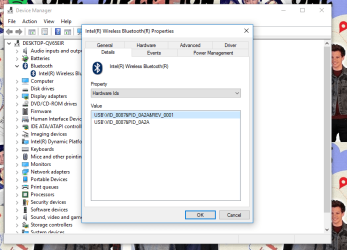
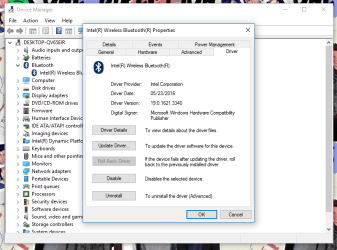
edit: Still no Bluetooth. Device ID's for Windows 10 have been attached.
 

Attachments

  • Bluetooth Device IDs.png
    Bluetooth Device IDs.png
    52.4 KB · Views: 1
  • bluetooth driver details.png
    bluetooth driver details.png
    44.3 KB · Views: 1
Last edited:

My Computer My Computer

At a glance

Windows 7 Professional, 64 bitIntel Core i7-4510U @ 2.00GHz16GB DDR3Intel HD 4400 (integrated)
Computer type
Laptop
Computer Manufacturer/Model Number
HP 15-ac153sa
OS
Windows 7 Professional, 64 bit
CPU
Intel Core i7-4510U @ 2.00GHz
Memory
16GB DDR3
Graphics Card(s)
Intel HD 4400 (integrated)
Monitor(s) Displays
Inbuilt 15.6 inch HD display
Screen Resolution
1366x768
Hard Drives
2TB HDD, partitioned as 1TB (Windows 7) and 1TB (Windows 10)
2TB external HDD (portable)
Cooling
1x built in laptop fan
Keyboard
HP Slimline Wired Keyboard
Mouse
HP Optical Wired Mouse
Internet Speed
Virgin Media 250Mbps
Antivirus
Microsoft Windows Defender
Browser
Chrome, Firefox
Other Info
Laptop is set up as dual boot with Windows 7 Professional and Windows 10 Home. Windows 7 preferred.
the hardware ID points to the driver you already installed, so the issue is not the driver, so maybe its something that is a pre-req for the device or something is stopping needed bluetooth services. To help narrow that down, try running HP assistant

HP Support Assistant | HP® Official Site

to see if it installs anything new that helps. You will want to reboot after every single step of these ideas by the way.

and to see if bluetooth services are running, go to task manager > services and look for bthserv. If it is not there, go to start > run > services.msc, find the bluetooth services and make sure they are all set to automatic. You can change them by doing right-click > properties > automatic > apply. The Bluetooth Support service is the important one and if you cannot change it to automatic, go into the registry and change this key to a value of "3"

[HKEY_LOCAL_MACHINE\SYSTEM\CurrentControlSet\Services\bthserv]
"Start"=dword:00000003

I had this same problem you are having btw, but unfortunately can't remember exactly what fixed it. But I remember what fixed it was something random like updating .NET framework, or maybe getting windows update totally up to date. Maybe the fix was even installing Microsoft Visual C++ redistributables. Just can't remember. I did see one guy on the net who had this problem and he fixed it by UNinstalling windows update KB958488. Worth a try. There is another guy who fixed it by running the black viper services reset registry file found below, but if you run this (you need to find your win7 version on the page), you should really save to a new system backup/restore point first in case you need to roll this back:

Windows 7 Service Pack 1 Services Registry Files | Black Viper | www.blackviper.com
 

My Computer My Computer

At a glance

Win7 pro x64stock i7 7700kCorsair Vengeance LPX 16GB (2x8GB) DDR4 @ 320...integrated Intel HD 630
Computer type
PC/Desktop
Computer Manufacturer/Model Number
diy
OS
Win7 pro x64
CPU
stock i7 7700k
Motherboard
Gigabyte Z270N-WIFI mini-ITX
Memory
Corsair Vengeance LPX 16GB (2x8GB) DDR4 @ 3200MHz
Graphics Card(s)
integrated Intel HD 630
Sound Card
onboard Realtek ALC1220
Monitor(s) Displays
two vertically mounted samsung 55" 4k un55mu8000
Screen Resolution
1920x1280
Hard Drives
256GB Samsung EVO 960 M.2 pci-e NVMe SSD
PSU
SilverStone Nightjar ST45NF 450Watt Fanless
Case
No case. Motherboard is mounted directly onto power supply
Cooling
Evercool low profile 815EP with Panaflow 12L fan at 7v
Keyboard
Ortek MCK-86 mini
Mouse
Belkin 5-button USB
Internet Speed
spectrum 400mbps
Hi, many thanks for the reply. I've been a bit busy as of late so have been ubnable to try anything. However, I have looked into a bit further and have found that Bluetooth is still not working.

the hardware ID points to the driver you already installed, so the issue is not the driver, so maybe its something that is a pre-req for the device or something is stopping needed bluetooth services. To help narrow that down, try running HP assistant

HP Support Assistant | HP® Official Site

to see if it installs anything new that helps. You will want to reboot after every single step of these ideas by the way.

Thank you for confirming this. I have got HP Support Assistant installed and nothing has come up regarding Bluetooth support. The only recent update I have had is a BIOS update and that hasn't fixed the Bluetooth issue. (I don't know what the BIOS update even did, probably some BIOS settings, but haven't checked.)

and to see if bluetooth services are running, go to task manager > services and look for bthserv. If it is not there, go to start > run > services.msc, find the bluetooth services and make sure they are all set to automatic. You can change them by doing right-click > properties > automatic > apply. The Bluetooth Support service is the important one and if you cannot change it to automatic, go into the registry and change this key to a value of "3"

[HKEY_LOCAL_MACHINE\SYSTEM\CurrentControlSet\Services\bthserv]
"Start"=dword:00000003

Bthserv does not shhow up on my task manager, I cannot remember where the exe actually is (I know I downloaded all the bluetooth stuff etc). Bluetooth Device Monitor, Bluetooth Media Service and Bluetooth OBEX Service are all set to Automatic (Delayed Start), with Bluetooth Support Service set to Automatic.

I had this same problem you are having btw, but unfortunately can't remember exactly what fixed it. But I remember what fixed it was something random like updating .NET framework, or maybe getting windows update totally up to date. Maybe the fix was even installing Microsoft Visual C++ redistributables. Just can't remember. I did see one guy on the net who had this problem and he fixed it by UNinstalling windows update KB958488. Worth a try. There is another guy who fixed it by running the black viper services reset registry file found below, but if you run this (you need to find your win7 version on the page), you should really save to a new system backup/restore point first in case you need to roll this back:

Windows 7 Service Pack 1 Services Registry Files | Black Viper | www.blackviper.com

Hmm, I wonder why this is such an issue with HP machines, maybe they just want you to be on Windows 10? (Yet I prefer Windows 7 and need to use it for as long as possible, due to software issues with 10.) NET Framework is up to date according to Windows Update. Windows Update is showing as up to date. Don't have the C++ redistributable installed, should I give it a go? Will have to check my Windows Update history regarding what I do and don't have installed. Won't use a service reset thing as I don't want to brick Windows 7 and getting the thing installed in the first place was a nightmare due to drivers.
 

My Computer My Computer

At a glance

Windows 7 Professional, 64 bitIntel Core i7-4510U @ 2.00GHz16GB DDR3Intel HD 4400 (integrated)
Computer type
Laptop
Computer Manufacturer/Model Number
HP 15-ac153sa
OS
Windows 7 Professional, 64 bit
CPU
Intel Core i7-4510U @ 2.00GHz
Memory
16GB DDR3
Graphics Card(s)
Intel HD 4400 (integrated)
Monitor(s) Displays
Inbuilt 15.6 inch HD display
Screen Resolution
1366x768
Hard Drives
2TB HDD, partitioned as 1TB (Windows 7) and 1TB (Windows 10)
2TB external HDD (portable)
Cooling
1x built in laptop fan
Keyboard
HP Slimline Wired Keyboard
Mouse
HP Optical Wired Mouse
Internet Speed
Virgin Media 250Mbps
Antivirus
Microsoft Windows Defender
Browser
Chrome, Firefox
Other Info
Laptop is set up as dual boot with Windows 7 Professional and Windows 10 Home. Windows 7 preferred.
Back
Top