Solved USB stick device, made under Win 7, trying to boot a Dell Optiplex 780

JohnPat

New member
Local time
3:24 PM
Messages
25
Location
Cambridgeshire
Hello All

Not sure I've got the right thread group, but here goes.

My post 20/02/2017 under 'Software' describes what I'm trying to do. This is essentially the creation of a bootable Win PE environment that will run Acronis Disk Director. Haven't achieved that yet, but a feature of old gits like me is persistence, so I keep trying.

Since that post I've become more familiar with the kit (WAIK) from which a PE 3.0 environment is built. However I have run into another problem.

I build the Win PE 3.0 environment on what Microsoft term a technician computer. This runs Win 7 with SP1.
For a trial I built, with scrupulous adherence to the documentation, a trial Win PE 3.0 file set using the standard, winpe_x86.wim file as boot.wim. This file set was transferred to a new USB stick prepared as per the MS instructions using diskpart, then running bootsect.exe to produce a bootable stick, and finally transferring the file set to the USB stick. I used two methods to do this: (a) at the command prompt I used XCOPY to move the contents of the winpe_x86 directory to the stick and (b) I used a utility called ViceVersaPro to 'burn' (strange term this - thought it was just for CD's and DVD's) the file set to the stick.

On moving the stick physically to the target machine, the Optiplex 780, and setting the BIOS so that USB is the priority boot medium and then trying to boot, I get an error message:

"
Selected boot disk not available.
Strike F1 to retry boot, F2 for setup utility
Press F5 for onboard diagnostics
"

I have run the onboard diagnostics, result all OK.
I have looked inside the boot.wim file and found that there are the 'proto' USB drivers present.
I have checked all the USB ports work by either attaching USB memory sticks or hard disks and reading/writing to them.
I have updated the machine BIOS from version A04 to the current version A15.

There is no improvement, and frankly I am running out of ideas. What causes this error message?

Hope somebody out in the community can suggest (a) how I could test the Win PE USB, (b) how I could test the USB ports for booting functionality in some other way. and (c) give ma a clue as to what is causing this error message. I am uncertain as to whether the problem is my preparation of the Win PE 3.0 file set on the technician computer or whether the problem lies in the target Optiplex's USB sub system

Thanks in advance for any help rendered.

Kind regards
JohnPat
 

My Computer My Computer

At a glance

Trying to move to Windows 7 Professionsl 64 bitIntel Core DuoCurrently 4GB moving to 16 GB if I get it all...NVidia Quadro K2200
Computer type
PC/Desktop
Computer Manufacturer/Model Number
Dell optiplex 780
OS
Trying to move to Windows 7 Professionsl 64 bit
CPU
Intel Core Duo
Motherboard
Dell 0C27VV revision A01
Memory
Currently 4GB moving to 16 GB if I get it all working!
Graphics Card(s)
NVidia Quadro K2200
Hard Drives
Currently Seagate 160 GB moving to WD 2TB
Also installing Micron 512 GB SSD for OS's
Antivirus
Not decided yet
Browser
Probably Opera

My Computers My Computers

  • At a glance

    7 X64i5 84002x8gb 3200mhz
    Computer type
    PC/Desktop
    OS
    7 X64
    CPU
    i5 8400
    Motherboard
    gigabyte b365m ds3h
    Memory
    2x8gb 3200mhz
    Hard Drives
    various
    PSU
    pure power 11 400w cm
    Case
    Coolermaster
    Cooling
    cryorig m9i
  • At a glance

    7x64g54008gb ddr4 2400
    Computer type
    PC/Desktop
    OS
    7x64
    CPU
    g5400
    Motherboard
    ga b365m ds3h
    Memory
    8gb ddr4 2400
    PSU
    xfx pro 450w
Hello SIW2

Thanks for your quick response.

I should have added in my list of things tried that I have used two new USB sticks (both SanDisk 16 GB) and two pre-used (but re-prepared sticks) - one HP 8GB, and one Cruzer 8 GB. Not sure if this means anything other than I can read/write at least 4 memory sticks.

What I would like to do is check whether there is a bit set that denotes the stick is bootable. Problem here is I don't have a disk editor, and I do not know where to look on a stick for the bit that denotes bootability. Do you know what to look for and could you recommend a disk editor?

I'll look at the Dell link later today, got to have some medical treatment shortly.

Thanks again.

Regards
John Pat
 

My Computer My Computer

At a glance

Trying to move to Windows 7 Professionsl 64 bitIntel Core DuoCurrently 4GB moving to 16 GB if I get it all...NVidia Quadro K2200
Computer type
PC/Desktop
Computer Manufacturer/Model Number
Dell optiplex 780
OS
Trying to move to Windows 7 Professionsl 64 bit
CPU
Intel Core Duo
Motherboard
Dell 0C27VV revision A01
Memory
Currently 4GB moving to 16 GB if I get it all working!
Graphics Card(s)
NVidia Quadro K2200
Hard Drives
Currently Seagate 160 GB moving to WD 2TB
Also installing Micron 512 GB SSD for OS's
Antivirus
Not decided yet
Browser
Probably Opera

My Computers My Computers

  • At a glance

    7 X64i5 84002x8gb 3200mhz
    Computer type
    PC/Desktop
    OS
    7 X64
    CPU
    i5 8400
    Motherboard
    gigabyte b365m ds3h
    Memory
    2x8gb 3200mhz
    Hard Drives
    various
    PSU
    pure power 11 400w cm
    Case
    Coolermaster
    Cooling
    cryorig m9i
  • At a glance

    7x64g54008gb ddr4 2400
    Computer type
    PC/Desktop
    OS
    7x64
    CPU
    g5400
    Motherboard
    ga b365m ds3h
    Memory
    8gb ddr4 2400
    PSU
    xfx pro 450w
Hello All

Following advice from SIW2 I looked at the link to the Dell problem he recommended. The solution there was to make the primary boot device '#1 <USB media name>', secondary '#2 <Other media>', etc.; unfortunately the BIOS on the Optiplex presents the user with pre-defined and uneditable boot media names, so this interesting approach was a non-starter.

However, the BIOS does have a facility to make a boot device 'dormant' - Dell's terminology, not mine - so I did this for all boot devices except 'USB Device'. Result was a slightly different error message:

"
No boot device available
Strike F1 to retry boot, F2 for setup utility
Press F5 for onboard diagnostics
"

Because I am uncertain about whether it is my preparation of the bootable USB stick, or the USB sub-system on the Optiplex, I borrowed a USB DVD/CD reader writer. Hooked this up on the target machine - currently 32 bit Win XP with SP3 - to the same USB port that I was using to try and boot from a stick. Then I set the OS to boot from a USB DVD/CD, put a Win 7 system disk in the drive and attempted to boot into the loading phase of the OS. This worked fine, so I concluded that the USB sub-system is OK as regards booting from a DVD/CD, in so far as it would boot when pointed at a USB DVD/CD device.

I downloaded SIW2's suggested utility in bootice.zip. Unpacked it and ran it to update the MBR on the stick containing the standard Win PE boot.wim, this time on the technician machine (Win 7 Pro). Moved it to the target machine, reset the BIOS to boot from a USB device, but again failed with the same error message.

Next I intend using the Bootice that SIW2 recommended in sector edit mode to look at the first sector of the file system, as this is where I understand the boot bits are set. I will do this after a disk format, again after I have refreshed the MBR with Bootice, and lastly after I have gone through the process of creating the bootable stick with Win PE on it.

Does anybody in the community have (a) a bootable USB stick that works, and (b) a disk editor, that they could use to let me have a file containing hex data? I understand that only the first three bytes are absolutely required, but if any body has the first 446 bytes off a bootable stick as a file that could be sent to me, I would be VERY grateful.

Once again thanks in advance for any help that is available.

Kind regards
JohnPat
 

My Computer My Computer

At a glance

Trying to move to Windows 7 Professionsl 64 bitIntel Core DuoCurrently 4GB moving to 16 GB if I get it all...NVidia Quadro K2200
Computer type
PC/Desktop
Computer Manufacturer/Model Number
Dell optiplex 780
OS
Trying to move to Windows 7 Professionsl 64 bit
CPU
Intel Core Duo
Motherboard
Dell 0C27VV revision A01
Memory
Currently 4GB moving to 16 GB if I get it all working!
Graphics Card(s)
NVidia Quadro K2200
Hard Drives
Currently Seagate 160 GB moving to WD 2TB
Also installing Micron 512 GB SSD for OS's
Antivirus
Not decided yet
Browser
Probably Opera
Hello all (again!)

Just reporting the latest work carried out.

1. Using Bootice as recommended by SIW2, I took a USB memory stick that I could read to and write from. Went to the elevated command prompt, entered diskpart and cleaned the USB stick. Exited diskpart and cmd. Started Bootice and went to sector edit. This screen shows the first sector with the master boot record (MBR).
Did a screen print, put the screen print into Paint, saved as a .png. Moved to PS Elements and cropped the screen print to the essentials, then produced a hard copy on a printer.

2. I then went back to the elevated cmd prompt and diskpart, and formatted the USB stick FAT 32, exited out again and ran Bootice. The sector edit screen was grabbed as before and processed to produce a hard copy. The hard copy was identical to that produced in 1 above.

3. Then I went back to to Bootice and looked at the machine's HD. Repeated the screen grab.

4. On comparison I found the following:

(a) the screen grabs from the USB stick have no data i.e a load of zeroes, between 0x01b8 and 0x01fd.
(b) the terminating signature at 0x1fe and 0x01ff are correct on all screen grabs as '55 aa'.
(c) the screen grab from the hard disk has 56 bytes of data from 0x01b8 and 0x1ef.
(d) the screen grab from the hard disk has, at 0x01be, an entry 80, which I believe to be the boot
indicator. This is the byte that indicates the volume is the active partition for booting.
(e) the values 80 does not appear in any of the offsets for the four allowed partitions.

Conclusion: despite following the USB preparation instructions, it would appear that no data to indicate the USB is active has been inserted into the MBR of the USB stick.

I think I could edit this MBR value in using Bootice, but I am unsure about what other data is required for the 16 bytes of a partition table for a USB.

Are there any knowledgeable persons who can (a) comment on what I have done and the interpretation or (b) let me have the correct partition table entry for a USB?

Kind regards
JohnPat
 

My Computer My Computer

At a glance

Trying to move to Windows 7 Professionsl 64 bitIntel Core DuoCurrently 4GB moving to 16 GB if I get it all...NVidia Quadro K2200
Computer type
PC/Desktop
Computer Manufacturer/Model Number
Dell optiplex 780
OS
Trying to move to Windows 7 Professionsl 64 bit
CPU
Intel Core Duo
Motherboard
Dell 0C27VV revision A01
Memory
Currently 4GB moving to 16 GB if I get it all working!
Graphics Card(s)
NVidia Quadro K2200
Hard Drives
Currently Seagate 160 GB moving to WD 2TB
Also installing Micron 512 GB SSD for OS's
Antivirus
Not decided yet
Browser
Probably Opera
bootice-activate.jpg

bootice-sector.jpg
 

My Computers My Computers

  • At a glance

    7 X64i5 84002x8gb 3200mhz
    Computer type
    PC/Desktop
    OS
    7 X64
    CPU
    i5 8400
    Motherboard
    gigabyte b365m ds3h
    Memory
    2x8gb 3200mhz
    Hard Drives
    various
    PSU
    pure power 11 400w cm
    Case
    Coolermaster
    Cooling
    cryorig m9i
  • At a glance

    7x64g54008gb ddr4 2400
    Computer type
    PC/Desktop
    OS
    7x64
    CPU
    g5400
    Motherboard
    ga b365m ds3h
    Memory
    8gb ddr4 2400
    PSU
    xfx pro 450w
I've no experience creating bootable PE media on flash drives, but you've asked some specific questions I can help with. Although I avoid diskpart like the plague, it sounds like you don't have a partition on the flash drive. Did you create a primary partition first before trying to format it FAT32? (It may sound pedantic, but you don't format flash drives or hard drives, you format partitions.)

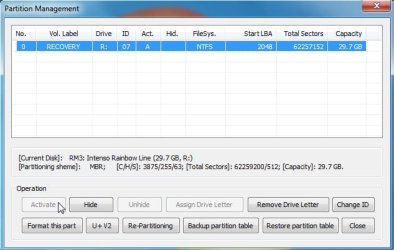
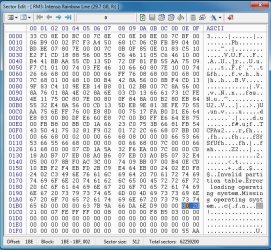
You haven't posted a screenshot, but I'll use SIW2's screenshot for reference. The bytes from 0000h-01B8h are the MBR boot code. It's only necessary if the device is meant to be bootable. Assorted Windows versions used slight variations on the MBR boot code. The 65 6D at 01B0h is indicative of boot code created by Win7's diskpart. Vista put the same 65 6D at 01AFh, while 2000/XP put it at 0179h. Not that it really matters, though, because they're all meant to do the same thing: find the active partition, load it's first sector into RAM, and redirect the CPU's instruction counter to that RAM location to pickup the instructions for loading whatever particular OS on that partition.

The four bytes from 01B8h-01BBh are the DiskID, and meant to uniquely identify each disk in Windows. Therefore, they should not be the same as any other disk in your system, and should not be zero. I believe Disk Management's "Initialize disk" procedure is supposed to create a random DiskID if it's not present, but you can also create a DiskID manually by putting in there any random values you wish. (I have a habit of using the DiskID to help identify my disks when I'm mucking around in a sector editor, so I use IDs like "250G" or "WD1T", and such.)

The partition table consists of four partition descriptors, 16 bytes each, spanning 01BEh-01FDh. A first byte of 80h indicates the "active" partition, and the other three descriptors must be 00h.

The next 15 bytes of each descriptor define the partition. If you said you've got all zeroes there, then no partition has been created. I never use diskpart, but I would think it ought to prompt you to create a partition before trying to format it, doesn't it?

Those 15 bytes are divided into groups of 3/1/3/4/4 bytes. The first and third groups are the beginning and ending sector locations of the partition, bit-encoded in the old fashioned cylinder-head-sector scheme. The fourth and fifth groups are the same partition defined as starting LBA sector number and total number of sectors in the partition. The second group is a single byte indicating the type (format) of the partition's file system (07h for NTFS, 0Bh or 0Ch for FAT32, etc.)

Now, of course, if you and SIW2 have different disks your values may be different, but chances are most values could be the same. Your partition-type byte will be 07h if NTFS, and the starting-location values are probably the same. In SIW2's example, 20-21-00 and 00-08-00-00 both mean LBA sector 2048, the usual starting sector for a standard MB-aligned partition in Vista/7/10. (Tip: the LBA numbers are stored in little-endian fashion, so 2048 is 00000800h. Similarly, the size of SIW2's partition is 03b5f800h, or 62257152 sectors.)

The old C-H-S scheme maxed out at 8GB, so if your flash drive is larger than 8GB the third group (ending CHS location) will be "pegged" at FE-FF-FF, it's maximum value, regardless of how much larger it actually is.

Hope this helps you interpret what you're looking at. It sounds like your immediate issue is to create a partition before formatting it and installing the PE stuff to it. As I said, my experience is too limited to direct you how to do that, but hopefully this info helps point you in the right direction.
 

My Computer My Computer

At a glance

Windows 7/8.1/10 multibootIntel Core i7-770048GB (2x16GB Crucial DDR4-3200 + 2x8GB Hynix ...Intel HD630 + AMD Radeon R7 450 PCIe
Computer type
PC/Desktop
Computer Manufacturer/Model Number
Dell Optiplex 7050
OS
Windows 7/8.1/10 multiboot
CPU
Intel Core i7-7700
Motherboard
Dell, Intel Q270 chipset
Memory
48GB (2x16GB Crucial DDR4-3200 + 2x8GB Hynix DDR4-2400)
Graphics Card(s)
Intel HD630 + AMD Radeon R7 450 PCIe
Monitor(s) Displays
Asus VC279 (27")
Screen Resolution
1920x1080
Hard Drives
Toshiba M.2 NVMe (256GB),
Samsung 960 Evo (500GB),
WD Red Plus 80EFBX (8TB)
Hello

Thanks both SIW2 and dg1261, a lot to work to do following study of your replies. Will have a session later after more medical treatment. Is this typical of trying to do something with Win PE?

Kind regards
JohnPat
 

My Computer My Computer

At a glance

Trying to move to Windows 7 Professionsl 64 bitIntel Core DuoCurrently 4GB moving to 16 GB if I get it all...NVidia Quadro K2200
Computer type
PC/Desktop
Computer Manufacturer/Model Number
Dell optiplex 780
OS
Trying to move to Windows 7 Professionsl 64 bit
CPU
Intel Core Duo
Motherboard
Dell 0C27VV revision A01
Memory
Currently 4GB moving to 16 GB if I get it all working!
Graphics Card(s)
NVidia Quadro K2200
Hard Drives
Currently Seagate 160 GB moving to WD 2TB
Also installing Micron 512 GB SSD for OS's
Antivirus
Not decided yet
Browser
Probably Opera
Is this typical of trying to do something with Win PE?

Nothing to do with winpe, seems like flash drive was not initialized properly.
 

My Computers My Computers

  • At a glance

    7 X64i5 84002x8gb 3200mhz
    Computer type
    PC/Desktop
    OS
    7 X64
    CPU
    i5 8400
    Motherboard
    gigabyte b365m ds3h
    Memory
    2x8gb 3200mhz
    Hard Drives
    various
    PSU
    pure power 11 400w cm
    Case
    Coolermaster
    Cooling
    cryorig m9i
  • At a glance

    7x64g54008gb ddr4 2400
    Computer type
    PC/Desktop
    OS
    7x64
    CPU
    g5400
    Motherboard
    ga b365m ds3h
    Memory
    8gb ddr4 2400
    PSU
    xfx pro 450w

My Computers My Computers

  • At a glance

    7 X64i5 84002x8gb 3200mhz
    Computer type
    PC/Desktop
    OS
    7 X64
    CPU
    i5 8400
    Motherboard
    gigabyte b365m ds3h
    Memory
    2x8gb 3200mhz
    Hard Drives
    various
    PSU
    pure power 11 400w cm
    Case
    Coolermaster
    Cooling
    cryorig m9i
  • At a glance

    7x64g54008gb ddr4 2400
    Computer type
    PC/Desktop
    OS
    7x64
    CPU
    g5400
    Motherboard
    ga b365m ds3h
    Memory
    8gb ddr4 2400
    PSU
    xfx pro 450w
I've no experience creating bootable PE media on flash drives


Well, my point really was that I can't help the OP fix it if things didn't work like they were supposed to.

There are lots of parts that have to come together exactly right to end up with a successful boot. There's the MBR boot sector, partition descriptor, active boot flag, partition boot sector, initial program loader, etc., etc. Plus, not all flash drives work the same. The fact you're supposed to be able to configure everything with a couple clicks doesn't help when it *doesn't* work right. When that happens, my experience is too limited to be familiar with what may have gone wrong and why, or how to remediate the problem.

Not that anyone should care, but I've never had a need to learn the ins and outs of creating PE-based USB media, anyway. Hence, my lack of experience doing so. It's not because I don't know how, it's because I don't need it. To install Win7 or 8 or 10, it works perfectly fine tossing the iso onto a DVD-R or DVD-RW and using an external USB DVD drive. And while the OP's aim is so he can use Acronis offline, I prefer Terabyte's Image for DOS instead, which doesn't require PE boot media.

The context of my post was just to help the OP with some of his specific questions, not to learn more about creating the media myself.
 

My Computer My Computer

At a glance

Windows 7/8.1/10 multibootIntel Core i7-770048GB (2x16GB Crucial DDR4-3200 + 2x8GB Hynix ...Intel HD630 + AMD Radeon R7 450 PCIe
Computer type
PC/Desktop
Computer Manufacturer/Model Number
Dell Optiplex 7050
OS
Windows 7/8.1/10 multiboot
CPU
Intel Core i7-7700
Motherboard
Dell, Intel Q270 chipset
Memory
48GB (2x16GB Crucial DDR4-3200 + 2x8GB Hynix DDR4-2400)
Graphics Card(s)
Intel HD630 + AMD Radeon R7 450 PCIe
Monitor(s) Displays
Asus VC279 (27")
Screen Resolution
1920x1080
Hard Drives
Toshiba M.2 NVMe (256GB),
Samsung 960 Evo (500GB),
WD Red Plus 80EFBX (8TB)
More learning from JohnPat

Hello all

Think that, without the help received here I would be still working on this at Christmas. However, one of the targets I initially set myself - see first post under Software - was to learn more about the Win 7 ecosystem. Don't know if this will help other newbies like me, but should be very familiar to the experts.

View attachment 398114

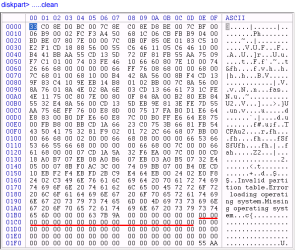
Above we see what happens after the clean command. If there were partition tables in the first 446 bytes, they have all been zeroed.

View attachment 398115

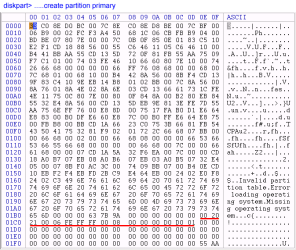
After creating the primary partition (above), 0x01bf to 0x01cd are filled with partition table data.

View attachment 398116

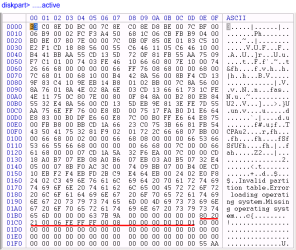
It is the active command (above) that makes the partition bootable - the nibble at 0x01b8 now contains 80.

View attachment 398117

The format command doesn't change the range 0x01be to 0x01cd.......

View attachment 398118

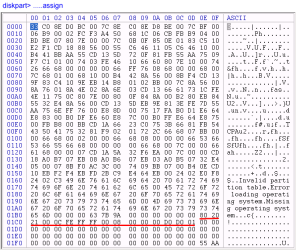
..and neither dies the assign command.......

View attachment 398119

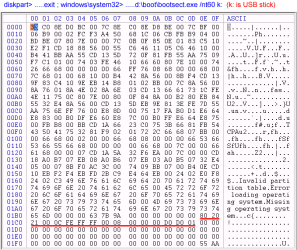
...or the loading of the bootmgr by means of bootsect.exe

So..onwards and upwards to Win PE.

Hope this helps newbies like me.

Kind regards
JohnPat
 

My Computer My Computer

At a glance

Trying to move to Windows 7 Professionsl 64 bitIntel Core DuoCurrently 4GB moving to 16 GB if I get it all...NVidia Quadro K2200
Computer type
PC/Desktop
Computer Manufacturer/Model Number
Dell optiplex 780
OS
Trying to move to Windows 7 Professionsl 64 bit
CPU
Intel Core Duo
Motherboard
Dell 0C27VV revision A01
Memory
Currently 4GB moving to 16 GB if I get it all working!
Graphics Card(s)
NVidia Quadro K2200
Hard Drives
Currently Seagate 160 GB moving to WD 2TB
Also installing Micron 512 GB SSD for OS's
Antivirus
Not decided yet
Browser
Probably Opera
Hello

Second attempt to provide feedback.

clean.png

The above image (should) shows the first sector after the diskpart 'clean command. The area of the sector reserved for the four partition tables (0x01be to 0x1fd inclusive) is zeroed, so there is no partition table data.
I have underlined the area 0x1be to 0x1cd which is the first partition table data area.

primary.png

Above we see the effect of creating the primary partition. The partition table data is present but nibble 0x01be is still zero.

active.png

Now we see the effect of making the partition active. Nibble 0x01be has been reset from 00 to 80. This is now a bootable partition,

format.png

Formatting the stick has no effect on the partition table or the bootability of the partition.......

assign.png

....and neither does the assignment command.....

bootsect.png

....or exiting diskpart and running bootsect.exe /nt60 to update the master boot code for the partition to use bootmgr.

Conclusion: Running the disk part active command makes the partition bootable.

In a state of great anticipation I then went to the standard winpe_x86 directory I had prepared using the Windows Automated Installation Kit for Win PE3.0. After copying all the files to the stick, and checking every thing was identical to the master on the HD, I then demounted the USB and went to the target machine, plugged the USB in, set the machine to boot from 'USB device' using the F12 one time boot menu key and...
received the following error message:

"
bootmgr not present
Strike F1 to retry boot, F2 for setup utility
Press F5 for onboard diagnostics
"

I then rechecked the USB stick and found in the iso directory a file called 'bootmgr' which had no extension. At this point I did what most English people would do, that is made a cup of tea, found the biscuit tin, and composed this mail.

Any further suggestions?

Regards
JohnPat
 

My Computer My Computer

At a glance

Trying to move to Windows 7 Professionsl 64 bitIntel Core DuoCurrently 4GB moving to 16 GB if I get it all...NVidia Quadro K2200
Computer type
PC/Desktop
Computer Manufacturer/Model Number
Dell optiplex 780
OS
Trying to move to Windows 7 Professionsl 64 bit
CPU
Intel Core Duo
Motherboard
Dell 0C27VV revision A01
Memory
Currently 4GB moving to 16 GB if I get it all working!
Graphics Card(s)
NVidia Quadro K2200
Hard Drives
Currently Seagate 160 GB moving to WD 2TB
Also installing Micron 512 GB SSD for OS's
Antivirus
Not decided yet
Browser
Probably Opera
Any further suggestions?

Not from me. You're at the point where, as I explained to SIW2, "my experience [with PE material] is too limited to be familiar with what may have gone wrong and why, or how to remediate the problem."

Your screenshots and stepping through the MBR sector look good, and exactly as they should be, with the minor exception that there is no DiskID. I don't think that's causing your boot problem, though.

Since you stated your effort is to learn, I'll add just a couple clarifications to your play-by-play commentary:

"Formatting the stick has no effect on the partition table or the bootability of the partition."​
Not quite true. You'll notice the "partition-type" byte at 0x01C2 changed from 06 ("FAT16") to 0C ("FAT32").

Also, to repeat myself and for the sake of accuracy, you don't format hard disks or USB sticks, you format partitions. You partition hard disks and USB sticks, and you format partitions.

The DiskID I mentioned is the four bytes at 0x01B8-0x01BB. Windows doesn't like to see all zeroes there. It doesn't matter what's there, just as long as it's not all zeroes. I doubt that's your immediate problem, though, because "bootmgr not present" suggests the OS is stalling earlier, before it ever gets to the point of looking at the DiskID.

The diskpart "assign" command is an OS-level command. Everything in the MBR sector is pre-OS, so naturally the command will change nothing in the MBR sector.

The bootsect "/nt60" switch writes boot code to the *partition* boot record (PBR), not the master boot record (MBR). So you won't find any changes to the MBR, you'll find them in the PBR.

The process is: the BIOS finds the boot disk (per your BIOS settings), loads and executes that disk's MBR code, which finds the boot partition (per the partition table and "active" flag), loads and executes that partition's PBR, which finds the OS-specific boot files and loads the operating system. In the case of Vista/7/8/10 OSes, it normally finds those per the BCD.

The "bootmgr not present" is a sign you got past the MBR stage, so you're beyond my area of expertise. (If your process had stalled before that point, you would have seen something like "no boot device" or "missing operating system".)

Maybe somebody else can help you with the PE part of the process. Perhaps it's a BCD issue or something like that. Regardless, the problem is not in your MBR sector, it's going to be in the partition boot sector or beyond. (FTR, your partition table says your partition boot sector is in LBA 2048, which is the expected and normal default location.)
 

My Computer My Computer

At a glance

Windows 7/8.1/10 multibootIntel Core i7-770048GB (2x16GB Crucial DDR4-3200 + 2x8GB Hynix ...Intel HD630 + AMD Radeon R7 450 PCIe
Computer type
PC/Desktop
Computer Manufacturer/Model Number
Dell Optiplex 7050
OS
Windows 7/8.1/10 multiboot
CPU
Intel Core i7-7700
Motherboard
Dell, Intel Q270 chipset
Memory
48GB (2x16GB Crucial DDR4-3200 + 2x8GB Hynix DDR4-2400)
Graphics Card(s)
Intel HD630 + AMD Radeon R7 450 PCIe
Monitor(s) Displays
Asus VC279 (27")
Screen Resolution
1920x1080
Hard Drives
Toshiba M.2 NVMe (256GB),
Samsung 960 Evo (500GB),
WD Red Plus 80EFBX (8TB)
Hello dg1621

Thank you for the detail you provided on the booting process. I will look further at the PBR starting at LBA 2048 to see what I can make of it. However, can you tell me what the letters BCD stand for please? There is a BCD file in the Boot directory of the Win PE 3.0 iso directory, but it is another file with no extension so presumably the OS doesn't know what to do with it.

I have opened this file with Notepad, and has the following alpha string:

"
regf/ / ._¤)UÇ   `  t \ b c d \ h i v e s \ b i n \ p c a t _ c d b o o t \ b c d { 4 6 3 6 8 5 6 e - 5 4 0 f - 4 1 7 0 - a 1 3 0 - a 8 4 7 7 6 f 4 c 6 5 4 } àÿÿÿvk  €    25Type{9deàÿÿÿvk  €   27Elementd*ÿÿÿnk ¼OÕ¬Å x ÿÿÿÿÿÿÿÿ € x ÿÿÿÿ   Description ¨ÿÿÿnk ¼OÕ¬Å x  P& ÿÿÿÿ ÿÿÿÿx ÿÿÿÿ  Elements¨ÿÿÿnk ¼OÕ¬Å h! ÿÿÿÿÿÿÿÿ `" x ÿÿÿÿ J³ÑL
"

together with numeric strings that look registry HK entries. Is this a pre-built registry data? Is this an executable or a data file? What file extension should it have to be usable?

There is one other point I'd like to understand. As I reported, the message I get says 'bootmgr not present'.
I looked at the file named 'bootmgr' with no extension in the iso directory of the Win PE build, again using Notepad. It looks like a binary file, but has within it a string containing an error message warning that 'this program cannot be run under MS-DOS'. There is also the following alpha string:

"
Þ  S t r i n g F i l e I n f o º  0 4 0 9 0 4 B 0 L   C o m p a n y N a m e M i c r o s o f t C o r p o r a t i o n B
 F i l e D e s c r i p t i o n B o o t M a n a g e r l &  F i l e V e r s i o n 6 . 1 . 7 6 0 0 . 1 6 3 8 5 ( w i n 7 _ r t m . 0 9 0 7 1 3 - 1 2 5 5 ) 8  I n t e r n a l N a m e b o o t m g r . e x e € .  L e g a l C o p y r i g h t © M i c r o s o f t C o r p o r a t i o n . A l l r i g h t s r e s e r v e d . @  O r i g i n a l F i l e n a m e b o o t m g r . e x e j %  P r o d u c t N a m e M i c r o s o f t ® W i n d o w s ® O p e r a t i n g S y s t e m B   P r o d u c t V e r s i o n 6 . 1 . 7 6 0 0 . 1 6 3 8 5 D  V a r F i l e I n f o $  T r a n s l a t i o n °
"

This suggest to me that this file it is actually an executable and is in fact the executable 'bootmgr.exe'. Why does the file not have an extension? How can it be used? What is the purpose of this?

My next step is to rename the file as 'bootmgr.exe' and try again, but I would welcome any comments from anybody before I take this step.

Kind regards
JohnPat

P.S. I will look at the Terabyte Disk management software tomorrow, thanks for the pointer to it
 

My Computer My Computer

At a glance

Trying to move to Windows 7 Professionsl 64 bitIntel Core DuoCurrently 4GB moving to 16 GB if I get it all...NVidia Quadro K2200
Computer type
PC/Desktop
Computer Manufacturer/Model Number
Dell optiplex 780
OS
Trying to move to Windows 7 Professionsl 64 bit
CPU
Intel Core Duo
Motherboard
Dell 0C27VV revision A01
Memory
Currently 4GB moving to 16 GB if I get it all working!
Graphics Card(s)
NVidia Quadro K2200
Hard Drives
Currently Seagate 160 GB moving to WD 2TB
Also installing Micron 512 GB SSD for OS's
Antivirus
Not decided yet
Browser
Probably Opera
Hello again dg1261

Sorry I got your moniker mixed up - I'm slightly dyslexic, not great for detailed work where every character counts, I guess.

Regards
JohnPat
 

My Computer My Computer

At a glance

Trying to move to Windows 7 Professionsl 64 bitIntel Core DuoCurrently 4GB moving to 16 GB if I get it all...NVidia Quadro K2200
Computer type
PC/Desktop
Computer Manufacturer/Model Number
Dell optiplex 780
OS
Trying to move to Windows 7 Professionsl 64 bit
CPU
Intel Core Duo
Motherboard
Dell 0C27VV revision A01
Memory
Currently 4GB moving to 16 GB if I get it all working!
Graphics Card(s)
NVidia Quadro K2200
Hard Drives
Currently Seagate 160 GB moving to WD 2TB
Also installing Micron 512 GB SSD for OS's
Antivirus
Not decided yet
Browser
Probably Opera
can you tell me what the letters BCD stand for please?
See Wikipedia


This suggest to me that this file it is actually an executable and is in fact the executable 'bootmgr.exe'. Why does the file not have an extension? How can it be used? What is the purpose of this?
Neither bootmgr nor the BCD have file extensions. Bootmgr is executable program code and the BCD is a database of configuration parameters telling bootmgr what to use. You cannot run bootmgr from the command shell, it is executed by the PBR. Study the PBR code at LBA 2048 and you should find references to bootmgr. FWIW, I think your "bootmgr not present" might mean the PBR can't find the bootmgr file for some reason. Again, I'm not qualified to diagnose why.

The BCD has to be configured correctly to tell bootmgr where the boot partition is (it need not necessarily be the same place as the bootmgr file and/or BCD) and assorted boot parameters. For more details, do some research on the various options for a BCD entry. There are also several BCD editors around, including Microsoft's command-line BCD editor.

As SIW2 implied, you shouldn't have to do all this grunt work. The method he linked to is supposed to take care of all this configuration stuff automatically. But since that didn't seem to work (or, at least, didn't seem to work the way you did it), I can't give you any guidance on what to do about it.
 

My Computer My Computer

At a glance

Windows 7/8.1/10 multibootIntel Core i7-770048GB (2x16GB Crucial DDR4-3200 + 2x8GB Hynix ...Intel HD630 + AMD Radeon R7 450 PCIe
Computer type
PC/Desktop
Computer Manufacturer/Model Number
Dell Optiplex 7050
OS
Windows 7/8.1/10 multiboot
CPU
Intel Core i7-7700
Motherboard
Dell, Intel Q270 chipset
Memory
48GB (2x16GB Crucial DDR4-3200 + 2x8GB Hynix DDR4-2400)
Graphics Card(s)
Intel HD630 + AMD Radeon R7 450 PCIe
Monitor(s) Displays
Asus VC279 (27")
Screen Resolution
1920x1080
Hard Drives
Toshiba M.2 NVMe (256GB),
Samsung 960 Evo (500GB),
WD Red Plus 80EFBX (8TB)
Hello all

In response to the error message 'bootmgr is missing', dg1261 suggested I look at the Partition Boot Record (PBR) starting at LBS 2048. This I have done, and the screen grab is shown below:

View attachment 398157

BOOTMGR is present at 0x016a to 0x016f. Following dg1261's lead I have looked on the internet for information about the structure of the PBR; not much is given compared with that for the MBR. Can anyone tell me whether or not this sector is correct? How does this entry come to use the extensionless file 'bootmgr' which is located in the ISO directory of the USB stick?

The directory structure on the USB stick was prepared on the 'technician' machine. and is as follows:

G:\ISO

...\boot
......\fonts
.........(5 .ttf files)
......bcd
......boot.sdi
......bootfix.bin
......etfsboot.com

...\EFI
......\microsoft
.........\boot
............\fonts
...............(same 5 .ttf files as earlier)
............bcd

...\sources
......boot.wim [Note this file is the same as winpe.wim generated in the WAIK, copied to the USB
root and then copied again to sources and renamed boot.wim, in accordance with
instructions]
...bootmgr

...\mount [Empty directory]

...etfsboot.com
...winpe.wim

dg1261 has said he doesn't have to work with Win PE so I do not expect him or her to comment on whether this structure is right, but there might be some one out there who can. I have temporarily abandoned integrating Acronis with the boot.wim file - I'm just trying to get the target machine to boot and for Win PE to present me with whatever it gives the user on the screen. This would rate a further cup of tea!!

I know there is Media Builder in Acronis. Looking back at my initial post under software, it can be seen that whilst this does seem to carry out some work - the .wim file increases from around 111 KB to around 180 KB, and the .wim file might boot (some unreliability here), it does not boot into the Acronis Disk Director product, but instead tries to start the Acronis True Image product. Since I do not have Acronis True Image the attempted boot to the application fails. There must be something wrong with the script that attempts to start the application, but I cannot locate the script despite considerable time trying

Any advice would once again be gratefully received and acted upon.

Kind regards
JohnPat
 

My Computer My Computer

At a glance

Trying to move to Windows 7 Professionsl 64 bitIntel Core DuoCurrently 4GB moving to 16 GB if I get it all...NVidia Quadro K2200
Computer type
PC/Desktop
Computer Manufacturer/Model Number
Dell optiplex 780
OS
Trying to move to Windows 7 Professionsl 64 bit
CPU
Intel Core Duo
Motherboard
Dell 0C27VV revision A01
Memory
Currently 4GB moving to 16 GB if I get it all working!
Graphics Card(s)
NVidia Quadro K2200
Hard Drives
Currently Seagate 160 GB moving to WD 2TB
Also installing Micron 512 GB SSD for OS's
Antivirus
Not decided yet
Browser
Probably Opera
Can anyone tell me whether or not this sector is correct?

No, because your attachment is borked.

I am not sure why you are having so much difficulty. It is a straightforward process. NT6 diskpart or any modern partition manager will write the correct bootsector code during format. What did you use to format the partition?
 

My Computers My Computers

  • At a glance

    7 X64i5 84002x8gb 3200mhz
    Computer type
    PC/Desktop
    OS
    7 X64
    CPU
    i5 8400
    Motherboard
    gigabyte b365m ds3h
    Memory
    2x8gb 3200mhz
    Hard Drives
    various
    PSU
    pure power 11 400w cm
    Case
    Coolermaster
    Cooling
    cryorig m9i
  • At a glance

    7x64g54008gb ddr4 2400
    Computer type
    PC/Desktop
    OS
    7x64
    CPU
    g5400
    Motherboard
    ga b365m ds3h
    Memory
    8gb ddr4 2400
    PSU
    xfx pro 450w
Back
Top