
Solved Hard drive running extremely loud

book

New member
Local time
9:23 AM
Messages
11
I replaced my laptop's hard drive around August 2016 and one night in December (around Christmas) when I woke it up from sleep mode, it started making loud screaming noises. Nowadays it's like that right when I turn it on and stays that way the entire time I use it. It gets the loudest if I let it fall asleep and wake it up. Once in a while it's completely normal, no screaming noises. (as I'm typing this now, the noise is not at possessed-demon level but it was like that when I turned in on ~10 minutes ago but it's randomly getting louder and getting quieter etc, my old hard drive was not like that at all, it only got loud when I was playing MMOs)

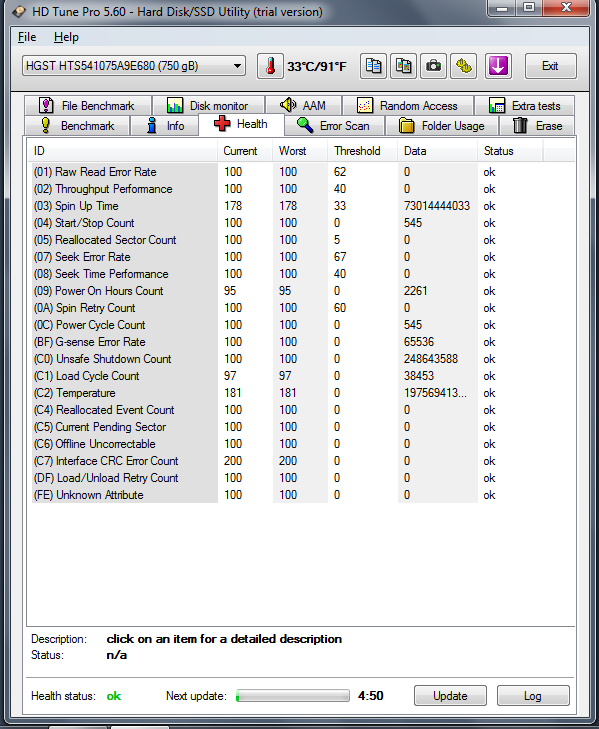
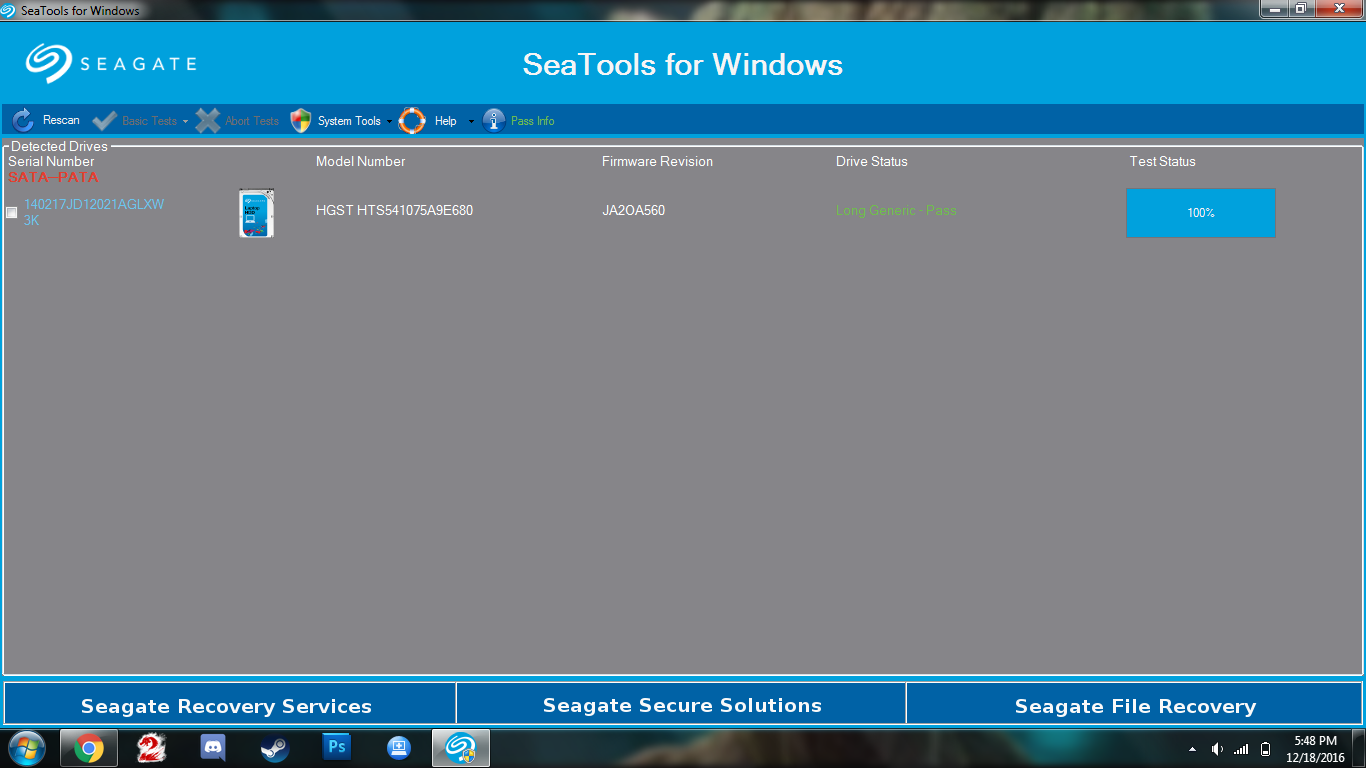
I've used HD Tune Pro a bunch of times to check on it but it claims everything is fine. I ran chkdsk back in December but it was fine.

Taken just now:
FWHvWga.png


December 2016 as you can see in the corner:
WeXgapr.png


I've uploaded an unlisted video to YouTube of my laptop singing to demons.

My laptop specs:

Toshiba Portege R835-P50X
Intel i3-2310M @ 2.1 GHz
4 GB RAM

This is the hard drive that came with the laptop (purchased June 2011, replaced August 2016):
X2wmpXa.jpg


This is the replacement I am using that is misbehaving:
VZWsYtX.jpg


I just want to know if anyone can figure out why it's doing this. Did I just get unlucky and get a faulty hard drive or is something else going on?
 

My Computer My Computer

Computer type
Laptop
Computer Manufacturer/Model Number
Toshiba Portege R835-P50X
OS
Windows 7 Home Premium 64bit
CPU
i3-2310M CPU @ 2.10GHz
Memory
4 GB
Graphics Card(s)
Intel HD Graphics Family
It sounds dreadful. Are you sure the sound is definitely coming from the HDD and not a fan for example?
If so back up your data and make a system image to an external HDD. At the moment I can't see any problems in the SMART data you posted. I think HGST is Hitachi taken over by WD which looks like a very close replacement.

If the drive is still under warranty I'd get it replaced.
 

My Computer My Computer

Computer type
PC/Desktop
Computer Manufacturer/Model Number
Own build
OS
Windows 7x64 Home Premium SP1
CPU
Intel i7 2600k
Motherboard
ASUS P8Z68 Deluxe
Memory
G.Skill Ripjaws (DDR3-1600) 2x4GB
Graphics Card(s)
Nvidia GeForce GTS 450; Intel HD Graphics 3000(GT2+)
Monitor(s) Displays
Dell Ultrasharp IPS panel U2311H, Samsung SyncMaster P2350
Screen Resolution
1920x1080
Hard Drives
Samsung 850 Pro SSD 256GB, Samsung SSD 840 120GB, Seagates 1TB Barracuda ST31000528AS x2
PSU
Seasonic M12II 520W
Case
Lian Li Lancool PC-K60
Cooling
Case: 1x120mm, 3x140mm CPU: Hyper 212+
Keyboard
Logitech MK520 (wireless)
Mouse
Logitech MK520
Internet Speed
6-7 Mbps
Antivirus
Norton Security Premium, Malwarebytes on 2 (MSE on 3rd PC)
Browser
FireFox
Other Info
Audio: Logitech Z523 2.1
Sounds like a noisy fan to me. A HDD making that much noise would probably fail to work.
 

My Computer My Computer

Computer type
PC/Desktop
Computer Manufacturer/Model Number
Self built using existing case
OS
Windows 7 Home Premium 64 bit sp1
CPU
Intel i5 3570 3.4Ghz Ivy Bridge SKT 1155 quad core
Motherboard
Gigabyte Z77-HD3 SKT 1155 2xSata 3, 4x USB 3.0
Memory
G-Skill Rip Jaws 16Gb (8x2) DDR3 -1600 PC3 12800 CL 10 red
Graphics Card(s)
Gigabyte NVIDIA GT610 1Gb DDR3 810/1200 PCI-E 2.0 Silent
Sound Card
NVIDIA High Definition & Realtech High Definition Audio
Monitor(s) Displays
2 x Philips 226V4L 16:9 aspect ratio
Screen Resolution
1920 x 1080 HD
Hard Drives
Samsung 840 Pro 256gb SSD, SATA 3.
Hitachi Touro Portable 1tb, USB 3.0 HDD used for image b/ups.
PSU
Corsair VS450
Case
Codeng
Cooling
PSU fan & CPU fan
Keyboard
Logitech
Mouse
Logitech Wireless trackball M570
Internet Speed
Wireless 3G. 3mg down & 550kb up.
Antivirus
Bitdefender Internet Security 2020
Browser
Opera (Current Version) & Firefox
Other Info
MS Office 2013 Pro. Davis weather station software. MGE Nova 600 avr UPS.
Noisy Hard Drive? Or bad fan

Sounds like a noisy fan to me. A HDD making that much noise would probably fail to work.

I was just about to say the same thing. If the health of the hard drive is as illustrated then I highly doubt it is the hard drive. You might want to check your fans.
 

My Computers My Computers

System One System Two

  • Computer type
    PC/Desktop
    Computer Manufacturer/Model Number
    ASUS CUSTOM BUILD IN THERMALTAKE LEVEL 10 GT CASE
    OS
    Windows 7 Ultimate, Windows 8.1 Pro, Linux Mint/Cinnimon (Triple Boot)
    CPU
    INTEL 6900K
    Motherboard
    X99-E WS USB 3.1
    Memory
    CORSAIR DOMINATOR PLATINUM 128GB
    Graphics Card(s)
    EVGA GTX 1070 FTW
    Sound Card
    Onboard Crystal Sound - very nice ;)
    Monitor(s) Displays
    SAMSUNG 4K 28"
    Screen Resolution
    3140 x 2160 - A little extreme. Need to change it.
    Hard Drives
    1) LSI LOGICAL VOLUME RAID 10 (250 GBX4) SSD ARRAY
    2) INTEL RAID 0 KINGSTON (2) SSD ARRAY
    3) INTEL RAID 1 SEAGATE (2) 1TB ARRAY (secured backup)
    4) INTEL RAID 1 SEAGATE HYBRID (2) (secure secured backup)
    5) AHCI SEAGATE 3TB (1) BACKUP & STORAGE (back
    PSU
    CORSAIR HX 1000i
    Case
    THERMAL TAKE LEVEL 10 GT
    Cooling
    NOCTUA TOWER COOLING - PUSH/PULL
    Keyboard
    LOGITECH PRODIGY (One day I'll get a real keyboard.)
    Mouse
    LOGITECH (One day I'll get a real mouse.)
    Internet Speed
    300 Gb down 12 up Intel(R) I210 Gigabit Network Connection
    Antivirus
    several - Network implementing vs from other PCs - ask me
    Browser
    Mostly FireFox these days
    Other Info
    NOT ENOUGH ROOM TO LIST ALL HARD DRIVES HERE. Cuts me off at 5. Did you know that if you run a network you can scan your PC for viruses via other PCs using several different virus scanners? No virus scanner gets it all. This is narrows down the window for contracting a virus. By using multiple operating systems you can use different virus scanners with no risk of conflict.
  • Antivirus
    KASPERSKY
Ok. Tried to test it by removing the hard drive and turning on the laptop. Noise was still there. So it's the fan? I removed the cover and took a look and everything seems okay to my amateur eye... Cleaned some dust out, put everything back, turned it back on and still screaming at me. Could something other than dust (I might have missed some unknowingly) be causing this issue?
 

My Computer My Computer

Computer type
Laptop
Computer Manufacturer/Model Number
Toshiba Portege R835-P50X
OS
Windows 7 Home Premium 64bit
CPU
i3-2310M CPU @ 2.10GHz
Memory
4 GB
Graphics Card(s)
Intel HD Graphics Family
It looks like you need a fan replacement. If you can turn the laptop on with the cover removed it should be easy to locate the source of the sound. I think you have a cpu cooling fan.
 

My Computer My Computer

Computer type
PC/Desktop
Computer Manufacturer/Model Number
Own build
OS
Windows 7x64 Home Premium SP1
CPU
Intel i7 2600k
Motherboard
ASUS P8Z68 Deluxe
Memory
G.Skill Ripjaws (DDR3-1600) 2x4GB
Graphics Card(s)
Nvidia GeForce GTS 450; Intel HD Graphics 3000(GT2+)
Monitor(s) Displays
Dell Ultrasharp IPS panel U2311H, Samsung SyncMaster P2350
Screen Resolution
1920x1080
Hard Drives
Samsung 850 Pro SSD 256GB, Samsung SSD 840 120GB, Seagates 1TB Barracuda ST31000528AS x2
PSU
Seasonic M12II 520W
Case
Lian Li Lancool PC-K60
Cooling
Case: 1x120mm, 3x140mm CPU: Hyper 212+
Keyboard
Logitech MK520 (wireless)
Mouse
Logitech MK520
Internet Speed
6-7 Mbps
Antivirus
Norton Security Premium, Malwarebytes on 2 (MSE on 3rd PC)
Browser
FireFox
Other Info
Audio: Logitech Z523 2.1
Ok. Tried to test it by removing the hard drive and turning on the laptop. Noise was still there. So it's the fan? I removed the cover and took a look and everything seems okay to my amateur eye... Cleaned some dust out, put everything back, turned it back on and still screaming at me. Could something other than dust (I might have missed some unknowingly) be causing this issue?

Noisy fans are usually caused by dry bearings & nothing can successfully be done to rectify that, other than replacing the fan.

The fan will look perfectly normal & can usually be turned easily by hand, but when running at speed the dry bearings start howling.

If you have any doubts about how to replace the CPU fan it would be best to take it to a reliable computer shop & get them to do it.
 

My Computer My Computer

Computer type
PC/Desktop
Computer Manufacturer/Model Number
Self built using existing case
OS
Windows 7 Home Premium 64 bit sp1
CPU
Intel i5 3570 3.4Ghz Ivy Bridge SKT 1155 quad core
Motherboard
Gigabyte Z77-HD3 SKT 1155 2xSata 3, 4x USB 3.0
Memory
G-Skill Rip Jaws 16Gb (8x2) DDR3 -1600 PC3 12800 CL 10 red
Graphics Card(s)
Gigabyte NVIDIA GT610 1Gb DDR3 810/1200 PCI-E 2.0 Silent
Sound Card
NVIDIA High Definition & Realtech High Definition Audio
Monitor(s) Displays
2 x Philips 226V4L 16:9 aspect ratio
Screen Resolution
1920 x 1080 HD
Hard Drives
Samsung 840 Pro 256gb SSD, SATA 3.
Hitachi Touro Portable 1tb, USB 3.0 HDD used for image b/ups.
PSU
Corsair VS450
Case
Codeng
Cooling
PSU fan & CPU fan
Keyboard
Logitech
Mouse
Logitech Wireless trackball M570
Internet Speed
Wireless 3G. 3mg down & 550kb up.
Antivirus
Bitdefender Internet Security 2020
Browser
Opera (Current Version) & Firefox
Other Info
MS Office 2013 Pro. Davis weather station software. MGE Nova 600 avr UPS.
Back
Top