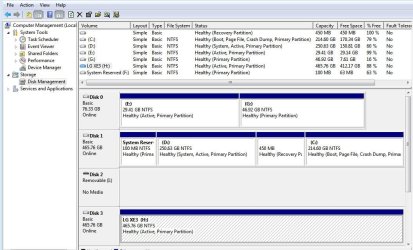
You don't need the rescue media on your external hard drive only on a CD. The CD is necessary to be able to boot the computer in the event of a major recovery. However, it is essential that you test it.
To do that shut down the computer, plug in the external hard drive, load the CD & restart the computer, hitting F8 or whatever key is necessary on the laptop to get to the boot menu & select the CD. After a short while it will display a menu & you should be able to find your external hard drive & also the particular image you wish to install. Don't install it unless you have a problem.
I got the menu to pop up, thanks so much! So, from the menu, are you saying that I can load any image? Like the backup image of my Windows backup that I made from Windows itself along with the image I made from Macrium?
My Computer
- Computer type
- Laptop
- Computer Manufacturer/Model Number
- DELL LATTITUDE E6520
- OS
- Windows 7 Pro, 64-bit, SP1
- CPU
- intel Core i7-2760QM @ 2.40 GHz - Sandy Bridge 32nm
- Motherboard
- Dell Inc. 0J4TFW (CPU 1)
- Memory
- 8.00GB Dual-Channel DDR3 @ 665MHz (9-9-9-24)
- Graphics Card(s)
- 511MB NVIDIA NVS 4200M (Dell)
- Sound Card
- NVIDIA High Definition Audio
- Monitor(s) Displays
- Panasonic 55"
- Screen Resolution
- 1920 x 1080@ 60Hz
- Hard Drives
- 465GB WD WDC WD50000BKPT-75PK4 (SATA)
558GB INTEL 320 SERIES VO0600EC HPP (SATA)
556GB MAXTOR ONETOUCH USB DEVICE (SATA)
- Antivirus
- MalwareBytes
- Browser
- Firefox