Solved Image your system with free Macrium

You don't need the rescue media on your external hard drive only on a CD. The CD is necessary to be able to boot the computer in the event of a major recovery. However, it is essential that you test it.

To do that shut down the computer, plug in the external hard drive, load the CD & restart the computer, hitting F8 or whatever key is necessary on the laptop to get to the boot menu & select the CD. After a short while it will display a menu & you should be able to find your external hard drive & also the particular image you wish to install. Don't install it unless you have a problem.

I got the menu to pop up, thanks so much! So, from the menu, are you saying that I can load any image? Like the backup image of my Windows backup that I made from Windows itself along with the image I made from Macrium?
 

My Computer My Computer

Computer type
Laptop
Computer Manufacturer/Model Number
DELL LATTITUDE E6520
OS
Windows 7 Pro, 64-bit, SP1
CPU
intel Core i7-2760QM @ 2.40 GHz - Sandy Bridge 32nm
Motherboard
Dell Inc. 0J4TFW (CPU 1)
Memory
8.00GB Dual-Channel DDR3 @ 665MHz (9-9-9-24)
Graphics Card(s)
511MB NVIDIA NVS 4200M (Dell)
Sound Card
NVIDIA High Definition Audio
Monitor(s) Displays
Panasonic 55"
Screen Resolution
1920 x 1080@ 60Hz
Hard Drives
465GB WD WDC WD50000BKPT-75PK4 (SATA)
558GB INTEL 320 SERIES VO0600EC HPP (SATA)
556GB MAXTOR ONETOUCH USB DEVICE (SATA)
Antivirus
MalwareBytes
Browser
Firefox
From the Macrium recovery disk you can restore a Macrium image you made. To restore a windows image made with windows backup you need a windows recovery disk.
 

My Computers My Computers

System One System Two

  • Computer type
    PC/Desktop
    Computer Manufacturer/Model Number
    ALWAYS UNDER CONSTRUCTION
    OS
    Windows 11 Pro
    CPU
    Ryzen 9 5900X
    Motherboard
    Asus X570 Crosshair Viii Hero
    Memory
    32GB G Skill DDR4-3600
    Graphics Card(s)
    EVGA RTX 3080 FTW 3 Ultra
    Sound Card
    On Board/Sennheiser PC37X Headset
    Monitor(s) Displays
    3 X Asus 27"
    Screen Resolution
    2560x1440
    Hard Drives
    2 X 1 TB NVME drives
    PSU
    EVGA 850
    Case
    Phanteks Eclipse P400A
    Cooling
    EVGA 280 AIO
    Keyboard
    Logitech G510s/ Logitech G13
    Mouse
    Logitech G502
    Internet Speed
    24/1
    Antivirus
    ESET/MBAM Pro/SAS Pro
    Browser
    Chrome/ Firefox/ Edge
  • Computer type
    Laptop
    System Manufacturer/Model Number
    Dell 16 Plus
    OS
    Windows 11 Pro
    CPU
    Intel Ultra 9 288V
    Memory
    32 GB LPDDR5X 8533
    Monitor(s) Displays
    16" Mini-LED HDR600 Touch 90 Hz
    Screen Resolution
    2560X1600
    Hard Drives
    1 TB NVME
Cool, I have one of those on CD as well. Thanks so much!
 

My Computer My Computer

Computer type
Laptop
Computer Manufacturer/Model Number
DELL LATTITUDE E6520
OS
Windows 7 Pro, 64-bit, SP1
CPU
intel Core i7-2760QM @ 2.40 GHz - Sandy Bridge 32nm
Motherboard
Dell Inc. 0J4TFW (CPU 1)
Memory
8.00GB Dual-Channel DDR3 @ 665MHz (9-9-9-24)
Graphics Card(s)
511MB NVIDIA NVS 4200M (Dell)
Sound Card
NVIDIA High Definition Audio
Monitor(s) Displays
Panasonic 55"
Screen Resolution
1920 x 1080@ 60Hz
Hard Drives
465GB WD WDC WD50000BKPT-75PK4 (SATA)
558GB INTEL 320 SERIES VO0600EC HPP (SATA)
556GB MAXTOR ONETOUCH USB DEVICE (SATA)
Antivirus
MalwareBytes
Browser
Firefox
From the Macrium recovery disk you can restore a Macrium image you made. To restore a windows image made with windows backup you need a windows recovery disk.

thank you, i tested out the recovery disks and backups on both on a 7 laptop + 8.1 desktop and it began the process of restoring before i canceled it. i've been using computers for 20 years and never have backed up my whole HDD before, just the important documents on externals and CD's. should've started much sooner, would've saved me some headache and money on CD's, DVD's, cases, labels, etc. :mad:

to be fair i've only had to reinstall my OS two or three times in that span but it sure is nice to know that even if my primary gets compromised, i can get it working in just a few steps. i REALLY appreciate all the help everyone. i also wish i joined this forum 20 years ago too now that i think about it. :D
 

My Computer My Computer

Computer type
Laptop
Computer Manufacturer/Model Number
DELL LATTITUDE E6520
OS
Windows 7 Pro, 64-bit, SP1
CPU
intel Core i7-2760QM @ 2.40 GHz - Sandy Bridge 32nm
Motherboard
Dell Inc. 0J4TFW (CPU 1)
Memory
8.00GB Dual-Channel DDR3 @ 665MHz (9-9-9-24)
Graphics Card(s)
511MB NVIDIA NVS 4200M (Dell)
Sound Card
NVIDIA High Definition Audio
Monitor(s) Displays
Panasonic 55"
Screen Resolution
1920 x 1080@ 60Hz
Hard Drives
465GB WD WDC WD50000BKPT-75PK4 (SATA)
558GB INTEL 320 SERIES VO0600EC HPP (SATA)
556GB MAXTOR ONETOUCH USB DEVICE (SATA)
Antivirus
MalwareBytes
Browser
Firefox
i can get a restore going on both my 7 and 8.1 and it loads up fine from the boot menu via CD. i went through the documentation at macrium but it's a bit of vague when it comes to partitions, system images and images of drives so i just make one of each on each OS. should my primary become incapable of loading windows properly, will they all do the trick of restoring it to a working state?

i also made images of both the primary and the 'system reserved', NTFS active, with the primary drive to my D drive. should all my images and/or partitions include the NTFS active?

it's also vague about XML files. my question for this is: should they be made to "read only" if it will be used from the boot menu? in other words, if i can get into windows but something is still not right and i need to restore, will the XML be useless if it has been changed to "read only'?

i should've asked this before i spent hours backing up TBH but i was kind of excited to hear that you can do all this with a free version of macrium. especially after i just got both machines fixes in the past week. i wanted to get theses backed up while they are both in perfect working order to save myself time and effort should it happen again. before i backed up my drives, i ran malwarebytes, superanti spyware, cc cleaner, advanced system care, driver booster and installed windows updates. then i took off all the music and video on an external 4TB HDD to speed up back up and recovery times on both machines. i learned from the best (you guys). :geek:
 

My Computer My Computer

Computer type
Laptop
Computer Manufacturer/Model Number
DELL LATTITUDE E6520
OS
Windows 7 Pro, 64-bit, SP1
CPU
intel Core i7-2760QM @ 2.40 GHz - Sandy Bridge 32nm
Motherboard
Dell Inc. 0J4TFW (CPU 1)
Memory
8.00GB Dual-Channel DDR3 @ 665MHz (9-9-9-24)
Graphics Card(s)
511MB NVIDIA NVS 4200M (Dell)
Sound Card
NVIDIA High Definition Audio
Monitor(s) Displays
Panasonic 55"
Screen Resolution
1920 x 1080@ 60Hz
Hard Drives
465GB WD WDC WD50000BKPT-75PK4 (SATA)
558GB INTEL 320 SERIES VO0600EC HPP (SATA)
556GB MAXTOR ONETOUCH USB DEVICE (SATA)
Antivirus
MalwareBytes
Browser
Firefox

My Computers My Computers

System One System Two

  • Computer type
    PC/Desktop
    OS
    7 X64
    CPU
    i5 8400
    Motherboard
    gigabyte b365m ds3h
    Memory
    2x8gb 3200mhz
    Hard Drives
    various
    PSU
    pure power 11 400w cm
    Case
    Coolermaster
    Cooling
    cryorig m9i
  • Computer type
    PC/Desktop
    OS
    7x64
    CPU
    g5400
    Motherboard
    ga b365m ds3h
    Memory
    8gb ddr4 2400
    PSU
    xfx pro 450w
You might find this useful
17514x64-v3.iso

i've never seen this software before, what is it exactly and can you suggest what i should or could do with it?

i burned the iso to a disc and ran it fine and loaded, just not sure what i am supposed do with this.
 

My Computer My Computer

Computer type
Laptop
Computer Manufacturer/Model Number
DELL LATTITUDE E6520
OS
Windows 7 Pro, 64-bit, SP1
CPU
intel Core i7-2760QM @ 2.40 GHz - Sandy Bridge 32nm
Motherboard
Dell Inc. 0J4TFW (CPU 1)
Memory
8.00GB Dual-Channel DDR3 @ 665MHz (9-9-9-24)
Graphics Card(s)
511MB NVIDIA NVS 4200M (Dell)
Sound Card
NVIDIA High Definition Audio
Monitor(s) Displays
Panasonic 55"
Screen Resolution
1920 x 1080@ 60Hz
Hard Drives
465GB WD WDC WD50000BKPT-75PK4 (SATA)
558GB INTEL 320 SERIES VO0600EC HPP (SATA)
556GB MAXTOR ONETOUCH USB DEVICE (SATA)
Antivirus
MalwareBytes
Browser
Firefox
It is boot media, useful if you need to repair or reinstall. It has a lot more functions than the standard windows recovery options.
 

My Computers My Computers

System One System Two

  • Computer type
    PC/Desktop
    OS
    7 X64
    CPU
    i5 8400
    Motherboard
    gigabyte b365m ds3h
    Memory
    2x8gb 3200mhz
    Hard Drives
    various
    PSU
    pure power 11 400w cm
    Case
    Coolermaster
    Cooling
    cryorig m9i
  • Computer type
    PC/Desktop
    OS
    7x64
    CPU
    g5400
    Motherboard
    ga b365m ds3h
    Memory
    8gb ddr4 2400
    PSU
    xfx pro 450w
It is boot media, useful if you need to repair or reinstall. It has a lot more functions than the standard windows recovery options.

awesome, thanks! can you just give me the full name and version of the boot media? i want to do some research on it and learn more. i appreciate it sir. :)
 

My Computer My Computer

Computer type
Laptop
Computer Manufacturer/Model Number
DELL LATTITUDE E6520
OS
Windows 7 Pro, 64-bit, SP1
CPU
intel Core i7-2760QM @ 2.40 GHz - Sandy Bridge 32nm
Motherboard
Dell Inc. 0J4TFW (CPU 1)
Memory
8.00GB Dual-Channel DDR3 @ 665MHz (9-9-9-24)
Graphics Card(s)
511MB NVIDIA NVS 4200M (Dell)
Sound Card
NVIDIA High Definition Audio
Monitor(s) Displays
Panasonic 55"
Screen Resolution
1920 x 1080@ 60Hz
Hard Drives
465GB WD WDC WD50000BKPT-75PK4 (SATA)
558GB INTEL 320 SERIES VO0600EC HPP (SATA)
556GB MAXTOR ONETOUCH USB DEVICE (SATA)
Antivirus
MalwareBytes
Browser
Firefox
I made it.

There are shortcuts on the desktop and under the start menu. Mostly standard programs, like aomei backupper, aomei partition assistant, eset antivirus, recuva ( file recovery), 7-zip. Dism++ is there ( start it up to find what it does). A couple of things I made, such as nt6repair, and dism gui. Also includes the usual windows recovery options. QTweb Internet browser is there on the taskbar, if you need it.
 

My Computers My Computers

System One System Two

  • Computer type
    PC/Desktop
    OS
    7 X64
    CPU
    i5 8400
    Motherboard
    gigabyte b365m ds3h
    Memory
    2x8gb 3200mhz
    Hard Drives
    various
    PSU
    pure power 11 400w cm
    Case
    Coolermaster
    Cooling
    cryorig m9i
  • Computer type
    PC/Desktop
    OS
    7x64
    CPU
    g5400
    Motherboard
    ga b365m ds3h
    Memory
    8gb ddr4 2400
    PSU
    xfx pro 450w
I made it.

There are shortcuts on the desktop and under the start menu. Mostly standard programs, like aomei backupper, aomei partition assistant, eset antivirus, recuva ( file recovery), 7-zip. Dism++ is there ( start it up to find what it does). A couple of things I made, such as nt6repair, and dism gui. Also includes the usual windows recovery options. QTweb Internet browser is there on the taskbar, if you need it.

damn, i feel special and blessed to have access to your creation. thank you sir. so i'll name it "SIW2 boot loader"? :cool:

i was afraid to play around with it bc i didn't know what any of the programs did.

can you tell me what nt6repair, and dism gui are? i understand the others.
 

My Computer My Computer

Computer type
Laptop
Computer Manufacturer/Model Number
DELL LATTITUDE E6520
OS
Windows 7 Pro, 64-bit, SP1
CPU
intel Core i7-2760QM @ 2.40 GHz - Sandy Bridge 32nm
Motherboard
Dell Inc. 0J4TFW (CPU 1)
Memory
8.00GB Dual-Channel DDR3 @ 665MHz (9-9-9-24)
Graphics Card(s)
511MB NVIDIA NVS 4200M (Dell)
Sound Card
NVIDIA High Definition Audio
Monitor(s) Displays
Panasonic 55"
Screen Resolution
1920 x 1080@ 60Hz
Hard Drives
465GB WD WDC WD50000BKPT-75PK4 (SATA)
558GB INTEL 320 SERIES VO0600EC HPP (SATA)
556GB MAXTOR ONETOUCH USB DEVICE (SATA)
Antivirus
MalwareBytes
Browser
Firefox
oh boy, i am getting the critical process died bsod again completely freezing up my 8.1 again. i had used macrium to restore my system to a point before these issues but it is still freezing up every 45 minutes or so. i am guessing i can restore my system to before this was an issue but it won't help because it is a separate issue? i took my pc to a friend last week and just got it back a few days ago. it seems it is back now. as soon as i got it back, i started to use macrium to avoid these kinds of issues but after 3 days or so, it's back. can someone tell me if it's possible to protect from this?
 

My Computer My Computer

Computer type
Laptop
Computer Manufacturer/Model Number
DELL LATTITUDE E6520
OS
Windows 7 Pro, 64-bit, SP1
CPU
intel Core i7-2760QM @ 2.40 GHz - Sandy Bridge 32nm
Motherboard
Dell Inc. 0J4TFW (CPU 1)
Memory
8.00GB Dual-Channel DDR3 @ 665MHz (9-9-9-24)
Graphics Card(s)
511MB NVIDIA NVS 4200M (Dell)
Sound Card
NVIDIA High Definition Audio
Monitor(s) Displays
Panasonic 55"
Screen Resolution
1920 x 1080@ 60Hz
Hard Drives
465GB WD WDC WD50000BKPT-75PK4 (SATA)
558GB INTEL 320 SERIES VO0600EC HPP (SATA)
556GB MAXTOR ONETOUCH USB DEVICE (SATA)
Antivirus
MalwareBytes
Browser
Firefox

My Computer My Computer

Computer type
PC/Desktop
Computer Manufacturer/Model Number
Self built using existing case
OS
Windows 7 Home Premium 64 bit sp1
CPU
Intel i5 3570 3.4Ghz Ivy Bridge SKT 1155 quad core
Motherboard
Gigabyte Z77-HD3 SKT 1155 2xSata 3, 4x USB 3.0
Memory
G-Skill Rip Jaws 16Gb (8x2) DDR3 -1600 PC3 12800 CL 10 red
Graphics Card(s)
Gigabyte NVIDIA GT610 1Gb DDR3 810/1200 PCI-E 2.0 Silent
Sound Card
NVIDIA High Definition & Realtech High Definition Audio
Monitor(s) Displays
2 x Philips 226V4L 16:9 aspect ratio
Screen Resolution
1920 x 1080 HD
Hard Drives
Samsung 840 Pro 256gb SSD, SATA 3.
Hitachi Touro Portable 1tb, USB 3.0 HDD used for image b/ups.
PSU
Corsair VS450
Case
Codeng
Cooling
PSU fan & CPU fan
Keyboard
Logitech
Mouse
Logitech Wireless trackball M570
Internet Speed
Wireless 3G. 3mg down & 550kb up.
Antivirus
Bitdefender Internet Security 2020
Browser
Opera (Current Version) & Firefox
Other Info
MS Office 2013 Pro. Davis weather station software. MGE Nova 600 avr UPS.
I made my first Macruim image of win 7. At first I did not try to reinstall the image, but was more interested in trying to copy a file or two that I wanted. I get as far as finding them and click on restore and nothing happens...so I do not know if its possible to restore individual files...does anyone know it can and how successful were they in doing so and explain how its done...inquiring minds want to know. LOL
 

My Computer My Computer

Computer type
PC/Desktop
Computer Manufacturer/Model Number
Build OEM Desktop
OS
Win 7 x64.Win 10
CPU
AMD A10 7850K
Motherboard
Asus A88X-Pro
Memory
8 gb
Graphics Card(s)
Nil
Sound Card
Nil
Monitor(s) Displays
Insignia
Screen Resolution
1376 x
Hard Drives
500 gb
Case
ABS
Keyboard
Sony
Mouse
OEM
Antivirus
Windows defender, Windows essential, Malware, autospyware
Browser
Firefox,Vivaldi
Have you tried a simple copy and paste?
 

My Computers My Computers

System One System Two

  • Computer type
    PC/Desktop
    Computer Manufacturer/Model Number
    ALWAYS UNDER CONSTRUCTION
    OS
    Windows 11 Pro
    CPU
    Ryzen 9 5900X
    Motherboard
    Asus X570 Crosshair Viii Hero
    Memory
    32GB G Skill DDR4-3600
    Graphics Card(s)
    EVGA RTX 3080 FTW 3 Ultra
    Sound Card
    On Board/Sennheiser PC37X Headset
    Monitor(s) Displays
    3 X Asus 27"
    Screen Resolution
    2560x1440
    Hard Drives
    2 X 1 TB NVME drives
    PSU
    EVGA 850
    Case
    Phanteks Eclipse P400A
    Cooling
    EVGA 280 AIO
    Keyboard
    Logitech G510s/ Logitech G13
    Mouse
    Logitech G502
    Internet Speed
    24/1
    Antivirus
    ESET/MBAM Pro/SAS Pro
    Browser
    Chrome/ Firefox/ Edge
  • Computer type
    Laptop
    System Manufacturer/Model Number
    Dell 16 Plus
    OS
    Windows 11 Pro
    CPU
    Intel Ultra 9 288V
    Memory
    32 GB LPDDR5X 8533
    Monitor(s) Displays
    16" Mini-LED HDR600 Touch 90 Hz
    Screen Resolution
    2560X1600
    Hard Drives
    1 TB NVME
:ditto:

I agree with essenbe's reply. Copy & paste definitely works as I have done it myself on numerous occasions.
 

My Computer My Computer

Computer type
PC/Desktop
Computer Manufacturer/Model Number
Self built using existing case
OS
Windows 7 Home Premium 64 bit sp1
CPU
Intel i5 3570 3.4Ghz Ivy Bridge SKT 1155 quad core
Motherboard
Gigabyte Z77-HD3 SKT 1155 2xSata 3, 4x USB 3.0
Memory
G-Skill Rip Jaws 16Gb (8x2) DDR3 -1600 PC3 12800 CL 10 red
Graphics Card(s)
Gigabyte NVIDIA GT610 1Gb DDR3 810/1200 PCI-E 2.0 Silent
Sound Card
NVIDIA High Definition & Realtech High Definition Audio
Monitor(s) Displays
2 x Philips 226V4L 16:9 aspect ratio
Screen Resolution
1920 x 1080 HD
Hard Drives
Samsung 840 Pro 256gb SSD, SATA 3.
Hitachi Touro Portable 1tb, USB 3.0 HDD used for image b/ups.
PSU
Corsair VS450
Case
Codeng
Cooling
PSU fan & CPU fan
Keyboard
Logitech
Mouse
Logitech Wireless trackball M570
Internet Speed
Wireless 3G. 3mg down & 550kb up.
Antivirus
Bitdefender Internet Security 2020
Browser
Opera (Current Version) & Firefox
Other Info
MS Office 2013 Pro. Davis weather station software. MGE Nova 600 avr UPS.
restoring a file from image

Have you tried copy/paste????>>>>

No, I haven't ...thanks, I will give it a try...something as simple as that who knew? LOL
 

My Computer My Computer

Computer type
PC/Desktop
Computer Manufacturer/Model Number
Build OEM Desktop
OS
Win 7 x64.Win 10
CPU
AMD A10 7850K
Motherboard
Asus A88X-Pro
Memory
8 gb
Graphics Card(s)
Nil
Sound Card
Nil
Monitor(s) Displays
Insignia
Screen Resolution
1376 x
Hard Drives
500 gb
Case
ABS
Keyboard
Sony
Mouse
OEM
Antivirus
Windows defender, Windows essential, Malware, autospyware
Browser
Firefox,Vivaldi
copying a file in Macruim

Most likely, its me and lack of knowledge that came with the free version of macruim. as it turned out when i went to make a backup of win 7 in 2016 on my external hd. Since then i had to buy a disk of Win 7 for a new computer...so all i am interested in with that bkup are some files. When i boot up the drive, i see so many drives and wonder why are they shown. I am only interested in my bkup one. When i see the size of that external drive, it carries the drive letter "J". That ought to give you the idea of how many drives are shown in Macruim. Messing around i came across what i assume is the backup drive, cause it says BKwin7. I choose to the left to browse files. At first i only see 4 listed folders starting with Boot, and source. Anyhow i finally get to see the list of folders that look like my older version. When I click on some of those folders that i would want to copy, they open empty. So what are my recourse, if any, after making a so called backup in Macruim, if the ones that i am interested in copying are shown as empty? Also, why does Macruim confuse the issue of showing all the other existing drives on my system as it stands today? The less shown, the better.
 

My Computer My Computer

Computer type
PC/Desktop
Computer Manufacturer/Model Number
Build OEM Desktop
OS
Win 7 x64.Win 10
CPU
AMD A10 7850K
Motherboard
Asus A88X-Pro
Memory
8 gb
Graphics Card(s)
Nil
Sound Card
Nil
Monitor(s) Displays
Insignia
Screen Resolution
1376 x
Hard Drives
500 gb
Case
ABS
Keyboard
Sony
Mouse
OEM
Antivirus
Windows defender, Windows essential, Malware, autospyware
Browser
Firefox,Vivaldi
This Macrium website might help you with mounting an image so you can copy files & paste them.

Browsing Macrium Reflect images and backups in Windows Explorer - KnowledgeBase - Macrium Reflect Knowledgebase

On your question on the number of drives showing in Macrium, may be related to the number of partitions you have on your hard drive, but where it says drive J does not mean that all the alphabetical letter before J are in use. If the back up drive is a USB one Windows will allocate a drive letter to it that has not been used before.

If you want to see what partitions you have on your main Windows C drive use Disc Management & to use that follow this Forum tutorial.

Disk Management - Post a Screen Capture Image - Windows 7 Help Forums
 

My Computer My Computer

Computer type
PC/Desktop
Computer Manufacturer/Model Number
Self built using existing case
OS
Windows 7 Home Premium 64 bit sp1
CPU
Intel i5 3570 3.4Ghz Ivy Bridge SKT 1155 quad core
Motherboard
Gigabyte Z77-HD3 SKT 1155 2xSata 3, 4x USB 3.0
Memory
G-Skill Rip Jaws 16Gb (8x2) DDR3 -1600 PC3 12800 CL 10 red
Graphics Card(s)
Gigabyte NVIDIA GT610 1Gb DDR3 810/1200 PCI-E 2.0 Silent
Sound Card
NVIDIA High Definition & Realtech High Definition Audio
Monitor(s) Displays
2 x Philips 226V4L 16:9 aspect ratio
Screen Resolution
1920 x 1080 HD
Hard Drives
Samsung 840 Pro 256gb SSD, SATA 3.
Hitachi Touro Portable 1tb, USB 3.0 HDD used for image b/ups.
PSU
Corsair VS450
Case
Codeng
Cooling
PSU fan & CPU fan
Keyboard
Logitech
Mouse
Logitech Wireless trackball M570
Internet Speed
Wireless 3G. 3mg down & 550kb up.
Antivirus
Bitdefender Internet Security 2020
Browser
Opera (Current Version) & Firefox
Other Info
MS Office 2013 Pro. Davis weather station software. MGE Nova 600 avr UPS.
my BkupWin7 Drive H

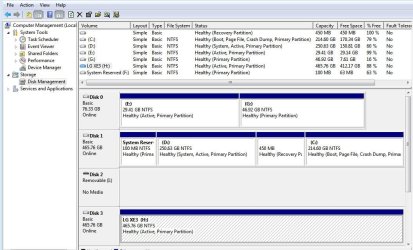
Here is the disk management including the external drive H.
 

Attachments

  • manage3.JPG
    manage3.JPG
    108.6 KB · Views: 1

My Computer My Computer

Computer type
PC/Desktop
Computer Manufacturer/Model Number
Build OEM Desktop
OS
Win 7 x64.Win 10
CPU
AMD A10 7850K
Motherboard
Asus A88X-Pro
Memory
8 gb
Graphics Card(s)
Nil
Sound Card
Nil
Monitor(s) Displays
Insignia
Screen Resolution
1376 x
Hard Drives
500 gb
Case
ABS
Keyboard
Sony
Mouse
OEM
Antivirus
Windows defender, Windows essential, Malware, autospyware
Browser
Firefox,Vivaldi
Back
Top