
You are using an out of date browser. It may not display this or other websites correctly.
You should upgrade or use an alternative browser.
You should upgrade or use an alternative browser.
Windows 7 5.1 surround problems (realtek)
- Thread starter wmaster
- Start date
They are working on the problem. Have sent me a couple things to try so far.
My Computer
- OS
- Windows 7 Beta 64 Bit
- CPU
- AMD Phenom II X4 940 B.E. @ 3Ghz
- Motherboard
- Foxconn Destoyer
- Memory
- 8GB Crucial Ballistics
- Graphics Card(s)
- Onboard Geforce 8000 series for now
- Sound Card
- Onboard Realtek HD Audio for now
- Monitor(s) Displays
- Samsung SyncMaster 220WM x2
- Screen Resolution
- 1680x1050
- Hard Drives
- WD 1TB SATA II Caviar Black x2
- PSU
- OCZ GameXstream 600W
- Case
- Antec 900
- Cooling
- Stock
- Keyboard
- Logitech Cordless Media
- Mouse
- Cordless Mouseman Optical
- Internet Speed
- Comcast HSI

Eiber Azuaje
New member
- Local time
- 6:11 AM
- Messages
- 8
I'm trying to configure a AC'97 on a MSI MoBo, it's kind of old but OS runs just fine... I'm having these sound issues though...
KM4 MoBo, VIA KM400 chipset FSB @ 333Mhz, 1Ghz RAM DDR266/333/400, VIA VT8237/VIA1617A Codec for 5.1 Channel Audio...
My setup worked just fine in XP-Pro with the Vinil700B drivers... the latest update from Realtek...
I've tried a couple of your suggestions, but there's nothing to it... actually, it sounds on the regular 2 speakers config with a cracking noise....
As I said... Works just fine on XP-Pro... (I happen to have different OS's installed and it runs OK).
Anything can help! I love my Creative 5.1 setup.... just for the right tunes!
KM4 MoBo, VIA KM400 chipset FSB @ 333Mhz, 1Ghz RAM DDR266/333/400, VIA VT8237/VIA1617A Codec for 5.1 Channel Audio...
My setup worked just fine in XP-Pro with the Vinil700B drivers... the latest update from Realtek...
I've tried a couple of your suggestions, but there's nothing to it... actually, it sounds on the regular 2 speakers config with a cracking noise....
As I said... Works just fine on XP-Pro... (I happen to have different OS's installed and it runs OK).
Anything can help! I love my Creative 5.1 setup.... just for the right tunes!
My Computer
- OS
- Windows (XP Home Ed, Vista Home Premium, 7)
Rip Thorndash
New member
- Local time
- 6:11 AM
- Messages
- 1
I have a GigaByte GA-EP43-DS3L motherboard with Win7 64bit install, and I'm having a similar problem. I'm using the only the optical S/PFID out to connect to my Yamaha DTS receiver, but I've had no luck getting my center or rear speaks to work. I would prefer to only use the optical out and not use the analog ports. I've tried both the drivers that came with Win7 and the R2.14 drivers from Realtek. No joy. If I switch modes from DTS to Dolby Digital in Windows 7 the Yamaha shows the correct mode, but still only the front L and R speakers. My DVD player does 5.1 through the optical just fine, so I know it's not the Yamaha receiver. Anyone run into this?[FONT="]
[/FONT]
[/FONT]
My Computer
- OS
- Windows 7 64bit
cnoobsaibot
New member
- Local time
- 11:11 AM
- Messages
- 1
well i gut same problem and fix et xD i plug cables and find theme on raltek hd panel - work all in panel - but in playback in winamp - work just 2 front speakers and subwofer , and now - work all xD see picture 


My Computer
- OS
- XP sp2

Win7 beta drivers for onboard HD audio chips is crap. Take Realtek's drivers, extract using winrar or any other archiver and use device manager to let windows update drivers. When it asks you to search for drivers, point to the Vista folder which must have been created after you extracted realtek's drivers.
I found that this solves many frstrating problems... particularly those cases where drivers won't ibstall due to setup not identifying your OS.
I would suggest you all to try this method as it has a high success rate.
Hope this helps, and thanks for your time.
I found that this solves many frstrating problems... particularly those cases where drivers won't ibstall due to setup not identifying your OS.
I would suggest you all to try this method as it has a high success rate.
Hope this helps, and thanks for your time.
My Computer
- Computer type
- PC/Desktop
- Computer Manufacturer/Model Number
- Custom built
- OS
- Windows 7 Ultimate (64 bit) dual boot with Fedora KDE
- CPU
- Intel Corei5-3470 @ 3.20Ghz (Turbo 3.60Ghz) [6MB L3 cache]
- Motherboard
- GIGABYTE GA-B75M-D3H [intel B75 Express Chipset]
- Memory
- 8 GB [4 GB x 2] DDR3 1600 Mhz G.Skill
- Graphics Card(s)
- Zotac nVidia GeForce GTX 650 1024 MB GDDR5 (128 bit)
- Sound Card
- Realtek ALC 887 HD Audio codec onboard
- Monitor(s) Displays
- Samsung SyncMaster 2033SW+
- Screen Resolution
- 1600 x 900 @ 60Hz
- Hard Drives
- 1 x S-ATA II Seagate 1 TB [Win7 Ultimate x86-64 RTM]
1 x S-ATA Samsung 1 TB [Fedora]
- PSU
- Cooler Master Thunder 650W
- Case
- Cooler Master Elite 344 - USB 3
- Cooling
- All Fan [1 on front and 1 at back]
- Keyboard
- Microsoft PS/2 Multimedia keyboard
- Mouse
- Microsoft Optical Mouse USB
- Internet Speed
- 1 Mbps Cable
- Antivirus
- Kaspersky Internet Security
- Browser
- Firefox

well i gut same problem and fix et xD i plug cables and find theme on raltek hd panel - work all in panel - but in playback in winamp - work just 2 front speakers and subwofer , and now - work all xD see picture
It looks like you are using XP drivers when you should be using the Vista drivers, try 2.14 it installs fine without any need for compatibility mode and it's fully functioning.
My Computer
- Computer Manufacturer/Model Number
- Home Brew
- OS
- Windows 7 Ultimate Vista Ultimate x64
- CPU
- Core 2 Duo E8500 3.16Ghz @ 3.8Ghz
- Motherboard
- eVGA 750i FTW
- Memory
- 2x2Gigs Patriot PC2-6400 LL
- Graphics Card(s)
- Inno3D GeForce GTX260 216 SP
- Monitor(s) Displays
- ASUS VW222U 22" 2ms Response time
- Screen Resolution
- 1680x1050
- Hard Drives
- SATA 150GB
SATA II 250GB
USB IDE 750GB Ext.
- PSU
- HYTEC 600W & Thermaltake 650W Toughpower Power Exp
- Case
- Thermaltake Armor LCS (Liquid Cooling System)
- Cooling
- Liquid Cooling System
- Keyboard
- Logitech G15 Gaming Keyboard
- Mouse
- Logitech G9 Gaming Mouse
halfassassin
New member
- Local time
- 3:11 AM
- Messages
- 1
I've got the same problem. Can't get sound out of the rear speakers. I installed Realtek's R2.14 drivers, and nothing changed. My Realtek HD Audio Manager seems to be having problems as well. It doesn't display any speakers on the screen, no matter what speaker configuration I pick. I was able to get sound out of my rear speakers by changing the both the black and green output jacks to "Front Speaker Out" This works fine for just playing music, but the rear speakers now just play exactly what is on the front ones, so it's basically a 2.1 surround. I had similar problems in Vista, but was able to get 5.1 working. I really thought they would have solved this issue by now...
Here's what my Realtek Audio Manager looks like:

Here's what my Realtek Audio Manager looks like:

My Computer
- OS
- Windows 7 Beta x32 / Vista Business x32/ XP Pro x32 (triple boot)
- CPU
- Intel Core 2 Duo E4600 2.4Ghz @ 2.4
- Motherboard
- Gigabyte GA-P35 DS3L
- Memory
- 2 GB G.Skill DDR2
- Graphics Card(s)
- GeForce 8800 GT
- Sound Card
- Realtek ALC888 Onboard
- Other Info
- Speakers:
Logitech Z-640 5.1 Surround
can i ask u what is the version of the driver u are using and where did u download it ? is it working alryt or what ? that is actually for a friend having a bigger problem with his audio driver giving him a blue crash screen most of the times and most probably bcuz of the sound driver he has a realtek ac'97 a bit out dated but there must be a way to make the system stop crashing like this thank you anyway
My Computer
- OS
- windows seven build 6801

racy
New member
Just to let you know, I have got this to work pretty well now.
I am a newebee. I just installed Windows 7 Ultimate 64 on an MCE system (see sig) that has been doing everying right for years (more than 4). I had to change out the Fusion HDTV express for a the pinnicle USB as fusion would not support the 64 bit version. I downloaded both Realtek WDM_R214 (hd drivers) and 6285_Vista_APO_PG536 (ac'97 drivers for 64 vista).
I only get two channel via RCA left, right (Two analog in on Dell 42 Plasma) and Optical out to a Sony DAVFX900Wreceiver. When running MCE 2005 evertying works great. I get the full on REaltek configuration tools (the one with the crazy bee sound) and can listen to DVD, HDTV, other via either the L/R RCA to the Plasma's speakers, or Optical (spid straight through) to the SOny.
I get only 2 channel from the optical in Windows 7 64 with above drivers. Also, here is the crazy useless config CPL that i get from ASUS (attached). when i try to conigure 6CH or 8CH only L/R work via the optical to the sony...
Also, why am i getting the old ASUS configuration CPL?
Sig did not kick in here is what I have:
Windows Ultimate 7 64 bit
ASUS A8N32-SLI Deluxe, 4 GIG
AMD Athlon 64 X2 Dual Core 3800+ 2.01 GHz
WD 500GIG SATA2 Cavier Green
2x Seagate 1TB SATA
1x WD ATA 320 GB
1x NEC ATA DVDRW Nd-3520AW
NVIDIA GeForce 7300 GT
Hauppauge WinTV PVR PCI II X2
Pinnacle PCTV 801e X1 (USB) - Fusion HDTV Express in but no on
Realtek Ac'97 Audio
Microsoft LifeCam VX-6000
Misc USB (Bluetooth, X-10 Power, X-10 Video, IR Repeater)
Attachments
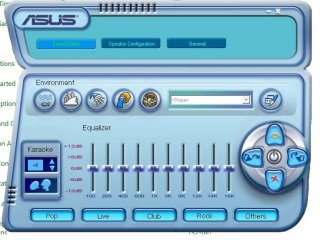
Last edited:
My Computer
- OS
- Windows 7 Beta
here's what worked for me to get sound out of my rear speakers-
right-click on taskbar speakers > playback devices > properties > enhancements > enable Environment (ROOM) and Speaker fill
hope that helps someone!
right-click on taskbar speakers > playback devices > properties > enhancements > enable Environment (ROOM) and Speaker fill
hope that helps someone!
My Computer
- Computer Manufacturer/Model Number
- Dell Inspiron 530
- OS
- Windows 7
- CPU
- 2.66 GHz Intel E6550
- Memory
- 3GB DDR2 SDRAM 667MHz
- Graphics Card(s)
- 128MB NVIDIA 8300 GS
- Sound Card
- Integrated!
- Monitor(s) Displays
- Dell 2001FP, Dell E248WFP
- Screen Resolution
- 3520 x 1200
- Hard Drives
- Internal: 500 GB SATA II
External: 2 x WD 500GB
- PSU
- Stock
- Case
- Dell
- Cooling
- Stock
- Keyboard
- Dynex Multimedia
- Mouse
- Microsoft Blue
- Internet Speed
- Fast

I have the same problem with Creative XFI Xtreme Music, is there any solution with this guys? I have Win 7 Build 7048
My Computer
- Computer Manufacturer/Model Number
- My Home PC
- OS
- Windows 7 Beta
- CPU
- E2180 @ 3,00 Ghz
- Motherboard
- MSI P35 Neo2 FIR
- Memory
- 2x2 GB Mushkin Redline @ 1000 Mhz
- Graphics Card(s)
- Sapphire ATi Radeon HD3870
- Sound Card
- Creative X-FI Xtreme Music
- Monitor(s) Displays
- Samsung 206BW
- Screen Resolution
- 1680x1050
- Hard Drives
- 500 GB Maxtor 32 MB HDD
120 GB Samsung 16 MB HDD
160 GB Samsung 16 MB HDD
- PSU
- 550Watt L&C Power
- Case
- Raidmax Smilodon
- Keyboard
- Logitech G15
- Mouse
- Creative Fatal1ty 1010
- Internet Speed
- 1Mbit download, 256 kbps upload
here's what worked for me to get sound out of my rear speakers-
right-click on taskbar speakers > playback devices > properties > enhancements > enable Environment (ROOM) and Speaker fill
hope that helps someone!
You are God ! Thank you very much, my rear speaker working good right now ! Thanks


My Computer
- OS
- Windows 7

12eason
New member
- Local time
- 11:11 AM
- Messages
- 290
Jesus, I never use speaker fill to expand stereo, or even cmss on creative for that matter. I use ac3 filter to upmix stereo. I'd use ffdshows dolby prologic II upmixer if it didn't add slight distortion, but ffdshows version of stereo expansion is still preferable to realtek or creatives.
Speaker fill and cmss are just glorified stereo cloners, whereas ac3filter and ffdshow use prologic noise cancelation matrixes to create proper surround effects as well as dealing with discreet bass properly too.
Speaker fill and cmss are just glorified stereo cloners, whereas ac3filter and ffdshow use prologic noise cancelation matrixes to create proper surround effects as well as dealing with discreet bass properly too.
My Computer
- OS
- Windows 7077
who can help me ?
:huh: hi ! i have a 5.1 sound card realtek on my acer aspire 7720G laptop and i can not find the hd audio driver for this acer i have a week with many nights of searching on google
 to resolve that problem . Who can help me ?
who know´s where can i find a driver ?
:huh: hi ! i have a 5.1 sound card realtek on my acer aspire 7720G laptop and i can not find the hd audio driver for this acer
i have a week with many nights of searching on google to resolve that problem . Who can help me ? who know´s where can i find a driver ?
My Computer
- OS
- windows 7
- Local time
- 5:11 AM
- Messages
- 43
i have exactly the same problem and i think i know what the solution is but somehow i can't get it to work. i know that in order to fix the problem that my realtek driver will actually work in all applications in windows 7 is to unplug them and plug the cables again and then simply show the computer which one is which, but the problem on my side is that the window does not appear, like it did in windows xp. it only shows that a cable has been plugged in, but it doesn't ask which one is it, like it did in windows xp. any ideas? i tried almost everything already lol and i'm pretty sure that this is the solution but i just somehow can't get that pop-up window to show lol.
after reading the sticky topic with the re-assigning jack outputs, i did everything that was explained in the first post, but it never changed anything for some reason. can someone help please? i would really like to use my 5.1 on windows 7
after reading the sticky topic with the re-assigning jack outputs, i did everything that was explained in the first post, but it never changed anything for some reason. can someone help please? i would really like to use my 5.1 on windows 7
Last edited:
My Computer
- OS
- Windows 7
- CPU
- Intel D (2 x 3.0 GHZ)
- Motherboard
- ASRock Wolfdale 1333-D667 R2
- Memory
- 2048 MB
- Graphics Card(s)
- GeForce 200 series
- Sound Card
- Realtek
- Monitor(s) Displays
- 2 monitors, 22inch acer and 17inch HP running same time
- Hard Drives
- only 160gb
- Case
- custom made
- Keyboard
- flat lol
- Internet Speed
- FiOS 15Mbs
- Local time
- 5:11 AM
- Messages
- 43
I think everyone has the same problem and it's not about anyone's computer specs, but it's with realtek and the fact that you can't normally set up your 5.1 system on windows 7.
@jmekerila:
when i try to install the file you were talking about, i get this error:

@jmekerila:
when i try to install the file you were talking about, i get this error:

My Computer
- OS
- Windows 7
- CPU
- Intel D (2 x 3.0 GHZ)
- Motherboard
- ASRock Wolfdale 1333-D667 R2
- Memory
- 2048 MB
- Graphics Card(s)
- GeForce 200 series
- Sound Card
- Realtek
- Monitor(s) Displays
- 2 monitors, 22inch acer and 17inch HP running same time
- Hard Drives
- only 160gb
- Case
- custom made
- Keyboard
- flat lol
- Internet Speed
- FiOS 15Mbs
Similar threads

- Replies
- 13
- Views
- 6K


- Replies
- 2
- Views
- 1K

- Replies
- 0
- Views
- 942