Windows 7 5.1 surround problems (realtek)

Sorry for digging up an old post..

but i had the same issues for ages, i recently just upgraded my computer and had the same problems, however as i plugged each cable in i got a pop to confirm what i had just plugged in, choosing rear speakers never worked.

However i then took it out, plugged it back in and chose 'headphones' with the sub/centre and front both configured to their own options.. and i now have all 5 speakers working together :)
 

My Computer My Computer

OS
Windows 7 Ultimate x64
Hello guys! first im sorry to bump this cuz i hoped this will be fixed by now...

Yes i have the exact same problem. 5.1 works in games and when testing the speakers in realtek manager, and in built-in sound manager from windows 7.

But when i play music or watching a movie it doesnt work. It should have worked NATIVE as it did in win XP. Flawlessly!!
mad.png


Now my advices to make it work better are :

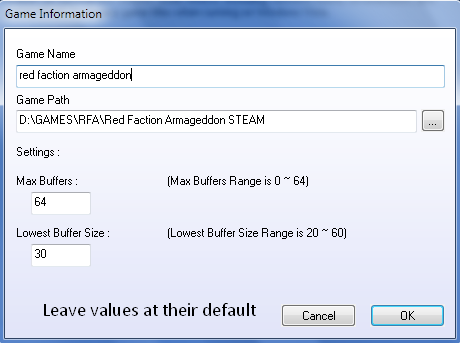
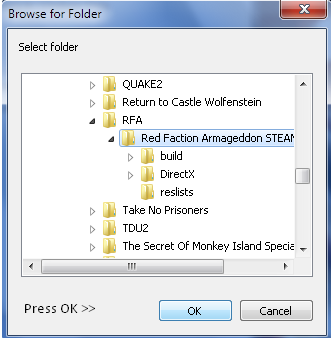
In certain games where 5.1 doesnt work, try this software from realtek called 3DSoundBack_Beta0.1.rar


MEGAUPLOAD - The leading online storage and file delivery service


1.
mQV0o.png


2.
tR2TT.png


3.
j0lUs.png


Then press the enable button and now your gave should have 5.1 sound.
========================================================

Now for movies, for example opened with BS Player. Get ffdshow from HERE
(direct link)

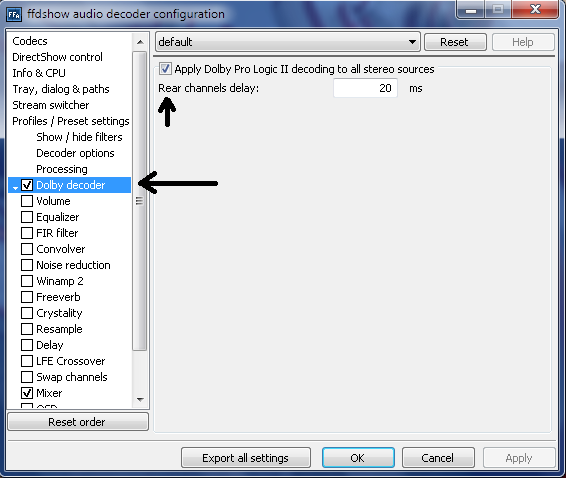
And open audio decoder and configure it this way
1.

jQssR.png


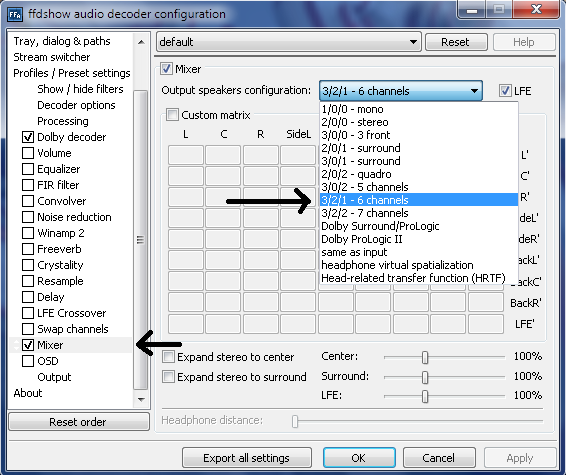
2. This one you can put it on Doubly Surround or ProLogic if you want too. It's pretty much the same. Worth checking them.

RLAUv.png


Now you should have 5.1 sound enabled in BS Player. As for Winamp, other solution than selecting Room enviroment from Realtek manager, i dont know. Hope this helps.

It's a bit better for me now. I still cant believe an issues which dates since Windows 7 released, still hasnt been fixed by Microsoft or Realtek. Last time i buy Gigabyte mobo with Realtek anyways...
 

My Computer My Computer

OS
Windows 7 32bit
First of all, forgive any english mistakes. It is not my primary language.

Notice: Some options may not have exactly the same description shown here. Please use common sense to figure out wich option to choose based on the information contained in this text.

I've consulted many forum posts around the world about making a 5.1 usb sound card output 5.1 sound through spdif(optical) on windows 7 (win7) and found very little information about it.

After two long days of trial and error, I've finally made it work. So here is the full story/process:

I've bought a sound card like this one:
Premium USB 2.0 External Sound Card Box with 7.1-Speaker SPDIF Optical Output - Free Shipping - DealExtreme

And connected it through optical spdif to a 5.1 samsung home theater.

The first step was to download this driver for the cm106 chip:
Download C-Media CM-106 Windows 7 Driver v.6.12.8.2131 | CM-106 | Catalog - News, articles, free drivers and firmware catalog: X-DRIVERS.COM

Once installed the driver and the sound card connected, it will show a systray icon that when double clicked opens an interface for configuring the sound input and output for the card. The options that worked were 8 channel for input and 8 channel for output. The interface will display 8 speakers (front left and right, center, middle left and right, back left and right and lfe/subwoofer).

On windows settings for the device (displayed when you right click on the speaker icon on systray and select "show audio devices"), there is a tab for "supported formats" shown after clicking on "properties" for the "digital/optical output usb device", I've unmarked everything but "dolby surround". Right beside it there is a button for testing the sound card configuration, click it and you should hear a sound that will start on the lfe/subwoofer and will play around each speaker in sequence, separatedly.

The tricky part was to play correctly ac3 and dts encoded audio from movies on my preferred media player: kmplayer.

On kmplayer, at first I needed to go on options and turn off every internal codec and make kmplayer use external codecs for audio. I then chose ffdshow for audio decompression. (Other media players like media player classic (home cinema or not) already use external codecs by default).

The key change was to configure the output on ffdshow. For my sound card and home theater configuration, on "Output format for uncompressed or decoded streams" box I've checked "AC3 (s/pdif encode mode)" and "encode 5.1 streams only". And selected only "Dolby Digital (AC3)" on the "Pass through" box.

The ffdshow screen for making these changes is this one: http://www.homecinema-hd.com/images/ffdshow/ffdshow13.png
ATTENTION!!!: The screen from the link above DOES NOT reflect the marked/unmarked boxes that were chosen. It is for reference only!

After doing this, ac3 and dts audio encoded from avi and mkv files worked perfectly on the 5.1 home theater system.

Hope it can help someone! ;)

If you have any doubt or trouble, feel free to contact me at www.lantis at gmail dot com. (and yes, it CONTAINS the www, lol)

(Typed, but not revised, by lantis.)

 

My Computer My Computer

OS
windows 7 home basic
Download ASrock THX trustudio.... works like a mofo
 

My Computer My Computer

OS
7 ultimate x64
Batch for enabling and disabling 5.1 sound.

Code:
taskkill /f /im wmplayer.exe
rename C:\Windows\SysWOW64\MP3DMOD.DLL MP3DMOD.DLL.BAK
start "" "C:\Program Files (x86)\Windows Media Player\wmplayer.exe" /prefetch:1
exit


Code:
taskkill /f /im wmplayer.exe
rename C:\Windows\SysWOW64\MP3DMOD.DLL.BAK MP3DMOD.DLL
start "" "C:\Program Files (x86)\Windows Media Player\wmplayer.exe" /prefetch:1
exit
 

My Computer My Computer

Computer Manufacturer/Model Number
Me
OS
Windows 7 Ultimate SP1 x64
CPU
AMD Phenom(tm) II X4 955
Motherboard
Asus M4A79T Deluxe
Memory
Kingston HyperX 2x4GB 1600MHz
Graphics Card(s)
Asus EAH6970 DCII/2DI4S/2GD5
Sound Card
Realtek ALC1200 @ ATI SB750 - High Definition
Monitor(s) Displays
LG W2253 (Digital) [22" LCD]
Screen Resolution
1920x1080
Hard Drives
OCZ-AGILITY2 ATA Device (50 GB, SATA-II)
ST31000340AS ATA Device (1000 GB, 7200 RPM, SATA-II)
WDC WD1002FBYS-02A6B0 ATA Device (1000 GB, 7200 RPM, SATA-II)
PSU
Enermax Infinity 720Watt
Case
Themaltake Soprano Dx
Cooling
Thermaltake Max Orb
Keyboard
Microsoft Multimedia Keyboard (PS/2)
Mouse
Microsoft USB Basic Optical Mouse (IntelliPoint)
Internet Speed
U/D 18655/1020 Kbps
Executable for switching betweed 5.1 in C# and .NET4

It is for win 7 x64, i am too bored to make it dynamic also for x32 :confused:


This program will do the same thing as the batch files, but with some additions together with visual window:

* Run it and it will enable 5.1 sound. Run it again and it will go back to 2.1 sound.
* Will rename properly MP3DMOD.DLL
* Will fix WMP not displaying an error if closed by taskkill.exe via registry keys under key "HKEY_CURRENT_USER\Software\Microsoft\MediaPlayer\Health"
* Will make plugin wmpkeys run again properly under registry key Running in "HKEY_CURRENT_USER\Software\Microsoft\MediaPlayer\UIPlugins\{9B61F641-7794-4322-BF6A-E45EFD6C8D7C}"
* Will start media player in library mode.

Ok that's all, have fun, download link at bottom.

Code:
using System;
using System.Collections.Generic;
using System.ComponentModel;
using System.Data;
using System.Drawing;
using System.Linq;
using System.Text;
using System.Windows.Forms;
using System.IO;
using System.Diagnostics;
using System.Threading;
using Microsoft.Win32;

namespace WMP._5_1.Sound
{
    public partial class MainForm : Form
    {
        public MainForm()
        {
            InitializeComponent();

            Location = new Point(Screen.PrimaryScreen.Bounds.Width / 2 - this.Size.Width / 2,
                                        Screen.PrimaryScreen.Bounds.Height / 2 - this.Height / 2);            
        }

        private void MainForm_Shown(object sender, EventArgs e)
        {
            Process.Start("taskkill", "/f /im wmplayer.exe");

            if (File.Exists(@"C:\Windows\SysWOW64\MP3DMOD.DLL"))
            {
                File.Move(@"C:\Windows\SysWOW64\MP3DMOD.DLL", @"C:\Windows\SysWOW64\MP3DMOD.DLL.BAK");
                FadeForm("5.1 Sound", Properties.Resources._5_1);
            }
            else if (File.Exists(@"C:\Windows\SysWOW64\MP3DMOD.DLL.BAK"))
            {
                File.Move(@"C:\Windows\SysWOW64\MP3DMOD.DLL.BAK", @"C:\Windows\SysWOW64\MP3DMOD.DLL");
                FadeForm("Normal Sound", Properties.Resources._2_1);
            }


            RegistryKey WMPRegKeys = Registry.CurrentUser.OpenSubKey(@"Software\Microsoft\MediaPlayer", true);
            RegistryKey WMPHealthKey = WMPRegKeys.OpenSubKey("Health");
            if (WMPHealthKey != null)
            {
                WMPRegKeys.DeleteSubKeyTree("Health");
            }
            WMPRegKeys.Close();


            Registry.SetValue(@"HKEY_CURRENT_USER\Software\Microsoft\MediaPlayer\UIPlugins\{9B61F641-7794-4322-BF6A-E45EFD6C8D7C}",
                                "Running",
                                1,
                                RegistryValueKind.DWord);


            Process.Start(@"C:\Program Files (x86)\Windows Media Player\wmplayer.exe", "/prefetch:1");
        }

        public void FadeForm(string message, Bitmap image)
        {
            MessageBox.Text = message;
            pictureBox2.Image = image;
            
            double opacity = 1;
            while (opacity > 0)
            {
                this.Opacity = opacity;
                this.Refresh();
                opacity = opacity - 0.01;
                System.Threading.Thread.Sleep(15);
            }
            this.Close();
        }
    }
}


WMP.5+1.Sound.exe | Game Front
 

My Computer My Computer

Computer Manufacturer/Model Number
Me
OS
Windows 7 Ultimate SP1 x64
CPU
AMD Phenom(tm) II X4 955
Motherboard
Asus M4A79T Deluxe
Memory
Kingston HyperX 2x4GB 1600MHz
Graphics Card(s)
Asus EAH6970 DCII/2DI4S/2GD5
Sound Card
Realtek ALC1200 @ ATI SB750 - High Definition
Monitor(s) Displays
LG W2253 (Digital) [22" LCD]
Screen Resolution
1920x1080
Hard Drives
OCZ-AGILITY2 ATA Device (50 GB, SATA-II)
ST31000340AS ATA Device (1000 GB, 7200 RPM, SATA-II)
WDC WD1002FBYS-02A6B0 ATA Device (1000 GB, 7200 RPM, SATA-II)
PSU
Enermax Infinity 720Watt
Case
Themaltake Soprano Dx
Cooling
Thermaltake Max Orb
Keyboard
Microsoft Multimedia Keyboard (PS/2)
Mouse
Microsoft USB Basic Optical Mouse (IntelliPoint)
Internet Speed
U/D 18655/1020 Kbps
No one has tested it yet? :(

Please provide feedback :)
 

My Computer My Computer

Computer Manufacturer/Model Number
Me
OS
Windows 7 Ultimate SP1 x64
CPU
AMD Phenom(tm) II X4 955
Motherboard
Asus M4A79T Deluxe
Memory
Kingston HyperX 2x4GB 1600MHz
Graphics Card(s)
Asus EAH6970 DCII/2DI4S/2GD5
Sound Card
Realtek ALC1200 @ ATI SB750 - High Definition
Monitor(s) Displays
LG W2253 (Digital) [22" LCD]
Screen Resolution
1920x1080
Hard Drives
OCZ-AGILITY2 ATA Device (50 GB, SATA-II)
ST31000340AS ATA Device (1000 GB, 7200 RPM, SATA-II)
WDC WD1002FBYS-02A6B0 ATA Device (1000 GB, 7200 RPM, SATA-II)
PSU
Enermax Infinity 720Watt
Case
Themaltake Soprano Dx
Cooling
Thermaltake Max Orb
Keyboard
Microsoft Multimedia Keyboard (PS/2)
Mouse
Microsoft USB Basic Optical Mouse (IntelliPoint)
Internet Speed
U/D 18655/1020 Kbps
I have Windows 7 on my HP notebook. I'm using a Real player, Is there a way to hook it up to my surround sound systen. My main computer is "out of order", I would like to get some decent sound. Can I hook up my USB cord to the systen?​
 

My Computer My Computer

Computer Manufacturer/Model Number
HP
OS
Windows 7
the link doesnt work man :( gonna try in do it manually.. brb
 

My Computer My Computer

OS
win7 64

My Computer My Computer

Computer Manufacturer/Model Number
Me
OS
Windows 7 Ultimate SP1 x64
CPU
AMD Phenom(tm) II X4 955
Motherboard
Asus M4A79T Deluxe
Memory
Kingston HyperX 2x4GB 1600MHz
Graphics Card(s)
Asus EAH6970 DCII/2DI4S/2GD5
Sound Card
Realtek ALC1200 @ ATI SB750 - High Definition
Monitor(s) Displays
LG W2253 (Digital) [22" LCD]
Screen Resolution
1920x1080
Hard Drives
OCZ-AGILITY2 ATA Device (50 GB, SATA-II)
ST31000340AS ATA Device (1000 GB, 7200 RPM, SATA-II)
WDC WD1002FBYS-02A6B0 ATA Device (1000 GB, 7200 RPM, SATA-II)
PSU
Enermax Infinity 720Watt
Case
Themaltake Soprano Dx
Cooling
Thermaltake Max Orb
Keyboard
Microsoft Multimedia Keyboard (PS/2)
Mouse
Microsoft USB Basic Optical Mouse (IntelliPoint)
Internet Speed
U/D 18655/1020 Kbps
here's what worked for me to get sound out of my rear speakers-


right-click on taskbar speakers > playback devices > properties > enhancements > enable Environment (ROOM) and Speaker fill

hope that helps someone!

You are God ! Thank you very much, my rear speaker working good right now ! Thanks ;):D


I Realize that this is a very old thread and no one will probably ever see this post, but I bow down to the FPS1800 know-it-all :geek:. I have had trouble with these speakers since I left XP. I couldn't see getting rid of them because they still sounded good, and I don't really have money to throw away.

I happened to stumble across this thread and saw Dexterqo's suggestion. Knowing that there was no way that would work, I tried it in desperation. It WORKED!! :sarc: While messing with the settings I turned off the environment, and it still worked! :confused: I don't know if it actually changed something, or my computer is haunted, but THANK YOU Dexterqo!!!!!:party:
 

My Computer My Computer

Computer type
PC/Desktop
Computer Manufacturer/Model Number
Custom Build
OS
Windows 7 Ulitimate x64
CPU
i3 - 2120
Motherboard
ASUS P8Z77 - V LK
Memory
8G
Graphics Card(s)
PNY nVidia GTS 250
Hard Drives
1T Western Digital SATA Drive
Antivirus
Norton
Browser
IE/Chrome
Back
Top