HP Laptop keeps turning off randomly

Takaaaa

New member
Member
Local time
6:15 AM
Messages
77
Hello,
So I have a very old HP dv7-2185dx on win7, thats always been good to me, but recently it would jsut randomly turn off. Whats strange is that when I turn it back on, i dont get a message saying that it was forced shut off and want to boot in safe mode kind of thing. Its as if it was properly shut down, but wasnt.

I dont ever move it, so I took out the battery and just have it plugged in all the time. Maybe I thought it was the power cable that made it shut off randomly, so I put my battery back in and with a full charge AND plugged in, it still shut off.

I checked my RAM and laptop with the windows memory diagnostic tool but no errors came up.

Any other ideas I can do to try and find a solution, besides buy a new laptop?
 

My Computer My Computer

Computer Manufacturer/Model Number
HP DV7-2185dx
OS
Microsoft Windows 7 Ultimate 64-bit 7600 Multiprocessor Free
CPU
Intel(R) Core(TM)2 Quad CPU Q9000 @ 2.00GHz
Motherboard
Quanta 3624
Memory
DDR-2 2.00 GB/ DDR-2 4.00 GB
Graphics Card(s)
ATI Mobility Radeon HD 4650
Sound Card
(1) AMD High Definition Audio Device (2) High Definition A
Hard Drives
FUJITSU MJA2500BH G2 ATA Device 465.76 GB
May be heat. Laptops do not have the CPU cooling that a desktop has and are prone to overheating. Most have thermal protection and will shut off if it gets too hot. One thing to consider.
 

My Computer My Computer

Computer type
PC/Desktop
Computer Manufacturer/Model Number
My Own Build
OS
Windows 10 64 bit
CPU
Intel i7 6700K
Motherboard
ASUS ROG Maximus VIII Hero
Memory
16GB Corsair Dominator
Graphics Card(s)
Intel CPU Graphics
Sound Card
RealTek
Monitor(s) Displays
27" Dell S2719dgf
Screen Resolution
2560X1440
Hard Drives
1 TB Samsung 850 EVO SSD for Win 10 Pro
500GB Samsung 850 EVO SSD for Win 10 Insider
2 TB drive for backup
PSU
EVGA Supernova 750G2
Case
BeQuiet Silent Base 600
Cooling
Deepcool Captain 120EX
Keyboard
Microsoft Wireless 2000
Mouse
Microsoft wireless
Internet Speed
100 MB/sec (Cable)
Antivirus
Microsoft Defender and Malwarebytes
Browser
Edge/Firefox
Other Info
Cakewalk (Sonar) by BandLab and Studio One 4.1 Pro recording studio software. MOTU 896Mk3 Hybrid recording interface, Frontier Tranzport wireless control unit, Behringer X-Touch Control Surface.
Five USB connected optical drives for CD Audio production using Nero BurningROM
I totally agree with Fireberd. Seems to be high temps.
As it's an old laptop, the heat sink must be clogged with dust.
Use open hardware monitor - Open Hardware Monitor - Core temp, fan speed and voltages in a free software gadget
Download , extract to a folder (C:\Program Files (x86)\HardwareMonitor) , run the exe file.
Under options tab set it run on start up.
If the CPU or GPU temp goes higher than 80ºC you will have to open and clean the heat sink.
 

My Computers My Computers

System One System Two

  • Computer type
    PC/Desktop
    Computer Manufacturer/Model Number
    custom build
    OS
    Windows 7 HP 64
    CPU
    i5 6600K - 800MHz to 4200MHz
    Motherboard
    GA-Z170-HD3P
    Memory
    4+4G GSkill DDR4 3000
    Graphics Card(s)
    IG - Intel 530
    Monitor(s) Displays
    Samsung 226BW
    Screen Resolution
    1680x1050
    Hard Drives
    (1) -1 SM951 – 128GB M.2 AHCI PCIe SSD drive for Windows 7 and Lubuntu
    (2) -1 WD SATA 3 - 1T for Data
    (3) -1 WD SATA 3 - 1T for backup
    PSU
    Thermaltake 450W TR2 gold
    Keyboard
    Old and good Chicony mechanical keyboard
    Mouse
    Logitech mX performance - 9 buttons (had to disable some)
    Internet Speed
    500Mb/s
    Browser
    Firefox 64
    Other Info
    TinyWall firewall
  • Computer type
    Laptop
    System Manufacturer/Model Number
    Asus Q550LF
    OS
    Windows 7 Pro
    CPU
    i7-4500U 800MHz to 3.0GHz
    Motherboard
    Asus Q550LF
    Memory
    (4+4)G DDR3 1600
    Graphics Card(s)
    IG intel 4400 + NVIDIA GeForce GT 745M
    Sound Card
    Realtek
    Monitor(s) Displays
    LG Display LP156WF4-SPH1
    Screen Resolution
    1920 x 1080
    Hard Drives
    BX500 120G SSD for Windows and programs +
    1T HDD for data
    Internet Speed
    500 Mb/s
    Browser
    Firefox
    Other Info
    TinyWall firewall
May be heat. Laptops do not have the CPU cooling that a desktop has and are prone to overheating. Most have thermal protection and will shut off if it gets too hot. One thing to consider.

I totally agree with Fireberd. Seems to be high temps.
As it's an old laptop, the heat sink must be clogged with dust.
Use open hardware monitor - Open Hardware Monitor - Core temp, fan speed and voltages in a free software gadget
Download , extract to a folder (C:\Program Files (x86)\HardwareMonitor) , run the exe file.
Under options tab set it run on start up.
If the CPU or GPU temp goes higher than 80ºC you will have to open and clean the heat sink.
I downloaded the program and will monitor the temp after it randomly shuts off again and boots up.
But right now its going around 47-52

esMeviS.png
 

My Computer My Computer

Computer Manufacturer/Model Number
HP DV7-2185dx
OS
Microsoft Windows 7 Ultimate 64-bit 7600 Multiprocessor Free
CPU
Intel(R) Core(TM)2 Quad CPU Q9000 @ 2.00GHz
Motherboard
Quanta 3624
Memory
DDR-2 2.00 GB/ DDR-2 4.00 GB
Graphics Card(s)
ATI Mobility Radeon HD 4650
Sound Card
(1) AMD High Definition Audio Device (2) High Definition A
Hard Drives
FUJITSU MJA2500BH G2 ATA Device 465.76 GB
In full agreement, temperatures, do not place the notebook in areas where the .cooler can attract suet particles; Such as room games, blankets, etc. Another thing and for the care of the same is not having or using the laptop on the legs other than being dangerous attracts amount of dust particles. Having an external fan you have to look for the compatible model where you have the fan on the exact side of your laptop.
Fix the connectors if they are s-ata that are attached to the connector, in your case also the hard disk that is not saturated by the functions that are performing the temperatures can be high and this, for security stop working (rare because according to says That no recovery messages appear). For me.
 

My Computer My Computer

Computer type
Laptop
Computer Manufacturer/Model Number
HP
OS
Windows 7 Ultimate x64
CPU
AMD E-450 APU with Raedon(tm) HD Graphics (2 CPUs), ~1.6GHz
Motherboard
Hewlett-Packard
Memory
6 GB
Graphics Card(s)
AMD Raedon HD 6320 Graphics
Sound Card
High Definition Audio
Monitor(s) Displays
Monitor PnP Generic
Screen Resolution
1024 x 728 (32 bit) (60Hz)
Keyboard
HP Key
Mouse
Perfect Choice
Internet Speed
1 MB/S
Antivirus
Windows Defender
Browser
Google Chrome
Taka, with CPU load at 10% you already have temperatures of 49ºC. I would say that you must clean the heat sink.
On the service manual http://h10032.www1.hp.com/ctg/Manual/c02638165.pdf at page 4-51 you will have the instructions to get it done.
 

My Computers My Computers

System One System Two

  • Computer type
    PC/Desktop
    Computer Manufacturer/Model Number
    custom build
    OS
    Windows 7 HP 64
    CPU
    i5 6600K - 800MHz to 4200MHz
    Motherboard
    GA-Z170-HD3P
    Memory
    4+4G GSkill DDR4 3000
    Graphics Card(s)
    IG - Intel 530
    Monitor(s) Displays
    Samsung 226BW
    Screen Resolution
    1680x1050
    Hard Drives
    (1) -1 SM951 – 128GB M.2 AHCI PCIe SSD drive for Windows 7 and Lubuntu
    (2) -1 WD SATA 3 - 1T for Data
    (3) -1 WD SATA 3 - 1T for backup
    PSU
    Thermaltake 450W TR2 gold
    Keyboard
    Old and good Chicony mechanical keyboard
    Mouse
    Logitech mX performance - 9 buttons (had to disable some)
    Internet Speed
    500Mb/s
    Browser
    Firefox 64
    Other Info
    TinyWall firewall
  • Computer type
    Laptop
    System Manufacturer/Model Number
    Asus Q550LF
    OS
    Windows 7 Pro
    CPU
    i7-4500U 800MHz to 3.0GHz
    Motherboard
    Asus Q550LF
    Memory
    (4+4)G DDR3 1600
    Graphics Card(s)
    IG intel 4400 + NVIDIA GeForce GT 745M
    Sound Card
    Realtek
    Monitor(s) Displays
    LG Display LP156WF4-SPH1
    Screen Resolution
    1920 x 1080
    Hard Drives
    BX500 120G SSD for Windows and programs +
    1T HDD for data
    Internet Speed
    500 Mb/s
    Browser
    Firefox
    Other Info
    TinyWall firewall
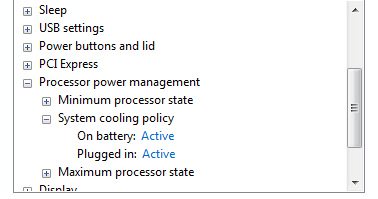
Your fan should be very noisy as well,
check your power settings here, see screenshot.


Roy
 

Attachments

  • taka.PNG
    taka.PNG
    3.4 KB · Views: 26

My Computer My Computer

Computer type
PC/Desktop
Computer Manufacturer/Model Number
medionl/Aspire 6930G/acer x55a
OS
W7 home premium 32bit/W7HP 64bit/w10 tp insider ring
CPU
E5300 dual core
Motherboard
medion MS7366
Memory
3gb
Graphics Card(s)
Nvidia Geforce 7100 Nforce 630i
Monitor(s) Displays
avixc
Internet Speed
n (isp resticted to 72)
Antivirus
mse/pands
Browser
palemoon
Other Info
Belkin Fd7050 n USB using Railink RT2870 drivers, more upto date
If you feel that you are up to the task, you could use some high-quality thermal paste to affix your heat sink to your CPU.

Arctic Silver 5 is an excellent thermal paste:

https://www.amazon.com/Arctic-Silver-AS5-3-5G-Thermal-Paste/dp/B0087X728K

Doing this can bring down the temperature significantly.

If you decide to do this, then you should do a couple of other things while your computer is disassembled:
* Replace the CMOS battery -- your computer is old, and so the CMOS battery should be replaced.
* Get ALL of the dust out.

Make sure you wear an anti-static wrist band while working on your computer. Here is an example:

https://www.amazon.com/Rosewill-Ant...03148&sr=1-3&keywords=anti+static+wrist+strap
 

My Computer My Computer

Computer type
PC/Desktop
Computer Manufacturer/Model Number
Dell
OS
Linux Mint 18.2 xfce 64-bit (VMWare host) / Windows 8.1 Pro 32-bit (VMWare guest)
CPU
Haswell
Memory
4 GB
Monitor(s) Displays
Acer 23"
Screen Resolution
1920 x 1080
Hard Drives
Two hard drives, 1TB each: One for Linux, one for my data.
Keyboard
IBM Model M
Antivirus
Sophos (Linux), Trend Micro (Windows)
Browser
Firefox, Opera
Other Info
I use Samba to share my data drive with the other computers at my house and with my guest session in VMWare Workstation Player.
Hello,
So I have a very old HP dv7-2185dx on win7, thats always been good to me, but recently it would jsut randomly turn off. Whats strange is that when I turn it back on, i dont get a message saying that it was forced shut off and want to boot in safe mode kind of thing. Its as if it was properly shut down, but wasnt.

I dont ever move it, so I took out the battery and just have it plugged in all the time. Maybe I thought it was the power cable that made it shut off randomly, so I put my battery back in and with a full charge AND plugged in, it still shut off.

I checked my RAM and laptop with the windows memory diagnostic tool but no errors came up.

Any other ideas I can do to try and find a solution, besides buy a new laptop?


Thermal probem. Get somebody to re-apply thermal paste and make sure the fan is running properly. Also clean the vent to make sure there is nothing blocking the heat exhaust. If you look in the system event log, you will see the error message.
 

My Computer My Computer

Computer Manufacturer/Model Number
Lenovo Thinkpad T520
OS
Windows 7 Professional x64
CPU
i7-2640m
Memory
8 GB
May be heat. Laptops do not have the CPU cooling that a desktop has and are prone to overheating. Most have thermal protection and will shut off if it gets too hot. One thing to consider.

may be ,is the electricity going well?
 

My Computer My Computer

Computer type
Laptop
Computer Manufacturer/Model Number
Dell
OS
Windows 7 Ultimate x64
Overheating!

I have a Toshiba Laptop purchased in 2012. For about a year it was randomly shutting down.
- I had a very old Acer with Linux on it and the fan firmware in the machine was not recognized by the Linux OS
- the Acer/Linux lasted about 20 miniutes then would shut down. Let it cool for 15 minutes and it would start again for a too short time.
Assuming my Toshiba was overheating I propped the back edge up on a length of wood. The problem was the "strip of wood hindered the air flow, the heat from under the laptop was quiet obvious.
Another symptom of over heating is weird behavior of open windows, it starts to look like a collage/jig-saw of bits of open windows.

No amount of extra fans, over heating detectors etc ... will remedy a dirty heat dissipation problem.
The ONLY solution is to clean the inside of the PC. Fan and Heat sink

Search YouTube for how to clean your HP laptop, there is no easy way to clean,
some YTs advocate using all sorts of bazaar ways to blow air into the out vent or at the heat sink, with a drinking straw and a piece of dry bread in your mouth. Definitely a no-no.

By using DuckDuckGo search engine you can use a shortcut to search for only YouTube videos.
DDG: DuckDuckGo
Search: !yt xxxxxxxxx
- where xxxxxxxx is what you are looking for
- the !yt trick only works with DDG search engine

It took me a few days to find a half decent video on how to clean my Toshiba.
- there are a lot of crappy videos in YT land, but there are some gems
Britec is a very useful YT channel, all his videos a first class. But keep searching and list the videos that look promising on Notepad or any TEXT editor (or Word pad, or even Word), eventually it will fall into place.

There are no quick fixes to an overheating PC. Like a teenages bedroom, when you cannot close (or open) the door it is time to CLEAN !

Don't rush it when you do get into pulling the laptop apart. Gently does it. Clean means clean, not just rearrange the dust and crud, Domestic vacuum cleaners are way to savage and can cause damage. Compressed air (in a can) is safest, because it is dry.

----------
My Toshiba, was so old the bottom case fell to pieces (because the previous owner had left out some serious screws) plus I broke the keyboard connection. Toshiba's are a dog to clean. A new case cost me $23 and I have a "rescued" laptop

My Lenovo laptop is a dream to clean, just take off the back plate and there is the fan and heat sink.

Here is a bad example of how not to clean a HP laptop how to clean the hp laptop fans - YouTube
- blowing all the crud back into the machine and around the heat sink
This good YouTube How to Fix an Overheating Laptop - Step by Step Fan Cleaning - HP Pavilion dv6500 is one video that got me started.

Cleaning the heat sink AND new thermal paste, is recommended with any machine, especially considering the age of you HP Laptop.

-----------
In 2 months time I will be 72 ... if I can do it anybody can. I have now cleaned (rescued) 3 laptops.

Good luck ... ::)
 

My Computer My Computer

Computer type
PC/Desktop
Computer Manufacturer/Model Number
Toshiba, Lenovo (laptops) + 4 rigs
OS
XP Pro (x86) | 7 HP (x86) & (x64) | 7 Pro (x64)
Since laptops are notoriously easy to get dirty and hard to clean, I caution all my laptop users/customers to never set their laptop on a bed or rug or any fibrous surface. Only set a laptop on a clean, hard, surface, to avoid it sucking dust and dirt up into the cpu/gpu heatsink.

I've successfully blown the dirt out of the heatsink using compressed air, while preventing the little cooling fan from turning, by inserting a thin rod into the fan to prevent the blades from turning. Over speeding the fan can cause damage to the blades. It's kind of a touchy process, but if done right, it can greatly lengthen the life of a laptop.

Cheers Mates!
TechnoMage :geek:
 

My Computer My Computer

Computer type
PC/Desktop
Computer Manufacturer/Model Number
Various
OS
Win 7 Pro, SP1, x86, Win-11/Pro/64
CPU
AMD
Motherboard
Various
Memory
8GB Crucial
Graphics Card(s)
Various
Sound Card
OnBoard
Monitor(s) Displays
Acer 21.5"
Hard Drives
Crucial SSD, 500 GB
PSU
OEM
Case
SFF Slim Line Case
Cooling
OEM
Keyboard
eMachines
Mouse
Logitech Wireless
Internet Speed
varies
Antivirus
Windows Defender/Super Anti-Spyware
Browser
Firefox
Back
Top