Solved Dual Boot Messing Up My Clock ???

BuckSkin

Member
Power User
VIP
Local time
11:30 PM
Messages
523
It took me a bit to figure out the culprit in this situation, but I now have the suspect list narrowed down to one.

I recently installed Linux ZorinOS in dual-boot configuration on one of our machines; both Windows 7 Pro and ZorinOS reside on the same HDD.

I got to noticing that the clock in Windows was mysteriously and very randomly jumping ahead six hours; six hours just happens to be my offset from Greenwich Mean Time, Greenwich being six hours ahead of me.

I finally realized that this was happening after I would boot to Linux and then boot back into Windows.

Curiously, it does not affect the time in ZorinOS; it is always correct.

As much research as I did before I jumped into the Linux boat, I never read of this happening; am I the only one to ever experience this ?

Is there a cure ?

Thanks for reading and Happy Holidays, Merry Christmas, and Happy New Year !
 

My Computer My Computer

Computer type
PC/Desktop
Computer Manufacturer/Model Number
Dell Optiplex 780m "mini-tower"
OS
Windows 7 Pro x64
CPU
Intel Core Two Duo E8600 3.33 ghz
Motherboard
Whatever DELL put in it
Memory
8GB
Graphics Card(s)
Gigabyte Radeon R7 240
Monitor(s) Displays
HP 2159m
PSU
750 Watt Corsair CX750
Keyboard
Logitech Wireless
Mouse
Logitech Wireless
Browser
Chrome, Firefox, IE
There is no way Linux or any other dual booted operating systems can alter each other clock that is been displayed this is a weird issue have a go at suggestions at below website link.

How to Fix an Incorrect Windows Clock
 

My Computer My Computer

Computer type
PC/Desktop
Computer Manufacturer/Model Number
Custom Build
OS
Windows 10 Pro x64
CPU
Intel Core i5 6600
Motherboard
Gigabyte Technology Z170M-D3H-CF (U3E1)
Memory
Corsair Vengeance LPX 16GB 2666MHz DDR4
Graphics Card(s)
AMD Radeon R9 380 Series
Hard Drives
SSD
HDD
Antivirus
Eset Smart Security
Browser
Mozila Firefox
There is no way Linux or any other dual booted operating systems can alter each other clock that is been displayed this is a weird issue have a go at suggestions at below website link.

How to Fix an Incorrect Windows Clock


I figured my clock problem was going to be a rare situation when I could find no reference to anyone else experiencing it.

Thanks for the link.
 

My Computer My Computer

Computer type
PC/Desktop
Computer Manufacturer/Model Number
Dell Optiplex 780m "mini-tower"
OS
Windows 7 Pro x64
CPU
Intel Core Two Duo E8600 3.33 ghz
Motherboard
Whatever DELL put in it
Memory
8GB
Graphics Card(s)
Gigabyte Radeon R7 240
Monitor(s) Displays
HP 2159m
PSU
750 Watt Corsair CX750
Keyboard
Logitech Wireless
Mouse
Logitech Wireless
Browser
Chrome, Firefox, IE
I thought issue could be cause by CMOS battery but you said Linux OS not affected with wrong clock been displayed but just in case you should check to see if BIOS have the correct clock.
 

My Computer My Computer

Computer type
PC/Desktop
Computer Manufacturer/Model Number
Custom Build
OS
Windows 10 Pro x64
CPU
Intel Core i5 6600
Motherboard
Gigabyte Technology Z170M-D3H-CF (U3E1)
Memory
Corsair Vengeance LPX 16GB 2666MHz DDR4
Graphics Card(s)
AMD Radeon R9 380 Series
Hard Drives
SSD
HDD
Antivirus
Eset Smart Security
Browser
Mozila Firefox
Hi Buckskin, This previous post may help you to read, as it was someone having the same issue with the

clock using Linux and Windows.


tick.png
Time is always wrong (
multipage.gif
1 2)
 

My Computer My Computer

Computer type
PC/Desktop
Computer Manufacturer/Model Number
ASUS A85XM-A custom build
OS
Windows 10 Pro 64 bit
CPU
AMD A4-5300 APU with Radeon(tm) HD Graphics
Motherboard
ASUSTeK COMPUTER INC. A85XM-A
Memory
8.00 GB
Graphics Card(s)
AMD Radeon HD 7480D
Sound Card
(1) High Definition Audio Device (2) Realtek High Definiti
Monitor(s) Displays
HP W2072a 20 inch Led Backlit Monitor
Screen Resolution
1600 x 900 x 32 bits (4294967296 colors) @ 60 Hz
Hard Drives
TOSHIBA DT01ACA100 SATA Disk Device
Keyboard
Acer
Mouse
Acer
Internet Speed
varies
Antivirus
Windows Defender Antivirus
Browser
Waterfox, Edge
That's because Linux uses UTC time and Windows uses local. The solution is to make Windows use UTC time or make Linux use local time. Making Linux use local time has downsides as well as Windows with UTC. The less destructive solution is to make Windows use UTC time, in my opinion. Below you can find numerous ways to change the time that Windows or Linux use.

Windows:

Note: The below command sc config w32time start= disabled disables "Windows Time" service, a service that synchronizes Windows' time with an internet server. This means that if you manually change your time or if Windows' time is already incorrect, it will never correct/sync itself. This change is made because Windows' time service is not fully compatible with UTC, therefore it is recommended to be disabled, although if you have problems with time in Windows after doing the steps below, you can leave it enabled and skip the last step in the following solution.

1:
> Windows key + R and type cmd then click OK OR search cmd then right-click on it and choose Run as administrator
> Type/copy reg add "HKEY_LOCAL_MACHINE\SYSTEM\CurrentControlSet\Control\TimeZoneInformation" /f /v RealTimeIsUniversal /t REG_DWORD /d 1
> Type/copy sc config w32time start= disabled

Linux:

1: For newer distros:
# timedatectl set-local-rtc 1

2: Sed one-liner for old distros:
# sudo sed -i 's/UTC=yes/UTC=no/' /etc/default/rcS

More on this topic, how and why it happens, etc. you can read here - System time - ArchWikihttps://wiki.archlinux.org/index.php/time
 
Last edited:
That's because Linux use UTC time and Windows use "Local". The solution would be to make Windows use UTC time or to make Linux use Local time. I prefer to make Linux use Local, because it's just easier.
:ditto:
 

My Computers My Computers

System One System Two

  • Computer type
    PC/Desktop
    Computer Manufacturer/Model Number
    custom build
    OS
    Windows 7 HP 64
    CPU
    i5 6600K - 800MHz to 4200MHz
    Motherboard
    GA-Z170-HD3P
    Memory
    4+4G GSkill DDR4 3000
    Graphics Card(s)
    IG - Intel 530
    Monitor(s) Displays
    Samsung 226BW
    Screen Resolution
    1680x1050
    Hard Drives
    (1) -1 SM951 – 128GB M.2 AHCI PCIe SSD drive for Windows 7 and Lubuntu
    (2) -1 WD SATA 3 - 1T for Data
    (3) -1 WD SATA 3 - 1T for backup
    PSU
    Thermaltake 450W TR2 gold
    Keyboard
    Old and good Chicony mechanical keyboard
    Mouse
    Logitech mX performance - 9 buttons (had to disable some)
    Internet Speed
    500Mb/s
    Browser
    Firefox 64
    Other Info
    TinyWall firewall
  • Computer type
    Laptop
    System Manufacturer/Model Number
    Asus Q550LF
    OS
    Windows 7 Pro
    CPU
    i7-4500U 800MHz to 3.0GHz
    Motherboard
    Asus Q550LF
    Memory
    (4+4)G DDR3 1600
    Graphics Card(s)
    IG intel 4400 + NVIDIA GeForce GT 745M
    Sound Card
    Realtek
    Monitor(s) Displays
    LG Display LP156WF4-SPH1
    Screen Resolution
    1920 x 1080
    Hard Drives
    BX500 120G SSD for Windows and programs +
    1T HDD for data
    Internet Speed
    500 Mb/s
    Browser
    Firefox
    Other Info
    TinyWall firewall
I think some of us should learn how dual booting works. Computer with multiple operating systems per storage device is a dual-booting computer that stores both Windows and Linux on the same disk drive. In this case a multi-booting boot loader is necessary. Also, the disk must be partitioned to give each operating system its own partition on the disk drive.

Linux does not know how to modify Windows settings no operating systems can modify offline operating systems settings also configurations of one operating system does not applied to any other operating systems which is installed on its own partition.

Linux time configuration cannot affect time configuration of Windows OS if anyone claims it can does not know how operating system works and does not understand how dual booting works. ;)
 

My Computer My Computer

Computer type
PC/Desktop
Computer Manufacturer/Model Number
Custom Build
OS
Windows 10 Pro x64
CPU
Intel Core i5 6600
Motherboard
Gigabyte Technology Z170M-D3H-CF (U3E1)
Memory
Corsair Vengeance LPX 16GB 2666MHz DDR4
Graphics Card(s)
AMD Radeon R9 380 Series
Hard Drives
SSD
HDD
Antivirus
Eset Smart Security
Browser
Mozila Firefox
Windows uses local time and update the hardware clock (a.k.a. the Real Time Clock (RTC) or CMOS clock).
Linux uses GMT or UTC time and also update the hardware clock (a.k.a. the Real Time Clock (RTC) or CMOS clock).
Time - ArchWiki

So when you run Linux it will set the hardware clock (RTC) to UTC time and make a correction due to the time zone to show the local time clock.
When you run windows it will load the hardware clock (RTC) that has been set to UTC by Linux. It will show GMT or UTC time until Windows makes the change to local time.

I have just made the MSClin suggestion (post #6) adding utc=no in /etc/default/rcS and it made the magic.
 
Last edited:

My Computers My Computers

System One System Two

  • Computer type
    PC/Desktop
    Computer Manufacturer/Model Number
    custom build
    OS
    Windows 7 HP 64
    CPU
    i5 6600K - 800MHz to 4200MHz
    Motherboard
    GA-Z170-HD3P
    Memory
    4+4G GSkill DDR4 3000
    Graphics Card(s)
    IG - Intel 530
    Monitor(s) Displays
    Samsung 226BW
    Screen Resolution
    1680x1050
    Hard Drives
    (1) -1 SM951 – 128GB M.2 AHCI PCIe SSD drive for Windows 7 and Lubuntu
    (2) -1 WD SATA 3 - 1T for Data
    (3) -1 WD SATA 3 - 1T for backup
    PSU
    Thermaltake 450W TR2 gold
    Keyboard
    Old and good Chicony mechanical keyboard
    Mouse
    Logitech mX performance - 9 buttons (had to disable some)
    Internet Speed
    500Mb/s
    Browser
    Firefox 64
    Other Info
    TinyWall firewall
  • Computer type
    Laptop
    System Manufacturer/Model Number
    Asus Q550LF
    OS
    Windows 7 Pro
    CPU
    i7-4500U 800MHz to 3.0GHz
    Motherboard
    Asus Q550LF
    Memory
    (4+4)G DDR3 1600
    Graphics Card(s)
    IG intel 4400 + NVIDIA GeForce GT 745M
    Sound Card
    Realtek
    Monitor(s) Displays
    LG Display LP156WF4-SPH1
    Screen Resolution
    1920 x 1080
    Hard Drives
    BX500 120G SSD for Windows and programs +
    1T HDD for data
    Internet Speed
    500 Mb/s
    Browser
    Firefox
    Other Info
    TinyWall firewall
A real-time clock (RTC) is a computer clock (most often in the form of an integrated circuit) that keeps track of the current time. Two clocks are important in Linux: a ‘hardware clock’, also known as RTC, CMOS or BIOS clock. This is the battery backed clock that keeps time even when the system is shut down. The second clock is called the ‘system clock’ or 'kernel clock' and is maintained by the operating system. At boot time, the hardware clock is read and used to set the system clock. From that point onward the system clock is used to track time.

Windows OS does not modify RTC and in Linux OS you will need to use tool called hwclock for accessing one of the hardware clocks directly. You can display the current time, set a hardware clock to a specified time, set a hardware clock to the system time, and set the system time from the hardware clock.

As you can see Linux also does not modify RTC by default only way to do it is to use a tool called hwclock.
 

My Computer My Computer

Computer type
PC/Desktop
Computer Manufacturer/Model Number
Custom Build
OS
Windows 10 Pro x64
CPU
Intel Core i5 6600
Motherboard
Gigabyte Technology Z170M-D3H-CF (U3E1)
Memory
Corsair Vengeance LPX 16GB 2666MHz DDR4
Graphics Card(s)
AMD Radeon R9 380 Series
Hard Drives
SSD
HDD
Antivirus
Eset Smart Security
Browser
Mozila Firefox
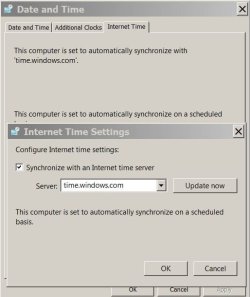
Windows does synchronize with a server and modify the RTC to local time.
Linux does the same but modify the RTC to UTC - GMT
 

Attachments

  • Win_time.JPG
    Win_time.JPG
    37.1 KB · Views: 42

My Computers My Computers

System One System Two

  • Computer type
    PC/Desktop
    Computer Manufacturer/Model Number
    custom build
    OS
    Windows 7 HP 64
    CPU
    i5 6600K - 800MHz to 4200MHz
    Motherboard
    GA-Z170-HD3P
    Memory
    4+4G GSkill DDR4 3000
    Graphics Card(s)
    IG - Intel 530
    Monitor(s) Displays
    Samsung 226BW
    Screen Resolution
    1680x1050
    Hard Drives
    (1) -1 SM951 – 128GB M.2 AHCI PCIe SSD drive for Windows 7 and Lubuntu
    (2) -1 WD SATA 3 - 1T for Data
    (3) -1 WD SATA 3 - 1T for backup
    PSU
    Thermaltake 450W TR2 gold
    Keyboard
    Old and good Chicony mechanical keyboard
    Mouse
    Logitech mX performance - 9 buttons (had to disable some)
    Internet Speed
    500Mb/s
    Browser
    Firefox 64
    Other Info
    TinyWall firewall
  • Computer type
    Laptop
    System Manufacturer/Model Number
    Asus Q550LF
    OS
    Windows 7 Pro
    CPU
    i7-4500U 800MHz to 3.0GHz
    Motherboard
    Asus Q550LF
    Memory
    (4+4)G DDR3 1600
    Graphics Card(s)
    IG intel 4400 + NVIDIA GeForce GT 745M
    Sound Card
    Realtek
    Monitor(s) Displays
    LG Display LP156WF4-SPH1
    Screen Resolution
    1920 x 1080
    Hard Drives
    BX500 120G SSD for Windows and programs +
    1T HDD for data
    Internet Speed
    500 Mb/s
    Browser
    Firefox
    Other Info
    TinyWall firewall
I think we both sticking with our own knowledge of how RTC works so there is no point for us to explain how operating systems works with RTC.
 

My Computer My Computer

Computer type
PC/Desktop
Computer Manufacturer/Model Number
Custom Build
OS
Windows 10 Pro x64
CPU
Intel Core i5 6600
Motherboard
Gigabyte Technology Z170M-D3H-CF (U3E1)
Memory
Corsair Vengeance LPX 16GB 2666MHz DDR4
Graphics Card(s)
AMD Radeon R9 380 Series
Hard Drives
SSD
HDD
Antivirus
Eset Smart Security
Browser
Mozila Firefox
Everything Megahertz07 said is true... At least read the link which Megahertz07 pointed to. I will even quote the answer from there:

If you have multiple operating systems installed in the same machine, they will all derive the current time from the same hardware clock: for this reason you must make sure that all of them see the hardware clock as providing time in the same chosen standard, or some of them will perform the time zone adjustement for the system clock, while others will not. For example, if the hardware clock was set to localtime, more than one operating system may adjust it after a DST change, thus resulting in an overcorrection; more problems may arise when travelling between different time zones and using one of the operating systems to reset the system/hardware clock.

This is the simple explanation to the problem the OP have.
 
Last edited:
Linux time configuration cannot affect time configuration of Windows OS if anyone claims it can does not know how operating system works and does not understand how dual booting works. ;)
You have no idea what you're talking about.
As a rule, a Linux OS won't directly write changes to a Windows OS without user intervention.

The "Linux Time vs Windows Time" issue has been well documented for many years.
I have personally experienced it for at least 8 years (especially when using Live Linux CD/DVD/USB).

I've recently had to perform the hacks that MSClin posted on my installed operating systems.
 
Last edited:

My Computer My Computer

Computer type
PC/Desktop
Computer Manufacturer/Model Number
n/a
OS
W7 Ultimate SP1, LM19.2 MATE, W10 Home 1703, W10 Pro 1703 VM, #All 64 bit
CPU
AMD Phenom II x6 1100T, 3.3 GHz
Motherboard
ASUS M4A88T-M/USB3 (AM3)
Memory
12GB DDR3 1333 G-Skill (4GB x 2), G-Skill (2GB x 2)
Graphics Card(s)
NVIDIA GeForce GTX 660
Sound Card
Realtek?
Monitor(s) Displays
Samsung S23B350
Screen Resolution
1920x1080
Hard Drives
WD Green 2TB (SATA), WD Green 3TB (SATA), WD Blue 4TB (SATA), WD Blue 6TB (SATA)
PSU
Cooler Master
Case
Antec GX300 Tower
Cooling
3x Antec TRICOOL 120mm Fans
Mouse
Wired Optical
Internet Speed
DSL
Antivirus
Avast
Browser
Pale Moon (64 bit)
Other Info
2018-12-27 Upgraded HDDs
2015-12-10 Upgraded case, graphics card, storage
2015-08-15 Upgraded motherboard & RAM
2015-07-15 Upgraded LM17.1 to LM17.2
You have no idea what you're talking about.

The "Linux Time vs Windows Time" issue has been well documented for many years.
I have personally experienced it for at least 8 years (especially when using Live Linux CD/DVD/USB).

I've recently had to perform the hacks that MSClin posted on my installed operating systems.

Wow so you are saying Linux can configure offline settings of Windows OS i think you have no idea what we are talking about because we have now established Linux time settings could configures RTC not the Windows OS time settings.
 

My Computer My Computer

Computer type
PC/Desktop
Computer Manufacturer/Model Number
Custom Build
OS
Windows 10 Pro x64
CPU
Intel Core i5 6600
Motherboard
Gigabyte Technology Z170M-D3H-CF (U3E1)
Memory
Corsair Vengeance LPX 16GB 2666MHz DDR4
Graphics Card(s)
AMD Radeon R9 380 Series
Hard Drives
SSD
HDD
Antivirus
Eset Smart Security
Browser
Mozila Firefox
Hi Buckskin, This previous post may help you to read

That's because Linux use UTC time and Windows use "Local". The solution would be to make Windows use UTC time or to make Linux use Local time. I prefer to make Linux use Local, because it's just easier.

So when you run Linux it will set the hardware clock (RTC) to UTC time and make a correction due to the time zone to show the local time clock.
When you run windows it will load the hardware clock (RTC) that has been set to UTC by Linux. It will show GMT or UTC time until Windows makes the change to local time.

I have just made the MSClin suggestion (post #6) adding utc=no in /etc/default/rcS and it made the magic.

Thanks, everyone; I will make a stab at this.

I have never yet messed with the Linux version of Command Line; I am assuming that is where I enter this text, or am I misunderstanding ?

Thanks and have a Happy New Year !
 

My Computer My Computer

Computer type
PC/Desktop
Computer Manufacturer/Model Number
Dell Optiplex 780m "mini-tower"
OS
Windows 7 Pro x64
CPU
Intel Core Two Duo E8600 3.33 ghz
Motherboard
Whatever DELL put in it
Memory
8GB
Graphics Card(s)
Gigabyte Radeon R7 240
Monitor(s) Displays
HP 2159m
PSU
750 Watt Corsair CX750
Keyboard
Logitech Wireless
Mouse
Logitech Wireless
Browser
Chrome, Firefox, IE
I have never yet messed with the Linux version of Command Line; I am assuming that is where I enter this text, or am I misunderstanding ?
!

You talk about "UTC=no"? If so, I'll just give you a simple command to make Linux use Local time. Open Terminal (that's how command line is called in Linux) and enter this command:

timedatectl set-local-rtc 1

Wow so you are saying Linux can configure offline settings of Windows OS i think you have no idea what we are talking about because we have now established Linux time settings could configures RTC not the Windows OS time settings.

I even quoted the cause of this problem, yet you still refuse to understand. "If you have multiple operating systems installed in the same machine, they will all derive the current time from the same hardware clock". And by this you should understand that if the hardware clock was set for example to UTC time, if Windows try to read it (as Windows uses Local time standard), the time would be displayed wrong in Windows. That's why every OS should use the same standard to read the hardware clock.

And the things you say doesn't make any sense. Nobody said that "Linux can configure offline settings of Windows", we basically said that if hardware clock is read with different standards, the time would be displayed wrong. All we said in this thread is documented here > Time - ArchWiki.
 
Last edited:
That's because Linux use UTC time and Windows use "Local". The solution would be to make Windows use UTC time or to make Linux use Local time. I prefer to make Linux use Local, because it's just easier.

Linux:
1. Edit "UTC=yes" to "UTC=no" in /etc/default/rcS.

Windows:
But if for some reason you want Windows to use UTC... Open Notepad and paste this code:

Windows Registry Editor Version 5.00
[HKEY_LOCAL_MACHINE\SYSTEM\CurrentControlSet\Control\TimeZoneInformation]
"RealTimeIsUniversal"=dword:00000001


Then save the file as "WindowsTimeToUTC.reg" and double-click to merge it with the registry. But this is not everything, you should open CMD and disable Windows Time service with this command:

sc config w32time start= disabled

Now you're finished with Windows. :p

Hi MSClin,

As you can see you have not mentioned about Linux modifying RTC chip setting.https://www.sevenforums.com/members/megahertz07.html
 

My Computer My Computer

Computer type
PC/Desktop
Computer Manufacturer/Model Number
Custom Build
OS
Windows 10 Pro x64
CPU
Intel Core i5 6600
Motherboard
Gigabyte Technology Z170M-D3H-CF (U3E1)
Memory
Corsair Vengeance LPX 16GB 2666MHz DDR4
Graphics Card(s)
AMD Radeon R9 380 Series
Hard Drives
SSD
HDD
Antivirus
Eset Smart Security
Browser
Mozila Firefox
Hi MSClin,

As you can see you have not mentioned about Linux modifying RTC chip setting.

Do I have to? I like to provide fast help to the people who have problems, not give them information which they can get by using Google.
 
Well you should so those helping and OP can learn from you.
 

My Computer My Computer

Computer type
PC/Desktop
Computer Manufacturer/Model Number
Custom Build
OS
Windows 10 Pro x64
CPU
Intel Core i5 6600
Motherboard
Gigabyte Technology Z170M-D3H-CF (U3E1)
Memory
Corsair Vengeance LPX 16GB 2666MHz DDR4
Graphics Card(s)
AMD Radeon R9 380 Series
Hard Drives
SSD
HDD
Antivirus
Eset Smart Security
Browser
Mozila Firefox
Back
Top