
Pc-1 on new win install in infinite loop w/ format done> how access

25 characters, 5 sets of 5, both numbers and letters. Should say product key:

Here's an example sticker:
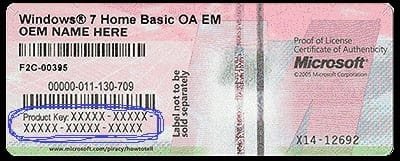
Win7 product key example.jpg
 

My Computer My Computer

At a glance

Win 10 x64, Linux Lite, Win 7 x64, BlackArch,...
Computer type
PC/Desktop
Computer Manufacturer/Model Number
HP Desktop & Compaq Laptop
OS
Win 10 x64, Linux Lite, Win 7 x64, BlackArch, & Kali
Hard Drives
Samsung 850 Pro 256Gb,
Hitachi HDD 1Tb,
Crucial MX SSD 250Gb
Segate 3Tb USB 3.0 Ext. Backup HDD
Internet Speed
150Mbps dn, 20Mbps up
Antivirus
Avast Free, Malwarebytes Anti-Exploit & Anti-Ransomware
Browser
Firefox, Chrome, Opera, & VPN
Yeah, the xtra number i was talking about is the xi4-12692 farthervto the right on that label.

But on mine its just close below the 5 on 5 number-letter sets
 

My Computer My Computer

At a glance

win7 Home Premium x64
Computer type
PC/Desktop
Computer Manufacturer/Model Number
gateway
OS
win7 Home Premium x64
Antivirus
avast
Browser
Firefox
Just curious,

You indicated prior that both your PCs are the same. Gateway PC (same model)

Is the OEM key on stickers the same?
 

My Computer My Computer

At a glance

Win 10 x64, Linux Lite, Win 7 x64, BlackArch,...
Computer type
PC/Desktop
Computer Manufacturer/Model Number
HP Desktop & Compaq Laptop
OS
Win 10 x64, Linux Lite, Win 7 x64, BlackArch, & Kali
Hard Drives
Samsung 850 Pro 256Gb,
Hitachi HDD 1Tb,
Crucial MX SSD 250Gb
Segate 3Tb USB 3.0 Ext. Backup HDD
Internet Speed
150Mbps dn, 20Mbps up
Antivirus
Avast Free, Malwarebytes Anti-Exploit & Anti-Ransomware
Browser
Firefox, Chrome, Opera, & VPN
Microsoft software, office, etc, & Windows OS are always 25-characters (numbers and letters)

You can run my attached VB script and it will locate the product key on your working machine.

I place it in a Zip/compressed folder to prevent bit flip/error. Double-left click, popup choose save file. Go to saved file location, double-left click, extract to Desktop. Back on desktop double-right click Find Windows Product Key, popup will be your product key.

FYI: if you want to view the code, left-click Find Windows Product Key, choose edit, notepad will open with the code displayed. Simple converter program.

FYI: Of the 36 Latin letters and Arabic numerals used in most Western European
languages, 24 appear to be used for current product key codes and 12 are not.
The 24 used are: 2346789BCDFGHJKMPQRTVWXY
The 12 unused are: 015AEILNOSUZ
 

Attachments

Last edited:

My Computer My Computer

At a glance

Win 10 x64, Linux Lite, Win 7 x64, BlackArch,...
Computer type
PC/Desktop
Computer Manufacturer/Model Number
HP Desktop & Compaq Laptop
OS
Win 10 x64, Linux Lite, Win 7 x64, BlackArch, & Kali
Hard Drives
Samsung 850 Pro 256Gb,
Hitachi HDD 1Tb,
Crucial MX SSD 250Gb
Segate 3Tb USB 3.0 Ext. Backup HDD
Internet Speed
150Mbps dn, 20Mbps up
Antivirus
Avast Free, Malwarebytes Anti-Exploit & Anti-Ransomware
Browser
Firefox, Chrome, Opera, & VPN
No the OEM key on stickers are not the same. same model, same brand, One a refurb, one new, same color, same win7x64 OS
...

DONE. Good and bad. Good is that it looks like the disks were in good shape, that is they did their job! But got the same old windows notice stuff:

"The computer restarted unexpectedly or encountered an unexpected error. Windows installation cannot proceed. To install windows click to restart the computer and then restart the installation."

So we know (right?) both the gtwy factory disc's are doing the same good job as are our 3 recent DVD dics since the same error appears and both go through to initial completion.

you said you had several wipe options (right?). Maybe time to fix the disc errors.

I know it's getting later back there, so do what you can on info now, and call it a nite Bud. Unless you don't want to that is!

Remember when running the factory discs, is when it froze. that when the prob occurred right after the format, ao something happened then and the hd was being cleaned out but not everything it seems now. J
 

My Computer My Computer

At a glance

win7 Home Premium x64
Computer type
PC/Desktop
Computer Manufacturer/Model Number
gateway
OS
win7 Home Premium x64
Antivirus
avast
Browser
Firefox
Grrr....

We'll see how you progressed tomorrow, I'm burn out on the study thing and continuing frustration with your issue.

Try disk to wipe HDD AOMEI Partition Assistant, Windows PE environment.

Download and make bootable media

Start AOMEI Partition Assistant,
in right Wizard section choose "Make Bootable Media"
in popup choose next, insert DVD/CE or USB, (be advised if you use USB it will delete all content of drive)
select boot device, CD/DVD or USB,
click proceed.

After creating CD/DVD or USB, insert it in non-working PC power down, power up and enter boot menu,
choose your media CD/DVD or USB.
After AOMEI loads,
Select HDD (click on most likely Disk 1 being that you only have one HDD installed)
Left pane Disk Operations choose Wipe Hard Drive,
Popup leave at 1 click OK
When completed remove media and install disk 1 of the Installation disks you created.
Power down
Power up, press F key to enter boot manager
Choose CD/DVD
Follow install instructions.
Cross fingers, eyes, legs, arms, toes, and pray. :rolleyes:

Nite!
 

My Computer My Computer

At a glance

Win 10 x64, Linux Lite, Win 7 x64, BlackArch,...
Computer type
PC/Desktop
Computer Manufacturer/Model Number
HP Desktop & Compaq Laptop
OS
Win 10 x64, Linux Lite, Win 7 x64, BlackArch, & Kali
Hard Drives
Samsung 850 Pro 256Gb,
Hitachi HDD 1Tb,
Crucial MX SSD 250Gb
Segate 3Tb USB 3.0 Ext. Backup HDD
Internet Speed
150Mbps dn, 20Mbps up
Antivirus
Avast Free, Malwarebytes Anti-Exploit & Anti-Ransomware
Browser
Firefox, Chrome, Opera, & VPN
Nite, and I do understand! J
 

My Computer My Computer

At a glance

win7 Home Premium x64
Computer type
PC/Desktop
Computer Manufacturer/Model Number
gateway
OS
win7 Home Premium x64
Antivirus
avast
Browser
Firefox
Got the disc burnt ok about 2 am. The when reading you after creating cd instructions, I got to this:

"Cross fingers, eyes, legs, arms, toes, and pray." am a lil shakey maybe but does that portray some sort of risk? Or is it just a hope it works good? See brave reviews online, seems people are happy. the win8 windows kind made me look tho. Jim

edit: NEVERMIND Just the jitters. I'm a lil punchy after all this. Am proceeding now. 6:48 am. Jim

Edit 2: It's running. directions a bit different so looked them up. Oh well. Jim 7:12 am
 
Last edited:

My Computer My Computer

At a glance

win7 Home Premium x64
Computer type
PC/Desktop
Computer Manufacturer/Model Number
gateway
OS
win7 Home Premium x64
Antivirus
avast
Browser
Firefox
YAY! up and running that miserable IE. The cleanup went well and that handy disc you figured out was a savior. Windows installed right off immediate without a heartbeat. Nothing on the HD to interfere with the win install, so it was a shoe-in. I see you're taking a break. Well earned I'd say. Thank You Sooooooo much! without you would not have happened, obviously.
Gonna get back and tackle that damn IE again. First thing was to install Avast. I was wide open. Jim
 

My Computer My Computer

At a glance

win7 Home Premium x64
Computer type
PC/Desktop
Computer Manufacturer/Model Number
gateway
OS
win7 Home Premium x64
Antivirus
avast
Browser
Firefox
AWESOME in Capitals! Glad to be able to rectify your issue.

See my post #5 on this thread for links to install all the Windows updates to April 2017. Click Here

I pretty much use Firefox exclusively with several add-ons! Disconnect, Cookie Auto-Delete, HTTPS Everywhere, uBlock Origin, Disable HTML5 Auto-play, and plugin Shockwave Flash set to Ask to Activate.

If you require any further assistance, you know where we are!

When you have the $$ invest in an External Hard Drive to back up your computers, Seagate makes a few large 3TB plus drives relatively inexpensive and plenty of backup storage. I have a Seagate 3Tb that I purchased a few years ago. They are about 1/2 the price now, compared to the one I purchased. Many on SevenForums recommend Macrium Reflect Free. I demoed it and for the novice, it's a little more daunting than what I use and recommend AOMEI Backupper (smaller edition without XP support). Either one is an excellent choice. I like FREE!!

Happy Computing!!
 

My Computer My Computer

At a glance

Win 10 x64, Linux Lite, Win 7 x64, BlackArch,...
Computer type
PC/Desktop
Computer Manufacturer/Model Number
HP Desktop & Compaq Laptop
OS
Win 10 x64, Linux Lite, Win 7 x64, BlackArch, & Kali
Hard Drives
Samsung 850 Pro 256Gb,
Hitachi HDD 1Tb,
Crucial MX SSD 250Gb
Segate 3Tb USB 3.0 Ext. Backup HDD
Internet Speed
150Mbps dn, 20Mbps up
Antivirus
Avast Free, Malwarebytes Anti-Exploit & Anti-Ransomware
Browser
Firefox, Chrome, Opera, & VPN
They are installing now...129 each. but I'll look at post #5 too. Yeah, long term Fx man myself. But that damn quantum did away with near all the extensions I used. So am in chrome now. Not too bad this time, much better on the extensions than in the past. Yeah. external HD is on my to get list alright. Amazing what an actual clean hd will do, eh! Jim

Edit: 192 each NOT 129. Looong download (and configure) time
 
Last edited:

My Computer My Computer

At a glance

win7 Home Premium x64
Computer type
PC/Desktop
Computer Manufacturer/Model Number
gateway
OS
win7 Home Premium x64
Antivirus
avast
Browser
Firefox
You can always use an older version of Firefox and turn off updates, click three bars upper right corner, click options, under general tab scroll down to Allow Firefox to, click radio button Never check for updates.

I have older version of Firefox32 57.09b & Firefox64 57.09b Quantum
 

My Computer My Computer

At a glance

Win 10 x64, Linux Lite, Win 7 x64, BlackArch,...
Computer type
PC/Desktop
Computer Manufacturer/Model Number
HP Desktop & Compaq Laptop
OS
Win 10 x64, Linux Lite, Win 7 x64, BlackArch, & Kali
Hard Drives
Samsung 850 Pro 256Gb,
Hitachi HDD 1Tb,
Crucial MX SSD 250Gb
Segate 3Tb USB 3.0 Ext. Backup HDD
Internet Speed
150Mbps dn, 20Mbps up
Antivirus
Avast Free, Malwarebytes Anti-Exploit & Anti-Ransomware
Browser
Firefox, Chrome, Opera, & VPN
You can always use an older version of Firefox and turn off updates, click three bars upper right corner, click options, under general tab scroll down to Allow Firefox to, click radio button Never check for updates.

I have older version of Firefox32 57.09b & Firefox64 57.09b Quantum

Your using Both? Did not think of that. Hmmmm Do you switch between the two Fx versions?
 

My Computer My Computer

At a glance

win7 Home Premium x64
Computer type
PC/Desktop
Computer Manufacturer/Model Number
gateway
OS
win7 Home Premium x64
Antivirus
avast
Browser
Firefox
Yes but not very often. If you customize, click three horizontal bars upper right hand corner, drop-down menu, click customize and delete, add, or move those items around, then use the other browser, i.e. use x64 and customize, then use x32, then back to x64 many of the changes revert to default, haven't a clue why as yet.

Just looked at Firefox32, its Firefox 56.0b8 beyond that version it's blocking the legacy/older add-ons.
 

My Computer My Computer

At a glance

Win 10 x64, Linux Lite, Win 7 x64, BlackArch,...
Computer type
PC/Desktop
Computer Manufacturer/Model Number
HP Desktop & Compaq Laptop
OS
Win 10 x64, Linux Lite, Win 7 x64, BlackArch, & Kali
Hard Drives
Samsung 850 Pro 256Gb,
Hitachi HDD 1Tb,
Crucial MX SSD 250Gb
Segate 3Tb USB 3.0 Ext. Backup HDD
Internet Speed
150Mbps dn, 20Mbps up
Antivirus
Avast Free, Malwarebytes Anti-Exploit & Anti-Ransomware
Browser
Firefox, Chrome, Opera, & VPN
Back
Top