

- Local time
- 6:23 PM
- Messages
- 3,615
25 characters, 5 sets of 5, both numbers and letters. Should say product key:
Here's an example sticker:
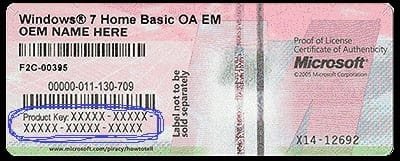
Here's an example sticker:
My Computer
At a glance
Win 10 x64, Linux Lite, Win 7 x64, BlackArch,...
- Computer type
- PC/Desktop
- Computer Manufacturer/Model Number
- HP Desktop & Compaq Laptop
- OS
- Win 10 x64, Linux Lite, Win 7 x64, BlackArch, & Kali
- Hard Drives
- Samsung 850 Pro 256Gb,
Hitachi HDD 1Tb,
Crucial MX SSD 250Gb
Segate 3Tb USB 3.0 Ext. Backup HDD
- Internet Speed
- 150Mbps dn, 20Mbps up
- Antivirus
- Avast Free, Malwarebytes Anti-Exploit & Anti-Ransomware
- Browser
- Firefox, Chrome, Opera, & VPN


