Solved windows 7 clean install but unable to get updates

Yes, that is correct.

This brilliant tutorial by Brink might also help:

Clean Install Windows 7

Good luck and I hope it all goes well!
 

My Computer My Computer

At a glance

Win 7 HP SP1 64-bit Vista HB SP2 32-bit Linux...Intel(R) Pentium(R) CPU P6200 @ 2.13GHz4.00 GBIntel(R) Graphics Media Accelerator HD
Computer type
Laptop
Computer Manufacturer/Model Number
Fujitsu LIFEBOOK
OS
Win 7 HP SP1 64-bit Vista HB SP2 32-bit Linux Mint 18.3
CPU
Intel(R) Pentium(R) CPU P6200 @ 2.13GHz
Motherboard
FUJITSU FJNBB06
Memory
4.00 GB
Graphics Card(s)
Intel(R) Graphics Media Accelerator HD
Sound Card
[1] Realtek High Definition Audio [2] Intel(R) Display Audio
Screen Resolution
1366 x 768 x 32 bits (4294967296 colors) @ 59 Hz
Hard Drives
TOSHIBA MK5076GSX
Antivirus
AVG FREE
really hoping that this was what I was looking for, but the system failed to load...here is the error
An operating system wasn't found. Try disconnecting any drives that don't contain an operating system. Press Ctrl+Alt+Del to restart...
I have all my storage disks disconnected, and I made sure to press any key during the start up...what did I do wrong this time?
 

My Computer My Computer

At a glance

windows 7 x64
Computer type
PC/Desktop
Computer Manufacturer/Model Number
dell
OS
windows 7 x64
Paul, I mounted the ISO file then I am burning the files that reside in the ISO file, ie...boot folder, efi folder, source folder, support folder, upgrade folder, autorun, bootmgr, bootmgr.efi, setup...to the DVD
 

My Computer My Computer

At a glance

windows 7 x64
Computer type
PC/Desktop
Computer Manufacturer/Model Number
dell
OS
windows 7 x64
Well that failed, now the error message is...An operating system wasn't found. Try disconnecting any drives that don't contain an operating system...
Yet the DVD looks exactly the same as the Windows 7 disk, right down to the file sizes...why isn't the system seeing the setup file, it sees it on the Windows 7 disk and starts the install but not on this disk...now the wife is losing faith in me IT skills to ever get this OS installed...that's a kick in the head
 

My Computer My Computer

At a glance

windows 7 x64
Computer type
PC/Desktop
Computer Manufacturer/Model Number
dell
OS
windows 7 x64
is it possible that windows 7 just won't install on an SSD drive? I had it install on this system when my hard drive was a regular drive but now that I have an SSD drive it won't install, no way I had it installed on a smaller SSD drive and now it won't install
 

My Computer My Computer

At a glance

windows 7 x64
Computer type
PC/Desktop
Computer Manufacturer/Model Number
dell
OS
windows 7 x64
No, it is possible to install Windows 7 all versions on SSD

What do you mean: "Mounted ISO file?"

You can't copy & paste an ISO file to DVD or USB stick, it has to be burned. (copy & paste will result in non-bootable DVD or USB stick)

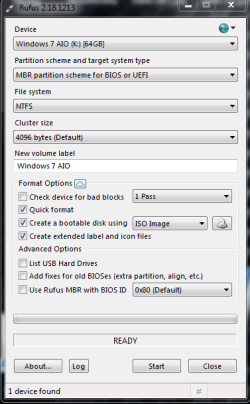
For DVD use ImgBurn for USB use either Rufus 2.18 or Rufus 2.18 portable

I have Windows 7 home premium on Samsung 850 pro 256 gb SSD

Fresh/clean install, you have to boot to your install media (DVD or USB)

Start your computer and continually press (I believe dell desktop is F12) for boot order, select DVD or CD-ROM or if your Win7 is on USB choose that (should indicate usb type, I have PNY usb stick)

If that doesn't get you to boot menu, try other keys by elimination

Screenshots of ImgBurn and Rufus:

ImgBurn Capture.PNG Rufus 2.18 Capture.PNG
 
Last edited:

My Computer My Computer

At a glance

Win 10 x64, Linux Lite, Win 7 x64, BlackArch,...
Computer type
PC/Desktop
Computer Manufacturer/Model Number
HP Desktop & Compaq Laptop
OS
Win 10 x64, Linux Lite, Win 7 x64, BlackArch, & Kali
Hard Drives
Samsung 850 Pro 256Gb,
Hitachi HDD 1Tb,
Crucial MX SSD 250Gb
Segate 3Tb USB 3.0 Ext. Backup HDD
Internet Speed
150Mbps dn, 20Mbps up
Antivirus
Avast Free, Malwarebytes Anti-Exploit & Anti-Ransomware
Browser
Firefox, Chrome, Opera, & VPN
If you downloaded image from TechBench you can use eicfg_removal_utility.zip
to convert it to AIO (all-in-one - All versions of Windows)
To do so download the zip file, open it, click on eicfg_remover.exe, in popup window, navigate (go to the image you downloaded) from TechBench, (mine is downloads Win7_Ult_SP1_English_x64) click open. Popup should say Success: ei.cfg restored).
What you did:
You removed the ei.cfg text file from the iso. the ei.cfg text file sets the version, i.e. (basic, home, home premium, ultimate) making it AIO all-in-one. You cannot use a different version from your product key, i.e. if you have product key for Win7 x64 Home Premium that is the version you must choose for install, otherwise you will not have activation, i.e. windows will not be verified as genuine.
 

My Computer My Computer

At a glance

Win 10 x64, Linux Lite, Win 7 x64, BlackArch,...
Computer type
PC/Desktop
Computer Manufacturer/Model Number
HP Desktop & Compaq Laptop
OS
Win 10 x64, Linux Lite, Win 7 x64, BlackArch, & Kali
Hard Drives
Samsung 850 Pro 256Gb,
Hitachi HDD 1Tb,
Crucial MX SSD 250Gb
Segate 3Tb USB 3.0 Ext. Backup HDD
Internet Speed
150Mbps dn, 20Mbps up
Antivirus
Avast Free, Malwarebytes Anti-Exploit & Anti-Ransomware
Browser
Firefox, Chrome, Opera, & VPN
Hi mdl18313,
error message is...An operating system wasn't found.
You can't just copy the ISO file to a DVD or USB, it has to be burnt so as to make it bootable.
Once you have done that just make sure that the DVD/USB is the TOP option in your BIOS (you can change it back to the HD after the installation) and then reboot with the DVD in the DVD drive.

Snick has given you excellent information and explanations so you should be alright from here on in.

Let us know how you get on!
 

My Computer My Computer

At a glance

Win 7 HP SP1 64-bit Vista HB SP2 32-bit Linux...Intel(R) Pentium(R) CPU P6200 @ 2.13GHz4.00 GBIntel(R) Graphics Media Accelerator HD
Computer type
Laptop
Computer Manufacturer/Model Number
Fujitsu LIFEBOOK
OS
Win 7 HP SP1 64-bit Vista HB SP2 32-bit Linux Mint 18.3
CPU
Intel(R) Pentium(R) CPU P6200 @ 2.13GHz
Motherboard
FUJITSU FJNBB06
Memory
4.00 GB
Graphics Card(s)
Intel(R) Graphics Media Accelerator HD
Sound Card
[1] Realtek High Definition Audio [2] Intel(R) Display Audio
Screen Resolution
1366 x 768 x 32 bits (4294967296 colors) @ 59 Hz
Hard Drives
TOSHIBA MK5076GSX
Antivirus
AVG FREE
I wouldn't enter bios setup to change boot order, you don't need to do this to boot to your install media, & not doing so, prevents you from making a mistake in BIOS configuration.

You can boot from DVD or USB without changing BIOS setup

When you start your computer, repeatedly press, I believe it's F12 on Dell Desktop PC. You should see a screen that says boot menu or similar, with several choices. You are looking for DVD/CD or name of USB stick (mine is PNY). Will most likely be under Legacy and near the bottom of screen.

If you make a mistake here, it's not critical, just power down the machine, power up, quickly press appropriate F key to enter Boot menu and try another choice.

I don't have a problem walking individuals through processes to accomplish computer related tasks. :D
 

My Computer My Computer

At a glance

Win 10 x64, Linux Lite, Win 7 x64, BlackArch,...
Computer type
PC/Desktop
Computer Manufacturer/Model Number
HP Desktop & Compaq Laptop
OS
Win 10 x64, Linux Lite, Win 7 x64, BlackArch, & Kali
Hard Drives
Samsung 850 Pro 256Gb,
Hitachi HDD 1Tb,
Crucial MX SSD 250Gb
Segate 3Tb USB 3.0 Ext. Backup HDD
Internet Speed
150Mbps dn, 20Mbps up
Antivirus
Avast Free, Malwarebytes Anti-Exploit & Anti-Ransomware
Browser
Firefox, Chrome, Opera, & VPN
Tried another time to load the Windows 7 and the error said "an operating system wasn't found", even when I used the original window 7 disk so I removed all the storage drives and removed all the unused sata cables from the mother board and also pulled the SSD drive and put the SSD drive in a "hot shoe" connected to my laptop and reformatted the drive and removed all partitions. Ten I reinstalled the SSD drive, but when I attempted to install windows 7 at the end of the install step seemed to hangup for at least a half hour when this error "Windows Setup could not configure Windows to run on this computer's hardware" Really? This just keeps throwing more curves at me. What now?
 

My Computer My Computer

At a glance

windows 7 x64
Computer type
PC/Desktop
Computer Manufacturer/Model Number
dell
OS
windows 7 x64
Did you download ISO and burn it to disk?

You seem to want to do your own thing and not listen/follow what we are asking you to do or saying.
 

My Computer My Computer

At a glance

Win 10 x64, Linux Lite, Win 7 x64, BlackArch,...
Computer type
PC/Desktop
Computer Manufacturer/Model Number
HP Desktop & Compaq Laptop
OS
Win 10 x64, Linux Lite, Win 7 x64, BlackArch, & Kali
Hard Drives
Samsung 850 Pro 256Gb,
Hitachi HDD 1Tb,
Crucial MX SSD 250Gb
Segate 3Tb USB 3.0 Ext. Backup HDD
Internet Speed
150Mbps dn, 20Mbps up
Antivirus
Avast Free, Malwarebytes Anti-Exploit & Anti-Ransomware
Browser
Firefox, Chrome, Opera, & VPN

My Computers My Computers

  • At a glance

    7 X64i5 84002x8gb 3200mhz
    Computer type
    PC/Desktop
    OS
    7 X64
    CPU
    i5 8400
    Motherboard
    gigabyte b365m ds3h
    Memory
    2x8gb 3200mhz
    Hard Drives
    various
    PSU
    pure power 11 400w cm
    Case
    Coolermaster
    Cooling
    cryorig m9i
  • At a glance

    7x64g54008gb ddr4 2400
    Computer type
    PC/Desktop
    OS
    7x64
    CPU
    g5400
    Motherboard
    ga b365m ds3h
    Memory
    8gb ddr4 2400
    PSU
    xfx pro 450w
"Windows Setup could not configure Windows to run on this computer's hardware" Really? This just keeps throwing more curves at me. What now?
This should be eject the installer at first restart of installation.
 

My Computer My Computer

At a glance

Windows 7 guest, Debian hostAMD FX-6100DDR3/16384 MBytes/2000.6MHzAMD Radeon HD 5500 Series
Computer type
PC/Desktop
Computer Manufacturer/Model Number
MSI
OS
Windows 7 guest, Debian host
CPU
AMD FX-6100
Motherboard
880GMS-E41(FX)(MS-7641)
Memory
DDR3/16384 MBytes/2000.6MHz
Graphics Card(s)
AMD Radeon HD 5500 Series
Sound Card
Built-in
Monitor(s) Displays
Samsung SyncMaster S23B300
Screen Resolution
1920x1080
Hard Drives
ST1000DM003-9YN162 ATA Device
WDC WD5000AAKX-00ERMAQ ATA Device
PSU
500W NAXN
Case
APOLLO
Cooling
XY
Keyboard
Logitech
Mouse
Samsung
Internet Speed
.79Mbps/1.71Mbps
Antivirus
Microsoft Security Essentials
Browser
Google Chrome/FireFox/Internet Explorer
Other Info
3in1 creative speaker
Ok guys thanks for your help, I finally got the install to complete. The post from SIW2 with the link he gave me was exactly what I was needing, but the first try I thought was working but the error popped up again. Then when viewing other videos on the link one of them said if the error pops up again just click "OK", so I saw this after I started the install again thinking that I would do that but to my amazement the install worked without any issues...woohoo...again thanks for everybody help.
 

My Computer My Computer

At a glance

windows 7 x64
Computer type
PC/Desktop
Computer Manufacturer/Model Number
dell
OS
windows 7 x64
thanks again
 

My Computer My Computer

At a glance

windows 7 x64
Computer type
PC/Desktop
Computer Manufacturer/Model Number
dell
OS
windows 7 x64
Glad to hear your issue is resolved! Love the veterans input!

Happy Computing!
 

My Computer My Computer

At a glance

Win 10 x64, Linux Lite, Win 7 x64, BlackArch,...
Computer type
PC/Desktop
Computer Manufacturer/Model Number
HP Desktop & Compaq Laptop
OS
Win 10 x64, Linux Lite, Win 7 x64, BlackArch, & Kali
Hard Drives
Samsung 850 Pro 256Gb,
Hitachi HDD 1Tb,
Crucial MX SSD 250Gb
Segate 3Tb USB 3.0 Ext. Backup HDD
Internet Speed
150Mbps dn, 20Mbps up
Antivirus
Avast Free, Malwarebytes Anti-Exploit & Anti-Ransomware
Browser
Firefox, Chrome, Opera, & VPN
Back
Top