Seagate 2TB Unallocated, Unknown, Not Initialized

OK. With the original WD cable, plug it into your PC and run Partition Recovery Wizard as indicated in my post # 16 and post the screenshot. Close PW and do not do anything else till I examine the screenshot and tell you the next step.

"But it shows up as bad disk - I remember you said if Bad disk there's no hope.."

Hope or no hope we shall try our best. In data recovery nothing is certain till it becomes certain :D That till hasn't come yet.

Do it at your own time. I won't go missing :) especially when I am into the thread.
 

My Computer My Computer

OS
Windows 7 Home Premium 32 bit
OK. With the original WD cable, plug it into your PC and run Partition Recovery Wizard as indicated in my post # 16 and post the screenshot. Close PW and do not do anything else till I examine the screenshot and tell you the next step.

"But it shows up as bad disk - I remember you said if Bad disk there's no hope.."

Hope or no hope we shall try our best. In data recovery nothing is certain till it becomes certain :D That till hasn't come yet.

Do it at your own time. I won't go missing :) especially when I am into the thread.

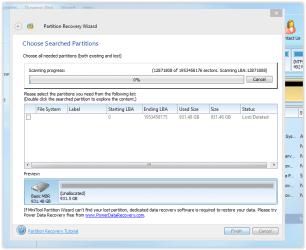
Ok I'm running it now. Is it correct to look like this?

And just curious will this minitool damage the HDD any further? As it takes long to run, I wonder if it does anything. Just to be safe. I'm so paranoid nowadays.
 

My Computer My Computer

Computer type
Laptop
OS
Wins 8.1
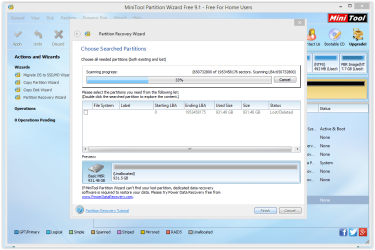
also to mention that hard disk is blinking white light when doing this - is it ok?

Screen Shot 04-19-18 at 08.58 PM.PNG
 

My Computer My Computer

Computer type
Laptop
OS
Wins 8.1
PW only scans the drive. Does not write anything to it. So don't worry. I am much more paranoid than you when dealing with data recovery.

Did it complete the scan? Scan percentage shows 0%. Also it did not find the partition start point at sector 2048.
 

My Computer My Computer

OS
Windows 7 Home Premium 32 bit
Current status.... is it ok?

Screen Shot 04-19-18 at 11.01 PM.PNG
 

My Computer My Computer

Computer type
Laptop
OS
Wins 8.1
should I still continue..?
 

My Computer My Computer

Computer type
Laptop
OS
Wins 8.1
No need. Click on cancel and close PW.

I have to plan my next strategy now. Will take sometime. You can look for my post tom morning by 10:00hrs ( my time) or later.

Before you go to sleep post a Windows Disk Management screenshot again. This time of course with the WD original cable. Just want to confirm it is the same as before.
 

My Computer My Computer

OS
Windows 7 Home Premium 32 bit
Yes same. the previous screenshot on Disk Management was already using the ori cable.
 

My Computer My Computer

Computer type
Laptop
OS
Wins 8.1
OK, We shall now try TestDisk and see what it shows. Follow the process in my post#6 here WD Elements being read as RAW // Contents readable through app - Windows 7 Help Forums

If at any time you get a screen different from what is posted there or you have any doubts on how to proceed further, stop,take that screenshot, close TestDisk and ask for clarification. Do not try to experiment on your own. ( You can close TestDisk anytime by clicking on the X in the top right of the Title bar.)
 

My Computer My Computer

OS
Windows 7 Home Premium 32 bit
OK, We shall now try TestDisk and see what it shows. Follow the process in my post#6 here WD Elements being read as RAW // Contents readable through app - Windows 7 Help Forums

If at any time you get a screen different from what is posted there or you have any doubts on how to proceed further, stop,take that screenshot, close TestDisk and ask for clarification. Do not try to experiment on your own. ( You can close TestDisk anytime by clicking on the X in the top right of the Title bar.)

Very, very good post you have done in that thread.:):):)
The same program I used in my thread I linked to in post three.
The program is very good and the best part is that it works for all operating systems.. and is available as bootable usb/dvd

I throw in these links if he wants to read more about TestDisk.
https://www.cgsecurity.org/wiki/TestDisk_Step_By_Step
https://www.cgsecurity.org/wiki/TestDisk
 

My Computer My Computer

Computer type
PC/Desktop
Computer Manufacturer/Model Number
AsusX53, Aspire E1-572. AsusUX32A, HP Pro3130mt+3010mt, HP Proliant ML150G3, 3xCustom, i3, i5, i7
OS
Linux:Debian, Kali.. 2xWin8.1,2x,1x7Pro, Retro:1x2003server.1xXPpro, 1xW2k,1x98SE,1x95,1x3.11
CPU
cpu's intel 8088 up to intel i7 gen9.. dual xenon on server
Motherboard
a lot of them :-)
Memory
oldest 1024KB newest 64GB
Graphics Card(s)
mostly internals i don't game
Sound Card
old retro=soundblaster.. newer ones internal
Monitor(s) Displays
smalest 12" largest 26"
Internet Speed
100/100
Antivirus
NortonInternetSecurity, MS, Avast, (not on the same computer
Browser
IE8, IE9. IE11, Firefox
Other Info
I can't fit all info on all my computers in these fields :-D
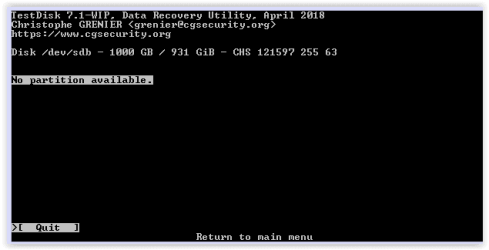
jumanji it doesnt work - it says no partition and not able to proceed..

Screen Shot 04-21-18 at 10.04 PM.PNG
 

My Computer My Computer

Computer type
Laptop
OS
Wins 8.1
Screen Shot 04-21-18 at 10.05 PM.PNG

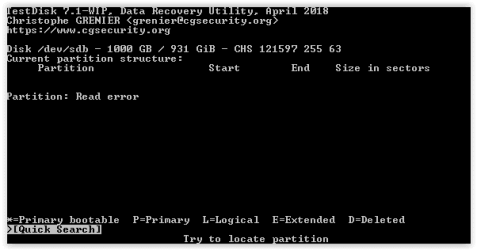
if I select quick search, this shows up..
 

My Computer My Computer

Computer type
Laptop
OS
Wins 8.1
@yoongcy421
Wish you would have posted more info in your System specs, at least the specs of your drive with the issue.
Seagate has a major problem with HDDs failing, at an unacceptable rate, and are being sued for their product
reliability.
Peruse:
How to determine if your computer's hard drive falls under class-action ... Seagate is being sued for selling shoddy hard drives - Geek.com
Seagate is being sued for selling shoddy hard drives - Geek.com
Seagate hit with class action lawsuit over defective hard drives ...
 

My Computer My Computer

Computer type
PC/Desktop
Computer Manufacturer/Model Number
HP Desktop & Compaq Laptop
OS
Win 10 x64, Linux Lite, Win 7 x64, BlackArch, & Kali
Hard Drives
Samsung 850 Pro 256Gb,
Hitachi HDD 1Tb,
Crucial MX SSD 250Gb
Segate 3Tb USB 3.0 Ext. Backup HDD
Internet Speed
150Mbps dn, 20Mbps up
Antivirus
Avast Free, Malwarebytes Anti-Exploit & Anti-Ransomware
Browser
Firefox, Chrome, Opera, & VPN
OK. It is unfortunate. Three Partition/data recovery programs Partition Wizard, GetDataback , and now TestDisk refusing to read sector 0.

It is again the failure of electronics. But this was manmade - using the Seagate cable on your WD drive instead of the propreitary WD cable. The connections could be different and the powering 5V could have been applied to a wrong point killing the electronics.

Atleast in the Seagate case you were fortunate - free data recovery once during the warranty period. ( Snick hasn't read the whole thread obviously.)

Here you have no choice. Since your WD Passport is hardware encrypted, you have to necessarily turn to WD data recovery partners who only know the decrypt key to recover the encrypted data on your HDD.

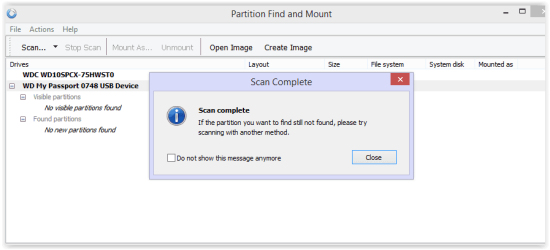
As a last resort try Partition Find and Mount and check whether it is able to find and mount the partition.. Partition Find and Mount: Download
You can find the documentation on how to use it in the same page.
 

My Computer My Computer

OS
Windows 7 Home Premium 32 bit
thank you jumanji
I have been blaming myself a lot recently.
Hopefully seagate can recover 100% of everything on my HDD so I dont have to recover this WD. Honestly I dont know how well they can do it :(

I will keep you guys posted on what Seagate is doing. by now, they told me that my HDD has arrived Netherlands recovery center.
I tried searching for reviews on their recovery but don't seem to find much details on these IT forums.

I'm trying Partition Find and Mount now. still 0% but let's see..
 

My Computer My Computer

Computer type
Laptop
OS
Wins 8.1
Screen Shot 04-22-18 at 09.33 AM.PNG

I guess this ends here. thank you jumanji
If you are interested, I will keep this thread updated with updates from Seagate data recovery center..
 

My Computer My Computer

Computer type
Laptop
OS
Wins 8.1
I'm interested to hear how it goes.
so your 1Gb disk is it an external hard drive to?
Do you have access to any computer other than your laptop.. a desktop computer possibly?
The disk shows the right size, so there may be hope to solve this one on your own.
Starting with.
Test the hard drive to another computer.
Test with another USB cable between the computer and the hard drive.
If none of that can give you access to the hard drive so is there one possibility left.
Is it a 2.5-inch or 3.5-inch hard drive?


Edit:
and there is no abnormal noise from the hard drive, like a click..click..click...click noise?
 

My Computer My Computer

Computer type
PC/Desktop
Computer Manufacturer/Model Number
AsusX53, Aspire E1-572. AsusUX32A, HP Pro3130mt+3010mt, HP Proliant ML150G3, 3xCustom, i3, i5, i7
OS
Linux:Debian, Kali.. 2xWin8.1,2x,1x7Pro, Retro:1x2003server.1xXPpro, 1xW2k,1x98SE,1x95,1x3.11
CPU
cpu's intel 8088 up to intel i7 gen9.. dual xenon on server
Motherboard
a lot of them :-)
Memory
oldest 1024KB newest 64GB
Graphics Card(s)
mostly internals i don't game
Sound Card
old retro=soundblaster.. newer ones internal
Monitor(s) Displays
smalest 12" largest 26"
Internet Speed
100/100
Antivirus
NortonInternetSecurity, MS, Avast, (not on the same computer
Browser
IE8, IE9. IE11, Firefox
Other Info
I can't fit all info on all my computers in these fields :-D
....If you are interested, I will keep this thread updated with updates from Seagate data recovery center..

Keep us posted. I have during the past three or four months seen many Seagates experiencing electronic failures.As Snick has stated there is class action suit too. This must have prompted Seagate to offer free data recovery once during the warranty period to fend themselves. Let us know how good they are at it.

As far as WD external drives are concerned, except WD Elements model ( both in Desktop and portable varieties) all other models are hardware encrypted plus the SATA to USB bridge electronics is integrated into the HDD inside in the portable models ( No sata connector in the HDD) and if the electronics fails no DIY data recovery is possible.

In the Seagate external drives, no hardware encryption plus the internal HDD has a SATA connector that enables one to break open the case , take the HDD out, connect it as an internal drive and recover the data. ( the data in the HDD is not encrypted as in WD drives). So I would believe that SeaGate would be able to recover the data with ease.
 
Last edited:

My Computer My Computer

OS
Windows 7 Home Premium 32 bit
@jumanji thanks for your input.
You are correct, I didn't thoroughly read the entire post, just speed read/skimmed it. My bad.
Your posts are always informative and on point.
Yes, Seagate is being very generous with it's data recovery.
I as MarieSWE, am interested to hear how it goes.
Wish yoongcy421 the best of luck with his data recovery.
 

My Computer My Computer

Computer type
PC/Desktop
Computer Manufacturer/Model Number
HP Desktop & Compaq Laptop
OS
Win 10 x64, Linux Lite, Win 7 x64, BlackArch, & Kali
Hard Drives
Samsung 850 Pro 256Gb,
Hitachi HDD 1Tb,
Crucial MX SSD 250Gb
Segate 3Tb USB 3.0 Ext. Backup HDD
Internet Speed
150Mbps dn, 20Mbps up
Antivirus
Avast Free, Malwarebytes Anti-Exploit & Anti-Ransomware
Browser
Firefox, Chrome, Opera, & VPN
Marie SWE,

On your query in the PM to me "Has WD started with hardware encryption and removed the sata connector. when did they do that?"

I can't give you the exact timeline when this happened but roughly discussions about the WD hardware encrypted drives and this "inseperable" :) portable HDDs started sometime around 2011 - 2013.

(After your query, I have edited my last post to clarify that in only the portable WD external drives the internal electronics is directly soldered to the HDD. In the desktop variety it would be a standard 3.5" HDD with a standard SATA connector. It would still be encrypted by the enclosure electronics. You will only be recovering the encrypted data by direct connection.)

Some blogs elsewhere as well as threads in this forum that may be of interest to you:

Should you avoid external hard drives that boast built-in encryption? | Bald Nerd ( 2013 ? )

Western Digital MyBook Drive Lock Encryption Carlton Bale .com ( 2011 ? )

Post #5 : drive fallen and clicking sound want to recover data - Windows 7 Help Forums

Posts #15 and 16 here External HDD Not Working - Computer Recognizes but wants to Initialize - Page 2 - Windows 7 Help Forums

Use Advanced Search with Keyword : WD encrypted drives User Name: jumanji to find more threads ( Some 24 threads are listed)


When will I be there? Stockholm :)
 
Last edited:

My Computer My Computer

OS
Windows 7 Home Premium 32 bit
Back
Top