Seagate 2TB Unallocated, Unknown, Not Initialized

yoongcy421

New member
Local time
12:32 PM
Messages
25
Hi all, I am extremely desperate.
I bought this new HDD two weeks ago for this particular vacation which I saved all camera photos on (due to lack of laptop memory), yesterday, during my last day of the trip, the HDD will not light up ( I hear spinning sound), and cannot be found on My Computer.

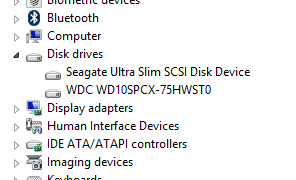
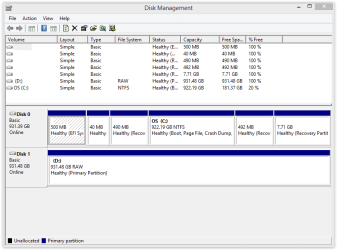
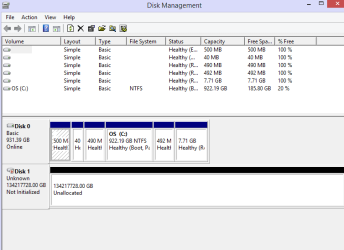
Attaching what I see in Disk Management. This HDD is also showing up in Device Manager.
Please help me. I'm in tears.

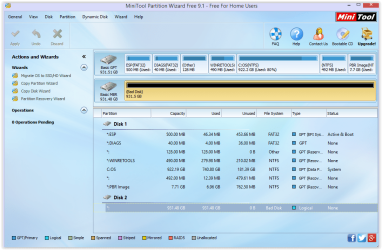
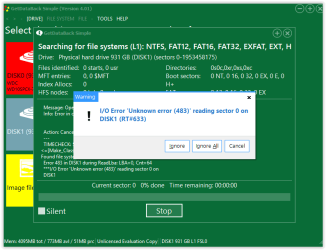
I am also running Minitool Partition Wizard at the same time but it is showing up as Bad Disk (does this mean no hope??).
It is also very slow, somehow going into Not Responding mode every few seconds.
 

Attachments
  • Screen Shot 04-15-18 at 12.57 AM.PNG
    Screen Shot 04-15-18 at 12.57 AM.PNG
    10.7 KB · Views: 4
  • Screen Shot 04-15-18 at 12.57 AM 001.PNG
    Screen Shot 04-15-18 at 12.57 AM 001.PNG
    120.9 KB · Views: 4
  • Screen Shot 04-15-18 at 12.58 AM.PNG
    Screen Shot 04-15-18 at 12.58 AM.PNG
    4.1 KB · Views: 70

My Computer

Computer type
Laptop
OS
Wins 8.1
Also, would like to add that I am only looking to retrieve 2 folders which contains photos and videos only. If this helps...

Also why is my 2TB HDD showing up as 134217728 GB?? Is this something of Seagate's fault or? Bearing in mind that this HDD is just 2 weeks old.
 

My Computer

Computer type
Laptop
OS
Wins 8.1

My Computer

Computer type
PC/Desktop
Computer Manufacturer/Model Number
AsusX53, Aspire E1-572. AsusUX32A, HP Pro3130mt+3010mt, HP Proliant ML150G3, 3xCustom, i3, i5, i7
OS
Linux:Debian, Kali.. 2xWin8.1,2x,1x7Pro, Retro:1x2003server.1xXPpro, 1xW2k,1x98SE,1x95,1x3.11
CPU
cpu's intel 8088 up to intel i7 gen9.. dual xenon on server
Motherboard
a lot of them :-)
Memory
oldest 1024KB newest 64GB
Graphics Card(s)
mostly internals i don't game
Sound Card
old retro=soundblaster.. newer ones internal
Monitor(s) Displays
smalest 12" largest 26"
Internet Speed
100/100
Antivirus
NortonInternetSecurity, MS, Avast, (not on the same computer
Browser
IE8, IE9. IE11, Firefox
Other Info
I can't fit all info on all my computers in these fields :-D
Did your disk has the same symptoms as mine above?
I accidentally deleted my partitions by lifting a read protection. But since you also have lost the partition, it's basically the same thing, it's only the causes that are different.

This program is a little easier to use, so you can only try to search for the partition. And if it finds the partition with the content, you know it's possible to restore it Free Data Recovery Software Download for File Recovery - EaseUS Data Recovery Wizard Free

And this was a good tutorial for recovering a partition: Partition - Recover Deleted Partitions in Windows Tutorial | Windows 8 Help Forums

Edit:
that's odd. your Disk management says that the disk is on 134217728.00GB It's not possible it could be that big..

Edit2: ------------------
I google it on HDD and 134217728.00GB.. and i found this on the forum to getdata.com.
Copied the text..
The problem is that your disk is not initialized. This means that your computer cannot communicate with it. Unless you can get this status to change you will not be able to use data recovery software.

Normally we advise users to avoid writing to a disk in any way - however with an "not initialized" disk you have very little choice.

If you go into Windows Disk Management and right click near this message you will see the option to "initialize disk". This will write a small amount of data, a Master Boot Record (MBR) to the start of the disk. Once this is done, it will then allow your computer to communicate with the disk and you can use Recover My Files to recover your data.

However, in many instances, the initialize disk function will return message such as an I/O error. This is an indication that you hard drive has physical errors and probably your only hope from this point is a good hardware recovery service.
Link: Unknown, not initialized unallocated harddrive
 
Last edited:

My Computer

Computer type
PC/Desktop
Computer Manufacturer/Model Number
AsusX53, Aspire E1-572. AsusUX32A, HP Pro3130mt+3010mt, HP Proliant ML150G3, 3xCustom, i3, i5, i7
OS
Linux:Debian, Kali.. 2xWin8.1,2x,1x7Pro, Retro:1x2003server.1xXPpro, 1xW2k,1x98SE,1x95,1x3.11
CPU
cpu's intel 8088 up to intel i7 gen9.. dual xenon on server
Motherboard
a lot of them :-)
Memory
oldest 1024KB newest 64GB
Graphics Card(s)
mostly internals i don't game
Sound Card
old retro=soundblaster.. newer ones internal
Monitor(s) Displays
smalest 12" largest 26"
Internet Speed
100/100
Antivirus
NortonInternetSecurity, MS, Avast, (not on the same computer
Browser
IE8, IE9. IE11, Firefox
Other Info
I can't fit all info on all my computers in these fields :-D
I accidentally deleted my partitions by lifting a read protection. But since you also have lost the partition, it's basically the same thing, it's only the causes that are different.

This program is a little easier to use, so you can only try to search for the partition. And if it finds the partition with the content, you know it's possible to restore it Free Data Recovery Software Download for File Recovery - EaseUS Data Recovery Wizard Free

And this was a good tutorial for recovering a partition: Partition - Recover Deleted Partitions in Windows Tutorial | Windows 8 Help Forums

Edit:
that's odd. your Disk management says that the disk is on 134217728.00GB It's not possible it could be that big..

Yes the disk size is wrong which is concerning. Does anyone know what this means?
 

My Computer

Computer type
Laptop
OS
Wins 8.1
When you disconnected the hard drive from the computer, did you do a safe removal or did you just pulled out the cord?
Have you dropped the hard disk?

Did you see my edit2 above?
 

My Computer

Computer type
PC/Desktop
Computer Manufacturer/Model Number
AsusX53, Aspire E1-572. AsusUX32A, HP Pro3130mt+3010mt, HP Proliant ML150G3, 3xCustom, i3, i5, i7
OS
Linux:Debian, Kali.. 2xWin8.1,2x,1x7Pro, Retro:1x2003server.1xXPpro, 1xW2k,1x98SE,1x95,1x3.11
CPU
cpu's intel 8088 up to intel i7 gen9.. dual xenon on server
Motherboard
a lot of them :-)
Memory
oldest 1024KB newest 64GB
Graphics Card(s)
mostly internals i don't game
Sound Card
old retro=soundblaster.. newer ones internal
Monitor(s) Displays
smalest 12" largest 26"
Internet Speed
100/100
Antivirus
NortonInternetSecurity, MS, Avast, (not on the same computer
Browser
IE8, IE9. IE11, Firefox
Other Info
I can't fit all info on all my computers in these fields :-D
Did not drop it at all plus it's brand new. All recovery program does not seem to be able to recover it...
Should I send to Seagate for professional recovery? anyone tried?
 

My Computer

Computer type
Laptop
OS
Wins 8.1
Did not drop it at all plus it's brand new. All recovery program does not seem to be able to recover it...
Should I send to Seagate for professional recovery? .......

Yes, without doubt it is the failure of electronics inside the enclosure and we won't be able to do anything. Seagate Data Recovery partners may be able to replace the defective electronics and recover the data. Discuss the matter with them.

Seagate backup plus portable Drive SRD00F1 ST1000LM035 100809471 repair data recovery - YouTube
 

My Computer

OS
Windows 7 Home Premium 32 bit
If you're lucky, it's only the usb chip card that is broken in the disk. If so, you can unscrew the hard drive and connect it directly to the SATA jack of your computer.
But if it's valuable data you have on it, and it was the holiday pictures you had, it sounds valuable. So I wouldn't hesitate a second to turn to Seagate Data Recovery partners as jumanji mentioned above.

Edit:
Keep in mind that the warranty will end if you disassemble the external hard drive on your own if you are not authorized.
 

My Computer

Computer type
PC/Desktop
Computer Manufacturer/Model Number
AsusX53, Aspire E1-572. AsusUX32A, HP Pro3130mt+3010mt, HP Proliant ML150G3, 3xCustom, i3, i5, i7
OS
Linux:Debian, Kali.. 2xWin8.1,2x,1x7Pro, Retro:1x2003server.1xXPpro, 1xW2k,1x98SE,1x95,1x3.11
CPU
cpu's intel 8088 up to intel i7 gen9.. dual xenon on server
Motherboard
a lot of them :-)
Memory
oldest 1024KB newest 64GB
Graphics Card(s)
mostly internals i don't game
Sound Card
old retro=soundblaster.. newer ones internal
Monitor(s) Displays
smalest 12" largest 26"
Internet Speed
100/100
Antivirus
NortonInternetSecurity, MS, Avast, (not on the same computer
Browser
IE8, IE9. IE11, Firefox
Other Info
I can't fit all info on all my computers in these fields :-D
Try booting into Linux Live, and then plugging in the drive, to see if you can read it in Linux. If so, you can copy the files from it while in Linux.
 

My Computer

Computer type
PC/Desktop
Computer Manufacturer/Model Number
Dell
OS
Linux Mint 18.2 xfce 64-bit (VMWare host) / Windows 8.1 Pro 32-bit (VMWare guest)
CPU
Haswell
Memory
4 GB
Monitor(s) Displays
Acer 23"
Screen Resolution
1920 x 1080
Hard Drives
Two hard drives, 1TB each: One for Linux, one for my data.
Keyboard
IBM Model M
Antivirus
Sophos (Linux), Trend Micro (Windows)
Browser
Firefox, Opera
Other Info
I use Samba to share my data drive with the other computers at my house and with my guest session in VMWare Workstation Player.
All, found that this particular model comes with data recovery warranty from Seagate (one time only). Just sent it to them and waiting to hear news. Will let you guys know how it went... still stressed out everyday..
 

My Computer

Computer type
Laptop
OS
Wins 8.1
Oh and to make things worse, I have another WD which has a copy of everything else (old photos from past years) on this Seagate drive. I came home from vacation to find that the HDD turned RAW.

Streak of bad luck obviously. But the WD is already 5 years old.. also one of the reasons why I purchased this seagate drive.
jumanji - I looked up various RAW solutions (testdisk, photorec, easeUS) but nothing seem to be able to recover this RAW drive which shows up as healthy on disk management and C5 cautious on Crystaldiskinfo - any idea how to fix?
 

My Computer

Computer type
Laptop
OS
Wins 8.1
1. Details of the WD Disk Model Name, Model no, Capacity

2. Screenshot of Windows Disk Management..

3. Screenshot of how your drive looks in MiniTool Partition Wizard Free 9.1 [download and install MiniTool Partition Wizard Free version 9.1 from here. (Yes, you heard it right - old version 9.1 and not 10.0, 10.1, 10.2.1 or 10.2.2.)]
MiniTool Partition Wizard Free 10.2.2 Download for Windows / Old Versions / FileHorse.com

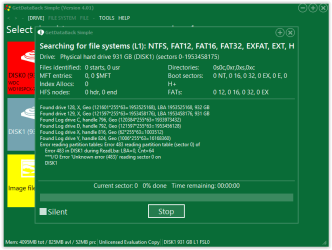
4. Download, install, run Getdataback Simple. Scan your RAW drive and check whether it shows all your files.

Data Recovery Software Products - Runtime Software Products

Note: First scan a good drive and familiarise yourself on using that software, how to open the files and check etc.,. Don't worry. It does not write anything to the disk and there is no way you can spoil it.
 

My Computer

OS
Windows 7 Home Premium 32 bit
Screen Shot 04-19-18 at 10.43 AM.PNG

WD light is on. 1TB WD My Passport.

Screen Shot 04-19-18 at 10.47 AM 001.PNG

Screen Shot 04-19-18 at 10.53 AM.PNG
 

Attachments

  • Screen Shot 04-19-18 at 10.52 AM.PNG
    Screen Shot 04-19-18 at 10.52 AM.PNG
    20.7 KB · Views: 0

My Computer

Computer type
Laptop
OS
Wins 8.1
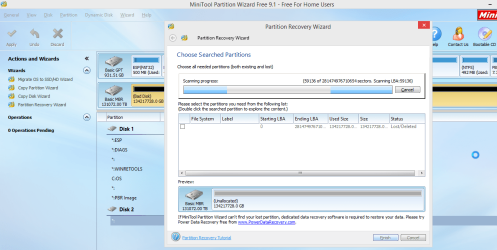
Launch Partition Wizard. On the left Pane click on Partition Recovery Wizard > Next > Select your faulty Drive > Next > Full Disk > Next > QuickScan > Next. Allow the quick scan to complete. At the end of the quickscan you will get a window showing all the found partitions Post a screenshot of it ( only that Window. No need of any background). After you have taken the screenshot click on Cancel button on that Window and close PW. You can run it again if need be.
 

My Computer

OS
Windows 7 Home Premium 32 bit
I will try it later tonight. Thank you.
But it shows up as bad disk - I remember you said if Bad disk there's no hope..
 

My Computer

Computer type
Laptop
OS
Wins 8.1
jumanji do you think USB cable can spoil hard disks? It just crossed my mind that before all these, WD was working fine. The first time it showed up as faulty is when I used the seagate cable to connect it... then it showed as RAW..
 

My Computer

Computer type
Laptop
OS
Wins 8.1
What happened to the WD cable? Connect it with the original cable and then check. I believe that WD cable is proprietary ( from what I have read. I don't have any WD external disk.) WD My Passport 4TB Portable Drive | Hardware Secrets "This My Passport drive comes with a 15” long detachable cable. The color of the cable matches the color of the drive. Since it is a proprietary cable, I find that the colored cable makes it easily identifiable among my tangles of different cables from various equipment."
 

My Computer

OS
Windows 7 Home Premium 32 bit
Tried wd cable after that and still raw.. maybe just coincidence...
 

My Computer

Computer type
Laptop
OS
Wins 8.1
Back
Top