Reinstalling Win 7 professional over old Win 7 Professional without

XP VM User

New member
Member
VIP
Local time
12:53 AM
Messages
279
Repeated the too long title: Reinstalling WIn7professional over old WIn 7 Professional without losing any data or messing up what I got!


I went here and found many tools to help me... as well as posting instructions.

Even though I don't have the problem just "yet" I didn't think I needed to use any of the tools but reading these instructions for posting rules:

Here are instructions I got that might be pertinent to my question that I moved off another thread .....

Windows Genuine and Activation Issue Posting Instructions - Windows 7 Help Forums

Product Key Number - Change - Windows 7 Help Forums

So I decided to perform the Microsoft Genuine Advantage Diagnostic Tool anyway...(without sending anything off to Microsoft as I've not decided to reinstall the OS so this was just for "fun" in case it can be useful for my current problem on the other thread...

Here are the pasted results:

Diagnostic Report (1.9.0027.0):
-----------------------------------------
Windows Validation Data-->

Validation Code: 0
Cached Online Validation Code: 0x0
Windows Product Key: *****-*****-G22JY-PMKDQ-C29KD
Windows Product Key Hash: T0cAFyb/81dAL8B8I0RtzziCX5o=
Windows Product ID: 00371-178-0257905-85734
Windows Product ID Type: 5
Windows License Type: Retail
Windows OS version: 6.1.7601.2.00010100.1.0.048
ID: {A13F2DF6-6F1F-401C-96B4-108508569594}(3)
Is Admin: Yes
TestCab: 0x0
LegitcheckControl ActiveX: N/A, hr = 0x80070002
Signed By: N/A, hr = 0x80070002
Product Name: Windows 7 Professional
Architecture: 0x00000009
Build lab: 7601.win7sp1_ldr_escrow.180330-1600
TTS Error:
Validation Diagnostic:
Resolution Status: N/A

Vista WgaER Data-->
ThreatID(s): N/A, hr = 0x80070002
Version: N/A, hr = 0x80070002

Windows XP Notifications Data-->
Cached Result: N/A, hr = 0x80070002
File Exists: No
Version: N/A, hr = 0x80070002
WgaTray.exe Signed By: N/A, hr = 0x80070002
WgaLogon.dll Signed By: N/A, hr = 0x80070002

OGA Notifications Data-->
Cached Result: N/A, hr = 0x80070002
Version: N/A, hr = 0x80070002
OGAExec.exe Signed By: N/A, hr = 0x80070002
OGAAddin.dll Signed By: N/A, hr = 0x80070002

OGA Data-->
Office Status: 102
Microsoft Office Home and Student 2007 - 100 Genuine
OGA Version: N/A, 0x80070002
Signed By: N/A, hr = 0x80070002
Office Diagnostics: 77F760FE-153-80070002_7E90FEE8-175-80070002_025D1FF3-364-80041010_025D1FF3-229-80041010_025D1FF3-230-1_025D1FF3-517-80040154_025D1FF3-237-80040154_025D1FF3-238-2_025D1FF3-244-80070002_025D1FF3-258-3_B4D0AA8B-920-80070057

Browser Data-->
Proxy settings: N/A
User Agent: Mozilla/4.0 (compatible; MSIE 8.0; Win32)
Default Browser: C:\Program Files\Pale Moon\palemoon.exe
Download signed ActiveX controls: Prompt
Download unsigned ActiveX controls: Disabled
Run ActiveX controls and plug-ins: Allowed
Initialize and script ActiveX controls not marked as safe: Disabled
Allow scripting of Internet Explorer Webbrowser control: Disabled
Active scripting: Allowed
Script ActiveX controls marked as safe for scripting: Allowed

File Scan Data-->

Other data-->
Office Details: <GenuineResults><MachineData><UGUID>{A13F2DF6-6F1F-401C-96B4-108508569594}</UGUID><Version>1.9.0027.0</Version><OS>6.1.7601.2.00010100.1.0.048</OS><Architecture>x64</Architecture><PKey>*****-*****-*****-*****-C29KD</PKey><PID>00371-178-0257905-85734</PID><PIDType>5</PIDType><SID>S-1-5-21-2436771687-1216539037-1952954280</SID><SYSTEM><Manufacturer>Sony Corporation</Manufacturer><Model>VPCS111FM</Model></SYSTEM><BIOS><Manufacturer>INSYDE</Manufacturer><Version>R0310Q3</Version><SMBIOSVersion major="2" minor="6"/><Date>20100930000000.000000+000</Date></BIOS><HWID>90F03707018400FC</HWID><UserLCID>0409</UserLCID><SystemLCID>0409</SystemLCID><TimeZone>Eastern Standard Time(GMT-05:00)</TimeZone><iJoin>0</iJoin><SBID><stat>3</stat><msppid></msppid><name></name><model></model></SBID><OEM><OEMID>Sony</OEMID><OEMTableID>VAIO</OEMTableID></OEM><GANotification/></MachineData><Software><Office><Result>102</Result><Products><Product GUID="{91120000-002F-0000-0000-0000000FF1CE}"><LegitResult>100</LegitResult><Name>Microsoft Office Home and Student 2007</Name><Ver>12</Ver><PidType>19</PidType></Product></Products><Applications><App Id="16" Version="12" Result="100"/><App Id="18" Version="12" Result="100"/><App Id="1B" Version="12" Result="100"/><App Id="A1" Version="12" Result="100"/></Applications></Office></Software></GenuineResults>

Spsys.log Content: 0x80070002

Licensing Data-->
Software licensing service version: 6.1.7601.17514

Name: Windows(R) 7, Professional edition
Description: Windows Operating System - Windows(R) 7, RETAIL channel
Activation ID: e838d943-63ed-4a0b-9fb1-47152908acc9
Application ID: 55c92734-d682-4d71-983e-d6ec3f16059f
Extended PID: 00371-00170-178-025790-00-1033-7601.0000-0682012
Installation ID: 004533802740164266314356942465325523260770422164512976
Processor Certificate URL: http://go.microsoft.com/fwlink/?LinkID=88338
Machine Certificate URL: http://go.microsoft.com/fwlink/?LinkID=88339
Use License URL: http://go.microsoft.com/fwlink/?LinkID=88341
Product Key Certificate URL: http://go.microsoft.com/fwlink/?LinkID=88340
Partial Product Key: C29KD
License Status: Licensed
Remaining Windows rearm count: 4
Trusted time: 4/19/2018 3:22:39 PM

Windows Activation Technologies-->
HrOffline: 0x00000000
HrOnline: N/A
HealthStatus: 0x0000000000000000
Event Time Stamp: N/A
ActiveX: Registered, Version: 7.1.7600.16395
Admin Service: Not Registered - 0x80070005
HealthStatus Bitmask Output:


HWID Data-->
HWID Hash Current: OAAAAAEAAwABAAEAAAACAAAABQABAAEAln2oSiYv8AouKYzdzFGy0pjOFGFKEjrshsKchLAxXF0=

OEM Activation 1.0 Data-->
N/A

OEM Activation 2.0 Data-->
BIOS valid for OA 2.0: yes
Windows marker version: 0x20001
OEMID and OEMTableID Consistent: yes
BIOS Information:
ACPI Table Name OEMID Value OEMTableID Value
APIC Sony VAIO
FACP Sony VAIO
HPET Sony VAIO
BOOT Sony VAIO
MCFG Sony VAIO
ASF! Sony VAIO
SLIC Sony VAIO
SSDT Sony VAIO
SSDT Sony VAIO
SSDT Sony VAIO

now here is my story/history:::

This is a continuation of a multi-part discussion on "Excessive Read Write Overloading HDD" Excessive Read Write overloading HDD - Windows 7 Help Forums thread.


I decided to move this section of the discussion off as it really would have a life of its own and I need to figure out a resolution of it before attempting to reinstall a new, working version of Windows 7 Professional version over the existing version, without losing any data, to fix many things that are going wrong (i.e. no Resource Monitor, no SMART reading on HD Tune program, etc)

Here is what happened earlier in the life of the Laptop described in the system for me at the bottom of every page here on this site....


On August 21, 2010 first installed OS (yes that was an OED) when I purchased the laptop with "home basic" Windows 7 on it and told them to remove the OS when they replaced the HDD and had the Professional version of Windows 7 installed on the new HDD

I found and checked the Original Microsoft Box, that I purchased off the store shelf, with the original DVD/CD holographic impressed colors on disk inside the box too.

My notes on the box say it was purchased in August, 2010 in the Blue curved top Windows 7 Professional Box (not an OEM installed product!)

Got a Product Key card inside the box!

Guess what?

On January 21, 2012 Windows program "asked" for the product key (I don't remember "why") and
I inputted the one in the box

IT SAID INVALID! :(

I got Windows/Microsoft on phone... they gave me a second Product Key to use
It too was "invalid". They had to "go away" for a while to discuss what to "do" since I purchased it more than 2 years ago so it was not "returnable" for a new one.

Microsoft called me back and I got a third Product Key March 8 , 2012 (yes I was without computer functioning 2 months or so while they were figuring this out).

That worked. And was confirmed again January 20, 2014 when I was asked by the program "again"! to furnish my product key.

So I guess that third version would be the product Key I will use to reinstall windows

BUT... (despite The Deer Dude's post in another thread having confidence in "me")

I do believe the laptop could benefit from a fresh install of Windows 7 Professional x64 (what OP currently has on it) - for that, he would need to find the license key. I think the OP should be capable of doing this on its own, I believe in him :) (+installing drivers)


I don't have the confidence I need that "nothing will go wrong" when I use the Product key from March 8, 2012. It is after all the third product key I received from Microsoft to use this same one Professional Windows 7 OS!

I'm certain NO ONE at Microsoft will answer the phone today, in 2018 when I'm calling to ask about Windows 7 Professional re installing it. [Since last time I called c. 2016 they informed me then that since the product was ending in 2020, they did not consider helping me in any way at all!--bye!]

And even if I manage to convince them to help me to get a new Product Key, the person switches me off to a computer voice will inform me that its $149 for "one" incident and $300 for a whole year's worth of incidents....."please enter your credit card at the beep---and turn your back" (You're right, I'm being sarcastic...the computer voice does not say "and turn your back".

And I never know what to choose so having no funds for this... Thus I choose zero incidents.....

So I lack the confidence to go on....

But I made a new thread here, separate from my huge other thread over the past week, just in case anyone would prefer to have a discussion just about multiple product codes from Microsoft and the fact they never (except for me!) give you a new product code for the disk you purchased (I had to read the inner ring numbers to them to prove I had the real disk and not a photo or Xerox copy of them!!
 

My Computer My Computer

Computer type
Laptop
Computer Manufacturer/Model Number
SONY VAIO VPCS111FM
OS
Windows7 Professional 64bit
CPU
Intel(R) Core (TM) i5 CPU M 430 @2.27 Ghz
Memory
8.0 GB
Hard Drives
Seagate 500GB Momentus
Cooling
Internal fan
Mouse
Logitech bluetooth trackball
Browser
Pale Moon Browser for x64
Hi XP,

Well looking at that report
seems like WAT is confusing itself:confused:

The top 2 lines state its genuine
Validation Code: 0
Cached Online Validation Code: 0x0

Futher down its missing critical registration info
Event Time Stamp: N/A
Admin Service: Not Registered - 0x80070005

please instal KB971033,

reboot rerun the MGdiag.

not sure if this will clear the error as its showing as access denied - very strange
can you post a screenshot
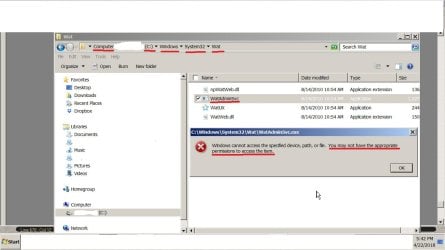
C >> Windows >> system32 >> WAT > WatAdminservices.

should be like mine

notes
if this error was present for the other 2 keys the same applies - valid keys bad WAT
this is likely to be a factor in your read/write thread
Belarc advisor will pull all your product keys
Is that renamed W10/W7 backup still on your system im wondering if your system is repeatedly trying to remove it

Roy
 

Attachments

  • watxp.PNG
    watxp.PNG
    13.3 KB · Views: 50
Last edited:

My Computer My Computer

Computer type
PC/Desktop
Computer Manufacturer/Model Number
medionl/Aspire 6930G/acer x55a
OS
W7 home premium 32bit/W7HP 64bit/w10 tp insider ring
CPU
E5300 dual core
Motherboard
medion MS7366
Memory
3gb
Graphics Card(s)
Nvidia Geforce 7100 Nforce 630i
Monitor(s) Displays
avixc
Internet Speed
n (isp resticted to 72)
Antivirus
mse/pands
Browser
palemoon
Other Info
Belkin Fd7050 n USB using Railink RT2870 drivers, more upto date
Thanks for the gentle reminder (cc to the person you copied to me) that I have not replied to your very detailed response to my question!

I didn't mean for this thread to sit two days while I responded to the other thread(s). I also lost computer to BSOD twice and another weird twice Blank screen of death. So those delayed responding while I was figuring them out!

I will do as you say and post a screenshot... Just wanted to let you know I'm back in regular windows 7 screens and will try what you suggest.

I have currently NO problems with "genuine" windows or product keys! I was raising the question due to my impending need to use the same Installation DVD and 3rd Product Key if I re-install Windows 7 as my other thread people are advising me to do.

Thanks! Will post a screenshot in a new post so whatever notification you get will be the screenshot and not no notification so I make it easy for you to find it! Thanks for helping me out!
 
Last edited:

My Computer My Computer

Computer type
Laptop
Computer Manufacturer/Model Number
SONY VAIO VPCS111FM
OS
Windows7 Professional 64bit
CPU
Intel(R) Core (TM) i5 CPU M 430 @2.27 Ghz
Memory
8.0 GB
Hard Drives
Seagate 500GB Momentus
Cooling
Internal fan
Mouse
Logitech bluetooth trackball
Browser
Pale Moon Browser for x64
Sorry I jumped to the "easy" item first...

I did not go to KB and try to read it and figure out what to do...

I just did the WAT (Wat Admin Services) one as it was "easy" to do.

But it says:

WAT WAT ADmin Serv NO PERMISSIONS PS35593.jpg


So now my question is "why"?

I should post another thread called "I cannot do PERMISSIONS properly"

Its always happened to me!

XP Home

XP Professional (two editions)

Vista (not at home)

Windows 7 (laptop at home)

ALL give me 100% "you do not have permission!" notices every day of my life!

I read the BOOKS! I have the MSFT guides and others written by Pogue, etc

I read the online help pages!

But I've given up!

I really know that unless I have "someone else by my side" pressing the correct buttons in order every day of my life... I continually save pages and photos and music and sounds and just about everything else "wrong" every single day of my life.

And 100000000's (millions) of wrong files can't be accessed if I don't have "permission"

I'm only user on here.

No other user is listed but it is the "public computer" for guests to dabble in when they need connection to internet, so others do use it but under the "one" user title.

I do know how to "Run as Administrator" which sometimes does
and most of time DOES NOT
Solve the problem.

I don't know if I mentioned it in the history of this laptop.... maybe see this topic.....but lots of posts and no way to "search them" that I'm aware of..

History of laptop is that we think in 2010 "Best Buy/Geek Squad" installed the new retail version of Windows 7 Professional "wrong" and it took two years before I showed up on this site as no one else could figure out what was "wrong" with the Windows 7.

And list of "how to solve it" was too daunting for me to follow---- same as today's in the link above...how to re-install Windows 7 over copy of Windows 7 without losing any data!

Thanks for reading this.

I'll see what advice you have.

Will go look at the KB at least...but you can respond to my problem with Permissions above with advice....

[Best advice I can give myself... keep your fingers OFF the computer "forever" and it will be fixed!)

sigh......
 

My Computer My Computer

Computer type
Laptop
Computer Manufacturer/Model Number
SONY VAIO VPCS111FM
OS
Windows7 Professional 64bit
CPU
Intel(R) Core (TM) i5 CPU M 430 @2.27 Ghz
Memory
8.0 GB
Hard Drives
Seagate 500GB Momentus
Cooling
Internal fan
Mouse
Logitech bluetooth trackball
Browser
Pale Moon Browser for x64
So what happens if my Windows 7 does not produce the desired "genuine" codes if prompted?

It failed twice before!

I don't know why!

I have third Product Key.

And I read this guy's posting that it "kills" pirated Windows 7..

https://blog-archive.josephcs.com/windows-update-kb971033/

Mine is the genuine in the box one!

Purchased in the USA in 2010 off the shelf (just put up that day first time too!) so fresh boxes from Microsoft!

So its not pirated....but I worry!

Will I now "destroy" my Windows 7 and all its data? I have a backup from January... but no more room to make another Macrium backup as this current running of Windows has lots of bad things happening inside it.... DO I really want to keep it?

Will I lose data?

I need to buy first! A larger External HDD

Then copy off what error filled Windows I got to preserve all the Apple iPad work I did since January 2018.... (and before too!)

THEN I guess I can apply the KB 971033
 

My Computer My Computer

Computer type
Laptop
Computer Manufacturer/Model Number
SONY VAIO VPCS111FM
OS
Windows7 Professional 64bit
CPU
Intel(R) Core (TM) i5 CPU M 430 @2.27 Ghz
Memory
8.0 GB
Hard Drives
Seagate 500GB Momentus
Cooling
Internal fan
Mouse
Logitech bluetooth trackball
Browser
Pale Moon Browser for x64
Hi Sigh......

More my fault than yours ....ooops
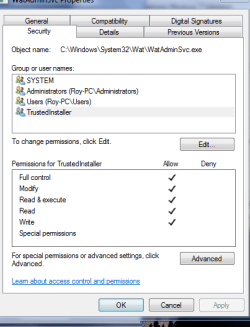
When your on the WatAminServ >> RIGHT click >> then select Properties,> then click on the Security tab.

From your last post

No other user is listed but it is the "public computer" for guests to dabble in when they need connection to internet, so others do use it but under the "one" user title.

This leaves you WIDE OPEN to malware, accidental or not!!!
I would suggest EVERYTIME its been used perform additional malware checks
Malwarebytes/AdwRemover/JRT and an on line scan Eset- on line is good

I would actually NOT keep any private data on it
Would also perform a clean install quarterly


A handy tool Tweaking.com its user friendly- he also has a help forum

Roy
 

My Computer My Computer

Computer type
PC/Desktop
Computer Manufacturer/Model Number
medionl/Aspire 6930G/acer x55a
OS
W7 home premium 32bit/W7HP 64bit/w10 tp insider ring
CPU
E5300 dual core
Motherboard
medion MS7366
Memory
3gb
Graphics Card(s)
Nvidia Geforce 7100 Nforce 630i
Monitor(s) Displays
avixc
Internet Speed
n (isp resticted to 72)
Antivirus
mse/pands
Browser
palemoon
Other Info
Belkin Fd7050 n USB using Railink RT2870 drivers, more upto date
Part 2

NO - that KB is part of MS genuine checks

It will interact with the WATAdminserv file

It can and does identify and block some pirated installs
(on its release it did cause some problems, then again MS hasnt got a good update track record)

The failures can also be caused by other programs especially AV's and corrupt downloads
Without seeing the info whilst the OS is in a non-genuine state i can only make guesses.


Roy
 

My Computer My Computer

Computer type
PC/Desktop
Computer Manufacturer/Model Number
medionl/Aspire 6930G/acer x55a
OS
W7 home premium 32bit/W7HP 64bit/w10 tp insider ring
CPU
E5300 dual core
Motherboard
medion MS7366
Memory
3gb
Graphics Card(s)
Nvidia Geforce 7100 Nforce 630i
Monitor(s) Displays
avixc
Internet Speed
n (isp resticted to 72)
Antivirus
mse/pands
Browser
palemoon
Other Info
Belkin Fd7050 n USB using Railink RT2870 drivers, more upto date
Don't worry about it. I said too much typing too fast.

Important people. They'd be aghast if I hampered their ability to do what they needed to do on the computer and print out or make CD's or flash drives or whatever. They clean out their stuff when they do it and so its always back to normal.

If its broken...no they don't help me. They just leave to the nearest pay as you go rental computer place and shell out the $$ to do the same thing they would have done here. Its a convenience we provide so not to get them angry or anything. NO they would never do anything bad as we know who they are and can trace it to them. More their embarrassment than ours. We're safe.

Yes, I have Malwarebytes and Norton AV running "EVERY DAY" a quick scan just for that reason so I don't have to check especially after they have been here since I never know when they can drop on.

Oh, right....forgot the screen shot I got from your new instructions:

Hi Sigh......

When your on the WatAminServ >> RIGHT click >> then select Properties,> then click on the Security tab.

WAT with properites and Right click security tab  NOW WHAT PS35594.jpg

I'm listed here as "XP VM User"

Sigh was me "sighing" not my name... apologies for mix up there
 

My Computer My Computer

Computer type
Laptop
Computer Manufacturer/Model Number
SONY VAIO VPCS111FM
OS
Windows7 Professional 64bit
CPU
Intel(R) Core (TM) i5 CPU M 430 @2.27 Ghz
Memory
8.0 GB
Hard Drives
Seagate 500GB Momentus
Cooling
Internal fan
Mouse
Logitech bluetooth trackball
Browser
Pale Moon Browser for x64
Hi Sigh....

knew it wasn't your name - lightning the mood.

Now its getting darker


Those permissions HAVE been changed
A picture is worth a thousand words

2 things
Everyone should NOT appear on that folder
as for * i dont know of any symbol being a valid operator/user
(unless its the TrustedInstaller name being changed- but by what?)


Going back to my earlier post re security and "Guest Users" in my opinion your system has been altered
(he said delicately)

To be brutally honest, and you wanting to keep your guests happy, the BEST and fastest way to resolve this is to perform a clean install


Incidentally if im right, and i havnt thoroughly read your other posts,
This will cause
High disk usage
failure of external back-ups
update failures
sfc /scannow will not run
BSOD - your system will run out of memory


Now as an added security measure if i was you i would put a VM, Virtual Machine, on the comp and set that up for your guests usage
as you allready have it on your comp, Oracle.
Roy
 
Last edited:

My Computer My Computer

Computer type
PC/Desktop
Computer Manufacturer/Model Number
medionl/Aspire 6930G/acer x55a
OS
W7 home premium 32bit/W7HP 64bit/w10 tp insider ring
CPU
E5300 dual core
Motherboard
medion MS7366
Memory
3gb
Graphics Card(s)
Nvidia Geforce 7100 Nforce 630i
Monitor(s) Displays
avixc
Internet Speed
n (isp resticted to 72)
Antivirus
mse/pands
Browser
palemoon
Other Info
Belkin Fd7050 n USB using Railink RT2870 drivers, more upto date
Hi Torchwood!!

A quick reply (not short) to let you know:
1. I received and read your Reply post # 9 two days ago.

2. Yes I'm very very concerned about the issues and recommendations you raise

3. To inform you (and others) what my action plan is:

QUESTION: What do you think of my plan?

1st See the Excessive Read Write Overloading HDD thread: Excessive Read Write overloading HDD - Page 6 - Windows 7 Help Forums where I did a TEST of SMART etc of Laptop's Drive C; for its health rating, etc. Seatools (Its a Seagate Momentus Drive)

2nd I need to post in a thread about choosing if I go to Windows 10 or stay with Windows 7 _______(Will fill it in when I respond to it eventually writing a long response!) ______________ I need to decide once and for all if I just re-initialize re-install the Windows 7 over my existing Windows 7 (as you just recommended a few times already!)
or do I go and use this moment in time with a new HDD to go up to Windows 10 at same time

I've not finished it yet, that's is why its number 1 to do it so I hope to stop teasing everyone and actually POST a reply there!

3rd Step I need to go buy a LARGER HDD for future use and immediate use to use a 2 TB or so 3 TB one to make a Macrium copy of the HDD damaged as it is before I lose everything I've done since January and everything I've done for the Apple people and their upgrade to the new iPad from the old BROKEN!! iPad and broken backups (*you KNOW its a long story won't repeat it here again)


4th Step. Then I have to copy off the HDD to that larger HDD as it is, containing all the current problems and bad sectors and data, since it is the latest work I've put into the drive.

And I can copy off all my documents and my notes from documents I use while creating the "shorter" documents that I eventually posted in all three threads at WindowsSevenForum I do have so far.

5th Finally! Then after I chose a pathway, THEN (if I choose to re-install Windows 7 over the old one) I can come back and follow your and others instructions on how to do this!)

That is if you approve of the idea of first repairing the Windows 7 I got before trying to upgrade it to Windows 10 (making this a two step procedure).

I don't know!

Maybe its safer method that way.

Especially when you consider that I try to follow the instructions. But very often I get choices that you did not anticipate! And I can't just leave the Computer stuck in the middle of a copying/repair process...running the HDD waiting for my "input" of choice 1 or choice 2.... when ZERO way to no one to ask Questions if anything goes wrong!!! on the process of either going Windows 7 to new Windows 7 install.

OR If i'm going for taking the Windows 7 I have and upgrading to Windows 10

QUESTION: Just to make that clear as if I ask it this way: maybe you know answer to that already.... Is it better to first "FIX" the Windows 7 before I upgrade to Windows 10 assuming that may only carry upward any errors already on the Windows 7?

Or does Windows/ Microsoft manage to fix and repair all damage to Windows 7 when it upgrades to Windows 10 so that is the better method if I decide to go up to Windows 10 just do it and expand up to Windows 10 just like that!!

Thanks for reading all of this and helping out as always Torchwood!

Have a great day!

XP VM User

P.S.: I took two days to write this far....so I thought I might as well add in some quotes from your last post that were easiest to respond quickly to as well so you know my reactions and we can discuss them further.......

Those permissions HAVE been changed
A picture is worth a thousand words

2 things
Everyone should NOT appear on that folder
as for * i dont know of any symbol being a valid operator/user
(unless its the TrustedInstaller name being changed- but by what?)

I have no idea what program is doing it! I use Norton Internet Security paid for and up to date always and scanning every night! I also have Malwarebytes scanning every night at a different time.
NO! I know when they are both set to scan and I do not complain about the HDD light running excessively when they are doing that (and even if they miss the time, sometimes one of them I think its Norton will run it the moment it gets notice the computer is turned on. I always turn it on and let it sit about an hour to make certain nothing else wants to use the HDD before I need to use it. When I say HDD light was running 24/7 I mean it! 24/7 no matter when I turned it on or off and what its doing is unknown as Applications on Task Manager are zero, !! and Processes (when I am not online or doing anything and the light was running all show CPU is using "00" and doing "nothing" almost at all....yet the HDD light was running and I can hear the drive spinning hard! So what mysterious program is doing this? A spy program ? A key Logger? I thought of all of these....but my primitive tools I have to check for those all came up empty.! I should have mentioned that in the other thread I guess ...might transfer this over but the conversation here went that way! Thanks!

Going back to my earlier post re security and "Guest Users" in my opinion your system has been altered
(he said delicately)

To be brutally honest, and you wanting to keep your guests happy, the BEST and fastest way to resolve this is to perform a clean install

The ones who use it (VERY VERY RARELY Not every day but its there and I always know when they do that as they ask first. Just saying no password needed to get in. They are very highly respected people here in the US! No one would sacrifice their life or career to mess up my freebie machine! I'm doing so much else for them anyway that can really mess up their days, they would never want to do anything to "upset" me so don't worry. I just honestly have to say "public" as others do use it and they all are much better at computers than I am, so I keep scanning in case they do something "wrong" or click somewhere they should not.


Incidentally if im right, and i havnt thoroughly read your other posts,
This will cause
High disk usage
failure of external back-ups
update failures
sfc /scannow will not run
BSOD - your system will run out of memory

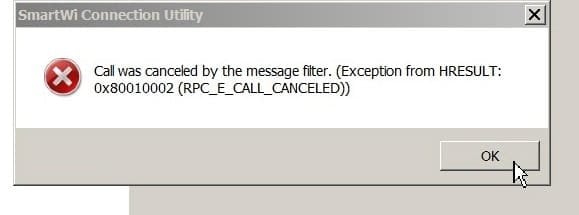
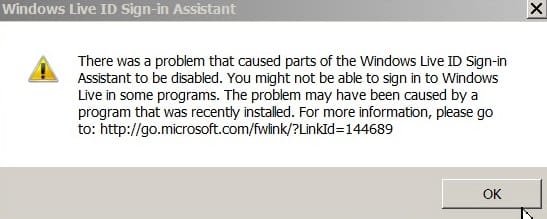
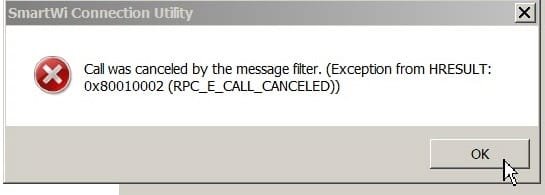
YES! See some of the screens I just got (computer acting up again I'll post them later!!!)

Call Cancelled errors etc p1 PS35652.jpg

Call Cancelled errors etc p2 PS35664.jpg

Call Cancelled errors etc p3 PS35665.jpg

Call Cancelled errors etc p4 PS35666.jpg

Call Cancelled errors etc p5 PS35668.jpg


Now as an added security measure if i was you i would put a VM, Virtual Machine, on the comp and set that up for your guests usage
as you allready have it on your comp, Oracle.
Roy

Great idea! One problem! THAT is why I appeared here at WindowsSevenForum for needing assistance with using VM on the Windows 7 version (and yes I got recommended to go to Oracle Virtual Box)
BUT!

I still suffer the same problems! [The whole concept of "using" my computer is for these important guests purposely to get free printouts and free internet usage without the guests being kicked out to go sit with the rest of the public and stand in line and wait for a computer to be available at one of the local computer places where you can use internet and print out! Its a Courtesy! So using my regular system works for printer and internet NOT either VM on Windows 7 nor Oracle Virtual Box (again not using it correctly and no one to ask why!) ]

Maybe back in 2012 my computer was damaged back then as I still can't PRINT or USE INTERNET Or the SIM CARD (Unless its broken!) from the VM programs no matter what I do
(I can show some screenshots recently here:

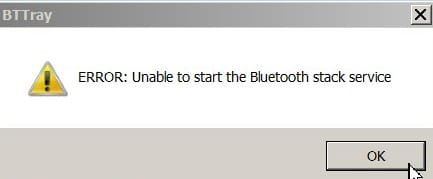
I think my Bluetooth is now "broken" as well even though I barely even used it and I get "Calls" that are broken links to Bluetooth (forgot to take a screenshot of that one) and this other one and third one... They alternate... I may or may not get them all at any particular start/restart on it AND NOW it says I'm out of memory "again" Have to close and restart JUST as you predicted above

Ok done with P.S. for now!
 

Attachments

  • Call cancelled p2 Bluetooth Stack service PS35263.jpg
    Call cancelled p2 Bluetooth Stack service PS35263.jpg
    6.9 KB · Views: 34
  • Call cancelled p1 PS35652.jpg
    Call cancelled p1 PS35652.jpg
    11 KB · Views: 34
Last edited:

My Computer My Computer

Computer type
Laptop
Computer Manufacturer/Model Number
SONY VAIO VPCS111FM
OS
Windows7 Professional 64bit
CPU
Intel(R) Core (TM) i5 CPU M 430 @2.27 Ghz
Memory
8.0 GB
Hard Drives
Seagate 500GB Momentus
Cooling
Internal fan
Mouse
Logitech bluetooth trackball
Browser
Pale Moon Browser for x64
Hi XP VM,

Backing up an infected system is pointless.
(if you clean it up fine, but if you use it in the future then your back at square one)
Not sure which tool your using for this i do know that Macrium has an option to NOT include bad sectors.

I would like you to run this tool, post the 2 reports, and i'll get DonnaB to look it over

Download Farbar Recovery Scan Tool

PLEASE REFRAIN FROM MAKING ANY CHANGES ONCE YOU HAVE RUN IT


The decistion to move to W10
Ask your guests for thier input
As of a month ago - its still free for W7 users to migrate
I would install it on your NEW SSD

As for your printing/SIM/Bluetooth problems these also appear to stem from incorrect permissions
if the problems started in 2012 then thats a possible infection date, around that time Phisshing was prevalent open up an Email with an attachment BANG your compromissed.

On a happier note
W7 and our sister W10 site have a vast array of tutorials, including setting up a VM and system set-up/ migration.

Roy
 

My Computer My Computer

Computer type
PC/Desktop
Computer Manufacturer/Model Number
medionl/Aspire 6930G/acer x55a
OS
W7 home premium 32bit/W7HP 64bit/w10 tp insider ring
CPU
E5300 dual core
Motherboard
medion MS7366
Memory
3gb
Graphics Card(s)
Nvidia Geforce 7100 Nforce 630i
Monitor(s) Displays
avixc
Internet Speed
n (isp resticted to 72)
Antivirus
mse/pands
Browser
palemoon
Other Info
Belkin Fd7050 n USB using Railink RT2870 drivers, more upto date
long reply sorry its late

Hi Torchwood!

1000 apologies for letting a week go by with no reply.

Excuse? I didn't see that your response started a new page 2! I have to learn to look for that when checking out "My Posts" for new responses! That and I was replying to other threads too I guess.

Lots to ask you before I actually "do" what you suggest above:

Biggest questions I copied here to ask first----and we can go on fro there so I know what in the world am I doing with FRST tool:

(looked it up and got more links---will share if and when I need to ask you more details or am I getting really :confused: by researching more before I leap?) (parenthetical question...no answer to that).

I would like you to run this tool, post the 2 reports, and i'll get DonnaB to look it over

Download Farbar Recovery Scan Tool

Great! Can't wait to do it! Tool looks like it does a lot for me pressing one button....

BUT!
BUT!
BUT!


PLEASE REFRAIN FROM MAKING ANY CHANGES ONCE YOU HAVE RUN IT

What in the seven galaxies do you mean by that?

I noticed its in all capitals and you never do that unless you really mean it and I have to follow that "or else" dire things happen.

If I do that and then go online to post here the results? Doesn't my HDD make changes to the Browser history? Don't I make changes to the HDD as I write (and save!!!) several versions of the words I use to say "here it is " for the FRST tool results (along with any funny or weird actions that occurred when I did it that I did not know about?)

And what if I run it and it asks me a "question"? I don't know the answer to??? What then? Can I stop it in the middle or does that cause more problems then it solves?

What am I being asked to do when the program runs? DOS Commands? Registry edits?

I am leaping off the cliff here without wings or a paraglider!!

I KNOW you didn't write this:

Bjorn • 2 months ago
For 99.9% removal guarantee run CCleaner, followed by MBAM, followed by FRST. Do not reboot between programs - only reboot after FRST has finished. You may need to run these tools in safe-mode (with networking) if your system is heavily infected.

Its copied and pasted from various postings on the website link you so very helpfully provided me above for the downloading of FRST. [I like it when someone shows me which download site to choose and Norton approves of the site too---saves me trying to figure out which has less chance of loading fake, unwanted extra programs on me!]

I thought I understood computer jargon.... I'm just lost here in the details!

CCCleaner I've used on other PC's HATE IT
First thing it does is destroys my one and only memory of what "jobs" I have to do... It clears my desktop of all icons but 4 (the original 4).

It clears all the Browser Cache's (however its pronounced)

It does other things that I will only find out by using the computer and it later asks me for passwords or key codes I don't readily have access to and I have to spend time and effort to figure out why and what happened...

So my sorry result is I'm off the "one button" CCCleaner (I thought it had 3 C's but who knows?) Maybe I used it only on my MAC? I don't recall its over 5 years ago..

MBAM? THen FRST?

So your suggestion I use FRST right now.... is a go? no go? hold off? Discover whatever this guy is posting about? Is he for real? What is going on here?
And the "do not reboot between programs?"

OH OH

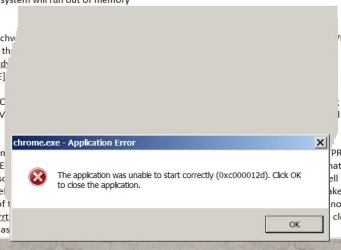
That can be a big problem! I'm having memory shortfall very frequently now... Something that runs that light eats up my memory (on the Resource Meter which never works), all I can see is the intro screen with CPU (4) histories and Memory which says 8GB and says its NOT being overused!

Yet I get crashes from all my browsers according to windows because my memory is run out

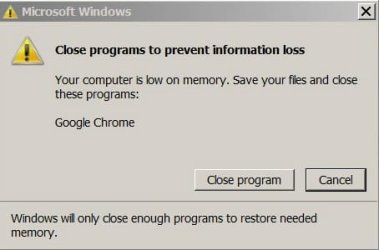
Here I got one from today just trying to answer some posts I had to turn on/off my computer 3 times... just running ONE word processor ONE Chrome browser...for a few hours typing on it...

Share with others on Windows Seven Google Chrome memory loss PS35807.jpg

So I"m certain I'm going to violate "Bjorn" 's suggestion that I : Do not reboot between programs - only reboot after FRST has finished.

* * *

Sadly--reading his and others comments... Maybe I'm too far gone to run FRST...

But I trust those here.. so its your call and others here...

Do I do as Bjorn says (But I don't like CCCLEANER!!) or do I partly do it (Not run CCCLeaner)
Or do I just suddenly Run FRST?

Or do nothing....as maybe I'm infected with something that none of my AV are recognizing and protecting me from??

Backing up an infected system is pointless.
(if you clean it up fine, but if you use it in the future then your back at square one)
Not sure which tool your using for this i do know that Macrium has an option to NOT include bad sectors.

Macrium is only option as AOMEI is non-functional as it won't let me go beyond the "install new version" screen(OF COURSE it does...else you can't get it back your old copies in an emergency but you have to "agree" to the notice that any detrimental effects are your problem as they have a new upgrade version (which I think is just trying to get $$ from those who have the free version and its a generic notice of warning-------------but who am I? I didn't' design AOMEI and I can't write in Chinese to get a message to them for help from migrating from paid version 2 to paid version 3 they don't tell me how!) Refuse to answer me without my product code) (which is on Email they sent me which is where?? from 2012 conversation I had here on Windows Seven Forum and took both MACRIUM and AOMEI so I would not have to worry that one of them would "fail" me... Good thing I did! AOMEI is out of commission so I could not have saved new stuff reliably for past year or two! Good I had Macrium to still use before the HDD light went on and on and on....... (am I rambling there? sorry)....

The decistion to move to W10
Ask your guests for thier input
As of a month ago - its still free for W7 users to migrate
I would install it on your NEW SSD

Thanks, I'll get back to this paragraph I want to send you the rest of my questions soon! ANd stop typing!

As for your printing/SIM/Bluetooth problems these also appear to stem from incorrect permissions
if the problems started in 2012 then thats a possible infection date, around that time Phisshing was prevalent open up an Email with an attachment BANG your compromissed.

YES quite the possibility! But I can tell you from past experience that any weird Emails I don't open. Norton and Malwarebytes prevents ME and them from going to bad sites. If they went to a bad site it would be on the "exception" list and its empty as I have NONE on it. IF guests used it and opened up some weird Emails on their accounts I'd have to ask them and myself why? Why use my machine for that? They are responsible people and if they mess it up they pay for fixing it, type of attitude... SO I don't worry too much when they are using it. They are far more wiser than me (just too busy to help me with this "toy" as they refer to it)....

On a happier note
W7 and our sister W10 site have a vast array of tutorials, including setting up a VM and system set-up/ migration.

I will look into those...thanks!!..


Thanks so very much!

XP VM User

P.S. Malwarebytes auto popped up this when I reloaded the page after shutting down Google Chrome (I guess it does that to protect the computer from accidentally downloading something without instructions on how to use it...)

See if you like this:

Farbar Recovery Scan Tool instructions | Official Malwarebytes Support
 
Last edited:

My Computer My Computer

Computer type
Laptop
Computer Manufacturer/Model Number
SONY VAIO VPCS111FM
OS
Windows7 Professional 64bit
CPU
Intel(R) Core (TM) i5 CPU M 430 @2.27 Ghz
Memory
8.0 GB
Hard Drives
Seagate 500GB Momentus
Cooling
Internal fan
Mouse
Logitech bluetooth trackball
Browser
Pale Moon Browser for x64
"BUMP" [Image does not work!]

Sorry.... :banghead:

Hi all!

I saw someone else do a "bump" but I don't know what rules you use. Its 5 days. If I should wait 7 days next time I will sorry for bumping early....but I didn't know you had that image on the site!

Generally re-read my post # 12

and my answers to your quoted instructions for me to follow, there in Post #12, and below:

I would like you to run this tool, post the 2 reports, and i'll get @DonnaB to look it over

Download Farbar Recovery Scan Tool

PLEASE REFRAIN FROM MAKING ANY CHANGES ONCE YOU HAVE RUN IT

I would LOVE to run the F R S T tool and post the 2 reports for you and @ DonnaB

And please explain what the capital letter phrase means?

Thank you! Thank you!

XP VM User
 
Last edited:

My Computer My Computer

Computer type
Laptop
Computer Manufacturer/Model Number
SONY VAIO VPCS111FM
OS
Windows7 Professional 64bit
CPU
Intel(R) Core (TM) i5 CPU M 430 @2.27 Ghz
Memory
8.0 GB
Hard Drives
Seagate 500GB Momentus
Cooling
Internal fan
Mouse
Logitech bluetooth trackball
Browser
Pale Moon Browser for x64
Hi again XP VM User,

Torchwood means don't try to run repair or similar wording but that's the gist. We need the reports/logs. After reviewing the logs, a fix script can be crafted to correct you issues. It is/they are .txt (text file(s)) which direct FRST to the necessary repairs. SFCFix.exe by Niemiro has the same functionality. FRST creates logs, similar to SURT (system update readiness tool).

I utilize both depending on the nature of the corruption.

Nic

p.s. If you would please shorten your replies some, would make it much easier on us to find/focus on relevant feedback from you.
 
Last edited:

My Computer My Computer

Computer type
PC/Desktop
Computer Manufacturer/Model Number
HP Desktop & Compaq Laptop
OS
Win 10 x64, Linux Lite, Win 7 x64, BlackArch, & Kali
Hard Drives
Samsung 850 Pro 256Gb,
Hitachi HDD 1Tb,
Crucial MX SSD 250Gb
Segate 3Tb USB 3.0 Ext. Backup HDD
Internet Speed
150Mbps dn, 20Mbps up
Antivirus
Avast Free, Malwarebytes Anti-Exploit & Anti-Ransomware
Browser
Firefox, Chrome, Opera, & VPN
I TRIED to do what you suggested!!!

Thank you Snick for informing me of all that information above!

I just RAN RAN RAN! Downloaded the FRST from the site provided by Torchwood

I knew two things from reading this Malwarebytes information:

Farbar Recovery Scan Tool instructions | Official Malwarebytes Support

1. The results will be saved to the same file as I saved the FRST download so I used my desktop and created a new folder to hold everything so I can access it easily

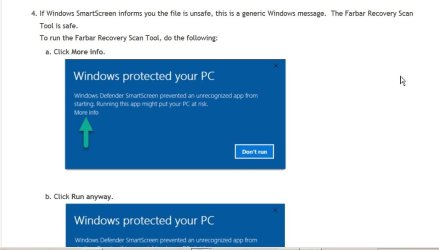
2. Instructions said the computer would not let me save/run it....just press "ok" or "ignore" and go on.

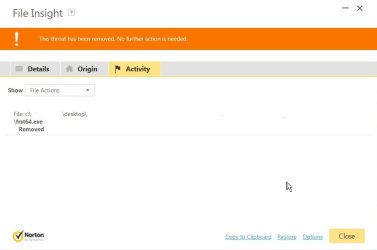
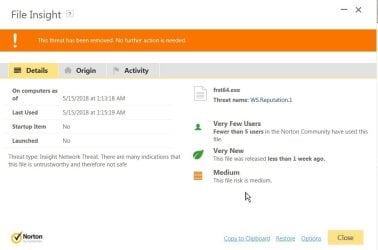
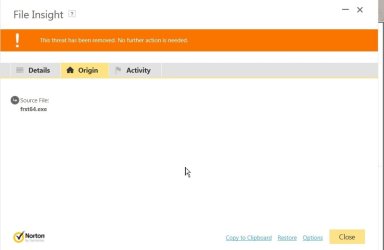
FRST first time FAILED to RUN p1 PS35936.jpg

What happened?

Norton took over! Removed it without giving me any chance to say "no " or "run it anyway".

Norton says its not safe so no matter what.... I won't run it....

Now what?

FRST first time FAILED to RUN p2 PS35935.jpg

FRST First time FAILED to RUN p3 PS35937.jpg

FRST First time FAILED to RUN p4 PS35938.jpg

(P. S. I never got this far before, so I had no idea Norton would prevent me from running it).

P.S.S. I'm a "Norton for Dummies" guy I'm sure there is a way to get it to go around this...but I never asked before and never did it before and worried sick I'm doing more damage to computer doing exactly what everyone says .... don't click and download and run anything off the Internet your Norton, etc programs warn you against running as they will damage computer... Just repeating what I've been warned about for years and years... and now here it comes! I have to make terrible choice to save computer and click "ignore" or whatever the magic button is on Norton or never run the FRST test and never get help script writing for my issue from Snick/Torchwood.
:confused:
 
Last edited:

My Computer My Computer

Computer type
Laptop
Computer Manufacturer/Model Number
SONY VAIO VPCS111FM
OS
Windows7 Professional 64bit
CPU
Intel(R) Core (TM) i5 CPU M 430 @2.27 Ghz
Memory
8.0 GB
Hard Drives
Seagate 500GB Momentus
Cooling
Internal fan
Mouse
Logitech bluetooth trackball
Browser
Pale Moon Browser for x64
I don't use or recommend Norton antivirus or Microsoft Security Essentials, or Windows Defender. Windows Firewall is adequate if you run an enhancer Windows7FirewallControl: Sphinx Software. You'll have to temporarily suspend Norton or select IGNORE and permit Windows AV for Farbar to run.


I also don't recommend running two Anti-Virus programs simultaneously. For one, it's not necessary if you use a good AV product. Secondly, the AVs conflict each other and reduce protection


I'm VERY SECURITY MINDED, with that said:
AV-Comparatives Independent Tests of Anti-Virus Software


My recommended AV’s, malware scanner, adware scanner, pup scanners
Avast Free this is what I use, Anti-virus.
BitDefender Free Edition don’t use but highly recommend
Malwarebytes Premium (it’s a free 30-day trial) If you utilize the free trial, it includes MB anti-exploit & MB anti-ransomware & will remove the standalone versions that you can obtain and install through the below links.
Malwarebytes Free this is what I use, one of the best all-around scanners, period.
BitDefender free, don’t use, but highly recommend, there is also a paid version.
SuperAntiSpyware free, this is what I use, there is also a paid version that runs real-time.
ADWCleaner Malwarebytes recently purchased from Tools.lib, available on both websites
HitmanProx32 scan is free, and one time trial virus removal, you can use Revo Uninstaller
to remove it and trial cookies if it finds malware to remove, then you can use the trial again.
HitmanProx64 scan is free, and one time trial virus removal, you can use Revo Uninstaller to remove it and trial cookies if it finds malware to remove, then you can use the trial again.
Malwarebytes Anti-Exploit this is what I use, real-time exploit protection, drive-bys, ssl injection, etc.
Malwarebytes Anti-Ransomware this is what I use, real-time ransomware protection.
TDSSkiller this is what I use, rootkit scanner.
VirusTotal online multi-AV scanner. If you download the app, it adds entry to right-click context menu. You can right-click on the file you wish to scan, and a couple clicks sends the file to them for analysis


Don't have malware on my systems!


Nic
 

My Computer My Computer

Computer type
PC/Desktop
Computer Manufacturer/Model Number
HP Desktop & Compaq Laptop
OS
Win 10 x64, Linux Lite, Win 7 x64, BlackArch, & Kali
Hard Drives
Samsung 850 Pro 256Gb,
Hitachi HDD 1Tb,
Crucial MX SSD 250Gb
Segate 3Tb USB 3.0 Ext. Backup HDD
Internet Speed
150Mbps dn, 20Mbps up
Antivirus
Avast Free, Malwarebytes Anti-Exploit & Anti-Ransomware
Browser
Firefox, Chrome, Opera, & VPN
It worked! FRST results are below Good luck!

Hi Snick and Torchwood!

Apologies for my slowness and lateness!

I have for Torchwood and @Donna the results of the Farbar Recovery Scan Tool FRST:

Here are the two files

View attachment FRST.txt

View attachment Addition.txt

Hope that helps!


As for Snick!

Fantastic amount of information! I really want to get better AV

But I read/heard/saw you can't use two AV's at same time...

So what good is the huge list? I can't run them all at same time in computer!

So (someone, maybe from Windows Seven Forum...check my 2012 or later posts) suggested I add Malwarebytes to my Norton Internet Security..... and that is the only two I'd ever need....

Saying that Malwarebytes (free or Premium--I paid for Premium as it seems to find things that Norton misses) finds things that Norton misses, so between the two they work to get rid of the viruses...

And Malwarebytes has ransomware protection (I think Norton does too but does not announce it on its front page/desktop).

So I'm posting this to get the FRST results out to everyone.... I hope private information is not in the txt files which I read...

I understand parts of it...

Oh for anyone who is interested
...as I read the FRST results and understand a tiny portion of what they did and mean, I will NOT be removing any old printer!

WHY?

WHY?

Because there are 100+- Pages of prints ready to be printed when the various machines DIED!

There MUST be a way to get those prints to print without the machine working as I don't have the machine anymore---sent it back to get a newer model.

There MUST be a way to upgrade those print images to the newer machine....

So until then, I will not remove the Printer icons and printer data files so I keep them year after year until SOMEONE invents a way to get HP printouts on a newer model machine!

Maybe setting up a virtual machine that runs the printer?

But every time I try to use the printer (any printer!) with my VM or Oracle Virtual Box they all FAIL! So there has to be a way to get printer to work with VM!! Else why would I ever want to use any OS on VM? If I can't print out my results (other things too don't work like scanners or sound, etc etc)

Back to the topic!

So I will write more if you reply to what I suggested above Snick... I just wanted to get this posted for Torchwood and thank you for your Virus Defense information!

Wish I can give more reps but I have to find 9 more others deserving of reps before I can give to Snick or Torchwood or etc etc again... (and of course they won't give it for the games, so I tried, and that's not allowed of course.)

XP VM Use
 
Last edited:

My Computer My Computer

Computer type
Laptop
Computer Manufacturer/Model Number
SONY VAIO VPCS111FM
OS
Windows7 Professional 64bit
CPU
Intel(R) Core (TM) i5 CPU M 430 @2.27 Ghz
Memory
8.0 GB
Hard Drives
Seagate 500GB Momentus
Cooling
Internal fan
Mouse
Logitech bluetooth trackball
Browser
Pale Moon Browser for x64
PS message for Snick re his posting above more detailed reply

P.S. for Snick:

I tried to get the Malwarebytes for

[QUOTE Snick]My recommended AV’s, malware scanner, adware scanner, pup scanners
Malwarebytes Anti-Exploit this is what I use, real-time exploit protection, drive-bys, ssl injection, etc.
Malwarebytes Anti-Ransomware this is what I use, real-time ransomware protection.
[/QUOTE]

from Major Geeks site you linked. Sorry..

The first one says "click here" (don't like that but I tend to trust Major Geeks since I've used a few items from there when recommended by the members here at Windows Seven Forum.. and NOTHING happens! So link is dead now....

And the second one, the page (1) you linked to does not have it!
And with 932 pages to search! I really have given up finding that one a bit early to do other things in life like eat and sleep... (I jest.. I can search for it.. But should not a link take me at least to the correct page out of 932?)

Appreciate your list!


I did find LOTS of other programs....but I really check and research before I use them.. I found another one I hope is ok by you as Google Chrome I avoided using for years as it never functioned well...so anything that helps me use it like my other browsers, better access, more ability to delete individual items without strenuous processes are appreciated!


Click&Clean for Chrome 9.1.3.3 [ 436 KB | Freeware | Win 10 / 8 / 7 / Vista / XP ] Click&Clean for Chrome is the perfect solution for erasing your private information, browsing history, saved form information, passwords, download history, and cache from your PC.
 

My Computer My Computer

Computer type
Laptop
Computer Manufacturer/Model Number
SONY VAIO VPCS111FM
OS
Windows7 Professional 64bit
CPU
Intel(R) Core (TM) i5 CPU M 430 @2.27 Ghz
Memory
8.0 GB
Hard Drives
Seagate 500GB Momentus
Cooling
Internal fan
Mouse
Logitech bluetooth trackball
Browser
Pale Moon Browser for x64
PS message for Snick re his posting above more detailed reply

P.S. for Snick:

I tried to get the Malwarebytes for

My recommended AV’s, malware scanner, adware scanner, pup scanners
Malwarebytes Anti-Exploit this is what I use, real-time exploit protection, drive-bys, ssl injection, etc.
Malwarebytes Anti-Ransomware this is what I use, real-time ransomware protection.

from Major Geeks site you linked. Sorry..

The first one says "click here" (I don't like that but I tend to trust Major Geeks since I've used a few items from there when recommended by the members here at Windows Seven Forum.. and NOTHING happens! So link is dead now) ....

And the second one, the page (1) you linked to does not have it!
And with 932 pages to search! I really have given up finding that one a bit early to do other things in life like eat and sleep... (I jest.. I can search for it.. But should not a link take me at least to the correct page out of 932?)

Appreciate your list!


I did find LOTS of other programs....but I really check and research before I use them.. I found another one I hope is ok by you as Google Chrome I avoided using for years as it never functioned well...so anything that helps me use it like my other browsers, better access, more ability to delete individual items without strenuous processes are appreciated!


Click&Clean for Chrome 9.1.3.3 [ 436 KB | Freeware | Win 10 / 8 / 7 / Vista / XP ] Click&Clean for Chrome is the perfect solution for erasing your private information, browsing history, saved form information, passwords, download history, and cache from your PC.
 

My Computer My Computer

Computer type
Laptop
Computer Manufacturer/Model Number
SONY VAIO VPCS111FM
OS
Windows7 Professional 64bit
CPU
Intel(R) Core (TM) i5 CPU M 430 @2.27 Ghz
Memory
8.0 GB
Hard Drives
Seagate 500GB Momentus
Cooling
Internal fan
Mouse
Logitech bluetooth trackball
Browser
Pale Moon Browser for x64

My Computer My Computer

Computer type
PC/Desktop
Computer Manufacturer/Model Number
HP Desktop & Compaq Laptop
OS
Win 10 x64, Linux Lite, Win 7 x64, BlackArch, & Kali
Hard Drives
Samsung 850 Pro 256Gb,
Hitachi HDD 1Tb,
Crucial MX SSD 250Gb
Segate 3Tb USB 3.0 Ext. Backup HDD
Internet Speed
150Mbps dn, 20Mbps up
Antivirus
Avast Free, Malwarebytes Anti-Exploit & Anti-Ransomware
Browser
Firefox, Chrome, Opera, & VPN
Back
Top