This is the error I rec'd. Note: I did pull out a usb drive and reseat it after the error occurred and before I ran the ipconfig in the cmd window. However, I have seen this type of error before. How do I fix it?
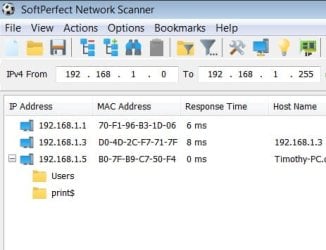
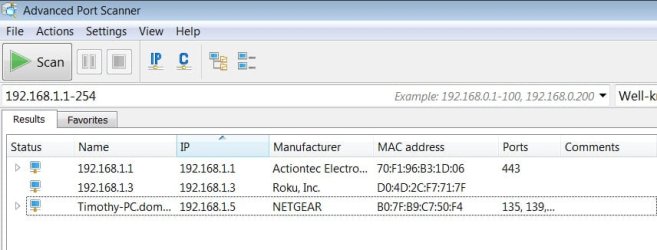
The system detected an address conflict for IP address 192.168.1.3 with the system having network hardware address D0-4D-2C-F7-71-7F.
Network operations on this system may be disrupted as a result.
1. Is this a*wired or wireless*connection issue? wireless
2.*Who is your Internet Service Provider (ISP)?*
US - Verizon
3.*What type of Broadband connection are you using?*
DSL
4.*What is the exact Make and Model of your Modem, Router or Modem/Router Combo*-
ActionTech GT784WN-VZ-1.1.22
5.*What is the Name of the Anti-Virus, Security or Firewall Software*Avast
6.*Here’s your ipconfig/all output:
Microsoft Windows [Version 6.1.7601]
Copyright (c) 2009 Microsoft Corporation. All rights reserved.
C:\windows\system32>ipconfig /all
Windows IP Configuration
Host Name . . . . . . . . . . . . : Timothy-PC
Primary Dns Suffix . . . . . . . :
Node Type . . . . . . . . . . . . : Hybrid
IP Routing Enabled. . . . . . . . : No
WINS Proxy Enabled. . . . . . . . : No
DNS Suffix Search List. . . . . . : domain.actdsltmp
Wireless LAN adapter Wireless Network Connection 20:
Media State . . . . . . . . . . . : Media disconnected
Connection-specific DNS Suffix . :
Description . . . . . . . . . . . : Intel(R) Centrino(R) Advanced-N 6200 AGN
Physical Address. . . . . . . . . : 00-00-00-00-00-00
DHCP Enabled. . . . . . . . . . . : Yes
Autoconfiguration Enabled . . . . : Yes
Wireless LAN adapter Wireless Network Connection 18:
Connection-specific DNS Suffix . : domain.actdsltmp
Description . . . . . . . . . . . : NETGEAR WNA3100 N300 Wireless USB Adapter
Physical Address. . . . . . . . . : B0-7F-B9-C7-50-F4
DHCP Enabled. . . . . . . . . . . : Yes
Autoconfiguration Enabled . . . . : Yes
Link-local IPv6 Address . . . . . : fe80::482e:1f80:2e85:cdac%30(Preferred)
IPv4 Address. . . . . . . . . . . : 192.168.1.6(Preferred)
Subnet Mask . . . . . . . . . . . : 255.255.255.0
Lease Obtained. . . . . . . . . . : Sunday, May 20, 2018 2:21:12 PM
Lease Expires . . . . . . . . . . : Sunday, May 27, 2018 2:21:12 PM
Default Gateway . . . . . . . . . : 192.168.1.1
DHCP Server . . . . . . . . . . . : 192.168.1.1
DHCPv6 IAID . . . . . . . . . . . : 649101241
DHCPv6 Client DUID. . . . . . . . : 00-01-00-01-1F-90-A3-9C-88-AE-1D-4B-F0-6C
DNS Servers . . . . . . . . . . . : 192.168.1.1
NetBIOS over Tcpip. . . . . . . . : Enabled
Ethernet adapter Local Area Connection:
Media State . . . . . . . . . . . : Media disconnected
Connection-specific DNS Suffix . :
Description . . . . . . . . . . . : Realtek PCIe FE Family Controller
Physical Address. . . . . . . . . : 88-AE-1D-4B-F0-6C
DHCP Enabled. . . . . . . . . . . : Yes
Autoconfiguration Enabled . . . . : Yes
Tunnel adapter isatap.{8E96E41D-909F-476A-92B3-D3F951AC2237}:
Media State . . . . . . . . . . . : Media disconnected
Connection-specific DNS Suffix . :
Description . . . . . . . . . . . : Microsoft ISATAP Adapter
Physical Address. . . . . . . . . : 00-00-00-00-00-00-00-E0
DHCP Enabled. . . . . . . . . . . : No
Autoconfiguration Enabled . . . . : Yes
Tunnel adapter Teredo Tunneling Pseudo-Interface:
Connection-specific DNS Suffix . :
Description . . . . . . . . . . . : Teredo Tunneling Pseudo-Interface
Physical Address. . . . . . . . . : 00-00-00-00-00-00-00-E0
DHCP Enabled. . . . . . . . . . . : No
Autoconfiguration Enabled . . . . : Yes
IPv6 Address. . . . . . . . . . . : 2001:0:5cf2:8c15:4a0:11fd:3f57:fef9(Prefe
rred)
Link-local IPv6 Address . . . . . : fe80::4a0:11fd:3f57:fef9%16(Preferred)
Default Gateway . . . . . . . . . : ::
NetBIOS over Tcpip. . . . . . . . : Disabled
Tunnel adapter isatap.{1DEC578D-3385-413A-87F8-3AE39262A3A5}:
Media State . . . . . . . . . . . : Media disconnected
Connection-specific DNS Suffix . :
Description . . . . . . . . . . . : Microsoft ISATAP Adapter #2
Physical Address. . . . . . . . . : 00-00-00-00-00-00-00-E0
DHCP Enabled. . . . . . . . . . . : No
Autoconfiguration Enabled . . . . : Yes
Tunnel adapter isatap.domain.actdsltmp:
Media State . . . . . . . . . . . : Media disconnected
Connection-specific DNS Suffix . : domain.actdsltmp
Description . . . . . . . . . . . : Microsoft ISATAP Adapter #3
Physical Address. . . . . . . . . : 00-00-00-00-00-00-00-E0
DHCP Enabled. . . . . . . . . . . : No
Autoconfiguration Enabled . . . . : Yes
C:\windows\system32>
The system detected an address conflict for IP address 192.168.1.3 with the system having network hardware address D0-4D-2C-F7-71-7F.
Network operations on this system may be disrupted as a result.
1. Is this a*wired or wireless*connection issue? wireless
2.*Who is your Internet Service Provider (ISP)?*
US - Verizon
3.*What type of Broadband connection are you using?*
DSL
4.*What is the exact Make and Model of your Modem, Router or Modem/Router Combo*-
ActionTech GT784WN-VZ-1.1.22
5.*What is the Name of the Anti-Virus, Security or Firewall Software*Avast
6.*Here’s your ipconfig/all output:
Microsoft Windows [Version 6.1.7601]
Copyright (c) 2009 Microsoft Corporation. All rights reserved.
C:\windows\system32>ipconfig /all
Windows IP Configuration
Host Name . . . . . . . . . . . . : Timothy-PC
Primary Dns Suffix . . . . . . . :
Node Type . . . . . . . . . . . . : Hybrid
IP Routing Enabled. . . . . . . . : No
WINS Proxy Enabled. . . . . . . . : No
DNS Suffix Search List. . . . . . : domain.actdsltmp
Wireless LAN adapter Wireless Network Connection 20:
Media State . . . . . . . . . . . : Media disconnected
Connection-specific DNS Suffix . :
Description . . . . . . . . . . . : Intel(R) Centrino(R) Advanced-N 6200 AGN
Physical Address. . . . . . . . . : 00-00-00-00-00-00
DHCP Enabled. . . . . . . . . . . : Yes
Autoconfiguration Enabled . . . . : Yes
Wireless LAN adapter Wireless Network Connection 18:
Connection-specific DNS Suffix . : domain.actdsltmp
Description . . . . . . . . . . . : NETGEAR WNA3100 N300 Wireless USB Adapter
Physical Address. . . . . . . . . : B0-7F-B9-C7-50-F4
DHCP Enabled. . . . . . . . . . . : Yes
Autoconfiguration Enabled . . . . : Yes
Link-local IPv6 Address . . . . . : fe80::482e:1f80:2e85:cdac%30(Preferred)
IPv4 Address. . . . . . . . . . . : 192.168.1.6(Preferred)
Subnet Mask . . . . . . . . . . . : 255.255.255.0
Lease Obtained. . . . . . . . . . : Sunday, May 20, 2018 2:21:12 PM
Lease Expires . . . . . . . . . . : Sunday, May 27, 2018 2:21:12 PM
Default Gateway . . . . . . . . . : 192.168.1.1
DHCP Server . . . . . . . . . . . : 192.168.1.1
DHCPv6 IAID . . . . . . . . . . . : 649101241
DHCPv6 Client DUID. . . . . . . . : 00-01-00-01-1F-90-A3-9C-88-AE-1D-4B-F0-6C
DNS Servers . . . . . . . . . . . : 192.168.1.1
NetBIOS over Tcpip. . . . . . . . : Enabled
Ethernet adapter Local Area Connection:
Media State . . . . . . . . . . . : Media disconnected
Connection-specific DNS Suffix . :
Description . . . . . . . . . . . : Realtek PCIe FE Family Controller
Physical Address. . . . . . . . . : 88-AE-1D-4B-F0-6C
DHCP Enabled. . . . . . . . . . . : Yes
Autoconfiguration Enabled . . . . : Yes
Tunnel adapter isatap.{8E96E41D-909F-476A-92B3-D3F951AC2237}:
Media State . . . . . . . . . . . : Media disconnected
Connection-specific DNS Suffix . :
Description . . . . . . . . . . . : Microsoft ISATAP Adapter
Physical Address. . . . . . . . . : 00-00-00-00-00-00-00-E0
DHCP Enabled. . . . . . . . . . . : No
Autoconfiguration Enabled . . . . : Yes
Tunnel adapter Teredo Tunneling Pseudo-Interface:
Connection-specific DNS Suffix . :
Description . . . . . . . . . . . : Teredo Tunneling Pseudo-Interface
Physical Address. . . . . . . . . : 00-00-00-00-00-00-00-E0
DHCP Enabled. . . . . . . . . . . : No
Autoconfiguration Enabled . . . . : Yes
IPv6 Address. . . . . . . . . . . : 2001:0:5cf2:8c15:4a0:11fd:3f57:fef9(Prefe
rred)
Link-local IPv6 Address . . . . . : fe80::4a0:11fd:3f57:fef9%16(Preferred)
Default Gateway . . . . . . . . . : ::
NetBIOS over Tcpip. . . . . . . . : Disabled
Tunnel adapter isatap.{1DEC578D-3385-413A-87F8-3AE39262A3A5}:
Media State . . . . . . . . . . . : Media disconnected
Connection-specific DNS Suffix . :
Description . . . . . . . . . . . : Microsoft ISATAP Adapter #2
Physical Address. . . . . . . . . : 00-00-00-00-00-00-00-E0
DHCP Enabled. . . . . . . . . . . : No
Autoconfiguration Enabled . . . . : Yes
Tunnel adapter isatap.domain.actdsltmp:
Media State . . . . . . . . . . . : Media disconnected
Connection-specific DNS Suffix . : domain.actdsltmp
Description . . . . . . . . . . . : Microsoft ISATAP Adapter #3
Physical Address. . . . . . . . . : 00-00-00-00-00-00-00-E0
DHCP Enabled. . . . . . . . . . . : No
Autoconfiguration Enabled . . . . : Yes
C:\windows\system32>
My Computer
At a glance
window 7 Home Premium SP12.27GHz Intel Core i3 CPU M3504GB DDR3 SDRAM 1066MHzMobile Intel® HD Graphics with 64MB: 4/21/201...
- Computer type
- Laptop
- Computer Manufacturer/Model Number
- Toshiba Satellite A665-S6050
- OS
- window 7 Home Premium SP1
- CPU
- 2.27GHz Intel Core i3 CPU M350
- Motherboard
- Toshiba Product #:NWQAA S/N: 123456789AV Version: 1.0
- Memory
- 4GB DDR3 SDRAM 1066MHz
- Graphics Card(s)
- Mobile Intel® HD Graphics with 64MB: 4/21/2010;8.15.10.2119
- Hard Drives
- IDE\DiskHitachi_HTS725050A9A360_________________PC4OC71E
- Antivirus
- Avast 18.4.2338/BLD: 18.4.3895.325;vs. 180520-4
- Browser
- Opera 52