Win 7 & Nas Drive

mikeh

New member
Local time
5:10 AM
Messages
17
Hi All

Using Win 7 I cannot access my Nas Vantec drive. I can see the drive but when I click to access it I get a message that I do not have the permissions to access the drive.

The drive works perfectly well when I boot to my Winxp pro OS.

The drive is showing on the network, the workgroup is "MSHOME" as it has always been.

What do I have to change in Win 7 to get it to work.

Also my other computers shared folder are not available to Win7. I have been poking around the forums but not really finding a solution to this yet. My internet is working fine, so my NIC card is running fine.

Thanks Mike H
 

My Computer

Computer Manufacturer/Model Number
Clone
OS
Win xp 64 Pro, trying Win 7
CPU
i5
Motherboard
Asus P7P55D
Memory
4gig 1600
Graphics Card(s)
XFX 4350 1Gig
Monitor(s) Displays
Lg W2453V
Hard Drives
2- 500 gig
PSU
Coolermaster 650
Case
Coolermaster
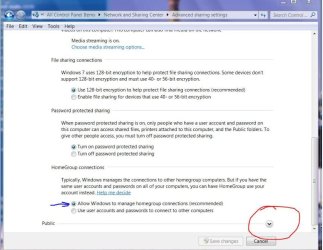
Have you tried changing some advanced share settings?
advance share 3.JPG
 

My Computer

Computer Manufacturer/Model Number
Gateway GT5692
OS
Windows 7 Ulti. x64
CPU
AMD Phenom 8450 triple-core 2.10 ghz
Memory
4GB
Graphics Card(s)
ATI Radion HD 3200
Monitor(s) Displays
Gateway FPD1775W
Screen Resolution
1280x720
Hard Drives
465.6613 Gibibytes
Yes this is turned on, but I still cannot access the Nas Drive, Still need some help here, any more suggestions???

Cheers Mike H
 

My Computer

Computer Manufacturer/Model Number
Clone
OS
Win xp 64 Pro, trying Win 7
CPU
i5
Motherboard
Asus P7P55D
Memory
4gig 1600
Graphics Card(s)
XFX 4350 1Gig
Monitor(s) Displays
Lg W2453V
Hard Drives
2- 500 gig
PSU
Coolermaster 650
Case
Coolermaster
Just to clarify - all of your computers belong to the MSHOME workgroup? You've verified that on each computer, and the NAS (if applicable)? Usually, if shared folders/computers don't appear, it's either a workgroup mismatch or a firewall problem.
 

My Computer

Computer Manufacturer/Model Number
Dell XPS 15 L502x
OS
Windows 7 Ultimate x64 SP1
CPU
Core i7-2670QM
Memory
8GB DDR3 PC3-10600
Graphics Card(s)
Intel HD Graphics 3000 + GeForce GT 540M
Screen Resolution
1920x1080
Hard Drives
1TB 5400RPM Seagate
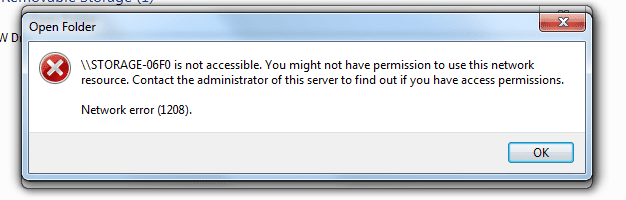
Here is the error box

Here is the error I am getting when I try to open NAS drive. I can see the drive in Win7 just cannot access it, when I try I get this error box.

Cheers Mik
 

Attachments

  • NasError.PNG
    NasError.PNG
    10.6 KB · Views: 365

My Computer

Computer Manufacturer/Model Number
Clone
OS
Win xp 64 Pro, trying Win 7
CPU
i5
Motherboard
Asus P7P55D
Memory
4gig 1600
Graphics Card(s)
XFX 4350 1Gig
Monitor(s) Displays
Lg W2453V
Hard Drives
2- 500 gig
PSU
Coolermaster 650
Case
Coolermaster
What about the questions I raised in my previous post?
 

My Computer

Computer Manufacturer/Model Number
Dell XPS 15 L502x
OS
Windows 7 Ultimate x64 SP1
CPU
Core i7-2670QM
Memory
8GB DDR3 PC3-10600
Graphics Card(s)
Intel HD Graphics 3000 + GeForce GT 540M
Screen Resolution
1920x1080
Hard Drives
1TB 5400RPM Seagate
Ok Sorry , yes all computers are on "MSHOME" workgroup, NAS is on "MSHOME" also , I have check it . I have 2 other computer on my network on workgroup "MSHOME", I can see all shared folders and drives and can access them all. The NAS drive is accessable under Win XP Pro, but not Win7. the only firewall that is running is on Win 7.
 

My Computer

Computer Manufacturer/Model Number
Clone
OS
Win xp 64 Pro, trying Win 7
CPU
i5
Motherboard
Asus P7P55D
Memory
4gig 1600
Graphics Card(s)
XFX 4350 1Gig
Monitor(s) Displays
Lg W2453V
Hard Drives
2- 500 gig
PSU
Coolermaster 650
Case
Coolermaster
What type of network does your Windows 7 computer belong to? Is it home, public, or work?
 

My Computer

Computer Manufacturer/Model Number
Dell XPS 15 L502x
OS
Windows 7 Ultimate x64 SP1
CPU
Core i7-2670QM
Memory
8GB DDR3 PC3-10600
Graphics Card(s)
Intel HD Graphics 3000 + GeForce GT 540M
Screen Resolution
1920x1080
Hard Drives
1TB 5400RPM Seagate
My network is a home network, I just turned off the Win 7 firewall, and it let me into the NAS drive, for about a minute, then I closed the drive and went to open it again and I get that error message again?
 

My Computer

Computer Manufacturer/Model Number
Clone
OS
Win xp 64 Pro, trying Win 7
CPU
i5
Motherboard
Asus P7P55D
Memory
4gig 1600
Graphics Card(s)
XFX 4350 1Gig
Monitor(s) Displays
Lg W2453V
Hard Drives
2- 500 gig
PSU
Coolermaster 650
Case
Coolermaster
Do you have homegroup enabled? If so, try disabling it.
 

My Computer

Computer Manufacturer/Model Number
Dell XPS 15 L502x
OS
Windows 7 Ultimate x64 SP1
CPU
Core i7-2670QM
Memory
8GB DDR3 PC3-10600
Graphics Card(s)
Intel HD Graphics 3000 + GeForce GT 540M
Screen Resolution
1920x1080
Hard Drives
1TB 5400RPM Seagate

My Computer

Computer Manufacturer/Model Number
Multiple machines in various stages of decomposition.
OS
Win7x64
Ok, Wow wierd, I disabled HomeGroup, but it seems to make no difference. It seems to let me connect when I first boot into Win7, or if I reboot the NAs drive. But the second time I try to get in I get the error screen that I attached to the prev. message. I can see all my shared Winxp drives and folders and my Dlink camera, and my tversity servers, but this NAS is still a problem???
 

My Computer

Computer Manufacturer/Model Number
Clone
OS
Win xp 64 Pro, trying Win 7
CPU
i5
Motherboard
Asus P7P55D
Memory
4gig 1600
Graphics Card(s)
XFX 4350 1Gig
Monitor(s) Displays
Lg W2453V
Hard Drives
2- 500 gig
PSU
Coolermaster 650
Case
Coolermaster
Ok, Wow wierd, I disabled HomeGroup, but it seems to make no difference. It seems to let me connect when I first boot into Win7, or if I reboot the NAs drive. But the second time I try to get in I get the error screen that I attached to the prev. message. I can see all my shared Winxp drives and folders and my Dlink camera, and my tversity servers, but this NAS is still a problem???

Take a look at the thread that H2SO4 linked. I hadn't even thought about the Samba connection!
 

My Computer

Computer Manufacturer/Model Number
Dell XPS 15 L502x
OS
Windows 7 Ultimate x64 SP1
CPU
Core i7-2670QM
Memory
8GB DDR3 PC3-10600
Graphics Card(s)
Intel HD Graphics 3000 + GeForce GT 540M
Screen Resolution
1920x1080
Hard Drives
1TB 5400RPM Seagate
Sorry
 
Last edited:

My Computer

Computer Manufacturer/Model Number
Clone
OS
Win xp 64 Pro, trying Win 7
CPU
i5
Motherboard
Asus P7P55D
Memory
4gig 1600
Graphics Card(s)
XFX 4350 1Gig
Monitor(s) Displays
Lg W2453V
Hard Drives
2- 500 gig
PSU
Coolermaster 650
Case
Coolermaster
Tried Disabling HomeGroup, did not help. When I first start my win 7 I see the NAS drive and it's hit or miss, sometimes I can open the contents, but just once, after the one time then after that I get the above error. Like I had said all my networking with my Xp machines is working fine, it's just the NAS drive that is giving me problems in Win7.

Mike H

Yeah, I know. You already said that disabling Homegroup didn't help. Did you read the link H2SO4 posted???
 

My Computer

Computer Manufacturer/Model Number
Dell XPS 15 L502x
OS
Windows 7 Ultimate x64 SP1
CPU
Core i7-2670QM
Memory
8GB DDR3 PC3-10600
Graphics Card(s)
Intel HD Graphics 3000 + GeForce GT 540M
Screen Resolution
1920x1080
Hard Drives
1TB 5400RPM Seagate
Hi Again

I have been all over win7 , I have never used Vista or Win7 before and I cannot seem to find the section that H2so4 is refering to, the Local Group Policy Editor, Can someone point me in the right direction, see message abouve with link from H2S04

Cheers Mike H
 

My Computer

Computer Manufacturer/Model Number
Clone
OS
Win xp 64 Pro, trying Win 7
CPU
i5
Motherboard
Asus P7P55D
Memory
4gig 1600
Graphics Card(s)
XFX 4350 1Gig
Monitor(s) Displays
Lg W2453V
Hard Drives
2- 500 gig
PSU
Coolermaster 650
Case
Coolermaster
How in Home version

I have the home edition of Win 7 is there away to make the changes I need to in this version, I just read that the home version does not have the policy editor?
 

My Computer

Computer Manufacturer/Model Number
Clone
OS
Win xp 64 Pro, trying Win 7
CPU
i5
Motherboard
Asus P7P55D
Memory
4gig 1600
Graphics Card(s)
XFX 4350 1Gig
Monitor(s) Displays
Lg W2453V
Hard Drives
2- 500 gig
PSU
Coolermaster 650
Case
Coolermaster
I am having a similar problem. Except I only have one machine. My laptop running Windows 7. I have a D-Link DNS-321. I successfully mapped my drives when I installed W7 and it worked all weekend and then yesterday I had leave and connected to a different network (at school). Now I can no longer map my drives. I receive this message.

"Check the spelling of the name. Otherwise, there might be a problem with your network. to try to identify and resolve network problems, click diagnose."

I have attempted to diagnose - no such luck. My gut tells me it is a name resolution issue. I can ping the IP address of the DNS-321, but cannot ping the name.
 

My Computer

Computer Manufacturer/Model Number
HP Pavilion dv9000
OS
Windows 7
Memory
4gb

My Computer

Computer Manufacturer/Model Number
Multiple machines in various stages of decomposition.
OS
Win7x64
Back
Top