Product Updater ???

BuckSkin

Member
Power User
VIP
Local time
5:51 PM
Messages
523
I have no idea just how or where it came from; I am very careful and vigilant when installing anything; however, a few months ago, one of our machines acquired an unwanted guest --- Product Updater.

I did a bit of Google-searching and read up on the situation and any guide that I found for removing the program seemed to be worse than the program itself.

If I knew how to manually track down it's pieces and parts and just delete them, I would be all for that.

Were it not for this warning notification that appears at every start or restart, I would have never known the problem even existed:
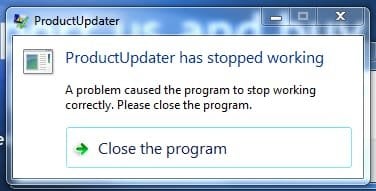
ProductUpdaterHasStoppedWorking_14-May-2018.jpg


Hence my question: I always click "Close the Program"
I occasionally check "Task Manager" > "Processes" and I have not yet seen any of the associated processes running.
Seeing as the program has "Stopped Working" before it has even had a chance to start, and that I "Close the Program", and that I never see any evidence of it in the Task Manager, other that the slight annoyance of having to address the issue at every start, and just knowing that something is there that shouldn't be, is this process doing anything undesirable without my knowledge ?

Thanks for reading and all help is appreciated.
 

My Computer My Computer

Computer type
PC/Desktop
Computer Manufacturer/Model Number
Dell Optiplex 780m "mini-tower"
OS
Windows 7 Pro x64
CPU
Intel Core Two Duo E8600 3.33 ghz
Motherboard
Whatever DELL put in it
Memory
8GB
Graphics Card(s)
Gigabyte Radeon R7 240
Monitor(s) Displays
HP 2159m
PSU
750 Watt Corsair CX750
Keyboard
Logitech Wireless
Mouse
Logitech Wireless
Browser
Chrome, Firefox, IE

My Computer My Computer

Computer type
PC/Desktop
Computer Manufacturer/Model Number
Self built custom
OS
64-bit Windows 11 Pro for Workstations
CPU
Intel i7-8700K OC'd to 5 GHz
Motherboard
ASUS ROG Maximus XI Formula Z390
Memory
64 GB (4x16GB) G.SKILL TridentZ RGB DDR4 3600 MHz
Graphics Card(s)
ASUS ROG-STRIX-GTX1080TI-O11G-GAMING
Sound Card
Integrated
Monitor(s) Displays
2 x Samsung Odyssey G7 27"
Screen Resolution
2560x1440
Hard Drives
1TB Samsung 990 PRO M.2,
4TB Samsung 990 PRO PRO M.2,
TerraMaster F8 SSD Plus NAS
PSU
Seasonic Prime Titanium 850W
Case
Thermaltake Core P3
Cooling
Corsair Hydro H115i
Keyboard
Logitech wireless K800
Mouse
Logitech MX Master 4
Internet Speed
2 Gb/s Download and 100 Mb/s Upload
Antivirus
Malwarebyte Anti-Malware Premium
Browser
Google Chrome
Other Info
Logitech Z625 speaker system,
Logitech BRIO 4K Pro webcam,
HP Color LaserJet Pro MFP M477fdn,
APC SMART-UPS RT 1000 XL - SURT1000XLI,
Galaxy S23 Plus phone
You might check in Programs and Features to see if "ProductUpdater" may be listed to uninstall.

Thanks for the info.

I just checked again and I am not seeing anything in Programs and Features related to this Product Updater.

I would also recommend to do a full scan of your system with an AV program to help make sure it's clean.

Scans of both Microsoft Security Essentials and Malwarebytes say "No Threats Detected"

I just now see that you said "full scan"; maybe I better take another peek at the scan dialogues and see if I did in fact do full scans.
 

My Computer My Computer

Computer type
PC/Desktop
Computer Manufacturer/Model Number
Dell Optiplex 780m "mini-tower"
OS
Windows 7 Pro x64
CPU
Intel Core Two Duo E8600 3.33 ghz
Motherboard
Whatever DELL put in it
Memory
8GB
Graphics Card(s)
Gigabyte Radeon R7 240
Monitor(s) Displays
HP 2159m
PSU
750 Watt Corsair CX750
Keyboard
Logitech Wireless
Mouse
Logitech Wireless
Browser
Chrome, Firefox, IE
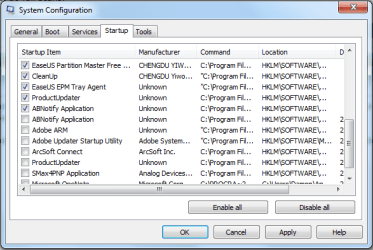
Run MSCONFIG and go to the Services tab. If you see this product listed among the services, disable it. Also, if you see it listed on the Startup tab, disable it there as well.

Now open your browser and go to the extensions / addons area. See if this product is listed there. If it is, remove it.
 

My Computer My Computer

Computer type
PC/Desktop
Computer Manufacturer/Model Number
Dell
OS
Linux Mint 18.2 xfce 64-bit (VMWare host) / Windows 8.1 Pro 32-bit (VMWare guest)
CPU
Haswell
Memory
4 GB
Monitor(s) Displays
Acer 23"
Screen Resolution
1920 x 1080
Hard Drives
Two hard drives, 1TB each: One for Linux, one for my data.
Keyboard
IBM Model M
Antivirus
Sophos (Linux), Trend Micro (Windows)
Browser
Firefox, Opera
Other Info
I use Samba to share my data drive with the other computers at my house and with my guest session in VMWare Workstation Player.
Run MSCONFIG and go to the Services tab. If you see this product listed among the services, disable it. Also, if you see it listed on the Startup tab, disable it there as well.

Now open your browser and go to the extensions / addons area. See if this product is listed there. If it is, remove it.

I didn't see it in Services, but it is listed in Startup twice; it shows exactly the same location and path for both listings, one unchecked, the other checked.
It is pictured as I found it; I then unchecked it.
Why would it be there twice ?

Thanks.

MSCONFIG_Startup_ProductUpdater_2018-07-18_003215.png
 

My Computer My Computer

Computer type
PC/Desktop
Computer Manufacturer/Model Number
Dell Optiplex 780m "mini-tower"
OS
Windows 7 Pro x64
CPU
Intel Core Two Duo E8600 3.33 ghz
Motherboard
Whatever DELL put in it
Memory
8GB
Graphics Card(s)
Gigabyte Radeon R7 240
Monitor(s) Displays
HP 2159m
PSU
750 Watt Corsair CX750
Keyboard
Logitech Wireless
Mouse
Logitech Wireless
Browser
Chrome, Firefox, IE
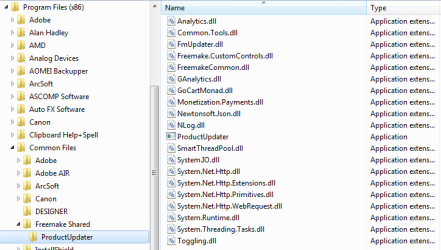
I found this:

x86CommonFiles_ProductUpdater_2018-07-18_004822.png

What would be the outcome if I just deleted that folder ?
 

My Computer My Computer

Computer type
PC/Desktop
Computer Manufacturer/Model Number
Dell Optiplex 780m "mini-tower"
OS
Windows 7 Pro x64
CPU
Intel Core Two Duo E8600 3.33 ghz
Motherboard
Whatever DELL put in it
Memory
8GB
Graphics Card(s)
Gigabyte Radeon R7 240
Monitor(s) Displays
HP 2159m
PSU
750 Watt Corsair CX750
Keyboard
Logitech Wireless
Mouse
Logitech Wireless
Browser
Chrome, Firefox, IE
If it was me, I would delete the folder. Deleting it will mean that the program won't be able to run, because it won't exist any more on your computer.

Hopefully that is the only place that this program resides on your computer.

As for why there were two entries in Startup, probably a bug in the program. It didn't check to see if there was already an entry in Startup. Either that, or as a way to keep the program running -- if you remove one entry in Startup, the other one will still be there.

Excellent detective work. You saw the location and path of the program, and you then found it on the hard drive at that location and path.
 

My Computer My Computer

Computer type
PC/Desktop
Computer Manufacturer/Model Number
Dell
OS
Linux Mint 18.2 xfce 64-bit (VMWare host) / Windows 8.1 Pro 32-bit (VMWare guest)
CPU
Haswell
Memory
4 GB
Monitor(s) Displays
Acer 23"
Screen Resolution
1920 x 1080
Hard Drives
Two hard drives, 1TB each: One for Linux, one for my data.
Keyboard
IBM Model M
Antivirus
Sophos (Linux), Trend Micro (Windows)
Browser
Firefox, Opera
Other Info
I use Samba to share my data drive with the other computers at my house and with my guest session in VMWare Workstation Player.
BuckSkin,

Do you have any "Freemake" or "FreeFixer" type program in Programs and Features to uninstall?
 

My Computer My Computer

Computer type
PC/Desktop
Computer Manufacturer/Model Number
Self built custom
OS
64-bit Windows 11 Pro for Workstations
CPU
Intel i7-8700K OC'd to 5 GHz
Motherboard
ASUS ROG Maximus XI Formula Z390
Memory
64 GB (4x16GB) G.SKILL TridentZ RGB DDR4 3600 MHz
Graphics Card(s)
ASUS ROG-STRIX-GTX1080TI-O11G-GAMING
Sound Card
Integrated
Monitor(s) Displays
2 x Samsung Odyssey G7 27"
Screen Resolution
2560x1440
Hard Drives
1TB Samsung 990 PRO M.2,
4TB Samsung 990 PRO PRO M.2,
TerraMaster F8 SSD Plus NAS
PSU
Seasonic Prime Titanium 850W
Case
Thermaltake Core P3
Cooling
Corsair Hydro H115i
Keyboard
Logitech wireless K800
Mouse
Logitech MX Master 4
Internet Speed
2 Gb/s Download and 100 Mb/s Upload
Antivirus
Malwarebyte Anti-Malware Premium
Browser
Google Chrome
Other Info
Logitech Z625 speaker system,
Logitech BRIO 4K Pro webcam,
HP Color LaserJet Pro MFP M477fdn,
APC SMART-UPS RT 1000 XL - SURT1000XLI,
Galaxy S23 Plus phone
If it was me, I would delete the folder.

Thanks; I will delete.

BuckSkin,

Do you have any "Freemake" or "FreeFixer" type program in Programs and Features to uninstall?

I have had Freemake Video Converter for several years.

I am now fairly certain that the ProductUpdater mess sneaked in when I recently installed Freemake Video Downloader --- which works wonderfully, by the way.
 

My Computer My Computer

Computer type
PC/Desktop
Computer Manufacturer/Model Number
Dell Optiplex 780m "mini-tower"
OS
Windows 7 Pro x64
CPU
Intel Core Two Duo E8600 3.33 ghz
Motherboard
Whatever DELL put in it
Memory
8GB
Graphics Card(s)
Gigabyte Radeon R7 240
Monitor(s) Displays
HP 2159m
PSU
750 Watt Corsair CX750
Keyboard
Logitech Wireless
Mouse
Logitech Wireless
Browser
Chrome, Firefox, IE
Back
Top