
You are using an out of date browser. It may not display this or other websites correctly.
You should upgrade or use an alternative browser.
You should upgrade or use an alternative browser.
Intel Wifi AC 9260 driver fir Win7 x32 x64
- Thread starter Grisu
- Start date


Get a USB wifi adapter for your computer. Any of these will probably be good:
https://www.amazon.com/s/ref=nb_sb_ss_c_3_8?url=search-alias%3Dcomputers&field-keywords=usb+wifi+adapter&sprefix=usb+wifi%2Celectronics%2C241&crid=4F3W6EV6KXE8
I have this adapter:
https://www.amazon.com/NETGEAR-N300...=1532106550&sr=1-25&keywords=usb+wifi+adapter
It has worked well for me. One thing I like about it is that you can either plug it in directly to the computer, or you can use the little stand with the USB extension cable. The advantage of using the stand with the USB extension cable is that you can move the adapter around to get the best possible signal. If the adapter is plugged directly into the computer, the computer might block the signal.
https://www.amazon.com/s/ref=nb_sb_ss_c_3_8?url=search-alias%3Dcomputers&field-keywords=usb+wifi+adapter&sprefix=usb+wifi%2Celectronics%2C241&crid=4F3W6EV6KXE8
I have this adapter:
https://www.amazon.com/NETGEAR-N300...=1532106550&sr=1-25&keywords=usb+wifi+adapter
It has worked well for me. One thing I like about it is that you can either plug it in directly to the computer, or you can use the little stand with the USB extension cable. The advantage of using the stand with the USB extension cable is that you can move the adapter around to get the best possible signal. If the adapter is plugged directly into the computer, the computer might block the signal.
My Computer
At a glance
Linux Mint 18.2 xfce 64-bit (VMWare host) / W...Haswell4 GB
- Computer type
- PC/Desktop
- Computer Manufacturer/Model Number
- Dell
- OS
- Linux Mint 18.2 xfce 64-bit (VMWare host) / Windows 8.1 Pro 32-bit (VMWare guest)
- CPU
- Haswell
- Memory
- 4 GB
- Monitor(s) Displays
- Acer 23"
- Screen Resolution
- 1920 x 1080
- Hard Drives
- Two hard drives, 1TB each: One for Linux, one for my data.
- Keyboard
- IBM Model M
- Antivirus
- Sophos (Linux), Trend Micro (Windows)
- Browser
- Firefox, Opera
- Other Info
- I use Samba to share my data drive with the other computers at my house and with my guest session in VMWare Workstation Player.
Thanks I know that I can always buy a completely different new solution, even replace by a 8265 would work.
Please answer only related to this topic if anyone found a working driver for it and would kindly link it or how to edit a driver to be accepted by this card.
Please answer only related to this topic if anyone found a working driver for it and would kindly link it or how to edit a driver to be accepted by this card.
My Computer
At a glance
Win7pro x32
- Computer type
- PC/Desktop
- OS
- Win7pro x32
You can try this link:
https://downloadcenter.intel.com/product/99445/Intel-Wireless-AC-9260
Click on the Show More Tab if you cannot see what you are looking for.
https://downloadcenter.intel.com/product/99445/Intel-Wireless-AC-9260
Click on the Show More Tab if you cannot see what you are looking for.
My Computer
At a glance
Windows 7 x64, Vista x64, 8.1 smartphoneIntel E8400 65W 64-bitDDR2 2 x 2GB, 1GB x 2XFX Radeon HD5750
- Computer type
- PC/Desktop
- OS
- Windows 7 x64, Vista x64, 8.1 smartphone
- CPU
- Intel E8400 65W 64-bit
- Motherboard
- Gigabyte EP45-UD3LR
- Memory
- DDR2 2 x 2GB, 1GB x 2
- Graphics Card(s)
- XFX Radeon HD5750
- Sound Card
- AMD High Definition Audio; Realtek High Definition Audio
- Monitor(s) Displays
- iiyama prolite X2377HDS
- Screen Resolution
- 1920 x 1080
- Hard Drives
- 500GB 7200 rpm Seagate ST3500413AS 16MB, 500GB 5400 rpm Toshiba MQ02ABF050H 32MB, 200GB 7200 rpm Seagate ST3200820AS 8MB, 2TB 7200 rpm Western Digital WD20EZRX 64MB
- PSU
- Enermax Liberty Modular
- Case
- Antec P193 Midi Tower
- Keyboard
- Mionix ZIBAL 60
- Mouse
- Razer USB 2.0 Diamondback Mouse or Huion Graphics Tablet
- Browser
- Internet Explorer, Lunascape, Firefox, Opera, Avast Safezone
They are all for Win10x64 only!You can try this link:
https://downloadcenter.intel.com/product/99445/Intel-Wireless-AC-9260
Click on the Show More Tab if you cannot see what you are looking for.
Did this before.
Same problem has been with 8265, but for that someone found a working Lenovo-driver!
Thats why I am asking for a similar solution for 9260.
My Computer
At a glance
Win7pro x32
- Computer type
- PC/Desktop
- OS
- Win7pro x32

- Local time
- 7:31 AM
- Messages
- 1,363
The below solution is NOT for the faint of heart, but you asked so I'm answering. This is the procedure I use to successfully get the newest HD630 graphics drivers (which are Win10 only) working within W7 on my system.
Download the ZIP file for the latest Intel wireless driver set for W7x64, which as you know works with the older intel drivers such as the 8265, yet excludes the 9260 since it is a W7 package. The "Drivers for IT Admins" page has it....
Download Intel® PROSet/Wireless Software and Drivers for IT Admins
(WiFi_20.60.0_Driver64_Win7.zip)
after downloading, extract the contents of the zip file to a folder on your desktop.
find the file named netsw04.inf. This is the setup file which contains a script which will install the wireless driver onto various wireless adapters. The reason you cannot install this driver on a 9260 within w7x64 is because the specific "vendor and device ID" of the 9260 does NOT appear within this file, so we need to remedy that.
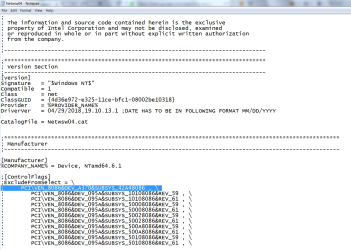
Open this file using notepad. Go down one page and find the "excludefromselect" section, then go down another 5 pages or so and find the "Device WIN7_64". Within each section you will see several dozen vendor/device IDs listed. You just need to modify a single line within each of these two sections in order to authorize your specific 9260 for installation. For instance, my system has an 8265 and its vendor/device ID is
PCI\VEN_8086&DEV_24FD&SUBSYS_10108086
which if you search, you will see is listed in both the Excludefromselect section, and in the WIN7_64 sections.
Now go into your control panel > device manager and right click on your 9260 wireless adapter. It may be listed as an Unknown Device at the bottom, or it may be in the network section. You may need to hunt around for it, but you know you've found it when you find a device with the DEV_2526 string as described below. Right click on the adapter's line, then select Properties, then Details, then under the word Property select Hardware IDs from the drop-down menu. At this point you will see 4 lines of data underneath. Right click the second line and then select copy. It will look something like this
PCI\VEN_8086&DEV_2526&SUBSYS_10108086
(though the SUBSYS part may be different)
Now go back to the netsw04.inf file and find the two lines we were at earlier, the lines that contain the string for the 8265, which have the string
PCI\VEN_8086&DEV_24FD&SUBSYS_10108086
in them.
Overwrite them so that instead of saying
PCI\VEN_8086&DEV_24FD&SUBSYS_10108086, they now say
PCI\VEN_8086&DEV_2526&SUBSYS_xxxxxxxx (I put x's there because I don't know what your specific SUBSYS numbers are).
Save the file. The script is now set up to allow this driver to install onto your 9260 even though you are running W7.
After saving it, right click on the file and select install. The script will check to see that you are running W7_64, which you are, then it will check to see if you have a 9260, which you do, and it will install the driver. Hopefully
Download the ZIP file for the latest Intel wireless driver set for W7x64, which as you know works with the older intel drivers such as the 8265, yet excludes the 9260 since it is a W7 package. The "Drivers for IT Admins" page has it....
Download Intel® PROSet/Wireless Software and Drivers for IT Admins
(WiFi_20.60.0_Driver64_Win7.zip)
after downloading, extract the contents of the zip file to a folder on your desktop.
find the file named netsw04.inf. This is the setup file which contains a script which will install the wireless driver onto various wireless adapters. The reason you cannot install this driver on a 9260 within w7x64 is because the specific "vendor and device ID" of the 9260 does NOT appear within this file, so we need to remedy that.
Open this file using notepad. Go down one page and find the "excludefromselect" section, then go down another 5 pages or so and find the "Device WIN7_64". Within each section you will see several dozen vendor/device IDs listed. You just need to modify a single line within each of these two sections in order to authorize your specific 9260 for installation. For instance, my system has an 8265 and its vendor/device ID is
PCI\VEN_8086&DEV_24FD&SUBSYS_10108086
which if you search, you will see is listed in both the Excludefromselect section, and in the WIN7_64 sections.
Now go into your control panel > device manager and right click on your 9260 wireless adapter. It may be listed as an Unknown Device at the bottom, or it may be in the network section. You may need to hunt around for it, but you know you've found it when you find a device with the DEV_2526 string as described below. Right click on the adapter's line, then select Properties, then Details, then under the word Property select Hardware IDs from the drop-down menu. At this point you will see 4 lines of data underneath. Right click the second line and then select copy. It will look something like this
PCI\VEN_8086&DEV_2526&SUBSYS_10108086
(though the SUBSYS part may be different)
Now go back to the netsw04.inf file and find the two lines we were at earlier, the lines that contain the string for the 8265, which have the string
PCI\VEN_8086&DEV_24FD&SUBSYS_10108086
in them.
Overwrite them so that instead of saying
PCI\VEN_8086&DEV_24FD&SUBSYS_10108086, they now say
PCI\VEN_8086&DEV_2526&SUBSYS_xxxxxxxx (I put x's there because I don't know what your specific SUBSYS numbers are).
Save the file. The script is now set up to allow this driver to install onto your 9260 even though you are running W7.
After saving it, right click on the file and select install. The script will check to see that you are running W7_64, which you are, then it will check to see if you have a 9260, which you do, and it will install the driver. Hopefully
My Computer
At a glance
Win7 pro x64stock i7 7700kCorsair Vengeance LPX 16GB (2x8GB) DDR4 @ 320...integrated Intel HD 630
- Computer type
- PC/Desktop
- Computer Manufacturer/Model Number
- diy
- OS
- Win7 pro x64
- CPU
- stock i7 7700k
- Motherboard
- Gigabyte Z270N-WIFI mini-ITX
- Memory
- Corsair Vengeance LPX 16GB (2x8GB) DDR4 @ 3200MHz
- Graphics Card(s)
- integrated Intel HD 630
- Sound Card
- onboard Realtek ALC1220
- Monitor(s) Displays
- two vertically mounted samsung 55" 4k un55mu8000
- Screen Resolution
- 1920x1280
- Hard Drives
- 256GB Samsung EVO 960 M.2 pci-e NVMe SSD
- PSU
- SilverStone Nightjar ST45NF 450Watt Fanless
- Case
- No case. Motherboard is mounted directly onto power supply
- Cooling
- Evercool low profile 815EP with Panaflow 12L fan at 7v
- Keyboard
- Ortek MCK-86 mini
- Mouse
- Belkin 5-button USB
- Internet Speed
- spectrum 400mbps
Thanks a lot for this very good and detailed explanation!
I will try and report back whether I got it working for Win10x32 and Win7x32.
Probably I may try to go a bit deeper to show correct adapter name too.
And same problem like you with HD630, there I can use this solution in a similar way.
Just allow one more question: whats the difference between Netsw04.INF and Netsw02.INF and why to take first one?
I will try and report back whether I got it working for Win10x32 and Win7x32.
Probably I may try to go a bit deeper to show correct adapter name too.
And same problem like you with HD630, there I can use this solution in a similar way.
Just allow one more question: whats the difference between Netsw04.INF and Netsw02.INF and why to take first one?
My Computer
At a glance
Win7pro x32
- Computer type
- PC/Desktop
- OS
- Win7pro x32
- Local time
- 7:31 AM
- Messages
- 1,363
Looking through the netsw02.inf and netsw04.inf files, it appeared to me that the 02 file was only for older adapters, so we can ignore it.
Also, if you are on 32-bit windows then of course you want to download the 32-bit zip file from the IT and Admins site, not the 64-bit.
Also, if you are on 32-bit windows then of course you want to download the 32-bit zip file from the IT and Admins site, not the 64-bit.
My Computer
At a glance
Win7 pro x64stock i7 7700kCorsair Vengeance LPX 16GB (2x8GB) DDR4 @ 320...integrated Intel HD 630
- Computer type
- PC/Desktop
- Computer Manufacturer/Model Number
- diy
- OS
- Win7 pro x64
- CPU
- stock i7 7700k
- Motherboard
- Gigabyte Z270N-WIFI mini-ITX
- Memory
- Corsair Vengeance LPX 16GB (2x8GB) DDR4 @ 3200MHz
- Graphics Card(s)
- integrated Intel HD 630
- Sound Card
- onboard Realtek ALC1220
- Monitor(s) Displays
- two vertically mounted samsung 55" 4k un55mu8000
- Screen Resolution
- 1920x1280
- Hard Drives
- 256GB Samsung EVO 960 M.2 pci-e NVMe SSD
- PSU
- SilverStone Nightjar ST45NF 450Watt Fanless
- Case
- No case. Motherboard is mounted directly onto power supply
- Cooling
- Evercool low profile 815EP with Panaflow 12L fan at 7v
- Keyboard
- Ortek MCK-86 mini
- Mouse
- Belkin 5-button USB
- Internet Speed
- spectrum 400mbps
Hi Johnhoh,
I'm trying to follow your steps for an: AC 9462 (a370) (is listed in 3rd position in the website you linked), the Hardware ID is:
PCI\VEN_8086&DEV_A370&SUBSYS_42A48086
but I can't figure out what line should I search for in the .inf file (btw, the inf file name I have from the .zip file is: Netwsw03.INF)
Could you please tell me what line should I look for? or better how can I figure it out? (is there some kind of equivalence list or is it an ID from the device, etc?)
Thanks!
I'm trying to follow your steps for an: AC 9462 (a370) (is listed in 3rd position in the website you linked), the Hardware ID is:
PCI\VEN_8086&DEV_A370&SUBSYS_42A48086
but I can't figure out what line should I search for in the .inf file (btw, the inf file name I have from the .zip file is: Netwsw03.INF)
Could you please tell me what line should I look for? or better how can I figure it out? (is there some kind of equivalence list or is it an ID from the device, etc?)
Thanks!
My Computer
At a glance
Windows 7 Ultimate x64
- Computer type
- PC/Desktop
- OS
- Windows 7 Ultimate x64
- Local time
- 7:31 AM
- Messages
- 1,363
Intel has updated the drivers since my first post. Current is now 20.70
Download Intel(R) PROSet/Wireless Software and Drivers for IT Admins
You should be downloading WiFi_20.70.0_Driver64_Win7 (your first post mentions both x32 and x64 so I am not sure which one you are running. Hopefully x64) In the package is a Netwsw04.INF file but not a Netwsw03.INF file.
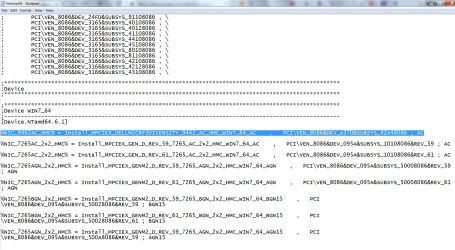
Something I did not think of until now, is we need to ALSO use the WIN10 download package in order to see the lines where Intel calls out your specific driver. To find that, you need to also download the WiFi_20.70.0_Driver64_Win10 package. Within it, we need to look at the Netwtw06.INF file which is the file that has your device. You will need to cut-n-paste the two lines within that file that contain the string PCI\VEN_8086&DEV_A370&SUBSYS_42A48086. Or better yet forget all that, I'll just cut-n-paste them now and include them in screenshots. You can ignore the Win10 download altogether in order to keep things straight.
So we cut and paste those two lines and put them within the Netwsw04.INF file that is in the win7 package. The first one goes at the top of the excludefrom select part, and the next one goes at the top of the DEVICE WIN7_64 section. I will attach a screenshots now of what these new lines look like within my editor. They are the highlighted lines. Since you cannot cut and paste from an image, here is the text of the two lines:
1st line
; PCI\VEN_8086&DEV_A370&SUBSYS_42A48086 , \
2nd line
%NIC_9462AC_HMC% = Install_MPCIEX_DELLM2CRF3DIVERSITY_9462_AC_HMC_WINT_64_AC , PCI\VEN_8086&DEV_A370&SUBSYS_42A48086 ; AC
As I mentioned before, the first line is near the top of the Netwsw04.inf file and the second line is about 5 pages down.
Here's a caveat, a new piece of information that is a potential show-stopper. See where within the second line there are three places where it says "AC"? That appears related to how the setup file integrates the driver later on in the file. Well over in the Win10 package it does not actually say "AC", instead it says "No_160", which is something that is part of the win10 package but not part of the win7 package. Based on text within the win10 setup file (the one named Netwsw06.inf) there appears to be a special section specifically for Dell machines called No_160. I'm over my head as to what exactly it all means, other than to say that since there is no section in the Win7 package called No_160, I had to change No_160 to AC in order for the win7 file to process the line, and of course it is possible that this driver cannot install without the No_160 section, meaning it is not installable on win7. So what that all adds up to is that when I first replied to you I was giving this method about a 70% chance of working, but now I would put the odds at 30%.
Download Intel(R) PROSet/Wireless Software and Drivers for IT Admins
You should be downloading WiFi_20.70.0_Driver64_Win7 (your first post mentions both x32 and x64 so I am not sure which one you are running. Hopefully x64) In the package is a Netwsw04.INF file but not a Netwsw03.INF file.
Something I did not think of until now, is we need to ALSO use the WIN10 download package in order to see the lines where Intel calls out your specific driver. To find that, you need to also download the WiFi_20.70.0_Driver64_Win10 package. Within it, we need to look at the Netwtw06.INF file which is the file that has your device. You will need to cut-n-paste the two lines within that file that contain the string PCI\VEN_8086&DEV_A370&SUBSYS_42A48086. Or better yet forget all that, I'll just cut-n-paste them now and include them in screenshots. You can ignore the Win10 download altogether in order to keep things straight.
So we cut and paste those two lines and put them within the Netwsw04.INF file that is in the win7 package. The first one goes at the top of the excludefrom select part, and the next one goes at the top of the DEVICE WIN7_64 section. I will attach a screenshots now of what these new lines look like within my editor. They are the highlighted lines. Since you cannot cut and paste from an image, here is the text of the two lines:
1st line
; PCI\VEN_8086&DEV_A370&SUBSYS_42A48086 , \
2nd line
%NIC_9462AC_HMC% = Install_MPCIEX_DELLM2CRF3DIVERSITY_9462_AC_HMC_WINT_64_AC , PCI\VEN_8086&DEV_A370&SUBSYS_42A48086 ; AC
As I mentioned before, the first line is near the top of the Netwsw04.inf file and the second line is about 5 pages down.
Here's a caveat, a new piece of information that is a potential show-stopper. See where within the second line there are three places where it says "AC"? That appears related to how the setup file integrates the driver later on in the file. Well over in the Win10 package it does not actually say "AC", instead it says "No_160", which is something that is part of the win10 package but not part of the win7 package. Based on text within the win10 setup file (the one named Netwsw06.inf) there appears to be a special section specifically for Dell machines called No_160. I'm over my head as to what exactly it all means, other than to say that since there is no section in the Win7 package called No_160, I had to change No_160 to AC in order for the win7 file to process the line, and of course it is possible that this driver cannot install without the No_160 section, meaning it is not installable on win7. So what that all adds up to is that when I first replied to you I was giving this method about a 70% chance of working, but now I would put the odds at 30%.
Attachments
My Computer
At a glance
Win7 pro x64stock i7 7700kCorsair Vengeance LPX 16GB (2x8GB) DDR4 @ 320...integrated Intel HD 630
- Computer type
- PC/Desktop
- Computer Manufacturer/Model Number
- diy
- OS
- Win7 pro x64
- CPU
- stock i7 7700k
- Motherboard
- Gigabyte Z270N-WIFI mini-ITX
- Memory
- Corsair Vengeance LPX 16GB (2x8GB) DDR4 @ 3200MHz
- Graphics Card(s)
- integrated Intel HD 630
- Sound Card
- onboard Realtek ALC1220
- Monitor(s) Displays
- two vertically mounted samsung 55" 4k un55mu8000
- Screen Resolution
- 1920x1280
- Hard Drives
- 256GB Samsung EVO 960 M.2 pci-e NVMe SSD
- PSU
- SilverStone Nightjar ST45NF 450Watt Fanless
- Case
- No case. Motherboard is mounted directly onto power supply
- Cooling
- Evercool low profile 815EP with Panaflow 12L fan at 7v
- Keyboard
- Ortek MCK-86 mini
- Mouse
- Belkin 5-button USB
- Internet Speed
- spectrum 400mbps
WOW Johnhoh!!
you ARE awesome!!
I will test it later, but even if it doesn't work, you gave me the information to try that on other drivers!!
Thank you very much for your quick and detailed reply!!
you ARE awesome!!
I will test it later, but even if it doesn't work, you gave me the information to try that on other drivers!!
Thank you very much for your quick and detailed reply!!
My Computer
At a glance
Windows 7 Ultimate x64
- Computer type
- PC/Desktop
- OS
- Windows 7 Ultimate x64
- Local time
- 7:31 AM
- Messages
- 1,363
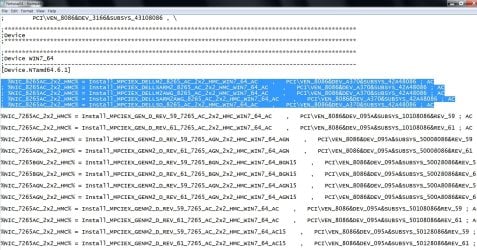
wait I found another issue. The highlighted line in the second image I attached above calls an MPCIEX install-section that exists in the WIN10 file but does not exist in the WIN7 file. This means we have to make a guess as to which one of the install-sections in the WIN7 file might work for your adapter. Its fair to say that the most likely section that will work with your 9260 is one that is used for a recent adapter instead of an old adapter, lets go with the 8265. And since the WIN10 file that refers to your specific adapter calls an install section that contains the string DELLM2, lets also go with that. Well within the WIN7 file are 5 install-sections for DELLM2 8265, so we might as well try all of them.
To do that you will need to do 5 iterations until one hopefully works. So I have created 5 new lines for you to put into your Netsws04 file within the DEVICE WIN_64 section. You can see them highlighted in the pic. Here they are in text form (but unfortunately the forum is probably gonna wrap them so they won't look as clean)
%NIC_8265AC_2x2_HMC% = Install_MPCIEX_DELLM2_8265_AC_2x2_HMC_WIN7_64_AC , PCI\VEN_8086&DEV_A370&SUBSYS_42A48086 ; AC
; %NIC_8265AC_2x2_HMC% = Install_MPCIEX_DELLSARM2_8265_AC_2x2_HMC_WIN7_64_AC , PCI\VEN_8086&DEV_A370&SUBSYS_42A48086 ; AC
; %NIC_8265AC_2x2_HMC% = Install_MPCIEX_DELLM2AWG_8265_AC_2x2_HMC_WIN7_64_AC , PCI\VEN_8086&DEV_A370&SUBSYS_42A48086 ; AC
; %NIC_8265AC_2x2_HMC% = Install_MPCIEX_DELLSARM2AWG_8265_AC_2x2_HMC_WIN7_64_AC , PCI\VEN_8086&DEV_A370&SUBSYS_42A48086 ; AC
; %NIC_8265AC_2x2_HMC% = Install_MPCIEX_DELLSD_8265_AC_2x2_HMC_WIN7_64_AC , PCI\VEN_8086&DEV_A370&SUBSYS_42A48086 ; AC
See how for the first line is starts off with an "%" but the other 4 lines start with an ";"? That ";" means the line is a comment and will be ignored by the installer. That's because for iteration 1 of your effort you want the installer to only execute the first line and ignore the other 4 lines. If after selecting "install" (from my top post from several days ago) you get an error, you know the install did not work and you will need to try the next line. By that I mean, after the installer craps out the first time you select "install", you will want to re-open the Netsws04 file and put a ";" in front of the first of the five highlighted lines in the attached pic, and change the ";" in the second line to a space. That way when you select install again on the next try, the installer will use the Install_MPCIEX_DELLSARM2 section instead of the Install_MPCIEX_DELLM2 section that it tried the first time. Then work your way through the five lines, always having a ";" in front of four of them and see if one such iteration results in a successful install.
To do that you will need to do 5 iterations until one hopefully works. So I have created 5 new lines for you to put into your Netsws04 file within the DEVICE WIN_64 section. You can see them highlighted in the pic. Here they are in text form (but unfortunately the forum is probably gonna wrap them so they won't look as clean)
%NIC_8265AC_2x2_HMC% = Install_MPCIEX_DELLM2_8265_AC_2x2_HMC_WIN7_64_AC , PCI\VEN_8086&DEV_A370&SUBSYS_42A48086 ; AC
; %NIC_8265AC_2x2_HMC% = Install_MPCIEX_DELLSARM2_8265_AC_2x2_HMC_WIN7_64_AC , PCI\VEN_8086&DEV_A370&SUBSYS_42A48086 ; AC
; %NIC_8265AC_2x2_HMC% = Install_MPCIEX_DELLM2AWG_8265_AC_2x2_HMC_WIN7_64_AC , PCI\VEN_8086&DEV_A370&SUBSYS_42A48086 ; AC
; %NIC_8265AC_2x2_HMC% = Install_MPCIEX_DELLSARM2AWG_8265_AC_2x2_HMC_WIN7_64_AC , PCI\VEN_8086&DEV_A370&SUBSYS_42A48086 ; AC
; %NIC_8265AC_2x2_HMC% = Install_MPCIEX_DELLSD_8265_AC_2x2_HMC_WIN7_64_AC , PCI\VEN_8086&DEV_A370&SUBSYS_42A48086 ; AC
See how for the first line is starts off with an "%" but the other 4 lines start with an ";"? That ";" means the line is a comment and will be ignored by the installer. That's because for iteration 1 of your effort you want the installer to only execute the first line and ignore the other 4 lines. If after selecting "install" (from my top post from several days ago) you get an error, you know the install did not work and you will need to try the next line. By that I mean, after the installer craps out the first time you select "install", you will want to re-open the Netsws04 file and put a ";" in front of the first of the five highlighted lines in the attached pic, and change the ";" in the second line to a space. That way when you select install again on the next try, the installer will use the Install_MPCIEX_DELLSARM2 section instead of the Install_MPCIEX_DELLM2 section that it tried the first time. Then work your way through the five lines, always having a ";" in front of four of them and see if one such iteration results in a successful install.
Attachments
My Computer
At a glance
Win7 pro x64stock i7 7700kCorsair Vengeance LPX 16GB (2x8GB) DDR4 @ 320...integrated Intel HD 630
- Computer type
- PC/Desktop
- Computer Manufacturer/Model Number
- diy
- OS
- Win7 pro x64
- CPU
- stock i7 7700k
- Motherboard
- Gigabyte Z270N-WIFI mini-ITX
- Memory
- Corsair Vengeance LPX 16GB (2x8GB) DDR4 @ 3200MHz
- Graphics Card(s)
- integrated Intel HD 630
- Sound Card
- onboard Realtek ALC1220
- Monitor(s) Displays
- two vertically mounted samsung 55" 4k un55mu8000
- Screen Resolution
- 1920x1280
- Hard Drives
- 256GB Samsung EVO 960 M.2 pci-e NVMe SSD
- PSU
- SilverStone Nightjar ST45NF 450Watt Fanless
- Case
- No case. Motherboard is mounted directly onto power supply
- Cooling
- Evercool low profile 815EP with Panaflow 12L fan at 7v
- Keyboard
- Ortek MCK-86 mini
- Mouse
- Belkin 5-button USB
- Internet Speed
- spectrum 400mbps
- Local time
- 7:31 AM
- Messages
- 1,363
The five lines I had you insert into Netsws04.inf should actually be:
%NIC_9462AC_HMC% = Install_MPCIEX_DELLM2_8265_AC_2x2_HMC_WIN7_64_AC , PCI\VEN_8086&DEV_A370&SUBSYS_42A48086 ; AC
; %NIC_9462AC_HMC% = Install_MPCIEX_DELLSARM2_8265_AC_2x2_HMC_WIN7_64_AC , PCI\VEN_8086&DEV_A370&SUBSYS_42A48086 ; AC
; %NIC_9462AC_HMC% = Install_MPCIEX_DELLM2AWG_8265_AC_2x2_HMC_WIN7_64_AC , PCI\VEN_8086&DEV_A370&SUBSYS_42A48086 ; AC
; %NIC_9462AC_HMC% = Install_MPCIEX_DELLSARM2AWG_8265_AC_2x2_HMC_WIN7_64_AC , PCI\VEN_8086&DEV_A370&SUBSYS_42A48086 ; AC
; %NIC_9462AC_HMC% = Install_MPCIEX_DELLSD_8265_AC_2x2_HMC_WIN7_64_AC , PCI\VEN_8086&DEV_A370&SUBSYS_42A48086 ; AC
The left of the equal sign is what the installer reads off of the adapter, and what is right of the equal sign is the procedure that gets invoked to do the install later in the file. My bad.
%NIC_9462AC_HMC% = Install_MPCIEX_DELLM2_8265_AC_2x2_HMC_WIN7_64_AC , PCI\VEN_8086&DEV_A370&SUBSYS_42A48086 ; AC
; %NIC_9462AC_HMC% = Install_MPCIEX_DELLSARM2_8265_AC_2x2_HMC_WIN7_64_AC , PCI\VEN_8086&DEV_A370&SUBSYS_42A48086 ; AC
; %NIC_9462AC_HMC% = Install_MPCIEX_DELLM2AWG_8265_AC_2x2_HMC_WIN7_64_AC , PCI\VEN_8086&DEV_A370&SUBSYS_42A48086 ; AC
; %NIC_9462AC_HMC% = Install_MPCIEX_DELLSARM2AWG_8265_AC_2x2_HMC_WIN7_64_AC , PCI\VEN_8086&DEV_A370&SUBSYS_42A48086 ; AC
; %NIC_9462AC_HMC% = Install_MPCIEX_DELLSD_8265_AC_2x2_HMC_WIN7_64_AC , PCI\VEN_8086&DEV_A370&SUBSYS_42A48086 ; AC
The left of the equal sign is what the installer reads off of the adapter, and what is right of the equal sign is the procedure that gets invoked to do the install later in the file. My bad.
My Computer
At a glance
Win7 pro x64stock i7 7700kCorsair Vengeance LPX 16GB (2x8GB) DDR4 @ 320...integrated Intel HD 630
- Computer type
- PC/Desktop
- Computer Manufacturer/Model Number
- diy
- OS
- Win7 pro x64
- CPU
- stock i7 7700k
- Motherboard
- Gigabyte Z270N-WIFI mini-ITX
- Memory
- Corsair Vengeance LPX 16GB (2x8GB) DDR4 @ 3200MHz
- Graphics Card(s)
- integrated Intel HD 630
- Sound Card
- onboard Realtek ALC1220
- Monitor(s) Displays
- two vertically mounted samsung 55" 4k un55mu8000
- Screen Resolution
- 1920x1280
- Hard Drives
- 256GB Samsung EVO 960 M.2 pci-e NVMe SSD
- PSU
- SilverStone Nightjar ST45NF 450Watt Fanless
- Case
- No case. Motherboard is mounted directly onto power supply
- Cooling
- Evercool low profile 815EP with Panaflow 12L fan at 7v
- Keyboard
- Ortek MCK-86 mini
- Mouse
- Belkin 5-button USB
- Internet Speed
- spectrum 400mbps
- Local time
- 7:31 AM
- Messages
- 1,363
one more item.... within the Netsws04.inf file, replace every instance of the 8 character string
Reg_8265
with
Reg_9462
Reg_8265
with
Reg_9462
My Computer
At a glance
Win7 pro x64stock i7 7700kCorsair Vengeance LPX 16GB (2x8GB) DDR4 @ 320...integrated Intel HD 630
- Computer type
- PC/Desktop
- Computer Manufacturer/Model Number
- diy
- OS
- Win7 pro x64
- CPU
- stock i7 7700k
- Motherboard
- Gigabyte Z270N-WIFI mini-ITX
- Memory
- Corsair Vengeance LPX 16GB (2x8GB) DDR4 @ 3200MHz
- Graphics Card(s)
- integrated Intel HD 630
- Sound Card
- onboard Realtek ALC1220
- Monitor(s) Displays
- two vertically mounted samsung 55" 4k un55mu8000
- Screen Resolution
- 1920x1280
- Hard Drives
- 256GB Samsung EVO 960 M.2 pci-e NVMe SSD
- PSU
- SilverStone Nightjar ST45NF 450Watt Fanless
- Case
- No case. Motherboard is mounted directly onto power supply
- Cooling
- Evercool low profile 815EP with Panaflow 12L fan at 7v
- Keyboard
- Ortek MCK-86 mini
- Mouse
- Belkin 5-button USB
- Internet Speed
- spectrum 400mbps
thanks for following up the thread!
I've just tried that and also changing the DELLM2_8265 with DELLM2_9462 but still the same message.
They way I'm installing the drivers is:
update driver
browse my computer for driver
let me pick
have disk
and then browse for the file (Netwsw04.INF)
I guess I have no luck this time...
I've just tried that and also changing the DELLM2_8265 with DELLM2_9462 but still the same message.
They way I'm installing the drivers is:
update driver
browse my computer for driver
let me pick
have disk
and then browse for the file (Netwsw04.INF)
I guess I have no luck this time...
My Computer
At a glance
Windows 7 Ultimate x64
- Computer type
- PC/Desktop
- OS
- Windows 7 Ultimate x64
- Local time
- 7:31 AM
- Messages
- 1,363
couple more thoughts here, as you should not be getting that message. I'm not surprised that the installer is having an issue, just not that issue, lol.
you do not want to change DELLM2_8265, as we are branching to that section in our process so if you rename it, our process has nowhere to go.
the way you are browsing to the netwsw04.inf file is correct, but note that your system probably has multiple copies of that file, so you want to make sure you are browsing to the one you just updated. ALSO, make sure you save it after updating it of course.
assuming all that is being done correctly, here's why you should not be getting that message. The message is
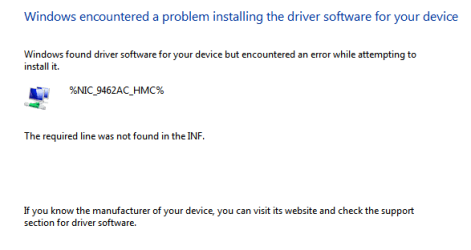
"%NIC_9462AC_HMC% the required line is not found in the inf"
the first time you got that message, the string %NIC_9462AC_HMC% was definitely not in the file, so it makes sense that you got that message. But then after you put in the 5 new lines (as corrected in post #14) if you are still getting that exact message, it means the installer is not detecting the new lines you inserted. So you want to make sure that you are saving the inf file before browsing to it, and also make sure that one of those 5 new lines does not have a ";" as the first character, and the other 4 lines do have ";" as the first character. The fact that you are getting the same error message implies that either all of the lines have ";" as the first character, or maybe you did not save the inf, or perhaps are browsing to a different inf file with the same name.
you do not want to change DELLM2_8265, as we are branching to that section in our process so if you rename it, our process has nowhere to go.
the way you are browsing to the netwsw04.inf file is correct, but note that your system probably has multiple copies of that file, so you want to make sure you are browsing to the one you just updated. ALSO, make sure you save it after updating it of course.
assuming all that is being done correctly, here's why you should not be getting that message. The message is
"%NIC_9462AC_HMC% the required line is not found in the inf"
the first time you got that message, the string %NIC_9462AC_HMC% was definitely not in the file, so it makes sense that you got that message. But then after you put in the 5 new lines (as corrected in post #14) if you are still getting that exact message, it means the installer is not detecting the new lines you inserted. So you want to make sure that you are saving the inf file before browsing to it, and also make sure that one of those 5 new lines does not have a ";" as the first character, and the other 4 lines do have ";" as the first character. The fact that you are getting the same error message implies that either all of the lines have ";" as the first character, or maybe you did not save the inf, or perhaps are browsing to a different inf file with the same name.
My Computer
At a glance
Win7 pro x64stock i7 7700kCorsair Vengeance LPX 16GB (2x8GB) DDR4 @ 320...integrated Intel HD 630
- Computer type
- PC/Desktop
- Computer Manufacturer/Model Number
- diy
- OS
- Win7 pro x64
- CPU
- stock i7 7700k
- Motherboard
- Gigabyte Z270N-WIFI mini-ITX
- Memory
- Corsair Vengeance LPX 16GB (2x8GB) DDR4 @ 3200MHz
- Graphics Card(s)
- integrated Intel HD 630
- Sound Card
- onboard Realtek ALC1220
- Monitor(s) Displays
- two vertically mounted samsung 55" 4k un55mu8000
- Screen Resolution
- 1920x1280
- Hard Drives
- 256GB Samsung EVO 960 M.2 pci-e NVMe SSD
- PSU
- SilverStone Nightjar ST45NF 450Watt Fanless
- Case
- No case. Motherboard is mounted directly onto power supply
- Cooling
- Evercool low profile 815EP with Panaflow 12L fan at 7v
- Keyboard
- Ortek MCK-86 mini
- Mouse
- Belkin 5-button USB
- Internet Speed
- spectrum 400mbps

- Local time
- 7:31 AM
- Messages
- 1,363
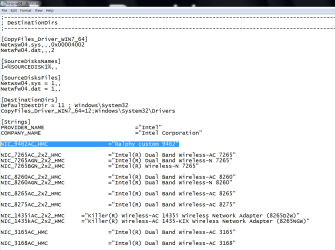
got another idea. Maybe it is finding the line like we want it to, but it is not happy that it is not finding the line later on in the INF where it is given a nickname. If that is the issue, then we solve it by inserting the following line within the DestinationDirs section, which is about 2/3 of the way through the INF, as in the pic. The highlighted line reads:
NIC_9462AC_HMC ="Ralphy custom 9462"
so give that a try, and if it does not work also try installing it by just clicking on the DPInst64 executable in the folder.
If it does not work please post a detailed blow-by-blow of how the install progresses and craps out. I'm assuming the only error you have ever gotten is the "line not found in the inf" error you posted a while back
NIC_9462AC_HMC ="Ralphy custom 9462"
so give that a try, and if it does not work also try installing it by just clicking on the DPInst64 executable in the folder.
If it does not work please post a detailed blow-by-blow of how the install progresses and craps out. I'm assuming the only error you have ever gotten is the "line not found in the inf" error you posted a while back
Attachments
Last edited:
My Computer
At a glance
Win7 pro x64stock i7 7700kCorsair Vengeance LPX 16GB (2x8GB) DDR4 @ 320...integrated Intel HD 630
- Computer type
- PC/Desktop
- Computer Manufacturer/Model Number
- diy
- OS
- Win7 pro x64
- CPU
- stock i7 7700k
- Motherboard
- Gigabyte Z270N-WIFI mini-ITX
- Memory
- Corsair Vengeance LPX 16GB (2x8GB) DDR4 @ 3200MHz
- Graphics Card(s)
- integrated Intel HD 630
- Sound Card
- onboard Realtek ALC1220
- Monitor(s) Displays
- two vertically mounted samsung 55" 4k un55mu8000
- Screen Resolution
- 1920x1280
- Hard Drives
- 256GB Samsung EVO 960 M.2 pci-e NVMe SSD
- PSU
- SilverStone Nightjar ST45NF 450Watt Fanless
- Case
- No case. Motherboard is mounted directly onto power supply
- Cooling
- Evercool low profile 815EP with Panaflow 12L fan at 7v
- Keyboard
- Ortek MCK-86 mini
- Mouse
- Belkin 5-button USB
- Internet Speed
- spectrum 400mbps
Thanks again John!,
I tried all but still no luck...
I tried installing with the DPinst64.exe (both w7 and w10... just in case), I tried uninstalling the driver and deleting the files and install again (using "let me pick"), I tried updating the driver (always "let me pick" so I can choose the file I modified and for that I even closed the notepad so I was sure I saved the file) and still the same.
Here are some pictures:


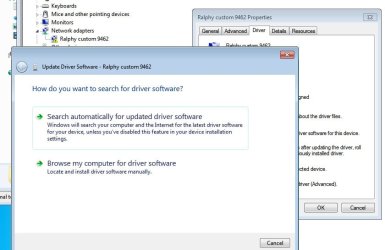
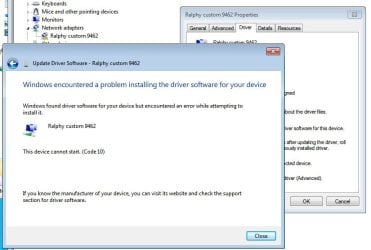
I tried all but still no luck...
I tried installing with the DPinst64.exe (both w7 and w10... just in case), I tried uninstalling the driver and deleting the files and install again (using "let me pick"), I tried updating the driver (always "let me pick" so I can choose the file I modified and for that I even closed the notepad so I was sure I saved the file) and still the same.
Here are some pictures:
My Computer
At a glance
Windows 7 Ultimate x64
- Computer type
- PC/Desktop
- OS
- Windows 7 Ultimate x64
Similar threads
- Replies
- 7
- Views
- 8K

- Replies
- 23
- Views
- 6K