Solved Ejected USB Hard Drive still comes up to scan for errors.

SnakeFist

New member
Member
Local time
11:51 PM
Messages
73
When i eject my 4TB Seagate usb drive with the option by the clock upon plugging it back in Windows 7 Ultimate x64 still tells me to check the drive for errors. I figured it was done and ejected cause the light on the USB hard drive was off.
Why is it doing that for? I read you are supposed to use the eject drive icon by the clock instead of just pulling it out as you will get that dialog box with out ejecting it. I still eject it and i still get the dialog box to scan for errors.
How can i fix this?
 
Last edited:

My Computer My Computer

Computer type
PC/Desktop
Computer Manufacturer/Model Number
Custom Built By Yours Truly.
OS
Windows 7 Ultimate x64 SP1
CPU
AMD FX 8350
Motherboard
Gigabyte 990FXA-UD3
Memory
G-Skill Sniper Series 16 GB
Graphics Card(s)
MSI GTX 970
Monitor(s) Displays
Sony Bravia 40 Inch
Screen Resolution
1920x1080 Full Pixel
Hard Drives
Kingston Hyper X Savage SSD 240GB (OS Drive)
Seagate FireCuda 2TB SSHD
Western Digital Black 2TB
PSU
Antec 900 Watt High Current Gamer
Case
Cooler Master Trooper Full Tower With View Window
Cooling
Noctua D14 Push Pull Air Cooler
Keyboard
Razer Blackwidow Chroma v2
Mouse
Logitech G700s 13 Button Gaming Mouse
Internet Speed
250 mB/s
Antivirus
None
Browser
Firefox
If it asks to scan it's normally because it knows there is an error so it's best to let it do it
 

My Computer My Computer

Computer type
PC/Desktop
OS
win 8 32 bit
Hi SnakeFist,

As samuria has suggested it is best to let it check for errors as there is obviously something wrong!
Post the results of the scan once you have done this.

I hope this helps!
 

My Computer My Computer

Computer type
Laptop
Computer Manufacturer/Model Number
Fujitsu LIFEBOOK
OS
Win 7 HP SP1 64-bit Vista HB SP2 32-bit Linux Mint 18.3
CPU
Intel(R) Pentium(R) CPU P6200 @ 2.13GHz
Motherboard
FUJITSU FJNBB06
Memory
4.00 GB
Graphics Card(s)
Intel(R) Graphics Media Accelerator HD
Sound Card
[1] Realtek High Definition Audio [2] Intel(R) Display Audio
Screen Resolution
1366 x 768 x 32 bits (4294967296 colors) @ 59 Hz
Hard Drives
TOSHIBA MK5076GSX
Antivirus
AVG FREE
Hi SnakeFist,

As samuria has suggested it is best to let it check for errors as there is obviously something wrong!
Post the results of the scan once you have done this.

I hope this helps!

Thanks for the replies. Here are the results.

[Window Title]
Checking Disk Storage 5 (Portable) (I:)

[Main Instruction]
Your device or disk was successfully scanned

Contents

No problems were found on the device or disk. It is ready to use.

If you removed the device or disk before all files were fully written to it, parts of some files might still be missing. If so, go back to the source and recopy those files to your device or disk.

[^] Hide details [Close]

[Expanded Information]
Volume label is Storage 5 (Portable).

CHKDSK is verifying files (stage 1 of 3)...
25088 file records processed.

File verification completed.
0 large file records processed.

0 bad file records processed.

0 EA records processed.

0 reparse records processed.

CHKDSK is verifying indexes (stage 2 of 3)...
25326 index entries processed.

Index verification completed.


CHKDSK is verifying security descriptors (stage 3 of 3)...
25088 file SDs/SIDs processed.

Security descriptor verification completed.
119 data files processed.

Windows has checked the file system and found no problems.

3815317 MB total disk space.
91940932 KB in 672 files.
436 KB in 121 indexes.
210271 KB in use by the system.
65536 KB occupied by the log file.
3725326 MB available on disk.

4096 bytes in each allocation unit.
976721407 total allocation units on disk.
953683498 allocation units available on disk.
 
Last edited:

My Computer My Computer

Computer type
PC/Desktop
Computer Manufacturer/Model Number
Custom Built By Yours Truly.
OS
Windows 7 Ultimate x64 SP1
CPU
AMD FX 8350
Motherboard
Gigabyte 990FXA-UD3
Memory
G-Skill Sniper Series 16 GB
Graphics Card(s)
MSI GTX 970
Monitor(s) Displays
Sony Bravia 40 Inch
Screen Resolution
1920x1080 Full Pixel
Hard Drives
Kingston Hyper X Savage SSD 240GB (OS Drive)
Seagate FireCuda 2TB SSHD
Western Digital Black 2TB
PSU
Antec 900 Watt High Current Gamer
Case
Cooler Master Trooper Full Tower With View Window
Cooling
Noctua D14 Push Pull Air Cooler
Keyboard
Razer Blackwidow Chroma v2
Mouse
Logitech G700s 13 Button Gaming Mouse
Internet Speed
250 mB/s
Antivirus
None
Browser
Firefox
So does anyone know why i still have to scan for errors every time i plug my hard drive in even though i click the usb icon by the clock and eject my hard drive.
 

My Computer My Computer

Computer type
PC/Desktop
Computer Manufacturer/Model Number
Custom Built By Yours Truly.
OS
Windows 7 Ultimate x64 SP1
CPU
AMD FX 8350
Motherboard
Gigabyte 990FXA-UD3
Memory
G-Skill Sniper Series 16 GB
Graphics Card(s)
MSI GTX 970
Monitor(s) Displays
Sony Bravia 40 Inch
Screen Resolution
1920x1080 Full Pixel
Hard Drives
Kingston Hyper X Savage SSD 240GB (OS Drive)
Seagate FireCuda 2TB SSHD
Western Digital Black 2TB
PSU
Antec 900 Watt High Current Gamer
Case
Cooler Master Trooper Full Tower With View Window
Cooling
Noctua D14 Push Pull Air Cooler
Keyboard
Razer Blackwidow Chroma v2
Mouse
Logitech G700s 13 Button Gaming Mouse
Internet Speed
250 mB/s
Antivirus
None
Browser
Firefox
Has the system asked to check the drive again, since Yesterday?

You can check if a scan is scheduled by opening a cmd prompt window and typing
Code:
fsutil dirty query <drive letter> <ENTER>

The so called Dirty Bit determines if a scan is scheduled. The only way of removing it is to let the scan run its course, which may mean letting it run for up to three times in a row.

There are other ways of removing it, but they are not safe.
 

My Computer My Computer

Computer type
PC/Desktop
OS
Windows 7 x64, Vista x64, 8.1 smartphone
CPU
Intel E8400 65W 64-bit
Motherboard
Gigabyte EP45-UD3LR
Memory
DDR2 2 x 2GB, 1GB x 2
Graphics Card(s)
XFX Radeon HD5750
Sound Card
AMD High Definition Audio; Realtek High Definition Audio
Monitor(s) Displays
iiyama prolite X2377HDS
Screen Resolution
1920 x 1080
Hard Drives
500GB 7200 rpm Seagate ST3500413AS 16MB, 500GB 5400 rpm Toshiba MQ02ABF050H 32MB, 200GB 7200 rpm Seagate ST3200820AS 8MB, 2TB 7200 rpm Western Digital WD20EZRX 64MB
PSU
Enermax Liberty Modular
Case
Antec P193 Midi Tower
Keyboard
Mionix ZIBAL 60
Mouse
Razer USB 2.0 Diamondback Mouse or Huion Graphics Tablet
Browser
Internet Explorer, Lunascape, Firefox, Opera, Avast Safezone
Has the system asked to check the drive again, since Yesterday?

You can check if a scan is scheduled by opening a cmd prompt window and typing
Code:
fsutil dirty query <drive letter> <ENTER>
The so called Dirty Bit determines if a scan is scheduled. The only way of removing it is to let the scan run its course, which may mean letting it run for up to three times in a row.

There are other ways of removing it, but they are not safe.


I did that command and it came back as saying it's not dirty.
No it didn't say it again about scanning. But i did unplug it while the pc was off. And plugged it back in after my computer was up and running.
I forgot to say that when i plug it in it takes about a minute or 2 to show up in my computer window before i can use it. But it does show up in eject icon by the clock as soon as i plug it in. I am connecting it to a usb 3.0 port on the front of my case.
 

My Computer My Computer

Computer type
PC/Desktop
Computer Manufacturer/Model Number
Custom Built By Yours Truly.
OS
Windows 7 Ultimate x64 SP1
CPU
AMD FX 8350
Motherboard
Gigabyte 990FXA-UD3
Memory
G-Skill Sniper Series 16 GB
Graphics Card(s)
MSI GTX 970
Monitor(s) Displays
Sony Bravia 40 Inch
Screen Resolution
1920x1080 Full Pixel
Hard Drives
Kingston Hyper X Savage SSD 240GB (OS Drive)
Seagate FireCuda 2TB SSHD
Western Digital Black 2TB
PSU
Antec 900 Watt High Current Gamer
Case
Cooler Master Trooper Full Tower With View Window
Cooling
Noctua D14 Push Pull Air Cooler
Keyboard
Razer Blackwidow Chroma v2
Mouse
Logitech G700s 13 Button Gaming Mouse
Internet Speed
250 mB/s
Antivirus
None
Browser
Firefox
Its Bill Gates' fault, , , , , ,
 

My Computer My Computer

Computer type
Laptop
Computer Manufacturer/Model Number
toshiba 505
OS
Windows 7 Home Premium bit
CPU
amd?
Motherboard
?
Memory
4 gig
Monitor(s) Displays
Samsung S27D360 &S24D300 - Acer K222HQL - Eizo 21" (4x3)
Screen Resolution
1280 x 720 -1600x900 - (eizo 1024x768
Hard Drives
240 ssd
PSU
amd (?)
Mouse
logitech tackball
Antivirus
360 total security
Browser
firefox portable 29.0.1

My Computers My Computers

System One System Two

  • Computer type
    PC/Desktop
    Computer Manufacturer/Model Number
    custom build
    OS
    Windows 7 HP 64
    CPU
    i5 6600K - 800MHz to 4200MHz
    Motherboard
    GA-Z170-HD3P
    Memory
    4+4G GSkill DDR4 3000
    Graphics Card(s)
    IG - Intel 530
    Monitor(s) Displays
    Samsung 226BW
    Screen Resolution
    1680x1050
    Hard Drives
    (1) -1 SM951 – 128GB M.2 AHCI PCIe SSD drive for Windows 7 and Lubuntu
    (2) -1 WD SATA 3 - 1T for Data
    (3) -1 WD SATA 3 - 1T for backup
    PSU
    Thermaltake 450W TR2 gold
    Keyboard
    Old and good Chicony mechanical keyboard
    Mouse
    Logitech mX performance - 9 buttons (had to disable some)
    Internet Speed
    500Mb/s
    Browser
    Firefox 64
    Other Info
    TinyWall firewall
  • Computer type
    Laptop
    System Manufacturer/Model Number
    Asus Q550LF
    OS
    Windows 7 Pro
    CPU
    i7-4500U 800MHz to 3.0GHz
    Motherboard
    Asus Q550LF
    Memory
    (4+4)G DDR3 1600
    Graphics Card(s)
    IG intel 4400 + NVIDIA GeForce GT 745M
    Sound Card
    Realtek
    Monitor(s) Displays
    LG Display LP156WF4-SPH1
    Screen Resolution
    1920 x 1080
    Hard Drives
    BX500 120G SSD for Windows and programs +
    1T HDD for data
    Internet Speed
    500 Mb/s
    Browser
    Firefox
    Other Info
    TinyWall firewall
Did you low formatted as Legacy - MBR or UEFI - GPT?
Use Seagate tools to diagnose the disk.
https://www.seagate.com/support/downloads/seatools/seatools-win-master/

It was already formatted out of the box in NTFS format. Cause it had a seagate backup program on it. Seatools say it passed when i did a short and long test on it. No option for a S.M.A.R.T. test i guess usb drives don't have that option.

I'll have to see if it does this again when i disconnect it again.
 

My Computer My Computer

Computer type
PC/Desktop
Computer Manufacturer/Model Number
Custom Built By Yours Truly.
OS
Windows 7 Ultimate x64 SP1
CPU
AMD FX 8350
Motherboard
Gigabyte 990FXA-UD3
Memory
G-Skill Sniper Series 16 GB
Graphics Card(s)
MSI GTX 970
Monitor(s) Displays
Sony Bravia 40 Inch
Screen Resolution
1920x1080 Full Pixel
Hard Drives
Kingston Hyper X Savage SSD 240GB (OS Drive)
Seagate FireCuda 2TB SSHD
Western Digital Black 2TB
PSU
Antec 900 Watt High Current Gamer
Case
Cooler Master Trooper Full Tower With View Window
Cooling
Noctua D14 Push Pull Air Cooler
Keyboard
Razer Blackwidow Chroma v2
Mouse
Logitech G700s 13 Button Gaming Mouse
Internet Speed
250 mB/s
Antivirus
None
Browser
Firefox
Yea it's still doing that. I'll eject it like you are supposed to and upon reconnect it will ask me to scan it yet again. Google comes up blank on this. Am i the only one in the world that has this issue? Sure seems like it since google knows nothing about this.
 

My Computer My Computer

Computer type
PC/Desktop
Computer Manufacturer/Model Number
Custom Built By Yours Truly.
OS
Windows 7 Ultimate x64 SP1
CPU
AMD FX 8350
Motherboard
Gigabyte 990FXA-UD3
Memory
G-Skill Sniper Series 16 GB
Graphics Card(s)
MSI GTX 970
Monitor(s) Displays
Sony Bravia 40 Inch
Screen Resolution
1920x1080 Full Pixel
Hard Drives
Kingston Hyper X Savage SSD 240GB (OS Drive)
Seagate FireCuda 2TB SSHD
Western Digital Black 2TB
PSU
Antec 900 Watt High Current Gamer
Case
Cooler Master Trooper Full Tower With View Window
Cooling
Noctua D14 Push Pull Air Cooler
Keyboard
Razer Blackwidow Chroma v2
Mouse
Logitech G700s 13 Button Gaming Mouse
Internet Speed
250 mB/s
Antivirus
None
Browser
Firefox
With the USB inserted on a USB port, open disk management (C:\Windows\System32\diskmgmt.msc). On top menu - View - Top - Disk list. Use the snipping tool to take a snapshot, save to your computer and post it here. Use the paper clip - browse to the image file- upload
 

My Computers My Computers

System One System Two

  • Computer type
    PC/Desktop
    Computer Manufacturer/Model Number
    custom build
    OS
    Windows 7 HP 64
    CPU
    i5 6600K - 800MHz to 4200MHz
    Motherboard
    GA-Z170-HD3P
    Memory
    4+4G GSkill DDR4 3000
    Graphics Card(s)
    IG - Intel 530
    Monitor(s) Displays
    Samsung 226BW
    Screen Resolution
    1680x1050
    Hard Drives
    (1) -1 SM951 – 128GB M.2 AHCI PCIe SSD drive for Windows 7 and Lubuntu
    (2) -1 WD SATA 3 - 1T for Data
    (3) -1 WD SATA 3 - 1T for backup
    PSU
    Thermaltake 450W TR2 gold
    Keyboard
    Old and good Chicony mechanical keyboard
    Mouse
    Logitech mX performance - 9 buttons (had to disable some)
    Internet Speed
    500Mb/s
    Browser
    Firefox 64
    Other Info
    TinyWall firewall
  • Computer type
    Laptop
    System Manufacturer/Model Number
    Asus Q550LF
    OS
    Windows 7 Pro
    CPU
    i7-4500U 800MHz to 3.0GHz
    Motherboard
    Asus Q550LF
    Memory
    (4+4)G DDR3 1600
    Graphics Card(s)
    IG intel 4400 + NVIDIA GeForce GT 745M
    Sound Card
    Realtek
    Monitor(s) Displays
    LG Display LP156WF4-SPH1
    Screen Resolution
    1920 x 1080
    Hard Drives
    BX500 120G SSD for Windows and programs +
    1T HDD for data
    Internet Speed
    500 Mb/s
    Browser
    Firefox
    Other Info
    TinyWall firewall
With the USB inserted on a USB port, open disk management (C:\Windows\System32\diskmgmt.msc). On top menu - View - Top - Disk list. Use the snipping tool to take a snapshot, save to your computer and post it here. Use the paper clip - browse to the image file- upload

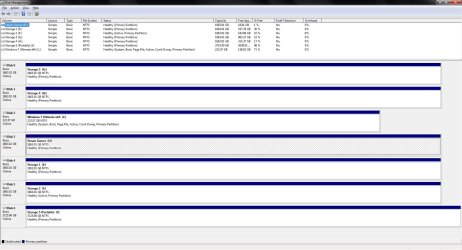
Here is the screen shot you wanted to see.

Disk Management Screen Shot.jpg
 

My Computer My Computer

Computer type
PC/Desktop
Computer Manufacturer/Model Number
Custom Built By Yours Truly.
OS
Windows 7 Ultimate x64 SP1
CPU
AMD FX 8350
Motherboard
Gigabyte 990FXA-UD3
Memory
G-Skill Sniper Series 16 GB
Graphics Card(s)
MSI GTX 970
Monitor(s) Displays
Sony Bravia 40 Inch
Screen Resolution
1920x1080 Full Pixel
Hard Drives
Kingston Hyper X Savage SSD 240GB (OS Drive)
Seagate FireCuda 2TB SSHD
Western Digital Black 2TB
PSU
Antec 900 Watt High Current Gamer
Case
Cooler Master Trooper Full Tower With View Window
Cooling
Noctua D14 Push Pull Air Cooler
Keyboard
Razer Blackwidow Chroma v2
Mouse
Logitech G700s 13 Button Gaming Mouse
Internet Speed
250 mB/s
Antivirus
None
Browser
Firefox
You didn't do what I asked:
Open disk management (C:\Windows\System32\diskmgmt.msc). On top menu - View - Top - Disk list.
 

My Computers My Computers

System One System Two

  • Computer type
    PC/Desktop
    Computer Manufacturer/Model Number
    custom build
    OS
    Windows 7 HP 64
    CPU
    i5 6600K - 800MHz to 4200MHz
    Motherboard
    GA-Z170-HD3P
    Memory
    4+4G GSkill DDR4 3000
    Graphics Card(s)
    IG - Intel 530
    Monitor(s) Displays
    Samsung 226BW
    Screen Resolution
    1680x1050
    Hard Drives
    (1) -1 SM951 – 128GB M.2 AHCI PCIe SSD drive for Windows 7 and Lubuntu
    (2) -1 WD SATA 3 - 1T for Data
    (3) -1 WD SATA 3 - 1T for backup
    PSU
    Thermaltake 450W TR2 gold
    Keyboard
    Old and good Chicony mechanical keyboard
    Mouse
    Logitech mX performance - 9 buttons (had to disable some)
    Internet Speed
    500Mb/s
    Browser
    Firefox 64
    Other Info
    TinyWall firewall
  • Computer type
    Laptop
    System Manufacturer/Model Number
    Asus Q550LF
    OS
    Windows 7 Pro
    CPU
    i7-4500U 800MHz to 3.0GHz
    Motherboard
    Asus Q550LF
    Memory
    (4+4)G DDR3 1600
    Graphics Card(s)
    IG intel 4400 + NVIDIA GeForce GT 745M
    Sound Card
    Realtek
    Monitor(s) Displays
    LG Display LP156WF4-SPH1
    Screen Resolution
    1920 x 1080
    Hard Drives
    BX500 120G SSD for Windows and programs +
    1T HDD for data
    Internet Speed
    500 Mb/s
    Browser
    Firefox
    Other Info
    TinyWall firewall
You didn't do what I asked:
Open disk management (C:\Windows\System32\diskmgmt.msc). On top menu - View - Top - Disk list.

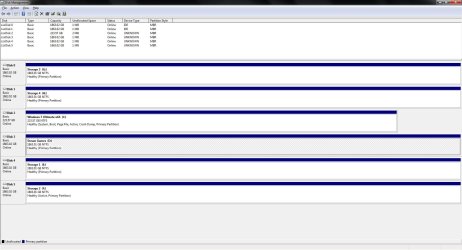
Sorry i took 2 screens shots and up loaded the wrong one.

Disk Management Screen Shot(1).jpg
 

My Computer My Computer

Computer type
PC/Desktop
Computer Manufacturer/Model Number
Custom Built By Yours Truly.
OS
Windows 7 Ultimate x64 SP1
CPU
AMD FX 8350
Motherboard
Gigabyte 990FXA-UD3
Memory
G-Skill Sniper Series 16 GB
Graphics Card(s)
MSI GTX 970
Monitor(s) Displays
Sony Bravia 40 Inch
Screen Resolution
1920x1080 Full Pixel
Hard Drives
Kingston Hyper X Savage SSD 240GB (OS Drive)
Seagate FireCuda 2TB SSHD
Western Digital Black 2TB
PSU
Antec 900 Watt High Current Gamer
Case
Cooler Master Trooper Full Tower With View Window
Cooling
Noctua D14 Push Pull Air Cooler
Keyboard
Razer Blackwidow Chroma v2
Mouse
Logitech G700s 13 Button Gaming Mouse
Internet Speed
250 mB/s
Antivirus
None
Browser
Firefox
Can't see the disk 6. Did you forget to connect?
 

My Computers My Computers

System One System Two

  • Computer type
    PC/Desktop
    Computer Manufacturer/Model Number
    custom build
    OS
    Windows 7 HP 64
    CPU
    i5 6600K - 800MHz to 4200MHz
    Motherboard
    GA-Z170-HD3P
    Memory
    4+4G GSkill DDR4 3000
    Graphics Card(s)
    IG - Intel 530
    Monitor(s) Displays
    Samsung 226BW
    Screen Resolution
    1680x1050
    Hard Drives
    (1) -1 SM951 – 128GB M.2 AHCI PCIe SSD drive for Windows 7 and Lubuntu
    (2) -1 WD SATA 3 - 1T for Data
    (3) -1 WD SATA 3 - 1T for backup
    PSU
    Thermaltake 450W TR2 gold
    Keyboard
    Old and good Chicony mechanical keyboard
    Mouse
    Logitech mX performance - 9 buttons (had to disable some)
    Internet Speed
    500Mb/s
    Browser
    Firefox 64
    Other Info
    TinyWall firewall
  • Computer type
    Laptop
    System Manufacturer/Model Number
    Asus Q550LF
    OS
    Windows 7 Pro
    CPU
    i7-4500U 800MHz to 3.0GHz
    Motherboard
    Asus Q550LF
    Memory
    (4+4)G DDR3 1600
    Graphics Card(s)
    IG intel 4400 + NVIDIA GeForce GT 745M
    Sound Card
    Realtek
    Monitor(s) Displays
    LG Display LP156WF4-SPH1
    Screen Resolution
    1920 x 1080
    Hard Drives
    BX500 120G SSD for Windows and programs +
    1T HDD for data
    Internet Speed
    500 Mb/s
    Browser
    Firefox
    Other Info
    TinyWall firewall
Can't see the disk 6. Did you forget to connect?

Both screenshots i took was at the same time. So i have no clue why one says 6 and the other says 7. I'll take another one but nothing was unplugged or plugged in when i took both screenshots except the usb 4tb drive.

Disk Management Screen Shot 3.jpg
 

My Computer My Computer

Computer type
PC/Desktop
Computer Manufacturer/Model Number
Custom Built By Yours Truly.
OS
Windows 7 Ultimate x64 SP1
CPU
AMD FX 8350
Motherboard
Gigabyte 990FXA-UD3
Memory
G-Skill Sniper Series 16 GB
Graphics Card(s)
MSI GTX 970
Monitor(s) Displays
Sony Bravia 40 Inch
Screen Resolution
1920x1080 Full Pixel
Hard Drives
Kingston Hyper X Savage SSD 240GB (OS Drive)
Seagate FireCuda 2TB SSHD
Western Digital Black 2TB
PSU
Antec 900 Watt High Current Gamer
Case
Cooler Master Trooper Full Tower With View Window
Cooling
Noctua D14 Push Pull Air Cooler
Keyboard
Razer Blackwidow Chroma v2
Mouse
Logitech G700s 13 Button Gaming Mouse
Internet Speed
250 mB/s
Antivirus
None
Browser
Firefox
Your 4 T disk (disk 6) has only one partition that has been low formatted as UEFI - GPT and formatted as NTFS.
Seatools didn't find any hardware problem. It must be logical.

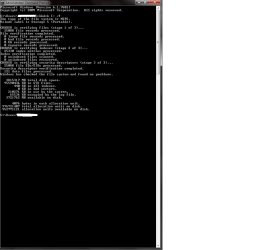
Open a CMD window and type chkdsk I: /f

When done, take a snapshot and post the image here.
 

My Computers My Computers

System One System Two

  • Computer type
    PC/Desktop
    Computer Manufacturer/Model Number
    custom build
    OS
    Windows 7 HP 64
    CPU
    i5 6600K - 800MHz to 4200MHz
    Motherboard
    GA-Z170-HD3P
    Memory
    4+4G GSkill DDR4 3000
    Graphics Card(s)
    IG - Intel 530
    Monitor(s) Displays
    Samsung 226BW
    Screen Resolution
    1680x1050
    Hard Drives
    (1) -1 SM951 – 128GB M.2 AHCI PCIe SSD drive for Windows 7 and Lubuntu
    (2) -1 WD SATA 3 - 1T for Data
    (3) -1 WD SATA 3 - 1T for backup
    PSU
    Thermaltake 450W TR2 gold
    Keyboard
    Old and good Chicony mechanical keyboard
    Mouse
    Logitech mX performance - 9 buttons (had to disable some)
    Internet Speed
    500Mb/s
    Browser
    Firefox 64
    Other Info
    TinyWall firewall
  • Computer type
    Laptop
    System Manufacturer/Model Number
    Asus Q550LF
    OS
    Windows 7 Pro
    CPU
    i7-4500U 800MHz to 3.0GHz
    Motherboard
    Asus Q550LF
    Memory
    (4+4)G DDR3 1600
    Graphics Card(s)
    IG intel 4400 + NVIDIA GeForce GT 745M
    Sound Card
    Realtek
    Monitor(s) Displays
    LG Display LP156WF4-SPH1
    Screen Resolution
    1920 x 1080
    Hard Drives
    BX500 120G SSD for Windows and programs +
    1T HDD for data
    Internet Speed
    500 Mb/s
    Browser
    Firefox
    Other Info
    TinyWall firewall
your 4 t disk (disk 6) has only one partition that has been low formatted as uefi - gpt and formatted as ntfs.
Seatools didn't find any hardware problem. It must be logical.

Open a cmd window and type chkdsk i: /f

when done, take a snapshot and post the image here.

Check Disk In Command Prompt.jpg
 

My Computer My Computer

Computer type
PC/Desktop
Computer Manufacturer/Model Number
Custom Built By Yours Truly.
OS
Windows 7 Ultimate x64 SP1
CPU
AMD FX 8350
Motherboard
Gigabyte 990FXA-UD3
Memory
G-Skill Sniper Series 16 GB
Graphics Card(s)
MSI GTX 970
Monitor(s) Displays
Sony Bravia 40 Inch
Screen Resolution
1920x1080 Full Pixel
Hard Drives
Kingston Hyper X Savage SSD 240GB (OS Drive)
Seagate FireCuda 2TB SSHD
Western Digital Black 2TB
PSU
Antec 900 Watt High Current Gamer
Case
Cooler Master Trooper Full Tower With View Window
Cooling
Noctua D14 Push Pull Air Cooler
Keyboard
Razer Blackwidow Chroma v2
Mouse
Logitech G700s 13 Button Gaming Mouse
Internet Speed
250 mB/s
Antivirus
None
Browser
Firefox
There is nothing wrong (hardware and software) with your disk. May be with your windows

Open a cmd window and type sfc /scannow
If it finds problems (fix or no fix) reboot and run again. Repeat 3 times rebooting after each run.
 

My Computers My Computers

System One System Two

  • Computer type
    PC/Desktop
    Computer Manufacturer/Model Number
    custom build
    OS
    Windows 7 HP 64
    CPU
    i5 6600K - 800MHz to 4200MHz
    Motherboard
    GA-Z170-HD3P
    Memory
    4+4G GSkill DDR4 3000
    Graphics Card(s)
    IG - Intel 530
    Monitor(s) Displays
    Samsung 226BW
    Screen Resolution
    1680x1050
    Hard Drives
    (1) -1 SM951 – 128GB M.2 AHCI PCIe SSD drive for Windows 7 and Lubuntu
    (2) -1 WD SATA 3 - 1T for Data
    (3) -1 WD SATA 3 - 1T for backup
    PSU
    Thermaltake 450W TR2 gold
    Keyboard
    Old and good Chicony mechanical keyboard
    Mouse
    Logitech mX performance - 9 buttons (had to disable some)
    Internet Speed
    500Mb/s
    Browser
    Firefox 64
    Other Info
    TinyWall firewall
  • Computer type
    Laptop
    System Manufacturer/Model Number
    Asus Q550LF
    OS
    Windows 7 Pro
    CPU
    i7-4500U 800MHz to 3.0GHz
    Motherboard
    Asus Q550LF
    Memory
    (4+4)G DDR3 1600
    Graphics Card(s)
    IG intel 4400 + NVIDIA GeForce GT 745M
    Sound Card
    Realtek
    Monitor(s) Displays
    LG Display LP156WF4-SPH1
    Screen Resolution
    1920 x 1080
    Hard Drives
    BX500 120G SSD for Windows and programs +
    1T HDD for data
    Internet Speed
    500 Mb/s
    Browser
    Firefox
    Other Info
    TinyWall firewall
Back
Top