Toshiba Chicony webcam help..

masantula

New member
Local time
9:32 AM
Messages
4
Toshiba Chicony webcam help..(SOLVED)

Hey there, i need some help, i recently installed windows 7 64 bit and i had done back up of all my drivers using driver magician and all the drivers restored well and no conflit.
But i have a problem with my camera, in the device manager it says that the device is working correctly but i cant see it anywhere, i went to my computer, start up, programes but there is no where to start it, am i missing something?
device manager says device working so im alil confused, i did driver update and it said that the driver is the latest one....any idea...
in vista in the left hand there would be the webcam thingy hidden and when you put your cursor there it would pop up and start the webcam, here there isnt...help
 
Last edited:

My Computer My Computer

OS
Windows 7
"start - devices & printers"
 

My Computer My Computer

Computer Manufacturer/Model Number
Sony Vaio FZ21Z
OS
Windows 7 Ultimate x64 ®™
CPU
Intel Core 2 Duo (2.2 GHz)
Motherboard
Sony (Intel Chipset)
Memory
2x 2GB Corsair (667 MHz)
Graphics Card(s)
NVIDIA 8600M GS (256MB)
Sound Card
Sigmatel
Monitor(s) Displays
15.4" TFT X-Black
Screen Resolution
1280x800
Hard Drives
Western Digital 300GB Scorpio Black (7200rpm)
Mouse
Logitech Anywhere MX
Internet Speed
Sky 5MB
I downloaded chicony camera assistant and now the webcam works perfectly, the drivers were installed it was the assistant that was missing...
 

My Computer My Computer

OS
Windows 7
Link for Toshiba Laptops

Had the same issues as the first poster (masantula). Recently upgraded to windows 7 on my Toshiba Satellite M305-S4822 and was missing camera assistant software for my integrated Chicony Web Camera.

Downloaded the software and everything is working great.

Link to download Camera Assistant Software:

Ask Iris
 

My Computer My Computer

OS
windows 7
I'm having the same problem... Installed the camera assistant, but it's not letting me runn it, it keeps saying it's disabled or to edit the settings... but I don't know how to fix that.
 

My Computer My Computer

OS
Windows 7
I'm having the same problem... Installed the camera assistant, but it's not letting me runn it, it keeps saying it's disabled or to edit the settings... but I don't know how to fix that.


Here is my problem and it seems it has affected a lot of Toshiba owners:

I also have a Toshiba A305-S6858 Fusion Finish that was Best Buy's most expensive model for $800 in August 2008.

I installed Windows 7 - 32 bit software a few months ago and now would like to use the webcam for Skype.

I installed many drivers and different Camera Assistance Software for countless hours trying to get my daughters USB chicony webcam working.

After reading the close the lid half way comments I tried it and now the webcam shows up in device manager every time I half close the lid.

The camera also works when I run the Camera Assistance Software.

So if you don't mind tilting the laptop to use Skype it works but is a pain to do.

Thanks Toshiba for using cheap hardware!!!!!!


My Computer My Computer

Computer Manufacturer/Model Number
Toshiba A305-S6858
OS
Windows 7 - 32 bit
CPU
INTEL DUO CORE
Motherboard
INTEL
Memory
4 GB
Graphics Card(s)
INTEL 965
Sound Card
REALTEK HIGH AUDIO
Monitor(s) Displays
PNP
Hard Drives
320GB
Case
LAPTOP
i am having same trouble on toshiba l300 have downloaded camera assistant no joy.
 

My Computer My Computer

OS
windows 7 32bit
i am having the same trouble trying to nrunb camera on a toshiba l300 have never had such trouble before wont purchase a toshiba again there help site is a joke.
 

My Computer My Computer

OS
windows 7 32bit
I'm having the same problem... Installed the camera assistant, but it's not letting me runn it, it keeps saying it's disabled or to edit the settings... but I don't know how to fix that.
i am having same trouble on a toshiba l300 laptop there help site is a joke wont buy another 1.
 

My Computer My Computer

OS
windows 7 32bit
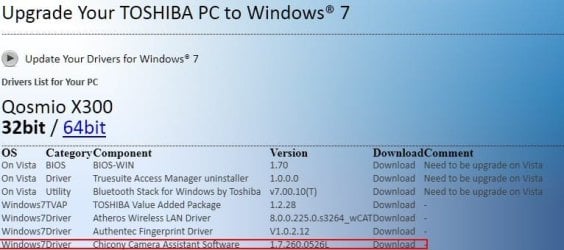
Download the driver listed below:
Screenshot_4.jpg
From here. There are many other Toshiba sources for this driver set, just be sure you get the 1.7.260.0526L version. Also, make sure you are obtaining it from a verified Toshiba web site.

I went through the same thing and once I found the above drivers it has been working fine. No screen tilting or any of that nonsense.

It simply works as it should.

IMG000001.jpg

This has already been discussed in these forums here.

I tried this one with a later version number of 1.7.267.0803L but it did not function properly. I reverted back to the 1.7.260.0526L version. As I mentioned, it works.

Happy video-ing! :D
 

My Computer My Computer

Computer Manufacturer/Model Number
Toshiba L355D
OS
Windows 7 Ultimate x64 SP1
CPU
Core2 Duo
Motherboard
Intel
Memory
4 GB
Graphics Card(s)
GM965 on-board
Sound Card
RealTek on-board
Monitor(s) Displays
19"+17"(laptop)
Screen Resolution
1440x900 (x 2)
Hard Drives
500GB Ext. 200GB Internal
PSU
N/A
Case
N/A
Cooling
N/A
ive installed everything that ive seen in this thread and multiple other threads and my camera still only works when the laptop lid is half closed........WTH?
 

My Computer My Computer

Computer type
PC/Desktop
Computer Manufacturer/Model Number
Asus Essentio Desktop PC CM1630
OS
Windows 7 Ultimate x64
CPU
AMD Athlon II X2 220 Regor 45nm Technology
Motherboard
ASUSTeK Computer INC. CM1630 (AM3)
Memory
4.00 GB Dual-Channel DDR3 @ 669MHz (9-9-9-24)
Graphics Card(s)
Generic Non-PnP Monitor (1024x768@60Hz) ATI Radeon 3000 Grap
Hard Drives
977GB Seagate ST31000528AS ATA Device (SATA)
Case
Asus
Cooling
Asus
Keyboard
Asus (came w/tower)
Mouse
Asus (came w/tower)
Other Info
Also have a Toshiba Satellite laptop running W7 Ult x64
maybe its a problem with your laptops wiring...
 

My Computer My Computer

OS
Windows 7 Ultimate x64
i read on toshiba's website about software/driver problems when the lid is opened or returned from sleep mode that it caused the webcam to not work properly.......i think wiring is low on the troubleshooting list right now, plus this laptop is just a lil over a year old with lil to no physical abuse so i dont see how it could be wiring.......but i might just open it up and check everything out since you mentioned it and since it's out of warranty
 

My Computer My Computer

Computer type
PC/Desktop
Computer Manufacturer/Model Number
Asus Essentio Desktop PC CM1630
OS
Windows 7 Ultimate x64
CPU
AMD Athlon II X2 220 Regor 45nm Technology
Motherboard
ASUSTeK Computer INC. CM1630 (AM3)
Memory
4.00 GB Dual-Channel DDR3 @ 669MHz (9-9-9-24)
Graphics Card(s)
Generic Non-PnP Monitor (1024x768@60Hz) ATI Radeon 3000 Grap
Hard Drives
977GB Seagate ST31000528AS ATA Device (SATA)
Case
Asus
Cooling
Asus
Keyboard
Asus (came w/tower)
Mouse
Asus (came w/tower)
Other Info
Also have a Toshiba Satellite laptop running W7 Ult x64
maybe its a problem with your laptops wiring...

i figured it would be more intermittent if it was wiring, not so consistent
 

My Computer My Computer

Computer type
PC/Desktop
Computer Manufacturer/Model Number
Asus Essentio Desktop PC CM1630
OS
Windows 7 Ultimate x64
CPU
AMD Athlon II X2 220 Regor 45nm Technology
Motherboard
ASUSTeK Computer INC. CM1630 (AM3)
Memory
4.00 GB Dual-Channel DDR3 @ 669MHz (9-9-9-24)
Graphics Card(s)
Generic Non-PnP Monitor (1024x768@60Hz) ATI Radeon 3000 Grap
Hard Drives
977GB Seagate ST31000528AS ATA Device (SATA)
Case
Asus
Cooling
Asus
Keyboard
Asus (came w/tower)
Mouse
Asus (came w/tower)
Other Info
Also have a Toshiba Satellite laptop running W7 Ult x64
i finally just opened the bezel of my laptop screen and unplugged the webcam, my xbox webcam will have to do for now.....but the constant usb unplugging and plugging in again sound is gone!
 

My Computer My Computer

Computer type
PC/Desktop
Computer Manufacturer/Model Number
Asus Essentio Desktop PC CM1630
OS
Windows 7 Ultimate x64
CPU
AMD Athlon II X2 220 Regor 45nm Technology
Motherboard
ASUSTeK Computer INC. CM1630 (AM3)
Memory
4.00 GB Dual-Channel DDR3 @ 669MHz (9-9-9-24)
Graphics Card(s)
Generic Non-PnP Monitor (1024x768@60Hz) ATI Radeon 3000 Grap
Hard Drives
977GB Seagate ST31000528AS ATA Device (SATA)
Case
Asus
Cooling
Asus
Keyboard
Asus (came w/tower)
Mouse
Asus (came w/tower)
Other Info
Also have a Toshiba Satellite laptop running W7 Ult x64
Back
Top