Password Reset Disk : Windows 7 / Vista

How to Create and Use a Windows 7 Password Reset Disk

If you forget your Windows password, you can use this password reset disk to create a new password. It is recommend that you create a password reset disk when you create your password, so you don't lose access to your files and information.

   Note
A password reset disk can only be created for local user accounts. If your computer is on a domain, a system administrator can reset your domain password.

You must have either a USB flash drive or a Floppy drive; it will not be created on a CD or DVD.
   Information
The disk can only be created from within Windows.

The disk will only work for the OS that it was created in.

This tutorial will also work for Windows Vista.


This will only create a password reset disk for the local user account that is currently logged on when it is created.

When you create a password reset disk on a USB flash drive, it will create and add a userkey.psw file on the USB flash drive for the specific local user account. You can move the userkey.psw file to another USB flash drive if you like, but you can only have one userkey.psw file on a USB flash drive.

The password reset disk can be used to reset your user account's password no matter how many times you reset it.

   Warning
Care must be taken where the disk is stored; anyone that can gain access to the disk can reset the password.


Let's get started!


OPTION ONE

Create the Password Reset Disk


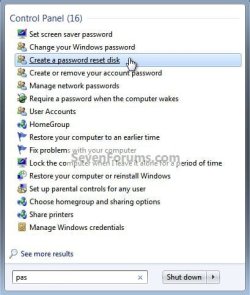
1) In the Windows start menu search box type "pas" (without the quotes) select the "Create a password ..." link, there will be no UAC prompt but it will ask you for the "Current User Account Password" enter it and click next.
Pass.jpg
Password.jpg
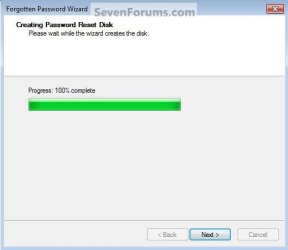
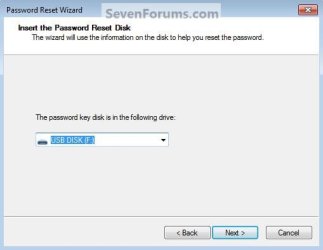
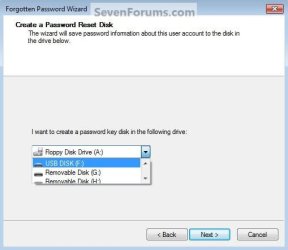
2) Insert the desired media you intend to use, then select the drive the disk is in, then in the wizard click next, then next again when it completes.
Select.jpg
Progress.jpg
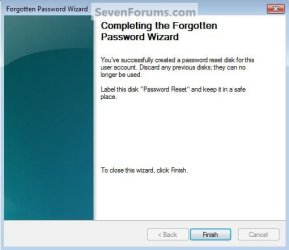
3) Then click Finish to close the wizard.
Finish.jpg


OPTION TWO

How to Use the Password Reset Disk


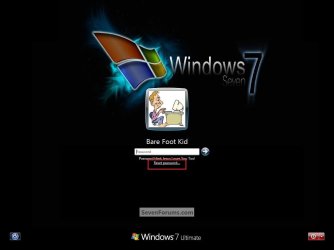
1) At the Windows logon screen, you'll get the "Reset Password" option when you enter an incorrect password, or if you just want to change the password, do as I did and type 1 in the password box and hit enter, then select "Reset Password".
Password R.jpg
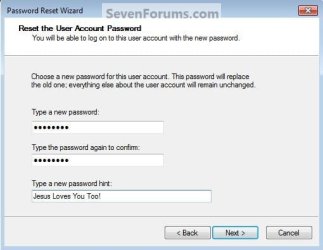
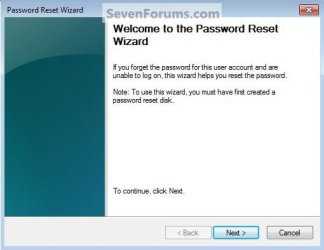
2) In the wizard that opens click next, you'll then be prompted to create a new password then a conformation, then click next.
Reset.jpg
Disk.jpg
New.jpg
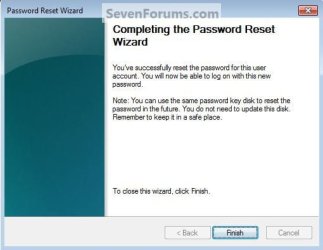
3) When it's done click finish to close the wizard.
You have now reset the password.
Finish2.jpg
Enjoy! :)


Last edited by a moderator:

My Computer

Computer type
PC/Desktop
Computer Manufacturer/Model Number
Self built custom
OS
64-bit Windows 11 Pro for Workstations
CPU
Intel i7-8700K OC'd to 5 GHz
Motherboard
ASUS ROG Maximus XI Formula Z390
Memory
64 GB (4x16GB) G.SKILL TridentZ RGB DDR4 3600 MHz
Graphics Card(s)
ASUS ROG-STRIX-GTX1080TI-O11G-GAMING
Sound Card
Integrated
Monitor(s) Displays
2 x Samsung Odyssey G7 27"
Screen Resolution
2560x1440
Hard Drives
1TB Samsung 990 PRO M.2,
4TB Samsung 990 PRO PRO M.2,
TerraMaster F8 SSD Plus NAS
PSU
Seasonic Prime Titanium 850W
Case
Thermaltake Core P3
Cooling
Corsair Hydro H115i
Keyboard
Logitech wireless K800
Mouse
Logitech MX Master 4
Internet Speed
2 Gb/s Download and 100 Mb/s Upload
Antivirus
Malwarebyte Anti-Malware Premium
Browser
Google Chrome
Other Info
Logitech Z625 speaker system,
Logitech BRIO 4K Pro webcam,
HP Color LaserJet Pro MFP M477fdn,
APC SMART-UPS RT 1000 XL - SURT1000XLI,
Galaxy S23 Plus phone
Thanks, I saved the page. I'm going to bed now. Gotta a Loooong week ahead. Two cutovers and two rebuilds. Whew!
 

My Computer

Computer Manufacturer/Model Number
BIOSTAR Group A55MH
OS
Windows 7 Ultimate 64-bit
CPU
2.90 gigahertz AMD A8-3850 APU with Radeon HD Graphics
Motherboard
BIOSTAR Group A55MH Bus Clock: 100 megahertz BIOS: American
Memory
8170 Megabytes Usable Installed Memory
Graphics Card(s)
ATI Radeon HD 5450 [Display adapter]
Sound Card
AMD High Definition Audio Device
Monitor(s) Displays
Samsung SyncMaster [Monitor] (19.1"vis, s/n HA19HVDP427004,
Screen Resolution
1440x900
Hard Drives
1500.20 Gigabytes Usable Hard Drive Capacity
1104.84 Gigabytes Hard Drive Free Space
Case
DELL Dimension 3000
Keyboard
HP KB 0228
Mouse
GH optical-wired
Internet Speed
50+MB
You're welcome.

That sounds like fun. :)
 

My Computer

Computer type
PC/Desktop
Computer Manufacturer/Model Number
Self built custom
OS
64-bit Windows 11 Pro for Workstations
CPU
Intel i7-8700K OC'd to 5 GHz
Motherboard
ASUS ROG Maximus XI Formula Z390
Memory
64 GB (4x16GB) G.SKILL TridentZ RGB DDR4 3600 MHz
Graphics Card(s)
ASUS ROG-STRIX-GTX1080TI-O11G-GAMING
Sound Card
Integrated
Monitor(s) Displays
2 x Samsung Odyssey G7 27"
Screen Resolution
2560x1440
Hard Drives
1TB Samsung 990 PRO M.2,
4TB Samsung 990 PRO PRO M.2,
TerraMaster F8 SSD Plus NAS
PSU
Seasonic Prime Titanium 850W
Case
Thermaltake Core P3
Cooling
Corsair Hydro H115i
Keyboard
Logitech wireless K800
Mouse
Logitech MX Master 4
Internet Speed
2 Gb/s Download and 100 Mb/s Upload
Antivirus
Malwarebyte Anti-Malware Premium
Browser
Google Chrome
Other Info
Logitech Z625 speaker system,
Logitech BRIO 4K Pro webcam,
HP Color LaserJet Pro MFP M477fdn,
APC SMART-UPS RT 1000 XL - SURT1000XLI,
Galaxy S23 Plus phone
Regaining access to a PC

Billy,
See A guide to recovering from Windows 7 Home Premium User Account lost password, cannot login, login problem in the Microsoft Answers / Microsoft Community site.
The article starts with some basic steps [such as the use of Password Reset Disks] then works up through more powerful but complicated methods. Please do read the intro but I think it will be method 8 that solves your problem. Do follow the precautionary measures later on in the thread as well.
You could be up & running again inside an hour, probably less.
 

My Computer

Computer Manufacturer/Model Number
Dell Inspiron 1545
OS
Windows 7 Home Premium 64bit
Memory
3GB
Sound Card
IDT
Password Reset Disc - Windows 7

p. 722 of Windows 7 the Missing Manual says to create the password reset disc insert a blank CD or USB flash drive, but when I do this on my laptop, it insists on a floppy disk or a USB flash drive. It doesn't want a blank CD. Do I have to format the CD first somehow? My laptop doesn't even have a floppy drive! I have Windows 7 Premium Home editin.
 

My Computer

OS
Windows 7
Yeah that's crazy. If you don't have a flash, and can't get one, get a portable 3.5 floppy drive. It's a USB device. But be aware that it may not work either! I tried it, and never got that done. I forgot what I did exactly, but just sayin...
 

My Computer

Computer Manufacturer/Model Number
BIOSTAR Group A55MH
OS
Windows 7 Ultimate 64-bit
CPU
2.90 gigahertz AMD A8-3850 APU with Radeon HD Graphics
Motherboard
BIOSTAR Group A55MH Bus Clock: 100 megahertz BIOS: American
Memory
8170 Megabytes Usable Installed Memory
Graphics Card(s)
ATI Radeon HD 5450 [Display adapter]
Sound Card
AMD High Definition Audio Device
Monitor(s) Displays
Samsung SyncMaster [Monitor] (19.1"vis, s/n HA19HVDP427004,
Screen Resolution
1440x900
Hard Drives
1500.20 Gigabytes Usable Hard Drive Capacity
1104.84 Gigabytes Hard Drive Free Space
Case
DELL Dimension 3000
Keyboard
HP KB 0228
Mouse
GH optical-wired
Internet Speed
50+MB
Has anyone got the files created available for download?
 

My Computer

Computer type
PC/Desktop
OS
Windows 7 Home Premium 64
Has anyone got the files created available for download?

Hello ausguerila, :)

I'm not sure what you mean?

You would just need to run the "Forgotten Password Wizard" to create a password reset disk.

Of course, you would need to do this before you should need it to reset the password with.
 

My Computer

Computer type
PC/Desktop
Computer Manufacturer/Model Number
Self built custom
OS
64-bit Windows 11 Pro for Workstations
CPU
Intel i7-8700K OC'd to 5 GHz
Motherboard
ASUS ROG Maximus XI Formula Z390
Memory
64 GB (4x16GB) G.SKILL TridentZ RGB DDR4 3600 MHz
Graphics Card(s)
ASUS ROG-STRIX-GTX1080TI-O11G-GAMING
Sound Card
Integrated
Monitor(s) Displays
2 x Samsung Odyssey G7 27"
Screen Resolution
2560x1440
Hard Drives
1TB Samsung 990 PRO M.2,
4TB Samsung 990 PRO PRO M.2,
TerraMaster F8 SSD Plus NAS
PSU
Seasonic Prime Titanium 850W
Case
Thermaltake Core P3
Cooling
Corsair Hydro H115i
Keyboard
Logitech wireless K800
Mouse
Logitech MX Master 4
Internet Speed
2 Gb/s Download and 100 Mb/s Upload
Antivirus
Malwarebyte Anti-Malware Premium
Browser
Google Chrome
Other Info
Logitech Z625 speaker system,
Logitech BRIO 4K Pro webcam,
HP Color LaserJet Pro MFP M477fdn,
APC SMART-UPS RT 1000 XL - SURT1000XLI,
Galaxy S23 Plus phone
Is there any way that work at any username and any windows 7 system?
 

My Computer

Computer type
PC/Desktop
OS
Windows 7 sp1
CPU
Intel core2duo e8300
Motherboard
ECS G31T-M
Memory
2 x 2gb ddr2-800
Graphics Card(s)
Sapphire ati radeon hd 5450
Sound Card
Motherboard and graphic card
Monitor(s) Displays
Samsung q80t 4k tv
Screen Resolution
4k
PSU
450watt
Is there any way that work at any username and any windows 7 system?

I'm afraid not. :(

It'll only work for the account it was created for prior to needing to reset its password.
 

My Computer

Computer type
PC/Desktop
Computer Manufacturer/Model Number
Self built custom
OS
64-bit Windows 11 Pro for Workstations
CPU
Intel i7-8700K OC'd to 5 GHz
Motherboard
ASUS ROG Maximus XI Formula Z390
Memory
64 GB (4x16GB) G.SKILL TridentZ RGB DDR4 3600 MHz
Graphics Card(s)
ASUS ROG-STRIX-GTX1080TI-O11G-GAMING
Sound Card
Integrated
Monitor(s) Displays
2 x Samsung Odyssey G7 27"
Screen Resolution
2560x1440
Hard Drives
1TB Samsung 990 PRO M.2,
4TB Samsung 990 PRO PRO M.2,
TerraMaster F8 SSD Plus NAS
PSU
Seasonic Prime Titanium 850W
Case
Thermaltake Core P3
Cooling
Corsair Hydro H115i
Keyboard
Logitech wireless K800
Mouse
Logitech MX Master 4
Internet Speed
2 Gb/s Download and 100 Mb/s Upload
Antivirus
Malwarebyte Anti-Malware Premium
Browser
Google Chrome
Other Info
Logitech Z625 speaker system,
Logitech BRIO 4K Pro webcam,
HP Color LaserJet Pro MFP M477fdn,
APC SMART-UPS RT 1000 XL - SURT1000XLI,
Galaxy S23 Plus phone
Ok how i reset the forgotten password?
 

My Computer

Computer type
PC/Desktop
OS
Windows 7 sp1
CPU
Intel core2duo e8300
Motherboard
ECS G31T-M
Memory
2 x 2gb ddr2-800
Graphics Card(s)
Sapphire ati radeon hd 5450
Sound Card
Motherboard and graphic card
Monitor(s) Displays
Samsung q80t 4k tv
Screen Resolution
4k
PSU
450watt
Hello fits79, :-)

If you like, you could try the method in the tutorial below to see if you may be able to reset your password at boot.

:ar: Password Reset
 

My Computer

Computer type
PC/Desktop
Computer Manufacturer/Model Number
Self built custom
OS
64-bit Windows 11 Pro for Workstations
CPU
Intel i7-8700K OC'd to 5 GHz
Motherboard
ASUS ROG Maximus XI Formula Z390
Memory
64 GB (4x16GB) G.SKILL TridentZ RGB DDR4 3600 MHz
Graphics Card(s)
ASUS ROG-STRIX-GTX1080TI-O11G-GAMING
Sound Card
Integrated
Monitor(s) Displays
2 x Samsung Odyssey G7 27"
Screen Resolution
2560x1440
Hard Drives
1TB Samsung 990 PRO M.2,
4TB Samsung 990 PRO PRO M.2,
TerraMaster F8 SSD Plus NAS
PSU
Seasonic Prime Titanium 850W
Case
Thermaltake Core P3
Cooling
Corsair Hydro H115i
Keyboard
Logitech wireless K800
Mouse
Logitech MX Master 4
Internet Speed
2 Gb/s Download and 100 Mb/s Upload
Antivirus
Malwarebyte Anti-Malware Premium
Browser
Google Chrome
Other Info
Logitech Z625 speaker system,
Logitech BRIO 4K Pro webcam,
HP Color LaserJet Pro MFP M477fdn,
APC SMART-UPS RT 1000 XL - SURT1000XLI,
Galaxy S23 Plus phone
Back
Top