Update your Win 7 installation media

I don't know if it is "correct". However only 2 partitions are required for uefi.

2.The gpt formatted usb thumb drive would not be selected as the uefi boot device in the bios. Need to use the 1244kB one from 1803.

Sounds like something to do with the bios on that machine, in that case.

The new 7update-image is simpler, there is less chance of user error.

If you are having trouble installing drivers, it might be because they are not win7 drivers that you are trying to install.
 

My Computers My Computers

  • At a glance

    7 X64i5 84002x8gb 3200mhz
    Computer type
    PC/Desktop
    OS
    7 X64
    CPU
    i5 8400
    Motherboard
    gigabyte b365m ds3h
    Memory
    2x8gb 3200mhz
    Hard Drives
    various
    PSU
    pure power 11 400w cm
    Case
    Coolermaster
    Cooling
    cryorig m9i
  • At a glance

    7x64g54008gb ddr4 2400
    Computer type
    PC/Desktop
    OS
    7x64
    CPU
    g5400
    Motherboard
    ga b365m ds3h
    Memory
    8gb ddr4 2400
    PSU
    xfx pro 450w
7UPDATER v10 is on the first post.
 

My Computers My Computers

  • At a glance

    7 X64i5 84002x8gb 3200mhz
    Computer type
    PC/Desktop
    OS
    7 X64
    CPU
    i5 8400
    Motherboard
    gigabyte b365m ds3h
    Memory
    2x8gb 3200mhz
    Hard Drives
    various
    PSU
    pure power 11 400w cm
    Case
    Coolermaster
    Cooling
    cryorig m9i
  • At a glance

    7x64g54008gb ddr4 2400
    Computer type
    PC/Desktop
    OS
    7x64
    CPU
    g5400
    Motherboard
    ga b365m ds3h
    Memory
    8gb ddr4 2400
    PSU
    xfx pro 450w
Hi SIW2,

7UPDATER v10 is on the first post.
I assume that they are just minor adjustments to the program?
I will have a look at the code later!
 

My Computer My Computer

At a glance

Win 7 HP SP1 64-bit Vista HB SP2 32-bit Linux...Intel(R) Pentium(R) CPU P6200 @ 2.13GHz4.00 GBIntel(R) Graphics Media Accelerator HD
Computer type
Laptop
Computer Manufacturer/Model Number
Fujitsu LIFEBOOK
OS
Win 7 HP SP1 64-bit Vista HB SP2 32-bit Linux Mint 18.3
CPU
Intel(R) Pentium(R) CPU P6200 @ 2.13GHz
Motherboard
FUJITSU FJNBB06
Memory
4.00 GB
Graphics Card(s)
Intel(R) Graphics Media Accelerator HD
Sound Card
[1] Realtek High Definition Audio [2] Intel(R) Display Audio
Screen Resolution
1366 x 768 x 32 bits (4294967296 colors) @ 59 Hz
Hard Drives
TOSHIBA MK5076GSX
Antivirus
AVG FREE
It also has the new update pack downloader
 

My Computers My Computers

  • At a glance

    7 X64i5 84002x8gb 3200mhz
    Computer type
    PC/Desktop
    OS
    7 X64
    CPU
    i5 8400
    Motherboard
    gigabyte b365m ds3h
    Memory
    2x8gb 3200mhz
    Hard Drives
    various
    PSU
    pure power 11 400w cm
    Case
    Coolermaster
    Cooling
    cryorig m9i
  • At a glance

    7x64g54008gb ddr4 2400
    Computer type
    PC/Desktop
    OS
    7x64
    CPU
    g5400
    Motherboard
    ga b365m ds3h
    Memory
    8gb ddr4 2400
    PSU
    xfx pro 450w
Hi SIW2,

It also has the new update pack downloader.
Brilliant, thanks for all your hard work and effort on this, I am sure everyone appreciates it :thumbsup:.
 

My Computer My Computer

At a glance

Win 7 HP SP1 64-bit Vista HB SP2 32-bit Linux...Intel(R) Pentium(R) CPU P6200 @ 2.13GHz4.00 GBIntel(R) Graphics Media Accelerator HD
Computer type
Laptop
Computer Manufacturer/Model Number
Fujitsu LIFEBOOK
OS
Win 7 HP SP1 64-bit Vista HB SP2 32-bit Linux Mint 18.3
CPU
Intel(R) Pentium(R) CPU P6200 @ 2.13GHz
Motherboard
FUJITSU FJNBB06
Memory
4.00 GB
Graphics Card(s)
Intel(R) Graphics Media Accelerator HD
Sound Card
[1] Realtek High Definition Audio [2] Intel(R) Display Audio
Screen Resolution
1366 x 768 x 32 bits (4294967296 colors) @ 59 Hz
Hard Drives
TOSHIBA MK5076GSX
Antivirus
AVG FREE
Hi SIW2,

I see you have added bootwimupdates and installwimupdates, along with adjusting the registry hives and creating a WinRE.WIM [then optimised it and compressed it]. I noticed that you also added these two lines:

IF EXIST "Import\Windows" XCOPY.exe "Import" "%TP%\MOUNT" /cheriky
IF EXIST "%TP%\winre.wim" COPY /Y "%TP%\winre.wim" "%TP%\MOUNT\Windows\System32\Recovery"

Does that setup the recovery options. I am just interested!

Thanks in advance.
 

My Computer My Computer

At a glance

Win 7 HP SP1 64-bit Vista HB SP2 32-bit Linux...Intel(R) Pentium(R) CPU P6200 @ 2.13GHz4.00 GBIntel(R) Graphics Media Accelerator HD
Computer type
Laptop
Computer Manufacturer/Model Number
Fujitsu LIFEBOOK
OS
Win 7 HP SP1 64-bit Vista HB SP2 32-bit Linux Mint 18.3
CPU
Intel(R) Pentium(R) CPU P6200 @ 2.13GHz
Motherboard
FUJITSU FJNBB06
Memory
4.00 GB
Graphics Card(s)
Intel(R) Graphics Media Accelerator HD
Sound Card
[1] Realtek High Definition Audio [2] Intel(R) Display Audio
Screen Resolution
1366 x 768 x 32 bits (4294967296 colors) @ 59 Hz
Hard Drives
TOSHIBA MK5076GSX
Antivirus
AVG FREE
Uncertain how to add drivers

Firstly: Muchos Muchos Gracias! :cool:

Anyways, Hello. I recognize I'm not in the same technical league as the other folks on this thread and if I should be posting this elsewhere plz point me in the right direction. Otherwise:

A quick tangential question: I've run this twice and the first time took about 34 min. whilst the second time took nearly 2 hrs. The first time I ran from my SSD (prod W7 install) with all defaults per instructions. The second time from an HDD (test W7 install) and selected to have it run only for 3/Pro. Could the storage type (both are SATA3) make that much time difference?

My real question is how to add the drivers into the folder you've provided. I have made a backup of my system's drivers. My first attempt was to use Powershell but I kept getting the following error (even after updating to PS 5.0) & I'm curious to know what I did wrong:
PS-export-driver-error.jpg


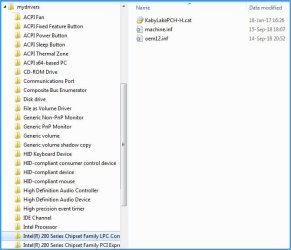
I did find a utility (DriverBackup!) at source forge which created the following:
MyDrivers.jpg

Should I copy everything under mydrivers -- folders and all -- or only the contents of each folder into the

drivers folder you provided?


Or am I completely headed in the wrong direction? And, if I am in the weeds, what should I be doing?


Thanx in advance for your time and expertise.
 

My Computer My Computer

At a glance

Win7 Pro x64 SP1Intel i7-670016 gig (2x8)MSI GTX 1660 Super
Computer type
PC/Desktop
Computer Manufacturer/Model Number
Custom Build
OS
Win7 Pro x64 SP1
CPU
Intel i7-6700
Motherboard
Gigabyte Z270 HD3
Memory
16 gig (2x8)
Graphics Card(s)
MSI GTX 1660 Super
Monitor(s) Displays
AOC CQ27G2
Screen Resolution
1440p
Hard Drives
Internal:
Crucial MX500 500GB SATA SSD (OS/Apps)
WD10EZEX-00WN4A0 1TB (Data/Games)
WD10EZEX-00WN4A0 1TB (On-line backup/Testing)
External
WD 4TB USB3.1 EasyStore (off-line backup archive/"sandbox")
PSU
Cooler Master 650W Bronze
Case
Sharkoon BW9000-V tower housing
Cooling
Deep Cool Ice Blade
Internet Speed
fiber optic 2 res broadband
Antivirus
Kaspersky Free
Browser
Firefox
1. You will only need to add 3rd party drivers. Place them in the folder 7UPDATER\Drivers\Bootx64 and 7UPDATER\Drivers\Installx64

2. Any drivers in the Drivers\Bootx64 folder will also be included in boot.wim and winre.wim
So you probably don't want to put your printer drivers in there, for example.

3. Any updates in the Updates\Bootx64 folder will also be included in boot.wim and winre.wim

4. You can copy the folders in. It searches recursively.

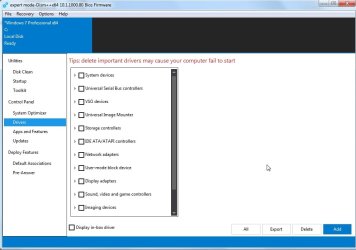
5. The easiest way to export 3rd party drivers from a running OS is to use dism++. It tells you what they all are. (Don't tick Display Inbox Drivers so it only shows you 3rd party drivers)

dism++-driver-export.jpg
 
Last edited:

My Computers My Computers

  • At a glance

    7 X64i5 84002x8gb 3200mhz
    Computer type
    PC/Desktop
    OS
    7 X64
    CPU
    i5 8400
    Motherboard
    gigabyte b365m ds3h
    Memory
    2x8gb 3200mhz
    Hard Drives
    various
    PSU
    pure power 11 400w cm
    Case
    Coolermaster
    Cooling
    cryorig m9i
  • At a glance

    7x64g54008gb ddr4 2400
    Computer type
    PC/Desktop
    OS
    7x64
    CPU
    g5400
    Motherboard
    ga b365m ds3h
    Memory
    8gb ddr4 2400
    PSU
    xfx pro 450w

My Computers My Computers

  • At a glance

    7 X64i5 84002x8gb 3200mhz
    Computer type
    PC/Desktop
    OS
    7 X64
    CPU
    i5 8400
    Motherboard
    gigabyte b365m ds3h
    Memory
    2x8gb 3200mhz
    Hard Drives
    various
    PSU
    pure power 11 400w cm
    Case
    Coolermaster
    Cooling
    cryorig m9i
  • At a glance

    7x64g54008gb ddr4 2400
    Computer type
    PC/Desktop
    OS
    7x64
    CPU
    g5400
    Motherboard
    ga b365m ds3h
    Memory
    8gb ddr4 2400
    PSU
    xfx pro 450w
My first attempt was to use Powershell but I kept getting the following error (even after updating to PS 5.0) & I'm curious to know what I did wrong:

Win7 dism doesn't support the export-driver command.
 

My Computers My Computers

  • At a glance

    7 X64i5 84002x8gb 3200mhz
    Computer type
    PC/Desktop
    OS
    7 X64
    CPU
    i5 8400
    Motherboard
    gigabyte b365m ds3h
    Memory
    2x8gb 3200mhz
    Hard Drives
    various
    PSU
    pure power 11 400w cm
    Case
    Coolermaster
    Cooling
    cryorig m9i
  • At a glance

    7x64g54008gb ddr4 2400
    Computer type
    PC/Desktop
    OS
    7x64
    CPU
    g5400
    Motherboard
    ga b365m ds3h
    Memory
    8gb ddr4 2400
    PSU
    xfx pro 450w
DriverBackup! probably works ok, but dism++ is kept up to date and is more descriptive.
 

My Computers My Computers

  • At a glance

    7 X64i5 84002x8gb 3200mhz
    Computer type
    PC/Desktop
    OS
    7 X64
    CPU
    i5 8400
    Motherboard
    gigabyte b365m ds3h
    Memory
    2x8gb 3200mhz
    Hard Drives
    various
    PSU
    pure power 11 400w cm
    Case
    Coolermaster
    Cooling
    cryorig m9i
  • At a glance

    7x64g54008gb ddr4 2400
    Computer type
    PC/Desktop
    OS
    7x64
    CPU
    g5400
    Motherboard
    ga b365m ds3h
    Memory
    8gb ddr4 2400
    PSU
    xfx pro 450w
Hi paul,

The bootwimupdates is mainly for the MS nvme updates ( it is complicated integrating those, so the .cmd file does it all for you).

The registry adjustments show hidden files and extensions. That allows you to see what you are doing if you need to browse from booted boot.wim or winre.wim. It also increases the scratch space to a usable size.

Instead of updating boot.wim and winre.wim separately, boot.wim is updated, then boot.wim image 2 is exported and used as winre.wim. Saves a lot of time and extra commands.

The Import folder is there so that you can add anything to be imported into the wim.

E.G. you can copy the contents of Atak's Import folder into it.


Hi SIW2,

I see you have added bootwimupdates and installwimupdates, along with adjusting the registry hives and creating a WinRE.WIM [then optimised it and compressed it]. I noticed that you also added these two lines:

IF EXIST "Import\Windows" XCOPY.exe "Import" "%TP%\MOUNT" /cheriky
IF EXIST "%TP%\winre.wim" COPY /Y "%TP%\winre.wim" "%TP%\MOUNT\Windows\System32\Recovery"

Does that setup the recovery options. I am just interested!

Thanks in advance.


IF EXIST "Import\Windows" XCOPY.exe "Import" "%TP%\MOUNT" /cheriky

If you have put anything in the Import folder, it is copied to the mounted install.wim image

IF EXIST "%TP%\winre.wim" COPY /Y "%TP%\winre.wim" "%TP%\MOUNT\Windows\System32\Recovery"

That copies the newly created winre.wim ( which contains any updates\drivers) into the mounted Install.wim image. It replaces the bog standard winre.wim that is in MOUNT\Windows\System32\Recovery folder.
 

My Computers My Computers

  • At a glance

    7 X64i5 84002x8gb 3200mhz
    Computer type
    PC/Desktop
    OS
    7 X64
    CPU
    i5 8400
    Motherboard
    gigabyte b365m ds3h
    Memory
    2x8gb 3200mhz
    Hard Drives
    various
    PSU
    pure power 11 400w cm
    Case
    Coolermaster
    Cooling
    cryorig m9i
  • At a glance

    7x64g54008gb ddr4 2400
    Computer type
    PC/Desktop
    OS
    7x64
    CPU
    g5400
    Motherboard
    ga b365m ds3h
    Memory
    8gb ddr4 2400
    PSU
    xfx pro 450w
Thanks for the explanations and detailed reply @SIW2, it is appreciated :thumbsup:.
 

My Computer My Computer

At a glance

Win 7 HP SP1 64-bit Vista HB SP2 32-bit Linux...Intel(R) Pentium(R) CPU P6200 @ 2.13GHz4.00 GBIntel(R) Graphics Media Accelerator HD
Computer type
Laptop
Computer Manufacturer/Model Number
Fujitsu LIFEBOOK
OS
Win 7 HP SP1 64-bit Vista HB SP2 32-bit Linux Mint 18.3
CPU
Intel(R) Pentium(R) CPU P6200 @ 2.13GHz
Motherboard
FUJITSU FJNBB06
Memory
4.00 GB
Graphics Card(s)
Intel(R) Graphics Media Accelerator HD
Sound Card
[1] Realtek High Definition Audio [2] Intel(R) Display Audio
Screen Resolution
1366 x 768 x 32 bits (4294967296 colors) @ 59 Hz
Hard Drives
TOSHIBA MK5076GSX
Antivirus
AVG FREE
When all's said and done

So the update:cool: [once it's done] is 700MB or at least 4GB?
 

My Computer My Computer

At a glance

Win 7 64bit Prointel core i3 inside4GB DDR3machine died before running sys info that wou...
Computer type
PC/Desktop
Computer Manufacturer/Model Number
Asus
OS
Win 7 64bit Pro
CPU
intel core i3 inside
Motherboard
P8B75-M
Memory
4GB DDR3
Graphics Card(s)
machine died before running sys info that would've told me
Sound Card
see above
Monitor(s) Displays
Panasonic 50-inch TV
Screen Resolution
Not sure
Hard Drives
1TB
Case
desktop tower
Keyboard
Logitech K260 wireless
Mouse
Logitech wireless
Internet Speed
ADSL
Antivirus
n/a
Browser
IE
Thank you for the informative response ...


1. You will only need to add 3rd party drivers. Place them in the folder 7UPDATER\Drivers\Bootx64 and 7UPDATER\Drivers\Installx64
Left "in the box" unchecked in dism++ per your instructions.


2. Any drivers in the Drivers\Bootx64 folder will also be included in boot.wim and winre.wim
So you probably don't want to put your printer drivers in there, for example.
Not sure how to differentiate between drivers needed during install and drivers needed to boot ...


3. Any updates in the Updates\Bootx64 folder will also be included in boot.wim and winre.wim
Don't believe I have any of these.


4. You can copy the folders in. It searches recursively.
Thanx, that makes it easy.


5. The easiest way to export 3rd party drivers from a running OS is to use dism++. It tells you what they all are. (Don't tick Display Inbox Drivers so it only shows you 3rd party drivers)
Yep this is far superior to DriverBackup. Thx for the tip.


If you want nvme support, you need to put the two MS nvme updates in the 7UPDATER\Updates\Bootx64 and 7UPDATER\Updates\Installx64 folders.

Apparently those two MS updates are required to support any 3rd party nvme drivers.
My "starting iso" for your process had USB3 and NVMe drivers/support inserted using the Gigabyte Windows USB Installation Tool; does that accomplish the same objective? [Not that I have NVMe yet... ]


So the only open question I have is determining which drivers are considered "boot" and which "install" (I googled "drivers to boot win7" but the results we're particularly informative) and then I can give this another whirl ...


Cheers for now ...
 

My Computer My Computer

At a glance

Win7 Pro x64 SP1Intel i7-670016 gig (2x8)MSI GTX 1660 Super
Computer type
PC/Desktop
Computer Manufacturer/Model Number
Custom Build
OS
Win7 Pro x64 SP1
CPU
Intel i7-6700
Motherboard
Gigabyte Z270 HD3
Memory
16 gig (2x8)
Graphics Card(s)
MSI GTX 1660 Super
Monitor(s) Displays
AOC CQ27G2
Screen Resolution
1440p
Hard Drives
Internal:
Crucial MX500 500GB SATA SSD (OS/Apps)
WD10EZEX-00WN4A0 1TB (Data/Games)
WD10EZEX-00WN4A0 1TB (On-line backup/Testing)
External
WD 4TB USB3.1 EasyStore (off-line backup archive/"sandbox")
PSU
Cooler Master 650W Bronze
Case
Sharkoon BW9000-V tower housing
Cooling
Deep Cool Ice Blade
Internet Speed
fiber optic 2 res broadband
Antivirus
Kaspersky Free
Browser
Firefox
My "starting iso" for your process had USB3 and NVMe drivers/support inserted using the Gigabyte Windows USB Installation Tool; does that accomplish the same objective? [Not that I have NVMe yet... ]

Yes, you shouldn't need to add the nvme updates again if you have already integrated them using the MSI tool.

So the only open question I have is determining which drivers are considered "boot" and which "install"

Yep.
 

My Computers My Computers

  • At a glance

    7 X64i5 84002x8gb 3200mhz
    Computer type
    PC/Desktop
    OS
    7 X64
    CPU
    i5 8400
    Motherboard
    gigabyte b365m ds3h
    Memory
    2x8gb 3200mhz
    Hard Drives
    various
    PSU
    pure power 11 400w cm
    Case
    Coolermaster
    Cooling
    cryorig m9i
  • At a glance

    7x64g54008gb ddr4 2400
    Computer type
    PC/Desktop
    OS
    7x64
    CPU
    g5400
    Motherboard
    ga b365m ds3h
    Memory
    8gb ddr4 2400
    PSU
    xfx pro 450w
Hello SIW2

So the only open question I have is determining which drivers are considered "boot" and which "install"
Yep.
My apologies for being unclear; that was actually a solicitation for assistance in determining which of the drivers exported using dism++ should go in the boot folder & which should go into the install folder:geek:

However, given your response I thought maybe doing that isn't a big deal. So I went googling for "win7 boot drivers". Finding scanty results I've taken a stab at it, which is sort of a "brute force/manual" process. I'd appreciate a "sanity check" ...


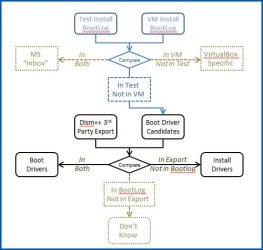
I have a test W7 install with all up-to-date drivers installed from mfg’s disks & downloads. I have a “virgin” install in VirtualBox for which I used the updated ISO resulting from the processes you've kindly shared. Bootlogging was activated for both installs. Below is a graphic depicting my approach:
Boot-Install-folders-proces.jpg


The first compare I did in Excel, my theory being that – since the VM install has nothing added – all drivers loaded there (with the exception of VM specific drivers) are “in box” drivers. Any drivers not found in both bootlogs should be 3rd party.


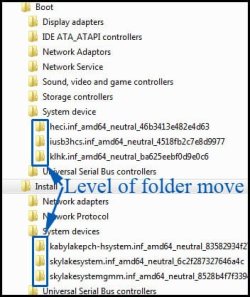
The 2nd compare was done by searching the dism++ exported folders for each file deemed to be 3rd party. The original dism++ export I considered “for install”; if a file was found in the export the entire folder containing that file was moved to a new “for boot” folder:
Boot-Install-folders.jpg


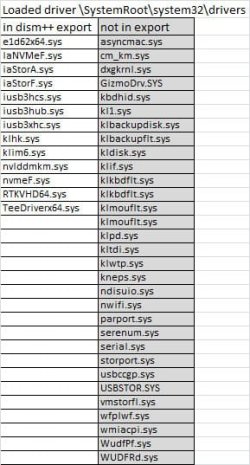
When finished there were a large number of files loaded during boot of the test install – which are designated as being in the drivers folder – that are not found in either the dism export or in the VM bootlog:
Boot-Install-folders-files.jpg


At this point I don’t know where my logic has gone awry…
Any observations or advice will be appreciated.
 
Last edited:

My Computer My Computer

At a glance

Win7 Pro x64 SP1Intel i7-670016 gig (2x8)MSI GTX 1660 Super
Computer type
PC/Desktop
Computer Manufacturer/Model Number
Custom Build
OS
Win7 Pro x64 SP1
CPU
Intel i7-6700
Motherboard
Gigabyte Z270 HD3
Memory
16 gig (2x8)
Graphics Card(s)
MSI GTX 1660 Super
Monitor(s) Displays
AOC CQ27G2
Screen Resolution
1440p
Hard Drives
Internal:
Crucial MX500 500GB SATA SSD (OS/Apps)
WD10EZEX-00WN4A0 1TB (Data/Games)
WD10EZEX-00WN4A0 1TB (On-line backup/Testing)
External
WD 4TB USB3.1 EasyStore (off-line backup archive/"sandbox")
PSU
Cooler Master 650W Bronze
Case
Sharkoon BW9000-V tower housing
Cooling
Deep Cool Ice Blade
Internet Speed
fiber optic 2 res broadband
Antivirus
Kaspersky Free
Browser
Firefox
"not in export":
Plenty of the current in box drivers that are supplied in the standard MS boot.wim will be loaded.

"in dism++ export"
If it works ok, then you have got it right.


A lot of people want to create a kind of universal install media that should work on almost any system. That obviously means integrating some things that are not needed on all systems. It doesn't matter, they won't be used if not needed.
 

My Computers My Computers

  • At a glance

    7 X64i5 84002x8gb 3200mhz
    Computer type
    PC/Desktop
    OS
    7 X64
    CPU
    i5 8400
    Motherboard
    gigabyte b365m ds3h
    Memory
    2x8gb 3200mhz
    Hard Drives
    various
    PSU
    pure power 11 400w cm
    Case
    Coolermaster
    Cooling
    cryorig m9i
  • At a glance

    7x64g54008gb ddr4 2400
    Computer type
    PC/Desktop
    OS
    7x64
    CPU
    g5400
    Motherboard
    ga b365m ds3h
    Memory
    8gb ddr4 2400
    PSU
    xfx pro 450w
Thank-you. It's what I hoped. Assistance much appreciated.
 

My Computer My Computer

At a glance

Win7 Pro x64 SP1Intel i7-670016 gig (2x8)MSI GTX 1660 Super
Computer type
PC/Desktop
Computer Manufacturer/Model Number
Custom Build
OS
Win7 Pro x64 SP1
CPU
Intel i7-6700
Motherboard
Gigabyte Z270 HD3
Memory
16 gig (2x8)
Graphics Card(s)
MSI GTX 1660 Super
Monitor(s) Displays
AOC CQ27G2
Screen Resolution
1440p
Hard Drives
Internal:
Crucial MX500 500GB SATA SSD (OS/Apps)
WD10EZEX-00WN4A0 1TB (Data/Games)
WD10EZEX-00WN4A0 1TB (On-line backup/Testing)
External
WD 4TB USB3.1 EasyStore (off-line backup archive/"sandbox")
PSU
Cooler Master 650W Bronze
Case
Sharkoon BW9000-V tower housing
Cooling
Deep Cool Ice Blade
Internet Speed
fiber optic 2 res broadband
Antivirus
Kaspersky Free
Browser
Firefox
Worked great twice; now it doesn't

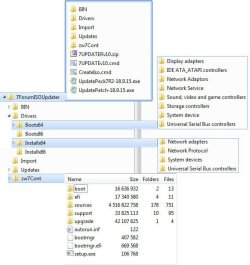
Not sure where I've gone wrong. This worked flawlessly twice (only 8 additional updates needed post-install). Now when I select the folder containing the win 7 installation media the blue command prompt window looks like it is trying to progress to the next step and then it terminates itself.


The win 7 installation media folder contains the results from a successful run from which an ISO was created. The ISO contents were copied into the win 7 installation media folder (zw7Cont).


My intent was to add drivers to the ISO containing the updated Win7 installation media. Below is my folder structure. Any insights about what I've screwed up and how to fix it will be much appreciated.
7UPDATER-problem.jpg
Thanx in advance for your time and expertise ...
 

My Computer My Computer

At a glance

Win7 Pro x64 SP1Intel i7-670016 gig (2x8)MSI GTX 1660 Super
Computer type
PC/Desktop
Computer Manufacturer/Model Number
Custom Build
OS
Win7 Pro x64 SP1
CPU
Intel i7-6700
Motherboard
Gigabyte Z270 HD3
Memory
16 gig (2x8)
Graphics Card(s)
MSI GTX 1660 Super
Monitor(s) Displays
AOC CQ27G2
Screen Resolution
1440p
Hard Drives
Internal:
Crucial MX500 500GB SATA SSD (OS/Apps)
WD10EZEX-00WN4A0 1TB (Data/Games)
WD10EZEX-00WN4A0 1TB (On-line backup/Testing)
External
WD 4TB USB3.1 EasyStore (off-line backup archive/"sandbox")
PSU
Cooler Master 650W Bronze
Case
Sharkoon BW9000-V tower housing
Cooling
Deep Cool Ice Blade
Internet Speed
fiber optic 2 res broadband
Antivirus
Kaspersky Free
Browser
Firefox
Back
Top