Autoplay no longer happens when I put in my USB flash drive

miloshapiro

New member
Member
Local time
2:29 PM
Messages
43
For years, inserting this same flash drive and caused Autoplay to come up and I could tell it to open in Windows Exploring. In the last week, it's stopped. Tried another USB flash, same thing.
If I go to Exploring and look in the list, there's the drive and i can open it, but I don't want to go to that extra step of opening Exploring and finding the drive among my many. I miss the box just popping up for me.


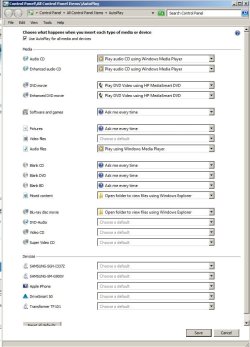
I tried going to Start/ControlPanel/AutoPlay hoping I'd see some option for external drives, but all the options seem to be about music, CDs, movies etc. I'm just trying to get the box to open at all.


Ideally, if it's possible, I'd love for the insert to always open Exploring without even asking me via an autoplay box, but if that's not possible, I'd be almost as happy to have the autoplay box back so I could TELL it to open Exploring.
Thanks!
 

My Computer My Computer

At a glance

Microsoft Windows 7 Home Premium 64-bit 7601 ...AMD Phenom(tm) II X4 945 Processor8.00 GBATI Radeon HD 5450
Computer type
PC/Desktop
Computer Manufacturer/Model Number
HP
OS
Microsoft Windows 7 Home Premium 64-bit 7601 Multiprocessor Free Service Pack 1
CPU
AMD Phenom(tm) II X4 945 Processor
Motherboard
FOXCONN 2AB1
Memory
8.00 GB
Graphics Card(s)
ATI Radeon HD 5450
Sound Card
(1) Realtek High Definition Audio (2) Logitech Microphone
Screen Resolution
1920 x 1080 x 32 bits (4294967296 colors) @ 60 Hz
Hard Drives
(1) Hitachi HDS721010CLA332 SATA Disk Device (2) Generic- Compact Flash USB Device (3) Generic- MS/MS-Pro USB Device (4) Generic- SD/MMC USB Device (5) Generic- SM/xD-Picture USB Device (6) Iomega E xternal HD USB Device (7) Seagate Backu
Hi miloshapiro,

Is this the only issue that appears to be happening?

Give this a try. Go into Task Manager and end the process for explorer.exe, then create a new task for explorer.exe and re-boot.

I hope this helps!
 
Last edited:

My Computer My Computer

At a glance

Win 7 HP SP1 64-bit Vista HB SP2 32-bit Linux...Intel(R) Pentium(R) CPU P6200 @ 2.13GHz4.00 GBIntel(R) Graphics Media Accelerator HD
Computer type
Laptop
Computer Manufacturer/Model Number
Fujitsu LIFEBOOK
OS
Win 7 HP SP1 64-bit Vista HB SP2 32-bit Linux Mint 18.3
CPU
Intel(R) Pentium(R) CPU P6200 @ 2.13GHz
Motherboard
FUJITSU FJNBB06
Memory
4.00 GB
Graphics Card(s)
Intel(R) Graphics Media Accelerator HD
Sound Card
[1] Realtek High Definition Audio [2] Intel(R) Display Audio
Screen Resolution
1366 x 768 x 32 bits (4294967296 colors) @ 59 Hz
Hard Drives
TOSHIBA MK5076GSX
Antivirus
AVG FREE
Most Anti Virus blocks Autorun on flash disks.
Did you change the AV recently?
 

My Computers My Computers

  • At a glance

    Windows 7 HP 64i5 6600K - 800MHz to 4200MHz4+4G GSkill DDR4 3000IG - Intel 530
    Computer type
    PC/Desktop
    Computer Manufacturer/Model Number
    custom build
    OS
    Windows 7 HP 64
    CPU
    i5 6600K - 800MHz to 4200MHz
    Motherboard
    GA-Z170-HD3P
    Memory
    4+4G GSkill DDR4 3000
    Graphics Card(s)
    IG - Intel 530
    Monitor(s) Displays
    Samsung 226BW
    Screen Resolution
    1680x1050
    Hard Drives
    (1) -1 SM951 – 128GB M.2 AHCI PCIe SSD drive for Windows 7 and Lubuntu
    (2) -1 WD SATA 3 - 1T for Data
    (3) -1 WD SATA 3 - 1T for backup
    PSU
    Thermaltake 450W TR2 gold
    Keyboard
    Old and good Chicony mechanical keyboard
    Mouse
    Logitech mX performance - 9 buttons (had to disable some)
    Internet Speed
    500Mb/s
    Browser
    Firefox 64
    Other Info
    TinyWall firewall
  • At a glance

    Windows 7 Proi7-4500U 800MHz to 3.0GHz(4+4)G DDR3 1600IG intel 4400 + NVIDIA GeForce GT 745M
    Computer type
    Laptop
    System Manufacturer/Model Number
    Asus Q550LF
    OS
    Windows 7 Pro
    CPU
    i7-4500U 800MHz to 3.0GHz
    Motherboard
    Asus Q550LF
    Memory
    (4+4)G DDR3 1600
    Graphics Card(s)
    IG intel 4400 + NVIDIA GeForce GT 745M
    Sound Card
    Realtek
    Monitor(s) Displays
    LG Display LP156WF4-SPH1
    Screen Resolution
    1920 x 1080
    Hard Drives
    BX500 120G SSD for Windows and programs +
    1T HDD for data
    Internet Speed
    500 Mb/s
    Browser
    Firefox
    Other Info
    TinyWall firewall
Go to services.msc and start Shell Hardware Detection service, also set it to start automatically.
This applies to Vista but I think for 7 too.
 

My Computer My Computer

At a glance

Windows 7 Home Premium x64AMD Athlon 64 X2 7450 @ 2.40Ghz2GB DDR2NVIDIA GeForce 8200 (nForce 730a)
Computer type
PC/Desktop
Computer Manufacturer/Model Number
Packard Bell
OS
Windows 7 Home Premium x64
CPU
AMD Athlon 64 X2 7450 @ 2.40Ghz
Memory
2GB DDR2
Graphics Card(s)
NVIDIA GeForce 8200 (nForce 730a)
Hard Drives
Western Digital 1TB HDD
Browser
Internet Explorer 11
You can check check group policy on this as well on auto run.

Tell you the truth, have auto run on exposes yourself to attacks. I have always turned it off through group policy.


Access Denied
Not sure why that says access denied. Perhaps M$ doesn't like this site's IP. Shouldn't parse links like that.
 

My Computer My Computer

At a glance

Windows 7 Ultimate x64
Computer type
PC/Desktop
OS
Windows 7 Ultimate x64
answers to everyone

I'll cover all your comments, with my thanks for trying.
Jeyneko: I did what you said and it's already set to Automatic.
Megahertz07: I have used Kaspersky for years and haven't messed with it lately.

F22 Simpilot: I don't know what group policy is and I'm really confused about your "access denied" section.
Paul Black: I can try that, but my computer is older and a reboot is a 15 minute deal (mostly because of Outlook) so I may make that the last thing I do before bed so that it reboots overnight.


all, isn't the attached image page in Control Panel where I would expect to set such a thing? I'm stunned that the page asks about all these things but not flash drives.
 

Attachments

  • temp8.jpg
    temp8.jpg
    89.2 KB · Views: 0

My Computer My Computer

At a glance

Microsoft Windows 7 Home Premium 64-bit 7601 ...AMD Phenom(tm) II X4 945 Processor8.00 GBATI Radeon HD 5450
Computer type
PC/Desktop
Computer Manufacturer/Model Number
HP
OS
Microsoft Windows 7 Home Premium 64-bit 7601 Multiprocessor Free Service Pack 1
CPU
AMD Phenom(tm) II X4 945 Processor
Motherboard
FOXCONN 2AB1
Memory
8.00 GB
Graphics Card(s)
ATI Radeon HD 5450
Sound Card
(1) Realtek High Definition Audio (2) Logitech Microphone
Screen Resolution
1920 x 1080 x 32 bits (4294967296 colors) @ 60 Hz
Hard Drives
(1) Hitachi HDS721010CLA332 SATA Disk Device (2) Generic- Compact Flash USB Device (3) Generic- MS/MS-Pro USB Device (4) Generic- SD/MMC USB Device (5) Generic- SM/xD-Picture USB Device (6) Iomega E xternal HD USB Device (7) Seagate Backu
Paul Black wins! I killed Explorer and re-ran it. Before ever rebooting, I gave it a try and not only did it go to autorun (for a split second) but it opened Exploring automatically. Not sure why it's now doing that extra step (maybe me setting the "Mixed Content) to Open as a test did that) but I don't mind that at all. I always want to open Exploring when i put the USB in. Hooray!
 

My Computer My Computer

At a glance

Microsoft Windows 7 Home Premium 64-bit 7601 ...AMD Phenom(tm) II X4 945 Processor8.00 GBATI Radeon HD 5450
Computer type
PC/Desktop
Computer Manufacturer/Model Number
HP
OS
Microsoft Windows 7 Home Premium 64-bit 7601 Multiprocessor Free Service Pack 1
CPU
AMD Phenom(tm) II X4 945 Processor
Motherboard
FOXCONN 2AB1
Memory
8.00 GB
Graphics Card(s)
ATI Radeon HD 5450
Sound Card
(1) Realtek High Definition Audio (2) Logitech Microphone
Screen Resolution
1920 x 1080 x 32 bits (4294967296 colors) @ 60 Hz
Hard Drives
(1) Hitachi HDS721010CLA332 SATA Disk Device (2) Generic- Compact Flash USB Device (3) Generic- MS/MS-Pro USB Device (4) Generic- SD/MMC USB Device (5) Generic- SM/xD-Picture USB Device (6) Iomega E xternal HD USB Device (7) Seagate Backu
Hi miloshapiro,

Paul Black wins! I killed Explorer and re-ran it. Before ever rebooting, I gave it a try and not only did it go to autorun (for a split second) but it opened Exploring automatically. Not sure why it's now doing that extra step (maybe me setting the "Mixed Content) to Open as a test did that but I don't mind that at all. I always want to open Exploring when i put the USB in. Hooray!

I am glad that you have resolved your problem and thank you for sharing the solution, it will help other people visiting this thread that have the same problem/question.
:thumbsup:
 

My Computer My Computer

At a glance

Win 7 HP SP1 64-bit Vista HB SP2 32-bit Linux...Intel(R) Pentium(R) CPU P6200 @ 2.13GHz4.00 GBIntel(R) Graphics Media Accelerator HD
Computer type
Laptop
Computer Manufacturer/Model Number
Fujitsu LIFEBOOK
OS
Win 7 HP SP1 64-bit Vista HB SP2 32-bit Linux Mint 18.3
CPU
Intel(R) Pentium(R) CPU P6200 @ 2.13GHz
Motherboard
FUJITSU FJNBB06
Memory
4.00 GB
Graphics Card(s)
Intel(R) Graphics Media Accelerator HD
Sound Card
[1] Realtek High Definition Audio [2] Intel(R) Display Audio
Screen Resolution
1366 x 768 x 32 bits (4294967296 colors) @ 59 Hz
Hard Drives
TOSHIBA MK5076GSX
Antivirus
AVG FREE
Back
Top