Solved Create patched ISO from existing up-to-date installation?

PatrickGSR94

New member
Member
VIP
Local time
7:51 PM
Messages
182
I have parts on order for 2 new workstations that I will be putting together soon. I dread the thought of having to continually run Windows Update multiple times from a fresh SP1 install. Being that my workstation is fully up to date, is there any way to create a fully patched ISO from my machine's installation, to use for installing Win7 on my 2 new workstations? This is an office environment with a Win Server 2012 R2 domain.


I've read several how-to articles on creating patched ISO files, but most of those are at least 2 years old, and it seems like it would be easier just to use the update/hotfix files already on my workstation to create the ISO instead of having to download a bunch of files from the internet.
 

My Computer My Computer

At a glance

Windows 7 Professional x64Core i7-4790K Devil's Canyon Quad Core 4.0 GHzG.SKILL Ripjaws X Series 32 GB DDR3-1866 (4x ...EVGA (nVIDIA) GTX 960 4 GB GDDR5
Computer type
PC/Desktop
Computer Manufacturer/Model Number
Custom-built PC workstation
OS
Windows 7 Professional x64
CPU
Core i7-4790K Devil's Canyon Quad Core 4.0 GHz
Motherboard
ASUS Z97-E/USB3.1 ATX
Memory
G.SKILL Ripjaws X Series 32 GB DDR3-1866 (4x 8GB)
Graphics Card(s)
EVGA (nVIDIA) GTX 960 4 GB GDDR5
Sound Card
on-board
Monitor(s) Displays
2x Dell Ultrasharp 24" U2415
Screen Resolution
2x 1920x1200
Hard Drives
Crucial MX200 500GB 2.5" SSD SATA III 6 GB/sec
PSU
Rosewill Glacier 700M 700-watt
Case
Fractal Design Define R4 Silent PC mid-tower
Cooling
OEM PSU cooler, 3x 140mm case fans (2 intake, 1 exhaust)
Keyboard
Logitech
Mouse
Logitech
Internet Speed
100+ Mbps
Antivirus
BitDefender
Browser
Firefox/Chrome
Hi PatrickGSR94,

I dread the thought of having to continually run Windows Update multiple times from a fresh SP1 install. Being that my workstation is fully up to date, is there any way to create a fully patched ISO from my machine's installation, to use for installing Win7 on my 2 new workstations?

There are a couple of ways to achieve this.

[1] SIW2 has put together an excellent utillity [7UPDATER] where you can integrate drivers and WU into the install.wim. It is quite a long thread but I think you will find it useful. It really is quite easy and you will end up with a fully updated ISO in which to use. You can update just one image, or all images. The size of the updated ISO will obviously be too big to fit onto a DVD so you will need to burn it to a USB for installation.

Here is the link to the thread I have mentioned => Update your Win 7 installation media.

[2] If you have an installation DVD, you can copy the files to the HDD, mount it, and fully update it with drivers and WU using DISM++. Again, the size of the updated ISO will obviously be too big to fit onto a DVD so you will need to burn it to a USB for installation.

DISM++ is a FREE implementation tool that has the ability to perform Windows Updates [WU]. Some of the advantages [but not all] are:

[1] The GUI is very easy to understand and use.
[2] It is much faster than M$’s WU because it uses a different engine.
[3] It downloads the latest WU DB from the M$ servers, scans your OS, and then lists the updates available.
[4] It doesn’t install superseded updates like M$ does.
[5] It gives you the option of what you want to install.
[6] The pre-ticked updates are what is recommended and are similar to the WU critical and recommended updates. The un-ticked updates are similar to the WU optional updates.

[7] It warns you if an update:
  • Includes telemetry.
  • Has known issues with certain hardware.
  • Needs exclusive access.
  • Is suspect.
  • Your OS doesn't need it.
  • Has any other known issues.
[8] It doesn’t require re-booting between updates.
[9] It can be used to either update an install.wim image OFFLINE, or to update the LIVE OS.

I hope this helps!
 

My Computer My Computer

At a glance

Win 7 HP SP1 64-bit Vista HB SP2 32-bit Linux...Intel(R) Pentium(R) CPU P6200 @ 2.13GHz4.00 GBIntel(R) Graphics Media Accelerator HD
Computer type
Laptop
Computer Manufacturer/Model Number
Fujitsu LIFEBOOK
OS
Win 7 HP SP1 64-bit Vista HB SP2 32-bit Linux Mint 18.3
CPU
Intel(R) Pentium(R) CPU P6200 @ 2.13GHz
Motherboard
FUJITSU FJNBB06
Memory
4.00 GB
Graphics Card(s)
Intel(R) Graphics Media Accelerator HD
Sound Card
[1] Realtek High Definition Audio [2] Intel(R) Display Audio
Screen Resolution
1366 x 768 x 32 bits (4294967296 colors) @ 59 Hz
Hard Drives
TOSHIBA MK5076GSX
Antivirus
AVG FREE
You could create a disk image and use that then change serial number after if you have imaging that multi casts you can do all ocs at once
 

My Computer My Computer

At a glance

win 8 32 bit
Computer type
PC/Desktop
OS
win 8 32 bit
You could create a disk image and use that then change serial number after if you have imaging that multi casts you can do all ocs at once


Wouldn't that basically replicate my installation with software and everything? I don't want to image my current workstation's system drive, as these will be new systems for different users, with different software installed. I was just hoping to create an ISO of my current Windows installation with all the installed updates and hotfixes, instead of having to try to download certain ones but not others. My current installation is suitable for our office, so it would be nice to just replicate the updated OS, without the installed software.
 

My Computer My Computer

At a glance

Windows 7 Professional x64Core i7-4790K Devil's Canyon Quad Core 4.0 GHzG.SKILL Ripjaws X Series 32 GB DDR3-1866 (4x ...EVGA (nVIDIA) GTX 960 4 GB GDDR5
Computer type
PC/Desktop
Computer Manufacturer/Model Number
Custom-built PC workstation
OS
Windows 7 Professional x64
CPU
Core i7-4790K Devil's Canyon Quad Core 4.0 GHz
Motherboard
ASUS Z97-E/USB3.1 ATX
Memory
G.SKILL Ripjaws X Series 32 GB DDR3-1866 (4x 8GB)
Graphics Card(s)
EVGA (nVIDIA) GTX 960 4 GB GDDR5
Sound Card
on-board
Monitor(s) Displays
2x Dell Ultrasharp 24" U2415
Screen Resolution
2x 1920x1200
Hard Drives
Crucial MX200 500GB 2.5" SSD SATA III 6 GB/sec
PSU
Rosewill Glacier 700M 700-watt
Case
Fractal Design Define R4 Silent PC mid-tower
Cooling
OEM PSU cooler, 3x 140mm case fans (2 intake, 1 exhaust)
Keyboard
Logitech
Mouse
Logitech
Internet Speed
100+ Mbps
Antivirus
BitDefender
Browser
Firefox/Chrome
The practical way to do that is to integrate the updates into installation media.

Update your Win 7 installation media.


Wouldn't that basically replicate my installation with software and everything? I don't want to image my current workstation's system drive, as these will be new systems for different users, with different software installed. I was just hoping to create an ISO of my current Windows installation with all the installed updates and hotfixes, instead of having to try to download certain ones but not others. My current installation is suitable for our office, so it would be nice to just replicate the updated OS, without the installed software.
 

My Computers My Computers

  • At a glance

    7 X64i5 84002x8gb 3200mhz
    Computer type
    PC/Desktop
    OS
    7 X64
    CPU
    i5 8400
    Motherboard
    gigabyte b365m ds3h
    Memory
    2x8gb 3200mhz
    Hard Drives
    various
    PSU
    pure power 11 400w cm
    Case
    Coolermaster
    Cooling
    cryorig m9i
  • At a glance

    7x64g54008gb ddr4 2400
    Computer type
    PC/Desktop
    OS
    7x64
    CPU
    g5400
    Motherboard
    ga b365m ds3h
    Memory
    8gb ddr4 2400
    PSU
    xfx pro 450w
Hi PatrickGSR94,

I was just hoping to create an ISO of my current Windows installation with all the installed updates and hotfixes, instead of having to try to download certain ones but not others.

I gave you two methods of doing this in my previous post!
The first method I gave you is the same as SIW2 [the author/creator of the utility] has given you above!
 

My Computer My Computer

At a glance

Win 7 HP SP1 64-bit Vista HB SP2 32-bit Linux...Intel(R) Pentium(R) CPU P6200 @ 2.13GHz4.00 GBIntel(R) Graphics Media Accelerator HD
Computer type
Laptop
Computer Manufacturer/Model Number
Fujitsu LIFEBOOK
OS
Win 7 HP SP1 64-bit Vista HB SP2 32-bit Linux Mint 18.3
CPU
Intel(R) Pentium(R) CPU P6200 @ 2.13GHz
Motherboard
FUJITSU FJNBB06
Memory
4.00 GB
Graphics Card(s)
Intel(R) Graphics Media Accelerator HD
Sound Card
[1] Realtek High Definition Audio [2] Intel(R) Display Audio
Screen Resolution
1366 x 768 x 32 bits (4294967296 colors) @ 59 Hz
Hard Drives
TOSHIBA MK5076GSX
Antivirus
AVG FREE
Hi PatrickGSR94,


I gave you two methods of doing this in my previous post!
The first method I gave you is the same as SIW2 [the author/creator of the utility] has given you above!


I guess I wasn't clear about what you posted. Is the utility taking the updates installed on my machine currently to create the ISO? Or is it downloading the various updates from Microsoft or elsewhere?
 

My Computer My Computer

At a glance

Windows 7 Professional x64Core i7-4790K Devil's Canyon Quad Core 4.0 GHzG.SKILL Ripjaws X Series 32 GB DDR3-1866 (4x ...EVGA (nVIDIA) GTX 960 4 GB GDDR5
Computer type
PC/Desktop
Computer Manufacturer/Model Number
Custom-built PC workstation
OS
Windows 7 Professional x64
CPU
Core i7-4790K Devil's Canyon Quad Core 4.0 GHz
Motherboard
ASUS Z97-E/USB3.1 ATX
Memory
G.SKILL Ripjaws X Series 32 GB DDR3-1866 (4x 8GB)
Graphics Card(s)
EVGA (nVIDIA) GTX 960 4 GB GDDR5
Sound Card
on-board
Monitor(s) Displays
2x Dell Ultrasharp 24" U2415
Screen Resolution
2x 1920x1200
Hard Drives
Crucial MX200 500GB 2.5" SSD SATA III 6 GB/sec
PSU
Rosewill Glacier 700M 700-watt
Case
Fractal Design Define R4 Silent PC mid-tower
Cooling
OEM PSU cooler, 3x 140mm case fans (2 intake, 1 exhaust)
Keyboard
Logitech
Mouse
Logitech
Internet Speed
100+ Mbps
Antivirus
BitDefender
Browser
Firefox/Chrome
I guess I wasn't clear about what you posted. Is the utility taking the updates installed on my machine currently to create the ISO? Or is it downloading the various updates from Microsoft or elsewhere?


If you had bothered to look at the post you have been linked and pointed to several times, it tells you.
 

My Computers My Computers

  • At a glance

    7 X64i5 84002x8gb 3200mhz
    Computer type
    PC/Desktop
    OS
    7 X64
    CPU
    i5 8400
    Motherboard
    gigabyte b365m ds3h
    Memory
    2x8gb 3200mhz
    Hard Drives
    various
    PSU
    pure power 11 400w cm
    Case
    Coolermaster
    Cooling
    cryorig m9i
  • At a glance

    7x64g54008gb ddr4 2400
    Computer type
    PC/Desktop
    OS
    7x64
    CPU
    g5400
    Motherboard
    ga b365m ds3h
    Memory
    8gb ddr4 2400
    PSU
    xfx pro 450w
Hi PatrickGSR94,

I guess I wasn't clear about what you posted. Is the utility taking the updates installed on my machine currently to create the ISO? Or is it downloading the various updates from Microsoft or elsewhere?

NO, the utility is not taking the updates installed on your machine currently to create the ISO.

7UPDATER gets the WU DB from a third-party provider.
DISM++ gets the WU DB from the M$ servers.

Basically, you need a Win 7 ISO or installation DVD. Then you use one of the two methods stated above to integrate the WU's. Finally, you burn the updated ISO to a USB for installation.

I, along with many people here have used both of the two methods mentioned without problems.

I hope this helps!
 

My Computer My Computer

At a glance

Win 7 HP SP1 64-bit Vista HB SP2 32-bit Linux...Intel(R) Pentium(R) CPU P6200 @ 2.13GHz4.00 GBIntel(R) Graphics Media Accelerator HD
Computer type
Laptop
Computer Manufacturer/Model Number
Fujitsu LIFEBOOK
OS
Win 7 HP SP1 64-bit Vista HB SP2 32-bit Linux Mint 18.3
CPU
Intel(R) Pentium(R) CPU P6200 @ 2.13GHz
Motherboard
FUJITSU FJNBB06
Memory
4.00 GB
Graphics Card(s)
Intel(R) Graphics Media Accelerator HD
Sound Card
[1] Realtek High Definition Audio [2] Intel(R) Display Audio
Screen Resolution
1366 x 768 x 32 bits (4294967296 colors) @ 59 Hz
Hard Drives
TOSHIBA MK5076GSX
Antivirus
AVG FREE
If you had bothered to look at the post you have been linked and pointed to several times, it tells you.


Man come on, I skimmed it over a little bit but I don't have time right this second to read through all 14 pages. I definitely appreciate the work you've done with that tool and will probably make use of it. No need to get all worked up or pissed off about it.
 

My Computer My Computer

At a glance

Windows 7 Professional x64Core i7-4790K Devil's Canyon Quad Core 4.0 GHzG.SKILL Ripjaws X Series 32 GB DDR3-1866 (4x ...EVGA (nVIDIA) GTX 960 4 GB GDDR5
Computer type
PC/Desktop
Computer Manufacturer/Model Number
Custom-built PC workstation
OS
Windows 7 Professional x64
CPU
Core i7-4790K Devil's Canyon Quad Core 4.0 GHz
Motherboard
ASUS Z97-E/USB3.1 ATX
Memory
G.SKILL Ripjaws X Series 32 GB DDR3-1866 (4x 8GB)
Graphics Card(s)
EVGA (nVIDIA) GTX 960 4 GB GDDR5
Sound Card
on-board
Monitor(s) Displays
2x Dell Ultrasharp 24" U2415
Screen Resolution
2x 1920x1200
Hard Drives
Crucial MX200 500GB 2.5" SSD SATA III 6 GB/sec
PSU
Rosewill Glacier 700M 700-watt
Case
Fractal Design Define R4 Silent PC mid-tower
Cooling
OEM PSU cooler, 3x 140mm case fans (2 intake, 1 exhaust)
Keyboard
Logitech
Mouse
Logitech
Internet Speed
100+ Mbps
Antivirus
BitDefender
Browser
Firefox/Chrome
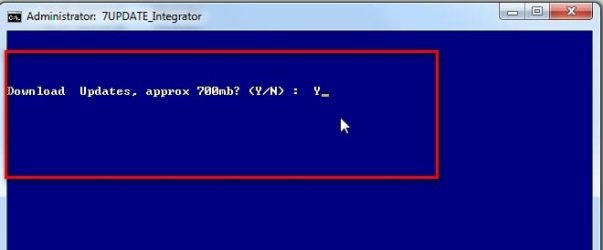
It is on the first post at the link.

download.jpg


There is no known method of using your currently installed updates in the way you want.

It used to be possible on Vista to utilize the cab files from software distribution folder. It can't be done that way on win7.

The download is not that big, approx 700mb, as stated in the photo.
 

My Computers My Computers

  • At a glance

    7 X64i5 84002x8gb 3200mhz
    Computer type
    PC/Desktop
    OS
    7 X64
    CPU
    i5 8400
    Motherboard
    gigabyte b365m ds3h
    Memory
    2x8gb 3200mhz
    Hard Drives
    various
    PSU
    pure power 11 400w cm
    Case
    Coolermaster
    Cooling
    cryorig m9i
  • At a glance

    7x64g54008gb ddr4 2400
    Computer type
    PC/Desktop
    OS
    7x64
    CPU
    g5400
    Motherboard
    ga b365m ds3h
    Memory
    8gb ddr4 2400
    PSU
    xfx pro 450w
Thanks, that's what I needed to know. I will look into your utility for my upcoming installations.
 

My Computer My Computer

At a glance

Windows 7 Professional x64Core i7-4790K Devil's Canyon Quad Core 4.0 GHzG.SKILL Ripjaws X Series 32 GB DDR3-1866 (4x ...EVGA (nVIDIA) GTX 960 4 GB GDDR5
Computer type
PC/Desktop
Computer Manufacturer/Model Number
Custom-built PC workstation
OS
Windows 7 Professional x64
CPU
Core i7-4790K Devil's Canyon Quad Core 4.0 GHz
Motherboard
ASUS Z97-E/USB3.1 ATX
Memory
G.SKILL Ripjaws X Series 32 GB DDR3-1866 (4x 8GB)
Graphics Card(s)
EVGA (nVIDIA) GTX 960 4 GB GDDR5
Sound Card
on-board
Monitor(s) Displays
2x Dell Ultrasharp 24" U2415
Screen Resolution
2x 1920x1200
Hard Drives
Crucial MX200 500GB 2.5" SSD SATA III 6 GB/sec
PSU
Rosewill Glacier 700M 700-watt
Case
Fractal Design Define R4 Silent PC mid-tower
Cooling
OEM PSU cooler, 3x 140mm case fans (2 intake, 1 exhaust)
Keyboard
Logitech
Mouse
Logitech
Internet Speed
100+ Mbps
Antivirus
BitDefender
Browser
Firefox/Chrome
Can you give us the specs of your new workstations?
Installing win 7 on new MoBo isn't that easy as Win 7 installation disk doesn't have the needed drivers. 7UPDATER can add the drivers to Win 7 installation disk.

My suggestion (if the Workstations has same hardware)
- Add the drivers to the Win 7 installation disk using 7UPDATER.
- Do a clean install. On BIOS, disable secure boot and fast boot. On a new MB you can install as Legacy- MBR or UEFI- GPT. To install as Legacy- MBR boot the in 7 installation disk as Legacy. To install as UEFI- GPT boot the in 7 installation disk as UEFI.
- Once you have installed on one workstation and it comes to the point to enter the user name, DON'T. Enter Audit mode (can guide you on), install all drivers and updates. For the updates, use ++Dism. When done shut down and clone the disk to the other two disks. Use Macrium Software | Macrium Reflect Free or Download Free Windows Backup Software
- When you boot again, you will be back to Oobe, asking to enter the user name.
 

My Computers My Computers

  • At a glance

    Windows 7 HP 64i5 6600K - 800MHz to 4200MHz4+4G GSkill DDR4 3000IG - Intel 530
    Computer type
    PC/Desktop
    Computer Manufacturer/Model Number
    custom build
    OS
    Windows 7 HP 64
    CPU
    i5 6600K - 800MHz to 4200MHz
    Motherboard
    GA-Z170-HD3P
    Memory
    4+4G GSkill DDR4 3000
    Graphics Card(s)
    IG - Intel 530
    Monitor(s) Displays
    Samsung 226BW
    Screen Resolution
    1680x1050
    Hard Drives
    (1) -1 SM951 – 128GB M.2 AHCI PCIe SSD drive for Windows 7 and Lubuntu
    (2) -1 WD SATA 3 - 1T for Data
    (3) -1 WD SATA 3 - 1T for backup
    PSU
    Thermaltake 450W TR2 gold
    Keyboard
    Old and good Chicony mechanical keyboard
    Mouse
    Logitech mX performance - 9 buttons (had to disable some)
    Internet Speed
    500Mb/s
    Browser
    Firefox 64
    Other Info
    TinyWall firewall
  • At a glance

    Windows 7 Proi7-4500U 800MHz to 3.0GHz(4+4)G DDR3 1600IG intel 4400 + NVIDIA GeForce GT 745M
    Computer type
    Laptop
    System Manufacturer/Model Number
    Asus Q550LF
    OS
    Windows 7 Pro
    CPU
    i7-4500U 800MHz to 3.0GHz
    Motherboard
    Asus Q550LF
    Memory
    (4+4)G DDR3 1600
    Graphics Card(s)
    IG intel 4400 + NVIDIA GeForce GT 745M
    Sound Card
    Realtek
    Monitor(s) Displays
    LG Display LP156WF4-SPH1
    Screen Resolution
    1920 x 1080
    Hard Drives
    BX500 120G SSD for Windows and programs +
    1T HDD for data
    Internet Speed
    500 Mb/s
    Browser
    Firefox
    Other Info
    TinyWall firewall
My last workstation build (listed at bottom left) installed Win7 as normal, except I ended up having to disable UEFI on the Asus mobo after the installation. New builds are as follows:


ASUS Prime H370M LGA1151 (300 Series)
Core i7-8700 Coffee Lake 6-core 3.2 GHz
Crucial MX500 500 GB SSD
G.SKILL Ripjaws V DDR4 32 GB total
GTX 1050 Ti 4GB GDDR5
 

My Computer My Computer

At a glance

Windows 7 Professional x64Core i7-4790K Devil's Canyon Quad Core 4.0 GHzG.SKILL Ripjaws X Series 32 GB DDR3-1866 (4x ...EVGA (nVIDIA) GTX 960 4 GB GDDR5
Computer type
PC/Desktop
Computer Manufacturer/Model Number
Custom-built PC workstation
OS
Windows 7 Professional x64
CPU
Core i7-4790K Devil's Canyon Quad Core 4.0 GHz
Motherboard
ASUS Z97-E/USB3.1 ATX
Memory
G.SKILL Ripjaws X Series 32 GB DDR3-1866 (4x 8GB)
Graphics Card(s)
EVGA (nVIDIA) GTX 960 4 GB GDDR5
Sound Card
on-board
Monitor(s) Displays
2x Dell Ultrasharp 24" U2415
Screen Resolution
2x 1920x1200
Hard Drives
Crucial MX200 500GB 2.5" SSD SATA III 6 GB/sec
PSU
Rosewill Glacier 700M 700-watt
Case
Fractal Design Define R4 Silent PC mid-tower
Cooling
OEM PSU cooler, 3x 140mm case fans (2 intake, 1 exhaust)
Keyboard
Logitech
Mouse
Logitech
Internet Speed
100+ Mbps
Antivirus
BitDefender
Browser
Firefox/Chrome
Some Coffee Lake chipsets doesn't have USB 3.x drivers for win 7. Don't know if it's the case of H370M.
SIW2 is the expert and will guide you.
 

My Computers My Computers

  • At a glance

    Windows 7 HP 64i5 6600K - 800MHz to 4200MHz4+4G GSkill DDR4 3000IG - Intel 530
    Computer type
    PC/Desktop
    Computer Manufacturer/Model Number
    custom build
    OS
    Windows 7 HP 64
    CPU
    i5 6600K - 800MHz to 4200MHz
    Motherboard
    GA-Z170-HD3P
    Memory
    4+4G GSkill DDR4 3000
    Graphics Card(s)
    IG - Intel 530
    Monitor(s) Displays
    Samsung 226BW
    Screen Resolution
    1680x1050
    Hard Drives
    (1) -1 SM951 – 128GB M.2 AHCI PCIe SSD drive for Windows 7 and Lubuntu
    (2) -1 WD SATA 3 - 1T for Data
    (3) -1 WD SATA 3 - 1T for backup
    PSU
    Thermaltake 450W TR2 gold
    Keyboard
    Old and good Chicony mechanical keyboard
    Mouse
    Logitech mX performance - 9 buttons (had to disable some)
    Internet Speed
    500Mb/s
    Browser
    Firefox 64
    Other Info
    TinyWall firewall
  • At a glance

    Windows 7 Proi7-4500U 800MHz to 3.0GHz(4+4)G DDR3 1600IG intel 4400 + NVIDIA GeForce GT 745M
    Computer type
    Laptop
    System Manufacturer/Model Number
    Asus Q550LF
    OS
    Windows 7 Pro
    CPU
    i7-4500U 800MHz to 3.0GHz
    Motherboard
    Asus Q550LF
    Memory
    (4+4)G DDR3 1600
    Graphics Card(s)
    IG intel 4400 + NVIDIA GeForce GT 745M
    Sound Card
    Realtek
    Monitor(s) Displays
    LG Display LP156WF4-SPH1
    Screen Resolution
    1920 x 1080
    Hard Drives
    BX500 120G SSD for Windows and programs +
    1T HDD for data
    Internet Speed
    500 Mb/s
    Browser
    Firefox
    Other Info
    TinyWall firewall
The mobo has 2x USB 2.0 ports in addition to the 3.0 and 3.1 ports, so I can run KB/mouse off of those. I don't recall any issues getting the USB 3.x ports on my last build to work in Win7, as it also has 2.0 ports on the rear panel.
 

My Computer My Computer

At a glance

Windows 7 Professional x64Core i7-4790K Devil's Canyon Quad Core 4.0 GHzG.SKILL Ripjaws X Series 32 GB DDR3-1866 (4x ...EVGA (nVIDIA) GTX 960 4 GB GDDR5
Computer type
PC/Desktop
Computer Manufacturer/Model Number
Custom-built PC workstation
OS
Windows 7 Professional x64
CPU
Core i7-4790K Devil's Canyon Quad Core 4.0 GHz
Motherboard
ASUS Z97-E/USB3.1 ATX
Memory
G.SKILL Ripjaws X Series 32 GB DDR3-1866 (4x 8GB)
Graphics Card(s)
EVGA (nVIDIA) GTX 960 4 GB GDDR5
Sound Card
on-board
Monitor(s) Displays
2x Dell Ultrasharp 24" U2415
Screen Resolution
2x 1920x1200
Hard Drives
Crucial MX200 500GB 2.5" SSD SATA III 6 GB/sec
PSU
Rosewill Glacier 700M 700-watt
Case
Fractal Design Define R4 Silent PC mid-tower
Cooling
OEM PSU cooler, 3x 140mm case fans (2 intake, 1 exhaust)
Keyboard
Logitech
Mouse
Logitech
Internet Speed
100+ Mbps
Antivirus
BitDefender
Browser
Firefox/Chrome
M$ is trying to kill Win 7. And Intel joined M$ making it hard to install Win 7 on a new MB.
Z, H and B 97 were the last chipsets that you could install Win 7 without adding drivers. It's COMPLETELY different on a Coffee Lake MB.
Even if you have USB 2.0, if the hardware is the H370M they won't work on Win 7, unless there is a driver for it.

Not sure if there is a win 7 driver for GTX 1050 Ti (it does for the GTX 1050)
NVIDIA DRIVERS GeForce Game Ready Driver WHQL
 
Last edited:

My Computers My Computers

  • At a glance

    Windows 7 HP 64i5 6600K - 800MHz to 4200MHz4+4G GSkill DDR4 3000IG - Intel 530
    Computer type
    PC/Desktop
    Computer Manufacturer/Model Number
    custom build
    OS
    Windows 7 HP 64
    CPU
    i5 6600K - 800MHz to 4200MHz
    Motherboard
    GA-Z170-HD3P
    Memory
    4+4G GSkill DDR4 3000
    Graphics Card(s)
    IG - Intel 530
    Monitor(s) Displays
    Samsung 226BW
    Screen Resolution
    1680x1050
    Hard Drives
    (1) -1 SM951 – 128GB M.2 AHCI PCIe SSD drive for Windows 7 and Lubuntu
    (2) -1 WD SATA 3 - 1T for Data
    (3) -1 WD SATA 3 - 1T for backup
    PSU
    Thermaltake 450W TR2 gold
    Keyboard
    Old and good Chicony mechanical keyboard
    Mouse
    Logitech mX performance - 9 buttons (had to disable some)
    Internet Speed
    500Mb/s
    Browser
    Firefox 64
    Other Info
    TinyWall firewall
  • At a glance

    Windows 7 Proi7-4500U 800MHz to 3.0GHz(4+4)G DDR3 1600IG intel 4400 + NVIDIA GeForce GT 745M
    Computer type
    Laptop
    System Manufacturer/Model Number
    Asus Q550LF
    OS
    Windows 7 Pro
    CPU
    i7-4500U 800MHz to 3.0GHz
    Motherboard
    Asus Q550LF
    Memory
    (4+4)G DDR3 1600
    Graphics Card(s)
    IG intel 4400 + NVIDIA GeForce GT 745M
    Sound Card
    Realtek
    Monitor(s) Displays
    LG Display LP156WF4-SPH1
    Screen Resolution
    1920 x 1080
    Hard Drives
    BX500 120G SSD for Windows and programs +
    1T HDD for data
    Internet Speed
    500 Mb/s
    Browser
    Firefox
    Other Info
    TinyWall firewall
well that sucks, I've been reluctant to move to 10 because of all the telemetry stuff on it. I already ordered 2 licenses of Win7 through Newegg, should I try to return them and go Win 10 Pro?
 

My Computer My Computer

At a glance

Windows 7 Professional x64Core i7-4790K Devil's Canyon Quad Core 4.0 GHzG.SKILL Ripjaws X Series 32 GB DDR3-1866 (4x ...EVGA (nVIDIA) GTX 960 4 GB GDDR5
Computer type
PC/Desktop
Computer Manufacturer/Model Number
Custom-built PC workstation
OS
Windows 7 Professional x64
CPU
Core i7-4790K Devil's Canyon Quad Core 4.0 GHz
Motherboard
ASUS Z97-E/USB3.1 ATX
Memory
G.SKILL Ripjaws X Series 32 GB DDR3-1866 (4x 8GB)
Graphics Card(s)
EVGA (nVIDIA) GTX 960 4 GB GDDR5
Sound Card
on-board
Monitor(s) Displays
2x Dell Ultrasharp 24" U2415
Screen Resolution
2x 1920x1200
Hard Drives
Crucial MX200 500GB 2.5" SSD SATA III 6 GB/sec
PSU
Rosewill Glacier 700M 700-watt
Case
Fractal Design Define R4 Silent PC mid-tower
Cooling
OEM PSU cooler, 3x 140mm case fans (2 intake, 1 exhaust)
Keyboard
Logitech
Mouse
Logitech
Internet Speed
100+ Mbps
Antivirus
BitDefender
Browser
Firefox/Chrome
Hi PatrickGSR94,

well that sucks, I've been reluctant to move to 10 because of all the telemetry stuff on it. I already ordered 2 licenses of Win7 through Newegg, should I try to return them and go Win 10 Pro?

Only you can answer that. It depends what the office strategy is!
 

My Computer My Computer

At a glance

Win 7 HP SP1 64-bit Vista HB SP2 32-bit Linux...Intel(R) Pentium(R) CPU P6200 @ 2.13GHz4.00 GBIntel(R) Graphics Media Accelerator HD
Computer type
Laptop
Computer Manufacturer/Model Number
Fujitsu LIFEBOOK
OS
Win 7 HP SP1 64-bit Vista HB SP2 32-bit Linux Mint 18.3
CPU
Intel(R) Pentium(R) CPU P6200 @ 2.13GHz
Motherboard
FUJITSU FJNBB06
Memory
4.00 GB
Graphics Card(s)
Intel(R) Graphics Media Accelerator HD
Sound Card
[1] Realtek High Definition Audio [2] Intel(R) Display Audio
Screen Resolution
1366 x 768 x 32 bits (4294967296 colors) @ 59 Hz
Hard Drives
TOSHIBA MK5076GSX
Antivirus
AVG FREE
Well I don't really care to deal with trying to force an unsupported OS to work on a newer proc/mobo.


I guess what I meant was, try to return the Win7 licenses (if Newegg will even do that) and get Win10 Pro licenses, or try to install/activate Win7 and then do Win10 upgrades. At this point I'm not sure what will be more cost effective.
 

My Computer My Computer

At a glance

Windows 7 Professional x64Core i7-4790K Devil's Canyon Quad Core 4.0 GHzG.SKILL Ripjaws X Series 32 GB DDR3-1866 (4x ...EVGA (nVIDIA) GTX 960 4 GB GDDR5
Computer type
PC/Desktop
Computer Manufacturer/Model Number
Custom-built PC workstation
OS
Windows 7 Professional x64
CPU
Core i7-4790K Devil's Canyon Quad Core 4.0 GHz
Motherboard
ASUS Z97-E/USB3.1 ATX
Memory
G.SKILL Ripjaws X Series 32 GB DDR3-1866 (4x 8GB)
Graphics Card(s)
EVGA (nVIDIA) GTX 960 4 GB GDDR5
Sound Card
on-board
Monitor(s) Displays
2x Dell Ultrasharp 24" U2415
Screen Resolution
2x 1920x1200
Hard Drives
Crucial MX200 500GB 2.5" SSD SATA III 6 GB/sec
PSU
Rosewill Glacier 700M 700-watt
Case
Fractal Design Define R4 Silent PC mid-tower
Cooling
OEM PSU cooler, 3x 140mm case fans (2 intake, 1 exhaust)
Keyboard
Logitech
Mouse
Logitech
Internet Speed
100+ Mbps
Antivirus
BitDefender
Browser
Firefox/Chrome
Back
Top