No hibernation or sleep after upgrading to SSD

The C:\Windows\System32\shutdown.exe /h puts the computer to hibernate

Create a shortcut and paste the above command line. See what happens.

Same thing, 2 seconds and right back on. But...here's what was returned...it might be a clue!

C:\Windows\System32\shutdown.exe /h
The volume for a file has been externally altered so that the opened file is no longer valid.(1006)
 

My Computer My Computer

At a glance

Windows 7 Home Premium 64 bitIntel(R) Core(TM) i5 3470 @ 3.20 GHz8GBMSI GT730
Computer type
PC/Desktop
Computer Manufacturer/Model Number
Custom build
OS
Windows 7 Home Premium 64 bit
CPU
Intel(R) Core(TM) i5 3470 @ 3.20 GHz
Motherboard
MSI B75MA-P45
Memory
8GB
Graphics Card(s)
MSI GT730
Sound Card
On Board
Monitor(s) Displays
Vizio M320SL & ViewSonic VP201s
Screen Resolution
1600x1024
Hard Drives
Samsung NAND SSD 860 EVO
Keyboard
Logitech K740
Mouse
Logitech M570 Wireless
Internet Speed
20Mb
Antivirus
MS Security Essentials
Browser
Chrome
Yes, I've done the "powercfg -h on" several times. There is never anything returned except the prompt, so I don't know if that is doing anything or not.

Going into the BIOS:
ACPI Standby State [S3] (the ONLY other option is S1)

Power Management Setup
EuP2013 [Disabled]

Wakeup Event Setup
Wakeup Event By [BIOS] other option is [OS]
Resume By RTC Alarm [Disabled]
Resume By PCI or PCI-E Device [Disabled] Set to enabled
Resume From S3 by USB Device [Enabled]
Resume From S3/S4/S5 by PS2 Mouse [Disabled] Set to enabled
Resume From S3/S4/S5 by PS2 Keyboard [Disabled] Set to enabled

Keyboard is USB, mouse is wireless, so USB bluetooth. Also, wireless network adapter is USB. Those are the only USB connections.

This makes me wonder if the wireless adapter could be causing the issue. However, it didn't cause an issue with the old spinning platter hard drive.

Try this options
 

My Computers My Computers

  • At a glance

    Windows 7 HP 64i5 6600K - 800MHz to 4200MHz4+4G GSkill DDR4 3000IG - Intel 530
    Computer type
    PC/Desktop
    Computer Manufacturer/Model Number
    custom build
    OS
    Windows 7 HP 64
    CPU
    i5 6600K - 800MHz to 4200MHz
    Motherboard
    GA-Z170-HD3P
    Memory
    4+4G GSkill DDR4 3000
    Graphics Card(s)
    IG - Intel 530
    Monitor(s) Displays
    Samsung 226BW
    Screen Resolution
    1680x1050
    Hard Drives
    (1) -1 SM951 – 128GB M.2 AHCI PCIe SSD drive for Windows 7 and Lubuntu
    (2) -1 WD SATA 3 - 1T for Data
    (3) -1 WD SATA 3 - 1T for backup
    PSU
    Thermaltake 450W TR2 gold
    Keyboard
    Old and good Chicony mechanical keyboard
    Mouse
    Logitech mX performance - 9 buttons (had to disable some)
    Internet Speed
    500Mb/s
    Browser
    Firefox 64
    Other Info
    TinyWall firewall
  • At a glance

    Windows 7 Proi7-4500U 800MHz to 3.0GHz(4+4)G DDR3 1600IG intel 4400 + NVIDIA GeForce GT 745M
    Computer type
    Laptop
    System Manufacturer/Model Number
    Asus Q550LF
    OS
    Windows 7 Pro
    CPU
    i7-4500U 800MHz to 3.0GHz
    Motherboard
    Asus Q550LF
    Memory
    (4+4)G DDR3 1600
    Graphics Card(s)
    IG intel 4400 + NVIDIA GeForce GT 745M
    Sound Card
    Realtek
    Monitor(s) Displays
    LG Display LP156WF4-SPH1
    Screen Resolution
    1920 x 1080
    Hard Drives
    BX500 120G SSD for Windows and programs +
    1T HDD for data
    Internet Speed
    500 Mb/s
    Browser
    Firefox
    Other Info
    TinyWall firewall
Try this options
Wakeup Event Setup
Wakeup Event By [BIOS] other option is [OS]
Resume By RTC Alarm [Disabled]
Resume By PCI or PCI-E Device [Disabled] Set to enabled
Resume From S3 by USB Device [Enabled]
Resume From S3/S4/S5 by PS2 Mouse [Disabled] Set to enabled
Resume From S3/S4/S5 by PS2 Keyboard [Disabled] Set to enabled

Wakeup Event Setup
Wakeup Event By [BIOS]
Resume By RTC Alarm [Disabled]
Resume By PCI or PCI-E Device [Enabled]
Resume From S3 by USB Device [Enabled]
Resume From S3/S4/S5 by PS2 Mouse [Enabled]
Resume From S3/S4/S5 by PS2 Keyboard [Any Key]

OK, I changed the settings in BIOS, same result; 2 seconds and back on.

Does anybody have any clue to this entry and result using CMD?

C:\Windows\System32\shutdown.exe /h
The volume for a file has been externally altered so that the opened file is no longer valid.(1006)


Does this mean that the "shutdown.exe" file is somehow corrupted? What would have altered it externally? What does "1006" indicate?
 

My Computer My Computer

At a glance

Windows 7 Home Premium 64 bitIntel(R) Core(TM) i5 3470 @ 3.20 GHz8GBMSI GT730
Computer type
PC/Desktop
Computer Manufacturer/Model Number
Custom build
OS
Windows 7 Home Premium 64 bit
CPU
Intel(R) Core(TM) i5 3470 @ 3.20 GHz
Motherboard
MSI B75MA-P45
Memory
8GB
Graphics Card(s)
MSI GT730
Sound Card
On Board
Monitor(s) Displays
Vizio M320SL & ViewSonic VP201s
Screen Resolution
1600x1024
Hard Drives
Samsung NAND SSD 860 EVO
Keyboard
Logitech K740
Mouse
Logitech M570 Wireless
Internet Speed
20Mb
Antivirus
MS Security Essentials
Browser
Chrome
On C:\ you have two system files:
pagefile.sys (virtual memory) and hiberfil.sys. Hiberfil.sys is the file that all memory will be stored to be reloaded on next boot. It is the size of your memory (8G).
Do you have them on your C:\ root folder? (they are system files so you can only see them if it system files are set to be shown on Explorer options)
 

My Computers My Computers

  • At a glance

    Windows 7 HP 64i5 6600K - 800MHz to 4200MHz4+4G GSkill DDR4 3000IG - Intel 530
    Computer type
    PC/Desktop
    Computer Manufacturer/Model Number
    custom build
    OS
    Windows 7 HP 64
    CPU
    i5 6600K - 800MHz to 4200MHz
    Motherboard
    GA-Z170-HD3P
    Memory
    4+4G GSkill DDR4 3000
    Graphics Card(s)
    IG - Intel 530
    Monitor(s) Displays
    Samsung 226BW
    Screen Resolution
    1680x1050
    Hard Drives
    (1) -1 SM951 – 128GB M.2 AHCI PCIe SSD drive for Windows 7 and Lubuntu
    (2) -1 WD SATA 3 - 1T for Data
    (3) -1 WD SATA 3 - 1T for backup
    PSU
    Thermaltake 450W TR2 gold
    Keyboard
    Old and good Chicony mechanical keyboard
    Mouse
    Logitech mX performance - 9 buttons (had to disable some)
    Internet Speed
    500Mb/s
    Browser
    Firefox 64
    Other Info
    TinyWall firewall
  • At a glance

    Windows 7 Proi7-4500U 800MHz to 3.0GHz(4+4)G DDR3 1600IG intel 4400 + NVIDIA GeForce GT 745M
    Computer type
    Laptop
    System Manufacturer/Model Number
    Asus Q550LF
    OS
    Windows 7 Pro
    CPU
    i7-4500U 800MHz to 3.0GHz
    Motherboard
    Asus Q550LF
    Memory
    (4+4)G DDR3 1600
    Graphics Card(s)
    IG intel 4400 + NVIDIA GeForce GT 745M
    Sound Card
    Realtek
    Monitor(s) Displays
    LG Display LP156WF4-SPH1
    Screen Resolution
    1920 x 1080
    Hard Drives
    BX500 120G SSD for Windows and programs +
    1T HDD for data
    Internet Speed
    500 Mb/s
    Browser
    Firefox
    Other Info
    TinyWall firewall
On C:\ you have two system files:
pagefile.sys (virtual memory) and hiberfil.sys. Hiberfil.sys is the file that all memory will be stored to be reloaded on next boot. It is the size of your memory (8G).
Do you have them on your C:\ root folder? (they are system files so you can only see them if it system files are set to be shown on Explorer options)

I think we may be getting closer...neither file exists on the drive. I do have my folder options set to view hidden and system files. They do show up on a virtual disk that contains everything from a previous hard drive (and computer) from XP. They don't exist on C:\ or on D:\SystemBoot. Now what? Where can I find them and is there any special procedure to load them? Can they be extracted from my Win7 disk? Can I do a repair reinstall?
 

My Computer My Computer

At a glance

Windows 7 Home Premium 64 bitIntel(R) Core(TM) i5 3470 @ 3.20 GHz8GBMSI GT730
Computer type
PC/Desktop
Computer Manufacturer/Model Number
Custom build
OS
Windows 7 Home Premium 64 bit
CPU
Intel(R) Core(TM) i5 3470 @ 3.20 GHz
Motherboard
MSI B75MA-P45
Memory
8GB
Graphics Card(s)
MSI GT730
Sound Card
On Board
Monitor(s) Displays
Vizio M320SL & ViewSonic VP201s
Screen Resolution
1600x1024
Hard Drives
Samsung NAND SSD 860 EVO
Keyboard
Logitech K740
Mouse
Logitech M570 Wireless
Internet Speed
20Mb
Antivirus
MS Security Essentials
Browser
Chrome
Please explain how did you built your virtual disk? Is it on a disk partition or under a virtual machine?'

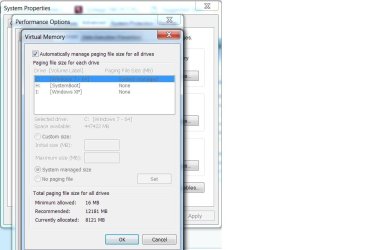
Open Control Panel\All Control Panel Items\System\advanced system settings - Advanced Tab - Performance - advanced Tab - Virtual Memory
Where is the Virtual page located?
 

My Computers My Computers

  • At a glance

    Windows 7 HP 64i5 6600K - 800MHz to 4200MHz4+4G GSkill DDR4 3000IG - Intel 530
    Computer type
    PC/Desktop
    Computer Manufacturer/Model Number
    custom build
    OS
    Windows 7 HP 64
    CPU
    i5 6600K - 800MHz to 4200MHz
    Motherboard
    GA-Z170-HD3P
    Memory
    4+4G GSkill DDR4 3000
    Graphics Card(s)
    IG - Intel 530
    Monitor(s) Displays
    Samsung 226BW
    Screen Resolution
    1680x1050
    Hard Drives
    (1) -1 SM951 – 128GB M.2 AHCI PCIe SSD drive for Windows 7 and Lubuntu
    (2) -1 WD SATA 3 - 1T for Data
    (3) -1 WD SATA 3 - 1T for backup
    PSU
    Thermaltake 450W TR2 gold
    Keyboard
    Old and good Chicony mechanical keyboard
    Mouse
    Logitech mX performance - 9 buttons (had to disable some)
    Internet Speed
    500Mb/s
    Browser
    Firefox 64
    Other Info
    TinyWall firewall
  • At a glance

    Windows 7 Proi7-4500U 800MHz to 3.0GHz(4+4)G DDR3 1600IG intel 4400 + NVIDIA GeForce GT 745M
    Computer type
    Laptop
    System Manufacturer/Model Number
    Asus Q550LF
    OS
    Windows 7 Pro
    CPU
    i7-4500U 800MHz to 3.0GHz
    Motherboard
    Asus Q550LF
    Memory
    (4+4)G DDR3 1600
    Graphics Card(s)
    IG intel 4400 + NVIDIA GeForce GT 745M
    Sound Card
    Realtek
    Monitor(s) Displays
    LG Display LP156WF4-SPH1
    Screen Resolution
    1920 x 1080
    Hard Drives
    BX500 120G SSD for Windows and programs +
    1T HDD for data
    Internet Speed
    500 Mb/s
    Browser
    Firefox
    Other Info
    TinyWall firewall
Please explain how did you built your virtual disk? Is it on a disk partition or under a virtual machine?'

Open Control Panel\All Control Panel Items\System\advanced system settings - Advanced Tab - Performance - advanced Tab - Virtual Memory
Where is the Virtual page located?

The virtual disk is a disk partition. Attached is a screenshot of the virtual memory settings. It's set to "automatic", and I have 8GB memory for it to work with.
 

Attachments

  • Virtual Memory.jpg
    Virtual Memory.jpg
    49 KB · Views: 0

My Computer My Computer

At a glance

Windows 7 Home Premium 64 bitIntel(R) Core(TM) i5 3470 @ 3.20 GHz8GBMSI GT730
Computer type
PC/Desktop
Computer Manufacturer/Model Number
Custom build
OS
Windows 7 Home Premium 64 bit
CPU
Intel(R) Core(TM) i5 3470 @ 3.20 GHz
Motherboard
MSI B75MA-P45
Memory
8GB
Graphics Card(s)
MSI GT730
Sound Card
On Board
Monitor(s) Displays
Vizio M320SL & ViewSonic VP201s
Screen Resolution
1600x1024
Hard Drives
Samsung NAND SSD 860 EVO
Keyboard
Logitech K740
Mouse
Logitech M570 Wireless
Internet Speed
20Mb
Antivirus
MS Security Essentials
Browser
Chrome
Do a check disk. Open a CMD window as admin and type:
chkdsk c: /f
It will say that the disk is in use and if you want to schedule to next start = Yes
Reboot.

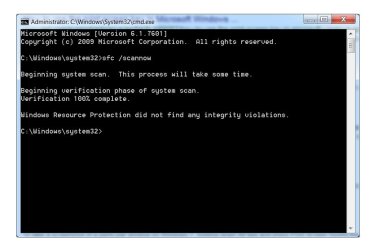
Once back to windows, open a CMD window as admin and type:
sfc /scannow
 

My Computers My Computers

  • At a glance

    Windows 7 HP 64i5 6600K - 800MHz to 4200MHz4+4G GSkill DDR4 3000IG - Intel 530
    Computer type
    PC/Desktop
    Computer Manufacturer/Model Number
    custom build
    OS
    Windows 7 HP 64
    CPU
    i5 6600K - 800MHz to 4200MHz
    Motherboard
    GA-Z170-HD3P
    Memory
    4+4G GSkill DDR4 3000
    Graphics Card(s)
    IG - Intel 530
    Monitor(s) Displays
    Samsung 226BW
    Screen Resolution
    1680x1050
    Hard Drives
    (1) -1 SM951 – 128GB M.2 AHCI PCIe SSD drive for Windows 7 and Lubuntu
    (2) -1 WD SATA 3 - 1T for Data
    (3) -1 WD SATA 3 - 1T for backup
    PSU
    Thermaltake 450W TR2 gold
    Keyboard
    Old and good Chicony mechanical keyboard
    Mouse
    Logitech mX performance - 9 buttons (had to disable some)
    Internet Speed
    500Mb/s
    Browser
    Firefox 64
    Other Info
    TinyWall firewall
  • At a glance

    Windows 7 Proi7-4500U 800MHz to 3.0GHz(4+4)G DDR3 1600IG intel 4400 + NVIDIA GeForce GT 745M
    Computer type
    Laptop
    System Manufacturer/Model Number
    Asus Q550LF
    OS
    Windows 7 Pro
    CPU
    i7-4500U 800MHz to 3.0GHz
    Motherboard
    Asus Q550LF
    Memory
    (4+4)G DDR3 1600
    Graphics Card(s)
    IG intel 4400 + NVIDIA GeForce GT 745M
    Sound Card
    Realtek
    Monitor(s) Displays
    LG Display LP156WF4-SPH1
    Screen Resolution
    1920 x 1080
    Hard Drives
    BX500 120G SSD for Windows and programs +
    1T HDD for data
    Internet Speed
    500 Mb/s
    Browser
    Firefox
    Other Info
    TinyWall firewall
Do a check disk. Open a CMD window as admin and type:
chkdsk c: /f
It will say that the disk is in use and if you want to schedule to next start = Yes
Reboot.

Once back to windows, open a CMD window as admin and type:
sfc /scannow

Done. Here are the results:
 

Attachments

  • sfc scannow.jpg
    sfc scannow.jpg
    38.4 KB · Views: 1

My Computer My Computer

At a glance

Windows 7 Home Premium 64 bitIntel(R) Core(TM) i5 3470 @ 3.20 GHz8GBMSI GT730
Computer type
PC/Desktop
Computer Manufacturer/Model Number
Custom build
OS
Windows 7 Home Premium 64 bit
CPU
Intel(R) Core(TM) i5 3470 @ 3.20 GHz
Motherboard
MSI B75MA-P45
Memory
8GB
Graphics Card(s)
MSI GT730
Sound Card
On Board
Monitor(s) Displays
Vizio M320SL & ViewSonic VP201s
Screen Resolution
1600x1024
Hard Drives
Samsung NAND SSD 860 EVO
Keyboard
Logitech K740
Mouse
Logitech M570 Wireless
Internet Speed
20Mb
Antivirus
MS Security Essentials
Browser
Chrome
Back
Top