Hi
justmessedit,
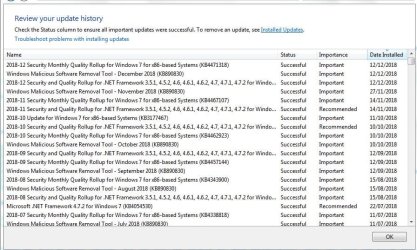
Paul; There is no new hardware installed; nor software; some new Windows updates as from the 12th, which I've attached as an image (I hope)...
They seem OK!
Haven't tried bootup without the Toshiba; would have to test that...
OK, let us know if it makes a difference!
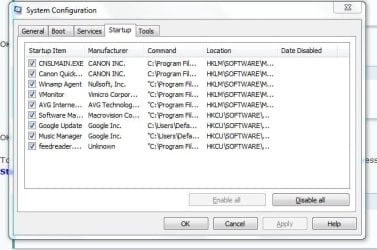
Things getting loaded at start-up....again would have to check
OK.
To see what is loading at
Startup, click
Start => type
msconfig in the search box => press
Enter. Click the
Startup tab.
I do have an installation disk...
That's good, we can run the
Startup Repair from it once you have checked out the above!
Getting into safe mode...have forgotten how this is done, because have never really had to use it...
I think it is the
F8 key on
bootup!
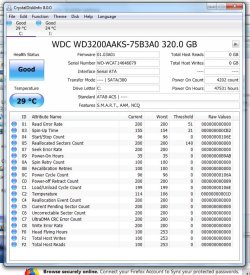
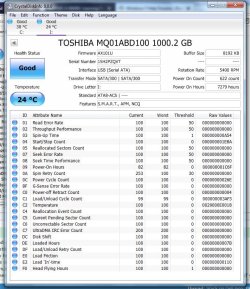
Download and run what
F22Simpilot has suggested.
=========================================================================
To run
CHKDSK [Check Disk], please follow my instructions below!
CHKDSK [Check Disk]
CHKDSK [Check Disk] is a Windows utility program for detecting and repairing corruptions of the file system [FAT16, FAT32, and NTFS drives]. CHKDSK
must be run from an
elevated command prompt:
(1) Click
Start.
(2) In the
search box type
cmd.
(3)
Right-click the
cmd icon from the search results under
Programs and select
Run as administrator.
(4) The elevated command prompt window will now open.
IMPORTANT: When running CHKDSK, if any bad sectors are found, and when attempting to repair that sector, the data available on that sector might be lost.
[1] Run CHKDSK in
repair mode. This one
repairs errors on the disk
without scanning for any bad sectors.
Copy chkdsk C: /F [yes there are 2 spaces there] and
Paste it [you need to use the mouse
right-click and
paste for this as
CTRL+V doesn’t work] into the elevated command prompt window and press
Enter - This
does repair any file system errors or corruptions on drive
C:\, provided that the disk isn’t in use. If the disk is in use [locked], CHKDSK displays a prompt that asks whether you want to schedule the disk to be checked the next time you restart the OS, click
Yes to schedule this check and then
Restart. After CHKDSK has completed, Windows should boot normally [possibly after a second auto-reboot].
If the problem persists, then run
Option 2 below!
[2] If there are still any errors or corruptions, then run CHKDSK in
repair mode again. This one
repairs errors on the disk
and scans for bad sectors, it then attempts to repair or recover any readable information [implies
/F].
Copy chkdsk C: /R [yes there are 2 spaces there] and
Paste it [you need to use the mouse
right-click and
paste for this as
CTRL+V doesn’t work] into the elevated command prompt window and press
Enter - This
does repair any file system errors or corruptions on drive
C:\, provided that the disk isn’t in use. If the disk is in use [locked], CHKDSK displays a prompt that asks whether you want to schedule the disk to be checked the next time you restart the OS, click
Yes to schedule this check and then
Restart. After CHKDSK has completed, Windows should boot normally [possibly after a second auto-reboot].
NOTE: The CHKDSK log can be found in the
Event Viewer:
(1) Click
Start.
(2) In the
search box type
eventvwr.msc and press
Enter.
(3) On the left-hand sidebar, expand
Windows Logs and click
Application.
(4) On the right-hand side click
Filter current log.
(5) In the
Event sources: dropdown list select
Wininit, press
Enter, and click
OK.
You should now only see the log files from the Wininit event sources displayed, which is where the CHKDSK logs are located.
ALTERNATIVELY: You can create your own log location on the
Root of
C:/ for example at the same time you run CHKDSK. Here is an example for each of the three options above, assuming that the HDD is
C:/ and you want the log created on the
Root of
C:/:
[1]
chkdsk C: > C:\ chkdskC_log.txt [change the log name to your own].
[2]
chkdsk C: /F > C:\ chkdskCF_log.txt [change the log name to your own].
[3]
chkdsk C: /R > C:\ chkdskCR_log.txt [change the log name to your own].
You can
Delete the log file if you so wish once you are satisfied and finished with it!
Here is some further information =>
How to Check Disk for Errors Using chkdsk and Command Prompt.
I hope this helps!