Stationary Blue Circle Over Network Icon

timw128

New member
Member
VIP
Local time
9:20 AM
Messages
294
Location
Michigan, USA
Hello-

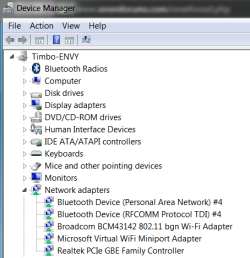
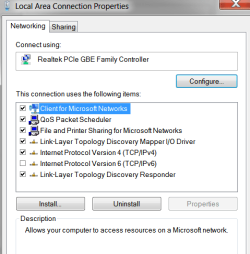
Hope we can get some help with this, this time around... First, there's nothing wrong

with my mobo, nor my network adapter driver- this surely seems an issue within

Windows 7.

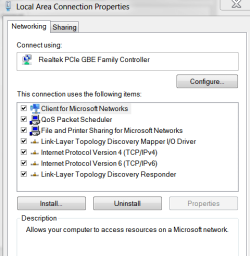
We'll attach some screen shots for observation. We tried to run the MS WMIDiag tool

and there seems to be something wrong with that, too.

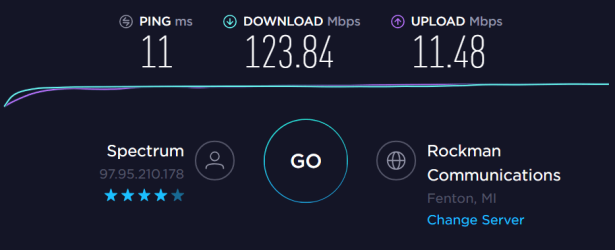
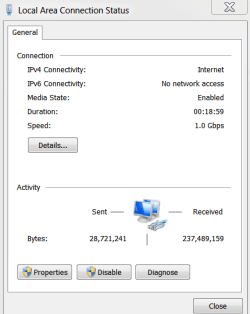
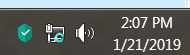
We have great connectivity, the stationary blue circle only appears to happen on start

up first thing in the morning.

The Windows blue circle seems to be a popular fault according to a Google search, but

haven't found a solution for my specific issue.

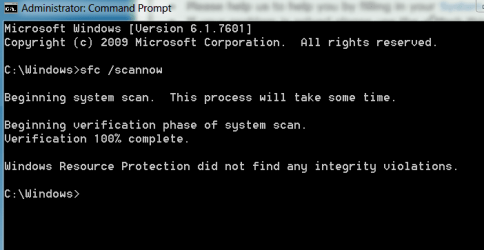
Yes, 'sfc/scannow' doesn't have any affect, either.

We use an ethernet connection and have Bluetooth and WiFi disconnected.

Of further note, we've had issues with the yellow exclamation point over the network

icon in the past, and the only way to get that and the blue circle to go away is to

disable/enable the network adapter.

If someone would like to see what's going on in Event Viewer, let me know and we'll

post... PLEASE NOTE ATTACHMENTS.

Thanks!
 

Attachments
  • 1.PNG
    1.PNG
    2.1 KB · Views: 15
  • 2.PNG
    2.PNG
    16.5 KB · Views: 0
  • 3.PNG
    3.PNG
    15.8 KB · Views: 15
  • 4.PNG
    4.PNG
    9.6 KB · Views: 15
  • 5.PNG
    5.PNG
    12.5 KB · Views: 15
  • 6.PNG
    6.PNG
    12 KB · Views: 15
  • 7.PNG
    7.PNG
    18.7 KB · Views: 0
  • 8.PNG
    8.PNG
    10.5 KB · Views: 15

My Computer My Computer

At a glance

Windows 7 Pro SP1 x64Intel Haswell i7-4770 3.4GHzG. SKILLS 32GB Ripjaws X Series DDR3 1600 SDRAMIntegrated HD4600- upgrade coming!
Computer type
PC/Desktop
Computer Manufacturer/Model Number
HP ENVY 700-515xt CTO, with more cam, headers, and 4.11 gears.
OS
Windows 7 Pro SP1 x64
CPU
Intel Haswell i7-4770 3.4GHz
Motherboard
OEM Kaili2 (MSI MS-7826 v2.0)
Memory
G. SKILLS 32GB Ripjaws X Series DDR3 1600 SDRAM
Graphics Card(s)
Integrated HD4600- upgrade coming!
Sound Card
Integrated...for now.
Monitor(s) Displays
Dell ST-2310 Digital
Screen Resolution
I like 1920x1080
Hard Drives
C\:-Samsung 850PRO SSD-256gb, D:\-SG Barracuda 7200 HDD 1 TB (Storage)
PSU
350w OEM (About to become a display in the aquarium!)
Case
ENVY OEM
Cooling
FANS
Keyboard
Logitech and HP- USB.
Mouse
Logitech LS1 (Alltime favorite of mine!) and HP- both USB
Internet Speed
65Mbps Down (min)/4.5Mbps UP- Charter Comm HS cable
Antivirus
avast! Internet Security 2015/MBAM
Browser
Opera, at present. Love that Chromium horsepower!
Hello timw128,

It means the network adapter is acquiring a connection.

Had you tried any of these, what was the result?

  • Connect to Network after a Clean Boot?
  • Connect to Network after Safe Boot with Networking?
  • Power up PC after Router shows all green lights?
 

My Computer My Computer

At a glance

Windows 7 x64, Vista x64, 8.1 smartphoneIntel E8400 65W 64-bitDDR2 2 x 2GB, 1GB x 2XFX Radeon HD5750
Computer type
PC/Desktop
OS
Windows 7 x64, Vista x64, 8.1 smartphone
CPU
Intel E8400 65W 64-bit
Motherboard
Gigabyte EP45-UD3LR
Memory
DDR2 2 x 2GB, 1GB x 2
Graphics Card(s)
XFX Radeon HD5750
Sound Card
AMD High Definition Audio; Realtek High Definition Audio
Monitor(s) Displays
iiyama prolite X2377HDS
Screen Resolution
1920 x 1080
Hard Drives
500GB 7200 rpm Seagate ST3500413AS 16MB, 500GB 5400 rpm Toshiba MQ02ABF050H 32MB, 200GB 7200 rpm Seagate ST3200820AS 8MB, 2TB 7200 rpm Western Digital WD20EZRX 64MB
PSU
Enermax Liberty Modular
Case
Antec P193 Midi Tower
Keyboard
Mionix ZIBAL 60
Mouse
Razer USB 2.0 Diamondback Mouse or Huion Graphics Tablet
Browser
Internet Explorer, Lunascape, Firefox, Opera, Avast Safezone
Hi

Might also be your AV getting in the way.

Im running Panda, and i regularly get that even thou i can access the Web
Funny thing is that prior to them, Panda, introducing the VPN access facility it worked fine

Roy
 

My Computer My Computer

At a glance

W7 home premium 32bit/W7HP 64bit/w10 tp insid...E5300 dual core3gbNvidia Geforce 7100 Nforce 630i
Computer type
PC/Desktop
Computer Manufacturer/Model Number
medionl/Aspire 6930G/acer x55a
OS
W7 home premium 32bit/W7HP 64bit/w10 tp insider ring
CPU
E5300 dual core
Motherboard
medion MS7366
Memory
3gb
Graphics Card(s)
Nvidia Geforce 7100 Nforce 630i
Monitor(s) Displays
avixc
Internet Speed
n (isp resticted to 72)
Antivirus
mse/pands
Browser
palemoon
Other Info
Belkin Fd7050 n USB using Railink RT2870 drivers, more upto date
Hello timw128,

It means the network adapter is acquiring a connection.

Had you tried any of these, what was the result?

  • Connect to Network after a Clean Boot?
  • Connect to Network after Safe Boot with Networking?
  • Power up PC after Router shows all green lights?


-No

-Yes... all's well.

-Yes

Thanks for checking on my post.

tim
 

My Computer My Computer

At a glance

Windows 7 Pro SP1 x64Intel Haswell i7-4770 3.4GHzG. SKILLS 32GB Ripjaws X Series DDR3 1600 SDRAMIntegrated HD4600- upgrade coming!
Computer type
PC/Desktop
Computer Manufacturer/Model Number
HP ENVY 700-515xt CTO, with more cam, headers, and 4.11 gears.
OS
Windows 7 Pro SP1 x64
CPU
Intel Haswell i7-4770 3.4GHz
Motherboard
OEM Kaili2 (MSI MS-7826 v2.0)
Memory
G. SKILLS 32GB Ripjaws X Series DDR3 1600 SDRAM
Graphics Card(s)
Integrated HD4600- upgrade coming!
Sound Card
Integrated...for now.
Monitor(s) Displays
Dell ST-2310 Digital
Screen Resolution
I like 1920x1080
Hard Drives
C\:-Samsung 850PRO SSD-256gb, D:\-SG Barracuda 7200 HDD 1 TB (Storage)
PSU
350w OEM (About to become a display in the aquarium!)
Case
ENVY OEM
Cooling
FANS
Keyboard
Logitech and HP- USB.
Mouse
Logitech LS1 (Alltime favorite of mine!) and HP- both USB
Internet Speed
65Mbps Down (min)/4.5Mbps UP- Charter Comm HS cable
Antivirus
avast! Internet Security 2015/MBAM
Browser
Opera, at present. Love that Chromium horsepower!
Hi

Might also be your AV getting in the way.

Im running Panda, and i regularly get that even thou i can access the Web
Funny thing is that prior to them, Panda, introducing the VPN access facility it worked fine

Roy


Thanks, Roy... indeed, that thought came to mind... I had changed a lot of settings in

Kaspersky Internet Security 2019 to work with the VPN provider I WAS using-

Private Internet Access. I don't use that subscription anymore, or any VPN for that matter.

Before publishing this thread, we uninstalled the Kaspersky, cleaned the Reg up with CCleaner,

and reinstalled, putting everything back to original. Yet, still get the blue circle on morning

startup. System is setup to Sleep Mode, and all of that works fine- no issue upon awakening.

The blue circle was NOT rotating, just statically hovering, for the record.

I looked in Event Viewer and noticed this particular Event ID 10 that was triggered at time of

morning startup... Event Viewer>Windows Logs> Applications- WMI error 0X80041003.

We ran the MS .vbs script relevant to WMI error, cleared the Event Log, but haven't tried a restart.

I've got to do a clean boot and figure out if it's Kaspersky, or what.

Thanks for helping me with this, Roy.

tim
 

My Computer My Computer

At a glance

Windows 7 Pro SP1 x64Intel Haswell i7-4770 3.4GHzG. SKILLS 32GB Ripjaws X Series DDR3 1600 SDRAMIntegrated HD4600- upgrade coming!
Computer type
PC/Desktop
Computer Manufacturer/Model Number
HP ENVY 700-515xt CTO, with more cam, headers, and 4.11 gears.
OS
Windows 7 Pro SP1 x64
CPU
Intel Haswell i7-4770 3.4GHz
Motherboard
OEM Kaili2 (MSI MS-7826 v2.0)
Memory
G. SKILLS 32GB Ripjaws X Series DDR3 1600 SDRAM
Graphics Card(s)
Integrated HD4600- upgrade coming!
Sound Card
Integrated...for now.
Monitor(s) Displays
Dell ST-2310 Digital
Screen Resolution
I like 1920x1080
Hard Drives
C\:-Samsung 850PRO SSD-256gb, D:\-SG Barracuda 7200 HDD 1 TB (Storage)
PSU
350w OEM (About to become a display in the aquarium!)
Case
ENVY OEM
Cooling
FANS
Keyboard
Logitech and HP- USB.
Mouse
Logitech LS1 (Alltime favorite of mine!) and HP- both USB
Internet Speed
65Mbps Down (min)/4.5Mbps UP- Charter Comm HS cable
Antivirus
avast! Internet Security 2015/MBAM
Browser
Opera, at present. Love that Chromium horsepower!
Back
Top