Floppy drive not being seen

Ukdodger

New member
Member
VIP
Local time
4:40 AM
Messages
178
Location
Surrey England
Windows 7 home desktop Akasa. The floppy drive isnt being seen. It's been in the PC from the beginning but I've only just wanted to use it. If I put a floppy in it starts up and sounds as of it's going to do something but then just stops. The drive itself isnt showing in Disk management or in the navigation pane. The floppy works fine in my Laptop. Any ideas? Thanks
 

My Computer My Computer

At a glance

Windows 7 home
Computer type
Laptop
OS
Windows 7 home
Hi

So, the floppy unit is wired up directly to the motherboard of your computer? Had you looked at the BIOS settings for an Enable IDE drive. or similar? Such setting was usually found in the first page of the BIOS menu. Also check for the Master/Slave jumper on the physical IDE connection.
 

My Computer My Computer

At a glance

Windows 7 x64, Vista x64, 8.1 smartphoneIntel E8400 65W 64-bitDDR2 2 x 2GB, 1GB x 2XFX Radeon HD5750
Computer type
PC/Desktop
OS
Windows 7 x64, Vista x64, 8.1 smartphone
CPU
Intel E8400 65W 64-bit
Motherboard
Gigabyte EP45-UD3LR
Memory
DDR2 2 x 2GB, 1GB x 2
Graphics Card(s)
XFX Radeon HD5750
Sound Card
AMD High Definition Audio; Realtek High Definition Audio
Monitor(s) Displays
iiyama prolite X2377HDS
Screen Resolution
1920 x 1080
Hard Drives
500GB 7200 rpm Seagate ST3500413AS 16MB, 500GB 5400 rpm Toshiba MQ02ABF050H 32MB, 200GB 7200 rpm Seagate ST3200820AS 8MB, 2TB 7200 rpm Western Digital WD20EZRX 64MB
PSU
Enermax Liberty Modular
Case
Antec P193 Midi Tower
Keyboard
Mionix ZIBAL 60
Mouse
Razer USB 2.0 Diamondback Mouse or Huion Graphics Tablet
Browser
Internet Explorer, Lunascape, Firefox, Opera, Avast Safezone

My Computer My Computer

At a glance

Win7 pro x64stock i7 7700kCorsair Vengeance LPX 16GB (2x8GB) DDR4 @ 320...integrated Intel HD 630
Computer type
PC/Desktop
Computer Manufacturer/Model Number
diy
OS
Win7 pro x64
CPU
stock i7 7700k
Motherboard
Gigabyte Z270N-WIFI mini-ITX
Memory
Corsair Vengeance LPX 16GB (2x8GB) DDR4 @ 3200MHz
Graphics Card(s)
integrated Intel HD 630
Sound Card
onboard Realtek ALC1220
Monitor(s) Displays
two vertically mounted samsung 55" 4k un55mu8000
Screen Resolution
1920x1280
Hard Drives
256GB Samsung EVO 960 M.2 pci-e NVMe SSD
PSU
SilverStone Nightjar ST45NF 450Watt Fanless
Case
No case. Motherboard is mounted directly onto power supply
Cooling
Evercool low profile 815EP with Panaflow 12L fan at 7v
Keyboard
Ortek MCK-86 mini
Mouse
Belkin 5-button USB
Internet Speed
spectrum 400mbps
Hi

So, the floppy unit is wired up directly to the motherboard of your computer? Had you looked at the BIOS settings for an Enable IDE drive. or similar? Such setting was usually found in the first page of the BIOS menu. Also check for the Master/Slave jumper on the physical IDE connection.


Thanks. I'll check the bios. Where is the Master/Slave jumper on the physical IDE connection?
 

My Computer My Computer

At a glance

Windows 7 home
Computer type
Laptop
OS
Windows 7 home
If yoy only have one floppy it doesn't matter about master slave it's more likely disabled in the bios
 

My Computer My Computer

At a glance

win 8 32 bit
Computer type
PC/Desktop
OS
win 8 32 bit
If yoy only have one floppy it doesn't matter about master slave it's more likely disabled in the bios

Thanks Sam. How do I get to the bios? I have a laptop with W7 home on it and a desktop with the same. Hitting 'F2' on the laptop puts up the bios screen. It's a simple one where you move the left arrow over to 'Boot' hit return and you get the boot order.

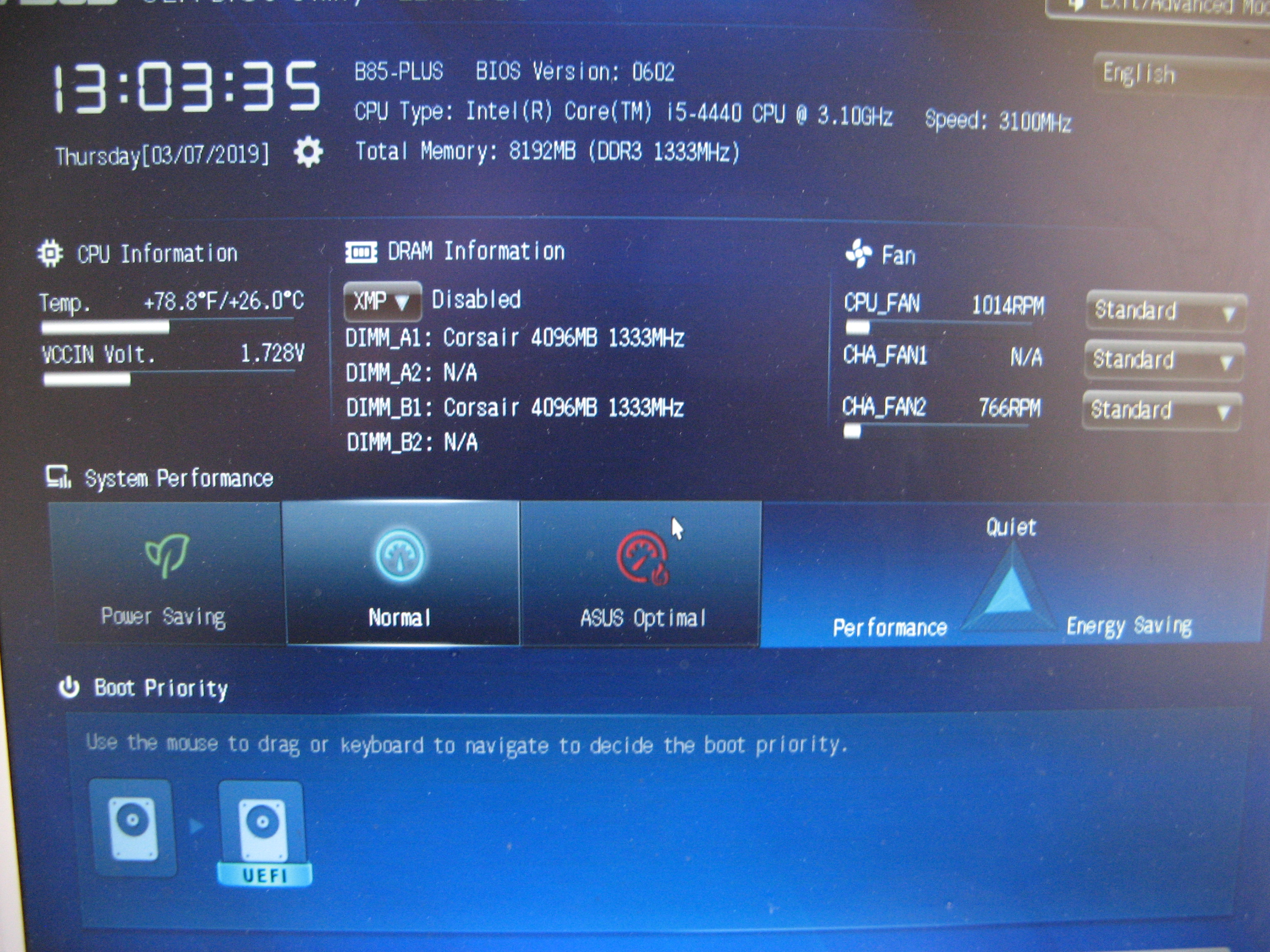
On the desktop however I get a far more complicated screen with lots of options and appears to related to the graphics card.


My Computer My Computer

At a glance

Windows 7 home
Computer type
Laptop
OS
Windows 7 home
On this particular Motherboard, you need to put the BIOS into advanced mode to be able to access all the options. The Advanced Mode selection is along the top row of options, around about the middle. Then see page 2-29 of the user manual for SATA/IDE setup.

For the legacy IDE chipset to work, you have to turn off SATA/AHCI. And you will need the software driver for the IDE device, otherwise the computer wont recognise the operating system.

Actually, having said that, you can check Window's device manager to see if the IDE driver is already installed.
 

My Computer My Computer

At a glance

Windows 7 x64, Vista x64, 8.1 smartphoneIntel E8400 65W 64-bitDDR2 2 x 2GB, 1GB x 2XFX Radeon HD5750
Computer type
PC/Desktop
OS
Windows 7 x64, Vista x64, 8.1 smartphone
CPU
Intel E8400 65W 64-bit
Motherboard
Gigabyte EP45-UD3LR
Memory
DDR2 2 x 2GB, 1GB x 2
Graphics Card(s)
XFX Radeon HD5750
Sound Card
AMD High Definition Audio; Realtek High Definition Audio
Monitor(s) Displays
iiyama prolite X2377HDS
Screen Resolution
1920 x 1080
Hard Drives
500GB 7200 rpm Seagate ST3500413AS 16MB, 500GB 5400 rpm Toshiba MQ02ABF050H 32MB, 200GB 7200 rpm Seagate ST3200820AS 8MB, 2TB 7200 rpm Western Digital WD20EZRX 64MB
PSU
Enermax Liberty Modular
Case
Antec P193 Midi Tower
Keyboard
Mionix ZIBAL 60
Mouse
Razer USB 2.0 Diamondback Mouse or Huion Graphics Tablet
Browser
Internet Explorer, Lunascape, Firefox, Opera, Avast Safezone
On this particular Motherboard, you need to put the BIOS into advanced mode to be able to access all the options. The Advanced Mode selection is along the top row of options, around about the middle. Then see page 2-29 of the user manual for SATA/IDE setup.

For the legacy IDE chipset to work, you have to turn off SATA/AHCI. And you will need the software driver for the IDE device, otherwise the computer wont recognise the operating system.

Actually, having said that, you can check Window's device manager to see if the IDE driver is already installed.

Thanks but you're way ahead of me. In the device manager it says this:

IDE ATA?ATAPI controllers
Intel(r) 8series/C220 chipset family SATA AHCI controller

I attempted an update and reply was it is up to date.

Is that all as should be?
 

My Computer My Computer

At a glance

Windows 7 home
Computer type
Laptop
OS
Windows 7 home
If I remember well, floppy drives had a dedicated connector to a flat cable. They are not IDE - PATA. The drive letters associated to floppy drives were A: or B:

You won't find a floppy connector on newer MB as the one on post #6.
 

My Computers My Computers

  • At a glance

    Windows 7 HP 64i5 6600K - 800MHz to 4200MHz4+4G GSkill DDR4 3000IG - Intel 530
    Computer type
    PC/Desktop
    Computer Manufacturer/Model Number
    custom build
    OS
    Windows 7 HP 64
    CPU
    i5 6600K - 800MHz to 4200MHz
    Motherboard
    GA-Z170-HD3P
    Memory
    4+4G GSkill DDR4 3000
    Graphics Card(s)
    IG - Intel 530
    Monitor(s) Displays
    Samsung 226BW
    Screen Resolution
    1680x1050
    Hard Drives
    (1) -1 SM951 – 128GB M.2 AHCI PCIe SSD drive for Windows 7 and Lubuntu
    (2) -1 WD SATA 3 - 1T for Data
    (3) -1 WD SATA 3 - 1T for backup
    PSU
    Thermaltake 450W TR2 gold
    Keyboard
    Old and good Chicony mechanical keyboard
    Mouse
    Logitech mX performance - 9 buttons (had to disable some)
    Internet Speed
    500Mb/s
    Browser
    Firefox 64
    Other Info
    TinyWall firewall
  • At a glance

    Windows 7 Proi7-4500U 800MHz to 3.0GHz(4+4)G DDR3 1600IG intel 4400 + NVIDIA GeForce GT 745M
    Computer type
    Laptop
    System Manufacturer/Model Number
    Asus Q550LF
    OS
    Windows 7 Pro
    CPU
    i7-4500U 800MHz to 3.0GHz
    Motherboard
    Asus Q550LF
    Memory
    (4+4)G DDR3 1600
    Graphics Card(s)
    IG intel 4400 + NVIDIA GeForce GT 745M
    Sound Card
    Realtek
    Monitor(s) Displays
    LG Display LP156WF4-SPH1
    Screen Resolution
    1920 x 1080
    Hard Drives
    BX500 120G SSD for Windows and programs +
    1T HDD for data
    Internet Speed
    500 Mb/s
    Browser
    Firefox
    Other Info
    TinyWall firewall
Sorry that is a blind alley - apparently there is no separate driver for the IDE chipset on the B85_PLUS. Disregard what I had said.

Instead, power up the computer into BIOS. Select Advanced Options from the Menu, then select SATA Configuration. IDE configuration will be there. You will need to set the SATA Mode Selection to IDE for the IDE Legacy option to appear. I have a feeling that the computer wont boot after those changes. But there is nothing stopping you checking that setting for yourself.
 

My Computer My Computer

At a glance

Windows 7 x64, Vista x64, 8.1 smartphoneIntel E8400 65W 64-bitDDR2 2 x 2GB, 1GB x 2XFX Radeon HD5750
Computer type
PC/Desktop
OS
Windows 7 x64, Vista x64, 8.1 smartphone
CPU
Intel E8400 65W 64-bit
Motherboard
Gigabyte EP45-UD3LR
Memory
DDR2 2 x 2GB, 1GB x 2
Graphics Card(s)
XFX Radeon HD5750
Sound Card
AMD High Definition Audio; Realtek High Definition Audio
Monitor(s) Displays
iiyama prolite X2377HDS
Screen Resolution
1920 x 1080
Hard Drives
500GB 7200 rpm Seagate ST3500413AS 16MB, 500GB 5400 rpm Toshiba MQ02ABF050H 32MB, 200GB 7200 rpm Seagate ST3200820AS 8MB, 2TB 7200 rpm Western Digital WD20EZRX 64MB
PSU
Enermax Liberty Modular
Case
Antec P193 Midi Tower
Keyboard
Mionix ZIBAL 60
Mouse
Razer USB 2.0 Diamondback Mouse or Huion Graphics Tablet
Browser
Internet Explorer, Lunascape, Firefox, Opera, Avast Safezone
Sorry that is a blind alley - apparently there is no separate driver for the IDE chipset on the B85_PLUS. Disregard what I had said.

Instead, power up the computer into BIOS. Select Advanced Options from the Menu, then select SATA Configuration. IDE configuration will be there. You will need to set the SATA Mode Selection to IDE for the IDE Legacy option to appear. I have a feeling that the computer wont boot after those changes. But there is nothing stopping you checking that setting for yourself.


Thanks Iko I'l try that. Not sure what you mean by checking yourself?
 

My Computer My Computer

At a glance

Windows 7 home
Computer type
Laptop
OS
Windows 7 home
Back
Top