Transfer b/u image to new SSD drive?

riffwraith

New member
Member
VIP
Local time
10:17 AM
Messages
240
Understandably, this might be better off on the Acronis forum, but I figured I'd start here.

My O/S drive is currently a SATA HDD. I have no problems imaging, and restoring to the same drive. I can also restore to a brand new drive, if this one ever failed.

But can I restore to a brand new SSD drive? I have no experience with these drives, and do not yet know if they function in principal the same way as SATA drives.

Anyone ever do this?

Thanks in advance.
 

My Computer My Computer

At a glance

W7 64 UltIntel Core i9-7940xGSkill 128GBAMD Radeon RX 560
Computer type
PC/Desktop
Computer Manufacturer/Model Number
Custom
OS
W7 64 Ult
CPU
Intel Core i9-7940x
Motherboard
ASUS x299 TUF
Memory
GSkill 128GB
Graphics Card(s)
AMD Radeon RX 560
Sound Card
RME
Screen Resolution
1920x1080
Hard Drives
5
PSU
BeQuiet!
Case
BeQuiet!
Keyboard
HyperX
Mouse
Logitech
Browser
IE - what else is there?

Thanks for that.

Hmmm.... how do I change the settings, if I have not done a b/u to the drive yet?
 

My Computer My Computer

At a glance

W7 64 UltIntel Core i9-7940xGSkill 128GBAMD Radeon RX 560
Computer type
PC/Desktop
Computer Manufacturer/Model Number
Custom
OS
W7 64 Ult
CPU
Intel Core i9-7940x
Motherboard
ASUS x299 TUF
Memory
GSkill 128GB
Graphics Card(s)
AMD Radeon RX 560
Sound Card
RME
Screen Resolution
1920x1080
Hard Drives
5
PSU
BeQuiet!
Case
BeQuiet!
Keyboard
HyperX
Mouse
Logitech
Browser
IE - what else is there?
You would be better off to search this forum instead of trying to follow something for W10. Just enter ' os to ssd ' in the search box and it will put you in the tutorials which are true masterpieces of technical data and as a bonus are simple to follow. Oh yeah they also WORK :D
Art.
 

My Computer My Computer

At a glance

Win7 sp1 Pro 64bit / XP sp2 Pro (games only)Intel Core 2 Duo E8400 @ 3.00GHz8.00 GB Dual-Channel DDR2 @ 400MHz (5-5-5-18)1024MB GeForce GTX 560
Computer type
PC/Desktop
Computer Manufacturer/Model Number
Home built
OS
Win7 sp1 Pro 64bit / XP sp2 Pro (games only)
CPU
Intel Core 2 Duo E8400 @ 3.00GHz
Motherboard
Intel Corporation DP35DP (CPU1)
Memory
8.00 GB Dual-Channel DDR2 @ 400MHz (5-5-5-18)
Graphics Card(s)
1024MB GeForce GTX 560
Sound Card
NVIDIA High Definition Audio
Monitor(s) Displays
SyncMaster (2048x1152@60Hz)
Hard Drives
240GB Sandisc Extreme Pro SSD
244GB Seagate ST3250410AS
488GB Seagate ST500DM002-1BD142
931GB Western Digital WDC WD1003FZEX
PSU
Corsair 720
Case
ATX
Keyboard
HID Keyboard Device Logitech
Mouse
HID-compliant mouse Microsoft
Other Info
TSSTcorp CDDVDW SH-S223L

HL-DT-ST BD-RE BH12LS35
You would be better off to search this forum instead of trying to follow something for W10.

Oh yeah - the link as it appears in samurai's post has a '7' in it; I didn't realize the art. is for 10 'till now. Thanks for pointing that out.

Ok, will do a search, and see what I come up with. If I need any more help, I will come back..

Thanks to both of you.
 

My Computer My Computer

At a glance

W7 64 UltIntel Core i9-7940xGSkill 128GBAMD Radeon RX 560
Computer type
PC/Desktop
Computer Manufacturer/Model Number
Custom
OS
W7 64 Ult
CPU
Intel Core i9-7940x
Motherboard
ASUS x299 TUF
Memory
GSkill 128GB
Graphics Card(s)
AMD Radeon RX 560
Sound Card
RME
Screen Resolution
1920x1080
Hard Drives
5
PSU
BeQuiet!
Case
BeQuiet!
Keyboard
HyperX
Mouse
Logitech
Browser
IE - what else is there?
Ok, I am stuck.

I bought this drive:

https://www.wd.com/products/internal-ssd/wd-black-sn750-nvme-ssd.html#WDS500G3X0C

With my SATA HDD disconnected...

I installed the SSD, and the BIOS sees it. I can not, however, b/u my Acronis image to it, nor can I install Windows to it from the W7 DVD. In the BIOS, ACHI is enabled. A search for "NVME" in my MB manual revealed nothing.

Hoping someone has an idea of what I need to do?

Again, the art above is for W10, and as this is going to be my OS drive, there is nothing to do in the OS yet, a it is not installed.

Thanks in advance.
 

My Computer My Computer

At a glance

W7 64 UltIntel Core i9-7940xGSkill 128GBAMD Radeon RX 560
Computer type
PC/Desktop
Computer Manufacturer/Model Number
Custom
OS
W7 64 Ult
CPU
Intel Core i9-7940x
Motherboard
ASUS x299 TUF
Memory
GSkill 128GB
Graphics Card(s)
AMD Radeon RX 560
Sound Card
RME
Screen Resolution
1920x1080
Hard Drives
5
PSU
BeQuiet!
Case
BeQuiet!
Keyboard
HyperX
Mouse
Logitech
Browser
IE - what else is there?
I can not, however, b/u my Acronis image to it, nor can I install Windows to it from the W7 DVD.


win 7 does not natively see nvme disks. It seems your Acronis boot media doesn't see it either?

You will have to integrate the MS nvme updates into your windows 7 installation media.

You can also integrate them into Acronis restore media ( if it is winpe based)

Update your Win 7 installation media.

Put the MS nvme updates ( they are attached to the linked post ) into the relevant UPDATES folders ( see second post below the linked one).

Then run 7updater.cmd You can say no to downloading SIMPLIX and then it will only integrate whatever you have already put in the UPDATES folders.
 

My Computers My Computers

  • At a glance

    7 X64i5 84002x8gb 3200mhz
    Computer type
    PC/Desktop
    OS
    7 X64
    CPU
    i5 8400
    Motherboard
    gigabyte b365m ds3h
    Memory
    2x8gb 3200mhz
    Hard Drives
    various
    PSU
    pure power 11 400w cm
    Case
    Coolermaster
    Cooling
    cryorig m9i
  • At a glance

    7x64g54008gb ddr4 2400
    Computer type
    PC/Desktop
    OS
    7x64
    CPU
    g5400
    Motherboard
    ga b365m ds3h
    Memory
    8gb ddr4 2400
    PSU
    xfx pro 450w
Thanks for that!


"win 7 does not natively see nvme disks"


Aha!


After doing some research, I booted into Windows (SATA HDD install), with the SSD installed. Not showing in C.MGMT, and shows as a PCI device with a yellow exc. mark next to it in Dev.Mgr. Now I see why.


So, I have the zips, but I am stuck


3. Browse to the folder containing your win 7 installation media


C:\Windows? Or...?
 

My Computer My Computer

At a glance

W7 64 UltIntel Core i9-7940xGSkill 128GBAMD Radeon RX 560
Computer type
PC/Desktop
Computer Manufacturer/Model Number
Custom
OS
W7 64 Ult
CPU
Intel Core i9-7940x
Motherboard
ASUS x299 TUF
Memory
GSkill 128GB
Graphics Card(s)
AMD Radeon RX 560
Sound Card
RME
Screen Resolution
1920x1080
Hard Drives
5
PSU
BeQuiet!
Case
BeQuiet!
Keyboard
HyperX
Mouse
Logitech
Browser
IE - what else is there?
You need to extract the win 7 iso to a folder on a hard drive. We are going to update some of the files so it has to be somewhere writeable. Too slow to do it if your installation media is on usb stick.

You can use the extract-iso.cmd

That will extract it to folder called EXTRACTED-ISO. That is the folder you browse to.easiest to put it on the root of the drive, so you will have C:\EXTRACTED-ISO folder.

If you don't have an iso, you can create a folder on the root and call it extracted-iso . Then copy the entire contents of your installation usb stick into that folder
 

My Computers My Computers

  • At a glance

    7 X64i5 84002x8gb 3200mhz
    Computer type
    PC/Desktop
    OS
    7 X64
    CPU
    i5 8400
    Motherboard
    gigabyte b365m ds3h
    Memory
    2x8gb 3200mhz
    Hard Drives
    various
    PSU
    pure power 11 400w cm
    Case
    Coolermaster
    Cooling
    cryorig m9i
  • At a glance

    7x64g54008gb ddr4 2400
    Computer type
    PC/Desktop
    OS
    7x64
    CPU
    g5400
    Motherboard
    ga b365m ds3h
    Memory
    8gb ddr4 2400
    PSU
    xfx pro 450w
You need to extract the win 7 iso to a folder on a hard drive.


I don't have an iso anywhere.

If you don't have an iso, you can create a folder on the root and call it extracted-iso . Then copy the entire contents of your installation usb stick into that folder


Ok, what I have is my orig. install DVD (pretty old). should I copy the contents to a HDD? Do I need to create an iso of that?
 

My Computer My Computer

At a glance

W7 64 UltIntel Core i9-7940xGSkill 128GBAMD Radeon RX 560
Computer type
PC/Desktop
Computer Manufacturer/Model Number
Custom
OS
W7 64 Ult
CPU
Intel Core i9-7940x
Motherboard
ASUS x299 TUF
Memory
GSkill 128GB
Graphics Card(s)
AMD Radeon RX 560
Sound Card
RME
Screen Resolution
1920x1080
Hard Drives
5
PSU
BeQuiet!
Case
BeQuiet!
Keyboard
HyperX
Mouse
Logitech
Browser
IE - what else is there?
There is a simple way to do it. I have done it on my computer.
- Shut down, disconnect the power cord from the wall outlet, wait a minute to discharge the PS capacitors.
- Install the M.2 MVMe SSD.
- Power on and boot from the HDD.
- Open device manager. It will say there is a new hardware. Install the M.2 MVMe SSD Driver. SIW2 gave you the link for his 7updater and on first post you have the links for the MVMe drivers.
- Once you have no yellow alerts of missing drivers on Device manager, you can clone the HDD to the MVMe SSD using Acronis or Macrium Software | Macrium Reflect Free
 
Last edited:

My Computers My Computers

  • At a glance

    Windows 7 HP 64i5 6600K - 800MHz to 4200MHz4+4G GSkill DDR4 3000IG - Intel 530
    Computer type
    PC/Desktop
    Computer Manufacturer/Model Number
    custom build
    OS
    Windows 7 HP 64
    CPU
    i5 6600K - 800MHz to 4200MHz
    Motherboard
    GA-Z170-HD3P
    Memory
    4+4G GSkill DDR4 3000
    Graphics Card(s)
    IG - Intel 530
    Monitor(s) Displays
    Samsung 226BW
    Screen Resolution
    1680x1050
    Hard Drives
    (1) -1 SM951 – 128GB M.2 AHCI PCIe SSD drive for Windows 7 and Lubuntu
    (2) -1 WD SATA 3 - 1T for Data
    (3) -1 WD SATA 3 - 1T for backup
    PSU
    Thermaltake 450W TR2 gold
    Keyboard
    Old and good Chicony mechanical keyboard
    Mouse
    Logitech mX performance - 9 buttons (had to disable some)
    Internet Speed
    500Mb/s
    Browser
    Firefox 64
    Other Info
    TinyWall firewall
  • At a glance

    Windows 7 Proi7-4500U 800MHz to 3.0GHz(4+4)G DDR3 1600IG intel 4400 + NVIDIA GeForce GT 745M
    Computer type
    Laptop
    System Manufacturer/Model Number
    Asus Q550LF
    OS
    Windows 7 Pro
    CPU
    i7-4500U 800MHz to 3.0GHz
    Motherboard
    Asus Q550LF
    Memory
    (4+4)G DDR3 1600
    Graphics Card(s)
    IG intel 4400 + NVIDIA GeForce GT 745M
    Sound Card
    Realtek
    Monitor(s) Displays
    LG Display LP156WF4-SPH1
    Screen Resolution
    1920 x 1080
    Hard Drives
    BX500 120G SSD for Windows and programs +
    1T HDD for data
    Internet Speed
    500 Mb/s
    Browser
    Firefox
    Other Info
    TinyWall firewall
I don't have an iso anywhere.


Ok, what I have is my orig. install DVD (pretty old). should I copy the contents to a HDD?

Yes, you can rt click the dvd drive , select copy. Then rt click your C partition and select paste.

You don't need to create a folder if you do it that way, it will automatically create a folder of the dvd label - something like GRMCULXFRER_EN_DVD

Then when it has finished copying, you browse to the C:\GRMCULXFRER_EN_DVD folder. The folder name shouldn't have spaces in it.
 

My Computers My Computers

  • At a glance

    7 X64i5 84002x8gb 3200mhz
    Computer type
    PC/Desktop
    OS
    7 X64
    CPU
    i5 8400
    Motherboard
    gigabyte b365m ds3h
    Memory
    2x8gb 3200mhz
    Hard Drives
    various
    PSU
    pure power 11 400w cm
    Case
    Coolermaster
    Cooling
    cryorig m9i
  • At a glance

    7x64g54008gb ddr4 2400
    Computer type
    PC/Desktop
    OS
    7x64
    CPU
    g5400
    Motherboard
    ga b365m ds3h
    Memory
    8gb ddr4 2400
    PSU
    xfx pro 450w
Understandably, this might be better off on the Acronis forum, but I figured I'd start here.

My O/S drive is currently a SATA HDD. I have no problems imaging, and restoring to the same drive. I can also restore to a brand new drive, if this one ever failed.

But can I restore to a brand new SSD drive? I have no experience with these drives, and do not yet know if they function in principal the same way as SATA drives.

Anyone ever do this?

Thanks in advance.

Use AOMEI partition assistant to transfer HDD to SSD, it has a dedicated wizard to set up the transfer. It's what I used. Works well.

Partition Manager Software: Partition Magic Alternative for Windows PC and Server | AOMEI Partition
Assistant
 

My Computer My Computer

At a glance

Windows 10/Windows 7 (My Idea- Virtual PC)Intel(R) Core(TM) i5-3470 CPU @ 3.20GHz16 GBnVidia GeForce GTX 750 Ti (2GB)
Computer type
PC/Desktop
Computer Manufacturer/Model Number
Lenovo Thinkcenter M92p
OS
Windows 10/Windows 7 (My Idea- Virtual PC)
CPU
Intel(R) Core(TM) i5-3470 CPU @ 3.20GHz
Motherboard
Lenovo MahoBay
Memory
16 GB
Graphics Card(s)
nVidia GeForce GTX 750 Ti (2GB)
Sound Card
nVidia HD Audio
Monitor(s) Displays
RCA 4KTV 50"
Screen Resolution
3840p x 2160p
Hard Drives
Onboard:
Seagate ST500DM009-2F110A 500GB
WDC WD4000FYYZ-01UL1B1 (WD-WCC131910831) [3726 GB]

USB 3.0
My Book 1140 (WCAZAD122454) [1862 GB]
Apple MDT MD10EAVS-00D7B0 (0000AB123473) [931 GB]

External:
WD Blue Innostar/Matsunichi (465 GB)
WD
PSU
Stock Thinkcenter M92p
Case
Stock Thinkcenter M92p
Cooling
Active
Keyboard
BYTEC BY-GA-KT-100-AC
Mouse
BYTEC
Internet Speed
1 GHz Down, 40 Mbps Up
Antivirus
Windows Defender
Browser
EDGE
Other Info
Old Other Info:
I finally have an Intel machine that has more than 8GB of Ram.
My ASUS M2N-SE AMD Windows 7 machine is back to Windows 7. Replaced the AMD 4400+ CPU and maxed out the RAM (4GB).
My Core Duo machine is only 2GB of Ram and it is locked to Windows XP in order to run Pro Tools 6.4, which I have been using since 2004.
I have one other Dell OptiPlex 980 tower, Identical to this one,
Thanks!

sisw's driver pkg did not have a WD driver. So, I went out and bought a Samsung SSD - same as the WD. Installed the Samsung driver, and now all looks good in the devmgr, and I was able to format the drive in comp mgmt, choosing mbr and ntfs. Furthermore, I can see the drive in MyComp, and I can r/w

I still can not however, access it with Acronis, nor install Windows to it. When I try the latter, it doesn't appear in the "install Win location" list.

So, do I need to use sisw's method as listed on the prev page?

Thinking yes, I gave it a shot. I guess the objective here is to update the W7 install files to enable an install onto the SSD?

r-click my W7 DVD, c, r-click my C drive, p

I now have the install files on my C drive in that aforementioned EN_DVD folder.

I then launch 7updaterv22f.cmd (as admin), and go through the process. The first time I tried, it did it's thing, but with several errors, if I chose y to mount 'install.win' and 'boot.win' The second time, I tried answering n to both. I can post screens if need be.

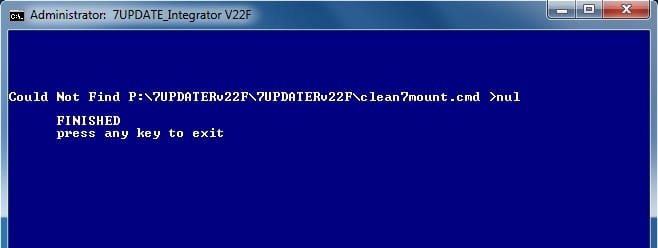
At the end, I rcvd an error stating that 'CLEAN7MOUNT.CMD' could not be found, even tho it is in fact in the dir that is being searched.

Nonetheless, I tried an install - 2x. When each 7updaterv22f.cmd attempt was done, I copied the EN_DVD folder from C to a USB stick, and booted into it, attempting to install windows. But I get to the "where to install windows" and there is nothing in the list.

So, thinking that is wants to see the NVMe drivers that I d/l-ed earlier, I put those on a DVD (separate comp), and then browsed to them. That works - I now see the SSD in the "where to install windows" list. But I get an error - W7 can not be installed to an MBR disk. So, I plug my C drive back in, boot into W7, and convert the SSD to GPT. I then go through the process again, load the NME drivers, and again, I see the SSD in the list. But I get an error again - different, non descript, saying Windows cannot be installed to this location. I even tried a format from right there - nada.

Thinking this might be related to the aforementioned errors, I tried again from the orig install DVD, armed with the "load drivers" option, which I did not have originally. Same thing.

What'd I do wrong?
 

My Computer My Computer

At a glance

W7 64 UltIntel Core i9-7940xGSkill 128GBAMD Radeon RX 560
Computer type
PC/Desktop
Computer Manufacturer/Model Number
Custom
OS
W7 64 Ult
CPU
Intel Core i9-7940x
Motherboard
ASUS x299 TUF
Memory
GSkill 128GB
Graphics Card(s)
AMD Radeon RX 560
Sound Card
RME
Screen Resolution
1920x1080
Hard Drives
5
PSU
BeQuiet!
Case
BeQuiet!
Keyboard
HyperX
Mouse
Logitech
Browser
IE - what else is there?
riffwraith said:
W7 can not be installed to an MBR disk

Say WHAT! Windows 7 installation should work on a SSD just like on a HDD, I've done it several times in the last couple of years. Or is this the disk you backed up? I still say start from scratch and use the wizard in AOMEI, I've used it twice now to transfer HDDs to SSDs. I installed it cos I was having issues with Minitool partition Wizard, and then I noticed the SSD feature. So I've been using that for migrations specifically. But I have used Partition Wizard and paragon to transfer systems to SSD. It should boot up normally, and then you can install your SSD software.
 

My Computer My Computer

At a glance

Windows 10/Windows 7 (My Idea- Virtual PC)Intel(R) Core(TM) i5-3470 CPU @ 3.20GHz16 GBnVidia GeForce GTX 750 Ti (2GB)
Computer type
PC/Desktop
Computer Manufacturer/Model Number
Lenovo Thinkcenter M92p
OS
Windows 10/Windows 7 (My Idea- Virtual PC)
CPU
Intel(R) Core(TM) i5-3470 CPU @ 3.20GHz
Motherboard
Lenovo MahoBay
Memory
16 GB
Graphics Card(s)
nVidia GeForce GTX 750 Ti (2GB)
Sound Card
nVidia HD Audio
Monitor(s) Displays
RCA 4KTV 50"
Screen Resolution
3840p x 2160p
Hard Drives
Onboard:
Seagate ST500DM009-2F110A 500GB
WDC WD4000FYYZ-01UL1B1 (WD-WCC131910831) [3726 GB]

USB 3.0
My Book 1140 (WCAZAD122454) [1862 GB]
Apple MDT MD10EAVS-00D7B0 (0000AB123473) [931 GB]

External:
WD Blue Innostar/Matsunichi (465 GB)
WD
PSU
Stock Thinkcenter M92p
Case
Stock Thinkcenter M92p
Cooling
Active
Keyboard
BYTEC BY-GA-KT-100-AC
Mouse
BYTEC
Internet Speed
1 GHz Down, 40 Mbps Up
Antivirus
Windows Defender
Browser
EDGE
Other Info
Old Other Info:
I finally have an Intel machine that has more than 8GB of Ram.
My ASUS M2N-SE AMD Windows 7 machine is back to Windows 7. Replaced the AMD 4400+ CPU and maxed out the RAM (4GB).
My Core Duo machine is only 2GB of Ram and it is locked to Windows XP in order to run Pro Tools 6.4, which I have been using since 2004.
I have one other Dell OptiPlex 980 tower, Identical to this one,
Thanks!

What'd I do wrong?


The MS nvme updates need to be installed in 4 places.

1. boot.wim image 2

2. winre.wim image 1

3. Install.wim whatever image number you selected

4 the sources folder of the installation media.

If any of the above has not been done, it won't work.

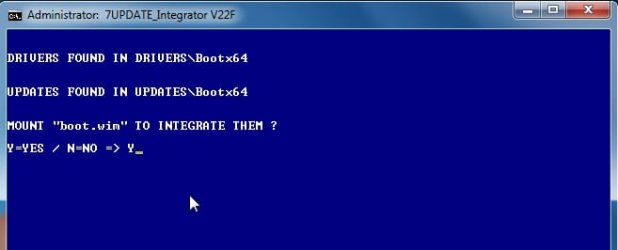
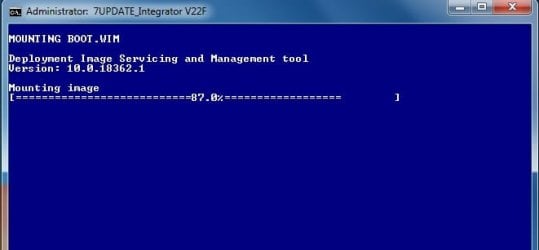
If you have put UPDATES or DRIVERS in the specified folders, then of course, you need to answer Y to mount boot.wim

7Updater has spotted you have placed something in those folders and prompts you. Answer Y to mount boot.wim and it will do the rest.

I made some changes in the last version, so will check again to see if there is a typo in it.
 

My Computers My Computers

  • At a glance

    7 X64i5 84002x8gb 3200mhz
    Computer type
    PC/Desktop
    OS
    7 X64
    CPU
    i5 8400
    Motherboard
    gigabyte b365m ds3h
    Memory
    2x8gb 3200mhz
    Hard Drives
    various
    PSU
    pure power 11 400w cm
    Case
    Coolermaster
    Cooling
    cryorig m9i
  • At a glance

    7x64g54008gb ddr4 2400
    Computer type
    PC/Desktop
    OS
    7x64
    CPU
    g5400
    Motherboard
    ga b365m ds3h
    Memory
    8gb ddr4 2400
    PSU
    xfx pro 450w
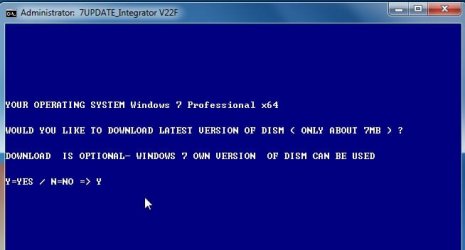
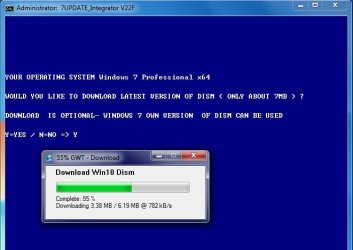
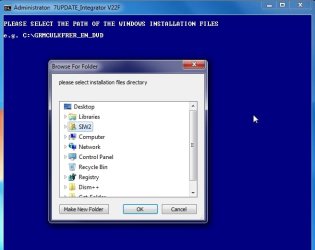
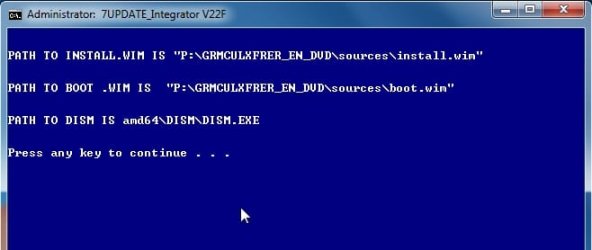
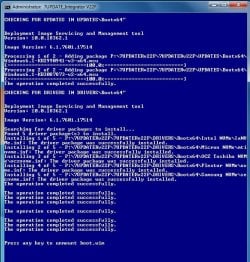
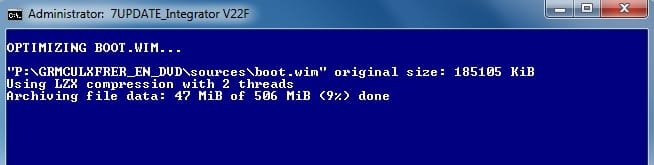
Just ran it. All worked perfectly.

1.jpg

2.jpg

3.jpg

4.jpg

5.jpg
 

My Computers My Computers

  • At a glance

    7 X64i5 84002x8gb 3200mhz
    Computer type
    PC/Desktop
    OS
    7 X64
    CPU
    i5 8400
    Motherboard
    gigabyte b365m ds3h
    Memory
    2x8gb 3200mhz
    Hard Drives
    various
    PSU
    pure power 11 400w cm
    Case
    Coolermaster
    Cooling
    cryorig m9i
  • At a glance

    7x64g54008gb ddr4 2400
    Computer type
    PC/Desktop
    OS
    7x64
    CPU
    g5400
    Motherboard
    ga b365m ds3h
    Memory
    8gb ddr4 2400
    PSU
    xfx pro 450w
6.jpg

8.jpg

9.jpg

10.jpg

11.jpg
 

My Computers My Computers

  • At a glance

    7 X64i5 84002x8gb 3200mhz
    Computer type
    PC/Desktop
    OS
    7 X64
    CPU
    i5 8400
    Motherboard
    gigabyte b365m ds3h
    Memory
    2x8gb 3200mhz
    Hard Drives
    various
    PSU
    pure power 11 400w cm
    Case
    Coolermaster
    Cooling
    cryorig m9i
  • At a glance

    7x64g54008gb ddr4 2400
    Computer type
    PC/Desktop
    OS
    7x64
    CPU
    g5400
    Motherboard
    ga b365m ds3h
    Memory
    8gb ddr4 2400
    PSU
    xfx pro 450w
12.jpg

14.jpg

2019-04-30_010603.jpg

2019-04-30_010626.jpg

This small message is just a file it couldn't find to clean up from the 7updater folder after everything has completed. It has no effect on the actual updating of the wims.

2019-04-30_010658.jpg
 

My Computers My Computers

  • At a glance

    7 X64i5 84002x8gb 3200mhz
    Computer type
    PC/Desktop
    OS
    7 X64
    CPU
    i5 8400
    Motherboard
    gigabyte b365m ds3h
    Memory
    2x8gb 3200mhz
    Hard Drives
    various
    PSU
    pure power 11 400w cm
    Case
    Coolermaster
    Cooling
    cryorig m9i
  • At a glance

    7x64g54008gb ddr4 2400
    Computer type
    PC/Desktop
    OS
    7x64
    CPU
    g5400
    Motherboard
    ga b365m ds3h
    Memory
    8gb ddr4 2400
    PSU
    xfx pro 450w
Thank you for the screens

"The MS nvme updates need to be installed in 4 places."

Meaning the contents from UPDATES-MS-Nvme-Win7x64.zip? The .msu files?

From your other tut:

Nvme updates for 64 bit go in the UPDATES\Bootx64 and UPDATES\Installx64 folders.

Did that.

Windows6.1-KB2990941-v3-x64.msu AND Windows6.1-KB3087873-v2-x64.msu are in 7UPDATERv22F\UPDATES\Bootx64

Windows6.1-KB2990941-v3-x64.msu AND Windows6.1-KB3087873-v2-x64.msu are in 7UPDATERv22F\\UPDATES\Installx64

Where else do those files go? Two more places? What are boot.wim image 2, winre.wim image 1, and Install.wim that you made reference to? Are those folders? I dont see those anywhere. Am I supposed to move the msu files there? How?
 

My Computer My Computer

At a glance

W7 64 UltIntel Core i9-7940xGSkill 128GBAMD Radeon RX 560
Computer type
PC/Desktop
Computer Manufacturer/Model Number
Custom
OS
W7 64 Ult
CPU
Intel Core i9-7940x
Motherboard
ASUS x299 TUF
Memory
GSkill 128GB
Graphics Card(s)
AMD Radeon RX 560
Sound Card
RME
Screen Resolution
1920x1080
Hard Drives
5
PSU
BeQuiet!
Case
BeQuiet!
Keyboard
HyperX
Mouse
Logitech
Browser
IE - what else is there?
Back
Top