How do I install W10 on second SSD for dual boot system

piikea

New member
Member
Local time
8:35 AM
Messages
53
Location
San Diego
I've found conflicting recommendations on whether it is necessary to unplug existing drives when installing Win 10 onto a second SSD. Desktop was drive 1 SSD (C:) and drive 2 HDD (D:) until I installed a second SSD to become (D:) so it will become:

1st drive > SSD (C:) with Win 7 on it.
2nd drive > SSD (D:) new/blank drive I'm newly installing Win 10 onto.
3rd drive > HDD (E:) with only data on it (never any OS).

Will install Win 10 from an iso on a CD. BIOS/UEFI (unsure of terminology) boot order was already set as:
#1 cd drive
#2 1st SSD (with Win 7)
#3 2nd SSD (new/blank) - I checked and it IS listed.

So, I'm trying to make sure I can dual boot AND the system is bootable even if one of the drives is removed at some point plus be sure that the drive letters assigned (as above) don't change. Another potential wrinkle is in disk management originally disk 0 was the SSD (with Win 7 on it) and disk 1 was the HDD (w/ no OS). After installing the new/2nd SSD (left SATA cable to 1st SSD as is was and just moved the other SATA cables down a notch so to speak) - but now it shows as new SSD as disk 0, original SSD as disk 1 and the HDD as disk 2. It is for sure connected to MoBo as: disk 0 = original SSD (w/ OS), disk 1 = new SSD, disk 2 = original HDD, disk 3 = CD drive.

Should I disconnect drives 1 and 3, then install Win 10 on drive 2 and reconnect other drives once Win10 after is up and working OR just leave all drives connected and install Win 10? If disconnect then from the MoBo end OR from the drive ends?
Thanks!
 

Attachments
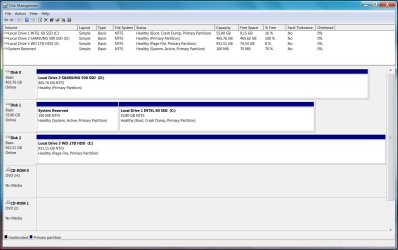
  • disk management.jpg
    disk management.jpg
    146.9 KB · Views: 3

My Computers My Computers

System One System Two

  • Computer type
    PC/Desktop
    OS
    Windows 7 Home Premium 64bit with SP1, OEM
    CPU
    Intel Core i7-3770
    Motherboard
    Gigabyte GA-Z77X-UD3H LGA1155
    Memory
    G Skill 8GB (2x4GB) Ripkaws PC3-12800 DDR3 1600MHz
    Graphics Card(s)
    EVGA, GeForce GTX 560 Ti FPB (AR) 1GB GDDR5 4104MHz
    Sound Card
    Creative Sound Blaster Audigy SE, 7.1 channels, 24 bit
    Monitor(s) Displays
    HP ZR24w
    Screen Resolution
    1920x1200 - 60Hz
    Hard Drives
    Intel 60GB 520 Series SSD, MLC SandForce SF-2281, 550/475 MB/s

    WD 1TB Caviar Blue, SATA 6 Gb/s, 7200 RPM
    PSU
    Seasonic X-560, 80 PLUS Gold
    Case
    Cooler Master Elite 430
    Cooling
    2 stock fans
  • Antivirus
    MS Security Essentials
Your win 7 is bios boot, mbr partition style with the 100 mb system part flagged as active.

Are you planning on installing win10 using bios or efi? It will be simpler to use bios and mbr for that as well.
 

My Computers My Computers

System One System Two

  • Computer type
    PC/Desktop
    OS
    7 X64
    CPU
    i5 8400
    Motherboard
    gigabyte b365m ds3h
    Memory
    2x8gb 3200mhz
    Hard Drives
    various
    PSU
    pure power 11 400w cm
    Case
    Coolermaster
    Cooling
    cryorig m9i
  • Computer type
    PC/Desktop
    OS
    7x64
    CPU
    g5400
    Motherboard
    ga b365m ds3h
    Memory
    8gb ddr4 2400
    PSU
    xfx pro 450w
Your win 7 is bios boot, mbr partition style with the 100 mb system part flagged as active.

Are you planning on installing win10 using bios or efi? It will be simpler to use bios and mbr for that as well.


I'd forgotten about the mbr vs gpt issue. Idk enough about it to know for sure. From what I can tell mbr suits my situation. GA-Z77X-UD3H MoBo has GIGABYTE 3D BIOS (Dual UEFI) & I "think" UEFI is enabled. Whichever would work for both W7 & W10.
 

My Computers My Computers

System One System Two

  • Computer type
    PC/Desktop
    OS
    Windows 7 Home Premium 64bit with SP1, OEM
    CPU
    Intel Core i7-3770
    Motherboard
    Gigabyte GA-Z77X-UD3H LGA1155
    Memory
    G Skill 8GB (2x4GB) Ripkaws PC3-12800 DDR3 1600MHz
    Graphics Card(s)
    EVGA, GeForce GTX 560 Ti FPB (AR) 1GB GDDR5 4104MHz
    Sound Card
    Creative Sound Blaster Audigy SE, 7.1 channels, 24 bit
    Monitor(s) Displays
    HP ZR24w
    Screen Resolution
    1920x1200 - 60Hz
    Hard Drives
    Intel 60GB 520 Series SSD, MLC SandForce SF-2281, 550/475 MB/s

    WD 1TB Caviar Blue, SATA 6 Gb/s, 7200 RPM
    PSU
    Seasonic X-560, 80 PLUS Gold
    Case
    Cooler Master Elite 430
    Cooling
    2 stock fans
  • Antivirus
    MS Security Essentials
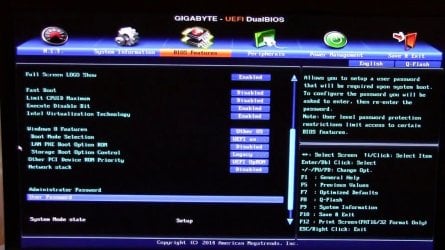
There is probably a setting that allows both, there is on gigabyte B75 mobos, which are similar.

Under BIOS FEATURES TAB.

WIndows 8 features, select Other OS

Boot Mode selection, select UEFI and BIOS

gigabyte-bios.jpg


F10 to save and exit. You might already have those settings.
 

My Computers My Computers

System One System Two

  • Computer type
    PC/Desktop
    OS
    7 X64
    CPU
    i5 8400
    Motherboard
    gigabyte b365m ds3h
    Memory
    2x8gb 3200mhz
    Hard Drives
    various
    PSU
    pure power 11 400w cm
    Case
    Coolermaster
    Cooling
    cryorig m9i
  • Computer type
    PC/Desktop
    OS
    7x64
    CPU
    g5400
    Motherboard
    ga b365m ds3h
    Memory
    8gb ddr4 2400
    PSU
    xfx pro 450w
There is probably a setting that allows both, there is on gigabyte B75 mobos, which are similar.

Under BIOS FEATURES TAB.

WIndows 8 features, select Other OS

Boot Mode selection, select UEFI and BIOS

F10 to save and exit. You might already have those settings.


Mine is similar to your screenshot but doesn't list ANY OS option (where yours shows: "WIndows 8 features, select Other OS....") OR a "Boot Mode selection" to select UEFI and/or BIOS.


Further research finds a lot of instances where people have boot problems (either W7 &/or W10) even when they've disconnected the other drives and installed Win 10 on the unallocated drive. So, what I thought would be a fairly straightforward process adding another drive & OS apparently isn't!
 

My Computers My Computers

System One System Two

  • Computer type
    PC/Desktop
    OS
    Windows 7 Home Premium 64bit with SP1, OEM
    CPU
    Intel Core i7-3770
    Motherboard
    Gigabyte GA-Z77X-UD3H LGA1155
    Memory
    G Skill 8GB (2x4GB) Ripkaws PC3-12800 DDR3 1600MHz
    Graphics Card(s)
    EVGA, GeForce GTX 560 Ti FPB (AR) 1GB GDDR5 4104MHz
    Sound Card
    Creative Sound Blaster Audigy SE, 7.1 channels, 24 bit
    Monitor(s) Displays
    HP ZR24w
    Screen Resolution
    1920x1200 - 60Hz
    Hard Drives
    Intel 60GB 520 Series SSD, MLC SandForce SF-2281, 550/475 MB/s

    WD 1TB Caviar Blue, SATA 6 Gb/s, 7200 RPM
    PSU
    Seasonic X-560, 80 PLUS Gold
    Case
    Cooler Master Elite 430
    Cooling
    2 stock fans
  • Antivirus
    MS Security Essentials
You might have to use advanced mode instead of the 3d thing. Or maybe you haven't got the latest bios.

It should be fine as it is - working ok with your win7, so no reason why it shouldn't work for your win10 installtion.
 

My Computers My Computers

System One System Two

  • Computer type
    PC/Desktop
    OS
    7 X64
    CPU
    i5 8400
    Motherboard
    gigabyte b365m ds3h
    Memory
    2x8gb 3200mhz
    Hard Drives
    various
    PSU
    pure power 11 400w cm
    Case
    Coolermaster
    Cooling
    cryorig m9i
  • Computer type
    PC/Desktop
    OS
    7x64
    CPU
    g5400
    Motherboard
    ga b365m ds3h
    Memory
    8gb ddr4 2400
    PSU
    xfx pro 450w
Back
Top