Installing Win 7 on AM4 system

shezz

New member
Local time
8:39 PM
Messages
4
Having to endure Win 10 for 3 years really makes me want to go back to 7, I have heard that AM4 mobos/chipsets are more or less the last kind that somewhat works well for installing Windows 7 (because of CSM), I had a few questions regarding this:

1. Is there much of a difference between chipsets? Supposedly 300 and 400 series would work better for Ryzen cpus on 7 because of Ryzen optimized power plan and the later 500 series (again) supposedly not having drivers for it

2. Is this Optimized Power Plan really a dealbreaker?

3. Is it likely my system will work with it in the first place?

specs:
ASUS TUFF B550M Plus II
AMD Ryzen 5 5600X
Gskill Tridentz 16 GB DDR4 RAM
MSI GTX 1660 Ventus

The HDD I want to use has no OS on it
 

My Computers

System One System Two

  • Computer type
    PC/Desktop
    Computer Manufacturer/Model Number
    ASUS
    OS
    Win 10 64 bit. for now
    CPU
    AMD Ryzen 5 5600X
    Motherboard
    Tuff Gaming B550M Plus II
    Memory
    G skill 16 GB Tridentz (8x2)
    Graphics Card(s)
    GTX 1660 MSI 6 OC Ventus
    Hard Drives
    Hitachi Desk star 3.5 1 TB
    Toshiba 3.5 6 TB
    Browser
    Vivaldi
  • Computer type
    PC/Desktop
Welcome to the forum assuming there are 7 drivers for the motherboard it should work fine have same cpu and it evens 10 +11 ok
you do need to goto the MB makers site and check for drivers if there arnt any your stuck
 

My Computer

Computer type
PC/Desktop
OS
win 8 32 bit
Try it and find out. Presumably there are win7 drivers for your gpu ?

canonkong has this

:ar: winraid.level1techs

AM3, FM1, FM2, X300, A320, B350, X370, X399, B450, X470, TRX40, A520, B550, PRO565, X570, WRX80, A620, B650, X670, B850, X870, TRX50 motherboards


Update 2024.12.14:
Drivers update. Add new device support.

Using driver package for win7 requires image pre integration of SHA256 patch
.

AMD official USB driver modified version (Especially ASUS motherboard must use this version)
AMD_Chips_Drivers_For_ASUS_Win7_8.1_SHA256_RE_J.7z

Users who are not ASUS motherboards strongly recommend using this driver package, which supports UASP and better compatibility(This package also can work for Intel and Zhaoxin platforms)AMD_Ryzen_Drivers_S11_Win7_64_SHA256_RE_J.7z

If you meet A5 BSOD, you can use mod acpi.sys to replace the file use PE system:
Replace C:\Windows\system32\drivers\acpi.sys
Replace C:\Windows\System32\DriverStore\FileRepository\acpi.inf_amd64_neutral_476d4b744f1f6916\acpi.sys
MOD acpi.sys download link: WIN7_A5_FIX_ACPI.7z

SHA256 patch
kb4474419 Microsoft Update Catalog
 
Last edited:

My Computers

System One System Two

  • Computer type
    PC/Desktop
    OS
    7 X64
    CPU
    i5 8400
    Motherboard
    gigabyte b365m ds3h
    Memory
    2x8gb 3200mhz
    Hard Drives
    various
    PSU
    pure power 11 400w cm
    Case
    Coolermaster
    Cooling
    cryorig m9i
  • Computer type
    PC/Desktop
    OS
    7x64
    CPU
    g5400
    Motherboard
    ga b365m ds3h
    Memory
    8gb ddr4 2400
    PSU
    xfx pro 450w
Funny you asked that, I just went thru a failed (big time for numerous reasons) project that involved a upgrade of equipment (MB, Video card, Memory) with the difference of tiring to live with W10. I ruled out staying with W7 with the assumption that drivers etc would be a huge issue.
Neither the O/S or the AM4 based MB etc worked out w/ W10 for many reasons.
I went back to W7 Pro with a AM3+ MB etc since none of it was broken!
Unlike W10!
 

My Computers

System One System Two

  • Computer type
    Laptop
    Computer Manufacturer/Model Number
    Toshiba
    OS
    Win7 x64
    CPU
    AMD
  • Computer type
    PC/Desktop
    System Manufacturer/Model Number
    AMD based MB
    OS
    Win 7 Pro x64
    CPU
    AMD FX-8350
    Motherboard
    Gigabyte GA-970A-D3P
    Memory
    16GB
    Graphics Card(s)
    nVidia GeForce 1060
    Monitor(s) Displays
    25"
    Screen Resolution
    1920x1200
    Hard Drives
    two SSD;
    two 4TB HDD
    PSU
    700watt Seasonic
    Internet Speed
    300MB up & down
    Browser
    Firefox
    Other Info
    BD Recorder
Checking the ASUS support site showed that AMD 300 and 400 series motherboards had drivers for Windows 7. That is not true for AMD 500 series motherboards. You would have to check each motherboard manufacturer to see which motherboards had drivers for Windows 7.

This was my original computer configurations.
Computer #1
MDB: Asus PRIME X370-PRO
CPU: AMD Ryzen 7 3700X (AM4)
GPU: ASUS ROG-STRIX-RTX3060TI-08G-V2-GAMING
O/S: Windows 11 Pro

Computer #2
MBD: Gigabyte GA-990FXA v1.0
CPU: AMD FX8350 (AM3+)
GPU: ASUS ROG STRIX-GTX1060-6G-GAMING
O/S: Windows 10 Pro/Windows 7 Home

One day when I tried to boot Computer #2 I could get no video. I narrowed it down to either CPU or motherboard. It made no sense to replace these with new/used ones. I decided to replace the motherboard, CPU, and RAM for Computer #2 with those from Computer #1. I bought a new motherboard, CPU, and RAM for Computer #1. Each computer kept their original drives.

Computer #1
MDB: Asus ROG STRIX B550-F GAMING WIFI II
CPU: AMD Ryzen 7 5700X3D (AM4)
GPU: ASUS ROG-STRIX-RTX3060TI-08G-V2-GAMING
O/S: Windows 11 Pro

Computer #2
MBD: Asus PRIME X370-PRO
CPU: AMD Ryzen 7 1700X (AM4)
GPU: ASUS ROG STRIX-GTX1060-6G-GAMING
O/S: Windows 10 Pro/Windows 7 Home

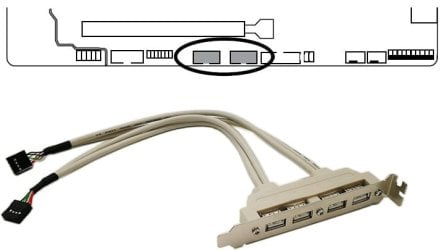
My biggest challenge with Windows 7 was that it has no native support for USB 3.0. Since all the available front and back panel USB ports were USB 3.0 neither the mouse or keyboard worked with Windows 7. I temporarily used a PS/2 keyboard and no mouse until I could install the USB 3.0 driver. Note the following week I added a 4-port USB 2.0 rear panel bracket connected to USB 2.0 headers on the motherboard.

UBS 2 rear port.jpg
 
Last edited:

My Computers

System One System Two

  • Computer type
    PC/Desktop
    Computer Manufacturer/Model Number
    Custom build
    OS
    Windows 7 Home Premium 64-bits
    CPU
    AMD FX-8350
    Motherboard
    Gigabyte GA-990FXA-UD3 (AM3+)
    Memory
    GSKILL Ripjaw-X PC3 12800 8GB (2x4GB)
    Graphics Card(s)
    ASUS ROG STRIX GTX 1060 6GB
    Sound Card
    Integrated
    Monitor(s) Displays
    Asus VE228H (21.5-in)
    Screen Resolution
    1920x1080 60Hz
    Hard Drives
    SAMSUNG 870 EVO 2.5 Inch SATA SSD (1TB)
    SAMSUNG 870 EVO 2.5 Inch SATA SSD (1TB)
    SAMSUNG 870 EVO 2.5 Inch SATA SSD (1TB)
    PSU
    Corsair RM750x (750 watts)
    Case
    Corsair Carbide Series 200R
    Cooling
    Corsair Hydro Series H60 (CWCH60)
    Keyboard
    Logitech Elite
    Mouse
    Logitech M510 Wireless Mouse
    Internet Speed
    Comcast Gigabit Extra (1200Mbps down / 35Mbps up)
    Antivirus
    Malwarebytes
    Browser
    Firefox, Edge, Chrome
    Other Info
    ASUS DRW-24B1ST DVD-RW (24X) optical drive
    Seagate Expansion Desk (5TB) external SATA/USB HDD
    Comcast XB8 Internet Gateway
  • Computer type
    PC/Desktop
    System Manufacturer/Model Number
    Custom
    OS
    Windows 7 Pro (64-bit)
    CPU
    AMD Phenom II 960T X4
    Motherboard
    ASUS M4N82 Deluxe
    Memory
    Corsair XMS2 DDR2-800 8GB (4x2GB)
    Graphics Card(s)
    ASUS ENGTX560 DCII OC/2DI/1GD5 1GB
    Monitor(s) Displays
    Samsung 930B 19-inch LCD
    Screen Resolution
    1280x1024
    Hard Drives
    Samsung SSD 870 EVO 1000 GB (Windows 10)
    Seagate ST1000DM003 1000 GB (Windows 7)
    PSU
    Antec TruePower (new) TP-650
    Case
    Antec Three Hundred
    Cooling
    AMD stock cooler from FX8350
    Mouse
    Logitech M100
    Internet Speed
    Xfinity Gigabit Extra 1200/35 Mbps
I ran Passmark Performance Test v10 on my current GB 970A system running W7 and compared that with a GB AM4, both with NVidea cards.
There wasn't a whole lot of actual difference in speed. The score was better with most, but not all the categories.
Considering the number of Processors that are running, in W10 which is at least 3x more than W7, I can see why there wasn't a big difference.
The svchost.exe count in W10 had to be over 50 compared to around 15 or so in W7.

Agree about the USB3 issue. I ran a 'jumper' USB2 cable from the rear panel to the front with s female plug to solve the problem.
 

My Computers

System One System Two

  • Computer type
    Laptop
    Computer Manufacturer/Model Number
    Toshiba
    OS
    Win7 x64
    CPU
    AMD
  • Computer type
    PC/Desktop
    System Manufacturer/Model Number
    AMD based MB
    OS
    Win 7 Pro x64
    CPU
    AMD FX-8350
    Motherboard
    Gigabyte GA-970A-D3P
    Memory
    16GB
    Graphics Card(s)
    nVidia GeForce 1060
    Monitor(s) Displays
    25"
    Screen Resolution
    1920x1200
    Hard Drives
    two SSD;
    two 4TB HDD
    PSU
    700watt Seasonic
    Internet Speed
    300MB up & down
    Browser
    Firefox
    Other Info
    BD Recorder
I had the opposite problem with another computer. In that case the motherboard didn't have any USB 3.0 ports. Backing up the computer over USB 2.0 was rather slow. I solved the problem by installing a USB 3.0 card.

Computer #3
MBD: ASUS M4N82 Deluxe
CPU: AMD Phenom II 960T X4 (AM4)
GPU: ASUS ENGTX560 DCII OC/2DI/1GD5
O/S: Windows 10 Home/Windows 7 Pro

PCIex1 USB 3.0 card: SYBA SY-PEX20140.

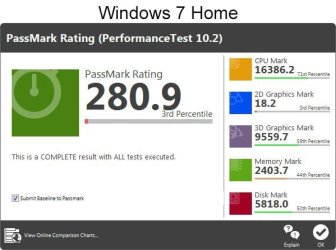
Performance Test v10 Windows 7 Home vs Windows 10 Pro on same computer.

Computer #2
MBD: Asus PRIME X370-PRO
CPU: AMD Ryzen 7 1700X (AM4)
GPU: ASUS ROG STRIX-GTX1060-6G-GAMING
O/S: Windows 10 Pro/Windows 7 Home

PT7H.jpg

PT10P.jpg
 
Last edited:

My Computers

System One System Two

  • Computer type
    PC/Desktop
    Computer Manufacturer/Model Number
    Custom build
    OS
    Windows 7 Home Premium 64-bits
    CPU
    AMD FX-8350
    Motherboard
    Gigabyte GA-990FXA-UD3 (AM3+)
    Memory
    GSKILL Ripjaw-X PC3 12800 8GB (2x4GB)
    Graphics Card(s)
    ASUS ROG STRIX GTX 1060 6GB
    Sound Card
    Integrated
    Monitor(s) Displays
    Asus VE228H (21.5-in)
    Screen Resolution
    1920x1080 60Hz
    Hard Drives
    SAMSUNG 870 EVO 2.5 Inch SATA SSD (1TB)
    SAMSUNG 870 EVO 2.5 Inch SATA SSD (1TB)
    SAMSUNG 870 EVO 2.5 Inch SATA SSD (1TB)
    PSU
    Corsair RM750x (750 watts)
    Case
    Corsair Carbide Series 200R
    Cooling
    Corsair Hydro Series H60 (CWCH60)
    Keyboard
    Logitech Elite
    Mouse
    Logitech M510 Wireless Mouse
    Internet Speed
    Comcast Gigabit Extra (1200Mbps down / 35Mbps up)
    Antivirus
    Malwarebytes
    Browser
    Firefox, Edge, Chrome
    Other Info
    ASUS DRW-24B1ST DVD-RW (24X) optical drive
    Seagate Expansion Desk (5TB) external SATA/USB HDD
    Comcast XB8 Internet Gateway
  • Computer type
    PC/Desktop
    System Manufacturer/Model Number
    Custom
    OS
    Windows 7 Pro (64-bit)
    CPU
    AMD Phenom II 960T X4
    Motherboard
    ASUS M4N82 Deluxe
    Memory
    Corsair XMS2 DDR2-800 8GB (4x2GB)
    Graphics Card(s)
    ASUS ENGTX560 DCII OC/2DI/1GD5 1GB
    Monitor(s) Displays
    Samsung 930B 19-inch LCD
    Screen Resolution
    1280x1024
    Hard Drives
    Samsung SSD 870 EVO 1000 GB (Windows 10)
    Seagate ST1000DM003 1000 GB (Windows 7)
    PSU
    Antec TruePower (new) TP-650
    Case
    Antec Three Hundred
    Cooling
    AMD stock cooler from FX8350
    Mouse
    Logitech M100
    Internet Speed
    Xfinity Gigabit Extra 1200/35 Mbps
I have no idea why the overall score on your W7 setup was so low. Also, why is the Disc score lower on the W10 machine? I've never used a 'Home' version with any of their O'S's, but I find it hard to believe the overly bloated W10 would score faster overall.

Frankly, I have reservations about their testing software.
 

My Computers

System One System Two

  • Computer type
    Laptop
    Computer Manufacturer/Model Number
    Toshiba
    OS
    Win7 x64
    CPU
    AMD
  • Computer type
    PC/Desktop
    System Manufacturer/Model Number
    AMD based MB
    OS
    Win 7 Pro x64
    CPU
    AMD FX-8350
    Motherboard
    Gigabyte GA-970A-D3P
    Memory
    16GB
    Graphics Card(s)
    nVidia GeForce 1060
    Monitor(s) Displays
    25"
    Screen Resolution
    1920x1200
    Hard Drives
    two SSD;
    two 4TB HDD
    PSU
    700watt Seasonic
    Internet Speed
    300MB up & down
    Browser
    Firefox
    Other Info
    BD Recorder
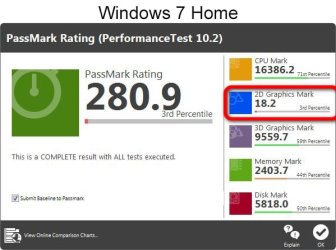
Looks like there is problem with the graphics

PT7H.jpg
 

My Computers

System One System Two

  • Computer type
    PC/Desktop
    OS
    7 X64
    CPU
    i5 8400
    Motherboard
    gigabyte b365m ds3h
    Memory
    2x8gb 3200mhz
    Hard Drives
    various
    PSU
    pure power 11 400w cm
    Case
    Coolermaster
    Cooling
    cryorig m9i
  • Computer type
    PC/Desktop
    OS
    7x64
    CPU
    g5400
    Motherboard
    ga b365m ds3h
    Memory
    8gb ddr4 2400
    PSU
    xfx pro 450w
I found out that the B450 supports Win 7 by default (or so it says) since there are drivers specifically for Win 7 on ASUS site, so I took the ASUS B450M Plus 2 instead of the B550 thing is, when I tried to install Win 7 through a bootable USB drive, the mouse and keyboard don't respond despite them working in the bios and during the booting of the system. I tried to put one of those USB to PS2 converters on my mouse but it still does nothing
 

Attachments

  • install-2.jpg
    install-2.jpg
    224.2 KB · Views: 1

My Computers

System One System Two

  • Computer type
    PC/Desktop
    Computer Manufacturer/Model Number
    ASUS
    OS
    Win 10 64 bit. for now
    CPU
    AMD Ryzen 5 5600X
    Motherboard
    Tuff Gaming B550M Plus II
    Memory
    G skill 16 GB Tridentz (8x2)
    Graphics Card(s)
    GTX 1660 MSI 6 OC Ventus
    Hard Drives
    Hitachi Desk star 3.5 1 TB
    Toshiba 3.5 6 TB
    Browser
    Vivaldi
  • Computer type
    PC/Desktop

My Computers

System One System Two

  • Computer type
    PC/Desktop
    OS
    7 X64
    CPU
    i5 8400
    Motherboard
    gigabyte b365m ds3h
    Memory
    2x8gb 3200mhz
    Hard Drives
    various
    PSU
    pure power 11 400w cm
    Case
    Coolermaster
    Cooling
    cryorig m9i
  • Computer type
    PC/Desktop
    OS
    7x64
    CPU
    g5400
    Motherboard
    ga b365m ds3h
    Memory
    8gb ddr4 2400
    PSU
    xfx pro 450w

My Computers

System One System Two

  • Computer type
    PC/Desktop
    Computer Manufacturer/Model Number
    ASUS
    OS
    Win 10 64 bit. for now
    CPU
    AMD Ryzen 5 5600X
    Motherboard
    Tuff Gaming B550M Plus II
    Memory
    G skill 16 GB Tridentz (8x2)
    Graphics Card(s)
    GTX 1660 MSI 6 OC Ventus
    Hard Drives
    Hitachi Desk star 3.5 1 TB
    Toshiba 3.5 6 TB
    Browser
    Vivaldi
  • Computer type
    PC/Desktop
That motherboard only has two USB 2.0 ports. You will have to use these during setup. They are the top two USB ports. Hopefully that will work until you boot into Windows 7 and install the chipset drivers. After that the USB 3.0 ports should work.
I installed Windows 7 on a computer with an Asus PRIME X370-PRO motherboard. That motherboard doesn't have any USB 2.0 ports on the back panel so I had to plug an old keyboard into the PS/2 port. I used that until I got into Windows installed and installed the chipset and USB 3.0 drivers.

The motherboard also has two USB 2.0 headers. You can use these for up to four USB 2.0 ports with a rear panel bracket.
 

My Computers

System One System Two

  • Computer type
    PC/Desktop
    Computer Manufacturer/Model Number
    Custom build
    OS
    Windows 7 Home Premium 64-bits
    CPU
    AMD FX-8350
    Motherboard
    Gigabyte GA-990FXA-UD3 (AM3+)
    Memory
    GSKILL Ripjaw-X PC3 12800 8GB (2x4GB)
    Graphics Card(s)
    ASUS ROG STRIX GTX 1060 6GB
    Sound Card
    Integrated
    Monitor(s) Displays
    Asus VE228H (21.5-in)
    Screen Resolution
    1920x1080 60Hz
    Hard Drives
    SAMSUNG 870 EVO 2.5 Inch SATA SSD (1TB)
    SAMSUNG 870 EVO 2.5 Inch SATA SSD (1TB)
    SAMSUNG 870 EVO 2.5 Inch SATA SSD (1TB)
    PSU
    Corsair RM750x (750 watts)
    Case
    Corsair Carbide Series 200R
    Cooling
    Corsair Hydro Series H60 (CWCH60)
    Keyboard
    Logitech Elite
    Mouse
    Logitech M510 Wireless Mouse
    Internet Speed
    Comcast Gigabit Extra (1200Mbps down / 35Mbps up)
    Antivirus
    Malwarebytes
    Browser
    Firefox, Edge, Chrome
    Other Info
    ASUS DRW-24B1ST DVD-RW (24X) optical drive
    Seagate Expansion Desk (5TB) external SATA/USB HDD
    Comcast XB8 Internet Gateway
  • Computer type
    PC/Desktop
    System Manufacturer/Model Number
    Custom
    OS
    Windows 7 Pro (64-bit)
    CPU
    AMD Phenom II 960T X4
    Motherboard
    ASUS M4N82 Deluxe
    Memory
    Corsair XMS2 DDR2-800 8GB (4x2GB)
    Graphics Card(s)
    ASUS ENGTX560 DCII OC/2DI/1GD5 1GB
    Monitor(s) Displays
    Samsung 930B 19-inch LCD
    Screen Resolution
    1280x1024
    Hard Drives
    Samsung SSD 870 EVO 1000 GB (Windows 10)
    Seagate ST1000DM003 1000 GB (Windows 7)
    PSU
    Antec TruePower (new) TP-650
    Case
    Antec Three Hundred
    Cooling
    AMD stock cooler from FX8350
    Mouse
    Logitech M100
    Internet Speed
    Xfinity Gigabit Extra 1200/35 Mbps

My Computers

System One System Two

  • Computer type
    PC/Desktop
    OS
    7 X64
    CPU
    i5 8400
    Motherboard
    gigabyte b365m ds3h
    Memory
    2x8gb 3200mhz
    Hard Drives
    various
    PSU
    pure power 11 400w cm
    Case
    Coolermaster
    Cooling
    cryorig m9i
  • Computer type
    PC/Desktop
    OS
    7x64
    CPU
    g5400
    Motherboard
    ga b365m ds3h
    Memory
    8gb ddr4 2400
    PSU
    xfx pro 450w
That motherboard only has two USB 2.0 ports. You will have to use these during setup. They are the top two USB ports. Hopefully that will work until you boot into Windows 7 and install the chipset drivers. After that the USB 3.0 ports should work.
I installed Windows 7 on a computer with an Asus PRIME X370-PRO motherboard. That motherboard doesn't have any USB 2.0 ports on the back panel so I had to plug an old keyboard into the PS/2 port. I used that until I got into Windows installed and installed the chipset and USB 3.0 drivers.

The motherboard also has two USB 2.0 headers. You can use these for up to four USB 2.0 ports with a rear panel bracket.
I tried that, I also enabled Precision Boost Overdrive and disabled PBO FMax Enhancer in the BIOS, still doesn't respond/freezes?

Also, do these modified AMD files for the B550 make it work just as well as the B450 (in terms of combability, speeds, stability)?
 

My Computers

System One System Two

  • Computer type
    PC/Desktop
    Computer Manufacturer/Model Number
    ASUS
    OS
    Win 10 64 bit. for now
    CPU
    AMD Ryzen 5 5600X
    Motherboard
    Tuff Gaming B550M Plus II
    Memory
    G skill 16 GB Tridentz (8x2)
    Graphics Card(s)
    GTX 1660 MSI 6 OC Ventus
    Hard Drives
    Hitachi Desk star 3.5 1 TB
    Toshiba 3.5 6 TB
    Browser
    Vivaldi
  • Computer type
    PC/Desktop
Back
Top