Boot problem on cloned dual-boot SSD

amblabs

New member
Member
Local time
6:31 AM
Messages
43
Location
San Francisco Bay Area
I have an MSI laptop originally equipped with a Western Digital WD3200BEVT 320GB SATA HDD, with Windows 7 Ultimate x64 and Windows XP Professional SP3 on different partitions set for dual boot (with EasyBCD). It was working perfectly and able to boot into either OS via a boot menu.


I used Acronis True Image WD Edition to clone that HDD to a new Western Digital WDS500G2B0A 500GB SATA SSD. The process went without a hitch and I installed the new SSD in place of the original HDD. The boot menu appears normally and I can boot Windows 7 with no problem, but it fails when I tried to boot Windows XP. The Windows XP startup splash screen appears, but then the computer simply resets itself and goes to BIOS POST again.

The Windows 7 partition is drive C, the Windows XP partition is drive D. I can see both partitions when booted on Windows 7 and the filesystems are OK.

I tried swapping back to the old HDD and it still boots both OSes successfully.

I also tried re-doing the clone with EaseUS Todo Backup, and the same thing happened.

Why can’t the new SSD boot Windows XP? I tried searching the web but I can’t find a solution to this yet.


[I realize this is a forum for Windows 7, not Windows XP, but there is no XP-specific forum here so I apologize and hope that someone would be able to assist anyway]
 

My Computer My Computer

At a glance

Windows 7 Ultimate x64, Windows XP Profession...AMD Athlon II P320 dual core 2.1GHz4GBBuilt-in ATI Mobillity Radeon HD4270
Computer type
Laptop
Computer Manufacturer/Model Number
MSI
OS
Windows 7 Ultimate x64, Windows XP Professional SP3
CPU
AMD Athlon II P320 dual core 2.1GHz
Motherboard
MSI laptop CR630-228us
Memory
4GB
Graphics Card(s)
Built-in ATI Mobillity Radeon HD4270
Hard Drives
Western Digital WD3200BEVT internal 2.5" SATA HDD 320GB (original)
Western Digital WDS500G2B0A internal 2.5" SATA SSD 500GB (new)
Antivirus
Avast
Browser
Mozilla Firefox
Hello amblabs, welcome to seven forums

1. Did you run a CHKDSK of the XP partition, before cloning the HDD?
2. If CHKDSK is clean, then check as many of following as you can, on the cloned disk: 10 things you can do when windows xp wont boot.
3. If still no luck, post your question on the Acronis or EaseUs forums.
 
Last edited:

My Computer My Computer

At a glance

Windows 7 x64, Vista x64, 8.1 smartphoneIntel E8400 65W 64-bitDDR2 2 x 2GB, 1GB x 2XFX Radeon HD5750
Computer type
PC/Desktop
OS
Windows 7 x64, Vista x64, 8.1 smartphone
CPU
Intel E8400 65W 64-bit
Motherboard
Gigabyte EP45-UD3LR
Memory
DDR2 2 x 2GB, 1GB x 2
Graphics Card(s)
XFX Radeon HD5750
Sound Card
AMD High Definition Audio; Realtek High Definition Audio
Monitor(s) Displays
iiyama prolite X2377HDS
Screen Resolution
1920 x 1080
Hard Drives
500GB 7200 rpm Seagate ST3500413AS 16MB, 500GB 5400 rpm Toshiba MQ02ABF050H 32MB, 200GB 7200 rpm Seagate ST3200820AS 8MB, 2TB 7200 rpm Western Digital WD20EZRX 64MB
PSU
Enermax Liberty Modular
Case
Antec P193 Midi Tower
Keyboard
Mionix ZIBAL 60
Mouse
Razer USB 2.0 Diamondback Mouse or Huion Graphics Tablet
Browser
Internet Explorer, Lunascape, Firefox, Opera, Avast Safezone
I'm wondering if your new drive is GPT instead of MBR and your winXP is 32-bit. Cloning tools don't necessarily convert the target disk's partition type to match the source disk's. I suggest this because win7 will boot with either type but XP 32-bit requires MBR. You can fix this by converting the new disk to MBR. You may have to reclone after converting.

Convert GPT to MBR
 

My Computer My Computer

At a glance

Win7 pro x64stock i7 7700kCorsair Vengeance LPX 16GB (2x8GB) DDR4 @ 320...integrated Intel HD 630
Computer type
PC/Desktop
Computer Manufacturer/Model Number
diy
OS
Win7 pro x64
CPU
stock i7 7700k
Motherboard
Gigabyte Z270N-WIFI mini-ITX
Memory
Corsair Vengeance LPX 16GB (2x8GB) DDR4 @ 3200MHz
Graphics Card(s)
integrated Intel HD 630
Sound Card
onboard Realtek ALC1220
Monitor(s) Displays
two vertically mounted samsung 55" 4k un55mu8000
Screen Resolution
1920x1280
Hard Drives
256GB Samsung EVO 960 M.2 pci-e NVMe SSD
PSU
SilverStone Nightjar ST45NF 450Watt Fanless
Case
No case. Motherboard is mounted directly onto power supply
Cooling
Evercool low profile 815EP with Panaflow 12L fan at 7v
Keyboard
Ortek MCK-86 mini
Mouse
Belkin 5-button USB
Internet Speed
spectrum 400mbps
iko22
I did do a chkdsk on the D: drive before cloning, as well as after on the clone too. No problems found. Thanks for the link, I'll have a look at that site.

johnhoh
The SSD was brand new and uninitialized, so no MBR or GPT to start with. The original HDD was MBR (the laptop is an older model that doesn't support GPT), and the cloning process initialized the SSD to be MBR too. Since the SSD is 500B compared to the original HDD's 320GB, I did allow the cloning to increase the new partition sizes on the SSD to use the additional space. And yes, the Windows XP installed on there is 32-bit.


Anyone else with suggestions please feel free to chime in.
 

My Computer My Computer

At a glance

Windows 7 Ultimate x64, Windows XP Profession...AMD Athlon II P320 dual core 2.1GHz4GBBuilt-in ATI Mobillity Radeon HD4270
Computer type
Laptop
Computer Manufacturer/Model Number
MSI
OS
Windows 7 Ultimate x64, Windows XP Professional SP3
CPU
AMD Athlon II P320 dual core 2.1GHz
Motherboard
MSI laptop CR630-228us
Memory
4GB
Graphics Card(s)
Built-in ATI Mobillity Radeon HD4270
Hard Drives
Western Digital WD3200BEVT internal 2.5" SATA HDD 320GB (original)
Western Digital WDS500G2B0A internal 2.5" SATA SSD 500GB (new)
Antivirus
Avast
Browser
Mozilla Firefox
my only other idea is to clone with macrium reflect and see if it produces better results. I've tried them all and imo its the best.
 

My Computer My Computer

At a glance

Win7 pro x64stock i7 7700kCorsair Vengeance LPX 16GB (2x8GB) DDR4 @ 320...integrated Intel HD 630
Computer type
PC/Desktop
Computer Manufacturer/Model Number
diy
OS
Win7 pro x64
CPU
stock i7 7700k
Motherboard
Gigabyte Z270N-WIFI mini-ITX
Memory
Corsair Vengeance LPX 16GB (2x8GB) DDR4 @ 3200MHz
Graphics Card(s)
integrated Intel HD 630
Sound Card
onboard Realtek ALC1220
Monitor(s) Displays
two vertically mounted samsung 55" 4k un55mu8000
Screen Resolution
1920x1280
Hard Drives
256GB Samsung EVO 960 M.2 pci-e NVMe SSD
PSU
SilverStone Nightjar ST45NF 450Watt Fanless
Case
No case. Motherboard is mounted directly onto power supply
Cooling
Evercool low profile 815EP with Panaflow 12L fan at 7v
Keyboard
Ortek MCK-86 mini
Mouse
Belkin 5-button USB
Internet Speed
spectrum 400mbps
Those symptoms are not altogether surprising given that you are using Microsoft's half-baked method of pseudo dual-booting. (I can tell you used Microsoft's method because you mentioned setting it up with EasyBCD.) Truly independent partitions have fewer problems multi-booting.

But there's not enough information to tell if that's really your problem, so at this point that may just be the snark coming out. (I despise the Microsoft method.)

Perhaps you could provide additional information. Connect the new drive and boot into the 7 clone, which you said boots fine. Then:

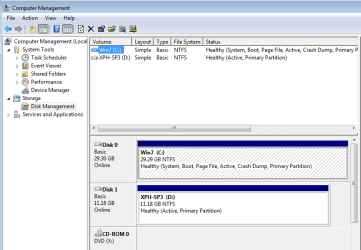
  1. Post a Disk Management screenshot. This should confirm that the partition layouts of the two disks are the same. Make sure we can tell which are the "Active", "System" and "Boot" partitions.

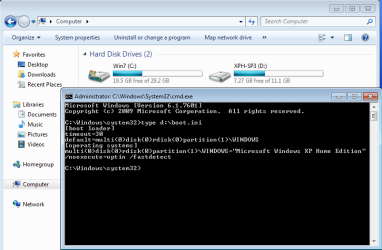
  2. Post the contents of XP's boot.ini file. Open a cmd prompt window as admin, enter "type d:\boot.ini" and copy/paste the contents. (Don't forget to open as admin or you'll get "Access denied".)

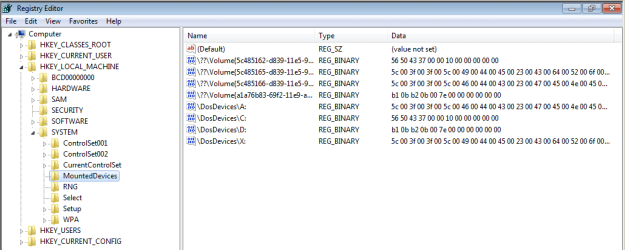
  3. Use regedit and expand the [HKLM\System\MountedDevices] key. Post the two lines "DosDevices\C:" and "DosDevices\D:" for review.

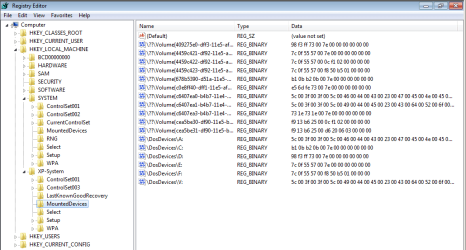
  4. Open the XP partition's System hive as a branch under the Win7 registry. In regedit click to select the HKLM branch, then select "File>Load Hive" from the menu bar. Navigate and select the file "d:\windows\system32\config\system". Give the loaded hive a unique name, such as "XP-System". Expand the newly loaded [HKLM\XP-System\MountedDevices] key and post the lines "DosDevices\C:" and "DosDevices\D:" (if present).

    This allows us to compare the partition signatures that 7 and XP are considering the C: and D: drives.

  5. Finally, disconnect the XP hive from the 7 registry. Click to select the [HKLM\XP-System] branch and on the regedit menu bar select "File>Unload Hive".
Attached are a few sample screenshots to give you an idea what you're looking for. (Note my C: and D: are on different disks, though yours will be on the same disk, I presume.)
 

Attachments

  • 1.png
    1.png
    17.6 KB · Views: 0
  • 2.png
    2.png
    20.5 KB · Views: 0
  • 3.png
    3.png
    15.6 KB · Views: 0
  • 4.png
    4.png
    21.1 KB · Views: 0

My Computer My Computer

At a glance

Windows 7/8.1/10 multibootIntel Core i7-770048GB (2x16GB Crucial DDR4-3200 + 2x8GB Hynix ...Intel HD630 + AMD Radeon R7 450 PCIe
Computer type
PC/Desktop
Computer Manufacturer/Model Number
Dell Optiplex 7050
OS
Windows 7/8.1/10 multiboot
CPU
Intel Core i7-7700
Motherboard
Dell, Intel Q270 chipset
Memory
48GB (2x16GB Crucial DDR4-3200 + 2x8GB Hynix DDR4-2400)
Graphics Card(s)
Intel HD630 + AMD Radeon R7 450 PCIe
Monitor(s) Displays
Asus VC279 (27")
Screen Resolution
1920x1080
Hard Drives
Toshiba M.2 NVMe (256GB),
Samsung 960 Evo (500GB),
WD Red Plus 80EFBX (8TB)
dg1261
Thanks for the reply. Here are what you requested. They are taken while booted on the cloned SSD under Win7.


1. Disk Management screenshot (C: is the Win7 partition, D: is the WinXP partition, The 10GB partition in the beginning of the disk is a recovery partition with no drive letter assigned, and the 100MB is a "System" partition also with no drive letter assigned).
ssd_diskmgmt.png


2. There is no boot.ini file on the XP (D:) partition, there is one on the Win7 (C:) partition (contents below). I checked and this is true on the original HDD as well as the new SSD.
boot_ini.png


3. regedit [HKLM\System\MountedDevices]:
registry_dosdevices.png


4. regedit [HKLM\XP-System\MountedDevices] after "Load hive":
registry_xp_dosdevices.png


Looks like the DosDevices\C and DosDevices\D entries between the two are indeed different! Have we found the problem?


Finally, here is a screenshot of the EasyBCD "view" of the dual-boot configuration:
easybcd_view.png
 

My Computer My Computer

At a glance

Windows 7 Ultimate x64, Windows XP Profession...AMD Athlon II P320 dual core 2.1GHz4GBBuilt-in ATI Mobillity Radeon HD4270
Computer type
Laptop
Computer Manufacturer/Model Number
MSI
OS
Windows 7 Ultimate x64, Windows XP Professional SP3
CPU
AMD Athlon II P320 dual core 2.1GHz
Motherboard
MSI laptop CR630-228us
Memory
4GB
Graphics Card(s)
Built-in ATI Mobillity Radeon HD4270
Hard Drives
Western Digital WD3200BEVT internal 2.5" SATA HDD 320GB (original)
Western Digital WDS500G2B0A internal 2.5" SATA SSD 500GB (new)
Antivirus
Avast
Browser
Mozilla Firefox
4. regedit [HKLM\XP-System\MountedDevices] after "Load hive":

There is no screenshot attached
 

My Computers My Computers

  • At a glance

    7 X64i5 84002x8gb 3200mhz
    Computer type
    PC/Desktop
    OS
    7 X64
    CPU
    i5 8400
    Motherboard
    gigabyte b365m ds3h
    Memory
    2x8gb 3200mhz
    Hard Drives
    various
    PSU
    pure power 11 400w cm
    Case
    Coolermaster
    Cooling
    cryorig m9i
  • At a glance

    7x64g54008gb ddr4 2400
    Computer type
    PC/Desktop
    OS
    7x64
    CPU
    g5400
    Motherboard
    ga b365m ds3h
    Memory
    8gb ddr4 2400
    PSU
    xfx pro 450w
Oops, it was a file permissions problem with the image. The post above shows the screenshot properly now.
 

My Computer My Computer

At a glance

Windows 7 Ultimate x64, Windows XP Profession...AMD Athlon II P320 dual core 2.1GHz4GBBuilt-in ATI Mobillity Radeon HD4270
Computer type
Laptop
Computer Manufacturer/Model Number
MSI
OS
Windows 7 Ultimate x64, Windows XP Professional SP3
CPU
AMD Athlon II P320 dual core 2.1GHz
Motherboard
MSI laptop CR630-228us
Memory
4GB
Graphics Card(s)
Built-in ATI Mobillity Radeon HD4270
Hard Drives
Western Digital WD3200BEVT internal 2.5" SATA HDD 320GB (original)
Western Digital WDS500G2B0A internal 2.5" SATA SSD 500GB (new)
Antivirus
Avast
Browser
Mozilla Firefox
Looks like the DosDevices\C and DosDevices\D entries between the two are indeed different! Have we found the problem?
Yeah, I think we're zeroing in on it.

First, though, that Disk Mgmt screenshot contains an oddity. Both partitions 3 and 4 are marked "Active", which should normally be a fatal boot condition. There should only be one Active partition, and in your case that appears to be the third partition. Maybe Disk Mgmt is wrong, or maybe you really do have two Active partitions. I've never seen the latter condition before, but if it's booting I'll ignore it for now and we should just keep in mind that maybe there's more than one problem here.

Boot.ini is supposed to be on the Active partition, so if it's on C: that supports the interpretation that the third partition is your real Active partition.

The contents of boot.ini look fine. It's saying XP is on the fourth partition, which it is. It also has a comment at the top that EasyBCD edited it, which lends further credence that it's now adjusted correctly, so no need to tinker with boot.ini.

The two regedit screenshots reveal what may be the main problem. The values of C and D should be similar between the two registry hives (the 7 hive and the XP hive).

The values shown indicate the original HDD had a DiskID of "4f be a1 0f" while the new SSD's DiskID is "6c 73 52 e0". (The remaining 8 bytes of each entry are the starting sector number of the specified partition on that disk.) You'll note the XP registry hive is still looking for C and D on the original disk, not the SSD. It can't find itself, so it's failing to boot.

Before correcting, it's relevant to know which partition you want XP to see as C and which D. The fourth screenshot suggests the old XP system saw itself as D: rather the more typical C: when it was booted. Is that correct? (IOW, 7 and XP both saw the 3rd partition as C: and the 4th partition as D: regardless of which OS you booted.)

If XP is supposed to see itself as D: then DosDevices\C and DosDevices\D should be exactly identical between the two MountedDevices branches.

Load the XP hive again and carefully edit those two entries in XP-System so they're identical to what you see in Win7's MountedDevices. Then unload the hive and see if XP will now boot correctly.
 

My Computer My Computer

At a glance

Windows 7/8.1/10 multibootIntel Core i7-770048GB (2x16GB Crucial DDR4-3200 + 2x8GB Hynix ...Intel HD630 + AMD Radeon R7 450 PCIe
Computer type
PC/Desktop
Computer Manufacturer/Model Number
Dell Optiplex 7050
OS
Windows 7/8.1/10 multiboot
CPU
Intel Core i7-7700
Motherboard
Dell, Intel Q270 chipset
Memory
48GB (2x16GB Crucial DDR4-3200 + 2x8GB Hynix DDR4-2400)
Graphics Card(s)
Intel HD630 + AMD Radeon R7 450 PCIe
Monitor(s) Displays
Asus VC279 (27")
Screen Resolution
1920x1080
Hard Drives
Toshiba M.2 NVMe (256GB),
Samsung 960 Evo (500GB),
WD Red Plus 80EFBX (8TB)
The fourth screenshot suggests the old XP system saw itself as D:

What makes you think that?

Does the XP registry store the drive letter in HKLM\Software\Microsoft\Windows NT\CurrentVersion /v PathName ?
 

My Computers My Computers

  • At a glance

    7 X64i5 84002x8gb 3200mhz
    Computer type
    PC/Desktop
    OS
    7 X64
    CPU
    i5 8400
    Motherboard
    gigabyte b365m ds3h
    Memory
    2x8gb 3200mhz
    Hard Drives
    various
    PSU
    pure power 11 400w cm
    Case
    Coolermaster
    Cooling
    cryorig m9i
  • At a glance

    7x64g54008gb ddr4 2400
    Computer type
    PC/Desktop
    OS
    7x64
    CPU
    g5400
    Motherboard
    ga b365m ds3h
    Memory
    8gb ddr4 2400
    PSU
    xfx pro 450w
First, though, that Disk Mgmt screenshot contains an oddity. Both partitions 3 and 4 are marked "Active", which should normally be a fatal boot condition. There should only be one Active partition, and in your case that appears to be the third partition. Maybe Disk Mgmt is wrong, or maybe you really do have two Active partitions.
I manually made partition 4 active just to see if it made any difference, it didn't. My previous screenshot was in that state. I have since turned of the active state of that partition, it now looks like this:


ssd_diskmgmt_2.png


The two regedit screenshots reveal what may be the main problem. The values of C and D should be similar between the two registry hives (the 7 hive and the XP hive).

The values shown indicate the original HDD had a DiskID of "4f be a1 0f" while the new SSD's DiskID is "6c 73 52 e0". (The remaining 8 bytes of each entry are the starting sector number of the specified partition on that disk.) You'll note the XP registry hive is still looking for C and D on the original disk, not the SSD. It can't find itself, so it's failing to boot.
Yup. that makes sense. The cloning process apparently did not touch the XP partition's registry, so it still has the old data from the HDD. It seems to have fixed Win7's registry to match the new DiskID.

Before correcting, it's relevant to know which partition you want XP to see as C and which D. The fourth screenshot suggests the old XP system saw itself as D: rather the more typical C: when it was booted. Is that correct? (IOW, 7 and XP both saw the 3rd partition as C: and the 4th partition as D: regardless of which OS you booted.)
Yes, both OSes saw partition 3 as C: and partition 4 as D:.

If XP is supposed to see itself as D: then DosDevices\C and DosDevices\D should be exactly identical between the two MountedDevices branches.

Load the XP hive again and carefully edit those two entries in XP-System so they're identical to what you see in Win7's MountedDevices. Then unload the hive and see if XP will now boot correctly.
I did this to make the DosDevices\C and DosDevices\D under the XP-System hive match those in HKLM\System\MountedDevices. Unfortunatey, that didn't fix the problem. The XP boot splash appears followed by a reset back to POST.

I noticed that there were other Volume entries under the XP-System hive that also had the old signature. In fact there were a couple that matched the old DosDevices\C and DosDevices\D entries exactly. So I edited those too. I left the others with the old DiskID signature alone, as they seem to pertain to other drive letters that aren't being used. This is what it looks like now:


registry_xp_dosdevices_2.png


But XP still doesn't boot -- same symptoms. What else should I look at?
 

My Computer My Computer

At a glance

Windows 7 Ultimate x64, Windows XP Profession...AMD Athlon II P320 dual core 2.1GHz4GBBuilt-in ATI Mobillity Radeon HD4270
Computer type
Laptop
Computer Manufacturer/Model Number
MSI
OS
Windows 7 Ultimate x64, Windows XP Professional SP3
CPU
AMD Athlon II P320 dual core 2.1GHz
Motherboard
MSI laptop CR630-228us
Memory
4GB
Graphics Card(s)
Built-in ATI Mobillity Radeon HD4270
Hard Drives
Western Digital WD3200BEVT internal 2.5" SATA HDD 320GB (original)
Western Digital WDS500G2B0A internal 2.5" SATA SSD 500GB (new)
Antivirus
Avast
Browser
Mozilla Firefox
They are inverted in your XP hive. Should normally be

\DosDevices\C should have 4d 00 00 00 at the end

\DosDevices\D should have 02 00 00 00 at the end
 
Last edited:

My Computers My Computers

  • At a glance

    7 X64i5 84002x8gb 3200mhz
    Computer type
    PC/Desktop
    OS
    7 X64
    CPU
    i5 8400
    Motherboard
    gigabyte b365m ds3h
    Memory
    2x8gb 3200mhz
    Hard Drives
    various
    PSU
    pure power 11 400w cm
    Case
    Coolermaster
    Cooling
    cryorig m9i
  • At a glance

    7x64g54008gb ddr4 2400
    Computer type
    PC/Desktop
    OS
    7x64
    CPU
    g5400
    Motherboard
    ga b365m ds3h
    Memory
    8gb ddr4 2400
    PSU
    xfx pro 450w
They are inverted in your XP hive.

\DosDevices\C should have 4d 00 00 00 at the end

\DosDevices\D should have 02 00 00 00 at the end
Really? Shouldn't these match those under Win7 exactly? The respective partitions' drive letter assignments are the same whether I boot Win7 or XP. I.e., C: is the Win7 partition and D: is the XP partition no matter which OS I boot.
 

My Computer My Computer

At a glance

Windows 7 Ultimate x64, Windows XP Profession...AMD Athlon II P320 dual core 2.1GHz4GBBuilt-in ATI Mobillity Radeon HD4270
Computer type
Laptop
Computer Manufacturer/Model Number
MSI
OS
Windows 7 Ultimate x64, Windows XP Professional SP3
CPU
AMD Athlon II P320 dual core 2.1GHz
Motherboard
MSI laptop CR630-228us
Memory
4GB
Graphics Card(s)
Built-in ATI Mobillity Radeon HD4270
Hard Drives
Western Digital WD3200BEVT internal 2.5" SATA HDD 320GB (original)
Western Digital WDS500G2B0A internal 2.5" SATA SSD 500GB (new)
Antivirus
Avast
Browser
Mozilla Firefox
If XP os letter is D in the software hive, it looks ok.
 

My Computers My Computers

  • At a glance

    7 X64i5 84002x8gb 3200mhz
    Computer type
    PC/Desktop
    OS
    7 X64
    CPU
    i5 8400
    Motherboard
    gigabyte b365m ds3h
    Memory
    2x8gb 3200mhz
    Hard Drives
    various
    PSU
    pure power 11 400w cm
    Case
    Coolermaster
    Cooling
    cryorig m9i
  • At a glance

    7x64g54008gb ddr4 2400
    Computer type
    PC/Desktop
    OS
    7x64
    CPU
    g5400
    Motherboard
    ga b365m ds3h
    Memory
    8gb ddr4 2400
    PSU
    xfx pro 450w
If XP os letter is D in the software hive, it looks ok.
It should be D:, but how do I check this? Where is the XP software hive that I could load from Win7?
 

My Computer My Computer

At a glance

Windows 7 Ultimate x64, Windows XP Profession...AMD Athlon II P320 dual core 2.1GHz4GBBuilt-in ATI Mobillity Radeon HD4270
Computer type
Laptop
Computer Manufacturer/Model Number
MSI
OS
Windows 7 Ultimate x64, Windows XP Professional SP3
CPU
AMD Athlon II P320 dual core 2.1GHz
Motherboard
MSI laptop CR630-228us
Memory
4GB
Graphics Card(s)
Built-in ATI Mobillity Radeon HD4270
Hard Drives
Western Digital WD3200BEVT internal 2.5" SATA HDD 320GB (original)
Western Digital WDS500G2B0A internal 2.5" SATA SSD 500GB (new)
Antivirus
Avast
Browser
Mozilla Firefox
"d:\windows\system32\config\software".
 

My Computers My Computers

  • At a glance

    7 X64i5 84002x8gb 3200mhz
    Computer type
    PC/Desktop
    OS
    7 X64
    CPU
    i5 8400
    Motherboard
    gigabyte b365m ds3h
    Memory
    2x8gb 3200mhz
    Hard Drives
    various
    PSU
    pure power 11 400w cm
    Case
    Coolermaster
    Cooling
    cryorig m9i
  • At a glance

    7x64g54008gb ddr4 2400
    Computer type
    PC/Desktop
    OS
    7x64
    CPU
    g5400
    Motherboard
    ga b365m ds3h
    Memory
    8gb ddr4 2400
    PSU
    xfx pro 450w
OK, it is indeed D:\WINDOWS

registry_xp_software_pathname.png


XP still doesn't boot. What else to look at?
 

My Computer My Computer

At a glance

Windows 7 Ultimate x64, Windows XP Profession...AMD Athlon II P320 dual core 2.1GHz4GBBuilt-in ATI Mobillity Radeon HD4270
Computer type
Laptop
Computer Manufacturer/Model Number
MSI
OS
Windows 7 Ultimate x64, Windows XP Professional SP3
CPU
AMD Athlon II P320 dual core 2.1GHz
Motherboard
MSI laptop CR630-228us
Memory
4GB
Graphics Card(s)
Built-in ATI Mobillity Radeon HD4270
Hard Drives
Western Digital WD3200BEVT internal 2.5" SATA HDD 320GB (original)
Western Digital WDS500G2B0A internal 2.5" SATA SSD 500GB (new)
Antivirus
Avast
Browser
Mozilla Firefox
The fourth screenshot suggests the old XP system saw itself as D:
What makes you think that?

I went by the fact the partition signatures in the XP System hive showed D was behind C, further toward the end. (The format of the partition signatures is detailed on my webpage.) Presuming XP was also the 4th partition on the old HDD as it is now on the SSD, that implied XP must have seen its own Boot partition as D.
 

My Computer My Computer

At a glance

Windows 7/8.1/10 multibootIntel Core i7-770048GB (2x16GB Crucial DDR4-3200 + 2x8GB Hynix ...Intel HD630 + AMD Radeon R7 450 PCIe
Computer type
PC/Desktop
Computer Manufacturer/Model Number
Dell Optiplex 7050
OS
Windows 7/8.1/10 multiboot
CPU
Intel Core i7-7700
Motherboard
Dell, Intel Q270 chipset
Memory
48GB (2x16GB Crucial DDR4-3200 + 2x8GB Hynix DDR4-2400)
Graphics Card(s)
Intel HD630 + AMD Radeon R7 450 PCIe
Monitor(s) Displays
Asus VC279 (27")
Screen Resolution
1920x1080
Hard Drives
Toshiba M.2 NVMe (256GB),
Samsung 960 Evo (500GB),
WD Red Plus 80EFBX (8TB)
I noticed that there were other Volume entries under the XP-System hive that also had the old signature. In fact there were a couple that matched the old DosDevices\C and DosDevices\D entries exactly. So I edited those too. I left the others with the old DiskID signature alone, as they seem to pertain to other drive letters that aren't being used.
No, the Volume entries should not be edited.

Those are a history of every partition or device the OS has ever seen attached, such as external drives, usb flash drives, other CD/DVD drives, etc. The Volume entries are some kind of conversion of device IDs to GUIDs, perhaps for use in the areas of the OS that reference devices by GUID. I'm not sure what those areas would be, but manually editing them might create GUID conflicts. The system generates the GUIDs as necessary, so don't try to edit them.

In fact, you can even completely delete the Volume entries and the OS will regenerate them as needed. I routinely delete all Volume entries (and all stale DosDevices entries) when I'm imaging an OS to move to another partition or hard disk. That way, there won't be detritus carried over when the OS is restored, and the restored OS will regenerate GUIDs for just the devices it sees in the new restoration. (Upon first boot you'll see some "Found new hardware" balloons.)

But your post does make me think of a possibility I had not considered before. Curiously, I noticed your 7 and XP hives don't share any of the same GUIDs. I presumed they would since some of the devices (like CD/DVD drives) weren't being changed. I don't sufficiently understand GUIDs or how they're generated, but I wonder if 7 and XP use different algorithms to generate GUIDs for the same devices. If so, the GUIDs you edited could be causing a problem.

We're getting to the limits of my knowledge here, but I think I would try deleting all entries from the XP [MountedDevices] hive except for DosDevices\C and DosDevices\D. Make a backup of the [MountedDevices] key first, just in case you need to put them back. Then reboot. XP should regenerate just the GUIDs it needs, and will associate drive letters based on the partition signatures.

Aside: the reason I normally recommend leaving the DosDevices entries for the OS's "System" and "Boot" partitions is because, when left to makes its own decisions, the OS will regenerate/reassign drive letters in a prescribed sequence, which depending on the system may or may not be what you want. In your case, if there were no DosDevices entries I would expect XP to assign C to partition 3 (because it's the Active partition), D and E to partitions 1 and 2, and F to partition 4. That's the default sequence for assigning drive letters, but it would create havoc for all the programs and parts of the system expecting partition 4 to be D. By predefining DosDevices\D you prevent the OS from giving away that drive letter to something else.
 

My Computer My Computer

At a glance

Windows 7/8.1/10 multibootIntel Core i7-770048GB (2x16GB Crucial DDR4-3200 + 2x8GB Hynix ...Intel HD630 + AMD Radeon R7 450 PCIe
Computer type
PC/Desktop
Computer Manufacturer/Model Number
Dell Optiplex 7050
OS
Windows 7/8.1/10 multiboot
CPU
Intel Core i7-7700
Motherboard
Dell, Intel Q270 chipset
Memory
48GB (2x16GB Crucial DDR4-3200 + 2x8GB Hynix DDR4-2400)
Graphics Card(s)
Intel HD630 + AMD Radeon R7 450 PCIe
Monitor(s) Displays
Asus VC279 (27")
Screen Resolution
1920x1080
Hard Drives
Toshiba M.2 NVMe (256GB),
Samsung 960 Evo (500GB),
WD Red Plus 80EFBX (8TB)
Back
Top