Solved How can I create a custom folder template in Windows 7

az1166

New member
Local time
2:33 AM
Messages
5
How can I create a custom folder template in Windows 7. For instance I need to see bitrate, album year, and genre in my music folders and it's sooo frustrating to have to open this information everytime I enter a folder. It sould just be there, how can I make this happen.
 

My Computer My Computer

Computer Manufacturer/Model Number
Fujitsu A3130
OS
Windows 7 Enterpries, 32 bit.
CPU
2GHz AMD Turion 64x2 Mobile
Memory
4gb
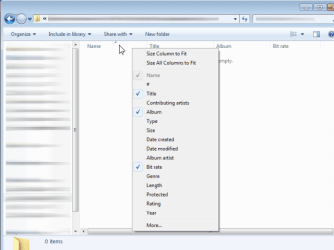
Right click that folder - Properties - Customize tab - Optimize this folder for MUSIC -Ok.

Then open this folder, make sure it is in details view (Right click - View - Details), then right-click on the table row "Name" and select parameters you want.
 

Attachments

  • template_music.png
    template_music.png
    28.2 KB · Views: 40

My Computer My Computer

Computer type
PC/Desktop
OS
Windows 8.1 ; Windows 7 x86 (Dec2008-Jan2013)
Other Info
"The scale icon at the top right of a post or tutorial is how you can give rep to the member."

My Computer My Computer

Computer type
PC/Desktop
Computer Manufacturer/Model Number
Self built custom
OS
64-bit Windows 11 Pro for Workstations
CPU
Intel i7-8700K OC'd to 5 GHz
Motherboard
ASUS ROG Maximus XI Formula Z390
Memory
64 GB (4x16GB) G.SKILL TridentZ RGB DDR4 3600 MHz
Graphics Card(s)
ASUS ROG-STRIX-GTX1080TI-O11G-GAMING
Sound Card
Integrated
Monitor(s) Displays
2 x Samsung Odyssey G7 27"
Screen Resolution
2560x1440
Hard Drives
1TB Samsung 990 PRO M.2,
4TB Samsung 990 PRO PRO M.2,
TerraMaster F8 SSD Plus NAS
PSU
Seasonic Prime Titanium 850W
Case
Thermaltake Core P3
Cooling
Corsair Hydro H115i
Keyboard
Logitech wireless K800
Mouse
Logitech MX Master 4
Internet Speed
2 Gb/s Download and 100 Mb/s Upload
Antivirus
Malwarebyte Anti-Malware Premium
Browser
Google Chrome
Other Info
Logitech Z625 speaker system,
Logitech BRIO 4K Pro webcam,
HP Color LaserJet Pro MFP M477fdn,
APC SMART-UPS RT 1000 XL - SURT1000XLI,
Galaxy S23 Plus phone
I thank you very much for your reply, but that's basic info I knew and the moment you exit that folder those parameters are gone and when you reopen the folder you have to right click and select them again, over and over and over again, I'm getting carpal tunnel just thinking about it. I'm needing to create a custom folder template where I can choose what parameters are permanently affixed to a folder or folders other than the generic templates here.
 

My Computer My Computer

Computer Manufacturer/Model Number
Fujitsu A3130
OS
Windows 7 Enterpries, 32 bit.
CPU
2GHz AMD Turion 64x2 Mobile
Memory
4gb
Strange, the method at the link I posted above usually works just fine with the folder templates that it was apllied to. Of course, you have to make sure that the folders you want this applied to, all have the same folder template. Is that the method you used to set it your's with?

Could you give a step by step break down of what you are doing to set it to see if something may be wrong for why it's not sticking?
 
Last edited:

My Computer My Computer

Computer type
PC/Desktop
Computer Manufacturer/Model Number
Self built custom
OS
64-bit Windows 11 Pro for Workstations
CPU
Intel i7-8700K OC'd to 5 GHz
Motherboard
ASUS ROG Maximus XI Formula Z390
Memory
64 GB (4x16GB) G.SKILL TridentZ RGB DDR4 3600 MHz
Graphics Card(s)
ASUS ROG-STRIX-GTX1080TI-O11G-GAMING
Sound Card
Integrated
Monitor(s) Displays
2 x Samsung Odyssey G7 27"
Screen Resolution
2560x1440
Hard Drives
1TB Samsung 990 PRO M.2,
4TB Samsung 990 PRO PRO M.2,
TerraMaster F8 SSD Plus NAS
PSU
Seasonic Prime Titanium 850W
Case
Thermaltake Core P3
Cooling
Corsair Hydro H115i
Keyboard
Logitech wireless K800
Mouse
Logitech MX Master 4
Internet Speed
2 Gb/s Download and 100 Mb/s Upload
Antivirus
Malwarebyte Anti-Malware Premium
Browser
Google Chrome
Other Info
Logitech Z625 speaker system,
Logitech BRIO 4K Pro webcam,
HP Color LaserJet Pro MFP M477fdn,
APC SMART-UPS RT 1000 XL - SURT1000XLI,
Galaxy S23 Plus phone
I apologize Brink, I was just replying to Neutron 16's post and had not seen yours, you've made my world, thanks buddy, that fixed my problems and saved my clicker finger. Thanks again.
 

My Computer My Computer

Computer Manufacturer/Model Number
Fujitsu A3130
OS
Windows 7 Enterpries, 32 bit.
CPU
2GHz AMD Turion 64x2 Mobile
Memory
4gb
No problem. You're most welcome. I'm happy to hear that it worked for you. :)
 

My Computer My Computer

Computer type
PC/Desktop
Computer Manufacturer/Model Number
Self built custom
OS
64-bit Windows 11 Pro for Workstations
CPU
Intel i7-8700K OC'd to 5 GHz
Motherboard
ASUS ROG Maximus XI Formula Z390
Memory
64 GB (4x16GB) G.SKILL TridentZ RGB DDR4 3600 MHz
Graphics Card(s)
ASUS ROG-STRIX-GTX1080TI-O11G-GAMING
Sound Card
Integrated
Monitor(s) Displays
2 x Samsung Odyssey G7 27"
Screen Resolution
2560x1440
Hard Drives
1TB Samsung 990 PRO M.2,
4TB Samsung 990 PRO PRO M.2,
TerraMaster F8 SSD Plus NAS
PSU
Seasonic Prime Titanium 850W
Case
Thermaltake Core P3
Cooling
Corsair Hydro H115i
Keyboard
Logitech wireless K800
Mouse
Logitech MX Master 4
Internet Speed
2 Gb/s Download and 100 Mb/s Upload
Antivirus
Malwarebyte Anti-Malware Premium
Browser
Google Chrome
Other Info
Logitech Z625 speaker system,
Logitech BRIO 4K Pro webcam,
HP Color LaserJet Pro MFP M477fdn,
APC SMART-UPS RT 1000 XL - SURT1000XLI,
Galaxy S23 Plus phone
Ok, he did not need to make a custom template. But I do,
so, the question per se remains.
 

My Computer My Computer

Computer type
PC/Desktop
OS
win
Ok, he did not need to make a custom template. But I do,
so, the question per se remains.

Hello,

I'm not aware of a way to create a custom template. Usually, you'll need to customize an existing one to how you want, and then apply to other folders using that same template if wanted. :(
 

My Computer My Computer

Computer type
PC/Desktop
Computer Manufacturer/Model Number
Self built custom
OS
64-bit Windows 11 Pro for Workstations
CPU
Intel i7-8700K OC'd to 5 GHz
Motherboard
ASUS ROG Maximus XI Formula Z390
Memory
64 GB (4x16GB) G.SKILL TridentZ RGB DDR4 3600 MHz
Graphics Card(s)
ASUS ROG-STRIX-GTX1080TI-O11G-GAMING
Sound Card
Integrated
Monitor(s) Displays
2 x Samsung Odyssey G7 27"
Screen Resolution
2560x1440
Hard Drives
1TB Samsung 990 PRO M.2,
4TB Samsung 990 PRO PRO M.2,
TerraMaster F8 SSD Plus NAS
PSU
Seasonic Prime Titanium 850W
Case
Thermaltake Core P3
Cooling
Corsair Hydro H115i
Keyboard
Logitech wireless K800
Mouse
Logitech MX Master 4
Internet Speed
2 Gb/s Download and 100 Mb/s Upload
Antivirus
Malwarebyte Anti-Malware Premium
Browser
Google Chrome
Other Info
Logitech Z625 speaker system,
Logitech BRIO 4K Pro webcam,
HP Color LaserJet Pro MFP M477fdn,
APC SMART-UPS RT 1000 XL - SURT1000XLI,
Galaxy S23 Plus phone
The "Also apply this template to all subfolders" does not apply customizations.
However, if I perform a different Apply in a different place in Explorer,
buried deeply within the main menu View item,
then customizations are applied.


So, you are right, it is possible.
(Requires suspension of reasonable (read: nonMicrosoft mentality) expectation that
"Also apply this template to all subfolders" will apply template as it is.)
 
Last edited:

My Computer My Computer

Computer type
PC/Desktop
OS
win
The "Also apply this template to all subfolders" does not apply customizations.
However, if I perform a different Apply in a different place in Explorer,
buried deeply within the main menu View item,
then customizations are applied.


So, you are right, it is possible.
(Requires suspension of reasonable (read: nonMicrosoft mentality) expectation that
"Also apply this template to all subfolders" will apply template as it is.)


Correct. It applies the current folder view to all folders using the same folder template.

:ar: Folder View - Apply to Folders

If you wanted to apply a folder view to all folders no matter the template, then you could use the method in the tutorial below instead.

:ar: Folder View - Set a Default for All Folders
 

My Computer My Computer

Computer type
PC/Desktop
Computer Manufacturer/Model Number
Self built custom
OS
64-bit Windows 11 Pro for Workstations
CPU
Intel i7-8700K OC'd to 5 GHz
Motherboard
ASUS ROG Maximus XI Formula Z390
Memory
64 GB (4x16GB) G.SKILL TridentZ RGB DDR4 3600 MHz
Graphics Card(s)
ASUS ROG-STRIX-GTX1080TI-O11G-GAMING
Sound Card
Integrated
Monitor(s) Displays
2 x Samsung Odyssey G7 27"
Screen Resolution
2560x1440
Hard Drives
1TB Samsung 990 PRO M.2,
4TB Samsung 990 PRO PRO M.2,
TerraMaster F8 SSD Plus NAS
PSU
Seasonic Prime Titanium 850W
Case
Thermaltake Core P3
Cooling
Corsair Hydro H115i
Keyboard
Logitech wireless K800
Mouse
Logitech MX Master 4
Internet Speed
2 Gb/s Download and 100 Mb/s Upload
Antivirus
Malwarebyte Anti-Malware Premium
Browser
Google Chrome
Other Info
Logitech Z625 speaker system,
Logitech BRIO 4K Pro webcam,
HP Color LaserJet Pro MFP M477fdn,
APC SMART-UPS RT 1000 XL - SURT1000XLI,
Galaxy S23 Plus phone
Brink,

1) In one of the many tutorials you posted screenshots of folder views,
those of template General and template Documents being identical. Mine look identical too.
Surely there must be some difference somewhere. Please elucidate.


2) Search in this site for term Restore Defaults returned no results.
Web search returned nothing useful.

Please inform about what it does:

a) What is/are the recipient(s) of such a restoration? Does/do recipient(s) in any given case

vary according to type of template of folder whose properties dialogue you are viewing?

b) Specifically what "defaults" are they?
 

My Computer My Computer

Computer type
PC/Desktop
OS
win

My Computer My Computer

Computer type
PC/Desktop
Computer Manufacturer/Model Number
Self built custom
OS
64-bit Windows 11 Pro for Workstations
CPU
Intel i7-8700K OC'd to 5 GHz
Motherboard
ASUS ROG Maximus XI Formula Z390
Memory
64 GB (4x16GB) G.SKILL TridentZ RGB DDR4 3600 MHz
Graphics Card(s)
ASUS ROG-STRIX-GTX1080TI-O11G-GAMING
Sound Card
Integrated
Monitor(s) Displays
2 x Samsung Odyssey G7 27"
Screen Resolution
2560x1440
Hard Drives
1TB Samsung 990 PRO M.2,
4TB Samsung 990 PRO PRO M.2,
TerraMaster F8 SSD Plus NAS
PSU
Seasonic Prime Titanium 850W
Case
Thermaltake Core P3
Cooling
Corsair Hydro H115i
Keyboard
Logitech wireless K800
Mouse
Logitech MX Master 4
Internet Speed
2 Gb/s Download and 100 Mb/s Upload
Antivirus
Malwarebyte Anti-Malware Premium
Browser
Google Chrome
Other Info
Logitech Z625 speaker system,
Logitech BRIO 4K Pro webcam,
HP Color LaserJet Pro MFP M477fdn,
APC SMART-UPS RT 1000 XL - SURT1000XLI,
Galaxy S23 Plus phone
Back
Top