Update your Win 7 installation media

Not sure what you have done there. Why not use the new version 30 - on first post.
 

My Computers My Computers

System One System Two

  • Computer type
    PC/Desktop
    OS
    7 X64
    CPU
    i5 8400
    Motherboard
    gigabyte b365m ds3h
    Memory
    2x8gb 3200mhz
    Hard Drives
    various
    PSU
    pure power 11 400w cm
    Case
    Coolermaster
    Cooling
    cryorig m9i
  • Computer type
    PC/Desktop
    OS
    7x64
    CPU
    g5400
    Motherboard
    ga b365m ds3h
    Memory
    8gb ddr4 2400
    PSU
    xfx pro 450w
Just didn't know if v30 was relevant and didn't want to change more than one thing I was doing at once. Looks like it's a problem with WIN-INFO now maybe? Even though my new install.wim has a new modified date and is considerably larger than before running 7UPDATERv29, the wiminfo output is identical before and after. Yes, I made sure I was running WIM-INFO on the correct file. Weird.

I'm going to try this new media I made with v29 since I've got it, see if there's any differences, and then I'll apply v30. It'll be good if I can get WIM-INFO v30 to report useful information again.
 

My Computer My Computer

Computer type
Laptop
Computer Manufacturer/Model Number
Lenovo T460s
OS
nothing yet...trying to install Windows 7 Pro 64
CPU
i5 6300U
Hard Drives
256GB M.2 OPAL2
For what it's worth, the two times I've created media with anything added to the 7UPDATER DRIVERS and UPDATES directories, I get the "A required CD/DVD driver device driver is missing..." error again and can't move forward. I'm moving on to v30 WITHOUT adding drivers and updates to see if that helps anything.
 

My Computer My Computer

Computer type
Laptop
Computer Manufacturer/Model Number
Lenovo T460s
OS
nothing yet...trying to install Windows 7 Pro 64
CPU
i5 6300U
Hard Drives
256GB M.2 OPAL2
I don't know how you managed to get into that situation. Wim-info just reads the xml info. looks like your xml file might have extra entries for unknown reasons.

Best to start from scratch using fresh install media and only v30.

My results:

Code:
Information for Image 1
-----------------------
Index:                  1
Name:                   Windows 7 HOMEBASIC
Description:            Windows 7 HOMEBASIC
Display Name:           Windows 7 Home Basic
Display Description:    Windows 7 Home Basic
Directory Count:        17554
File Count:             87317
Total Bytes:            15913018160
Hard Link Bytes:        4765247594
Creation Time:          Sat Jul 20 01:20:42 2019 UTC
Last Modification Time: Sat Jul 20 00:01:42 2019 UTC
Architecture:           x86_64
Product Name:           Microsoft® Windows® Operating System
Edition ID:             HomeBasic
Installation Type:      Client
HAL:                    acpiapic
Product Type:           WinNT
Product Suite:          Terminal Server
Languages:              en-US 
Default Language:       en-US
System Root:            WINDOWS
Major Version:          6
Minor Version:          1
Build:                  7601
Service Pack Build:     24499
Service Pack Level:     1
Flags:                  HomeBasic
WIMBoot compatible:     no

Information for Image 2
-----------------------
Index:                  2
Name:                   Windows 7 HOMEPREMIUM
Description:            Windows 7 HOMEPREMIUM
Display Name:           Windows 7 Home Premium
Display Description:    Windows 7 Home Premium
Directory Count:        17710
File Count:             88253
Total Bytes:            16345310373
Hard Link Bytes:        5169029916
Creation Time:          Sat Jul 20 01:20:42 2019 UTC
Last Modification Time: Sat Jul 20 00:08:14 2019 UTC
Architecture:           x86_64
Product Name:           Microsoft® Windows® Operating System
Edition ID:             HomePremium
Installation Type:      Client
HAL:                    acpiapic
Product Type:           WinNT
Product Suite:          Terminal Server
Languages:              en-US 
Default Language:       en-US
System Root:            WINDOWS
Major Version:          6
Minor Version:          1
Build:                  7601
Service Pack Build:     24494
Service Pack Level:     1
Flags:                  HomePremium
WIMBoot compatible:     no

Information for Image 3
-----------------------
Index:                  3
Name:                   Windows 7 PROFESSIONAL
Description:            Windows 7 PROFESSIONAL
Display Name:           Windows 7 Professional
Display Description:    Windows 7 Professional
Directory Count:        17758
File Count:             88744
Total Bytes:            16232577735
Hard Link Bytes:        5045162036
Creation Time:          Sat Jul 20 01:20:42 2019 UTC
Last Modification Time: Sat Jul 20 00:14:18 2019 UTC
Architecture:           x86_64
Product Name:           Microsoft® Windows® Operating System
Edition ID:             Professional
Installation Type:      Client
HAL:                    acpiapic
Product Type:           WinNT
Product Suite:          Terminal Server
Languages:              en-US 
Default Language:       en-US
System Root:            WINDOWS
Major Version:          6
Minor Version:          1
Build:                  7601
Service Pack Build:     24494
Service Pack Level:     1
Flags:                  Professional
WIMBoot compatible:     no

Information for Image 4
-----------------------
Index:                  4
Name:                   Windows 7 ULTIMATE
Description:            Windows 7 ULTIMATE
Display Name:           Windows 7 Ultimate
Display Description:    Windows 7 Ultimate
Directory Count:        17795
File Count:             88918
Total Bytes:            16394924624
Hard Link Bytes:        5205310304
Creation Time:          Sat Jul 20 01:20:42 2019 UTC
Last Modification Time: Sat Jul 20 00:20:04 2019 UTC
Architecture:           x86_64
Product Name:           Microsoft® Windows® Operating System
Edition ID:             Ultimate
Installation Type:      Client
HAL:                    acpiapic
Product Type:           WinNT
Product Suite:          Terminal Server
Languages:              en-US 
Default Language:       en-US
System Root:            WINDOWS
Major Version:          6
Minor Version:          1
Build:                  7601
Service Pack Build:     24494
Service Pack Level:     1
Flags:                  Ultimate
WIMBoot compatible:     no

boot.wim 3rd party drivers

Code:
Published Name : oem0.inf
Original File Name : ianvme.inf
Inbox : No
Class Name : SCSIAdapter
Provider Name : Intel
Date : 22/10/2018
Version : 4.2.0.1002

Published Name : oem1.inf
Original File Name : iusb3hcs.inf
Inbox : No
Class Name : System
Provider Name : Intel
Date : 11/05/2017
Version : 5.0.5.55

Published Name : oem2.inf
Original File Name : iusb3hub.inf
Inbox : No
Class Name : USB
Provider Name : Intel(R) Corporation
Date : 11/05/2017
Version : 5.0.5.55

Published Name : oem3.inf
Original File Name : iusb3xhc.inf
Inbox : No
Class Name : USB
Provider Name : Intel(R) Corporation
Date : 11/05/2017
Version : 5.0.5.55

Published Name : oem4.inf
Original File Name : mtinvme.inf
Inbox : No
Class Name : SCSIAdapter
Provider Name : Micron Technology, Inc.
Date : 29/04/2016
Version : 2.1.5.0

Published Name : oem5.inf
Original File Name : nvme.inf
Inbox : No
Class Name : SCSIAdapter
Provider Name : LiteOn Technology Corp.
Date : 09/03/2016
Version : 1.4.0.0

Published Name : oem6.inf
Original File Name : ocznvme.inf
Inbox : No
Class Name : SCSIAdapter
Provider Name : Toshiba
Date : 13/05/2016
Version : 1.2.126.843

Published Name : oem7.inf
Original File Name : secnvme.inf
Inbox : No
Class Name : SCSIAdapter
Provider Name : Samsung Electronics Co., Ltd
Date : 17/01/2019
Version : 3.1.0.1901
 

My Computers My Computers

System One System Two

  • Computer type
    PC/Desktop
    OS
    7 X64
    CPU
    i5 8400
    Motherboard
    gigabyte b365m ds3h
    Memory
    2x8gb 3200mhz
    Hard Drives
    various
    PSU
    pure power 11 400w cm
    Case
    Coolermaster
    Cooling
    cryorig m9i
  • Computer type
    PC/Desktop
    OS
    7x64
    CPU
    g5400
    Motherboard
    ga b365m ds3h
    Memory
    8gb ddr4 2400
    PSU
    xfx pro 450w
Yeah, I'm using brand new install media each time. Will see what I get from v30... Working on that now.

----------------

At least my WIM-INFO out from my unmodified install.wim is back to only having 4 images listed and with the original creation/modification dates now. That makes me happy.
 
Last edited:

My Computer My Computer

Computer type
Laptop
Computer Manufacturer/Model Number
Lenovo T460s
OS
nothing yet...trying to install Windows 7 Pro 64
CPU
i5 6300U
Hard Drives
256GB M.2 OPAL2
Well, my WIN-INFO output still seems weird. See below. (Note the additional entries in the after file again.)

As with the v29 update (with no changes to the original 7UPDATERvXX directories), I can see and install Win 7 Professional, but all the drives and drivers are unknown to the Device Manager.

Something that might be relevant is that all versions displayed on the "Select the operating system you want to install" pop-up window have a modification date of 11/21/2010 which of course is the CREATION date of all of them and should be the MODIFICATION date of none of them.

Any ideas? Thanks.

install.wim before 7UPDATERv30:
Code:
Information for Image 1
-----------------------
Index:                  1
Name:                   Windows 7 HOMEBASIC
Description:            Windows 7 HOMEBASIC
Display Name:           Windows 7 Home Basic
Display Description:    Windows 7 Home Basic
Directory Count:        13365
File Count:             64285
Total Bytes:            11710161360
Hard Link Bytes:        4497873056
Creation Time:          Sun Nov 21 04:39:25 2010 UTC
Last Modification Time: Tue Apr 12 08:59:58 2011 UTC
Architecture:           x86_64
Product Name:           Microsoft® Windows® Operating System
Edition ID:             HomeBasic
Installation Type:      Client
HAL:                    acpiapic
Product Type:           WinNT
Product Suite:          Terminal Server
Languages:              en-US 
Default Language:       en-US
System Root:            WINDOWS
Major Version:          6
Minor Version:          1
Build:                  7601
Service Pack Build:     17514
Service Pack Level:     1
Flags:                  HomeBasic
WIMBoot compatible:     no

Information for Image 2
-----------------------
Index:                  2
Name:                   Windows 7 HOMEPREMIUM
Description:            Windows 7 HOMEPREMIUM
Display Name:           Windows 7 Home Premium
Display Description:    Windows 7 Home Premium
Directory Count:        13614
File Count:             65339
Total Bytes:            12222587449
Hard Link Bytes:        4912986404
Creation Time:          Sun Nov 21 04:39:25 2010 UTC
Last Modification Time: Tue Apr 12 09:00:58 2011 UTC
Architecture:           x86_64
Product Name:           Microsoft® Windows® Operating System
Edition ID:             HomePremium
Installation Type:      Client
HAL:                    acpiapic
Product Type:           WinNT
Product Suite:          Terminal Server
Languages:              en-US 
Default Language:       en-US
System Root:            WINDOWS
Major Version:          6
Minor Version:          1
Build:                  7601
Service Pack Build:     17514
Service Pack Level:     1
Flags:                  HomePremium
WIMBoot compatible:     no

Information for Image 3
-----------------------
Index:                  3
Name:                   Windows 7 PROFESSIONAL
Description:            Windows 7 PROFESSIONAL
Display Name:           Windows 7 Professional
Display Description:    Windows 7 Professional
Directory Count:        13701
File Count:             65851
Total Bytes:            12122886417
Hard Link Bytes:        4786527097
Creation Time:          Sun Nov 21 04:39:25 2010 UTC
Last Modification Time: Tue Apr 12 09:01:59 2011 UTC
Architecture:           x86_64
Product Name:           Microsoft® Windows® Operating System
Edition ID:             Professional
Installation Type:      Client
HAL:                    acpiapic
Product Type:           WinNT
Product Suite:          Terminal Server
Languages:              en-US 
Default Language:       en-US
System Root:            WINDOWS
Major Version:          6
Minor Version:          1
Build:                  7601
Service Pack Build:     17514
Service Pack Level:     1
Flags:                  Professional
WIMBoot compatible:     no

Information for Image 4
-----------------------
Index:                  4
Name:                   Windows 7 ULTIMATE
Description:            Windows 7 ULTIMATE
Display Name:           Windows 7 Ultimate
Display Description:    Windows 7 Ultimate
Directory Count:        13737
File Count:             66029
Total Bytes:            12285492779
Hard Link Bytes:        4947144081
Creation Time:          Sun Nov 21 04:39:25 2010 UTC
Last Modification Time: Tue Apr 12 09:03:02 2011 UTC
Architecture:           x86_64
Product Name:           Microsoft® Windows® Operating System
Edition ID:             Ultimate
Installation Type:      Client
HAL:                    acpiapic
Product Type:           WinNT
Product Suite:          Terminal Server
Languages:              en-US 
Default Language:       en-US
System Root:            WINDOWS
Major Version:          6
Minor Version:          1
Build:                  7601
Service Pack Build:     17514
Service Pack Level:     1
Flags:                  Ultimate
WIMBoot compatible:     no

install.wim after 7UPDATERv30:
Code:
Information for Image 1
-----------------------
Index:                  1
Name:                   Windows 7 HOMEBASIC
Description:            Windows 7 HOMEBASIC
Display Name:           Windows 7 Home Basic
Display Description:    Windows 7 Home Basic
Directory Count:        13365
File Count:             64285
Total Bytes:            11710161360
Hard Link Bytes:        4497873056
Creation Time:          Sun Nov 21 04:39:25 2010 UTC
Last Modification Time: Tue Apr 12 08:59:58 2011 UTC
Architecture:           x86_64
Product Name:           Microsoft® Windows® Operating System
Edition ID:             HomeBasic
Installation Type:      Client
HAL:                    acpiapic
Product Type:           WinNT
Product Suite:          Terminal Server
Languages:              en-US 
Default Language:       en-US
System Root:            WINDOWS
Major Version:          6
Minor Version:          1
Build:                  7601
Service Pack Build:     17514
Service Pack Level:     1
Flags:                  HomeBasic
WIMBoot compatible:     no

Information for Image 2
-----------------------
Index:                  2
Name:                   Windows 7 HOMEPREMIUM
Description:            Windows 7 HOMEPREMIUM
Display Name:           Windows 7 Home Premium
Display Description:    Windows 7 Home Premium
Directory Count:        13614
File Count:             65339
Total Bytes:            12222587449
Hard Link Bytes:        4912986404
Creation Time:          Sun Nov 21 04:39:25 2010 UTC
Last Modification Time: Tue Apr 12 09:00:58 2011 UTC
Architecture:           x86_64
Product Name:           Microsoft® Windows® Operating System
Edition ID:             HomePremium
Installation Type:      Client
HAL:                    acpiapic
Product Type:           WinNT
Product Suite:          Terminal Server
Languages:              en-US 
Default Language:       en-US
System Root:            WINDOWS
Major Version:          6
Minor Version:          1
Build:                  7601
Service Pack Build:     17514
Service Pack Level:     1
Flags:                  HomePremium
WIMBoot compatible:     no

Information for Image 3
-----------------------
Index:                  3
Name:                   Windows 7 PROFESSIONAL
Description:            Windows 7 PROFESSIONAL
Display Name:           Windows 7 Professional
Display Description:    Windows 7 Professional
Directory Count:        13701
File Count:             65851
Total Bytes:            12122886417
Hard Link Bytes:        4786527097
Creation Time:          Sun Nov 21 04:39:25 2010 UTC
Last Modification Time: Tue Apr 12 09:01:59 2011 UTC
Architecture:           x86_64
Product Name:           Microsoft® Windows® Operating System
Edition ID:             Professional
Installation Type:      Client
HAL:                    acpiapic
Product Type:           WinNT
Product Suite:          Terminal Server
Languages:              en-US 
Default Language:       en-US
System Root:            WINDOWS
Major Version:          6
Minor Version:          1
Build:                  7601
Service Pack Build:     17514
Service Pack Level:     1
Flags:                  Professional
WIMBoot compatible:     no

Information for Image 4
-----------------------
Index:                  4
Name:                   Windows 7 ULTIMATE
Description:            Windows 7 ULTIMATE
Display Name:           Windows 7 Ultimate
Display Description:    Windows 7 Ultimate
Directory Count:        13737
File Count:             66029
Total Bytes:            12285492779
Hard Link Bytes:        4947144081
Creation Time:          Sun Nov 21 04:39:25 2010 UTC
Last Modification Time: Tue Apr 12 09:03:02 2011 UTC
Architecture:           x86_64
Product Name:           Microsoft® Windows® Operating System
Edition ID:             Ultimate
Installation Type:      Client
HAL:                    acpiapic
Product Type:           WinNT
Product Suite:          Terminal Server
Languages:              en-US 
Default Language:       en-US
System Root:            WINDOWS
Major Version:          6
Minor Version:          1
Build:                  7601
Service Pack Build:     17514
Service Pack Level:     1
Flags:                  Ultimate
WIMBoot compatible:     no

Information for Image 1
-----------------------
Index:                  1
Name:                   Windows 7 HOMEBASIC
Description:            Windows 7 HOMEBASIC
Display Name:           Windows 7 Home Basic
Display Description:    Windows 7 Home Basic
Directory Count:        13368
File Count:             64255
Total Bytes:            11669753933
Hard Link Bytes:        4497873056
Creation Time:          Sun Nov 21 04:39:25 2010 UTC
Last Modification Time: Wed Jul 24 21:07:57 2019 UTC
Architecture:           x86_64
Product Name:           Microsoft® Windows® Operating System
Edition ID:             HomeBasic
Installation Type:      Client
HAL:                    acpiapic
Product Type:           WinNT
Product Suite:          Terminal Server
Languages:              en-US 
Default Language:       en-US
System Root:            WINDOWS
Major Version:          6
Minor Version:          1
Build:                  7601
Service Pack Build:     17514
Service Pack Level:     1
Flags:                  HomeBasic
WIMBoot compatible:     no

Information for Image 2
-----------------------
Index:                  2
Name:                   Windows 7 HOMEPREMIUM
Description:            Windows 7 HOMEPREMIUM
Display Name:           Windows 7 Home Premium
Display Description:    Windows 7 Home Premium
Directory Count:        13614
File Count:             65339
Total Bytes:            12222587449
Hard Link Bytes:        4912986404
Creation Time:          Sun Nov 21 04:39:25 2010 UTC
Last Modification Time: Tue Apr 12 09:00:58 2011 UTC
Architecture:           x86_64
Product Name:           Microsoft® Windows® Operating System
Edition ID:             HomePremium
Installation Type:      Client
HAL:                    acpiapic
Product Type:           WinNT
Product Suite:          Terminal Server
Languages:              en-US 
Default Language:       en-US
System Root:            WINDOWS
Major Version:          6
Minor Version:          1
Build:                  7601
Service Pack Build:     17514
Service Pack Level:     1
Flags:                  HomePremium
WIMBoot compatible:     no

Information for Image 3
-----------------------
Index:                  3
Name:                   Windows 7 PROFESSIONAL
Description:            Windows 7 PROFESSIONAL
Display Name:           Windows 7 Professional
Display Description:    Windows 7 Professional
Directory Count:        13701
File Count:             65851
Total Bytes:            12122886417
Hard Link Bytes:        4786527097
Creation Time:          Sun Nov 21 04:39:25 2010 UTC
Last Modification Time: Tue Apr 12 09:01:59 2011 UTC
Architecture:           x86_64
Product Name:           Microsoft® Windows® Operating System
Edition ID:             Professional
Installation Type:      Client
HAL:                    acpiapic
Product Type:           WinNT
Product Suite:          Terminal Server
Languages:              en-US 
Default Language:       en-US
System Root:            WINDOWS
Major Version:          6
Minor Version:          1
Build:                  7601
Service Pack Build:     17514
Service Pack Level:     1
Flags:                  Professional
WIMBoot compatible:     no

Information for Image 4
-----------------------
Index:                  4
Name:                   Windows 7 ULTIMATE
Description:            Windows 7 ULTIMATE
Display Name:           Windows 7 Ultimate
Display Description:    Windows 7 Ultimate
Directory Count:        13737
File Count:             66029
Total Bytes:            12285492779
Hard Link Bytes:        4947144081
Creation Time:          Sun Nov 21 04:39:25 2010 UTC
Last Modification Time: Tue Apr 12 09:03:02 2011 UTC
Architecture:           x86_64
Product Name:           Microsoft® Windows® Operating System
Edition ID:             Ultimate
Installation Type:      Client
HAL:                    acpiapic
Product Type:           WinNT
Product Suite:          Terminal Server
Languages:              en-US 
Default Language:       en-US
System Root:            WINDOWS
Major Version:          6
Minor Version:          1
Build:                  7601
Service Pack Build:     17514
Service Pack Level:     1
Flags:                  Ultimate
WIMBoot compatible:     no
 

My Computer My Computer

Computer type
Laptop
Computer Manufacturer/Model Number
Lenovo T460s
OS
nothing yet...trying to install Windows 7 Pro 64
CPU
i5 6300U
Hard Drives
256GB M.2 OPAL2
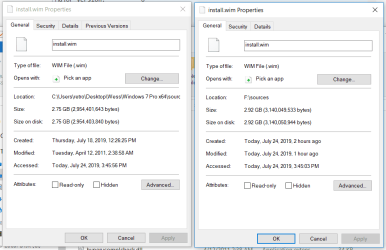
Properties on the left are before running 7UPDATERv30; on the right, after running 7UPDATERv30:
 

Attachments

  • install.wim info before n after running 7UPDATERv30.PNG
    install.wim info before n after running 7UPDATERv30.PNG
    18.7 KB · Views: 0

My Computer My Computer

Computer type
Laptop
Computer Manufacturer/Model Number
Lenovo T460s
OS
nothing yet...trying to install Windows 7 Pro 64
CPU
i5 6300U
Hard Drives
256GB M.2 OPAL2
At this point, I'm just assuming that the inconsistent WIM-INFO reports and the strange modification dates indicate a problem. Is that incorrect? Is it time to move on to the problems with the after-installation drivers and updates?
 

My Computer My Computer

Computer type
Laptop
Computer Manufacturer/Model Number
Lenovo T460s
OS
nothing yet...trying to install Windows 7 Pro 64
CPU
i5 6300U
Hard Drives
256GB M.2 OPAL2
You are not making any sense. What do you mean by strange and inconsistent?

The pic you posted indicates the completed wim is larger than the original. Why is that strange? what did you integrate? how many images?

I tested v30 adding only the nvme updates and usb3 drivers into all images with no problems. Also tested integrating simplix into only one image, with no problems. Also tested integrating simplix into all images, with no problems.

If you can explain exactly what you did, I will see if it can be replicated. Since they still show build 17514- I assume you didn't integrate simplix. I don't know why the images are listed twice - I am not getting that.
 

My Computers My Computers

System One System Two

  • Computer type
    PC/Desktop
    OS
    7 X64
    CPU
    i5 8400
    Motherboard
    gigabyte b365m ds3h
    Memory
    2x8gb 3200mhz
    Hard Drives
    various
    PSU
    pure power 11 400w cm
    Case
    Coolermaster
    Cooling
    cryorig m9i
  • Computer type
    PC/Desktop
    OS
    7x64
    CPU
    g5400
    Motherboard
    ga b365m ds3h
    Memory
    8gb ddr4 2400
    PSU
    xfx pro 450w
Yes I agree that the Properties are as expected. but they aren't consistent with the output of the WIN-INFO script after applying the 7UPDATERv30, and neither is consistent with the "Select the operating system you want to install" window modification dates.

Every time I have selected * in order to integrate ALL images. The WIN-INFO output isn't consistent with that either.

I haven't tried applying simplix yet, b/c I understood that this would include additional updates, and I didn't want to introduce any additional variables. I figured I should try to get Windows 7 working first and then apply updates later.
 
Last edited:

My Computer My Computer

Computer type
Laptop
Computer Manufacturer/Model Number
Lenovo T460s
OS
nothing yet...trying to install Windows 7 Pro 64
CPU
i5 6300U
Hard Drives
256GB M.2 OPAL2
paul,

can you replicate any of this?
 

My Computers My Computers

System One System Two

  • Computer type
    PC/Desktop
    OS
    7 X64
    CPU
    i5 8400
    Motherboard
    gigabyte b365m ds3h
    Memory
    2x8gb 3200mhz
    Hard Drives
    various
    PSU
    pure power 11 400w cm
    Case
    Coolermaster
    Cooling
    cryorig m9i
  • Computer type
    PC/Desktop
    OS
    7x64
    CPU
    g5400
    Motherboard
    ga b365m ds3h
    Memory
    8gb ddr4 2400
    PSU
    xfx pro 450w
Yes I agree that the Properties are as expected. but they aren't consistent with the output of the WIN-INFO script after applying the 7UPDATERv30, and neither is consistent with the "Select the operating system you want to install" window modification dates.

Every time I have selected * in order to integrate ALL images. The WIN-INFO output isn't consistent with that either.

I haven't tried applying simplix yet, b/c I understood that this would include additional updates, and I didn't want to introduce any additional variables. I figured I should try to get Windows 7 working first and then apply updates later.


Did you try to integrate only the usb3 drivers and ms nvme updates?

The usb3 drivers are already in the correct folders.

Where did you place the nvme updates?

Which image did you select?
 

My Computers My Computers

System One System Two

  • Computer type
    PC/Desktop
    OS
    7 X64
    CPU
    i5 8400
    Motherboard
    gigabyte b365m ds3h
    Memory
    2x8gb 3200mhz
    Hard Drives
    various
    PSU
    pure power 11 400w cm
    Case
    Coolermaster
    Cooling
    cryorig m9i
  • Computer type
    PC/Desktop
    OS
    7x64
    CPU
    g5400
    Motherboard
    ga b365m ds3h
    Memory
    8gb ddr4 2400
    PSU
    xfx pro 450w
Hi Marley.

Dont know where its picking that Modified date field from, but you can change it

Home | Attribute Changer


Roy
 

My Computer My Computer

Computer type
PC/Desktop
Computer Manufacturer/Model Number
medionl/Aspire 6930G/acer x55a
OS
W7 home premium 32bit/W7HP 64bit/w10 tp insider ring
CPU
E5300 dual core
Motherboard
medion MS7366
Memory
3gb
Graphics Card(s)
Nvidia Geforce 7100 Nforce 630i
Monitor(s) Displays
avixc
Internet Speed
n (isp resticted to 72)
Antivirus
mse/pands
Browser
palemoon
Other Info
Belkin Fd7050 n USB using Railink RT2870 drivers, more upto date
Hi Marley.

Dont know where its picking that Modified date field from, but you can change it

Home | Attribute Changer


Roy

Introducing a 3rd party program is not going to help. We are trying to find out why this particular system/user is having a problem with this particular script.


It works fine for me. Until he describes exactly what he did, I can't see if it can replicated.


I have tested several scenarios and all are successful.
 
Last edited:

My Computers My Computers

System One System Two

  • Computer type
    PC/Desktop
    OS
    7 X64
    CPU
    i5 8400
    Motherboard
    gigabyte b365m ds3h
    Memory
    2x8gb 3200mhz
    Hard Drives
    various
    PSU
    pure power 11 400w cm
    Case
    Coolermaster
    Cooling
    cryorig m9i
  • Computer type
    PC/Desktop
    OS
    7x64
    CPU
    g5400
    Motherboard
    ga b365m ds3h
    Memory
    8gb ddr4 2400
    PSU
    xfx pro 450w
Hi SIW2,

I can see where your coming from.
I highly suspect its his system set-up. Would be handy to know exactly what it is.
(dual boot / extra drives / OS's etc)
The dates can only be picked up from Bios or explorer.exe

possible red herring that modified date is suspiciously close to the time Service pack 1 was released

Roy
 
Last edited:

My Computer My Computer

Computer type
PC/Desktop
Computer Manufacturer/Model Number
medionl/Aspire 6930G/acer x55a
OS
W7 home premium 32bit/W7HP 64bit/w10 tp insider ring
CPU
E5300 dual core
Motherboard
medion MS7366
Memory
3gb
Graphics Card(s)
Nvidia Geforce 7100 Nforce 630i
Monitor(s) Displays
avixc
Internet Speed
n (isp resticted to 72)
Antivirus
mse/pands
Browser
palemoon
Other Info
Belkin Fd7050 n USB using Railink RT2870 drivers, more upto date
Hi Roy, You want the details of the computer I'm using to create the media or the computer I'm trying to install it on? The machine I'm using to create the media is a Sager D9F Intel i7 12 GB RAM 64 bit running Windows 10 Pro. The one I'm trying to install is an off-the-shelf Lenovo T460s (ThinkPad,ThinkPad T460s,Model:20F9003GUS).

I ordered a 20F90038US which comes with Windows 7 Pro. They sent me a 003GUS not 0038US. The 003GUS comes with Windows 10 not Windows 7. By the time I figured out they'd sent me the wrong model, I couldn't get my money back so I decided to try to install Windows 7 myself. I had to repartition the drive in order to install Windows 7, and in doing so I wiped out the original Windows 10 installation, naturally. So, it's currently not got an OS. You want the BIOS for this one?

As I've said I'm not a Windows person. Give me Linux or a Mac any day. Does that give you the information you need?
 

My Computer My Computer

Computer type
Laptop
Computer Manufacturer/Model Number
Lenovo T460s
OS
nothing yet...trying to install Windows 7 Pro 64
CPU
i5 6300U
Hard Drives
256GB M.2 OPAL2
Did you try to integrate only the usb3 drivers and ms nvme updates?

The usb3 drivers are already in the correct folders.

Where did you place the nvme updates?

Which image did you select?

Hi SIW2

I'm not sure if you didn't see or understand my earlier answers, or if I'm not managing to understand what you are asking.... I'll try restating it.

I've done this two ways.

1) Using the 7UPDATERv30 script and file structure exactly as downloaded in the zip file. I update all images. With the v30 version, when I run set up, on the pop-up where I am to select the version I want to install, I now see the Windows 7 Professional (which I didn't with v29 or v28), but all Windows versions have the incorrect modification date of 11/21/2010. I proceed to install Windows 7 Pro but none of my drives or drivers can be seen by the Device Manager inside Windows 7 Pro, specifically I have no internet or USBs, among others.

2) Adding to the 7UPDATERv30 directories exactly as I described earlier for v28:
This is what I understand I am to do:

  1. Make sure all virus protection is disabled.
  2. Download NVME-DRIVERS-OEMx64.zip and extract.
  3. Copy
    ~\Samsung NVMe\secnvme.cat
    ~\Samsung NVMe\secnvme.inf
    ~\Samsung NVMe\secnvme.sys
    ~\Samsung NVMe\secnvmeF.sys
    to ~\7UPDATERv28\DRIVERS\Bootx64\ and to ~\7UPDATERv28\DRIVERS\Installx64\
  4. Download UPDATES-MS-Nvme-Win7x64.zip and extract.
  5. Copy
    ~\Nvme-hotfixx64\Windows6.1-KB2990941-v3-x64.msu
    ~\Nvme-hotfixx64\Windows6.1-KB3087873-v2-x64.msu
    to ~\7UPDATERv28\UPDATES\Bootx64\ and to ~\7UPDATERv28\UPDATES\Installx64\
  6. Run 7UPDATERv28.cmd (as admin), answering N to the SIMPLIX question and answering * to update all images.

When I do this and run set up, I get the "A required CD/DVD driver device driver is missing..." error again and can't move on.

Please tell me if it's still not clear.
 

My Computer My Computer

Computer type
Laptop
Computer Manufacturer/Model Number
Lenovo T460s
OS
nothing yet...trying to install Windows 7 Pro 64
CPU
i5 6300U
Hard Drives
256GB M.2 OPAL2
Tried repeating process 2 above but without the Samsung NVMe drivers. Same result. "A required CD/DVD driver device driver is missing...".
 

My Computer My Computer

Computer type
Laptop
Computer Manufacturer/Model Number
Lenovo T460s
OS
nothing yet...trying to install Windows 7 Pro 64
CPU
i5 6300U
Hard Drives
256GB M.2 OPAL2
"A required CD/DVD driver device driver is missing..."

That usually means setup.exe can't find install.wim.

Most likely cause is not having integrated the correct usb3/3.1 drivers.

Another possibilty is that the boot.wim has MS nvme updates integrated, but they weren't extracted to the installation media sources folder.

Have a look at the installation media sources folder and check, for example, if the setup.exe there is the new version. It should match the setup.exe in the boot.wim image 2 sources folder.

Install media sources folder:

setup-exe-new-version.jpg


Line 222 in the script extracts the boot.wim image 2 sources folder into the installation media to ensure all the setup file versions match.


%wimlib% extract "%wimdir%\sources\boot.wim" 2 /Sources/ --no-acls --dest-dir="%wimdir%"
 

My Computers My Computers

System One System Two

  • Computer type
    PC/Desktop
    OS
    7 X64
    CPU
    i5 8400
    Motherboard
    gigabyte b365m ds3h
    Memory
    2x8gb 3200mhz
    Hard Drives
    various
    PSU
    pure power 11 400w cm
    Case
    Coolermaster
    Cooling
    cryorig m9i
  • Computer type
    PC/Desktop
    OS
    7x64
    CPU
    g5400
    Motherboard
    ga b365m ds3h
    Memory
    8gb ddr4 2400
    PSU
    xfx pro 450w
I had the exact same issue - the windows 7 installer can even detect the NVMe-drive, but you can't install windows on it.
For my Windows 7 SP2.8-series I want to have native NVMe-support with using MS's two NVMe-Updates. I ordered a ssdpekkw 12 for this, that, for my surprise, supports installation to it in GPT and MBR, for testing/developing. It took me 6 really fu**ing frustrating hours to figure it out (due to my ADHD i can get annoyed pretty fast). To get it working like i wanted to - using Gigabyte's Tool or combining a Windows 10's ISO and a Windows 7's install.wim, which would both work, tested it - wasn't an option for me because but I want it to have as Windows 7-native as possible.
Here's how i did it:
It took me some 'attempt's' to really notice it but in MS's how-to there's an, at least for me, unusal way for slipstreaming this:
First you have to add the two updates as usual, but DIRECTLY AFTER slipstreaming the two updates, you need to copy the contents from your mount-directory to the sources-directory that you use to create your ISO later:

dism /mount-wim /wimfile:w:\extract\sources\boot.wim /mountdir:%mount% /index:2
dism /image:%mount% /Add-Package /PackagePath:%v1%Updates\%arc%\NVMe
dism /image:%mount% /add-driver /driver:%v1%driver\%arc%\usb3 /recurse /forceunsigned
xcopy /s /y %mount%\sources w:\extract\sources
dism /unmount-wim /mountdir:%mount% /commit

Hope this helps, interested in replys.

 

My Computer My Computer

Computer type
PC/Desktop
OS
Windows 7 Professional x64
CPU
9900KS
Motherboard
ASRock Z390M Pro4
Memory
32GB DDR4
Graphics Card(s)
GeForce GT 640
Sound Card
Renkforce MX 0103USB
Hard Drives
Samsung 850 EVO Basic 250GB
Cooling
Be Quiet! shadow rock lp and one case fan.
Mouse
Logitech MX Anywhere 2S
Internet Speed
~80mb/s down, 15mb/s up
Browser
mostly Chrome
Back
Top