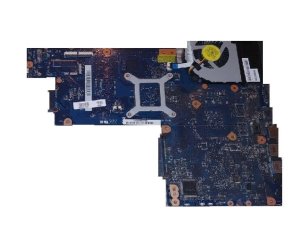
Solved Wheres the jumper to reset BIOS on Toshiba Satellite P850 motherboard

sheffieldyorky

New member
Member
VIP
Local time
6:21 PM
Messages
106
I saw a question that was posed on another Forum the title of the threadwas; "Where is the jumper to reset BIOS on Toshiba Satellite P855"Well I have a similar problem.
On Gumtree I have recently purchased from a local guy (who has now movedhouse, which I knew was happening he was living in Sheffield) well anyway I installedthis Toshiba Satellite C850 H000052450 Motherboard and it continues to ask for"supervisor password" or "press F11" I have tried thefollowing passwords;
  • Admin
  • Supervisor
  • Administrator
  • Toshiba
  • You get the idea
    So in the end I had to press F11
    This motherboard was taken out of a working laptop i.e. broken screenhinges etc.
    When I picked it up from his house I saw the laptop and he booted it upfor me, plugging it into a slave monitor.
    This now takes me to the BIOS but the elements to alter things, i.e.boot order passwords etc. are all greyed out. This tells me that I am in the BIOSas a "user" and not an administrator, so I have restricted privileges.I have tried all sorts of things from leaving the battery out overnight toresearching on the internet. I even checked the voltage on the battery and itreads 3v they all have come up with the same answer "press F2 or F. . . .. . whatever and get into the BIOS and then go along to . . . . . . . None ofwhich helps.
    I have looked on the motherboard, initially I was looking for a "Motherboard Jumper" but nowafter reading this other thread it now seems that I should be looking for thefollowing it is under the memory. For the C850, the jumper is B500.
    It’s not there.
    The reason why I want to alter the BIOS is because of thefollowing problem;
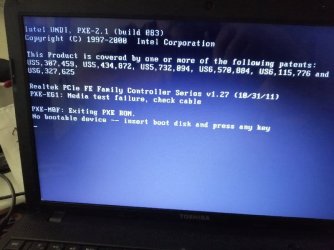
    "Checking media (fail)" ON BOOT
    Now I know that it is not the HDD because I installed a new OS onit on a different laptop and swapped the SATA HDD’s
    Maybe I am undertaking things in the wrong order.
    Something else that have seen is when I finally manage to get intothe “user” BIOS I do not see the DVD drive listed but it spins up with orwithout software.
    My thinking is that if I can clear the following items;
  • "supervisor password"
  • "Checking media (fail)" ON BOOT
The DVD drive appearance should not be a problem.
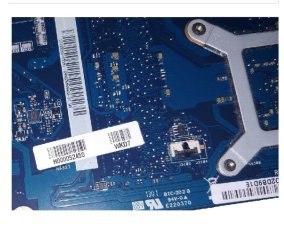
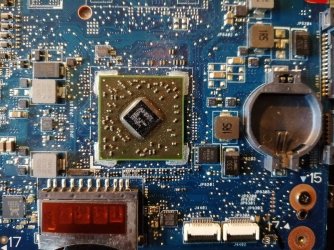
I have attached some photos of the motherboard for referencesake.
I posted the very same question on the answers.microsoft.comwebsite and the Moderator told me in no uncertain terms the following;
MVP
|
VolunteerModerator
Wecan't help you due to Microsoft's policy about BIOS/etc. Passwords.
Contact your laptop, computer or motherboardmanufacturer.
@@@@@@@@@@@@@@@@@@@@@@
Microsoft forbids any assistance being given in theseForums to help you bypass or "crack" lost or forgotten Passwords.
Regarding questions with respect to resetting hardware BIOSpasswordswe would request that you direct customers to the appropriate resources on theHardware manufacturers sites for the correct procedure.
I replied back
Thanks ****
Forget the supposedly crackingthe password, which I'm NOT because as already stated I purchased themotherboard !
What about help with therest of my thread ?
Thanks


Do you think China will getback to me with a BIOS password, never in a million years.

As you can see Microsoftare not any help whatsoever and all I want to do is get this fixed and forwardthe repaired machine back to my customer.


I have attached some photos of the motherboard for referencesake.
IfI could get back to the seller (Joe if you are reading this call round to thehouse) but anyway as I say I’m positive Joe would supply the BIOS supervisor password.
Sothe questions are as follows;
1. Whattwo pins can I short out on the motherboard ?
2. How can I clear the wording "Checkingmedia (fail)" ON BOOT ?


If you require any more details please feel free to contact me.


Attachments
  • Toshiba 1.jpg
    Toshiba 1.jpg
    122.9 KB · Views: 2
  • Toshiba 2.jpg
    Toshiba 2.jpg
    43.9 KB · Views: 35
  • Toshiba 3.jpg
    Toshiba 3.jpg
    66.4 KB · Views: 34

My Computer My Computer

At a glance

Windows 7 64bit Service Pack 1Intel Core 2 Quad Q8300 @ 2.50GHz8.00GB Dual-Channel DDR3 @ 666MHzV223W (1680x1050@59Hz) 1023MB NVIDIA GeForce ...
Computer type
PC/Desktop
Computer Manufacturer/Model Number
Custom build
OS
Windows 7 64bit Service Pack 1
CPU
Intel Core 2 Quad Q8300 @ 2.50GHz
Motherboard
ASUSTeK Computer INC. P5E3 Premium (LGA775)
Memory
8.00GB Dual-Channel DDR3 @ 666MHz
Graphics Card(s)
V223W (1680x1050@59Hz) 1023MB NVIDIA GeForce GT 430 (NVIDIA)
Sound Card
NVIDIA Virtual Audio Device (Wave Extensible) (WDM)
Monitor(s) Displays
Acer 22"
Screen Resolution
X193HQL (Analog)
Hard Drives
Seagate 2.0TB
ST2000DL003-9VT166 ATA Device
PSU
700W
Cooling
Akassa heatsink and two coolingfansg
Keyboard
Logitech
Antivirus
Kaspersky Internet Security 2019
Browser
IE 11
Other Info
Will be undertaking a total upgrade from the case upwards next year.
Case, motherboard, ram, cpu and last but not least a 2TB SSD, but before I do that everything will be backed up to the cloud

My Computer My Computer

At a glance

Windows 7 Professional 64bitIntel i7-5960X64GB Corsair Dominator 2400MHz3 EVGA GTX980's
Computer type
PC/Desktop
Computer Manufacturer/Model Number
custom build
OS
Windows 7 Professional 64bit
CPU
Intel i7-5960X
Motherboard
EVGA X99 Classified
Memory
64GB Corsair Dominator 2400MHz
Graphics Card(s)
3 EVGA GTX980's
Sound Card
on board
Monitor(s) Displays
3 Dell E2715H 27"
Screen Resolution
1920x1080 (5760x1080)
Hard Drives
Samsung 950 Pro 1TB M.2 SSD,
Western Digital Black 2TB HDD's x5
Western Digital Black 1TB HDD's x3
PSU
Corsair AX1200i
Case
Corsair 750D
Cooling
Corsair H110i GT
Keyboard
Corsair K70
Mouse
Corsair M45
Internet Speed
250 down/10 up
Antivirus
Microsoft Security Essentials
Browser
IE 11, Google Chrome

My Computer My Computer

At a glance

Windows 7 64bit Service Pack 1Intel Core 2 Quad Q8300 @ 2.50GHz8.00GB Dual-Channel DDR3 @ 666MHzV223W (1680x1050@59Hz) 1023MB NVIDIA GeForce ...
Computer type
PC/Desktop
Computer Manufacturer/Model Number
Custom build
OS
Windows 7 64bit Service Pack 1
CPU
Intel Core 2 Quad Q8300 @ 2.50GHz
Motherboard
ASUSTeK Computer INC. P5E3 Premium (LGA775)
Memory
8.00GB Dual-Channel DDR3 @ 666MHz
Graphics Card(s)
V223W (1680x1050@59Hz) 1023MB NVIDIA GeForce GT 430 (NVIDIA)
Sound Card
NVIDIA Virtual Audio Device (Wave Extensible) (WDM)
Monitor(s) Displays
Acer 22"
Screen Resolution
X193HQL (Analog)
Hard Drives
Seagate 2.0TB
ST2000DL003-9VT166 ATA Device
PSU
700W
Cooling
Akassa heatsink and two coolingfansg
Keyboard
Logitech
Antivirus
Kaspersky Internet Security 2019
Browser
IE 11
Other Info
Will be undertaking a total upgrade from the case upwards next year.
Case, motherboard, ram, cpu and last but not least a 2TB SSD, but before I do that everything will be backed up to the cloud
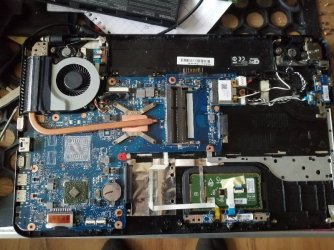
Taking out the CMOS battery for a few minutes should clear all of the settings. This video might help you with accessing it. YouTube

Note: that is not the battery pack. Also you will lose all BIOS settings including the time.
 

My Computers My Computers

  • At a glance

    Windows 7 pro/Windows 10 ProIntel i7 860 Quad core 2.8 ghz8 gbATI Radeon HD 5770 1 gb ram
    Computer type
    PC/Desktop
    Computer Manufacturer/Model Number
    HP Pavillion Elite HPE-250f
    OS
    Windows 7 pro/Windows 10 Pro
    CPU
    Intel i7 860 Quad core 2.8 ghz
    Memory
    8 gb
    Graphics Card(s)
    ATI Radeon HD 5770 1 gb ram
    Monitor(s) Displays
    Alienware 25 AW2521HF & Viewsonic
    Screen Resolution
    1920 x1080 & 1680x1050
    Hard Drives
    WD blue 1 tb & 500 gb.
    Browser
    FF of course.
    Other Info
    https://www.bestbuy.com/site/hp-pavilion-elite-desktop-intel-core-i7-processor-8gb-memory-1tb-hard-drive/9921493.p?skuId=9921493
  • At a glance

    Windows 2012 R2 Data center/Linux Minti3 9100 3.6GHz, 8M cache, 4C/4T8GB 2666MT/s DDR4 ECC UDIMM
    Computer type
    PC/Desktop
    System Manufacturer/Model Number
    Dell Poweredge T140
    OS
    Windows 2012 R2 Data center/Linux Mint
    CPU
    i3 9100 3.6GHz, 8M cache, 4C/4T
    Memory
    8GB 2666MT/s DDR4 ECC UDIMM
    Monitor(s) Displays
    Viewsonic
    Screen Resolution
    1680x1050
    Hard Drives
    1 TB & 750 GB
    Other Info
    https://www.dell.com/en-us/work/shop/productdetailstxn/poweredge-t140?~ck=bt
Taking out the CMOS battery for a few minutes should clear all of the settings. This video might help you with accessing it. YouTube

Note: that is not the battery pack. Also you will lose all BIOS settings including the time.
>
Hi there
Thanks for the reply please see the following;


I have tried all sorts of things from leaving the battery out overnight toresearching on the internet. I even checked the voltage on the battery and it reads 3v they all have come up with the same answer "press F2 or F. . . .. . whatever and get into the BIOS and then go along to . . . . . . . None of which helps.
 

My Computer My Computer

At a glance

Windows 7 64bit Service Pack 1Intel Core 2 Quad Q8300 @ 2.50GHz8.00GB Dual-Channel DDR3 @ 666MHzV223W (1680x1050@59Hz) 1023MB NVIDIA GeForce ...
Computer type
PC/Desktop
Computer Manufacturer/Model Number
Custom build
OS
Windows 7 64bit Service Pack 1
CPU
Intel Core 2 Quad Q8300 @ 2.50GHz
Motherboard
ASUSTeK Computer INC. P5E3 Premium (LGA775)
Memory
8.00GB Dual-Channel DDR3 @ 666MHz
Graphics Card(s)
V223W (1680x1050@59Hz) 1023MB NVIDIA GeForce GT 430 (NVIDIA)
Sound Card
NVIDIA Virtual Audio Device (Wave Extensible) (WDM)
Monitor(s) Displays
Acer 22"
Screen Resolution
X193HQL (Analog)
Hard Drives
Seagate 2.0TB
ST2000DL003-9VT166 ATA Device
PSU
700W
Cooling
Akassa heatsink and two coolingfansg
Keyboard
Logitech
Antivirus
Kaspersky Internet Security 2019
Browser
IE 11
Other Info
Will be undertaking a total upgrade from the case upwards next year.
Case, motherboard, ram, cpu and last but not least a 2TB SSD, but before I do that everything will be backed up to the cloud
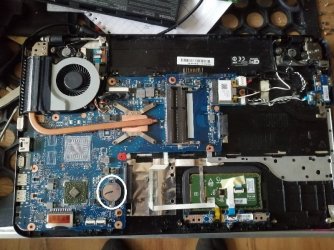
Hi there
Thanks for the reply but in short no.
If you want a better photo than those supplied or a photo of a specific area then I will be more than happy to oblige.
Thanks once again.

Will need a better picture. Maybe one that I can enlarge. Maybe upload it to imgur.com
When you take the pictures, try to get every part of the board.
 

My Computer My Computer

At a glance

Windows 7 Professional 64bitIntel i7-5960X64GB Corsair Dominator 2400MHz3 EVGA GTX980's
Computer type
PC/Desktop
Computer Manufacturer/Model Number
custom build
OS
Windows 7 Professional 64bit
CPU
Intel i7-5960X
Motherboard
EVGA X99 Classified
Memory
64GB Corsair Dominator 2400MHz
Graphics Card(s)
3 EVGA GTX980's
Sound Card
on board
Monitor(s) Displays
3 Dell E2715H 27"
Screen Resolution
1920x1080 (5760x1080)
Hard Drives
Samsung 950 Pro 1TB M.2 SSD,
Western Digital Black 2TB HDD's x5
Western Digital Black 1TB HDD's x3
PSU
Corsair AX1200i
Case
Corsair 750D
Cooling
Corsair H110i GT
Keyboard
Corsair K70
Mouse
Corsair M45
Internet Speed
250 down/10 up
Antivirus
Microsoft Security Essentials
Browser
IE 11, Google Chrome
Will need a better picture. Maybe one that I can enlarge. Maybe upload it to imgur.com
When you take the pictures, try to get every part of the board.


Thanks the reply Starting with that now
 

My Computer My Computer

At a glance

Windows 7 64bit Service Pack 1Intel Core 2 Quad Q8300 @ 2.50GHz8.00GB Dual-Channel DDR3 @ 666MHzV223W (1680x1050@59Hz) 1023MB NVIDIA GeForce ...
Computer type
PC/Desktop
Computer Manufacturer/Model Number
Custom build
OS
Windows 7 64bit Service Pack 1
CPU
Intel Core 2 Quad Q8300 @ 2.50GHz
Motherboard
ASUSTeK Computer INC. P5E3 Premium (LGA775)
Memory
8.00GB Dual-Channel DDR3 @ 666MHz
Graphics Card(s)
V223W (1680x1050@59Hz) 1023MB NVIDIA GeForce GT 430 (NVIDIA)
Sound Card
NVIDIA Virtual Audio Device (Wave Extensible) (WDM)
Monitor(s) Displays
Acer 22"
Screen Resolution
X193HQL (Analog)
Hard Drives
Seagate 2.0TB
ST2000DL003-9VT166 ATA Device
PSU
700W
Cooling
Akassa heatsink and two coolingfansg
Keyboard
Logitech
Antivirus
Kaspersky Internet Security 2019
Browser
IE 11
Other Info
Will be undertaking a total upgrade from the case upwards next year.
Case, motherboard, ram, cpu and last but not least a 2TB SSD, but before I do that everything will be backed up to the cloud
Will need a better picture. Maybe one that I can enlarge. Maybe upload it to imgur.com
When you take the pictures, try to get every part of the board.

>
>
I don't have an imgur.com account but I have Google-drive account so I'll use that also.
>
Toshiba Satellite - Google Drive


Please see the attached I have viewed on my desktop and with the mouse thumb wheel you are able to zoom in.
I have just tried it via the forum, you might need to manipulate it somewhat.
 

Attachments

  • BOARD.jpg
    BOARD.jpg
    97 KB · Views: 10

My Computer My Computer

At a glance

Windows 7 64bit Service Pack 1Intel Core 2 Quad Q8300 @ 2.50GHz8.00GB Dual-Channel DDR3 @ 666MHzV223W (1680x1050@59Hz) 1023MB NVIDIA GeForce ...
Computer type
PC/Desktop
Computer Manufacturer/Model Number
Custom build
OS
Windows 7 64bit Service Pack 1
CPU
Intel Core 2 Quad Q8300 @ 2.50GHz
Motherboard
ASUSTeK Computer INC. P5E3 Premium (LGA775)
Memory
8.00GB Dual-Channel DDR3 @ 666MHz
Graphics Card(s)
V223W (1680x1050@59Hz) 1023MB NVIDIA GeForce GT 430 (NVIDIA)
Sound Card
NVIDIA Virtual Audio Device (Wave Extensible) (WDM)
Monitor(s) Displays
Acer 22"
Screen Resolution
X193HQL (Analog)
Hard Drives
Seagate 2.0TB
ST2000DL003-9VT166 ATA Device
PSU
700W
Cooling
Akassa heatsink and two coolingfansg
Keyboard
Logitech
Antivirus
Kaspersky Internet Security 2019
Browser
IE 11
Other Info
Will be undertaking a total upgrade from the case upwards next year.
Case, motherboard, ram, cpu and last but not least a 2TB SSD, but before I do that everything will be backed up to the cloud
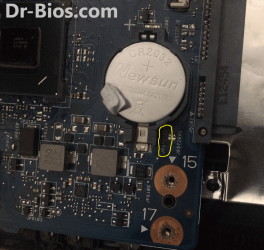
The part that I've circled in white is the battery you need to remove.
 

Attachments

  • BOARD.jpg
    BOARD.jpg
    95.4 KB · Views: 0

My Computer My Computer

At a glance

Windows 7 Professional 64bitIntel i7-5960X64GB Corsair Dominator 2400MHz3 EVGA GTX980's
Computer type
PC/Desktop
Computer Manufacturer/Model Number
custom build
OS
Windows 7 Professional 64bit
CPU
Intel i7-5960X
Motherboard
EVGA X99 Classified
Memory
64GB Corsair Dominator 2400MHz
Graphics Card(s)
3 EVGA GTX980's
Sound Card
on board
Monitor(s) Displays
3 Dell E2715H 27"
Screen Resolution
1920x1080 (5760x1080)
Hard Drives
Samsung 950 Pro 1TB M.2 SSD,
Western Digital Black 2TB HDD's x5
Western Digital Black 1TB HDD's x3
PSU
Corsair AX1200i
Case
Corsair 750D
Cooling
Corsair H110i GT
Keyboard
Corsair K70
Mouse
Corsair M45
Internet Speed
250 down/10 up
Antivirus
Microsoft Security Essentials
Browser
IE 11, Google Chrome
The part that I've circled in white is the battery you need to remove.


hi there thanks for the reply


Please see the following text which was in my initial thread;


I have tried all sorts of things from leaving the battery out overnight toresearching on the internet
 

My Computer My Computer

At a glance

Windows 7 64bit Service Pack 1Intel Core 2 Quad Q8300 @ 2.50GHz8.00GB Dual-Channel DDR3 @ 666MHzV223W (1680x1050@59Hz) 1023MB NVIDIA GeForce ...
Computer type
PC/Desktop
Computer Manufacturer/Model Number
Custom build
OS
Windows 7 64bit Service Pack 1
CPU
Intel Core 2 Quad Q8300 @ 2.50GHz
Motherboard
ASUSTeK Computer INC. P5E3 Premium (LGA775)
Memory
8.00GB Dual-Channel DDR3 @ 666MHz
Graphics Card(s)
V223W (1680x1050@59Hz) 1023MB NVIDIA GeForce GT 430 (NVIDIA)
Sound Card
NVIDIA Virtual Audio Device (Wave Extensible) (WDM)
Monitor(s) Displays
Acer 22"
Screen Resolution
X193HQL (Analog)
Hard Drives
Seagate 2.0TB
ST2000DL003-9VT166 ATA Device
PSU
700W
Cooling
Akassa heatsink and two coolingfansg
Keyboard
Logitech
Antivirus
Kaspersky Internet Security 2019
Browser
IE 11
Other Info
Will be undertaking a total upgrade from the case upwards next year.
Case, motherboard, ram, cpu and last but not least a 2TB SSD, but before I do that everything will be backed up to the cloud
Hopefully someone will have had the same mobo and may have an idea. Nothing obvious in the screenshots as far as I can tell.
 

My Computers My Computers

  • At a glance

    7 X64i5 84002x8gb 3200mhz
    Computer type
    PC/Desktop
    OS
    7 X64
    CPU
    i5 8400
    Motherboard
    gigabyte b365m ds3h
    Memory
    2x8gb 3200mhz
    Hard Drives
    various
    PSU
    pure power 11 400w cm
    Case
    Coolermaster
    Cooling
    cryorig m9i
  • At a glance

    7x64g54008gb ddr4 2400
    Computer type
    PC/Desktop
    OS
    7x64
    CPU
    g5400
    Motherboard
    ga b365m ds3h
    Memory
    8gb ddr4 2400
    PSU
    xfx pro 450w
None of us here can see the pins. Look for 2 or 3 pins grouped in line together. There is probably a little jumper on at least one of them. If you can't find it and removing the battery doesn't work then you might have to contact the seller.
 

My Computers My Computers

  • At a glance

    Windows 7 pro/Windows 10 ProIntel i7 860 Quad core 2.8 ghz8 gbATI Radeon HD 5770 1 gb ram
    Computer type
    PC/Desktop
    Computer Manufacturer/Model Number
    HP Pavillion Elite HPE-250f
    OS
    Windows 7 pro/Windows 10 Pro
    CPU
    Intel i7 860 Quad core 2.8 ghz
    Memory
    8 gb
    Graphics Card(s)
    ATI Radeon HD 5770 1 gb ram
    Monitor(s) Displays
    Alienware 25 AW2521HF & Viewsonic
    Screen Resolution
    1920 x1080 & 1680x1050
    Hard Drives
    WD blue 1 tb & 500 gb.
    Browser
    FF of course.
    Other Info
    https://www.bestbuy.com/site/hp-pavilion-elite-desktop-intel-core-i7-processor-8gb-memory-1tb-hard-drive/9921493.p?skuId=9921493
  • At a glance

    Windows 2012 R2 Data center/Linux Minti3 9100 3.6GHz, 8M cache, 4C/4T8GB 2666MT/s DDR4 ECC UDIMM
    Computer type
    PC/Desktop
    System Manufacturer/Model Number
    Dell Poweredge T140
    OS
    Windows 2012 R2 Data center/Linux Mint
    CPU
    i3 9100 3.6GHz, 8M cache, 4C/4T
    Memory
    8GB 2666MT/s DDR4 ECC UDIMM
    Monitor(s) Displays
    Viewsonic
    Screen Resolution
    1680x1050
    Hard Drives
    1 TB & 750 GB
    Other Info
    https://www.dell.com/en-us/work/shop/productdetailstxn/poweredge-t140?~ck=bt
None of us here can see the pins. Look for 2 or 3 pins grouped in line together. There is probably a little jumper on at least one of them. If you can't find it and removing the battery doesn't work then you might have to contact the seller.


Thanks for your reply.
Please below;
>
>
>


On Gumtree I have recently purchased from a local guy (who has now movedhouse, which I knew was happening he was living in Sheffield)


AND


If I could get back to the seller (Joeif you are reading this call round to the house) but anyway as I say I’mpositive Joe would supply the BIOS supervisor password.
 

My Computer My Computer

At a glance

Windows 7 64bit Service Pack 1Intel Core 2 Quad Q8300 @ 2.50GHz8.00GB Dual-Channel DDR3 @ 666MHzV223W (1680x1050@59Hz) 1023MB NVIDIA GeForce ...
Computer type
PC/Desktop
Computer Manufacturer/Model Number
Custom build
OS
Windows 7 64bit Service Pack 1
CPU
Intel Core 2 Quad Q8300 @ 2.50GHz
Motherboard
ASUSTeK Computer INC. P5E3 Premium (LGA775)
Memory
8.00GB Dual-Channel DDR3 @ 666MHz
Graphics Card(s)
V223W (1680x1050@59Hz) 1023MB NVIDIA GeForce GT 430 (NVIDIA)
Sound Card
NVIDIA Virtual Audio Device (Wave Extensible) (WDM)
Monitor(s) Displays
Acer 22"
Screen Resolution
X193HQL (Analog)
Hard Drives
Seagate 2.0TB
ST2000DL003-9VT166 ATA Device
PSU
700W
Cooling
Akassa heatsink and two coolingfansg
Keyboard
Logitech
Antivirus
Kaspersky Internet Security 2019
Browser
IE 11
Other Info
Will be undertaking a total upgrade from the case upwards next year.
Case, motherboard, ram, cpu and last but not least a 2TB SSD, but before I do that everything will be backed up to the cloud
Hopefully someone will have had the same mobo and may have an idea. Nothing obvious in the screenshots as far as I can tell.
AND
None of us here can see the pins. Look for 2 or 3 pins grouped in line together. There is probably a little jumper on at least one of them. If you can't find it and removing the battery doesn't work then you might have to contact the seller.

Probably this schematic might help, please see attached.

Regarding three pins that's a negative.

Just a thought on what SIW2 wrote I am willing / could provide a video of the pesky motherboard, I wonder if that's down to the Moderators to allow this.
As HAVOC has been contributing to this thread maybe they might be able to shed some light on this.
 

Attachments

My Computer My Computer

At a glance

Windows 7 64bit Service Pack 1Intel Core 2 Quad Q8300 @ 2.50GHz8.00GB Dual-Channel DDR3 @ 666MHzV223W (1680x1050@59Hz) 1023MB NVIDIA GeForce ...
Computer type
PC/Desktop
Computer Manufacturer/Model Number
Custom build
OS
Windows 7 64bit Service Pack 1
CPU
Intel Core 2 Quad Q8300 @ 2.50GHz
Motherboard
ASUSTeK Computer INC. P5E3 Premium (LGA775)
Memory
8.00GB Dual-Channel DDR3 @ 666MHz
Graphics Card(s)
V223W (1680x1050@59Hz) 1023MB NVIDIA GeForce GT 430 (NVIDIA)
Sound Card
NVIDIA Virtual Audio Device (Wave Extensible) (WDM)
Monitor(s) Displays
Acer 22"
Screen Resolution
X193HQL (Analog)
Hard Drives
Seagate 2.0TB
ST2000DL003-9VT166 ATA Device
PSU
700W
Cooling
Akassa heatsink and two coolingfansg
Keyboard
Logitech
Antivirus
Kaspersky Internet Security 2019
Browser
IE 11
Other Info
Will be undertaking a total upgrade from the case upwards next year.
Case, motherboard, ram, cpu and last but not least a 2TB SSD, but before I do that everything will be backed up to the cloud
Here is one thing I found.
Going to need a picture of close up around the battery. You can jumper these connections to clear the BIOS.
 

Attachments

  • BIOS reset.png
    BIOS reset.png
    747.9 KB · Views: 1

My Computer My Computer

At a glance

Windows 7 Professional 64bitIntel i7-5960X64GB Corsair Dominator 2400MHz3 EVGA GTX980's
Computer type
PC/Desktop
Computer Manufacturer/Model Number
custom build
OS
Windows 7 Professional 64bit
CPU
Intel i7-5960X
Motherboard
EVGA X99 Classified
Memory
64GB Corsair Dominator 2400MHz
Graphics Card(s)
3 EVGA GTX980's
Sound Card
on board
Monitor(s) Displays
3 Dell E2715H 27"
Screen Resolution
1920x1080 (5760x1080)
Hard Drives
Samsung 950 Pro 1TB M.2 SSD,
Western Digital Black 2TB HDD's x5
Western Digital Black 1TB HDD's x3
PSU
Corsair AX1200i
Case
Corsair 750D
Cooling
Corsair H110i GT
Keyboard
Corsair K70
Mouse
Corsair M45
Internet Speed
250 down/10 up
Antivirus
Microsoft Security Essentials
Browser
IE 11, Google Chrome
Well it looks like I may have moved a bit further on in my quest.
Shorting the two contacts JRST2001 by the battery looks like it had no effect whatsoever.
>
>
So reading on another website [Try turning off. Leave for just a few seconds then turn on and press F12 a few times while booting. A list of bootable devices should appear][2]
[Bollotom][2]

As seen here;
Toshiba satellite c850 laptop no bootable device please restart system - MoneySavingExpert.com Forums


The thing is it is now allowing me to Leave "secure boot enabled or do I disable "secure boot"
I have a Windows 7 OS in the DVD drive and a blank HDD ready to go.
Your thoughts please.
I don't want to do the wrong thing and then get back to square one
 
Last edited:

My Computer My Computer

At a glance

Windows 7 64bit Service Pack 1Intel Core 2 Quad Q8300 @ 2.50GHz8.00GB Dual-Channel DDR3 @ 666MHzV223W (1680x1050@59Hz) 1023MB NVIDIA GeForce ...
Computer type
PC/Desktop
Computer Manufacturer/Model Number
Custom build
OS
Windows 7 64bit Service Pack 1
CPU
Intel Core 2 Quad Q8300 @ 2.50GHz
Motherboard
ASUSTeK Computer INC. P5E3 Premium (LGA775)
Memory
8.00GB Dual-Channel DDR3 @ 666MHz
Graphics Card(s)
V223W (1680x1050@59Hz) 1023MB NVIDIA GeForce GT 430 (NVIDIA)
Sound Card
NVIDIA Virtual Audio Device (Wave Extensible) (WDM)
Monitor(s) Displays
Acer 22"
Screen Resolution
X193HQL (Analog)
Hard Drives
Seagate 2.0TB
ST2000DL003-9VT166 ATA Device
PSU
700W
Cooling
Akassa heatsink and two coolingfansg
Keyboard
Logitech
Antivirus
Kaspersky Internet Security 2019
Browser
IE 11
Other Info
Will be undertaking a total upgrade from the case upwards next year.
Case, motherboard, ram, cpu and last but not least a 2TB SSD, but before I do that everything will be backed up to the cloud
Disable secure boot. You won't be able to boot win7 if secure boot is enabled.

Win 7 also requires CSM so there should be a bios setting for enable csm or it is sometimes called Legacy boot
 
Last edited:

My Computers My Computers

  • At a glance

    7 X64i5 84002x8gb 3200mhz
    Computer type
    PC/Desktop
    OS
    7 X64
    CPU
    i5 8400
    Motherboard
    gigabyte b365m ds3h
    Memory
    2x8gb 3200mhz
    Hard Drives
    various
    PSU
    pure power 11 400w cm
    Case
    Coolermaster
    Cooling
    cryorig m9i
  • At a glance

    7x64g54008gb ddr4 2400
    Computer type
    PC/Desktop
    OS
    7x64
    CPU
    g5400
    Motherboard
    ga b365m ds3h
    Memory
    8gb ddr4 2400
    PSU
    xfx pro 450w
Disable secure boot. You won't be able to boot win7 if secure boot is enabled.

Win 7 also requires CSM so there should be a bios setting for enable csm or it is sometimes called Legacy boot


Thanks for that


I have now disabled secure boot and found CSM under the Advanced tab that is now set to CSM Boot


Do I now just click F10 ( save and exit ) and leave the Windows 7 installation disc in the DVD drive ready to install
The BIOS boot order now reads
DVD
HDD
etc etc


OR


Do I just shut down altogether and THEN switch on the machine as I would normally install a new OS
 

My Computer My Computer

At a glance

Windows 7 64bit Service Pack 1Intel Core 2 Quad Q8300 @ 2.50GHz8.00GB Dual-Channel DDR3 @ 666MHzV223W (1680x1050@59Hz) 1023MB NVIDIA GeForce ...
Computer type
PC/Desktop
Computer Manufacturer/Model Number
Custom build
OS
Windows 7 64bit Service Pack 1
CPU
Intel Core 2 Quad Q8300 @ 2.50GHz
Motherboard
ASUSTeK Computer INC. P5E3 Premium (LGA775)
Memory
8.00GB Dual-Channel DDR3 @ 666MHz
Graphics Card(s)
V223W (1680x1050@59Hz) 1023MB NVIDIA GeForce GT 430 (NVIDIA)
Sound Card
NVIDIA Virtual Audio Device (Wave Extensible) (WDM)
Monitor(s) Displays
Acer 22"
Screen Resolution
X193HQL (Analog)
Hard Drives
Seagate 2.0TB
ST2000DL003-9VT166 ATA Device
PSU
700W
Cooling
Akassa heatsink and two coolingfansg
Keyboard
Logitech
Antivirus
Kaspersky Internet Security 2019
Browser
IE 11
Other Info
Will be undertaking a total upgrade from the case upwards next year.
Case, motherboard, ram, cpu and last but not least a 2TB SSD, but before I do that everything will be backed up to the cloud
If you make any changes in bios settings, you need to save and exit (F10) for them to take effect.

If dvd is first in bios boot order, then it should boot from the dvd ( if there is bootable media in the dvd drive)


Do I now just click F10 ( save and exit ) and leave the Windows 7 installation disc in the DVD drive ready to install
The BIOS boot order now reads
DVD
HDD
etc etc

Yes.
 

My Computers My Computers

  • At a glance

    7 X64i5 84002x8gb 3200mhz
    Computer type
    PC/Desktop
    OS
    7 X64
    CPU
    i5 8400
    Motherboard
    gigabyte b365m ds3h
    Memory
    2x8gb 3200mhz
    Hard Drives
    various
    PSU
    pure power 11 400w cm
    Case
    Coolermaster
    Cooling
    cryorig m9i
  • At a glance

    7x64g54008gb ddr4 2400
    Computer type
    PC/Desktop
    OS
    7x64
    CPU
    g5400
    Motherboard
    ga b365m ds3h
    Memory
    8gb ddr4 2400
    PSU
    xfx pro 450w
If you make any changes in bios settings, you need to save and exit (F10) for them to take effect.

If dvd is first in bios boot order, then it should boot from the dvd ( if there is bootable media in the dvd drive)

Yes.


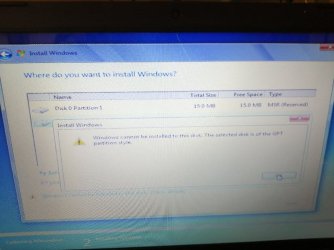
Well after a bit of an unexpected problem (please see attached) I am now finally Installing Windows 7 Professional I'm up to 82% expanding


I will edit this post as and when everything finalises and mark as solved
>
>
Well its installed BUT I am now having problems with the Wi-Fi card.
I will report back later
 

Attachments

  • GPT partition style.jpg
    GPT partition style.jpg
    46.5 KB · Views: 0
  • DVD etc..jpg
    DVD etc..jpg
    49.3 KB · Views: 0
Last edited:

My Computer My Computer

At a glance

Windows 7 64bit Service Pack 1Intel Core 2 Quad Q8300 @ 2.50GHz8.00GB Dual-Channel DDR3 @ 666MHzV223W (1680x1050@59Hz) 1023MB NVIDIA GeForce ...
Computer type
PC/Desktop
Computer Manufacturer/Model Number
Custom build
OS
Windows 7 64bit Service Pack 1
CPU
Intel Core 2 Quad Q8300 @ 2.50GHz
Motherboard
ASUSTeK Computer INC. P5E3 Premium (LGA775)
Memory
8.00GB Dual-Channel DDR3 @ 666MHz
Graphics Card(s)
V223W (1680x1050@59Hz) 1023MB NVIDIA GeForce GT 430 (NVIDIA)
Sound Card
NVIDIA Virtual Audio Device (Wave Extensible) (WDM)
Monitor(s) Displays
Acer 22"
Screen Resolution
X193HQL (Analog)
Hard Drives
Seagate 2.0TB
ST2000DL003-9VT166 ATA Device
PSU
700W
Cooling
Akassa heatsink and two coolingfansg
Keyboard
Logitech
Antivirus
Kaspersky Internet Security 2019
Browser
IE 11
Other Info
Will be undertaking a total upgrade from the case upwards next year.
Case, motherboard, ram, cpu and last but not least a 2TB SSD, but before I do that everything will be backed up to the cloud
Back
Top