- Local time
- 4:35 PM
- Messages
- 106
I saw a question that was posed on another Forum the title of the threadwas; "Where is the jumper to reset BIOS on Toshiba Satellite P855"Well I have a similar problem.
On Gumtree I have recently purchased from a local guy (who has now movedhouse, which I knew was happening he was living in Sheffield) well anyway I installedthis Toshiba Satellite C850 H000052450 Motherboard and it continues to ask for"supervisor password" or "press F11" I have tried thefollowing passwords;
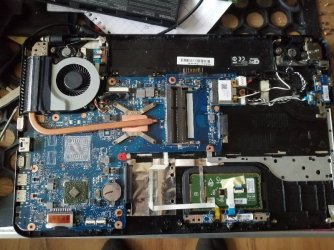
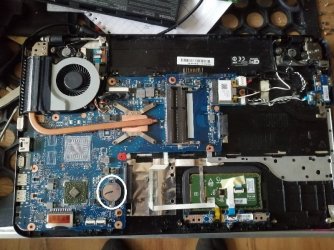
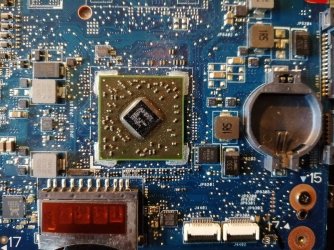
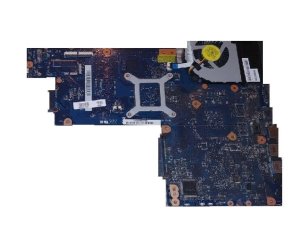
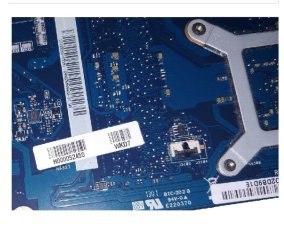
I have attached some photos of the motherboard for referencesake.
I posted the very same question on the answers.microsoft.comwebsite and the Moderator told me in no uncertain terms the following;
MVP
|
VolunteerModerator
Wecan't help you due to Microsoft's policy about BIOS/etc. Passwords.
Contact your laptop, computer or motherboardmanufacturer.
@@@@@@@@@@@@@@@@@@@@@@
Microsoft forbids any assistance being given in theseForums to help you bypass or "crack" lost or forgotten Passwords.
Regarding questions with respect to resetting hardware BIOSpasswordswe would request that you direct customers to the appropriate resources on theHardware manufacturers sites for the correct procedure.
I replied back
Thanks ****
Forget the supposedly crackingthe password, which I'm NOT because as already stated I purchased themotherboard !
What about help with therest of my thread ?
Thanks
Do you think China will getback to me with a BIOS password, never in a million years.
As you can see Microsoftare not any help whatsoever and all I want to do is get this fixed and forwardthe repaired machine back to my customer.
I have attached some photos of the motherboard for referencesake.
IfI could get back to the seller (Joe if you are reading this call round to thehouse) but anyway as I say I’m positive Joe would supply the BIOS supervisor password.
Sothe questions are as follows;
1. Whattwo pins can I short out on the motherboard ?
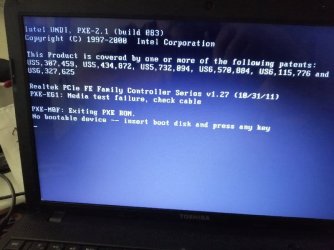
2. How can I clear the wording "Checkingmedia (fail)" ON BOOT ?
If you require any more details please feel free to contact me.
On Gumtree I have recently purchased from a local guy (who has now movedhouse, which I knew was happening he was living in Sheffield) well anyway I installedthis Toshiba Satellite C850 H000052450 Motherboard and it continues to ask for"supervisor password" or "press F11" I have tried thefollowing passwords;
- Admin
- Supervisor
- Administrator
- Toshiba
- You get the idea
So in the end I had to press F11
This motherboard was taken out of a working laptop i.e. broken screenhinges etc.
When I picked it up from his house I saw the laptop and he booted it upfor me, plugging it into a slave monitor.
This now takes me to the BIOS but the elements to alter things, i.e.boot order passwords etc. are all greyed out. This tells me that I am in the BIOSas a "user" and not an administrator, so I have restricted privileges.I have tried all sorts of things from leaving the battery out overnight toresearching on the internet. I even checked the voltage on the battery and itreads 3v they all have come up with the same answer "press F2 or F. . . .. . whatever and get into the BIOS and then go along to . . . . . . . None ofwhich helps.
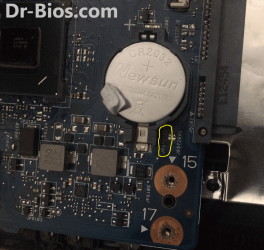
I have looked on the motherboard, initially I was looking for a "Motherboard Jumper" but nowafter reading this other thread it now seems that I should be looking for thefollowing it is under the memory. For the C850, the jumper is B500.
It’s not there.
The reason why I want to alter the BIOS is because of thefollowing problem;
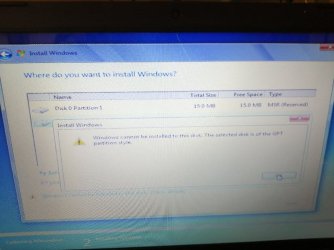
"Checking media (fail)" ON BOOT
Now I know that it is not the HDD because I installed a new OS onit on a different laptop and swapped the SATA HDD’s
Maybe I am undertaking things in the wrong order.
Something else that have seen is when I finally manage to get intothe “user” BIOS I do not see the DVD drive listed but it spins up with orwithout software.
My thinking is that if I can clear the following items;
- "supervisor password"
- "Checking media (fail)" ON BOOT
I have attached some photos of the motherboard for referencesake.
I posted the very same question on the answers.microsoft.comwebsite and the Moderator told me in no uncertain terms the following;
MVP
|
VolunteerModerator
Wecan't help you due to Microsoft's policy about BIOS/etc. Passwords.
Contact your laptop, computer or motherboardmanufacturer.
@@@@@@@@@@@@@@@@@@@@@@
Microsoft forbids any assistance being given in theseForums to help you bypass or "crack" lost or forgotten Passwords.
Regarding questions with respect to resetting hardware BIOSpasswordswe would request that you direct customers to the appropriate resources on theHardware manufacturers sites for the correct procedure.
I replied back
Thanks ****
Forget the supposedly crackingthe password, which I'm NOT because as already stated I purchased themotherboard !
What about help with therest of my thread ?
Thanks
Do you think China will getback to me with a BIOS password, never in a million years.
As you can see Microsoftare not any help whatsoever and all I want to do is get this fixed and forwardthe repaired machine back to my customer.
I have attached some photos of the motherboard for referencesake.
IfI could get back to the seller (Joe if you are reading this call round to thehouse) but anyway as I say I’m positive Joe would supply the BIOS supervisor password.
Sothe questions are as follows;
1. Whattwo pins can I short out on the motherboard ?
2. How can I clear the wording "Checkingmedia (fail)" ON BOOT ?
If you require any more details please feel free to contact me.
Attachments
My Computer
At a glance
Windows 7 64bit Service Pack 1Intel Core 2 Quad Q8300 @ 2.50GHz8.00GB Dual-Channel DDR3 @ 666MHzV223W (1680x1050@59Hz) 1023MB NVIDIA GeForce ...
- Computer type
- PC/Desktop
- Computer Manufacturer/Model Number
- Custom build
- OS
- Windows 7 64bit Service Pack 1
- CPU
- Intel Core 2 Quad Q8300 @ 2.50GHz
- Motherboard
- ASUSTeK Computer INC. P5E3 Premium (LGA775)
- Memory
- 8.00GB Dual-Channel DDR3 @ 666MHz
- Graphics Card(s)
- V223W (1680x1050@59Hz) 1023MB NVIDIA GeForce GT 430 (NVIDIA)
- Sound Card
- NVIDIA Virtual Audio Device (Wave Extensible) (WDM)
- Monitor(s) Displays
- Acer 22"
- Screen Resolution
- X193HQL (Analog)
- Hard Drives
- Seagate 2.0TB
ST2000DL003-9VT166 ATA Device
- PSU
- 700W
- Cooling
- Akassa heatsink and two coolingfansg
- Keyboard
- Logitech
- Antivirus
- Kaspersky Internet Security 2019
- Browser
- IE 11
- Other Info
- Will be undertaking a total upgrade from the case upwards next year.
Case, motherboard, ram, cpu and last but not least a 2TB SSD, but before I do that everything will be backed up to the cloud