Need Network/Ethernet Adapters for Windows 7 Pro 64-bit

BottomLiner

New member
Local time
7:20 AM
Messages
12
Location
Thornlie, Western Australia
Hallo! :-)

I am re-building an "incomplete" installation of Windows 7 Pro 64-bit before upgrading to Windows 10.

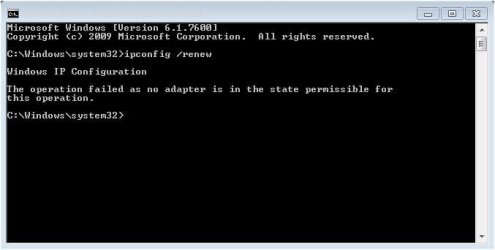
But it looks like I need some Adapters to complete the re-build; to solve the deficiencies expressed in the attached files.

Are the Adapters Software, Firmware, or Hardware?

Where might I obtain the Adapters - hoping they are still available?

And how would I install them?

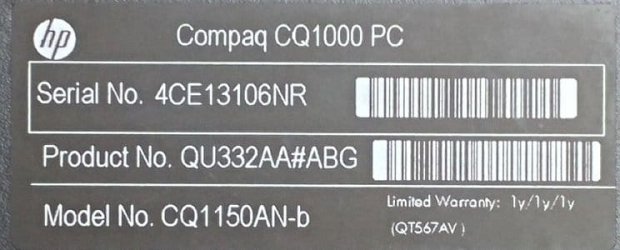
The computer is a HP Compaq Desktop PC. See attached file for model number, etc.

Following are the details, before beginning the re-build, from Piriform's Speccy:

Summary
Operating System
Windows 7 Professional 64-bit SP1
CPU
AMD E-450
Zacate 40nm Technology
RAM
8.00GB DDR3 @ 672MHz (9-9-9-25)
Motherboard
Foxconn 2ACA (CPU 1) 66 °C
Graphics
LG FULL HD (1920x1080@60Hz)
384MB ATI AMD Radeon HD 6320 Graphics (HP) 66 °C
Storage
465GB SAMSUNG HD502HJ SATA Disk Device (SATA ) 37 °C
Optical Drives
hp DVD RW AD-7251H5 SATA CdRom Device
Audio
Realtek High Definition Audio
 

Attachments
  • 20190130_102004_HDR(modified)(resized)(cropped).jpg
    20190130_102004_HDR(modified)(resized)(cropped).jpg
    32.6 KB · Views: 15
  • Network_connections(annotated).jpg
    Network_connections(annotated).jpg
    30 KB · Views: 0
  • ipconfig-renew-failure.jpg
    ipconfig-renew-failure.jpg
    24.2 KB · Views: 14

My Computer My Computer

Computer type
PC/Desktop
Computer Manufacturer/Model Number
HP, Compaq
OS
Windows 7 Professional 64-bit SP1
CPU
AMD E-450 Zacate 40nm Technology
Motherboard
Foxconn 2ACA (CPU 1) 64 °C
Memory
8.00GB DDR3 @ 672MHz (9-9-9-25)
Graphics Card(s)
LG FULL HD (1920x1080@60Hz) 384MB ATI AMD Radeon HD 6320 (HP
Hard Drives
465GB SAMSUNG HD502HJ SATA Disk Device (SATA) 43 °C
931GB TOSHIBA External USB 3.0 USB Device (USB (SATA))
hp DVD RW AD-7251H5 SATA CdRom Device
Antivirus
HitmanPro.Alert, Malwarebytes Anti-Malware
Browser
Opera
My thanks to oscer1 :-)

I've used Macrium Reflect to make dual backups every which-way - File and Folder, Image, Clone, and also with the Windows 7 Backup and Restore function with system image so I feel pretty confident of not finding myself beyond the point of return in anything I do forthwith :-)

With "fresh install" should I first do a full format of C: ?

Although I guess I'd first need to change the boot sequence so I was operating, say, from a bootable disk.

And I'd probably, but not necessarily, use DISKPART.

Eric
 

My Computer My Computer

Computer type
PC/Desktop
Computer Manufacturer/Model Number
HP, Compaq
OS
Windows 7 Professional 64-bit SP1
CPU
AMD E-450 Zacate 40nm Technology
Motherboard
Foxconn 2ACA (CPU 1) 64 °C
Memory
8.00GB DDR3 @ 672MHz (9-9-9-25)
Graphics Card(s)
LG FULL HD (1920x1080@60Hz) 384MB ATI AMD Radeon HD 6320 (HP
Hard Drives
465GB SAMSUNG HD502HJ SATA Disk Device (SATA) 43 °C
931GB TOSHIBA External USB 3.0 USB Device (USB (SATA))
hp DVD RW AD-7251H5 SATA CdRom Device
Antivirus
HitmanPro.Alert, Malwarebytes Anti-Malware
Browser
Opera
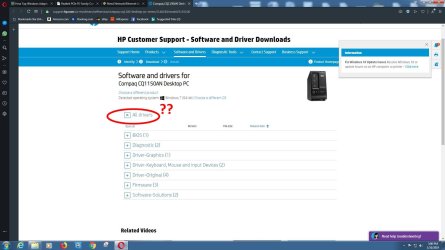
is it "All Drivers" I need to click on? See attached file.
 

Attachments

  • HP driver download(annotated).jpg
    HP driver download(annotated).jpg
    118 KB · Views: 0

My Computer My Computer

Computer type
PC/Desktop
Computer Manufacturer/Model Number
HP, Compaq
OS
Windows 7 Professional 64-bit SP1
CPU
AMD E-450 Zacate 40nm Technology
Motherboard
Foxconn 2ACA (CPU 1) 64 °C
Memory
8.00GB DDR3 @ 672MHz (9-9-9-25)
Graphics Card(s)
LG FULL HD (1920x1080@60Hz) 384MB ATI AMD Radeon HD 6320 (HP
Hard Drives
465GB SAMSUNG HD502HJ SATA Disk Device (SATA) 43 °C
931GB TOSHIBA External USB 3.0 USB Device (USB (SATA))
hp DVD RW AD-7251H5 SATA CdRom Device
Antivirus
HitmanPro.Alert, Malwarebytes Anti-Malware
Browser
Opera
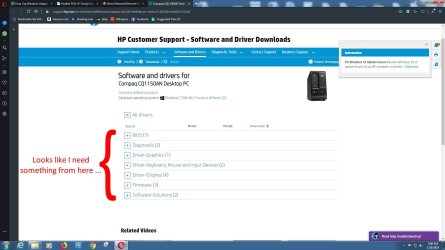
Clicking on "All Drivers" just collapsed the list below :o

Looks like I need something from ... but see the attached file.
 

Attachments

  • HP driver download(re-annotated).jpg
    HP driver download(re-annotated).jpg
    123.7 KB · Views: 0

My Computer My Computer

Computer type
PC/Desktop
Computer Manufacturer/Model Number
HP, Compaq
OS
Windows 7 Professional 64-bit SP1
CPU
AMD E-450 Zacate 40nm Technology
Motherboard
Foxconn 2ACA (CPU 1) 64 °C
Memory
8.00GB DDR3 @ 672MHz (9-9-9-25)
Graphics Card(s)
LG FULL HD (1920x1080@60Hz) 384MB ATI AMD Radeon HD 6320 (HP
Hard Drives
465GB SAMSUNG HD502HJ SATA Disk Device (SATA) 43 °C
931GB TOSHIBA External USB 3.0 USB Device (USB (SATA))
hp DVD RW AD-7251H5 SATA CdRom Device
Antivirus
HitmanPro.Alert, Malwarebytes Anti-Malware
Browser
Opera
But do I need the Adapters before the Drivers?

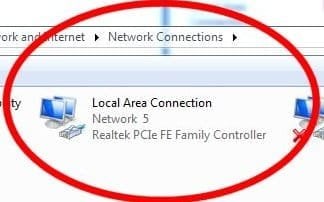
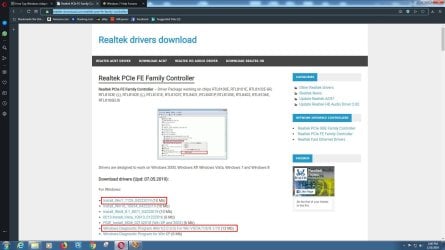
I came across a screenshot of Network Connections taken before beginning the re-build. It mentions Realtek PCIe FE Family Controller.

So I went to their website and downloaded - but not yet installed or used - a couple of programs that had useful potential. See the items within red rectangles in the attached file.
 

Attachments

  • network connections(circled)(extracted).jpg
    network connections(circled)(extracted).jpg
    11.8 KB · Views: 11
  • Realtek PCIe FE Family Controller(annotated).jpg
    Realtek PCIe FE Family Controller(annotated).jpg
    133.6 KB · Views: 0

My Computer My Computer

Computer type
PC/Desktop
Computer Manufacturer/Model Number
HP, Compaq
OS
Windows 7 Professional 64-bit SP1
CPU
AMD E-450 Zacate 40nm Technology
Motherboard
Foxconn 2ACA (CPU 1) 64 °C
Memory
8.00GB DDR3 @ 672MHz (9-9-9-25)
Graphics Card(s)
LG FULL HD (1920x1080@60Hz) 384MB ATI AMD Radeon HD 6320 (HP
Hard Drives
465GB SAMSUNG HD502HJ SATA Disk Device (SATA) 43 °C
931GB TOSHIBA External USB 3.0 USB Device (USB (SATA))
hp DVD RW AD-7251H5 SATA CdRom Device
Antivirus
HitmanPro.Alert, Malwarebytes Anti-Malware
Browser
Opera
Hi BottomLiner,

Did you make any hardware/software changes before this issue occurred?

You could try the following . . .

[1] Open a command prompt.
[2] Type => netsh int ip reset resetlog.txt =>Enter [resets the TCP/IP network protocol].
[3] Type => ipconfig /renew => Enter.

@samuria is good at network related issues like this!

I hope this helps!
 

My Computer My Computer

Computer type
Laptop
Computer Manufacturer/Model Number
Fujitsu LIFEBOOK
OS
Win 7 HP SP1 64-bit Vista HB SP2 32-bit Linux Mint 18.3
CPU
Intel(R) Pentium(R) CPU P6200 @ 2.13GHz
Motherboard
FUJITSU FJNBB06
Memory
4.00 GB
Graphics Card(s)
Intel(R) Graphics Media Accelerator HD
Sound Card
[1] Realtek High Definition Audio [2] Intel(R) Display Audio
Screen Resolution
1366 x 768 x 32 bits (4294967296 colors) @ 59 Hz
Hard Drives
TOSHIBA MK5076GSX
Antivirus
AVG FREE
Hi BottomLiner,

Did you make any hardware/software changes before this issue occurred?

No changes made by me, but changes were occurring. Error messages I didn't understand nor remedy.

Perhaps my computer was labouring under 124 installed programs; I think I've been a compulsive installer :confused:

But I suspect the real problem goes back to when I obtained the HP Compaq PC.

The vendor was a family friend with a well-established computer service business; I think he was being financially benevolent when he supplied the machine with what appeared to be Windows 7 Pro 64-bit.

But, as a veterinarian might say, it was "incomplete". No installation disk, no product key. And no TRUSTED INSTALLER among the owners.

I actually think it was Windows 10 somehow masquerading as Windows 7.

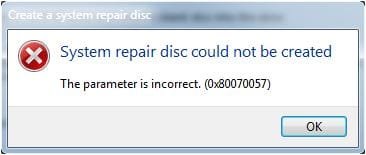
And things got progressively worse; the most frustrating being "the parameter is incorrect". See attached screenshot.

So with the end of support for Windows 7 looming I decided to see if I could upgrade from a "complete" Windows 7.

I bought an In-a-box, with a product key, on a disk, Windows 7 Pro 64-bit and after making dual backups of everything via Macrium Reflect I set about the re-build.

But things came to a halt with what appeared to be missing Network/Ethernet Adaptors.

Every think I tried from then on foundered on lack of Adaptors.

So here I am, cap in hand so-to-speak :D

Eric
 

Attachments

  • System repair disk could not be created.jpg
    System repair disk could not be created.jpg
    15.8 KB · Views: 11

My Computer My Computer

Computer type
PC/Desktop
Computer Manufacturer/Model Number
HP, Compaq
OS
Windows 7 Professional 64-bit SP1
CPU
AMD E-450 Zacate 40nm Technology
Motherboard
Foxconn 2ACA (CPU 1) 64 °C
Memory
8.00GB DDR3 @ 672MHz (9-9-9-25)
Graphics Card(s)
LG FULL HD (1920x1080@60Hz) 384MB ATI AMD Radeon HD 6320 (HP
Hard Drives
465GB SAMSUNG HD502HJ SATA Disk Device (SATA) 43 °C
931GB TOSHIBA External USB 3.0 USB Device (USB (SATA))
hp DVD RW AD-7251H5 SATA CdRom Device
Antivirus
HitmanPro.Alert, Malwarebytes Anti-Malware
Browser
Opera
Hi BottomLiner,

But I suspect the real problem goes back to when I obtained the HP Compaq PC.

The vendor was a family friend with a well-established computer service business; I think he was being financially benevolent when he supplied the machine with what appeared to be Windows 7 Pro 64-bit.

But, as a veterinarian might say, it was "incomplete". No installation disk, no product key. And no TRUSTED INSTALLER among the owners.

I actually think it was Windows 10 somehow masquerading as Windows 7.

OK, there are a couple of things that we can try!

Let's try this first . . .

MGADiag - Check If Your Version Of Windows Is Genuine

The MGADiag Tool provides detailed information about the Microsoft Genuine Advantage components and settings on your system. The MGADiag.exe can be used to analyze and troubleshoot a non-genuine notification issue you may be experiencing.

Download the MGADiag Tool [direct download] => MGADiag Tool. Run the MGADiag.exe and click Continue. It will immediately tell you if your version of Win 7 is Genuine or not.

The MGADiag Tool however, does not automatically create a log file. What you can do though, is either . . .

[1] Click the COPY button and PASTE the results into your post [preferable].
[2] Click the COPY button and PASTE the results into notepad and SAVE it. Then upload the file.

I hope this helps!
 
Last edited:

My Computer My Computer

Computer type
Laptop
Computer Manufacturer/Model Number
Fujitsu LIFEBOOK
OS
Win 7 HP SP1 64-bit Vista HB SP2 32-bit Linux Mint 18.3
CPU
Intel(R) Pentium(R) CPU P6200 @ 2.13GHz
Motherboard
FUJITSU FJNBB06
Memory
4.00 GB
Graphics Card(s)
Intel(R) Graphics Media Accelerator HD
Sound Card
[1] Realtek High Definition Audio [2] Intel(R) Display Audio
Screen Resolution
1366 x 768 x 32 bits (4294967296 colors) @ 59 Hz
Hard Drives
TOSHIBA MK5076GSX
Antivirus
AVG FREE
Thank you Paul! :-)

Would the 'log' be recorded under EVENTVWR?

I've used EVENTVWR when running chkdsk C: /f /r at bootup. A bit tedious, considering that EVENTVWR is a total mess, but the log can be located :D

Again - Thank you!

Eric
 

My Computer My Computer

Computer type
PC/Desktop
Computer Manufacturer/Model Number
HP, Compaq
OS
Windows 7 Professional 64-bit SP1
CPU
AMD E-450 Zacate 40nm Technology
Motherboard
Foxconn 2ACA (CPU 1) 64 °C
Memory
8.00GB DDR3 @ 672MHz (9-9-9-25)
Graphics Card(s)
LG FULL HD (1920x1080@60Hz) 384MB ATI AMD Radeon HD 6320 (HP
Hard Drives
465GB SAMSUNG HD502HJ SATA Disk Device (SATA) 43 °C
931GB TOSHIBA External USB 3.0 USB Device (USB (SATA))
hp DVD RW AD-7251H5 SATA CdRom Device
Antivirus
HitmanPro.Alert, Malwarebytes Anti-Malware
Browser
Opera
How does one become a supporter of this forum?
 

My Computer My Computer

Computer type
PC/Desktop
Computer Manufacturer/Model Number
HP, Compaq
OS
Windows 7 Professional 64-bit SP1
CPU
AMD E-450 Zacate 40nm Technology
Motherboard
Foxconn 2ACA (CPU 1) 64 °C
Memory
8.00GB DDR3 @ 672MHz (9-9-9-25)
Graphics Card(s)
LG FULL HD (1920x1080@60Hz) 384MB ATI AMD Radeon HD 6320 (HP
Hard Drives
465GB SAMSUNG HD502HJ SATA Disk Device (SATA) 43 °C
931GB TOSHIBA External USB 3.0 USB Device (USB (SATA))
hp DVD RW AD-7251H5 SATA CdRom Device
Antivirus
HitmanPro.Alert, Malwarebytes Anti-Malware
Browser
Opera
Hi BottomLiner,

Would the 'log' be recorded under EVENTVWR?

I've used EVENTVWR when running chkdsk C: /f /r at bootup. A bit tedious, considering that EVENTVWR is a total mess, but the log can be located.

As posted in my previous post . . .

The MGADiag Tool however, does not automatically create a log file. What you can do though, is either . . .

[1] Click the COPY button and PASTE the results into your post [preferable].
[2] Click the COPY button and PASTE the results into notepad and SAVE it. Then upload the file.

I hope this helps!
 

My Computer My Computer

Computer type
Laptop
Computer Manufacturer/Model Number
Fujitsu LIFEBOOK
OS
Win 7 HP SP1 64-bit Vista HB SP2 32-bit Linux Mint 18.3
CPU
Intel(R) Pentium(R) CPU P6200 @ 2.13GHz
Motherboard
FUJITSU FJNBB06
Memory
4.00 GB
Graphics Card(s)
Intel(R) Graphics Media Accelerator HD
Sound Card
[1] Realtek High Definition Audio [2] Intel(R) Display Audio
Screen Resolution
1366 x 768 x 32 bits (4294967296 colors) @ 59 Hz
Hard Drives
TOSHIBA MK5076GSX
Antivirus
AVG FREE

My Computer My Computer

Computer type
Laptop
Computer Manufacturer/Model Number
Fujitsu LIFEBOOK
OS
Win 7 HP SP1 64-bit Vista HB SP2 32-bit Linux Mint 18.3
CPU
Intel(R) Pentium(R) CPU P6200 @ 2.13GHz
Motherboard
FUJITSU FJNBB06
Memory
4.00 GB
Graphics Card(s)
Intel(R) Graphics Media Accelerator HD
Sound Card
[1] Realtek High Definition Audio [2] Intel(R) Display Audio
Screen Resolution
1366 x 768 x 32 bits (4294967296 colors) @ 59 Hz
Hard Drives
TOSHIBA MK5076GSX
Antivirus
AVG FREE
Hi BottomLiner,
[1] Click the COPY button and PASTE the results into your post [preferable].
[2] Click the COPY button and PASTE the results into notepad and SAVE it. Then upload the file.

Running MGADiag produced a largish file that I put into .pdf format and uploaded here.

Eric
 

Attachments

My Computer My Computer

Computer type
PC/Desktop
Computer Manufacturer/Model Number
HP, Compaq
OS
Windows 7 Professional 64-bit SP1
CPU
AMD E-450 Zacate 40nm Technology
Motherboard
Foxconn 2ACA (CPU 1) 64 °C
Memory
8.00GB DDR3 @ 672MHz (9-9-9-25)
Graphics Card(s)
LG FULL HD (1920x1080@60Hz) 384MB ATI AMD Radeon HD 6320 (HP
Hard Drives
465GB SAMSUNG HD502HJ SATA Disk Device (SATA) 43 °C
931GB TOSHIBA External USB 3.0 USB Device (USB (SATA))
hp DVD RW AD-7251H5 SATA CdRom Device
Antivirus
HitmanPro.Alert, Malwarebytes Anti-Malware
Browser
Opera
Hi

NOTHING wrong with the Mgadiag.

please open your device manger are there any unknown or ! marked drivers

please follow the instruction here - IGNORE the title it will likely provide the info we need

Blue Screen of Death (BSOD) Posting Instructions

NOTEs
the red circled item is an Ethernet connection, your comp should have an inbuilt wifi card.
(the BSOD report will tell me)

The free upgrade is still available, if you can get your money back

Roy
 

My Computer My Computer

Computer type
PC/Desktop
Computer Manufacturer/Model Number
medionl/Aspire 6930G/acer x55a
OS
W7 home premium 32bit/W7HP 64bit/w10 tp insider ring
CPU
E5300 dual core
Motherboard
medion MS7366
Memory
3gb
Graphics Card(s)
Nvidia Geforce 7100 Nforce 630i
Monitor(s) Displays
avixc
Internet Speed
n (isp resticted to 72)
Antivirus
mse/pands
Browser
palemoon
Other Info
Belkin Fd7050 n USB using Railink RT2870 drivers, more upto date
Back
Top