Unable to install Win 7 x64 in UEFI mode on ASUS MoBo (TR4 socket)

BizkitBoy

New member
Local time
7:29 PM
Messages
23
Hi everyone,

It's been a long time since I've posted here, but last time I did I received very pertinent and helpful answers.
Hoping this will happen once again now, and also maybe help others with the same issue.

So my problem is when I try to install Windows 7 x64 in UEFI mode on my new Asus Prime X399-A motherboard (TR4 socket with Threadripper 1920X CPU installed). Also, this is being installed on an M.2 NVMe SSD from Intel 760p series.

I have made a bootable USB flash drive with Rufus and this is the error I'm getting when trying to boot from it:
Status: 0xc000000d
Info: The boot selection failed because a required device is inaccessible.
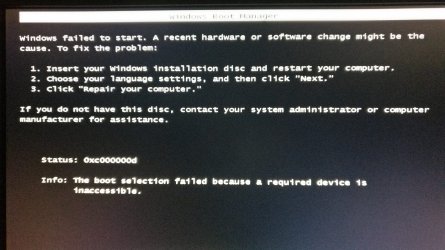
IMG_20190203_172935.jpg

I have deactivated Secure Boot under BIOS:

IMG_20190208_201808.jpg

Other BIOS settings I've made:

- CSM (Compatibility Support Module) configuration:
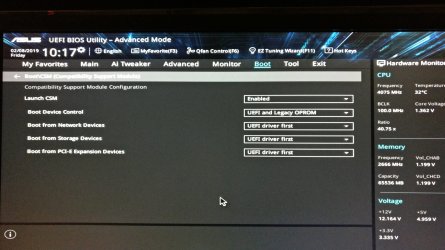
IMG_20190208_201754.jpg

- Boot Configuration:

IMG_20190208_201734.jpg

- Fast Boot has also been disabled

These are the settings used in Rufus to make the bootable USB:
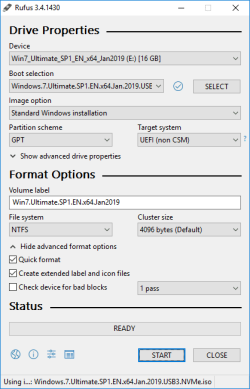
Rufus settings.png

I have to note that this is an image I made myself by downloading untouched MSDN image of Windows 7 SP1 x64 and slipstreaming Simplix update pack which contains all updates to this moment (Jan 2019).
This will make the install.wim file of 4,66GB which makes it impossible to create the bootable USB under FAT32 file system. So NTFS was the only way to go.

I'm certain that I've done everything correct when creating the Windows image with slipstreamed updates because I also tried creating the bootable USB with MBR partition scheme and installer booted just fine.
By using Asus' EZ Installer tool and slipstreaming USB 3.0 & NVMe hotfix in the installer, Windows 7 was successfully installed with MBR partition scheme, this is how I know the image I made is fine.

But MBR is not what I'm after. I know that in Jan 2020 Microsoft will drop support of Win7 and probably not long after I will start having problems with unsupported software. Plus that if I upgrade to an RTX GPU, I will not have RTX support on Win7. So I know installing Windows 10 is inevitable, I'm just waiting for a more stable version and am not in a rush. I also am not a fan of Win10...

Because I'm after the possibility to have 2 separate Windows' installed (7 & 10) and boot up whichever I require based on my needs, I need to install Win7 with GPT partition scheme and (why not) NTFS file system.

Perhaps others with Asus motherboards have run into the same issue and know a fix for it.
If this has been already discussed, apologies. I did search the threads, but have not found this particular error when trying to install a fresh Windows.

I'm really hopping there's something I missed and there's a workaround for this because I know for a fact Win7 x64 does support UEFI mode.
Since making the bootable USB with the exact same settings for Win10 did launch the installation process, it seems like there might be something missing from the Win7 installation files, I'm just not advanced enough to figure it out.

One more thing I want to point out: I did also try to disable CSM from BIOS and that was a major mistake. My PC refused to boot, only a black screen came up. Then I used a jumper to shortcircuit PINs 1 & 2 in order to reset CMOS as specified in the manual and then my PC wouldn't even power up anymore. I had to repeat the process TWICE with the battery removed in order for it to work.
So disabling CSM is a no go.

I googled all I could and tried my best to figure it out by myself by changing different BIOS settings, but I'm stuck and need input from more advanced users.
 
Last edited:

My Computer My Computer

At a glance

Windows 7 Ultimate (x64)AMD Ryzen Threadripper 1920X4x16GB DDR4 Crucial ECC RAM @ 2666Mhz CL19 (C...Asus Strix GTX 970
Computer type
PC/Desktop
OS
Windows 7 Ultimate (x64)
CPU
AMD Ryzen Threadripper 1920X
Motherboard
Asus Prime X399-A
Memory
4x16GB DDR4 Crucial ECC RAM @ 2666Mhz CL19 (CT16G4WFD8266)
Graphics Card(s)
Asus Strix GTX 970
Sound Card
on-board
Monitor(s) Displays
Dell U2311H
Screen Resolution
1920x1080
Hard Drives
OS installed on M.2 500GB Intel 760p NVMe SSD;
Areca 1882ix-24 RAID controller with 2 drive pools: 5x4TB HGST
+ 5x10TB HGST
PSU
Seasonic Prime Titanium 1000W
Case
Antec Twelve Hundred
Cooling
Noctua NH U12S TR4-SP3
Keyboard
Steelseries APEX 350
Mouse
Steelseries MMO Cataclysm
Internet Speed
1Gbps
To install as UEFI you must boot the Win 7 installation disk as UEFI. The Flash drive must be formatted as Fat32 as UEFI BIOS will look for the boot loader only on a UEFI partition.
Lets assume you're installing Win 7 pro. Did you deleted the other modes (home, HP and ultimate) to make the install.wim smaller than 4G?
There are complicated workaround to format a drive as Fat32 that can handle files bigger than 4G. SIW2 is the one that can help you with those tricks.


My solution:
- Slipstream onto a Win 7 SP1 installation files only the USB 3.0 and M.2 NVMe drivers.
- Format the flash drive as Fat32 and COPY all files of the Win 7 SP1 installation (USB 3.0 and M.2 NVMe drivers added). Add the boot folder under efi folder
https://www.sevenforums.com/attachm...ows-7-installer-stuck-setup-starting-boot.zip
Don't need to use Rufus.
- Boot from the flash drive and install.

I know that there is also another way transferring the expanded install.wim to the HDD (Fat32 100M + Big NTFS)
 
Last edited:

My Computers My Computers

  • At a glance

    Windows 7 HP 64i5 6600K - 800MHz to 4200MHz4+4G GSkill DDR4 3000IG - Intel 530
    Computer type
    PC/Desktop
    Computer Manufacturer/Model Number
    custom build
    OS
    Windows 7 HP 64
    CPU
    i5 6600K - 800MHz to 4200MHz
    Motherboard
    GA-Z170-HD3P
    Memory
    4+4G GSkill DDR4 3000
    Graphics Card(s)
    IG - Intel 530
    Monitor(s) Displays
    Samsung 226BW
    Screen Resolution
    1680x1050
    Hard Drives
    (1) -1 SM951 – 128GB M.2 AHCI PCIe SSD drive for Windows 7 and Lubuntu
    (2) -1 WD SATA 3 - 1T for Data
    (3) -1 WD SATA 3 - 1T for backup
    PSU
    Thermaltake 450W TR2 gold
    Keyboard
    Old and good Chicony mechanical keyboard
    Mouse
    Logitech mX performance - 9 buttons (had to disable some)
    Internet Speed
    500Mb/s
    Browser
    Firefox 64
    Other Info
    TinyWall firewall
  • At a glance

    Windows 7 Proi7-4500U 800MHz to 3.0GHz(4+4)G DDR3 1600IG intel 4400 + NVIDIA GeForce GT 745M
    Computer type
    Laptop
    System Manufacturer/Model Number
    Asus Q550LF
    OS
    Windows 7 Pro
    CPU
    i7-4500U 800MHz to 3.0GHz
    Motherboard
    Asus Q550LF
    Memory
    (4+4)G DDR3 1600
    Graphics Card(s)
    IG intel 4400 + NVIDIA GeForce GT 745M
    Sound Card
    Realtek
    Monitor(s) Displays
    LG Display LP156WF4-SPH1
    Screen Resolution
    1920 x 1080
    Hard Drives
    BX500 120G SSD for Windows and programs +
    1T HDD for data
    Internet Speed
    500 Mb/s
    Browser
    Firefox
    Other Info
    TinyWall firewall
Actually, I've already tried the above after my initial post with the sole difference that I used Rufus to create the bootable USB.

I used the untouched MSDN image of Windows 7 SP1 x64 which has an install.wim that's less that 4GB, made a bootable USB with GPT partition scheme and FAT32 file system. Same error.

I now tried what you suggested - which is basically the manual way to do it - and used the boot folder you provided. Same error :(
So it doesn't even care if it's NTFS or FAT32, it just throws the same error.

What I find very interesting is that the error doesn't mention any path above the "Status: 0xc000000d" line, something like "File: ...path..."

Based on what I found here, it looks more like a BIOS problem. Because it's similar to my issue, even though error is not the same.
Trying to install Win10 in UEFI works fine but Win7 doesn't... it sure looks like an Asus BIOS screw over.

I had another idea, but not sure if it's a brilliant one... what if I try to flash the BIOS to the very first version listed on Asus website as being compatible with my mobo?
I know it's risky, but is there really any chance in messing up the mobo itself?
It originally came with version 0807, I flashed it to the latest one which is 0808 and behavior is the same.

Opinions on flashing to first release 0318 from 2017/08/16 ?
 

My Computer My Computer

At a glance

Windows 7 Ultimate (x64)AMD Ryzen Threadripper 1920X4x16GB DDR4 Crucial ECC RAM @ 2666Mhz CL19 (C...Asus Strix GTX 970
Computer type
PC/Desktop
OS
Windows 7 Ultimate (x64)
CPU
AMD Ryzen Threadripper 1920X
Motherboard
Asus Prime X399-A
Memory
4x16GB DDR4 Crucial ECC RAM @ 2666Mhz CL19 (CT16G4WFD8266)
Graphics Card(s)
Asus Strix GTX 970
Sound Card
on-board
Monitor(s) Displays
Dell U2311H
Screen Resolution
1920x1080
Hard Drives
OS installed on M.2 500GB Intel 760p NVMe SSD;
Areca 1882ix-24 RAID controller with 2 drive pools: 5x4TB HGST
+ 5x10TB HGST
PSU
Seasonic Prime Titanium 1000W
Case
Antec Twelve Hundred
Cooling
Noctua NH U12S TR4-SP3
Keyboard
Steelseries APEX 350
Mouse
Steelseries MMO Cataclysm
Internet Speed
1Gbps
Don't change your BIOS. Use the last version.

Every BIOS is different. Try this
On the CSM page
- Set Boot device to UEFI only
- Boot from network to disable
- Boot from storage devices to UEFI only
 

My Computers My Computers

  • At a glance

    Windows 7 HP 64i5 6600K - 800MHz to 4200MHz4+4G GSkill DDR4 3000IG - Intel 530
    Computer type
    PC/Desktop
    Computer Manufacturer/Model Number
    custom build
    OS
    Windows 7 HP 64
    CPU
    i5 6600K - 800MHz to 4200MHz
    Motherboard
    GA-Z170-HD3P
    Memory
    4+4G GSkill DDR4 3000
    Graphics Card(s)
    IG - Intel 530
    Monitor(s) Displays
    Samsung 226BW
    Screen Resolution
    1680x1050
    Hard Drives
    (1) -1 SM951 – 128GB M.2 AHCI PCIe SSD drive for Windows 7 and Lubuntu
    (2) -1 WD SATA 3 - 1T for Data
    (3) -1 WD SATA 3 - 1T for backup
    PSU
    Thermaltake 450W TR2 gold
    Keyboard
    Old and good Chicony mechanical keyboard
    Mouse
    Logitech mX performance - 9 buttons (had to disable some)
    Internet Speed
    500Mb/s
    Browser
    Firefox 64
    Other Info
    TinyWall firewall
  • At a glance

    Windows 7 Proi7-4500U 800MHz to 3.0GHz(4+4)G DDR3 1600IG intel 4400 + NVIDIA GeForce GT 745M
    Computer type
    Laptop
    System Manufacturer/Model Number
    Asus Q550LF
    OS
    Windows 7 Pro
    CPU
    i7-4500U 800MHz to 3.0GHz
    Motherboard
    Asus Q550LF
    Memory
    (4+4)G DDR3 1600
    Graphics Card(s)
    IG intel 4400 + NVIDIA GeForce GT 745M
    Sound Card
    Realtek
    Monitor(s) Displays
    LG Display LP156WF4-SPH1
    Screen Resolution
    1920 x 1080
    Hard Drives
    BX500 120G SSD for Windows and programs +
    1T HDD for data
    Internet Speed
    500 Mb/s
    Browser
    Firefox
    Other Info
    TinyWall firewall

My Computers My Computers

  • At a glance

    Windows 7 HP 64i5 6600K - 800MHz to 4200MHz4+4G GSkill DDR4 3000IG - Intel 530
    Computer type
    PC/Desktop
    Computer Manufacturer/Model Number
    custom build
    OS
    Windows 7 HP 64
    CPU
    i5 6600K - 800MHz to 4200MHz
    Motherboard
    GA-Z170-HD3P
    Memory
    4+4G GSkill DDR4 3000
    Graphics Card(s)
    IG - Intel 530
    Monitor(s) Displays
    Samsung 226BW
    Screen Resolution
    1680x1050
    Hard Drives
    (1) -1 SM951 – 128GB M.2 AHCI PCIe SSD drive for Windows 7 and Lubuntu
    (2) -1 WD SATA 3 - 1T for Data
    (3) -1 WD SATA 3 - 1T for backup
    PSU
    Thermaltake 450W TR2 gold
    Keyboard
    Old and good Chicony mechanical keyboard
    Mouse
    Logitech mX performance - 9 buttons (had to disable some)
    Internet Speed
    500Mb/s
    Browser
    Firefox 64
    Other Info
    TinyWall firewall
  • At a glance

    Windows 7 Proi7-4500U 800MHz to 3.0GHz(4+4)G DDR3 1600IG intel 4400 + NVIDIA GeForce GT 745M
    Computer type
    Laptop
    System Manufacturer/Model Number
    Asus Q550LF
    OS
    Windows 7 Pro
    CPU
    i7-4500U 800MHz to 3.0GHz
    Motherboard
    Asus Q550LF
    Memory
    (4+4)G DDR3 1600
    Graphics Card(s)
    IG intel 4400 + NVIDIA GeForce GT 745M
    Sound Card
    Realtek
    Monitor(s) Displays
    LG Display LP156WF4-SPH1
    Screen Resolution
    1920 x 1080
    Hard Drives
    BX500 120G SSD for Windows and programs +
    1T HDD for data
    Internet Speed
    500 Mb/s
    Browser
    Firefox
    Other Info
    TinyWall firewall
In the CSM page
- Set Boot device to UEFI only
- Boot from network to disable
- Boot from storage devices to UEFI only
Just tried it now, no change. Same error :shock:

I've downloaded the Bios manual https://dlcdnets.asus.com/pub/ASUS/.../E13557_PRIME_X399-A_BIOS_EM_WEB_20171030.pdf

Asus made a big mess referring Windows 10 as Windows UEFI.
What does this mean, more specifically?
That they made this BIOS to have only Windows 10 boot under UEFI?

When you installed as Legacy - MBR did you use the USB disk?
How To Get Ryzen Working on Windows 7 x64
Yes, I installed as Legacy - MBR using the same USB, but that's after the failure to install as GPT.
Also, did you link the Anandtech article because of section "Potential Install Solution 1.1: Use a Chipset USB 2.0 Port" ?
Worth to try, I guess. Definitely got nothing to lose.
Edit: Just tried booting from all backplane USB ports, no success. My case is connected to one of the USB 2.0 connectors on the mobo and tried its front USB ports, but again same error. Need to try and connect to the other USB 2.0 connector.
 
Last edited:

My Computer My Computer

At a glance

Windows 7 Ultimate (x64)AMD Ryzen Threadripper 1920X4x16GB DDR4 Crucial ECC RAM @ 2666Mhz CL19 (C...Asus Strix GTX 970
Computer type
PC/Desktop
OS
Windows 7 Ultimate (x64)
CPU
AMD Ryzen Threadripper 1920X
Motherboard
Asus Prime X399-A
Memory
4x16GB DDR4 Crucial ECC RAM @ 2666Mhz CL19 (CT16G4WFD8266)
Graphics Card(s)
Asus Strix GTX 970
Sound Card
on-board
Monitor(s) Displays
Dell U2311H
Screen Resolution
1920x1080
Hard Drives
OS installed on M.2 500GB Intel 760p NVMe SSD;
Areca 1882ix-24 RAID controller with 2 drive pools: 5x4TB HGST
+ 5x10TB HGST
PSU
Seasonic Prime Titanium 1000W
Case
Antec Twelve Hundred
Cooling
Noctua NH U12S TR4-SP3
Keyboard
Steelseries APEX 350
Mouse
Steelseries MMO Cataclysm
Internet Speed
1Gbps
What we know:
- The installation disk must be on a flash drive formatted as Fat32 to boot as UEFI.
- If you were able to install as Legacy MBR, the added USB driver is working on the Win PE.

How was the following BIOS settings on the CSM page when you install as Legacy MBR:
- Boot device?
- Boot from storage devices ?

Does the Flash disk has other partitions?
Open disk manager and see if there is any partition marked as Active. If so, set it to inactive.
 

My Computers My Computers

  • At a glance

    Windows 7 HP 64i5 6600K - 800MHz to 4200MHz4+4G GSkill DDR4 3000IG - Intel 530
    Computer type
    PC/Desktop
    Computer Manufacturer/Model Number
    custom build
    OS
    Windows 7 HP 64
    CPU
    i5 6600K - 800MHz to 4200MHz
    Motherboard
    GA-Z170-HD3P
    Memory
    4+4G GSkill DDR4 3000
    Graphics Card(s)
    IG - Intel 530
    Monitor(s) Displays
    Samsung 226BW
    Screen Resolution
    1680x1050
    Hard Drives
    (1) -1 SM951 – 128GB M.2 AHCI PCIe SSD drive for Windows 7 and Lubuntu
    (2) -1 WD SATA 3 - 1T for Data
    (3) -1 WD SATA 3 - 1T for backup
    PSU
    Thermaltake 450W TR2 gold
    Keyboard
    Old and good Chicony mechanical keyboard
    Mouse
    Logitech mX performance - 9 buttons (had to disable some)
    Internet Speed
    500Mb/s
    Browser
    Firefox 64
    Other Info
    TinyWall firewall
  • At a glance

    Windows 7 Proi7-4500U 800MHz to 3.0GHz(4+4)G DDR3 1600IG intel 4400 + NVIDIA GeForce GT 745M
    Computer type
    Laptop
    System Manufacturer/Model Number
    Asus Q550LF
    OS
    Windows 7 Pro
    CPU
    i7-4500U 800MHz to 3.0GHz
    Motherboard
    Asus Q550LF
    Memory
    (4+4)G DDR3 1600
    Graphics Card(s)
    IG intel 4400 + NVIDIA GeForce GT 745M
    Sound Card
    Realtek
    Monitor(s) Displays
    LG Display LP156WF4-SPH1
    Screen Resolution
    1920 x 1080
    Hard Drives
    BX500 120G SSD for Windows and programs +
    1T HDD for data
    Internet Speed
    500 Mb/s
    Browser
    Firefox
    Other Info
    TinyWall firewall
How was the following BIOS settings on the CSM page when you install as Legacy MBR:
- Boot device?
- Boot from storage devices ?
The settings were the same as in the prtscr from my original post:
Boot Device Control = UEFI and Legacy OPROM
Boot from Storage Devices = UEFI driver first

Does the Flash disk has other partitions?
Open disk manager and see if there is any partition marked as Active. If so, set it to inactive.
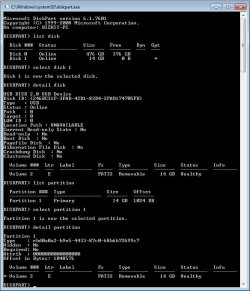
No, there is one single partition on the flash drive and it's not marked as Active:

Diskpart info on USB flash drive.jpg

I have another question: would I have the same issue if I try booting from an optical disc drive with a DVD?
Because you don't specify any partition scheme or file system when creating it.
Or it doesn't make any difference ?
 

My Computer My Computer

At a glance

Windows 7 Ultimate (x64)AMD Ryzen Threadripper 1920X4x16GB DDR4 Crucial ECC RAM @ 2666Mhz CL19 (C...Asus Strix GTX 970
Computer type
PC/Desktop
OS
Windows 7 Ultimate (x64)
CPU
AMD Ryzen Threadripper 1920X
Motherboard
Asus Prime X399-A
Memory
4x16GB DDR4 Crucial ECC RAM @ 2666Mhz CL19 (CT16G4WFD8266)
Graphics Card(s)
Asus Strix GTX 970
Sound Card
on-board
Monitor(s) Displays
Dell U2311H
Screen Resolution
1920x1080
Hard Drives
OS installed on M.2 500GB Intel 760p NVMe SSD;
Areca 1882ix-24 RAID controller with 2 drive pools: 5x4TB HGST
+ 5x10TB HGST
PSU
Seasonic Prime Titanium 1000W
Case
Antec Twelve Hundred
Cooling
Noctua NH U12S TR4-SP3
Keyboard
Steelseries APEX 350
Mouse
Steelseries MMO Cataclysm
Internet Speed
1Gbps
You can give the DVD a chance.
SIW2 Updater can create a iso so you can burn a boot able DVD.
Update your Win 7 installation media.
When running POST, launch the boot menu and choose to boot the DVD as UEFI.
 

My Computers My Computers

  • At a glance

    Windows 7 HP 64i5 6600K - 800MHz to 4200MHz4+4G GSkill DDR4 3000IG - Intel 530
    Computer type
    PC/Desktop
    Computer Manufacturer/Model Number
    custom build
    OS
    Windows 7 HP 64
    CPU
    i5 6600K - 800MHz to 4200MHz
    Motherboard
    GA-Z170-HD3P
    Memory
    4+4G GSkill DDR4 3000
    Graphics Card(s)
    IG - Intel 530
    Monitor(s) Displays
    Samsung 226BW
    Screen Resolution
    1680x1050
    Hard Drives
    (1) -1 SM951 – 128GB M.2 AHCI PCIe SSD drive for Windows 7 and Lubuntu
    (2) -1 WD SATA 3 - 1T for Data
    (3) -1 WD SATA 3 - 1T for backup
    PSU
    Thermaltake 450W TR2 gold
    Keyboard
    Old and good Chicony mechanical keyboard
    Mouse
    Logitech mX performance - 9 buttons (had to disable some)
    Internet Speed
    500Mb/s
    Browser
    Firefox 64
    Other Info
    TinyWall firewall
  • At a glance

    Windows 7 Proi7-4500U 800MHz to 3.0GHz(4+4)G DDR3 1600IG intel 4400 + NVIDIA GeForce GT 745M
    Computer type
    Laptop
    System Manufacturer/Model Number
    Asus Q550LF
    OS
    Windows 7 Pro
    CPU
    i7-4500U 800MHz to 3.0GHz
    Motherboard
    Asus Q550LF
    Memory
    (4+4)G DDR3 1600
    Graphics Card(s)
    IG intel 4400 + NVIDIA GeForce GT 745M
    Sound Card
    Realtek
    Monitor(s) Displays
    LG Display LP156WF4-SPH1
    Screen Resolution
    1920 x 1080
    Hard Drives
    BX500 120G SSD for Windows and programs +
    1T HDD for data
    Internet Speed
    500 Mb/s
    Browser
    Firefox
    Other Info
    TinyWall firewall
Tried 2 other things today, both to no success.

I ordered for myself a new flash drive, a Patriot Supersonic Rage XT USB 3.0 as I've read good things about it.
It behaves exactly as the other no name one I used the other days, same error when trying to boot in UEFI with GPT partition format and FAT32 file system.

I bought an Asus DRW-24D5MT Writer and booted from a very old Win7 x64 bootable DVD I had, so old that it doesn't even have SP1 integrated.
Selected boot priority in BIOS to boot in UEFI mode first, a message comes up with "Press any key to boot from CD/DVD..." and nothing happens. Screen just goes black for a second and then it enters BIOS, or just boots from the next boot priority.
The DVD boots fine in Legacy - MBR.
Is there any reason a DVD this old would not boot in UEFI ?
I want to know if I should waste a blank DVD to write a more recent image on it.
 

My Computer My Computer

At a glance

Windows 7 Ultimate (x64)AMD Ryzen Threadripper 1920X4x16GB DDR4 Crucial ECC RAM @ 2666Mhz CL19 (C...Asus Strix GTX 970
Computer type
PC/Desktop
OS
Windows 7 Ultimate (x64)
CPU
AMD Ryzen Threadripper 1920X
Motherboard
Asus Prime X399-A
Memory
4x16GB DDR4 Crucial ECC RAM @ 2666Mhz CL19 (CT16G4WFD8266)
Graphics Card(s)
Asus Strix GTX 970
Sound Card
on-board
Monitor(s) Displays
Dell U2311H
Screen Resolution
1920x1080
Hard Drives
OS installed on M.2 500GB Intel 760p NVMe SSD;
Areca 1882ix-24 RAID controller with 2 drive pools: 5x4TB HGST
+ 5x10TB HGST
PSU
Seasonic Prime Titanium 1000W
Case
Antec Twelve Hundred
Cooling
Noctua NH U12S TR4-SP3
Keyboard
Steelseries APEX 350
Mouse
Steelseries MMO Cataclysm
Internet Speed
1Gbps
As I wrote before, Asus name Windows UEFI as Windows 8 / 10.
You have to try other BIOS configuration related to CSM / UEFI

Silly question, but is your Win 7 installation disk 64 bits? Only 64 bits boots as UEFI.
 

My Computers My Computers

  • At a glance

    Windows 7 HP 64i5 6600K - 800MHz to 4200MHz4+4G GSkill DDR4 3000IG - Intel 530
    Computer type
    PC/Desktop
    Computer Manufacturer/Model Number
    custom build
    OS
    Windows 7 HP 64
    CPU
    i5 6600K - 800MHz to 4200MHz
    Motherboard
    GA-Z170-HD3P
    Memory
    4+4G GSkill DDR4 3000
    Graphics Card(s)
    IG - Intel 530
    Monitor(s) Displays
    Samsung 226BW
    Screen Resolution
    1680x1050
    Hard Drives
    (1) -1 SM951 – 128GB M.2 AHCI PCIe SSD drive for Windows 7 and Lubuntu
    (2) -1 WD SATA 3 - 1T for Data
    (3) -1 WD SATA 3 - 1T for backup
    PSU
    Thermaltake 450W TR2 gold
    Keyboard
    Old and good Chicony mechanical keyboard
    Mouse
    Logitech mX performance - 9 buttons (had to disable some)
    Internet Speed
    500Mb/s
    Browser
    Firefox 64
    Other Info
    TinyWall firewall
  • At a glance

    Windows 7 Proi7-4500U 800MHz to 3.0GHz(4+4)G DDR3 1600IG intel 4400 + NVIDIA GeForce GT 745M
    Computer type
    Laptop
    System Manufacturer/Model Number
    Asus Q550LF
    OS
    Windows 7 Pro
    CPU
    i7-4500U 800MHz to 3.0GHz
    Motherboard
    Asus Q550LF
    Memory
    (4+4)G DDR3 1600
    Graphics Card(s)
    IG intel 4400 + NVIDIA GeForce GT 745M
    Sound Card
    Realtek
    Monitor(s) Displays
    LG Display LP156WF4-SPH1
    Screen Resolution
    1920 x 1080
    Hard Drives
    BX500 120G SSD for Windows and programs +
    1T HDD for data
    Internet Speed
    500 Mb/s
    Browser
    Firefox
    Other Info
    TinyWall firewall
As I wrote before, Asus name Windows UEFI as Windows 8 / 10.
You have to try other BIOS configuration related to CSM / UEFI
I believe I am out of combinations. I actually think I tried all of them.
It has to be the BIOS... Asus really screwed me over. Just another gimmick to force people into Windows 10.

Silly question, but is your Win 7 installation disk 64 bits? Only 64 bits boots as UEFI.
It is.
It's just that the disc doesn't have the boot folder under the efi folder with the bootx64.efi file.
I don't know if that makes any difference in optical media, or it's just for flash drives.
 

My Computer My Computer

At a glance

Windows 7 Ultimate (x64)AMD Ryzen Threadripper 1920X4x16GB DDR4 Crucial ECC RAM @ 2666Mhz CL19 (C...Asus Strix GTX 970
Computer type
PC/Desktop
OS
Windows 7 Ultimate (x64)
CPU
AMD Ryzen Threadripper 1920X
Motherboard
Asus Prime X399-A
Memory
4x16GB DDR4 Crucial ECC RAM @ 2666Mhz CL19 (CT16G4WFD8266)
Graphics Card(s)
Asus Strix GTX 970
Sound Card
on-board
Monitor(s) Displays
Dell U2311H
Screen Resolution
1920x1080
Hard Drives
OS installed on M.2 500GB Intel 760p NVMe SSD;
Areca 1882ix-24 RAID controller with 2 drive pools: 5x4TB HGST
+ 5x10TB HGST
PSU
Seasonic Prime Titanium 1000W
Case
Antec Twelve Hundred
Cooling
Noctua NH U12S TR4-SP3
Keyboard
Steelseries APEX 350
Mouse
Steelseries MMO Cataclysm
Internet Speed
1Gbps
I believe I am out of combinations. I actually think I tried all of them.
It has to be the BIOS... Asus really screwed me over. Just another gimmick to force people into Windows 10.

It is.
It's just that the disc doesn't have the boot folder under the efi folder with the bootx64.efi file.
I don't know if that makes any difference in optical media, or it's just for flash drives.


sorry to bring this old thread back but asus is not the only OEM that "screwed" people over.
all manufacturers that made PCs & motherboards in the past few years are no longer Win7 compatible.


the asus Prime X399-A board that you are using is only Win10 compatible and there are only Win10 x64 drivers for the Prime X399-A board. installing win7 on there will be next to impossible, BizkitBoy


if you really want to install Win7 on a UEFI based board, you need to get an older one that was manufactured between late 2012 and mid 2016 (perhaps a Socket FM1 or FM2 board like F1A55 or F1A75)
 

My Computer My Computer

At a glance

Windows 7 SP1 Home Premium 64bit [x64]Intel(R) Core(TM) i5-2310 CPU @ 2.90GHz6 GBIntel HD Graphics 2000
Computer type
PC/Desktop
Computer Manufacturer/Model Number
Dell Inspiron 620
OS
Windows 7 SP1 Home Premium 64bit [x64]
CPU
Intel(R) Core(TM) i5-2310 CPU @ 2.90GHz
Memory
6 GB
Graphics Card(s)
Intel HD Graphics 2000
Sound Card
Conexant CX20641 HD Audio
Hard Drives
Western Digital 1TB (1024GB) WD10EALX-759BA1
Internet Speed
Spectrum Cable Internet up to 100Mbps
Check win raid forum. Plenty of people running win7 on 300, 400 series boards with ryzen 3000 ( not apu)

Also H310/B360/H370/Q370/Z390/HM370 and othet 14nm 300 series chips intel
we have graphics drivers for intel uhd620 and hd630 also.

Ryzen 3700x
ryzen3700x.png

And

X399 Taichi with threadripper
ryzen-x399taichi.jpg


sorry to bring this old thread back but asus is not the only OEM that "screwed" people over.
all manufacturers that made PCs & motherboards in the past few years are no longer Win7 compatible.
 
Last edited:

My Computers My Computers

  • At a glance

    7 X64i5 84002x8gb 3200mhz
    Computer type
    PC/Desktop
    OS
    7 X64
    CPU
    i5 8400
    Motherboard
    gigabyte b365m ds3h
    Memory
    2x8gb 3200mhz
    Hard Drives
    various
    PSU
    pure power 11 400w cm
    Case
    Coolermaster
    Cooling
    cryorig m9i
  • At a glance

    7x64g54008gb ddr4 2400
    Computer type
    PC/Desktop
    OS
    7x64
    CPU
    g5400
    Motherboard
    ga b365m ds3h
    Memory
    8gb ddr4 2400
    PSU
    xfx pro 450w
Back
Top