Solved How to prevent Windows 7 installation from booting in UEFI mode?

Bullet Tango

New member
Local time
9:38 AM
Messages
10
Location
Vilnius, Lithuania
Hi there. I've built a brand new HTPC and it has UEFI BIOS on it. I've tried to install Windows 7 with USB drive that I've made UEFI bootable with Rufus, but it gives me blue screen everytime after Windows goes from "Windows files are loading" screen to a Windows logo animation. The hard drive that I'm using is set to MBR, (I know that I should set it to GPT for UEFI installation). I don't want to have a UEFI version of Windows in my system anymore. How do I install legacy version of Windows 7 from USB stick on UEFI BIOS capable PC with HDD using MBR?
 

My Computer My Computer

At a glance

Windows 7 Ultimate x64AMD Athlon 5350, Quad core @2.05GHz8GB DDR3 Kingston HyperX FURY @1600MHzIntegrated AMD Radeon R3 Graphics.
Computer type
PC/Desktop
Computer Manufacturer/Model Number
Custom build
OS
Windows 7 Ultimate x64
CPU
AMD Athlon 5350, Quad core @2.05GHz
Motherboard
Asus AM1M-A
Memory
8GB DDR3 Kingston HyperX FURY @1600MHz
Graphics Card(s)
Integrated AMD Radeon R3 Graphics.
Hard Drives
Seagate Barracuda 500GB, 7200RPM, SATA 3.0GB/s HDD
PSU
Corsair VS450, 450W
Case
DeepCool Smarter
Cooling
Stock heatsink and fan from AMD

My Computer My Computer

At a glance

Win-7-Pro64bit 7-H-Prem-64biti7-5930K 2nd i9-9940x both water blocked VRM'...Trident-z 3200C14 2nd Trident-z 3600C16EVGA 1080ti ftw3 2nd Titan Xp both water blocked
Computer type
PC/Desktop
Computer Manufacturer/Model Number
Custom assembled by me :}
OS
Win-7-Pro64bit 7-H-Prem-64bit
CPU
i7-5930K 2nd i9-9940x both water blocked VRM's too
Motherboard
ASUS SABERTOOTH X99 2nd ASUS x299 Apex
Memory
Trident-z 3200C14 2nd Trident-z 3600C16
Graphics Card(s)
EVGA 1080ti ftw3 2nd Titan Xp both water blocked
Sound Card
Built-in Realtek
Monitor(s) Displays
1-AOC G2460PG 24"G-Sync 144Hz/ 2nd 1-ASUS VG248QE 24" 144Hz
Screen Resolution
1920 x 1080 144Hz
Hard Drives
2-Samsung M.2 Evo & Evo Plus
2-Samsung 850 EVO 500GB SSD's/ 3-2.5 W.D. Black 1tb-&3-1tb/3-3.5 WD Black 1tb hdd's
PSU
EVGA SuperNOVA 1000-P2 2nd 1200-P2
Case
2-Corsair Obsidian Series 450D Black ATX Mid Tower
Cooling
Custom water loops
Keyboard
Logitech G710+/ 2nd Logitech G910
Mouse
2-RedDragon M901 Perdition 16400 dpi Gaming mouse = wired
Internet Speed
Comcast Ping 19ms 89.31mbps download speed 6.12mbps upload
Antivirus
Malwarebytes Pro/ Superantispyware Pro
Browser
FireFox & Pale moon
Other Info
2nd ASUS X299 Apex/Intel i9-9940x with Custom water loop/7H-Prem-x64/Corsair 450D case/Ram Trident-z 3600C16 4x8gb / Samsung970Evo plus 500gb SSD/Dual ssd EZ swap evo/PSU EVGA SuperNova 1200w-P2 80+Platinum/GPU Titan Xp /8-ML-140 on push-pull on 2-280GTX rads
My UEFI BIOS has the Secure Boot option. I have disabled it.
 

My Computer My Computer

At a glance

Windows 7 Ultimate x64AMD Athlon 5350, Quad core @2.05GHz8GB DDR3 Kingston HyperX FURY @1600MHzIntegrated AMD Radeon R3 Graphics.
Computer type
PC/Desktop
Computer Manufacturer/Model Number
Custom build
OS
Windows 7 Ultimate x64
CPU
AMD Athlon 5350, Quad core @2.05GHz
Motherboard
Asus AM1M-A
Memory
8GB DDR3 Kingston HyperX FURY @1600MHz
Graphics Card(s)
Integrated AMD Radeon R3 Graphics.
Hard Drives
Seagate Barracuda 500GB, 7200RPM, SATA 3.0GB/s HDD
PSU
Corsair VS450, 450W
Case
DeepCool Smarter
Cooling
Stock heatsink and fan from AMD
Can someone tell me if I need to use MBR partition scheme for BIOS or UEFI-CSM, or MBR partition scheme for UEFI for legacy installation of Windows?
 

My Computer My Computer

At a glance

Windows 7 Ultimate x64AMD Athlon 5350, Quad core @2.05GHz8GB DDR3 Kingston HyperX FURY @1600MHzIntegrated AMD Radeon R3 Graphics.
Computer type
PC/Desktop
Computer Manufacturer/Model Number
Custom build
OS
Windows 7 Ultimate x64
CPU
AMD Athlon 5350, Quad core @2.05GHz
Motherboard
Asus AM1M-A
Memory
8GB DDR3 Kingston HyperX FURY @1600MHz
Graphics Card(s)
Integrated AMD Radeon R3 Graphics.
Hard Drives
Seagate Barracuda 500GB, 7200RPM, SATA 3.0GB/s HDD
PSU
Corsair VS450, 450W
Case
DeepCool Smarter
Cooling
Stock heatsink and fan from AMD

My Computer My Computer

At a glance

Win-7-Pro64bit 7-H-Prem-64biti7-5930K 2nd i9-9940x both water blocked VRM'...Trident-z 3200C14 2nd Trident-z 3600C16EVGA 1080ti ftw3 2nd Titan Xp both water blocked
Computer type
PC/Desktop
Computer Manufacturer/Model Number
Custom assembled by me :}
OS
Win-7-Pro64bit 7-H-Prem-64bit
CPU
i7-5930K 2nd i9-9940x both water blocked VRM's too
Motherboard
ASUS SABERTOOTH X99 2nd ASUS x299 Apex
Memory
Trident-z 3200C14 2nd Trident-z 3600C16
Graphics Card(s)
EVGA 1080ti ftw3 2nd Titan Xp both water blocked
Sound Card
Built-in Realtek
Monitor(s) Displays
1-AOC G2460PG 24"G-Sync 144Hz/ 2nd 1-ASUS VG248QE 24" 144Hz
Screen Resolution
1920 x 1080 144Hz
Hard Drives
2-Samsung M.2 Evo & Evo Plus
2-Samsung 850 EVO 500GB SSD's/ 3-2.5 W.D. Black 1tb-&3-1tb/3-3.5 WD Black 1tb hdd's
PSU
EVGA SuperNOVA 1000-P2 2nd 1200-P2
Case
2-Corsair Obsidian Series 450D Black ATX Mid Tower
Cooling
Custom water loops
Keyboard
Logitech G710+/ 2nd Logitech G910
Mouse
2-RedDragon M901 Perdition 16400 dpi Gaming mouse = wired
Internet Speed
Comcast Ping 19ms 89.31mbps download speed 6.12mbps upload
Antivirus
Malwarebytes Pro/ Superantispyware Pro
Browser
FireFox & Pale moon
Other Info
2nd ASUS X299 Apex/Intel i9-9940x with Custom water loop/7H-Prem-x64/Corsair 450D case/Ram Trident-z 3600C16 4x8gb / Samsung970Evo plus 500gb SSD/Dual ssd EZ swap evo/PSU EVGA SuperNova 1200w-P2 80+Platinum/GPU Titan Xp /8-ML-140 on push-pull on 2-280GTX rads
I've made my USB drive with Windows installation with MBR partition scheme for BIOS or UEFI with no luck... I've disabled Fast Boot, Secure Boot options in the UEFI BIOS. I've set that only legacy drives would show up.
 

My Computer My Computer

At a glance

Windows 7 Ultimate x64AMD Athlon 5350, Quad core @2.05GHz8GB DDR3 Kingston HyperX FURY @1600MHzIntegrated AMD Radeon R3 Graphics.
Computer type
PC/Desktop
Computer Manufacturer/Model Number
Custom build
OS
Windows 7 Ultimate x64
CPU
AMD Athlon 5350, Quad core @2.05GHz
Motherboard
Asus AM1M-A
Memory
8GB DDR3 Kingston HyperX FURY @1600MHz
Graphics Card(s)
Integrated AMD Radeon R3 Graphics.
Hard Drives
Seagate Barracuda 500GB, 7200RPM, SATA 3.0GB/s HDD
PSU
Corsair VS450, 450W
Case
DeepCool Smarter
Cooling
Stock heatsink and fan from AMD
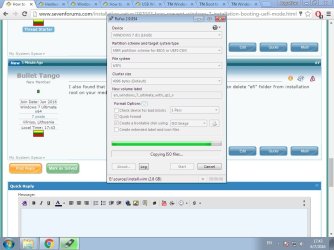
I also found that to make sure that you won't boot in UEFI mode, you can delete "efi" folder from installation root on your media. I'll try that. Pictures shows what settings I use for making the USB drive.
 

Attachments

  • Rufus.jpg
    Rufus.jpg
    84.1 KB · Views: 0

My Computer My Computer

At a glance

Windows 7 Ultimate x64AMD Athlon 5350, Quad core @2.05GHz8GB DDR3 Kingston HyperX FURY @1600MHzIntegrated AMD Radeon R3 Graphics.
Computer type
PC/Desktop
Computer Manufacturer/Model Number
Custom build
OS
Windows 7 Ultimate x64
CPU
AMD Athlon 5350, Quad core @2.05GHz
Motherboard
Asus AM1M-A
Memory
8GB DDR3 Kingston HyperX FURY @1600MHz
Graphics Card(s)
Integrated AMD Radeon R3 Graphics.
Hard Drives
Seagate Barracuda 500GB, 7200RPM, SATA 3.0GB/s HDD
PSU
Corsair VS450, 450W
Case
DeepCool Smarter
Cooling
Stock heatsink and fan from AMD
Hi,
The disk it's self might need to be reformatted
http://www.sevenforums.com/tutorials/26203-convert-gpt-disk-mbr-disk.html

Otherwise just boot to the device and not to a uefi listing in the boot list usually works for me
Plus do not create a partition to install on
Just clean the entire hdd and install on it
You can resize the C drive later
Which is the way I like it with No 100mb system reserved partitions only the C drive
 

My Computer My Computer

At a glance

Win-7-Pro64bit 7-H-Prem-64biti7-5930K 2nd i9-9940x both water blocked VRM'...Trident-z 3200C14 2nd Trident-z 3600C16EVGA 1080ti ftw3 2nd Titan Xp both water blocked
Computer type
PC/Desktop
Computer Manufacturer/Model Number
Custom assembled by me :}
OS
Win-7-Pro64bit 7-H-Prem-64bit
CPU
i7-5930K 2nd i9-9940x both water blocked VRM's too
Motherboard
ASUS SABERTOOTH X99 2nd ASUS x299 Apex
Memory
Trident-z 3200C14 2nd Trident-z 3600C16
Graphics Card(s)
EVGA 1080ti ftw3 2nd Titan Xp both water blocked
Sound Card
Built-in Realtek
Monitor(s) Displays
1-AOC G2460PG 24"G-Sync 144Hz/ 2nd 1-ASUS VG248QE 24" 144Hz
Screen Resolution
1920 x 1080 144Hz
Hard Drives
2-Samsung M.2 Evo & Evo Plus
2-Samsung 850 EVO 500GB SSD's/ 3-2.5 W.D. Black 1tb-&3-1tb/3-3.5 WD Black 1tb hdd's
PSU
EVGA SuperNOVA 1000-P2 2nd 1200-P2
Case
2-Corsair Obsidian Series 450D Black ATX Mid Tower
Cooling
Custom water loops
Keyboard
Logitech G710+/ 2nd Logitech G910
Mouse
2-RedDragon M901 Perdition 16400 dpi Gaming mouse = wired
Internet Speed
Comcast Ping 19ms 89.31mbps download speed 6.12mbps upload
Antivirus
Malwarebytes Pro/ Superantispyware Pro
Browser
FireFox & Pale moon
Other Info
2nd ASUS X299 Apex/Intel i9-9940x with Custom water loop/7H-Prem-x64/Corsair 450D case/Ram Trident-z 3600C16 4x8gb / Samsung970Evo plus 500gb SSD/Dual ssd EZ swap evo/PSU EVGA SuperNova 1200w-P2 80+Platinum/GPU Titan Xp /8-ML-140 on push-pull on 2-280GTX rads
Thank for your reply TrashZone, I've solved my problem. My HDD was set to MBR. I've made bootable USB stick with settings that you can see in picture above. While Rufus was busy I've changed SATA cable from one MoBo port to another and RAM stick from one slot to another. Surprise, surprise... After 6 days of headache I've get it working.
 

My Computer My Computer

At a glance

Windows 7 Ultimate x64AMD Athlon 5350, Quad core @2.05GHz8GB DDR3 Kingston HyperX FURY @1600MHzIntegrated AMD Radeon R3 Graphics.
Computer type
PC/Desktop
Computer Manufacturer/Model Number
Custom build
OS
Windows 7 Ultimate x64
CPU
AMD Athlon 5350, Quad core @2.05GHz
Motherboard
Asus AM1M-A
Memory
8GB DDR3 Kingston HyperX FURY @1600MHz
Graphics Card(s)
Integrated AMD Radeon R3 Graphics.
Hard Drives
Seagate Barracuda 500GB, 7200RPM, SATA 3.0GB/s HDD
PSU
Corsair VS450, 450W
Case
DeepCool Smarter
Cooling
Stock heatsink and fan from AMD
Hi,
Good deal :)
 

My Computer My Computer

At a glance

Win-7-Pro64bit 7-H-Prem-64biti7-5930K 2nd i9-9940x both water blocked VRM'...Trident-z 3200C14 2nd Trident-z 3600C16EVGA 1080ti ftw3 2nd Titan Xp both water blocked
Computer type
PC/Desktop
Computer Manufacturer/Model Number
Custom assembled by me :}
OS
Win-7-Pro64bit 7-H-Prem-64bit
CPU
i7-5930K 2nd i9-9940x both water blocked VRM's too
Motherboard
ASUS SABERTOOTH X99 2nd ASUS x299 Apex
Memory
Trident-z 3200C14 2nd Trident-z 3600C16
Graphics Card(s)
EVGA 1080ti ftw3 2nd Titan Xp both water blocked
Sound Card
Built-in Realtek
Monitor(s) Displays
1-AOC G2460PG 24"G-Sync 144Hz/ 2nd 1-ASUS VG248QE 24" 144Hz
Screen Resolution
1920 x 1080 144Hz
Hard Drives
2-Samsung M.2 Evo & Evo Plus
2-Samsung 850 EVO 500GB SSD's/ 3-2.5 W.D. Black 1tb-&3-1tb/3-3.5 WD Black 1tb hdd's
PSU
EVGA SuperNOVA 1000-P2 2nd 1200-P2
Case
2-Corsair Obsidian Series 450D Black ATX Mid Tower
Cooling
Custom water loops
Keyboard
Logitech G710+/ 2nd Logitech G910
Mouse
2-RedDragon M901 Perdition 16400 dpi Gaming mouse = wired
Internet Speed
Comcast Ping 19ms 89.31mbps download speed 6.12mbps upload
Antivirus
Malwarebytes Pro/ Superantispyware Pro
Browser
FireFox & Pale moon
Other Info
2nd ASUS X299 Apex/Intel i9-9940x with Custom water loop/7H-Prem-x64/Corsair 450D case/Ram Trident-z 3600C16 4x8gb / Samsung970Evo plus 500gb SSD/Dual ssd EZ swap evo/PSU EVGA SuperNova 1200w-P2 80+Platinum/GPU Titan Xp /8-ML-140 on push-pull on 2-280GTX rads
The MBR scheme has nothing to do with the bios, only the hard drive.

Set the bios to legacy & uefi or strictly legacy, create a normal installer, or just use a dvd, it`s so much easier, and always disable secure boot, as Mike mentioned.

Not sure why so many people have trouble with this.

And to create a usb installer with usb 3.0 drivers integrated, just use Asus`s EZ Installer, it works perfectly, tested it yesterday.
 

My Computer My Computer

At a glance

Windows 10 Pro x64Intel Core i7 6700KGSkill TridentZ RGB 16GB 3600 16-16-16-36EVGA GTX 980 Ti SC x2
Computer type
PC/Desktop
Computer Manufacturer/Model Number
Skylake Special #666
OS
Windows 10 Pro x64
CPU
Intel Core i7 6700K
Motherboard
Asus Sabertooth Z170 Mark 1
Memory
GSkill TridentZ RGB 16GB 3600 16-16-16-36
Graphics Card(s)
EVGA GTX 980 Ti SC x2
Sound Card
Realtek High Definition
Monitor(s) Displays
AOC G2460PG
Screen Resolution
1920 x 1080 144Hz
Hard Drives
Samsung 860 Pro 256GB, Seagate Barracuda 4TB x2
PSU
EVGA 1000 P2, EVGA White Custom Braided Cables
Case
Corsair Vengeance C70 Gunmetal Black
Cooling
Corsair H100i v2, Corsair ML120 x2, Thermal Grizzly Kryonaut
Keyboard
Logitech G910 Orion Spectrum
Mouse
Logitech G700s
Internet Speed
Verizon Fios Quantum Gateway 75/75
Antivirus
Windows Defender, Malwarebytes Free 3.8.3
Browser
Chrome
Other Info
Corsair SP120 x4, LG Blu-ray Drive, Durabrand HT-395 100 Watt Dolby Digital Amp, Corsair H2100 Wireless 7.1 Headset
Yea I didn't notice when this board was released so I don't know how old it is
But I had no issue with usb2 device with a usb3 port on my case so I don't know if usb3 driver is really the issue or not
I believe the usb3 driver issues were just on z170 series boards
x99 sure didn't have any issues :)

Switching sata ports sure is interesting though :)
 

My Computer My Computer

At a glance

Win-7-Pro64bit 7-H-Prem-64biti7-5930K 2nd i9-9940x both water blocked VRM'...Trident-z 3200C14 2nd Trident-z 3600C16EVGA 1080ti ftw3 2nd Titan Xp both water blocked
Computer type
PC/Desktop
Computer Manufacturer/Model Number
Custom assembled by me :}
OS
Win-7-Pro64bit 7-H-Prem-64bit
CPU
i7-5930K 2nd i9-9940x both water blocked VRM's too
Motherboard
ASUS SABERTOOTH X99 2nd ASUS x299 Apex
Memory
Trident-z 3200C14 2nd Trident-z 3600C16
Graphics Card(s)
EVGA 1080ti ftw3 2nd Titan Xp both water blocked
Sound Card
Built-in Realtek
Monitor(s) Displays
1-AOC G2460PG 24"G-Sync 144Hz/ 2nd 1-ASUS VG248QE 24" 144Hz
Screen Resolution
1920 x 1080 144Hz
Hard Drives
2-Samsung M.2 Evo & Evo Plus
2-Samsung 850 EVO 500GB SSD's/ 3-2.5 W.D. Black 1tb-&3-1tb/3-3.5 WD Black 1tb hdd's
PSU
EVGA SuperNOVA 1000-P2 2nd 1200-P2
Case
2-Corsair Obsidian Series 450D Black ATX Mid Tower
Cooling
Custom water loops
Keyboard
Logitech G710+/ 2nd Logitech G910
Mouse
2-RedDragon M901 Perdition 16400 dpi Gaming mouse = wired
Internet Speed
Comcast Ping 19ms 89.31mbps download speed 6.12mbps upload
Antivirus
Malwarebytes Pro/ Superantispyware Pro
Browser
FireFox & Pale moon
Other Info
2nd ASUS X299 Apex/Intel i9-9940x with Custom water loop/7H-Prem-x64/Corsair 450D case/Ram Trident-z 3600C16 4x8gb / Samsung970Evo plus 500gb SSD/Dual ssd EZ swap evo/PSU EVGA SuperNova 1200w-P2 80+Platinum/GPU Titan Xp /8-ML-140 on push-pull on 2-280GTX rads
There is no usb 3.0 driver issues during a W7 install anymore, not with Asus`s program EZ Installer.

Tested it yesterday, installed 7 Pro through the usb 3.0 port no problem.

http://dlcdnet.asus.com/pub/ASUS/mb/LGA1151/Z170-K/DE164_100_Series_Windows_7_Setup_Guide_print.pdf

But the whole idea is kinda stupid in my opinion, as you need a W7 install dvd or an iso file on a working computer to create the usb installer, so if you had a dvd, why not just use that to do your install :confused: But I suppose if one had a laptop with only usb 3.0 ports, then I guess it would be necessary.
 

Attachments

  • Capture.JPG
    Capture.JPG
    18.2 KB · Views: 2

My Computer My Computer

At a glance

Windows 10 Pro x64Intel Core i7 6700KGSkill TridentZ RGB 16GB 3600 16-16-16-36EVGA GTX 980 Ti SC x2
Computer type
PC/Desktop
Computer Manufacturer/Model Number
Skylake Special #666
OS
Windows 10 Pro x64
CPU
Intel Core i7 6700K
Motherboard
Asus Sabertooth Z170 Mark 1
Memory
GSkill TridentZ RGB 16GB 3600 16-16-16-36
Graphics Card(s)
EVGA GTX 980 Ti SC x2
Sound Card
Realtek High Definition
Monitor(s) Displays
AOC G2460PG
Screen Resolution
1920 x 1080 144Hz
Hard Drives
Samsung 860 Pro 256GB, Seagate Barracuda 4TB x2
PSU
EVGA 1000 P2, EVGA White Custom Braided Cables
Case
Corsair Vengeance C70 Gunmetal Black
Cooling
Corsair H100i v2, Corsair ML120 x2, Thermal Grizzly Kryonaut
Keyboard
Logitech G910 Orion Spectrum
Mouse
Logitech G700s
Internet Speed
Verizon Fios Quantum Gateway 75/75
Antivirus
Windows Defender, Malwarebytes Free 3.8.3
Browser
Chrome
Other Info
Corsair SP120 x4, LG Blu-ray Drive, Durabrand HT-395 100 Watt Dolby Digital Amp, Corsair H2100 Wireless 7.1 Headset
But the whole idea is kinda stupid in my opinion, as you need a W7 install dvd or an iso file on a working computer to create the usb installer...

edit: If you do not have a DVD drive.

Download the EZ Installer and extract the zip file contents.

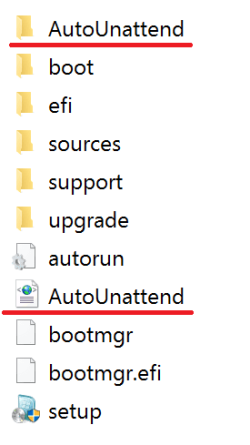
Then copy from the OS folder the AutoUnattend folder and AutoUnattend.xml file to the root of the USB flash drive (see screenshot below).

AutoUnattend.png
 
Last edited:

My Computer My Computer

At a glance

Windows 7/10
Computer type
PC/Desktop
OS
Windows 7/10
You don`t have to do any of that extra work, just use the program, it does everything for you.

Why do more work then needed ?
 

My Computer My Computer

At a glance

Windows 10 Pro x64Intel Core i7 6700KGSkill TridentZ RGB 16GB 3600 16-16-16-36EVGA GTX 980 Ti SC x2
Computer type
PC/Desktop
Computer Manufacturer/Model Number
Skylake Special #666
OS
Windows 10 Pro x64
CPU
Intel Core i7 6700K
Motherboard
Asus Sabertooth Z170 Mark 1
Memory
GSkill TridentZ RGB 16GB 3600 16-16-16-36
Graphics Card(s)
EVGA GTX 980 Ti SC x2
Sound Card
Realtek High Definition
Monitor(s) Displays
AOC G2460PG
Screen Resolution
1920 x 1080 144Hz
Hard Drives
Samsung 860 Pro 256GB, Seagate Barracuda 4TB x2
PSU
EVGA 1000 P2, EVGA White Custom Braided Cables
Case
Corsair Vengeance C70 Gunmetal Black
Cooling
Corsair H100i v2, Corsair ML120 x2, Thermal Grizzly Kryonaut
Keyboard
Logitech G910 Orion Spectrum
Mouse
Logitech G700s
Internet Speed
Verizon Fios Quantum Gateway 75/75
Antivirus
Windows Defender, Malwarebytes Free 3.8.3
Browser
Chrome
Other Info
Corsair SP120 x4, LG Blu-ray Drive, Durabrand HT-395 100 Watt Dolby Digital Amp, Corsair H2100 Wireless 7.1 Headset
You don`t have to do any of that extra work, just use the program, it does everything for you.

But if you do not have a DVD drive, then copy the AutoUnattend folder and AutoUnattend.xml file to the root of the USB flash drive.
 

My Computer My Computer

At a glance

Windows 7/10
Computer type
PC/Desktop
OS
Windows 7/10
Back
Top